

Content
[](https://mseep.ai/app/cnych-mcp-sse-demo)
# Developing an SSE-Type MCP Server
[MCP](https://www.claudemcp.com/) supports two communication transport methods: `STDIO` (standard input/output) or `SSE` (server-sent events), both of which use `JSON-RPC 2.0` for message formatting. `STDIO` is used for local integration, while `SSE` is used for network-based communication.
For example, if we want to use the MCP service directly in the command line, we can use the `STDIO` transport method. If we want to use the MCP service in a web page, we can use the `SSE` transport method.
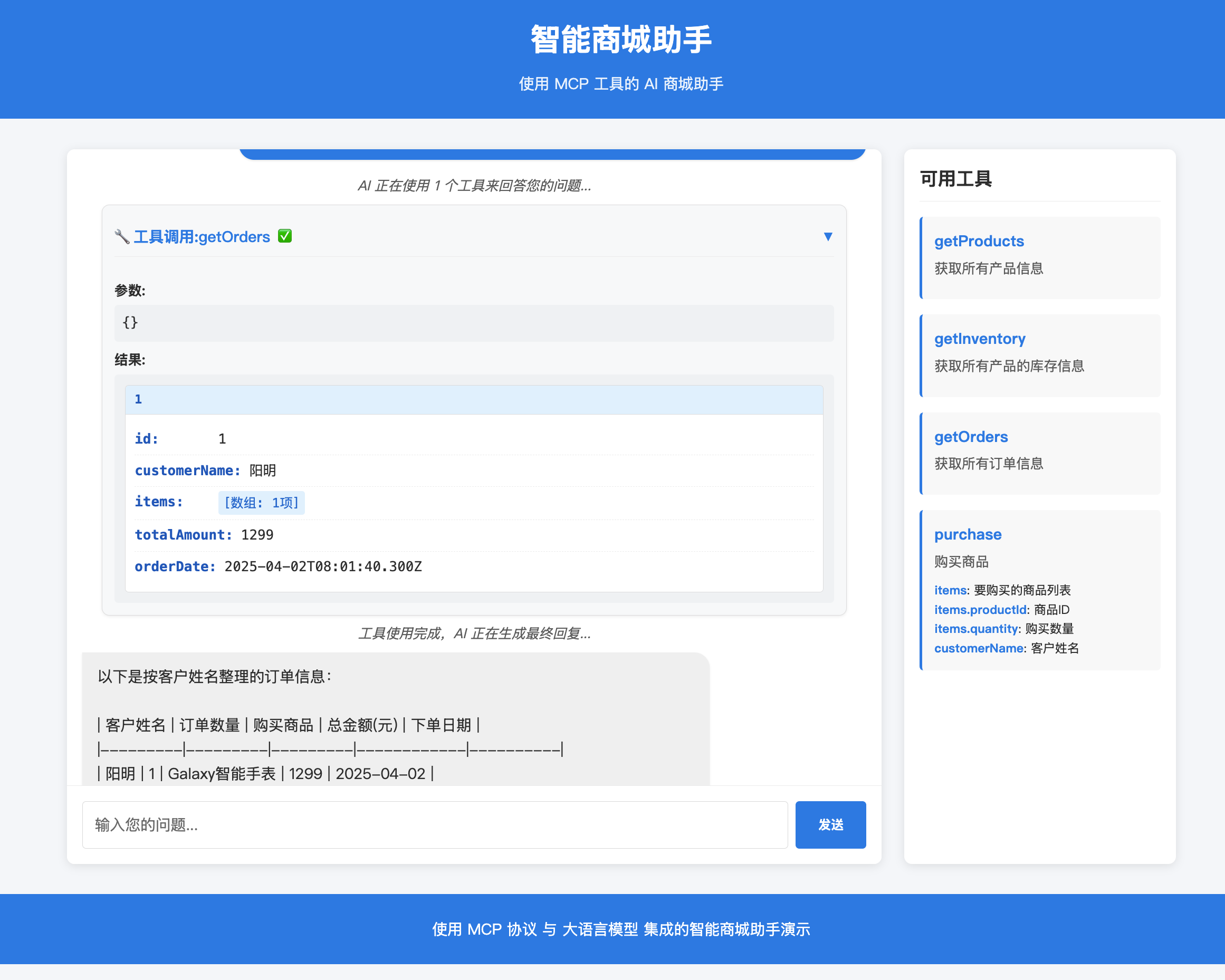
Next, we will develop an MCP-based smart shopping mall service assistant, using an SSE-type MCP service, with the following core functions:
- Real-time access to product information and inventory levels, supporting customized orders.
- Recommend products based on customer preferences and available inventory.
- Use the MCP tool server to interact with microservices in real time.
- Check real-time inventory levels when answering product inquiries.
- Facilitate product purchases using product IDs and quantities.
- Real-time updates to inventory levels.
- Provide ad-hoc analysis of order transactions through natural language queries.
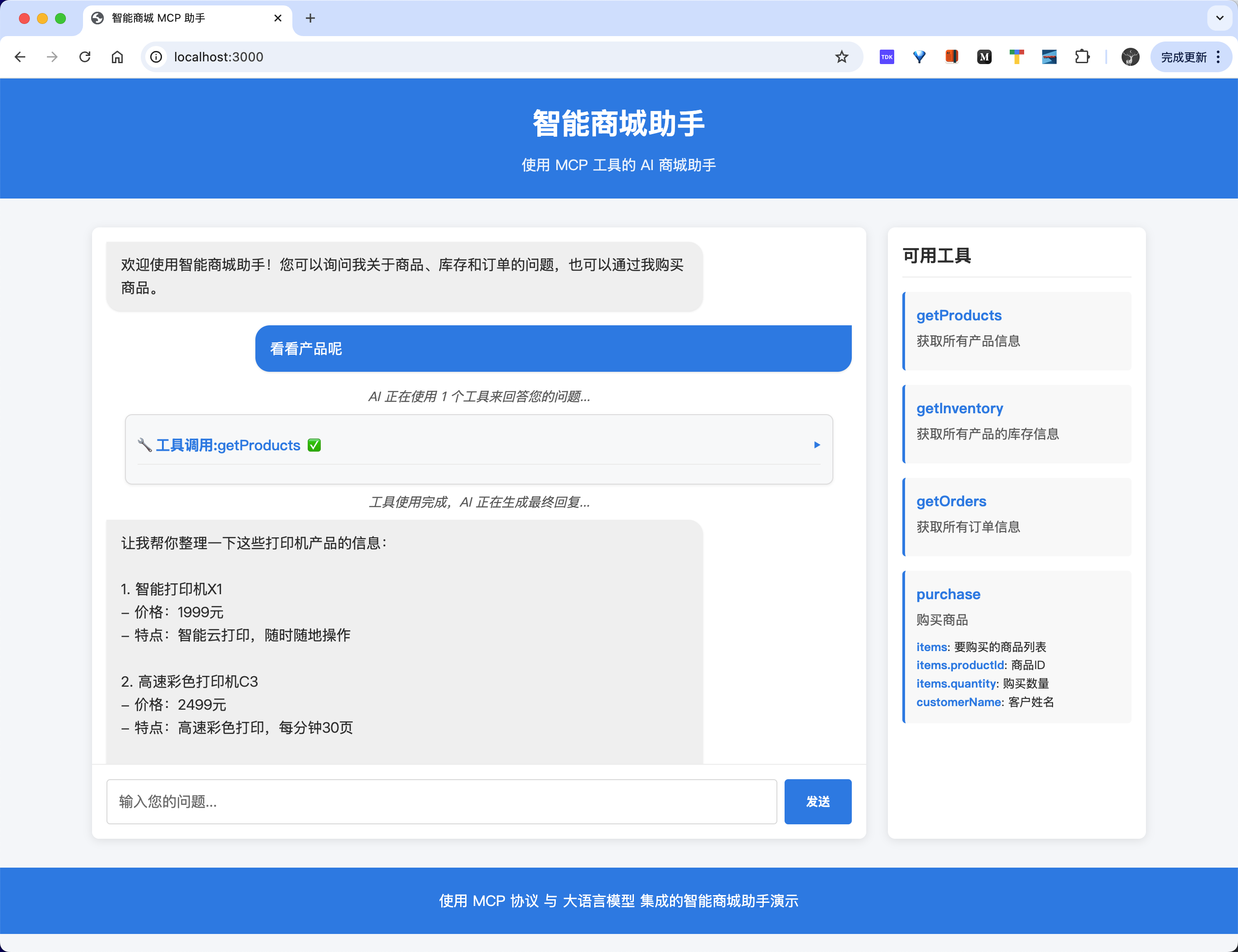
> Here we use the Anthropic Claude 3.5 Sonnet model as the AI assistant for the MCP service. Of course, you can also choose other models that support tool calling.
First, we need a product microservice to expose an API interface for a list of products. Then, we provide an order microservice to expose API interfaces for order creation, inventory information, etc.
The core of the next step is the core MCP SSE server, which is used to expose product microservice and order microservice data to the LLM as a tool using the SSE protocol.
Finally, use the MCP client to connect to the MCP SSE server through the SSE protocol and interact with the LLM.
## Microservices
Next, we will start developing product microservices and order microservices, and expose API interfaces.
First, define the types of products, inventory, and orders.
```typescript
// types/index.ts
export interface Product {
id: number;
name: string;
price: number;
description: string;
}
export interface Inventory {
productId: number;
quantity: number;
product?: Product;
}
export interface Order {
id: number;
customerName: string;
items: Array<{ productId: number; quantity: number }>;
totalAmount: number;
orderDate: string;
}
```
Then we can use Express to expose product microservices and order microservices, and provide API interfaces. Since it is simulated data, we use simpler memory data to simulate it here, and directly expose the data through the following functions. (In a production environment, you still need to use microservices plus a database to implement it)
```typescript
// services/product-service.ts
import { Product, Inventory, Order } from "../types/index.js";
// 模拟数据存储
let products: Product[] = [
{
id: 1,
name: "智能手表Galaxy",
price: 1299,
description: "健康监测,运动追踪,支持多种应用",
},
{
id: 2,
name: "无线蓝牙耳机Pro",
price: 899,
description: "主动降噪,30小时续航,IPX7防水",
},
{
id: 3,
name: "便携式移动电源",
price: 299,
description: "20000mAh大容量,支持快充,轻薄设计",
},
{
id: 4,
name: "华为MateBook X Pro",
price: 1599,
description: "14.2英寸全面屏,3:2比例,100% sRGB色域",
},
];
// 模拟库存数据
let inventory: Inventory[] = [
{ productId: 1, quantity: 100 },
{ productId: 2, quantity: 50 },
{ productId: 3, quantity: 200 },
{ productId: 4, quantity: 150 },
];
let orders: Order[] = [];
export async function getProducts(): Promise<Product[]> {
return products;
}
export async function getInventory(): Promise<Inventory[]> {
return inventory.map((item) => {
const product = products.find((p) => p.id === item.productId);
return {
...item,
product,
};
});
}
export async function getOrders(): Promise<Order[]> {
return [...orders].sort(
(a, b) => new Date(b.orderDate).getTime() - new Date(a.orderDate).getTime()
);
}
export async function createPurchase(
customerName: string,
items: { productId: number; quantity: number }[]
): Promise<Order> {
if (!customerName || !items || items.length === 0) {
throw new Error("请求无效:缺少客户名称或商品");
}
let totalAmount = 0;
// 验证库存并计算总价
for (const item of items) {
const inventoryItem = inventory.find((i) => i.productId === item.productId);
const product = products.find((p) => p.id === item.productId);
if (!inventoryItem || !product) {
throw new Error(`商品ID ${item.productId} 不存在`);
}
if (inventoryItem.quantity < item.quantity) {
throw new Error(
`商品 ${product.name} 库存不足. 可用: ${inventoryItem.quantity}`
);
}
totalAmount += product.price * item.quantity;
}
// 创建订单
const order: Order = {
id: orders.length + 1,
customerName,
items,
totalAmount,
orderDate: new Date().toISOString(),
};
// 更新库存
items.forEach((item) => {
const inventoryItem = inventory.find(
(i) => i.productId === item.productId
)!;
inventoryItem.quantity -= item.quantity;
});
orders.push(order);
return order;
}
```
Then we can expose these API interfaces through MCP tools, as follows:
```typescript
// mcp-server.ts
import { McpServer } from "@modelcontextprotocol/sdk/server/mcp.js";
import { z } from "zod";
import {
getProducts,
getInventory,
getOrders,
createPurchase,
} from "./services/product-service.js";
export const server = new McpServer({
name: "mcp-sse-demo",
version: "1.0.0",
description: "提供商品查询、库存管理和订单处理的MCP工具",
});
// 获取产品列表工具
server.tool("getProducts", "获取所有产品信息", {}, async () => {
console.log("获取产品列表");
const products = await getProducts();
return {
content: [
{
type: "text",
text: JSON.stringify(products),
},
],
};
});
// 获取库存信息工具
server.tool("getInventory", "获取所有产品的库存信息", {}, async () => {
console.log("获取库存信息");
const inventory = await getInventory();
return {
content: [
{
type: "text",
text: JSON.stringify(inventory),
},
],
};
});
// 获取订单列表工具
server.tool("getOrders", "获取所有订单信息", {}, async () => {
console.log("获取订单列表");
const orders = await getOrders();
return {
content: [
{
type: "text",
text: JSON.stringify(orders),
},
],
};
});
// 购买商品工具
server.tool(
"purchase",
"购买商品",
{
items: z
.array(
z.object({
productId: z.number().describe("商品ID"),
quantity: z.number().describe("购买数量"),
})
)
.describe("要购买的商品列表"),
customerName: z.string().describe("客户姓名"),
},
async ({ items, customerName }) => {
console.log("处理购买请求", { items, customerName });
try {
const order = await createPurchase(customerName, items);
return {
content: [
{
type: "text",
text: JSON.stringify(order),
},
],
};
} catch (error: any) {
return {
content: [
{
type: "text",
text: JSON.stringify({ error: error.message }),
},
],
};
}
}
);
```
Here we have defined a total of 4 tools, which are:
- `getProducts`: Get all product information
- `getInventory`: Get inventory information for all products
- `getOrders`: Get all order information
- `purchase`: Purchase goods
If it is a Stdio type MCP service, then we can directly use these tools in the command line, but now we need to use an SSE type MCP service, so we also need an MCP SSE server to expose these tools.
## MCP SSE Server
Next, we will start developing the MCP SSE server to expose product microservice and order microservice data as a tool using the SSE protocol.
```typescript
// mcp-sse-server.ts
import express, { Request, Response, NextFunction } from "express";
import cors from "cors";
import { SSEServerTransport } from "@modelcontextprotocol/sdk/server/sse.js";
import { server as mcpServer } from "./mcp-server.js"; // 重命名以避免命名冲突
const app = express();
app.use(
cors({
origin: process.env.ALLOWED_ORIGINS?.split(",") || "*",
methods: ["GET", "POST"],
allowedHeaders: ["Content-Type", "Authorization"],
})
);
// 存储活跃连接
const connections = new Map();
// 健康检查端点
app.get("/health", (req, res) => {
res.status(200).json({
status: "ok",
version: "1.0.0",
uptime: process.uptime(),
timestamp: new Date().toISOString(),
connections: connections.size,
});
});
// SSE 连接建立端点
app.get("/sse", async (req, res) => {
// 实例化SSE传输对象
const transport = new SSEServerTransport("/messages", res);
// 获取sessionId
const sessionId = transport.sessionId;
console.log(`[${new Date().toISOString()}] 新的SSE连接建立: ${sessionId}`);
// 注册连接
connections.set(sessionId, transport);
// 连接中断处理
req.on("close", () => {
console.log(`[${new Date().toISOString()}] SSE连接关闭: ${sessionId}`);
connections.delete(sessionId);
});
// 将传输对象与MCP服务器连接
await mcpServer.connect(transport);
console.log(`[${new Date().toISOString()}] MCP服务器连接成功: ${sessionId}`);
});
// 接收客户端消息的端点
app.post("/messages", async (req: Request, res: Response) => {
try {
console.log(`[${new Date().toISOString()}] 收到客户端消息:`, req.query);
const sessionId = req.query.sessionId as string;
// 查找对应的SSE连接并处理消息
if (connections.size > 0) {
const transport: SSEServerTransport = connections.get(
sessionId
) as SSEServerTransport;
// 使用transport处理消息
if (transport) {
await transport.handlePostMessage(req, res);
} else {
throw new Error("没有活跃的SSE连接");
}
} else {
throw new Error("没有活跃的SSE连接");
}
} catch (error: any) {
console.error(`[${new Date().toISOString()}] 处理客户端消息失败:`, error);
res.status(500).json({ error: "处理消息失败", message: error.message });
}
});
// 优雅关闭所有连接
async function closeAllConnections() {
console.log(
`[${new Date().toISOString()}] 关闭所有连接 (${connections.size}个)`
);
for (const [id, transport] of connections.entries()) {
try {
// 发送关闭事件
transport.res.write(
'event: server_shutdown\ndata: {"reason": "Server is shutting down"}\n\n'
);
transport.res.end();
console.log(`[${new Date().toISOString()}] 已关闭连接: ${id}`);
} catch (error) {
console.error(`[${new Date().toISOString()}] 关闭连接失败: ${id}`, error);
}
}
connections.clear();
}
// 错误处理
app.use((err: Error, req: Request, res: Response, next: NextFunction) => {
console.error(`[${new Date().toISOString()}] 未处理的异常:`, err);
res.status(500).json({ error: "服务器内部错误" });
});
// 优雅关闭
process.on("SIGTERM", async () => {
console.log(`[${new Date().toISOString()}] 接收到SIGTERM信号,准备关闭`);
await closeAllConnections();
server.close(() => {
console.log(`[${new Date().toISOString()}] 服务器已关闭`);
process.exit(0);
});
});
process.on("SIGINT", async () => {
console.log(`[${new Date().toISOString()}] 接收到SIGINT信号,准备关闭`);
await closeAllConnections();
process.exit(0);
});
// 启动服务器
const port = process.env.PORT || 8083;
const server = app.listen(port, () => {
console.log(
`[${new Date().toISOString()}] 智能商城 MCP SSE 服务器已启动,地址: http://localhost:${port}`
);
console.log(`- SSE 连接端点: http://localhost:${port}/sse`);
console.log(`- 消息处理端点: http://localhost:${port}/messages`);
console.log(`- 健康检查端点: http://localhost:${port}/health`);
});
```
Here we use Express to expose an SSE connection endpoint `/sse` for receiving client messages. Use `SSEServerTransport` to create an SSE transport object and specify the message processing endpoint as `/messages`.
```typescript
const transport = new SSEServerTransport("/messages", res);
```
After the transport object is created, we can connect the transport object to the MCP server, as follows:
```typescript
// 将传输对象与MCP服务器连接
await mcpServer.connect(transport);
```
In this way, we can receive client messages through the SSE connection endpoint `/sse`, and use the message processing endpoint `/messages` to process client messages. When a client message is received, in the `/messages` endpoint, we need to use the `transport` object to process the client message:
```typescript
// 使用transport处理消息
await transport.handlePostMessage(req, res);
```
That is, the operations we often say, such as listing tools and calling tools.
## MCP Client
Next, we will start developing the MCP client to connect to the MCP SSE server and interact with the LLM. For the client, we can develop a command-line client or a Web client.
We have already introduced the command-line client before. The only difference is that we now need to use the SSE protocol to connect to the MCP SSE server.
```typescript
// 创建MCP客户端
const mcpClient = new McpClient({
name: "mcp-sse-demo",
version: "1.0.0",
});
// 创建SSE传输对象
const transport = new SSEClientTransport(new URL(config.mcp.serverUrl));
// 连接到MCP服务器
await mcpClient.connect(transport);
```
Then the other operations are the same as the command-line client introduced earlier, that is, list all the tools, and then send the user's question and the tools to the LLM for processing. After the LLM returns the result, we then call the tool according to the result, and send the tool call result and historical messages to the LLM for processing to obtain the final result.
For the Web client, it is basically the same as the command-line client, except that we now put these processing processes into some interfaces to implement, and then call these interfaces through the Web page.
We first need to initialize the MCP client, then get all the tools, and convert the tool format into the array form required by Anthropic, and then create the Anthropic client.
```typescript
// 初始化MCP客户端
async function initMcpClient() {
if (mcpClient) return;
try {
console.log("正在连接到MCP服务器...");
mcpClient = new McpClient({
name: "mcp-client",
version: "1.0.0",
});
const transport = new SSEClientTransport(new URL(config.mcp.serverUrl));
await mcpClient.connect(transport);
const { tools } = await mcpClient.listTools();
// 转换工具格式为Anthropic所需的数组形式
anthropicTools = tools.map((tool: any) => {
return {
name: tool.name,
description: tool.description,
input_schema: tool.inputSchema,
};
});
// 创建Anthropic客户端
aiClient = createAnthropicClient(config);
console.log("MCP客户端和工具已初始化完成");
} catch (error) {
console.error("初始化MCP客户端失败:", error);
throw error;
}
}
```
Then, we develop the API interface according to our own needs. For example, we develop a chat interface here to receive user questions, and then call the MCP client's tools to send the tool call results and historical messages to the LLM for processing to obtain the final result. The code is as follows:
```typescript
// API: 聊天请求
apiRouter.post("/chat", async (req, res) => {
try {
const { message, history = [] } = req.body;
if (!message) {
console.warn("请求中消息为空");
return res.status(400).json({ error: "消息不能为空" });
}
// 构建消息历史
const messages = [...history, { role: "user", content: message }];
// 调用AI
const response = await aiClient.messages.create({
model: config.ai.defaultModel,
messages,
tools: anthropicTools,
max_tokens: 1000,
});
// 处理工具调用
const hasToolUse = response.content.some(
(item) => item.type === "tool_use"
);
if (hasToolUse) {
// 处理所有工具调用
const toolResults = [];
for (const content of response.content) {
if (content.type === "tool_use") {
const name = content.name;
const toolInput = content.input as
| { [x: string]: unknown }
| undefined;
try {
// 调用MCP工具
if (!mcpClient) {
console.error("MCP客户端未初始化");
throw new Error("MCP客户端未初始化");
}
console.log(`开始调用MCP工具: ${name}`);
const toolResult = await mcpClient.callTool({
name,
arguments: toolInput,
});
toolResults.push({
name,
result: toolResult,
});
} catch (error: any) {
console.error(`工具调用失败: ${name}`, error);
toolResults.push({
name,
error: error.message,
});
}
}
}
// 将工具结果发送回AI获取最终回复
const finalResponse = await aiClient.messages.create({
model: config.ai.defaultModel,
messages: [
...messages,
{
role: "user",
content: JSON.stringify(toolResults),
},
],
max_tokens: 1000,
});
const textResponse = finalResponse.content
.filter((c) => c.type === "text")
.map((c) => c.text)
.join("\n");
res.json({
response: textResponse,
toolCalls: toolResults,
});
} else {
// 直接返回AI回复
const textResponse = response.content
.filter((c) => c.type === "text")
.map((c) => c.text)
.join("\n");
res.json({
response: textResponse,
toolCalls: [],
});
}
} catch (error: any) {
console.error("聊天请求处理失败:", error);
res.status(500).json({ error: error.message });
}
});
```
The core implementation here is also relatively simple, and it is basically the same as the command-line client, except that we now put these processing processes into some interfaces to implement it.
## Usage
Here is an example of using the command-line client:
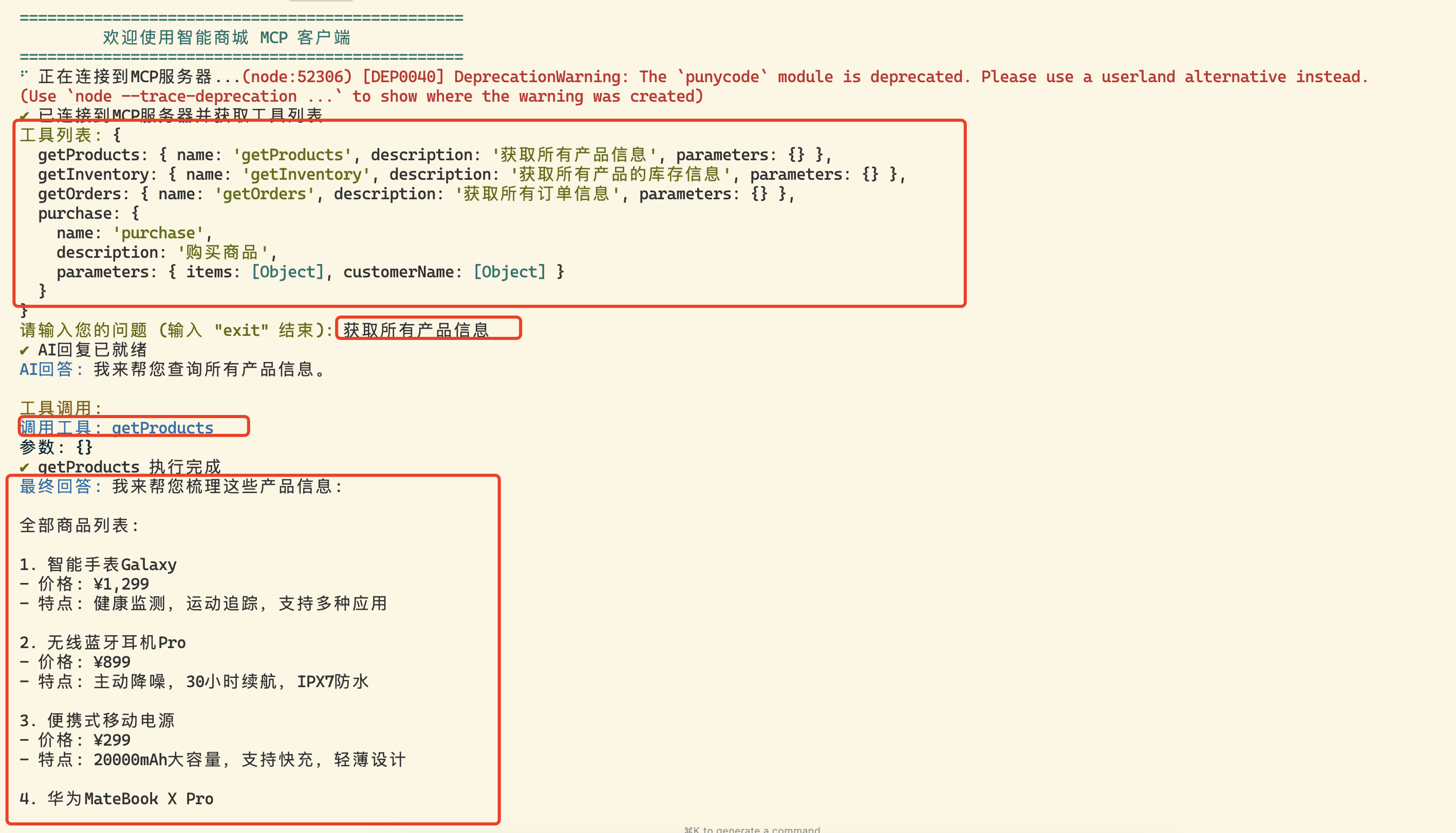
Of course, we can also use it in Cursor. Create a `.cursor/mcp.json` file and add the following content:
```json
{
"mcpServers": {
"products-sse": {
"url": "http://localhost:8083/sse"
}
}
}
```
Then in the Cursor settings page, we can see this MCP service, and then we can use this MCP service in Cursor.

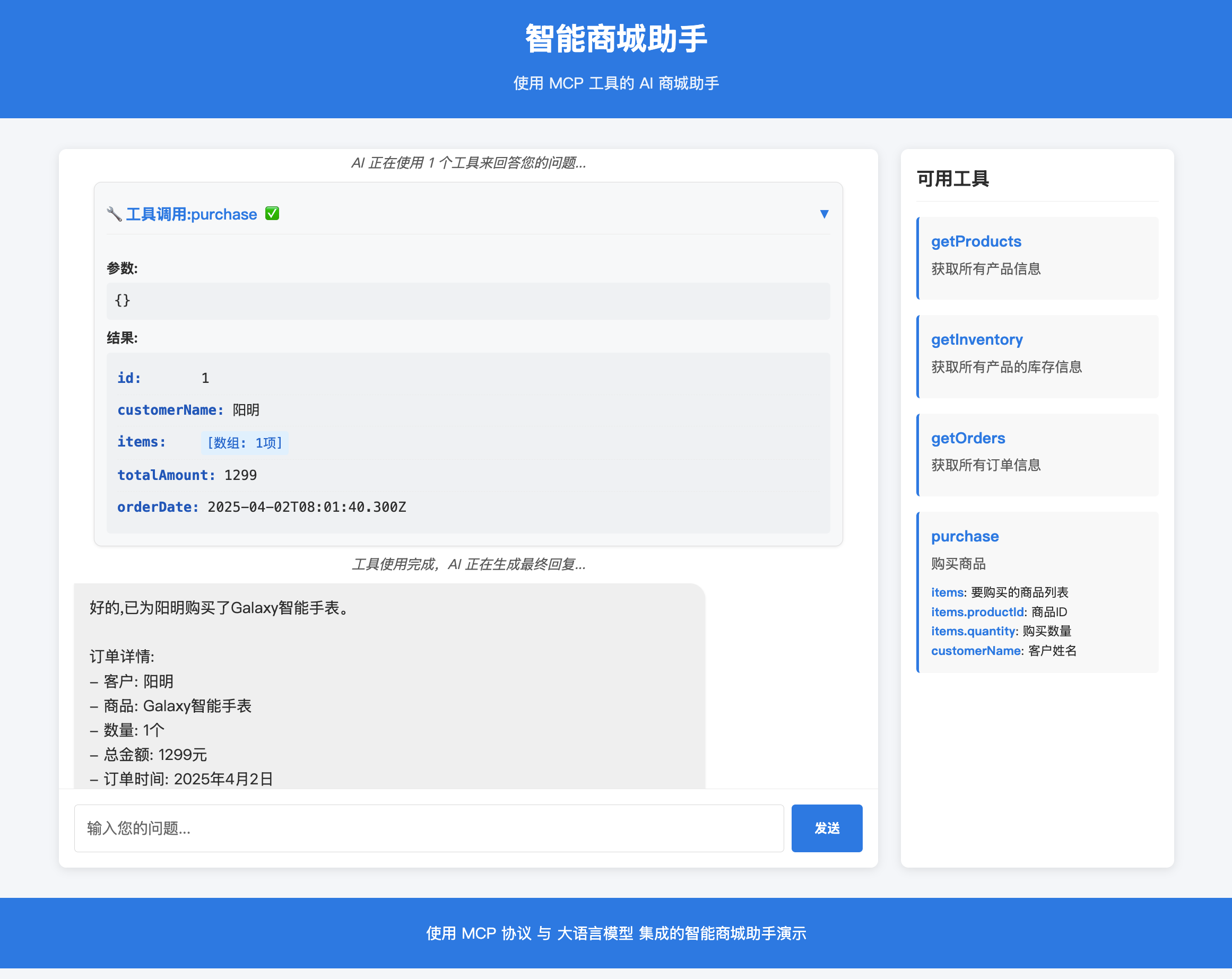
Below is an example of using the Web client we developed:
## Debugging
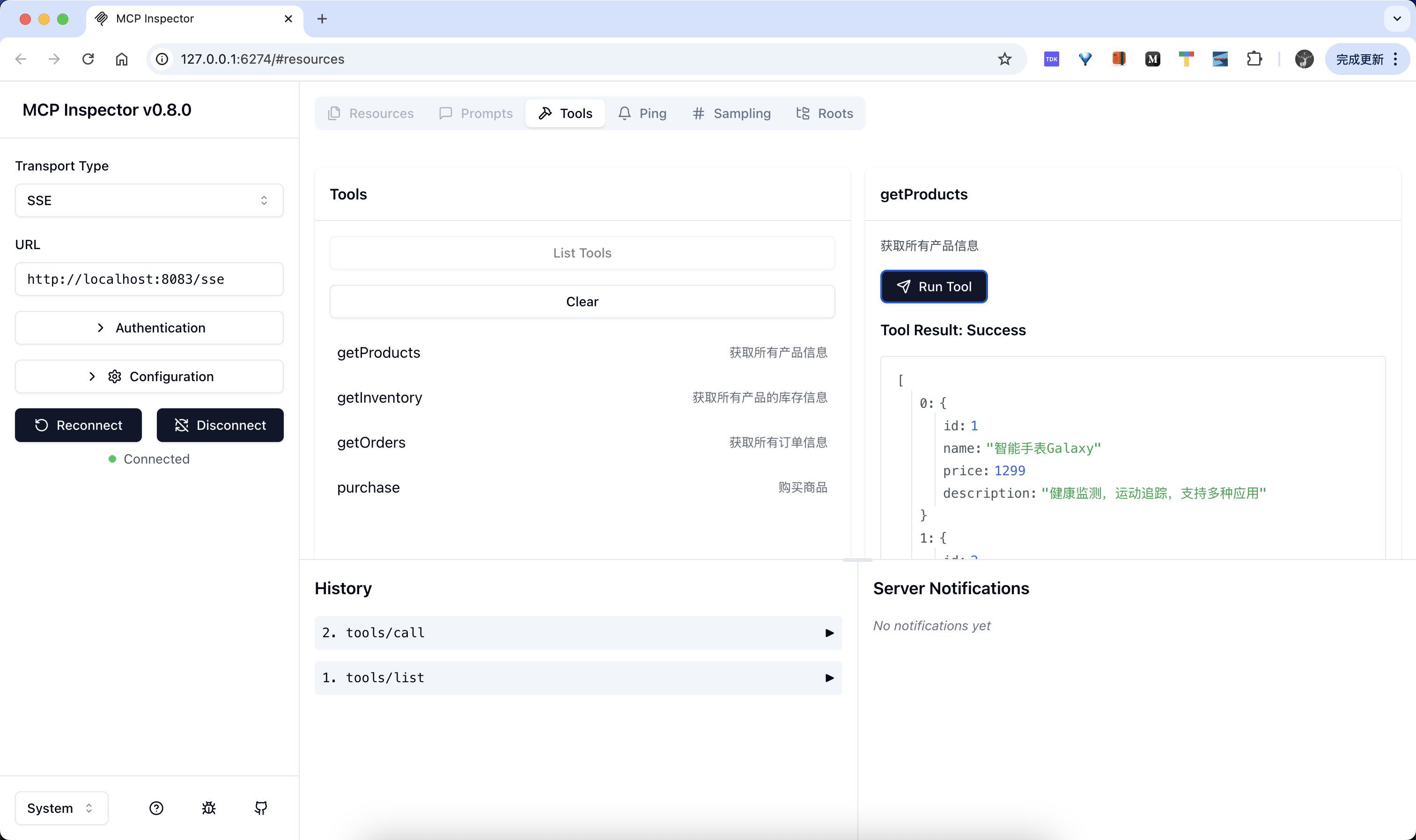
Similarly, we can use the `npx @modelcontextprotocol/inspector` command to debug our SSE service:
```bash
$ npx @modelcontextprotocol/inspector
Starting MCP inspector...
⚙️ Proxy server listening on port 6277
🔍 MCP Inspector is up and running at http://127.0.0.1:6274 🚀
```
Then open the above address in the browser, select SSE, and configure our SSE address to test:
## Summary
When the LLM decides to trigger a call to a user's tool, the quality of the tool description is crucial:
- **Precise Description**: Ensure that the description of each tool is clear and unambiguous, containing keywords so that the LLM correctly identifies when to use the tool.
- **Avoid Conflicts**: Do not provide multiple tools with similar functions, as this may cause the LLM to choose the wrong one.
- **Test Verification**: Test the accuracy of tool calls using various user query scenarios before deployment.
The MCP server can be implemented using various technologies:
- Python SDK
- TypeScript/JavaScript
- Other programming languages
The choice should be based on team familiarity and existing technology stack.
Additionally, integrating the AI assistant and the MCP server into the existing microservices architecture has the following advantages:
1. **Real-time Data**: Provides real-time or near real-time updates via SSE (Server-Sent Events), which is especially important for dynamic data such as inventory information and order status.
2. **Scalability**: Each part of the system can be scaled independently, for example, a frequently used inventory check service can be scaled separately.
3. **Resilience**: Failure of a single microservice does not affect the operation of the entire system, ensuring system stability.
4. **Flexibility**: Different teams can handle different parts of the system independently, using different technology stacks if necessary.
5. **Efficient Communication**: SSE is more efficient than continuous polling, sending updates only when data changes.
6. **Improved User Experience**: Real-time updates and fast responses improve customer satisfaction.
7. **Simplified Client**: Client code is more concise, eliminating the need for complex polling mechanisms and simply listening for server events.
Of course, if you want to use it in a production environment, we also need to consider the following:
- Conduct comprehensive testing to identify potential errors
- Design fault recovery mechanisms
- Implement a monitoring system to track tool call performance and accuracy
- Consider adding a caching layer to reduce the load on backend services
Through the above practices, we can build an efficient and reliable MCP-based intelligent shopping mall service assistant to provide users with a real-time and personalized shopping experience.
---
2025.05.28. Update, using OpenAI LLM in the client. See [Developing MCP Server and Client with MCP Python SDK](https://www.claudemcp.com/zh/docs/mcp-py-sdk-basic).
Previously, we used a combination of TypeScript + Claude + MCP + SSE. Some issues mentioned how to replace it with the OpenAI large model. Below, we use the MCP Python SDK to implement a simple OpenAI-based MCP client.
The MCP Python SDK provides a high-level client interface for connecting to the MCP server in various ways, as shown in the following code:
```python
from mcp import ClientSession, StdioServerParameters, types
from mcp.client.stdio import stdio_client
# Create stdio type MCP server parameters
server_params = StdioServerParameters(
command="python", # Executable file
args=["example_server.py"], # Optional command line arguments
env=None, # Optional environment variables
)
async def run():
async with stdio_client(server_params) as (read, write): # Create a stdio type client
async with ClientSession(read, write) as session: # Create a client session
# Initialize connection
await session.initialize()
# List available prompts
prompts = await session.list_prompts()
# Get a prompt
prompt = await session.get_prompt(
"example-prompt", arguments={"arg1": "value"}
)
# List available resources
resources = await session.list_resources()
# List available tools
tools = await session.list_tools()
# Read a resource
content, mime_type = await session.read_resource("file://some/path")
# Call a tool
result = await session.call_tool("tool-name", arguments={"arg1": "value"})
if __name__ == "__main__":
import asyncio
asyncio.run(run())
```
In the above code, we created a stdio type MCP client and used the `stdio_client` function to create a client session. Then, we created a client session through the `ClientSession` class, and then initialized the connection through the `session.initialize()` method. Then, we listed the available prompts through the `session.list_prompts()` method, and then obtained a prompt through the `session.get_prompt()` method. Then, we listed the available resources through the `session.list_resources()` method, and then listed the available tools through the `session.list_tools()` method. Then, we read a resource through the `session.read_resource()` method, and then called a tool through the `session.call_tool()` method. These are common methods of the MCP client.
However, in the actual MCP client or host, we generally combine LLM to achieve more intelligent interaction. For example, if we want to implement an OpenAI-based MCP client, how should we implement it? We can refer to Cursor's approach:
- First, configure the MCP server through a JSON configuration file
- Read the configuration file and load the MCP server list
- Get the list of available tools provided by the MCP server
- Then, according to the user's input and the Tools list, pass it to the LLM (if the LLM does not support tool calls, then you need to tell the LLM how to call these tools in the System prompt)
- According to the return result of the LLM, loop through all the tools provided by the MCP server
- After obtaining the return result of the MCP tool, you can send the return result to the LLM to get an answer that is more in line with the user's intention
This process is more in line with our actual interaction process. Below, we implement a simple MCP client based on OpenAI.
First, use the following command to initialize a uv managed project:
```bash
uv init mymcp --python 3.13
cd mymcp
```
Then install the MCP Python SDK dependencies:
```bash
uv add "mcp[cli]"
uv add openai
uv add rich
```
The complete code is as follows:
```python
#!/usr/bin/env python
"""
MyMCP Client - Using OpenAI native tools call
"""
import asyncio
import json
import os
import sys
from typing import Dict, List, Any, Optional
from dataclasses import dataclass
from openai import AsyncOpenAI
from mcp import StdioServerParameters
from mcp.client.stdio import stdio_client
from mcp.client.session import ClientSession
from mcp.types import Tool, TextContent
from rich.console import Console
from rich.prompt import Prompt
from rich.panel import Panel
from rich.markdown import Markdown
from rich.table import Table
from rich.spinner import Spinner
from rich.live import Live
from dotenv import load_dotenv
# Load environment variables
load_dotenv()
```
# Initialize Rich console
console = Console()
@dataclass
class MCPServerConfig:
"""MCP Server configuration"""
name: str
command: str
args: List[str]
description: str
env: Optional[Dict[str, str]] = None
class MyMCPClient:
"""MyMCP Client"""
def __init__(self, config_path: str = "mcp.json"):
self.config_path = config_path
self.servers: Dict[str, MCPServerConfig] = {}
self.all_tools: List[tuple[str, Any]] = [] # (server_name, tool)
self.openai_client = AsyncOpenAI(
api_key=os.getenv("OPENAI_API_KEY")
)
def load_config(self):
"""Load MCP server configuration from the configuration file"""
try:
with open(self.config_path, 'r', encoding='utf-8') as f:
config = json.load(f)
for name, server_config in config.get("mcpServers", {}).items():
env_dict = server_config.get("env", {})
self.servers[name] = MCPServerConfig(
name=name,
command=server_config["command"],
args=server_config.get("args", []),
description=server_config.get("description", ""),
env=env_dict if env_dict else None
)
console.print(f"[green]✓ Loaded {len(self.servers)} MCP server configurations[/green]")
except Exception as e:
console.print(f"[red]✗ Failed to load configuration file: {e}[/red]")
sys.exit(1)
async def get_tools_from_server(self, name: str, config: MCPServerConfig) -> List[Tool]:
"""Get the tool list from a single server"""
try:
console.print(f"[blue]→ Connecting to server: {name}[/blue]")
# Prepare environment variables
env = os.environ.copy()
if config.env:
env.update(config.env)
# Create server parameters
server_params = StdioServerParameters(
command=config.command,
args=config.args,
env=env
)
# Use async with context manager (double nested)
async with stdio_client(server_params) as (read, write):
async with ClientSession(read, write) as session:
await session.initialize()
# Get the tool list
tools_result = await session.list_tools()
tools = tools_result.tools
console.print(f"[green]✓ {name}: {len(tools)} tools[/green]")
return tools
except Exception as e:
console.print(f"[red]✗ Failed to connect to server {name}: {e}[/red]")
console.print(f"[red] Error type: {type(e).__name__}[/red]")
import traceback
console.print(f"[red] Detailed error: {traceback.format_exc()}[/red]")
return []
async def load_all_tools(self):
"""Load tools from all servers"""
console.print("\n[blue]→ Getting the list of available tools...[/blue]")
for name, config in self.servers.items():
tools = await self.get_tools_from_server(name, config)
for tool in tools:
self.all_tools.append((name, tool))
def display_tools(self):
"""Display all available tools"""
table = Table(title="Available MCP Tools", show_header=True)
table.add_column("Server", style="cyan")
table.add_column("Tool Name", style="green")
table.add_column("Description", style="white")
# Group by server
current_server = None
for server_name, tool in self.all_tools:
# Display the server name only when it changes
display_server = server_name if server_name != current_server else ""
current_server = server_name
table.add_row(
display_server,
tool.name,
tool.description or "No description"
)
console.print(table)
def build_openai_tools(self) -> List[Dict[str, Any]]:
"""Build tool definitions in OpenAI tools format"""
openai_tools = []
for server_name, tool in self.all_tools:
# Build OpenAI function format
function_def = {
"type": "function",
"function": {
"name": f"{server_name}_{tool.name}", # Add server prefix to avoid conflicts
"description": f"[{server_name}] {tool.description or 'No description'}",
"parameters": tool.inputSchema or {"type": "object", "properties": {}}
}
}
openai_tools.append(function_def)
return openai_tools
def parse_tool_name(self, function_name: str) -> tuple[str, str]:
"""Parse the tool name, extract the server name and tool name"""
# Format: server_name_tool_name
parts = function_name.split('_', 1)
if len(parts) == 2:
return parts[0], parts[1]
else:
# If there is no underscore, assume it is a tool from the first server
if self.all_tools:
return self.all_tools[0][0], function_name
return "unknown", function_name
async def call_tool(self, server_name: str, tool_name: str, arguments: Dict[str, Any]) -> Any:
"""Call the specified tool"""
config = self.servers.get(server_name)
if not config:
raise ValueError(f"Server {server_name} does not exist")
try:
# Prepare environment variables
env = os.environ.copy()
if config.env:
env.update(config.env)
# Create server parameters
server_params = StdioServerParameters(
command=config.command,
args=config.args,
env=env
)
# Use async with context manager (double nested)
async with stdio_client(server_params) as (read, write):
async with ClientSession(read, write) as session:
await session.initialize()
# Call the tool
result = await session.call_tool(tool_name, arguments)
return result
except Exception as e:
console.print(f"[red]✗ Failed to call tool {tool_name}: {e}[/red]")
raise
def extract_text_content(self, content_list: List[Any]) -> str:
"""Extract text content from MCP response"""
text_parts: List[str] = []
for content in content_list:
if isinstance(content, TextContent):
text_parts.append(content.text)
elif hasattr(content, 'text'):
text_parts.append(str(content.text))
else:
# Handle other types of content
text_parts.append(str(content))
return "\n".join(text_parts) if text_parts else "✅ Operation completed, but no text content was returned"
async def process_user_input(self, user_input: str) -> str:
"""Process user input and return the final response"""
# Build tool definitions
openai_tools = self.build_openai_tools()
try:
# First call - let LLM decide whether to use tools
messages = [
{"role": "system", "content": "You are an intelligent assistant that can use various MCP tools to help users complete tasks. If you don't need to use tools, return the answer directly."},
{"role": "user", "content": user_input}
]
# Call OpenAI API
kwargs = {
"model": "deepseek-chat",
"messages": messages,
"temperature": 0.7
}
# Add tools parameter only when there are tools
if openai_tools:
kwargs["tools"] = openai_tools
kwargs["tool_choice"] = "auto"
# Use loading effect
with Live(Spinner("dots", text="[blue]Thinking...[/blue]"), console=console, refresh_per_second=10):
response = await self.openai_client.chat.completions.create(**kwargs) # type: ignore
message = response.choices[0].message
# Check if there are tool calls
if hasattr(message, 'tool_calls') and message.tool_calls: # type: ignore
# Add assistant message to history
messages.append({ # type: ignore
"role": "assistant",
"content": message.content,
"tool_calls": [
{
"id": tc.id,
"type": "function",
"function": {
"name": tc.function.name,
"arguments": tc.function.arguments
}
} for tc in message.tool_calls # type: ignore
]
})
# Execute each tool call
for tool_call in message.tool_calls:
function_name = tool_call.function.name # type: ignore
arguments = json.loads(tool_call.function.arguments) # type: ignore
# Parse server name and tool name
server_name, tool_name = self.parse_tool_name(function_name) # type: ignore
try:
# Use loading effect to call the tool
with Live(Spinner("dots", text=f"[cyan]Calling {server_name}.{tool_name}...[/cyan]"), console=console, refresh_per_second=10):
result = await self.call_tool(server_name, tool_name, arguments)
```html
# Extract Text Content from MCP Response
result_content = self.extract_text_content(result.content)
# Add Tool Call Result
messages.append({
"role": "tool",
"tool_call_id": tool_call.id,
"content": result_content
})
console.print(f"[green]✓ {server_name}.{tool_name} call succeeded[/green]")
except Exception as e:
# Add Error Message
messages.append({
"role": "tool",
"tool_call_id": tool_call.id,
"content": f"Error: {str(e)}"
})
console.print(f"[red]✗ {server_name}.{tool_name} call failed: {e}[/red]")
# Get Final Response
with Live(Spinner("dots", text="[blue]Generating final response...[/blue]"), console=console, refresh_per_second=10):
final_response = await self.openai_client.chat.completions.create(
model="deepseek-chat",
messages=messages, # type: ignore
temperature=0.7
)
final_content = final_response.choices[0].message.content
return final_content or "Sorry, I cannot generate a final answer."
else:
# No Tool Call, Return Response Directly
return message.content or "Sorry, I cannot generate an answer."
except Exception as e:
console.print(f"[red]✗ Error processing request: {e}[/red]")
return f"Sorry, an error occurred while processing your request: {str(e)}"
async def interactive_loop(self):
"""Interactive Loop"""
console.print(Panel.fit(
"[bold cyan]MyMCP Client Started[/bold cyan]\n"
"Enter your question, and I will use the available MCP tools to help you.\n"
"Enter 'tools' to view available tools\n"
"Enter 'exit' or 'quit' to exit.",
title="Welcome to the MCP Client"
))
while True:
try:
# Get User Input
user_input = Prompt.ask("\n[bold green]You[/bold green]")
if user_input.lower() in ['exit', 'quit', 'q']:
console.print("\n[yellow]Goodbye![/yellow]")
break
if user_input.lower() == 'tools':
self.display_tools()
continue
# Process User Input
response = await self.process_user_input(user_input)
# Display Response
console.print("\n[bold blue]Assistant[/bold blue]:")
console.print(Panel(Markdown(response), border_style="blue"))
except KeyboardInterrupt:
console.print("\n[yellow]Interrupted[/yellow]")
break
except Exception as e:
console.print(f"\n[red]Error: {e}[/red]")
async def run(self):
"""Run Client"""
# Load Configuration
self.load_config()
if not self.servers:
console.print("[red]✗ No configured servers[/red]")
return
# Get All Tools
await self.load_all_tools()
if not self.all_tools:
console.print("[red]✗ No available tools[/red]")
return
# Display Available Tools
self.display_tools()
# Enter Interactive Loop
await self.interactive_loop()
async def main():
"""Main Function"""
# Check OpenAI API Key
if not os.getenv("OPENAI_API_KEY"):
console.print("[red]✗ Please set the environment variable OPENAI_API_KEY[/red]")
console.print("Hint: Create a .env file and add: OPENAI_API_KEY=your-api-key")
sys.exit(1)
# Create and Run Client
client = MyMCPClient()
await client.run()
if __name__ == "__main__":
try:
asyncio.run(main())
except KeyboardInterrupt:
console.print("\n[yellow]Program exited[/yellow]")
except Exception as e:
console.print(f"\n[red]Program error: {e}[/red]")
sys.exit(1)
```
Above code, we first load the `mcp.json` file. The configuration format is consistent with Cursor to obtain all our own configured MCP servers. For example, we configure the following `mcp.json` file:
```json
{
"mcpServers": {
"weather": {
"command": "uv",
"args": ["--directory", ".", "run", "main.py"],
"description": "Weather Information Server - Get current weather and weather forecast",
"env": {
"OPENWEATHER_API_KEY": "xxxx"
}
},
"filesystem": {
"command": "npx",
"args": ["-y", "@modelcontextprotocol/server-filesystem", "/tmp"],
"description": "File System Operation Server - File read/write and directory management"
}
}
}
```
Then in the `run` method, we call the `load_all_tools` method to load all the tool lists. The core implementation here is to call the tool list on the MCP server side, as shown below:
```python
async def get_tools_from_server(self, name: str, config: MCPServerConfig) -> List[Tool]:
"""Get tool list from a single server"""
try:
console.print(f"[blue]→ Connecting to server: {name}[/blue]")
# Prepare environment variables
env = os.environ.copy()
if config.env:
env.update(config.env)
# Create server parameters
server_params = StdioServerParameters(
command=config.command,
args=config.args,
env=env
)
# Use async with context manager (double nested)
async with stdio_client(server_params) as (read, write):
async with ClientSession(read, write) as session:
await session.initialize()
# Get tool list
tools_result = await session.list_tools()
tools = tools_result.tools
console.print(f"[green]✓ {name}: {len(tools)} tools[/green]")
return tools
except Exception as e:
console.print(f"[red]✗ Failed to connect to server {name}: {e}[/red]")
console.print(f"[red] Error type: {type(e).__name__}[/red]")
import traceback
console.print(f"[red] Detailed error: {traceback.format_exc()}[/red]")
return []
```
The core here is to directly use the client interface provided by the MCP Python SDK to call the MCP server to obtain the tool list.
Next is to process the user's input. Here, the first thing we need to do is convert the obtained MCP tool list into a function tools format that OpenAI can recognize, and then send the user's input and tools to OpenAI for processing. Then, based on the return result, determine whether a certain tool should be called. If necessary, you can directly call the MCP tool. Finally, assemble the obtained results and send them to OpenAI to obtain a more complete answer result. This whole process is not complicated, and of course there are many details that can be optimized, and more are integrated according to our own needs.
Now we can directly test the results:
```bash
$ python simple_client.py
✓ Loaded 1 MCP server configuration
→ Getting available tool list...
→ Connecting to server: weather
[05/25/25 11:42:51] INFO Processing request of type ListToolsRequest server.py:551
✓ weather: 2 tools
Available MCP Tools
┏━━━━━━━━━┳━━━━━━━━━━━━━━━━━━━━━━┳━━━━━━━━━━━━━━━━━━━━━━━━━━━━━━━━━━━━━━┓
┃ Server ┃ Tool Name ┃ Description ┃
┡━━━━━━━━━╇━━━━━━━━━━━━━━━━━━━━━━╇━━━━━━━━━━━━━━━━━━━━━━━━━━━━━━━━━━━━━━┩
│ weather │ get_current_weather │ │
│ │ │ Get current weather information for a specified city │
│ │ │ │
│ │ │ Args: │
│ │ │ city: City name (English) │
│ │ │ │
│ │ │ Returns: │
│ │ │ Formatted current weather information │
│ │ │ │
│ │ get_weather_forecast │ │
│ │ │ Get weather forecast for a specified city │
│ │ │ │
│ │ │ Args: │
│ │ │ city: City name (English) │
│ │ │ days: Forecast days (1-5 days, default 5 days) │
│ │ │ │
│ │ │ Returns: │
│ │ │ Formatted weather forecast information │
│ │ │ │
└─────────┴──────────────────────┴──────────────────────────────────────┘
╭────────────── Welcome to the MCP Client ──────────────╮
│ MyMCP client has started │
│ Enter your question, and I will use the available MCP tools to help you. │
│ Enter 'tools' to view available tools │
│ Enter 'exit' or 'quit' to exit. │
╰─────────────────────────────────────────────────╯
You: Hello, who are you?
⠹ Thinking...
Assistant:
╭──────────────────────────────────────────────────────────────────────────────────────────────────────────────────────────────────────────╮
│ Hello! I am an intelligent assistant who can help you with various tasks, such as answering questions, checking the weather, providing suggestions, etc. If you need anything, feel free to tell me! 😊 │
╰──────────────────────────────────────────────────────────────────────────────────────────────────────────────────────────────────────────╯
You: How is the weather in Chengdu today? Is it suitable to wear a skirt tomorrow?
⠧ Thinking...
⠴ Calling weather.get_current_weather...[05/25/25 11:44:03] INFO Processing request of type CallToolRequest server.py:551
⠴ Calling weather.get_current_weather...
✓ weather.get_current_weather call succeeded
⠸ Calling weather.get_weather_forecast...[05/25/25 11:44:04] INFO Processing request of type CallToolRequest server.py:551
⠋ Calling weather.get_weather_forecast...
✓ weather.get_weather_forecast call succeeded
⠧ Generating final response...
```
Assistant:
╭──────────────────────────────────────────────────────────────────────────────────────────────────────────────────────────────────────────╮
│ The weather in Chengdu today is sunny, the current temperature is 26.9°C, humidity is 44%, and the wind is light, making it very suitable for outdoor activities. │
│ │
│ Tomorrow (May 25) weather forecast: │
│ │
│ • Weather: Cloudy │
│ • Temperature: 26.4°C~29.3°C │
│ • Wind: 3.1 m/s │
│ • Humidity: 41% │
│ │
│ Suggestion: The temperature will be moderate tomorrow, and the wind will not be strong, so it is perfectly fine to wear a skirt. However, it is recommended to wear a light jacket or sunscreen because the ultraviolet rays may be strong in cloudy weather. If you plan to be outdoors for a long time, you can bring a parasol for backup. │
╰──────────────────────────────────────────────────────────────────────────────────────────────────────────────────────────────────────────╯
You:
```
From the output, you can see that the tool provided by the configured MCP Server can be called normally.
Connection Info
You Might Also Like

markitdown
MarkItDown-MCP is a lightweight server for converting URIs to Markdown.

everything-claude-code
Complete Claude Code configuration collection - agents, skills, hooks,...

servers
Model Context Protocol Servers

Time
A Model Context Protocol server for time and timezone conversions.
Filesystem
Node.js MCP Server for filesystem operations with dynamic access control.
Sequential Thinking
A structured MCP server for dynamic problem-solving and reflective thinking.