

Content
# <img src="https://cdn.jsdelivr.net/gh/homarr-labs/dashboard-icons/png/unifi-dark.png" alt="UniFi Dark Logo" width="40" /> UniFi MCP Server
[](https://github.com/enuno/unifi-mcp-server/actions/workflows/ci.yml)
[](https://github.com/enuno/unifi-mcp-server/actions/workflows/security.yml)
[](https://codecov.io/github/enuno/unifi-mcp-server)
[](https://pypi.org/project/unifi-mcp-server/)
[](https://www.python.org/downloads/)
[](LICENSE)
[](https://deepwiki.com/enuno/unifi-mcp-server)
A Model Context Protocol (MCP) server that exposes the UniFi Network Controller API today and is evolving into a production-grade multi-domain platform for Protect, Access, and enterprise-scale orchestration.
See `SPEC.md` for the architecture target and `DEVELOPMENT_PLAN.md` for the phase roadmap.
## Operator quick start
### Objective
Give operators a fast, safe reading order for understanding what the server does today, what it is becoming, and which docs govern rollout decisions.
### Prerequisites
- You know which UniFi API mode the deployment uses: local, cloud-ea, or cloud-v1.
- You know whether the runtime is stdio, HTTP, SSE, or streamable HTTP.
- You have read the phase target in `SPEC.md` and the current work item in `DEVELOPMENT_PLAN.md`.
### Procedure
1. Confirm the current stable release and current phase focus.
2. Read `SPEC.md` for architecture intent and `DEVELOPMENT_PLAN.md` for sequencing.
3. Use `API.md` and `docs/UNIFI_API.md` for implementation surface details.
4. Use the phase runbooks in `NETWORK_PLAYBOOK.md`, `HARBOR_SETUP.md`, `MULTI_CONTROLLER.md`, `METRICS.md`, `WEBHOOK_SETUP.md`, and `A2A.md` when operating or extending phase 5 systems.
5. For release work, consult `RELEASE_CHECKLIST.md` and `docs/RELEASE_PROCESS.md` before tagging or publishing.
### Verification
- The chosen API mode matches the runtime configuration.
- The current phase and the documented roadmap agree.
- The operator can point to the correct runbook before making a change.
### Rollback
- If the selected runbook does not match the deployed capability, stop and reconcile docs before changing production state.
### Common failure modes
- README claims outrun the codebase.
- Operators follow phase language without checking the specific runbook.
- Release or rollout decisions are made from the README alone instead of the canonical docs.
## 📋 Version Notice
**Current Stable Release**: 0.2.5 (May 1, 2026) 🎉
**Installation:**
```bash
pip install unifi-mcp-server
```
**Roadmap focus:**
- Phase 3: native Protect API integration (camera/NVR/device/view/event read tools and resources now wired; PTZ and media streams still in progress)
- Phase 4: testing, polish, minor gaps, runbooks, skills, and developer workflow hardening
- Phase 5: multi-controller orchestration, dry-run, RBAC, audit logging, metrics, A2A, webhooks, Access API work, and tool exposure profiles
**See:** [RELEASE_NOTES_0.2.5.md](RELEASE_NOTES_0.2.5.md) for complete changelog.
## Current Development Posture
- Current repo codebase: ~220 async tool functions across 40+ modules
- Phases 0–2 are complete
- Phase 3 (Protect API integration) is the active implementation target
- The architectural target is documented in `SPEC.md`
- The canonical roadmap is `DEVELOPMENT_PLAN.md`
**Previous Release - v0.2.4 (2026-02-19):**
- 🚨 **Critical Startup Fix (issue #42)** - `ImportError: cannot import 'config' from 'agnost'` prevented startup. Fixed by moving agnost imports inside the conditional block.
- 📌 **Dependency Pin** - Excluded broken `agnost==0.1.13` from version range (`>=0.1.12,!=0.1.13`)
- 🧪 **1,325 Tests Passing** - 1219 unit + 106 integration tests, cloud-ea API compatibility fixes, Site Manager endpoint hardening
**Previous Release - v0.2.3 (2026-02-18):**
- ✅ P1 API bug fixes (QoS audit_action, Site Manager decorator, Topology warnings, Backup client methods)
- ✅ P2 RADIUS & Guest Portal — Complete CRUD (get/update for RADIUS accounts and hotspot packages)
**Previous Release - v0.2.2 (2026-02-16):**
- 🔌 **Port Profile Management** - 8 new tools for switch port configuration (PoE, VLAN, 802.1X, LLDP-MED)
- 🔒 **Security Updates** - Critical dependency updates (FastMCP 2.14.5, MCP 1.26.0, cryptography 46.0.5)
- 🧪 **1,068 Tests Passing** - 75 new tests, all passing across Python 3.10, 3.11, 3.12
**Major Release - v0.2.0 (2026-01-25):**
- ✨ **74 MCP Tools** - All 7 feature phases complete
- 📦 **Published on PyPI** - Easy installation with pip/uv
- 📊 **QoS Management** - Traffic prioritization and bandwidth control (11 tools)
- 💾 **Backup & Restore** - Automated scheduling and verification (8 tools)
- 🌐 **Multi-Site Aggregation** - Cross-site analytics and management (4 tools)
- 🔒 **ACL & Traffic Filtering** - Advanced traffic control (7 tools)
- 🏢 **Site Management** - Multi-site provisioning and VPN (9 tools)
- 🔐 **RADIUS & Guest Portal** - 802.1X authentication (6 tools)
- 🗺️ **Network Topology** - Complete topology mapping and visualization (5 tools)
See [CHANGELOG.md](CHANGELOG.md) for complete release notes and [VERIFICATION_REPORT.md](docs/archive/VERIFICATION_REPORT.md) for detailed verification.
## 🌐 API Mode Support
The UniFi MCP Server supports **three distinct API modes** with different capabilities:
### Local Gateway API (Recommended) ✅
**Full feature support** - Direct access to your UniFi gateway.
- ✅ **All Features Available**: Device management, client control, network configuration, firewall rules, WiFi management
- ✅ **Real-time Data**: Access to live device/client statistics and detailed information
- ✅ **Configuration Changes**: Create, update, delete networks, VLANs, firewall rules, SSIDs
- 📍 **Requirement**: Local network access to your UniFi gateway (e.g., 192.168.2.1)
- ⚙️ **Configuration**: `UNIFI_API_TYPE=local` + `UNIFI_LOCAL_HOST=<gateway-ip>`
### Cloud Early Access API ⚠️
**Site-centric access** - UniFi cloud API with limited but functional read-only capabilities.
- ✅ **Site Management**: List sites, get site details (matches by `siteId`, `_id`, `name`, or `meta.name`)
- ✅ **Site Manager API** (optional): Multi-site aggregation, host inventory, cross-site statistics
- Enable with `UNIFI_SITE_MANAGER_ENABLED=true`
- Gracefully degrades when endpoints are unavailable
- ⚠️ **No Individual Device/Client Access**: Cannot query specific devices or clients
- ⚠️ **No Configuration Changes**: Cannot modify networks, firewall rules, or settings
- ⚙️ **Configuration**: `UNIFI_API_TYPE=cloud-ea` + optional `UNIFI_SITE_MANAGER_ENABLED=true`
- 📊 **Rate Limit**: 100 requests/minute
### Cloud V1 API ⚠️
**Limited to aggregate statistics** - UniFi stable v1 cloud API.
- ✅ **Site Information**: List sites with aggregate statistics (device counts, client counts, bandwidth)
- ⚠️ **No Individual Device/Client Access**: Cannot query specific devices or clients
- ⚠️ **No Configuration Changes**: Cannot modify networks, firewall rules, or settings
- ⚙️ **Configuration**: `UNIFI_API_TYPE=cloud-v1`
- 📊 **Rate Limit**: 10,000 requests/minute
**💡 Recommendation**: Use **Local Gateway API** (`UNIFI_API_TYPE=local`) for full functionality. Cloud APIs are suitable only for high-level monitoring dashboards.
## 🔌 Transport Modes
The UniFi MCP Server supports **multiple transport modes** for different deployment scenarios:
### STDIO (Default) ✅
**Local subprocess communication** — Best for Claude Desktop, Cursor, and local AI clients.
- ✅ **Default mode**: No configuration needed
- ✅ **Zero network overhead**: Direct stdin/stdout communication
- ✅ **No port required**: Runs as a subprocess of the MCP client
- ⚙️ **Configuration**: `MCP_SERVER_TRANSPORT=stdio` (default)
### SSE (Server-Sent Events) 🌐 ⚠️ Deprecated
**Network-accessible HTTP server** — legacy transport, kept for backward compatibility.
- ⚠️ **Known issue**: client proxies such as `mcp-remote` can send the first tool call before the SSE `initialize` handshake finishes, which the MCP SDK rejects with `Received request before initialization was complete` (see [#96](https://github.com/enuno/unifi-mcp-server/issues/96)). This is a timing issue in the SSE transport itself (upstream in the `mcp` SDK / client proxy, not this server's tool logic), so it cannot be fixed from this codebase.
- ✅ **Network access**: Connect from any MCP client over HTTP
- ✅ **MCP gateway compatible**: Works with MCP gateways that consolidate servers
- ⚙️ **Configuration**: `MCP_SERVER_TRANSPORT=sse` + `MCP_SERVER_PORT=3000`
- 👉 **Prefer Streamable HTTP below** for any new network-accessible deployment.
### HTTP 🌐
**Standard HTTP transport** — Alternative network mode.
- ⚙️ **Configuration**: `MCP_SERVER_TRANSPORT=http` + `MCP_SERVER_PORT=3000`
### Streamable HTTP 🌐 ✅ Recommended for network access
**Modern HTTP transport** — the current MCP transport standard, and the successor to SSE.
- ✅ **Network access**: Connect from any MCP client over HTTP
- ✅ **MCP gateway compatible**: Works with MCP gateways that consolidate servers
- ✅ **No SSE handshake race**: session initialization is part of the same request/response cycle, avoiding the class of timing issue SSE has with proxies like `mcp-remote`
- ⚙️ **Configuration**: `MCP_SERVER_TRANSPORT=streamable_http` + `MCP_SERVER_PORT=3000` + `MCP_AUTH_TOKEN=<token>`
> ⚠️ **Authentication is required for network transports.** The MCP endpoint exposes every
> registered tool, including destructive ones. `http`, `sse`, and `streamable_http` will refuse
> to start unless `MCP_AUTH_TOKEN` is set; clients then send `Authorization: Bearer <token>`.
> The server binds to `127.0.0.1` by default — terminate TLS and authenticate at a reverse proxy
> before widening `MCP_SERVER_HOST` to `0.0.0.0`.
**💡 Recommendation**: Use **STDIO** for local AI clients (Claude Desktop, Cursor). Use **Streamable HTTP** when running behind an authenticating MCP gateway or reverse proxy — prefer it over SSE, which is kept only for backward compatibility.
## 🧭 Tool Exposure Profiles
To reduce context-window bloat, the server will support named exposure profiles that register only the tools relevant to a given UniFi application area.
### Planned profiles
- `network` — network, switching, WiFi, DHCP, DNS, traffic, and client tools
- `protect` — cameras, NVRs, devices, views, events, talkback, and Protect workflows (read surfaces wired; PTZ/media streams still in progress)
- `access` — doors, readers, credentials, visitors, and access-control workflows
- `talk` — UniFi Talk devices, calls, lines, and telephony workflows
- `drive` — UniFi Drive storage, files, sharing, and drive workflows
- `read-only` — `get_*`, `list_*`, `stat_*`, and `search_*` tools only
### Intended behavior
- Keep the full tool surface available when no profile is selected
- Expose fewer tools per session so agents do not carry unrelated UniFi modules in context
- Make the server easier to use in application-specific deployments and focused agent workflows
- Pair with `UNIFI_PROFILE` so profile selection is explicit and repeatable
### Running in Streamable HTTP Mode (recommended for network access)
```bash
# Set transport to Streamable HTTP
export MCP_SERVER_TRANSPORT=streamable_http
export MCP_SERVER_PORT=3000
# Required — the server refuses to start a network transport without it
export MCP_AUTH_TOKEN=$(openssl rand -hex 32)
# Start the server (binds to 127.0.0.1 by default)
unifi-mcp-server
# Server listening on 127.0.0.1:3000 via streamable_http
# Clients send: Authorization: Bearer $MCP_AUTH_TOKEN
```
### Docker Compose for Streamable HTTP Mode
```yaml
services:
unifi-mcp:
image: ghcr.io/enuno/unifi-mcp-server:latest
environment:
UNIFI_API_KEY: your-api-key
UNIFI_API_TYPE: local
UNIFI_LOCAL_HOST: 192.168.2.1
MCP_SERVER_TRANSPORT: streamable_http
MCP_SERVER_PORT: 3000
MCP_SERVER_HOST: 0.0.0.0 # container-internal; keep the published port on loopback
MCP_AUTH_TOKEN: ${MCP_AUTH_TOKEN} # required — clients send Authorization: Bearer <token>
ports:
# Published on loopback; put an authenticating TLS proxy in front to expose it further.
- "127.0.0.1:3000:3000"
```
### Connecting via MCP Gateway
Once running in Streamable HTTP mode, configure your MCP gateway to connect:
```json
{
"mcpServers": {
"unifi": {
"url": "http://your-server-ip:3000/mcp"
}
}
}
```
### Running in SSE Mode (deprecated)
SSE is kept for backward compatibility only — see the [transport modes](#-transport-modes) section above for why Streamable HTTP is preferred. To run it anyway:
```bash
export MCP_SERVER_TRANSPORT=sse
export MCP_SERVER_PORT=3000
unifi-mcp-server
# Server listening on 127.0.0.1:3000 via sse (MCP_AUTH_TOKEN required)
```
## Features
### Core Network Management
- **Device Management**: List, monitor, restart, locate, and upgrade UniFi devices (APs, switches, gateways)
- **Network Configuration**: Create, update, and delete networks, VLANs, and subnets with DHCP configuration
- **Client Management**: Query, block, unblock, and reconnect clients with detailed analytics
- **WiFi/SSID Management**: Create and manage wireless networks with WPA2/WPA3, guest networks, and VLAN isolation
- **Port Profile Management** (v0.2.2): Switch port configuration with PoE, VLAN trunking, 802.1X, LLDP-MED, speed/duplex
- **Device Port Overrides** (v0.2.2): Per-port configuration on individual switches with smart merge capabilities
- **Port Forwarding**: Configure port forwarding rules for external access
- **DPI Statistics**: Deep Packet Inspection analytics for bandwidth usage by application and category
- **Multi-Site Support**: Work with multiple UniFi sites seamlessly
- **Real-time Monitoring**: Access device, network, client, and WiFi statistics
### Security & Firewall (v0.2.0)
- **Firewall Rules**: Create, update, and delete firewall rules with advanced traffic filtering
- **ACL Management**: Layer 3/4 access control lists with rule ordering and priority
- **Traffic Matching Lists**: IP, MAC, domain, and port-based traffic classification
- **Zone-Based Firewall**: Modern zone-based security with zone management and zone-to-zone policies
- **RADIUS Authentication**: 802.1X authentication with RADIUS server configuration
- **Guest Portal**: Customizable captive portals with hotspot billing and voucher management
### Quality of Service (v0.2.0)
- **QoS Profiles**: Create and manage QoS profiles for traffic prioritization
- **Traffic Routes**: Time-based routing with schedules and application awareness
- **Bandwidth Management**: Upload/download limits with guaranteed minimums
- **ProAV Mode**: Professional audio/video QoS templates
- **Reference Profiles**: Built-in QoS templates for common applications
### Backup & Operations (v0.2.0)
- **Automated Backups**: Schedule backups with cron expressions
- **Backup Management**: Create, download, restore, and delete backups
- **Cloud Sync Tracking**: Monitor backup cloud synchronization status
- **Checksum Verification**: Ensure backup integrity with SHA-256 checksums
- **Multiple Backup Types**: Network configurations and full system backups
### Multi-Site Management (v0.2.0)
- **Site Provisioning**: Create, update, and delete UniFi sites
- **Site-to-Site VPN**: Configure VPN tunnels between sites
- **Device Migration**: Move devices between sites seamlessly
- **Site Health Monitoring**: Track site health scores and metrics
- **Cross-Site Analytics**: Aggregate device and client statistics across locations
- **Configuration Export**: Export site configurations for backup/documentation
### Network Topology (v0.2.0)
- **Topology Discovery**: Complete network graph with devices and clients
- **Connection Mapping**: Port-level device interconnections
- **Multi-Format Export**: JSON, GraphML (Gephi), and DOT (Graphviz) formats
- **Network Depth Analysis**: Identify network hierarchy and uplink relationships
- **Visual Coordinates**: Optional device positioning for diagrams
### Phase 5: Enterprise scale and operational excellence
- **Redis Caching**: Optional Redis-based caching for improved performance (configurable TTL per resource type)
- **Webhook Support**: Real-time event processing with HMAC signature verification
- **Automatic Cache Invalidation**: Smart cache invalidation when configuration changes
- **Event Handlers**: Built-in handlers for device, client, and alert events
- **Performance Tracking**: Optional agnost.ai integration for monitoring MCP tool performance and usage analytics
- **Operator Memory**: Optional Supermemory integration for persisting operator notes/context across tool calls, scoped per site
- **Roadmap-aligned controls**: planned dry-run, RBAC, audit logging, metrics, and A2A discovery
### Safety & Security
- **Read-Only Mode**: Set `UNIFI_READ_ONLY=true` to register only non-mutating tools — state-changing tools are then absent from the MCP tool list entirely, rather than relying on a caller-supplied `confirm` flag
- **Confirmation Required**: All mutating operations require explicit `confirm=True` flag
- **Dry-Run Mode**: Planned change-safe preview path for all write and destructive operations
- **Audit Logging**: Planned append-only audit trail for mutation paths
- **Tool Scoping**: Planned API-key-based RBAC for least-privilege access
- **Input Validation**: Comprehensive parameter validation with detailed error messages
- **Password Masking**: Sensitive data automatically masked in logs
- **Type-Safe**: Full type hints and Pydantic validation throughout
- **Security Scanners**: CodeQL, Trivy, Bandit, Safety, and detect-secrets integration
### Technical Excellence
- **Async Support**: Built with async/await for high performance and concurrency
- **MCP Protocol**: Standard Model Context Protocol for AI agent integration
- **Comprehensive Testing**: 1,236 tests with high coverage, all passing across Python 3.10–3.13
- **CI/CD Pipelines**: Automated testing, security scanning, and Docker builds (18 checks)
- **Multi-Architecture**: Docker images for amd64, arm64, arm/v7 (32-bit ARM), and arm64/v8
- **Security Hardened**: Updated critical dependencies (FastMCP, MCP SDK, cryptography)
- **Quality Metrics**: Black formatting, Ruff linting, comprehensive type hints, Pydantic validation
## Quick Start
### Prerequisites
- Python 3.10 or higher
- A UniFi account at [unifi.ui.com](https://unifi.ui.com)
- UniFi API key (obtain from Settings → Control Plane → Integrations)
- Access to UniFi Cloud API or local gateway
### Installation
#### Using PyPI (Recommended)
The UniFi MCP Server is published on PyPI and can be installed with pip or uv:
```bash
# Install from PyPI
pip install unifi-mcp-server
# Or using uv (faster)
uv pip install unifi-mcp-server
# Install specific version
pip install unifi-mcp-server==0.2.5
```
After installation, the `unifi-mcp-server` command will be available globally.
**PyPI Package**: <https://pypi.org/project/unifi-mcp-server/>
#### Using Docker (Alternative)
```bash
# Pull the latest release
docker pull ghcr.io/enuno/unifi-mcp-server:0.2.5
# Multi-architecture support: amd64, arm64, arm/v7, arm64/v8
```
#### Build from Source (Development)
##### Using uv (Recommended)
```bash
# Install uv if you haven't already
curl -LsSf https://astral.sh/uv/install.sh | sh
# Clone the repository
git clone https://github.com/enuno/unifi-mcp-server.git
cd unifi-mcp-server
# Create virtual environment and install dependencies
uv venv
source .venv/bin/activate # On Windows: .venv\Scripts\activate
uv pip install -e ".[dev]"
```
#### Using pip
```bash
# Clone the repository
git clone https://github.com/enuno/unifi-mcp-server.git
cd unifi-mcp-server
# Create virtual environment
python -m venv .venv
source .venv/bin/activate # On Windows: .venv\Scripts\activate
# Install dependencies
pip install -e ".[dev]"
```
#### Using Docker Compose (Recommended for Production)
The recommended way to run the UniFi MCP Server with full monitoring capabilities:
```bash
# 1. Copy and configure environment variables
cp .env.docker.example .env
# Edit .env with your UNIFI_API_KEY and AGNOST_ORG_ID
# 2. Start all services (MCP Server + Redis + MCP Toolbox)
docker-compose up -d
# 3. Check service status
docker-compose ps
# 4. View logs
docker-compose logs -f unifi-mcp
# 5. Access MCP Toolbox dashboard
open http://localhost:8080
# 6. Stop all services
docker-compose down
```
**Included Services:**
- **UniFi MCP Server**: Main MCP server with ~220 async tool functions
- **MCP Toolbox**: Web-based analytics dashboard (port 8080)
- **Redis**: High-performance caching layer
See [MCP_TOOLBOX.md](MCP_TOOLBOX.md) for detailed Toolbox documentation.
#### Using Docker (Standalone)
For standalone Docker usage (not with MCP clients):
```bash
# Pull the image
docker pull ghcr.io/enuno/unifi-mcp-server:latest
# Run the container in background (Cloud API)
# Note: -i flag keeps stdin open for STDIO transport
docker run -i -d \
--name unifi-mcp \
-e UNIFI_API_KEY=your-api-key \
-e UNIFI_API_TYPE=cloud \
ghcr.io/enuno/unifi-mcp-server:latest
# OR run with local gateway proxy
docker run -i -d \
--name unifi-mcp \
-e UNIFI_API_KEY=your-api-key \
-e UNIFI_API_TYPE=local \
-e UNIFI_HOST=192.168.2.1 \
ghcr.io/enuno/unifi-mcp-server:latest
# Check container status
docker ps --filter name=unifi-mcp
# View logs
docker logs unifi-mcp
# Stop and remove
docker rm -f unifi-mcp
```
**Note**: For MCP client integration (Claude Desktop, etc.), see the [Usage](#usage) section below for the correct configuration without `-d` flag.
## Build from Source
### Prerequisites
- **Python 3.10+**: Required for running the server
- **Git**: For cloning the repository
- **uv** (recommended) or **pip**: For dependency management
- **Docker** (optional): For containerized builds
- **Node.js & npm** (optional): For npm package publishing
### Development Build
#### 1. Clone the Repository
```bash
git clone https://github.com/enuno/unifi-mcp-server.git
cd unifi-mcp-server
```
#### 2. Set Up Development Environment
**Using uv (Recommended):**
```bash
# Install uv if not already installed
curl -LsSf https://astral.sh/uv/install.sh | sh
# Create virtual environment
uv venv
# Activate virtual environment
source .venv/bin/activate # Linux/macOS
# Or on Windows: .venv\Scripts\activate
# Install development dependencies
uv pip install -e ".[dev]"
# Install pre-commit hooks
pre-commit install
pre-commit install --hook-type commit-msg
```
**Using pip:**
```bash
# Create virtual environment
python -m venv .venv
# Activate virtual environment
source .venv/bin/activate # Linux/macOS
# Or on Windows: .venv\Scripts\activate
# Upgrade pip
pip install --upgrade pip
# Install development dependencies
pip install -e ".[dev]"
# Install pre-commit hooks
pre-commit install
pre-commit install --hook-type commit-msg
```
**Using make:** the repository `Makefile` wraps the uv commands above, and every
target runs through the locked environment, so no activation is needed:
```bash
make install # uv sync --frozen --extra dev
make hooks # install the pre-commit and commit-msg hooks
make help # list every target
```
#### 3. Configure Environment
```bash
# Copy example configuration
cp .env.example .env
# Edit .env with your UniFi credentials
# Required: UNIFI_API_KEY
# Recommended: UNIFI_API_TYPE=local, UNIFI_LOCAL_HOST=<gateway-ip>
```
#### 4. Run Tests
```bash
# Run all unit tests
pytest tests/unit/ -v
# Run with coverage report
pytest tests/unit/ --cov=src --cov-report=html --cov-report=term-missing
# View coverage report
open htmlcov/index.html # macOS
# Or: xdg-open htmlcov/index.html # Linux
```
The same checks CI runs are available as `make` targets: `make test`,
`make test-cov` (with the 80% coverage gate), `make lint`, `make format`,
`make security`, `make docs-coverage`, `make pre-commit`, and `make ci` to run
all of the blocking ones. `make typecheck` runs mypy, which CI does not block on
yet.
#### 5. Run the Server
```bash
# Development mode with MCP Inspector
uv run mcp dev src/main.py
# Production mode
uv run python -m src.main
# The MCP Inspector will be available at http://localhost:5173
```
### Production Build
#### Build Python Package
```bash
# Install build tools
uv pip install build
# Build wheel and source distribution
python -m build
# Output: dist/unifi_mcp_server-0.2.0-py3-none-any.whl
# dist/unifi_mcp_server-0.2.0.tar.gz
```
#### Build Docker Image
```bash
# Build for current architecture
docker build -t unifi-mcp-server:0.2.0 .
# Build multi-architecture (requires buildx)
docker buildx create --use
docker buildx build \
--platform linux/amd64,linux/arm64,linux/arm/v7 \
-t ghcr.io/enuno/unifi-mcp-server:0.2.0 \
--push .
# Test the image
docker run -i --rm \
-e UNIFI_API_KEY=your-key \
-e UNIFI_API_TYPE=cloud \
unifi-mcp-server:0.2.0
```
### Publishing
#### Publish to PyPI
```bash
# Install twine
uv pip install twine
# Check distribution
twine check dist/*
# Upload to PyPI (requires PyPI account and token)
twine upload dist/*
# Or upload to Test PyPI first
twine upload --repository testpypi dist/*
```
#### Publish to npm (Metadata Wrapper)
```bash
# Ensure package.json is up to date
cat package.json
# Login to npm (if not already)
npm login
# Publish package
npm publish --access public
# Verify publication
npm view unifi-mcp-server
```
#### Publish to MCP Registry
```bash
# Install mcp-publisher
brew install mcp-publisher
# Or: curl -L "https://github.com/modelcontextprotocol/registry/releases/latest/download/mcp-publisher_$(uname -s | tr '[:upper:]' '[:lower:]')_$(uname -m | sed 's/x86_64/amd64/;s/aarch64/arm64/').tar.gz" | tar xz mcp-publisher && sudo mv mcp-publisher /usr/local/bin/
# Authenticate with GitHub (for io.github.enuno namespace)
mcp-publisher login github
# Publish to registry (requires npm package published first)
mcp-publisher publish
# Verify
curl "https://registry.modelcontextprotocol.io/v0.1/servers?search=io.github.enuno/unifi-mcp-server"
```
### Release Process
See [docs/RELEASE_PROCESS.md](docs/RELEASE_PROCESS.md) for the complete release workflow, including automated GitHub Actions, manual PyPI/npm publishing, and MCP registry submission.
### Configuration
#### Obtaining Your API Key
1. Log in to [UniFi Site Manager](https://unifi.ui.com)
2. Navigate to **Settings → Control Plane → Integrations**
3. Click **Create API Key**
4. **Save the key immediately** - it's only shown once!
5. Store it securely in your `.env` file
#### Configuration File
Create a `.env` file in the project root:
```env
# Required: Your UniFi API Key
UNIFI_API_KEY=your-api-key-here
# API Mode Selection (choose one):
# - 'local': Full access via local gateway (RECOMMENDED)
# - 'cloud-ea': Early Access cloud API (limited to statistics)
# - 'cloud-v1': Stable v1 cloud API (limited to statistics)
UNIFI_API_TYPE=local
# Local Gateway Configuration (for UNIFI_API_TYPE=local)
UNIFI_LOCAL_HOST=192.168.2.1
UNIFI_LOCAL_PORT=443
UNIFI_LOCAL_VERIFY_SSL=false
# Cloud API Configuration (for cloud-ea or cloud-v1)
# UNIFI_CLOUD_API_URL=https://api.ui.com
# Site Manager API (cloud-ea only, optional)
# UNIFI_SITE_MANAGER_ENABLED=true
# Optional settings
UNIFI_DEFAULT_SITE=default
# Redis caching (optional - improves performance)
REDIS_HOST=localhost
REDIS_PORT=6379
REDIS_DB=0
# REDIS_PASSWORD=your-password # If Redis requires authentication
# Webhook support (optional - for real-time events)
WEBHOOK_SECRET=your-webhook-secret-here
# Performance tracking with agnost.ai (optional - for analytics)
# Get your Organization ID from https://app.agnost.ai
# AGNOST_ENABLED=true
# AGNOST_ORG_ID=your-organization-id-here
# AGNOST_ENDPOINT=https://api.agnost.ai
# AGNOST_DISABLE_INPUT=false # Set to true to disable input tracking
# AGNOST_DISABLE_OUTPUT=false # Set to true to disable output tracking
# Supermemory (optional - operator notes/context storage, scoped per site)
# Requires: pip install supermemory
# Get your API key from https://console.supermemory.ai
# SUPERMEMORY_ENABLED=true
# SUPERMEMORY_API_KEY=your-supermemory-api-key-here
```
See `.env.example` for all available options.
### Running the Server
```bash
# Development mode with MCP Inspector
uv run mcp dev src/main.py
# Production mode
uv run python src/main.py
```
The MCP Inspector will be available at `http://localhost:5173` for interactive testing.
## Usage
### With Claude Desktop
Add to your Claude Desktop configuration (`~/Library/Application Support/Claude/claude_desktop_config.json` on macOS):
#### Option 1: Using PyPI Package (Recommended)
After installing via `pip install unifi-mcp-server`:
```json
{
"mcpServers": {
"unifi": {
"command": "unifi-mcp-server",
"env": {
"UNIFI_API_KEY": "your-api-key-here",
"UNIFI_API_TYPE": "local",
"UNIFI_LOCAL_HOST": "192.168.2.1"
}
}
}
}
```
For cloud API access, use:
```json
{
"mcpServers": {
"unifi": {
"command": "unifi-mcp-server",
"env": {
"UNIFI_API_KEY": "your-api-key-here",
"UNIFI_API_TYPE": "cloud-v1"
}
}
}
}
```
#### Option 2: Using uv with PyPI Package
```json
{
"mcpServers": {
"unifi": {
"command": "uvx",
"args": ["unifi-mcp-server"],
"env": {
"UNIFI_API_KEY": "your-api-key-here",
"UNIFI_API_TYPE": "local",
"UNIFI_LOCAL_HOST": "192.168.2.1"
}
}
}
}
```
#### Option 3: Using Docker
```json
{
"mcpServers": {
"unifi": {
"command": "docker",
"args": [
"run",
"-i",
"--rm",
"-e",
"UNIFI_API_KEY=your-api-key-here",
"-e",
"UNIFI_API_TYPE=cloud",
"ghcr.io/enuno/unifi-mcp-server:latest"
]
}
}
}
```
**Important**: Do NOT use `-d` (detached mode) in MCP client configurations. The MCP client needs to maintain a persistent stdin/stdout connection to the container.
### With Cursor
Add to your Cursor MCP configuration (`mcp.json` via "View: Open MCP Settings → New MCP Server"):
#### Option 1: Using PyPI Package (Recommended)
After installing via `pip install unifi-mcp-server`:
```json
{
"mcpServers": {
"unifi-mcp": {
"command": "unifi-mcp-server",
"env": {
"UNIFI_API_KEY": "your-api-key-here",
"UNIFI_API_TYPE": "local",
"UNIFI_LOCAL_HOST": "192.168.2.1",
"UNIFI_LOCAL_VERIFY_SSL": "false"
},
"disabled": false
}
}
}
```
#### Option 2: Using uv with PyPI Package
```json
{
"mcpServers": {
"unifi-mcp": {
"command": "uvx",
"args": ["unifi-mcp-server"],
"env": {
"UNIFI_API_KEY": "your-api-key-here",
"UNIFI_API_TYPE": "local",
"UNIFI_LOCAL_HOST": "192.168.2.1"
},
"disabled": false
}
}
}
```
#### Option 3: Using Docker
```json
{
"mcpServers": {
"unifi-mcp": {
"command": "docker",
"args": [
"run", "--rm", "-i",
"--name", "unifi-mcp-server",
"-e", "UNIFI_API_KEY=your_unifi_api_key_here",
"-e", "UNIFI_API_TYPE=local",
"-e", "UNIFI_LOCAL_HOST=192.168.2.1",
"-e", "UNIFI_LOCAL_VERIFY_SSL=false",
"ghcr.io/enuno/unifi-mcp-server:latest"
],
"disabled": false
}
}
}
```
**Configuration Notes:**
- Replace `UNIFI_API_KEY` with your actual UniFi API key
- For local gateway access, set `UNIFI_API_TYPE=local` and provide `UNIFI_LOCAL_HOST`
- For cloud API access, use `UNIFI_API_TYPE=cloud-v1` or `cloud-ea`
- After saving, restart Cursor to activate the server
- Invoke tools in the Chat sidebar (e.g., "List my UniFi devices")
### With Other MCP Clients
The UniFi MCP Server works with any MCP-compatible client. Here are generic configuration patterns:
#### Using the Installed Command
After installing from PyPI (`pip install unifi-mcp-server`):
```json
{
"mcpServers": {
"unifi": {
"command": "unifi-mcp-server",
"env": {
"UNIFI_API_KEY": "your-api-key-here",
"UNIFI_API_TYPE": "local",
"UNIFI_LOCAL_HOST": "192.168.2.1"
}
}
}
}
```
#### Using uvx (Run from PyPI without installation)
```json
{
"mcpServers": {
"unifi": {
"command": "uvx",
"args": ["unifi-mcp-server"],
"env": {
"UNIFI_API_KEY": "your-api-key-here",
"UNIFI_API_TYPE": "local",
"UNIFI_LOCAL_HOST": "192.168.2.1"
}
}
}
}
```
#### Using Python Module Directly
```json
{
"mcpServers": {
"unifi": {
"command": "python3",
"args": ["-m", "src.main"],
"env": {
"UNIFI_API_KEY": "your-api-key-here",
"UNIFI_API_TYPE": "local",
"UNIFI_LOCAL_HOST": "192.168.2.1"
}
}
}
}
```
### Using as a Claude Code Skill
The repo ships a `SKILL.md` and four categorized skill files in `skills/` that let AI agents load UniFi context on-demand — without keeping all 215+ tool definitions in the LLM context for every conversation.
#### Install the skill
```bash
# Personal skill (available in all Claude Code sessions)
cp SKILL.md ~/.claude/skills/unifi.md
# Or install all four domain skills individually
cp skills/unifi-network.md ~/.claude/skills/
cp skills/unifi-devices.md ~/.claude/skills/
cp skills/unifi-security.md ~/.claude/skills/
cp skills/unifi-system.md ~/.claude/skills/
```
Once installed, Claude Code will automatically reference the skill when you ask about UniFi topics, without loading the full MCP server into every conversation.
#### Scoped MCP profiles (reduce context footprint)
You can run the MCP server with only the tools you need by setting `UNIFI_PROFILE`:
| Profile | Tools loaded | Best for |
|---|---|---|
| `network` | Clients, VLANs, WiFi, DHCP, DNS, vouchers | Day-to-day network ops |
| `devices` | Inventory, control, ports, switching, topology | Hardware management |
| `security` | Firewall, ZBF, ACLs, VPN, content filtering | Security audits |
| `system` | Sites, backups, traffic flows, DPI, RADIUS | Monitoring & ops |
| `minimal` | Sites + clients + devices only | Quick checks |
```json
{
"mcpServers": {
"unifi-security": {
"command": "uvx",
"args": ["unifi-mcp-server"],
"env": {
"UNIFI_API_KEY": "your-api-key-here",
"UNIFI_API_TYPE": "local",
"UNIFI_LOCAL_HOST": "192.168.2.1",
"UNIFI_PROFILE": "security"
}
}
}
}
```
See [docs/SKILLS.md](docs/SKILLS.md) for the full guide.
**Environment Variables (All Clients):**
- `UNIFI_API_KEY` (required): Your UniFi API key from unifi.ui.com
- `UNIFI_API_TYPE` (required): `local`, `cloud-v1`, or `cloud-ea`
- **For Local Gateway API**:
- `UNIFI_LOCAL_HOST`: Gateway IP (e.g., 192.168.2.1)
- `UNIFI_LOCAL_PORT`: Gateway port (default: 443)
- `UNIFI_LOCAL_VERIFY_SSL`: SSL verification (default: false)
- **For Cloud APIs**:
- `UNIFI_CLOUD_API_URL`: Cloud API URL (default: <https://api.ui.com>)
- `UNIFI_DEFAULT_SITE`: Default site ID (default: default)
- `UNIFI_SITE_MANAGER_ENABLED`: Enable Site Manager multi-site tools for cloud-ea (default: false)
- **Tool Scope (reduces LLM context size)**:
- `UNIFI_PROFILE`: Load only a subset of tools — `network`, `devices`, `security`, `system`, or `minimal` (default: all tools)
- **MCP Server Transport**:
- `MCP_SERVER_TRANSPORT`: Transport mode (`stdio`, `sse`, `http`, `streamable_http`; default: `stdio`)
- `MCP_SERVER_HOST`: Bind address for network transports (default: `127.0.0.1`)
- `MCP_SERVER_PORT`: Server port (default: `3000`)
- `MCP_AUTH_TOKEN`: Bearer token required for network transports; comma-separate for several (default: unset — network transports refuse to start without it)
### Programmatic Usage
```python
from mcp import MCP
import asyncio
async def main():
mcp = MCP("unifi-mcp-server")
# List all devices
devices = await mcp.call_tool("list_devices", {
"site_id": "default"
})
for device in devices:
print(f"{device['name']}: {device['status']}")
# Get network information via resource
networks = await mcp.read_resource("sites://default/networks")
print(f"Networks: {len(networks)}")
# Create a guest WiFi network with VLAN isolation
wifi = await mcp.call_tool("create_wlan", {
"site_id": "default",
"name": "Guest WiFi",
"security": "wpapsk",
"password": "GuestPass123!",
"is_guest": True,
"vlan_id": 100,
"confirm": True # Required for safety
})
print(f"Created WiFi: {wifi['name']}")
# Get DPI statistics for top bandwidth users
top_apps = await mcp.call_tool("list_top_applications", {
"site_id": "default",
"limit": 5,
"time_range": "24h"
})
for app in top_apps:
gb = app['total_bytes'] / 1024**3
print(f"{app['application']}: {gb:.2f} GB")
# Create Zone-Based Firewall zones (UniFi Network 9.0+)
lan_zone = await mcp.call_tool("create_firewall_zone", {
"site_id": "default",
"name": "LAN",
"description": "Trusted local network",
"confirm": True
})
iot_zone = await mcp.call_tool("create_firewall_zone", {
"site_id": "default",
"name": "IoT",
"description": "Internet of Things devices",
"confirm": True
})
# Set zone-to-zone policy (LAN can access IoT, but IoT cannot access LAN)
await mcp.call_tool("update_zbf_policy", {
"site_id": "default",
"source_zone_id": lan_zone["_id"],
"destination_zone_id": iot_zone["_id"],
"action": "accept",
"confirm": True
})
asyncio.run(main())
```
## API Documentation
See [API.md](API.md) for complete API documentation, including:
- Available MCP tools
- Resource URI schemes
- Request/response formats
- Error handling
- Examples
## Development
Command reference: [commands.md](commands.md)
### Setup Development Environment
```bash
# Install development dependencies
uv pip install -e ".[dev]"
# Install pre-commit hooks
pre-commit install
pre-commit install --hook-type commit-msg
```
### Running Tests
```bash
# Run all tests
pytest tests/unit/
# Run with coverage report
pytest tests/unit/ --cov=src --cov-report=html --cov-report=term-missing
# Run specific test file
pytest tests/unit/test_zbf_tools.py -v
# Run tests for the current feature set
pytest tests/unit/test_new_models.py tests/unit/test_zbf_tools.py tests/unit/test_traffic_flow_tools.py
# Run only unit tests (fast)
pytest -m unit
# Run only integration tests (requires UniFi controller)
pytest -m integration
```
**Current Test Coverage**:
- 1,236 tests passing across Python 3.10-3.13
- Coverage and module-level reporting are tracked in Codecov and CI
- Module-specific targets are maintained in `DEVELOPMENT_PLAN.md` and the test suite
[](https://codecov.io/github/enuno/unifi-mcp-server)
**Coverage focus areas:**
- Models and validation layers
- Core tool paths and safety controls
- Network, security, and operations surfaces
- Utilities and helpers
**Top Coverage Performers** (>95%):
- clients.py: 98.72%
- devices.py: 98.44%
- device_control.py: 99.10%
- topology.py: 95.83% ⭐ (v0.2.0)
- vouchers.py: 96.36%
- firewall.py: 96.11%
See [VERIFICATION_REPORT.md](docs/archive/VERIFICATION_REPORT.md) for complete coverage details and [TESTING_PLAN.md](docs/archive/TESTING_PLAN.md) for testing strategy.
### Code Quality
```bash
# Format code
black src/ tests/
isort src/ tests/
# Lint code
ruff check src/ tests/ --fix
# Type check
mypy src/
# Run all pre-commit checks
pre-commit run --all-files
```
### Testing with MCP Inspector
```bash
# Start development server with inspector
uv run mcp dev src/main.py
# Open http://localhost:5173 in your browser
```
## Project Structure
```
unifi-mcp-server/
├── .github/
│ └── workflows/ # CI/CD pipelines (CI, security, release)
├── .claude/
│ └── commands/ # Custom slash commands for development
├── bin/
│ └── unifi-cli # Shell wrapper for CLI invocation
├── skills/ # Categorized skill files for AI agents
│ ├── unifi-network.md # Clients, VLANs, WiFi, DHCP, DNS, vouchers
│ ├── unifi-devices.md # Device management, ports, switching, topology
│ ├── unifi-security.md # Firewall, ZBF, ACLs, VPN, content filtering
│ └── unifi-system.md # Sites, backups, traffic flows, DPI, RADIUS
├── src/
│ ├── main.py # MCP server entry point (215+ tools registered)
│ ├── cache.py # Redis caching implementation
│ ├── memory.py # Supermemory operator notes/context storage
│ ├── config/ # Configuration management
│ ├── api/ # UniFi API client with rate limiting
│ ├── models/ # Pydantic data models
│ │ └── zbf.py # Zone-Based Firewall models
│ ├── tools/ # MCP tool definitions
│ │ ├── clients.py # Client query tools
│ │ ├── devices.py # Device query tools
│ │ ├── networks.py # Network query tools
│ │ ├── sites.py # Site query tools
│ │ ├── firewall.py # Firewall management (Phase 4)
│ │ ├── firewall_zones.py # Zone-Based Firewall zone management (v0.1.4)
│ │ ├── zbf_matrix.py # Zone-Based Firewall policy matrix (v0.1.4)
│ │ ├── network_config.py # Network configuration (Phase 4)
│ │ ├── device_control.py # Device control (Phase 4)
│ │ ├── client_management.py # Client management (Phase 4)
│ │ ├── wifi.py # WiFi/SSID management (Phase 5)
│ │ ├── port_forwarding.py # Port forwarding (Phase 5)
│ │ └── dpi.py # DPI statistics (Phase 5)
│ ├── resources/ # MCP resource definitions
│ ├── webhooks/ # Webhook receiver and handlers (Phase 5)
│ └── utils/ # Utility functions and validators
├── tests/
│ ├── unit/ # Unit tests (213 tests, 37% coverage)
│ ├── integration/ # Integration tests (planned)
│ └── performance/ # Performance benchmarks (planned)
├── docs/ # Additional documentation
│ └── AI-Coding/ # AI coding guidelines
├── .env.example # Environment variable template
├── pyproject.toml # Project configuration
├── README.md # This file
├── SKILL.md # Top-level AI agent skill manifest
├── API.md # Complete API documentation
├── DEVELOPMENT_PLAN.md # Development roadmap
├── docs/archive/ # Archived planning & session docs
├── CONTRIBUTING.md # Contribution guidelines
├── SECURITY.md # Security policy and best practices
├── AGENTS.md # AI agent guidelines
└── LICENSE # Apache 2.0 License
```
## Contributing
We welcome contributions from both human developers and AI coding assistants! Please see:
- [CONTRIBUTING.md](CONTRIBUTING.md) - Contribution guidelines
- [AGENTS.md](AGENTS.md) - AI agent-specific guidelines
- [AI_CODING_ASSISTANT.md](AI_CODING_ASSISTANT.md) - AI coding standards
- [AI_GIT_PRACTICES.md](AI_GIT_PRACTICES.md) - AI Git practices
### Quick Contribution Guide
1. Fork the repository
2. Create a feature branch: `git checkout -b feature/your-feature-name`
3. Make your changes
4. Run tests and linting: `pytest && pre-commit run --all-files`
5. Commit with conventional commits: `feat: add new feature`
6. Push and create a pull request
### Automated Bug Reports
Found a bug? Issues with `[Bug]` in the title are automatically analyzed by our AI bug handler:
- **Instant Response**: Get immediate feedback on your bug report
- **Smart Analysis**: AI determines if it's a real bug or usage issue
- **Auto-Fix**: Simple bugs may be automatically fixed with a PR
- **Helpful Guidance**: Usage issues receive documentation and examples
See [CONTRIBUTING.md](CONTRIBUTING.md#automated-workflows) for more details.
## Security
Security is a top priority. Please see [SECURITY.md](SECURITY.md) for:
- Reporting vulnerabilities
- Security best practices
- Supported versions
**Never commit credentials or sensitive data!**
## Roadmap
### Version 0.2.0 (Current - Complete ✅ 2026-01-25)
**All 7 Feature Phases Complete - 74 MCP Tools**
**Phase 3: Read-Only Operations (16 tools)**
- [x] Device management (list, details, statistics, search by type)
- [x] Client management (list, details, statistics, search)
- [x] Network information (details, VLANs, subnets, statistics)
- [x] Site management (list, details, statistics)
- [x] MCP resources (sites, devices, clients, networks)
**Phase 4: Mutating Operations with Safety (13 tools)**
- [x] Firewall rule management (create, update, delete)
- [x] Network configuration (create, update, delete networks/VLANs)
- [x] Device control (restart, locate, upgrade)
- [x] Client management (block, unblock, reconnect)
- [x] Safety mechanisms (confirmation, dry-run, audit logging)
**Phase 5: Enterprise scale and operational excellence (11 tools)**
- [x] WiFi/SSID management (create, update, delete, statistics)
- [x] Port forwarding configuration (create, delete, list)
- [x] DPI statistics (site-wide, top apps, per-client)
- [x] Redis caching with automatic invalidation
- [x] Webhook support for real-time events
**Phase 6: Zone-Based Firewall (12 working tools)**
- [x] Zone management (create, update, delete, list, assign networks) - 7 tools ✅ WORKING
- [x] **Zone-to-zone policies via Firewall Policies v2 API** - 5 tools ✅ WORKING (PR #13)
- [x] Legacy zone matrix endpoints - 5 tools ❌ ENDPOINTS DO NOT EXIST (use v2 API instead)
- [x] Application blocking per zone (DPI-based blocking) - 2 tools ❌ ENDPOINTS DO NOT EXIST
- [x] Zone statistics and monitoring - 1 tool ❌ ENDPOINT DOES NOT EXIST
- [x] Type-safe Pydantic models for ZBF and Firewall Policies
- [x] Comprehensive unit tests (84% coverage)
- [x] Endpoint verification on U7 Express and UDM Pro (v10.0.156)
**Phase 7: Traffic Flow Monitoring (15 tools) ✅ COMPLETE**
- [x] Real-time traffic flow monitoring and analysis
- [x] Flow filtering by IP, protocol, application, time range
- [x] Connection state tracking (active, closed, timed-out)
- [x] Client traffic aggregation with top applications/destinations
- [x] Bandwidth rate calculations for streaming flows
- [x] Security quick-response capabilities (block suspicious IPs)
- [x] Type-safe Pydantic models for traffic flows
- [x] Comprehensive unit tests (86.62% coverage)
- [x] Advanced analytics and reporting capabilities
**ZBF Implementation Notes (Verified 2025-11-18):**
- ✅ Zone CRUD operations work (local gateway API only)
- ✅ **Zone-to-zone policies work via Firewall Policies v2 API** (local gateway API only)
- ❌ Legacy zone matrix endpoints NOT available via API (use v2 API instead)
- ❌ Application blocking per zone NOT available via API
- ❌ Zone statistics NOT available via API
- See docs/archive/ZBF_STATUS.md for complete details and examples
**Phase 1: QoS Enhancements (11 tools) ✅**
- [x] QoS profile management (CRUD operations)
- [x] Reference profiles and ProAV templates
- [x] Traffic routing with time-based schedules
- [x] Application-based QoS configuration
- [x] Coverage: 82.43% (46 tests passing)
**Phase 2: Backup & Restore (8 tools) ✅**
- [x] Manual and automated backup creation
- [x] Backup listing, download, and verification
- [x] Backup restore functionality
- [x] Automated scheduling with cron expressions
- [x] Cloud synchronization tracking
- [x] Coverage: 86.32% (10 tests passing)
**Phase 3: Multi-Site Aggregation (4 tools) ✅**
- [x] Cross-site device and client analytics
- [x] Site health monitoring with scoring
- [x] Side-by-side site comparison
- [x] Consolidated reporting across locations
- [x] Coverage: 92.95% (10 tests passing)
**Phase 4: ACL & Traffic Filtering (7 tools) ✅**
- [x] Layer 3/4 access control list management
- [x] Traffic matching lists (IP, MAC, domain, port)
- [x] Firewall policy automation
- [x] Rule ordering and priority
- [x] Coverage: 89.30-93.84%
**Phase 5: Site Management Enhancements (9 tools) ✅**
- [x] Multi-site provisioning and configuration
- [x] Site-to-site VPN setup
- [x] Device migration between sites
- [x] Advanced site settings management
- [x] Configuration export for backup
- [x] Coverage: 92.95% (10 tests passing)
**Phase 6: RADIUS & Guest Portal (6 tools) ✅**
- [x] RADIUS profile configuration (802.1X)
- [x] RADIUS accounting server support
- [x] Guest portal customization
- [x] Hotspot billing and voucher management
- [x] Session timeout and redirect control
- [x] Coverage: 69.77% (17 tests passing)
**Phase 7: Network Topology (5 tools) ✅**
- [x] Complete topology graph retrieval
- [x] Multi-format export (JSON, GraphML, DOT)
- [x] Device interconnection mapping
- [x] Port-level connection tracking
- [x] Network depth analysis
- [x] Coverage tracked in Codecov and CI
**Quality Achievements:**
- [x] 1,236 tests passing
- [x] 18/18 CI/CD checks passing
- [x] Zero security vulnerabilities
- [x] 30+ AI assistant example prompts
- [x] Comprehensive documentation (docs/archive/VERIFICATION_REPORT.md, API.md)
**Total: 364 MCP tools + Comprehensive documentation and verification**
### Version 0.3.0 (Future - Planned)
- [ ] VPN Management (site_vpn.py - 0% coverage currently)
- [ ] WAN Management (wans.py - 0% coverage currently)
- [ ] Enhanced ZBF Matrix (zbf_matrix.py - improve 65% coverage)
- [ ] Integration tests for caching and webhooks
- [ ] Performance benchmarks and optimization
- [ ] Additional DPI analytics (historical trends)
- [ ] Bulk device/client operations
- [ ] Advanced traffic flow analytics
### Version 1.0.0 (Future)
- [ ] Complete UniFi API coverage (remaining endpoints)
- [ ] Advanced analytics dashboard
- [ ] VPN configuration management
- [ ] Alert and notification management
- [ ] Bulk operations for devices
- [ ] Traffic shaping and QoS management
## Acknowledgments
This project is inspired by and builds upon:
- [sirkirby/unifi-network-mcp](https://github.com/sirkirby/unifi-network-mcp) - Reference implementation
- [MakeWithData UniFi MCP Guide](https://www.makewithdata.tech/p/build-a-mcp-server-for-ai-access) - Tutorial and guide
- [Anthropic MCP](https://github.com/anthropics/mcp) - Model Context Protocol specification
- [FastMCP](https://github.com/jlowin/fastmcp) - MCP server framework
## License
This project is licensed under the Apache License 2.0 - see the [LICENSE](LICENSE) file for details.
## Support
- **Issues**: [GitHub Issues](https://github.com/enuno/unifi-mcp-server/issues)
- **Discussions**: [GitHub Discussions](https://github.com/enuno/unifi-mcp-server/discussions)
- **Documentation**: See [API.md](API.md) and other docs in this repository
## Links
- **Repository**: <https://github.com/enuno/unifi-mcp-server>
- **Releases**: <https://github.com/enuno/unifi-mcp-server/releases>
- **Docker Registry**: <https://ghcr.io/enuno/unifi-mcp-server>
- **npm Package**: <https://www.npmjs.com/package/unifi-mcp-server>
- **MCP Registry**: Search for `io.github.enuno/unifi-mcp-server` at <https://registry.modelcontextprotocol.io>
- **Documentation**: [API.md](API.md) | [SKILLS.md](docs/SKILLS.md) | [VERIFICATION_REPORT.md](docs/archive/VERIFICATION_REPORT.md)
- **UniFi Official**: <https://www.ui.com/>
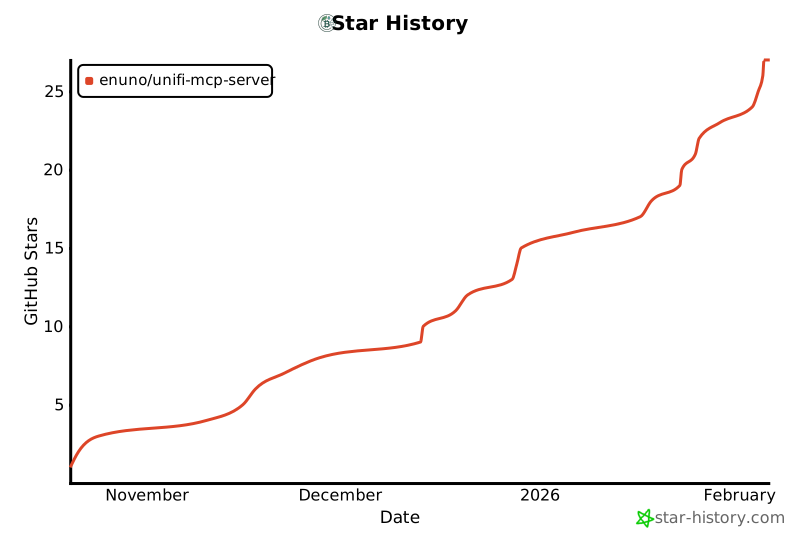
## 🌟 Star History
If you find this project useful, please consider starring it on GitHub to help others discover it!
[](https://www.star-history.com/#enuno/unifi-mcp-server&type=date&legend=top-left)
---
Made with ❤️ for the UniFi and AI communities
Connection Info
You Might Also Like
No recommendations available