Content
<div align="center"><a name="readme-top"></a>
<a href="https://cloud.tencent.com/developer/article/2649588" target="_blank"><img width="3094" height="654" alt="banner" src="https://github.com/user-attachments/assets/37982d04-274a-4b6c-85b8-06983c615d9a" /></a>

<h1>CloudBase MCP</h1>
**🪐 AI Programming, One-Click Deployment**<br/>
Bridging AI IDE with Tencent Cloud's CloudBase deployment, enabling instant deployment of AI applications<br/>
<sup>💡 Like Vercel + Supabase, but fully AI-driven - from prompts to production</sup>
[English](./README-EN.md) · [Documentation][docs] · [Changelog][changelog] · [Feedback][github-issues-link]
<!-- SHIELD GROUP -->
[![][npm-version-shield]][npm-link]
[![][npm-downloads-shield]][npm-link]
[![][github-stars-shield]][github-stars-link]
[![][github-forks-shield]][github-forks-link]
[![][github-issues-shield]][github-issues-link]
![][github-license-shield]
![][github-contributors-shield]
[![][cnb-shield]][cnb-link]
[![][deepwiki-shield]][deepwiki-link]
⭐️ Like this project? Star it to receive notifications about new releases!
**Discover a tool that enables one-click deployment of AI programming, and recommend it to friends using AI programming!**
[![][share-x-shield]][share-x-link]
[![][share-telegram-shield]][share-telegram-link]
[![][share-weibo-shield]][share-weibo-link]
<sup>The shortest path from AI prompts to application deployment</sup>
<img width="1148" height="389" alt="Clipboard_Screenshot_1764660604" src="https://github.com/user-attachments/assets/86294f88-632e-46b5-958f-94d8c8b85070" />
[![][github-trending-shield]](https://github.com/TencentCloudBase/CloudBase-MCP)
[<img width="791" height="592" alt="Clipboard_Screenshot_1763724670" src="https://github.com/user-attachments/assets/f769beb7-5710-4397-8854-af2b7e452f70" />](https://docs.cloudbase.net/ai/cloudbase-ai-toolkit/tutorials)
</div>
## Why Do You Need CloudBase MCP?
AI programming tools (like OpenClaw, Cursor, CodeBuddy) have solved the **code generation** problem.
However, there is still a gap between "generated code" and "application deployment" (deployment, database configuration, CDN, domain).
**CloudBase MCP** (formerly CloudBase AI Toolkit) fills this gap.
You no longer need:
- ❌ Tedious DevOps configuration and YAML files
- ❌ Manual setup of cloud functions and databases
- ❌ Switching between IDE and cloud console
You only need to use natural language in AI IDE to complete the process from "idea" to "deployment".
<details>
<summary><kbd>Table of Contents</kbd></summary>
- [🚀 Quick Start](#-quick-start)
- [✨ Core Features](#-core-features)
- [📦 Installation and Configuration](#-installation-and-configuration)
- [🎯 Use Cases](#-use-cases)
- [🧩 MCP Tools](#-mcp-tools)
- [📚 More Resources](#-more-resources)
</details>
## 🚀 Quick Start
### One-Line Configuration, Immediate Use
In AI IDEs that support MCP (Cursor, WindSurf, CodeBuddy, etc.), add any of the following configurations:
---
#### Method 1: Local Mode (Recommended)
**Meaning**: MCP service runs on your local machine via `npx`, same machine as IDE.
**Advantages**: Most features available (including upload/download, template installation, etc., which rely on local file system).
**Requirements**: Node.js installed on your machine, and can execute `npx`.
```json
{
"mcpServers": {
"cloudbase": {
"command": "npx",
"args": ["@cloudbase/cloudbase-mcp@latest"]
}
}
}
```
---
#### Method 2: Hosted Mode
**Meaning**: MCP service runs on Tencent Cloud, IDE connects to cloud service via HTTP, no local installation or Node required.
**Advantages**: No dependency on local environment, just configure credentials and use.
**Limitations**: Some features relying on local file system not available (e.g., local file upload, template download to local).
Replace `<env_id>`, `<Tencent Cloud Secret ID>`, and `<Tencent Cloud Secret Key>` with your environment ID and Tencent Cloud API credentials:
```json
{
"mcpServers": {
"cloudbase": {
"type": "http",
"url": "https://tcb-api.cloud.tencent.com/mcp/v1?env_id=<env_id>",
"headers": {
"X-TencentCloud-SecretId": "<Tencent Cloud Secret ID>",
"X-TencentCloud-SecretKey": "<Tencent Cloud Secret Key>"
}
}
}
}
```
#### Method 3: Self-Hosted Server Deployment (Cloud Mode)
**Meaning**: Run MCP service on your own server, enable Cloud Mode via environment variable `CLOUDBASE_MCP_CLOUD_MODE=true`.
**Applicable Scenarios**: Need to deploy MCP service on remote server, provide Streamable HTTP interface.
**Security Mechanism**: When Cloud Mode is enabled, tools involving local file system read/write and local process launch are **automatically disabled**, ensuring remote callers cannot access local server resources.
```bash
# Environment variable to enable Cloud Mode (choose one)
export CLOUDBASE_MCP_CLOUD_MODE=true
# or
export MCP_CLOUD_MODE=true
```
In Cloud Mode, the following tools are disabled: `downloadRemoteFile`, `downloadTemplate`, `manageCloudRun` (local run), `manageApps` (local code upload deployment), `manageStorage` (local file upload/download), `createFunction` (local code upload), etc., which involve local file I/O operations.
> [!IMPORTANT]
> **Deployment Mode Selection Suggestions:**
> - **Personal Development**: Use local mode (`npx`), most features available
> - **Team Collaboration / Remote Service**: Use Tencent Cloud hosted mode (Method 2), no maintenance required
> - **Self-Hosted Server**: Make sure to set `CLOUDBASE_MCP_CLOUD_MODE=true`, disable local file operation tools
---
**Hosted Mode Optional: Control Plugin Scope via URL**
You can control the plugin scope in `url` using query parameters:
- `enable_plugins`: Only enable specified plugins, comma-separated, e.g., only enable `env` and `database`
- `disable_plugins`: Disable specified plugins from the default plugin set, comma-separated, e.g., disable `rag` and `env`
```
# Only enable specified plugins
https://tcb-api.cloud.tencent.com/mcp/v1?env_id=YOUR_ENV_ID&enable_plugins=env,database
# Disable specified plugins
https://tcb-api.cloud.tencent.com/mcp/v1?env_id=YOUR_ENV_ID&disable_plugins=rag,env
```
Current configurable plugin names are based on `mcp/src/server.ts`, suggest using canonical names: `env`, `database`, `functions`, `hosting`, `storage`, `setup`, `rag`, `download`, `gateway`, `cloudrun`, `app-auth`, `permissions`, `logs`, `agents`, `invite-code`, `capi`, `apps`.
> [!TIP]
> **Recommended Use of CloudBase AI CLI**
>
> One-click installation, automatic configuration, supports multiple AI programming tools:
>
> ```bash
> npm install @cloudbase/cli@latest -g
> ```
>
> Run `tcb ai` to start using
>
> [View full documentation](https://docs.cloudbase.net/cli-v1/ai/introduce) | [Detailed tutorial](https://docs.cloudbase.net/practices/ai-cli-mini-program)
### First Use
1. **Login to Cloud Development**
```
Login to cloud development
```
AI will automatically open the login interface and guide environment selection
2. **Start Development**
```
Create a two-player online Gomoku website, support online battle, and deploy last
```
AI will automatically generate code, deploy to cloud, and return access link
### Supported AI IDEs
| Tool | Supported Platforms | View Guide |
|------|----------|----------|
| [CloudBase AI CLI](https://docs.cloudbase.net/cli-v1/ai/introduce) | Command-line tool | [View Guide](https://docs.cloudbase.net/cli-v1/ai/introduce) |
| [OpenClaw](https://docs.cloudbase.net/ai/cloudbase-ai-toolkit/ide-setup/openclaw) | Command-line tool | [View Guide](https://docs.cloudbase.net/ai/cloudbase-ai-toolkit/ide-setup/openclaw) |
| [WorkBuddy](https://docs.cloudbase.net/ai/cloudbase-ai-toolkit/ide-setup/workbuddy) | Independent IDE | [View Guide](https://docs.cloudbase.net/ai/cloudbase-ai-toolkit/ide-setup/workbuddy) |
| [Cursor](https://docs.cloudbase.net/ai/cloudbase-ai-toolkit/ide-setup/cursor) | Independent IDE| [View Guide](https://docs.cloudbase.net/ai/cloudbase-ai-toolkit/ide-setup/cursor) |
| [WindSurf](https://docs.cloudbase.net/ai/cloudbase-ai-toolkit/ide-setup/windsurf) | Independent IDE, VSCode, JetBrains plugins | [View Guide](https://docs.cloudbase.net/ai/cloudbase-ai-toolkit/ide-setup/windsurf) |
| [CodeBuddy](https://docs.cloudbase.net/ai/cloudbase-ai-toolkit/ide-setup/codebuddy) | Independent IDE (built-in CloudBase), VS Code, JetBrains, WeChat developer tools| [View Guide](https://docs.cloudbase.net/ai/cloudbase-ai-toolkit/ide-setup/codebuddy) |
| [CLINE](https://docs.cloudbase.net/ai/cloudbase-ai-toolkit/ide-setup/cline) | VS Code plugin | [View Guide](https://docs.cloudbase.net/ai/cloudbase-ai-toolkit/ide-setup/cline) |
| [GitHub Copilot](https://docs.cloudbase.net/ai/cloudbase-ai-toolkit/ide-setup/github-copilot) | VS Code plugin | [View Guide](https://docs.cloudbase.net/ai/cloudbase-ai-toolkit/ide-setup/github-copilot) |
| [Trae](https://docs.cloudbase.net/ai/cloudbase-ai-toolkit/ide-setup/trae) | Independent IDE | [View Guide](https://docs.cloudbase.net/ai/cloudbase-ai-toolkit/ide-setup/trae) |
| [Tongyi Lingma](https://docs.cloudbase.net/ai/cloudbase-ai-toolkit/ide-setup/tongyi-lingma) | Independent IDE, VS Code, JetBrains plugins | [View Guide](https://docs.cloudbase.net/ai/cloudbase-ai-toolkit/ide-setup/tongyi-lingma) |
| [RooCode](https://docs.cloudbase.net/ai/cloudbase-ai-toolkit/ide-setup/roocode) | VS Code plugin | [View Guide](https://docs.cloudbase.net/ai/cloudbase-ai-toolkit/ide-setup/roocode) |
| [Baidu Comate](https://docs.cloudbase.net/ai/cloudbase-ai-toolkit/ide-setup/baidu-comate) | VS Code, JetBrains plugins| [View Guide](https://docs.cloudbase.net/ai/cloudbase-ai-toolkit/ide-setup/baidu-comate) |
| [Augment Code](https://docs.cloudbase.net/ai/cloudbase-ai-toolkit/ide-setup/augment-code) | VS Code, JetBrains plugins | [View Guide](https://docs.cloudbase.net/ai/cloudbase-ai-toolkit/ide-setup/augment-code) |
| [Claude Code](https://docs.cloudbase.net/ai/cloudbase-ai-toolkit/ide-setup/claude-code) | Command-line tool | [View Guide](https://docs.cloudbase.net/ai/cloudbase-ai-toolkit/ide-setup/claude-code) |
| [Gemini CLI](https://docs.cloudbase.net/ai/cloudbase-ai-toolkit/ide-setup/gemini-cli) | Command-line tool | [View Guide](https://docs.cloudbase.net/ai/cloudbase-ai-toolkit/ide-setup/gemini-cli) |
| [OpenAI Codex CLI](https://docs.cloudbase.net/ai/cloudbase-ai-toolkit/ide-setup/openai-codex-cli) | Command-line tool | [View Guide](https://docs.cloudbase.net/ai/cloudbase-ai-toolkit/ide-setup/openai-codex-cli) |
| [OpenCode](https://docs.cloudbase.net/ai/cloudbase-ai-toolkit/ide-setup/opencode) | Command-line tool | [View Guide](https://docs.cloudbase.net/ai/cloudbase-ai-toolkit/ide-setup/opencode) |
| [Qwen Code](https://docs.cloudbase.net/ai/cloudbase-ai-toolkit/ide-setup/qwen-code) | Command-line tool | [View Guide](https://docs.cloudbase.net/ai/cloudbase-ai-toolkit/ide-setup/qwen-code) |
## ✨ How to Achieve AI Programming "One-Click Deployment"?
### 1. AI-Native
We are not just "glue code". The built-in rule library is designed for AI programming, allowing AI to directly generate "deployable" CloudBase best practice code.
```markdown
Prompt: Generate a user login feature
- AI automatically generates code compliant with CloudBase specifications
- Automatically configures database, cloud functions, security rules
- One-click deployment to cloud
```
<img width="1200" alt="AI Native" src="scripts/assets/cloudbase-mcp-card-01.png" />
### 2. One-Click Deployment
AI-automated MCP deployment flow, AI handles all cloud resource configurations from cloud functions, databases to static websites.
```markdown
Prompt: Deploy current project to CloudBase
- Automatically detect project type (Web/miniprogram/backend)
- Intelligently configure deployment parameters
- Real-time display deployment progress
- Automatically return access link
```
<img width="1200" alt="One-Click Deploy" src="scripts/assets/cloudbase-mcp-card-02.png" />
### 3. Smart Debugging
Deployment error? No worries. AI will automatically read logs, analyze and fix issues, achieving a true **development-deployment-debugging** loop.
```markdown
Prompt: Error occurred, error is xxxx
- AI automatically views cloud function logs
- Analyzes error cause
- Generates repair code
- Automatically redeploy
```
<img width="1200" alt="Smart Debugging" src="scripts/assets/cloudbase-mcp-card-03.png" />
### 4. Full-Stack Ready
Whether it's a web application, a mini-program, or a back-end service, AI can handle it for you, allowing you to focus on business logic.
| Application Type | Tech Stack | Deployment Method |
|---------|--------|---------|
| **Web Application** | React/Vue/Next.js | Static Hosting + CDN |
| **WeChat Mini-Program** | Native/UniApp | Mini-Program Release |
| **Back-end Service** | Node.js/Python | Cloud Function/Cloud Hosting |
<img width="1200" alt="Full-Stack Ready" src="scripts/assets/cloudbase-mcp-card-04.png" />
### 5. Knowledge Search
Built-in intelligent vector retrieval of professional knowledge bases such as cloud development and WeChat mini-programs, making AI more knowledgeable about cloud development.
```markdown
Prompt: How to use cloud database to achieve real-time data synchronization?
- Intelligent retrieval of cloud development knowledge base
- Return relevant documents and best practices
- Provide code examples
```
<img width="1200" alt="Knowledge Search" src="scripts/assets/cloudbase-mcp-card-05.png" />
### 6. Flexible Workflow
Supports /spec and /no_spec commands, intelligently choosing according to task complexity.
```markdown
/spec - Complete workflow (demand → design → task → implementation)
/no_spec - Quick iteration (direct implementation)
```
<img width="1200" alt="Flexible Workflow" src="scripts/assets/cloudbase-mcp-card-06.png" />
## 📦 Installation and Configuration
### Prerequisites
- ✅ Node.js v18.15.0 or higher
- ✅ Tencent Cloud Development Environment enabled [Tencent Cloud Development Environment](https://tcb.cloud.tencent.com/dev)
- ✅ Install AI IDE supporting MCP ([View supported IDEs](#supported-ai-ides))
### Configuration Methods
#### Method 1: CloudBase AI CLI (Recommended)
```bash
# Installation
npm install @cloudbase/cli@latest -g
# Usage
tcb ai
```
#### Method 2: Manual MCP Configuration
According to the AI IDE you use, add MCP configuration:
<details>
<summary><b>Cursor</b></summary>
Add to `.cursor/mcp.json`:
```json
{
"mcpServers": {
"cloudbase": {
"command": "npx",
"args": ["@cloudbase/cloudbase-mcp@latest"]
}
}
}
```
</details>
<details>
<summary><b>WindSurf</b></summary>
Add to `.windsurf/settings.json`:
```json
{
"mcpServers": {
"cloudbase": {
"command": "npx",
"args": ["@cloudbase/cloudbase-mcp@latest"]
}
}
}
```
</details>
<details>
<summary><b>CodeBuddy</b></summary>
CodeBuddy has CloudBase MCP built-in, no configuration needed.
</details>
<details>
<summary><b>Other IDEs</b></summary>
View [Complete Configuration Guide](https://docs.cloudbase.net/ai/cloudbase-ai-toolkit/ide-setup/) for other IDE configurations.
</details>
## 🎯 Use Cases
### Case 1: Online Five-in-a-Row Game for Two Players
**Development Process:**
1. Input requirement: "Create a two-player online five-in-a-row game website, supporting online battles"
2. AI generates: Web application + cloud database + real-time data push
3. Automatic deployment and access link obtained
**Experience Address:** [Five-in-a-Row Game](https://cloud1-5g39elugeec5ba0f-1300855855.tcloudbaseapp.com/gobang/#/)
<details>
<summary>View development screenshots</summary>
| Development Process | Final Effect |
|---------|---------|
| ![][image-case1-dev] | ![][image-case1-result] |
</details>
### Case 2: AI Pet Raising Mini-Program
**Development Process:**
1. Input: "Develop a pet elf raising mini-program, using AI to enhance interaction"
2. AI generates: Mini-program + cloud database + AI cloud function
3. Import WeChat developer tools for release
<details>
<summary>View development screenshots and mini-program preview</summary>
![][image-case2]
</details>
### Case 3: Intelligent Problem Diagnosis
When the application encounters problems, AI automatically checks logs, analyzes errors, and generates repair code.
<details>
<summary>View intelligent diagnosis process</summary>
![][image-case3]
</details>
## 🧩 MCP Tools
Covers core functions such as environment management, database, cloud function, static hosting, mini-program release, etc.
| Category | Tools | Core Functions |
|------|------|----------|
| **Environment** | 4 | Login authentication, environment query, domain management |
| **Database** | 11 | Collection management, document CRUD, indexing, data model |
| **Cloud Function** | 9 | Creation, update, invocation, log, trigger |
| **Static Hosting** | 5 | File upload, domain configuration, website deployment |
| **Mini-Program** | 7 | Upload, preview, build, configuration, debugging |
| **Tool Support** | 4 | Template, knowledge base search, internet search, interactive dialogue |
[View complete tool documentation](doc/mcp-tools.md) | [Tool specification JSON](scripts/tools.json)
## 📚 More Resources
### Documentation
- [Quick Start](https://docs.cloudbase.net/ai/cloudbase-ai-toolkit/getting-started)
- [IDE Configuration Guide](https://docs.cloudbase.net/ai/cloudbase-ai-toolkit/ide-setup/)
- [Project Templates](https://docs.cloudbase.net/ai/cloudbase-ai-toolkit/templates)
- [Development Guide](https://docs.cloudbase.net/ai/cloudbase-ai-toolkit/development)
- [Plugin System](https://docs.cloudbase.net/ai/cloudbase-ai-toolkit/plugins)
- [Frequently Asked Questions](https://docs.cloudbase.net/ai/cloudbase-ai-toolkit/faq)
### Latest Articles
- [One person is a team: OpenClaw + CloudBase achieves fully automatic development and上线](https://mp.weixin.qq.com/s/vKcnro2GrbjI_QyQohpNRw)
- [Agent Skills practice sharing: AI programming last mile, don't let code die in localhost](https://mp.weixin.qq.com/s/soIEU5DG01xfrKMaCetGAA)
- [View more videos and tutorials](https://docs.cloudbase.net/ai/cloudbase-ai-toolkit/tutorials)
## ❓ Frequently Asked Questions
<details>
<summary><b>What's different from Vercel / Railway / Netlify?</b></summary>
These platforms solve "deployment", while CloudBase MCP solves the complete chain of "from AI-generated code to deployment". You don't need to leave the IDE, no need to write configuration files, AI automatically handles cloud functions, databases, CDN, domains, and all other cloud resources. In one sentence: they are deployment tools, we are AI-native full-stack development + deployment platforms.
</details>
<details>
<summary><b>Can I use it without Cursor / Copilot AI IDEs?</b></summary>
CloudBase MCP is based on the standard MCP protocol, supporting all MCP-compatible tools - including Claude Code, Gemini CLI, OpenCode, and other command-line tools. As long as your tool can configure the MCP Server, you can use it. [View complete support list](#supported-ai-ides).
</details>
<details>
<summary><b>Where will my code be uploaded? Is it safe?</b></summary>
Code will only be deployed to **your own** Tencent Cloud Development Environment, without going through any third party. In local mode, MCP services run on your local machine, and code won't leave your computer until you actively deploy it. All cloud communications are encrypted with HTTPS.
</details>
<details>
<summary><b>Is it safe to deploy MCP services on the server?</b></summary>
CloudBase MCP provides a complete deployment mode security isolation mechanism:
- **Local Mode** (`npx` startup): MCP services run on the developer's local machine, communicating with AI IDE through stdio. The caller is the developer themselves, with complete control over the machine. Tools like `downloadRemoteFile` and `manageCloudRun(action="run")` are essentially equivalent to developers executing `curl` or `node app.js` in the terminal, which is a normal product function.
- **Cloud/Server Mode** (set `CLOUDBASE_MCP_CLOUD_MODE=true`): Enables three-layer security filtering mechanism, **all tools involving local file read/write and local process startup are disabled**, and remote callers cannot operate the server's local file system or start local processes through MCP.
If you need to deploy MCP services on a remote server, **be sure to set the `CLOUDBASE_MCP_CLOUD_MODE=true` environment variable**. Using Tencent Cloud hosting mode (Streamable HTTP) automatically enables this protection.
</details>
<details>
<summary><b>What types of projects are supported?</b></summary>
Almost all mainstream scenarios: React/Vue/Next.js and other web applications, WeChat mini-programs, Node.js/Python/Go/Java back-end services. AI will automatically detect the project type and choose the appropriate deployment strategy (static hosting, cloud function, cloud hosting container).
</details>
<details>
<summary><b>Is it free? Do I need to pay?</b></summary>
CloudBase MCP tools are completely open-source and free (MIT). Cloud development environments have free quotas, which are usually sufficient for personal development and small projects. Beyond the free quota, billing is based on usage, see [billing instructions](https://cloud.tencent.com/document/product/876/39095).
</details>
<details>
<summary><b>What if I encounter "environment does not exist" during login?</b></summary>
1. Confirm that the environment has been enabled in [Cloud Development Console](https://tcb.cloud.tencent.com/)
2. Check if the environment is in a normal running state (not due to arrears/isolated)
3. Re-execute "login cloud development" to let AI guide the selection of the correct environment
</details>
## 💬 Community
### WeChat Discussion Group
<div align="center">
<img src="https://7463-tcb-advanced-a656fc-1257967285.tcb.qcloud.la/mcp/toolkit-qrcode.png" width="200" alt="WeChat Group QR Code">
<br>
<i>Scan to join the WeChat technical discussion group</i>
</div>
### Other Communication Methods
| Platform | Link | Description |
|------|------|------|
| **Official Documentation** | [View Documentation](https://docs.cloudbase.net/) | Complete cloud development documentation |
| **Issue Feedback** | [Submit Issues](https://github.com/TencentCloudBase/CloudBase-MCP/issues) | Bug feedback and feature requests |
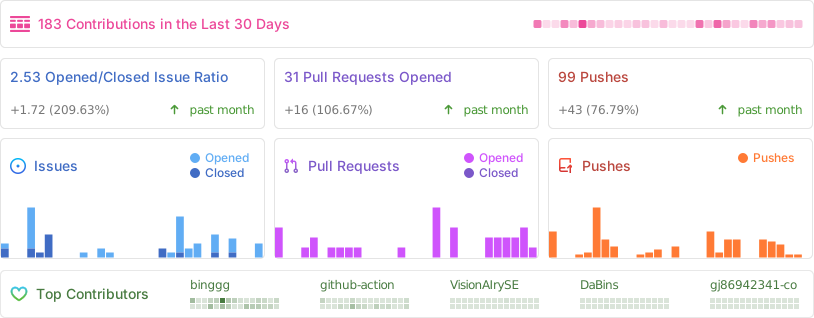
## Project Activity
## Contributors
Thanks to all the developers who have contributed to CloudBase MCP!
[](https://github.com/TencentCloudBase/CloudBase-MCP/graphs/contributors)
---
<div align="center">
**If this project helps you, give us a Star!**
[![][github-stars-shield]][github-stars-link]
[MIT](LICENSE) © TencentCloudBase
</div>
<!-- Image Placeholders - These images need to be actually generated or replaced -->
<!--
Design style constraints (all images follow uniformly):
- Modern flat design, simple and vibrant
- Background color: pure black #000000 (uniform black background)
- Main color gradient: #67E9E9 → #4896FF → #2BCCCC (keep)
- Vivid embellishment color: moderate use of #FFD93D (yellow), #6BCF7F (green) as embellishments
- Simple geometric shapes (circle, rectangle, line), no text
- Use geometric graphics and icons to express concepts, abstract UI skeleton
- Promotional video style, modern UI skeleton
- Smooth lines, moderate light effects, balanced color matching
Prompt word templates (all images without text, pure geometric shapes and icons):
- image-overview: "Abstract UI skeleton diagram, modern style, pure black background #000000, main color #67E9E9 #4896FF #2BCCCC gradient, moderate vivid embellishment color, use geometric shapes (circle, rectangle, smooth lines) and icons to express AI IDE, code generation, cloud deployment process, no text, promotional video style, modern UI skeleton"
- image-ai-native: "Abstract code generation interface skeleton, modern style, pure black background, main color cyan blue gradient, use rectangle to represent code block, circle to represent AI icon, smooth lines to represent connection relationship, no text, promotional video style, simple geometric graphics"
- image-deploy: "Abstract deployment interface skeleton, modern style, pure black background, main color gradient, use circle progress indicator, rectangle progress bar, smooth lines to express deployment process, no text, promotional video style, modern UI skeleton"
- image-fullstack: "Abstract full-stack architecture skeleton diagram, modern style, pure black background, main color gradient, use circle nodes to represent different services (Web/applet/backend/database), smooth lines connection to express integration relationship, geometric shapes icon to express, no text, promotional video style"
- image-agent: "Abstract AI intelligent agent interface skeleton, modern style, pure black background, main color gradient, use circle to represent Agent, rectangle to represent configuration card, smooth lines to express data flow, geometric shapes icon, no text, promotional video style, modern UI skeleton"
- image-debug: "Abstract problem diagnosis interface skeleton, modern style, pure black background, main color gradient, use rectangle to represent log card, circle to represent status indicator, smooth lines to express analysis process, geometric shapes icon, no text, promotional video style"
- image-knowledge: "Abstract knowledge retrieval interface skeleton, modern style, pure black background, main color gradient, use rectangle card to represent search results, circle to represent search icon, smooth lines to express association relationship, geometric shapes icon, no text, promotional video style, modern UI skeleton"
- image-workflow: "Abstract workflow selection interface skeleton, modern style, pure black background, main color gradient, use circle button to represent two modes, rectangle panel to represent options, smooth lines to express process, geometric shapes icon, no text, promotional video style"
- image-case1-dev: "Abstract game development interface skeleton, modern style, pure black background, main color gradient, use geometric shapes to represent code editor, game interface elements, no text, promotional video style, modern UI skeleton"
- image-case1-result: "Abstract game interface skeleton, modern style, pure black background, main color gradient, use circle and rectangle to represent game elements, geometric shapes icon to express, no text, promotional video style"
- image-case2: "Abstract applet development interface skeleton, modern style, pure black background, main color gradient, use rectangle to represent applet interface, circle to represent functional module, geometric shapes icon, no text, promotional video style, modern UI skeleton"
- image-case3: "Abstract problem diagnosis interface skeleton, modern style, pure black background, main color gradient, use rectangle to represent log card, circle to represent status, smooth lines to express diagnosis process, geometric shapes icon, no text, promotional video style"
-->
[image-overview]: https://7463-tcb-advanced-a656fc-1257967285.tcb.qcloud.la/mcp/video-banner.png
[image-ai-native]: https://via.placeholder.com/800x400/3B82F6/FFFFFF?text=AI+Native+Development
[image-deploy]: https://via.placeholder.com/800x400/10B981/FFFFFF?text=One-Click+Deploy
[image-fullstack]: https://via.placeholder.com/800x400/8B5CF6/FFFFFF?text=Full-Stack+Application
[image-agent]: https://via.placeholder.com/800x400/EC4899/FFFFFF?text=AI+Agent+Development
[image-debug]: https://via.placeholder.com/800x400/F59E0B/FFFFFF?text=Smart+Debugging
[image-knowledge]: https://via.placeholder.com/800x400/06B6D4/FFFFFF?text=Knowledge+Search
[image-workflow]: https://via.placeholder.com/800x400/6366F1/FFFFFF?text=Flexible+Workflow
[image-case1-dev]: https://7463-tcb-advanced-a656fc-1257967285.tcb.qcloud.la/turbo-deploy/turbo-deploy-001.png
[image-case1-result]: https://7463-tcb-advanced-a656fc-1257967285.tcb.qcloud.la/turbo-deploy/turbo-deploy-004.png
[image-case2]: https://7463-tcb-advanced-a656fc-1257967285.tcb.qcloud.la/turbo-deploy/turbo-deploy-005.png
[image-case3]: https://7463-tcb-advanced-a656fc-1257967285.tcb.qcloud.la/turbo-deploy/turbo-deploy-009.png
<!-- Links -->
[docs]: https://docs.cloudbase.net/ai/cloudbase-ai-toolkit/
[changelog]: https://github.com/TencentCloudBase/CloudBase-MCP/releases
[github-issues-link]: https://github.com/TencentCloudBase/CloudBase-MCP/issues
[github-stars-link]: https://github.com/TencentCloudBase/CloudBase-MCP/stargazers
[github-forks-link]: https://github.com/TencentCloudBase/CloudBase-MCP/network/members
[github-trending-url]: https://github.com/trending
[npm-link]: https://www.npmjs.com/package/@cloudbase/cloudbase-mcp
[cnb-link]: https://cnb.cool/tencent/cloud/cloudbase/CloudBase-MCP
[deepwiki-link]: https://deepwiki.com/TencentCloudBase/CloudBase-MCP
<!-- Shields -->
[npm-version-shield]: https://img.shields.io/npm/v/@cloudbase/cloudbase-mcp?color=3B82F6&label=npm&logo=npm&style=flat-square
[npm-downloads-shield]: https://img.shields.io/npm/dw/@cloudbase/cloudbase-mcp?color=10B981&label=downloads&logo=npm&style=flat-square
[github-stars-shield]: https://img.shields.io/github/stars/TencentCloudBase/CloudBase-MCP?color=F59E0B&label=stars&logo=github&style=flat-square
[github-forks-shield]: https://img.shields.io/github/forks/TencentCloudBase/CloudBase-MCP?color=8B5CF6&label=forks&logo=github&style=flat-square
[github-issues-shield]: https://img.shields.io/github/issues/TencentCloudBase/CloudBase-MCP?color=EC4899&label=issues&logo=github&style=flat-square
[github-license-shield]: https://img.shields.io/badge/license-MIT-6366F1?logo=github&style=flat-square
[github-contributors-shield]: https://img.shields.io/github/contributors/TencentCloudBase/CloudBase-MCP?color=06B6D4&label=contributors&logo=github&style=flat-square
[github-contributors-link]: https://github.com/TencentCloudBase/CloudBase-MCP/graphs/contributors
[cnb-shield]: https://img.shields.io/badge/CNB-CloudBase--AI--ToolKit-3B82F6?logo=data:image/svg+xml;base64,PHN2ZyB3aWR0aD0iMTIiIGhlaWdodD0iMTIiIHZpZXdCb3g9IjAgMCAxMiAxMiIgZmlsbD0ibm9uZSIgeG1sbnM9Imh0dHA6Ly93d3cudzMub3JnLzIwMDAvc3ZnIj48cmVjdCB3aWR0aD0iMTIiIGhlaWdodD0iMTIiIHJ4PSIyIiBmaWxsPSIjM0I4MkY2Ii8+PHBhdGggZD0iTTUgM0g3VjVINSIgc3Ryb2tlPSJ3aGl0ZSIgc3Ryb2tlLXdpZHRoPSIxLjUiLz48cGF0aCBkPSJNNSA3SDdWOUg1IiBzdHJva2U9IndoaXRlIiBzdHJva2Utd2lkdGg9IjEuNSIvPjwvc3ZnPg==&style=flat-square
[deepwiki-shield]: https://deepwiki.com/badge.svg
[github-trending-shield]: https://img.shields.io/github/stars/TencentCloudBase/CloudBase-MCP?style=social
<!-- Share Links -->
[share-x-link]: https://x.com/intent/tweet?hashtags=cloudbase,ai,devtools&text=AI%20programming%2C%20one-click%20online%21%20Goodbye%20cumbersome%20DevOps%20configuration%2C%20from%20prompt%20word%20to%20application%20online%20the%20shortest%20path%20&url=https://github.com/TencentCloudBase/CloudBase-MCP
[share-x-shield]: https://img.shields.io/badge/-share%20on%20x-black?labelColor=black&logo=x&logoColor=white&style=flat-square
[share-telegram-shield]: https://img.shields.io/badge/-share%20on%20telegram-black?labelColor=black&logo=telegram&logoColor=white&style=flat-square
[share-telegram-link]: https://t.me/share/url?url=https://github.com/TencentCloudBase/CloudBase-MCP&text=AI%20programming%2C%20one-click%20online%21%20Goodbye%20cumbersome%20DevOps%20configuration%2C%20from%20prompt%20word%20to%20application%20online%20the%20shortest%20path%20
[share-weibo-link]: http://service.weibo.com/share/share.php?sharesource=weibo&title=AI%20programming%2C%20one-click%20online%21%20Goodbye%20cumbersome%20DevOps%20configuration%2C%20from%20prompt%20word%20to%20application%20online%20the%20shortest%20path%20&url=https://github.com/TencentCloudBase/CloudBase-MCP
[share-weibo-shield]: https://img.shields.io/badge/-share%20on%20weibo-black?labelColor=black&logo=sinaweibo&logoColor=white&style=flat-square



