Content
# Claude Delegator
GPT expert subagents for Claude Code. Five specialists that can analyze AND implement—architecture, security, code review, and more.
[](LICENSE)
[](https://github.com/jarrodwatts/claude-delegator/stargazers)

## Install
Inside a Claude Code instance, run the following commands:
**Step 1: Add the marketplace**
```
/plugin marketplace add jarrodwatts/claude-delegator
```
**Step 2: Install the plugin**
```
/plugin install claude-delegator
```
**Step 3: Run setup**
```
/claude-delegator:setup
```
Done! Claude now routes complex tasks to GPT experts automatically.
> **Note**: Requires [Codex CLI](https://github.com/openai/codex) or [Gemini CLI](https://github.com/google/gemini-cli). Setup guides you through installation.
---
## What is Claude Delegator?
Claude gains a team of GPT and Gemini specialists via native MCP. Each expert has a distinct specialty and can advise OR implement.
**Note:** You can use either provider (GPT or Gemini), or both. The plugin will automatically detect which one is configured and route tasks accordingly.
| What You Get | Why It Matters |
|--------------|----------------|
| **5 domain experts** | Right specialist for each problem type |
| **GPT or Gemini** | Use your preferred model provider |
| **Dual mode** | Experts can analyze (read-only) or implement (write) |
| **Auto-routing** | Claude detects when to delegate based on your request |
| **Synthesized responses** | Claude interprets expert output, never raw passthrough |
### The Experts
| Expert | What They Do | Example Triggers |
|--------|--------------|------------------|
| **Architect** | System design, tradeoffs, complex debugging | "How should I structure this?" / "What are the tradeoffs?" |
| **Plan Reviewer** | Validate plans before you start | "Review this migration plan" / "Is this approach sound?" |
| **Scope Analyst** | Catch ambiguities early | "What am I missing?" / "Clarify the scope" |
| **Code Reviewer** | Find bugs, improve quality | "Review this PR" / "What's wrong with this?" |
| **Security Analyst** | Vulnerabilities, threat modeling | "Is this secure?" / "Harden this endpoint" |
### When Experts Help Most
- **Architecture decisions** — "Should I use Redis or in-memory caching?"
- **Stuck debugging** — After 2+ failed attempts, get a fresh perspective
- **Pre-implementation** — Validate your plan before writing code
- **Security concerns** — "Is this auth flow safe?"
- **Code quality** — Get a second opinion on your implementation
### When NOT to Use Experts
- Simple file operations (Claude handles these directly)
- First attempt at any fix (try yourself first)
- Trivial questions (no need to delegate)
---
## How It Works
```
You: "Is this authentication flow secure?"
↓
Claude: [Detects security question → selects Security Analyst]
↓
┌───────────────────────────────┐
│ mcp__codex__codex │
│ (or mcp__gemini__gemini) │
│ → Security Analyst prompt │
│ → Expert analyzes your code │
└───────────────────────────────┘
↓
Claude: "Based on the analysis, I found 3 issues..."
[Synthesizes response, applies judgment]
```
**Key details:**
- Each expert has a specialized system prompt (in `prompts/`)
- Claude reads your request → picks the right expert → delegates via MCP (GPT or Gemini)
- Responses are synthesized, not passed through raw
- Experts can retry up to 3 times before escalating
- Multi-turn conversations preserve context via `threadId` for chained tasks
### Multi-Turn Conversations
For chained implementation steps, the expert preserves context across turns:
```
Turn 1: mcp__*__* → returns threadId
Turn 2: mcp__*__*-reply(threadId) → expert remembers turn 1
Turn 3: mcp__*__*-reply(threadId) → expert remembers turns 1-2
```
Use single-shot (`codex` or `gemini` only) for advisory tasks. Use multi-turn for implementation chains and retries.
---
## Configuration
### Operating Modes
Every expert supports two modes based on the task:
| Mode | Sandbox | Use When |
|------|---------|----------|
| **Advisory** | `read-only` | Analysis, recommendations, reviews |
| **Implementation** | `workspace-write` | Making changes, fixing issues |
Claude automatically selects the mode based on your request.
### Configuration Defaults
Set global defaults in `~/.codex/config.toml` instead of passing parameters on every call:
```toml
sandbox_mode = "workspace-write"
approval_policy = "on-failure"
```
Per-call parameters override these defaults. See [Codex CLI docs](https://github.com/openai/codex) for all config options.
### Manual MCP Setup
If `/setup` doesn't work, register the MCP server(s) manually:
```bash
# For Codex (GPT)
# Idempotent: safe to rerun
claude mcp remove codex >/dev/null 2>&1 || true
claude mcp add --transport stdio --scope user codex -- codex -m gpt-5.3-codex mcp-server
# For Gemini
# Idempotent: safe to rerun
claude mcp remove gemini >/dev/null 2>&1 || true
claude mcp add --transport stdio --scope user gemini -- node ${CLAUDE_PLUGIN_ROOT}/server/gemini/index.js
```
Verify with:
```bash
claude mcp list
printf '{"jsonrpc":"2.0","id":"health","method":"initialize","params":{}}\n' | node ${CLAUDE_PLUGIN_ROOT}/server/gemini/index.js
```
### Customizing Expert Prompts
Expert prompts live in `prompts/`. Each follows the same structure:
- Role definition and context
- Advisory vs Implementation modes
- Response format guidelines
- When to invoke / when NOT to invoke
Edit these to customize expert behavior for your workflow.
---
## Requirements
You need at least one of the following providers configured:
- **Codex CLI** (for GPT): `npm install -g @openai/codex`
- **Gemini CLI** (for Gemini): `npm install -g @google/gemini-cli`
**Authentication**:
- Codex: run `codex login`
- Gemini: run `gemini` once and complete the sign-in flow (or set `GOOGLE_API_KEY`)
---
## Commands
| Command | Description |
|---------|-------------|
| `/claude-delegator:setup` | Configure MCP server and install rules |
| `/claude-delegator:uninstall` | Remove MCP config and rules |
---
## Troubleshooting
| Issue | Solution |
|-------|----------|
| MCP server not found | Restart Claude Code after setup |
| Provider not authenticated | Codex: run `codex login`. Gemini: run `gemini` once to complete sign-in (or set `GOOGLE_API_KEY`) |
| Tool not appearing | Run `claude mcp list` and verify registration |
| Expert not triggered | Try explicit: "Ask GPT to review..." or "Ask Gemini to review..." |
---
## Development
```bash
git clone https://github.com/jarrodwatts/claude-delegator
cd claude-delegator
# Test locally without reinstalling
claude --plugin-dir /path/to/claude-delegator
```
See [CONTRIBUTING.md](CONTRIBUTING.md) for guidelines.
---
## Acknowledgments
Expert prompts adapted from [oh-my-opencode](https://github.com/code-yeongyu/oh-my-opencode) by [@code-yeongyu](https://github.com/code-yeongyu).
---
## License
MIT — see [LICENSE](LICENSE)
---
## Star History
[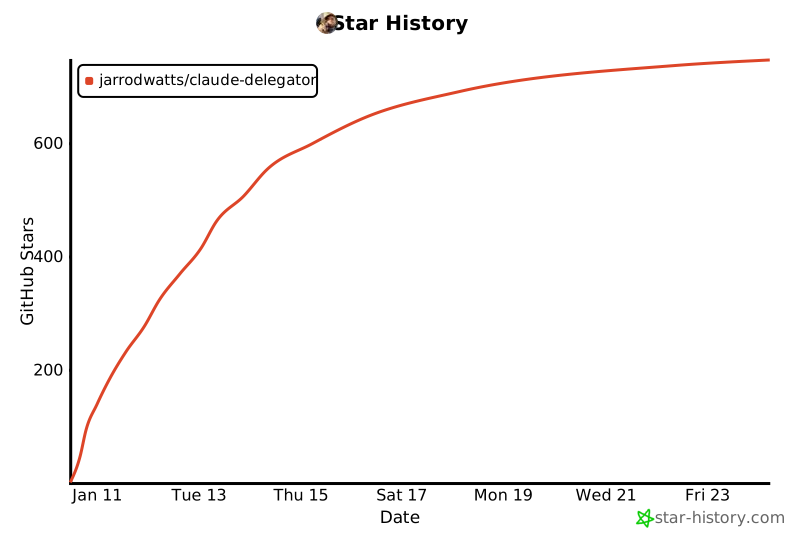](https://star-history.com/#jarrodwatts/claude-delegator&Date)



