

Content
<div align="center">
<img src="assets/light-mode-logo.png" alt="MimikaStudio Logo" width="400"/>
<br><br>
<code>v2026.04.1</code> macOS (Apple Silicon) · MLX Native
<br><br>
<h1>Clone any voice <i>in seconds</i> + Agentic Voice Cloning Server</h1>
<p>Local-first voice cloning, text-to-speech, Read Aloud document reader, audiobook creator, and an agentic voice cloning server with state-of-the-art job queue orchestration.<br>Optimized for Apple Silicon with native Metal acceleration via MLX.</p>
<br>
<a href="https://boltzmannentropy.github.io/mimikastudio.github.io/"><strong>Get Started</strong></a> · <a href="https://github.com/BoltzmannEntropy/MimikaStudio"><strong>View on GitHub</strong></a>
<br><br>
macOS (Apple Silicon) · MLX-Audio · Source Available
<br><br>
<b>Windows support coming soon</b> — the codebase runs on Windows, but <a href="https://boltzmannentropy.github.io/mimikastudio.github.io/">we currently provide macOS binaries only.</a>
<br><br>
</div>
> **Custom Voice Cloning** | **Text-to-Speech** | **PDF Read Aloud** | **Audiobook Creator** | **MCP & API Dashboard**
A local-first application for **macOS (Apple Silicon)** with four integrated capabilities and production-oriented workflows: **clone any voice** from as little as 3 seconds of reference audio using multiple engines (Qwen3-TTS and Chatterbox), generate **high-quality text-to-speech** with fast and expressive model families (Kokoro and Supertonic), **read documents aloud** with sentence-level highlighting and synchronized progression (PDF, DOCX, EPUB, Markdown, TXT), and **convert full documents to audiobooks** with queueable chapter generation and reusable voice presets. MimikaStudio also operates as an **agentic voice cloning server** with a **state-of-the-art jobs queue** for TTS, cloning, and audiobook pipelines. It runs fully on-device, includes first-run model download management, and exposes both UI and API paths for advanced local automation.
> **Featured Qwen Long-Form Audiobooks:** [Yelena](backend/data/pregenerated/audiobooks/long-sherlock-yelena.mp3) · [Mikhail](backend/data/pregenerated/audiobooks/long-sherlock-mikhail.mp3) · [Anastasia](backend/data/pregenerated/audiobooks/long-sherlock-anastasia.mp3) · [Svetlana](backend/data/pregenerated/audiobooks/long-sherlock-svetlana.mp3)
License: Source code is licensed under Business Source License 1.1 (BSL-1.1), and binary distributions are licensed under the MimikaStudio Binary Distribution License. See LICENSE, BINARY-LICENSE.txt, and the website License page.
[LICENSE](LICENSE) · [BINARY-LICENSE.txt](BINARY-LICENSE.txt) · [Website License page](https://boltzmannentropy.github.io/mimikastudio.github.io/license.html)
The codebase is cross-platform, but we currently provide macOS binaries only.
[we currently provide macOS binaries only.](https://boltzmannentropy.github.io/mimikastudio.github.io/)
> **Note:** Windows support is planned for a future release.
## Latest Release
**v2026.04.1** adds in-app PDF page preview for audiobook source documents, disables the old 7-day expiration and Polar/LemonSqueezy purchase flow in the Pro UI, and removes pricing/buying paths from the website in favor of direct GitHub release downloads.
## Stars
[](https://github.com/BoltzmannEntropy/MimikaStudio/stargazers)
[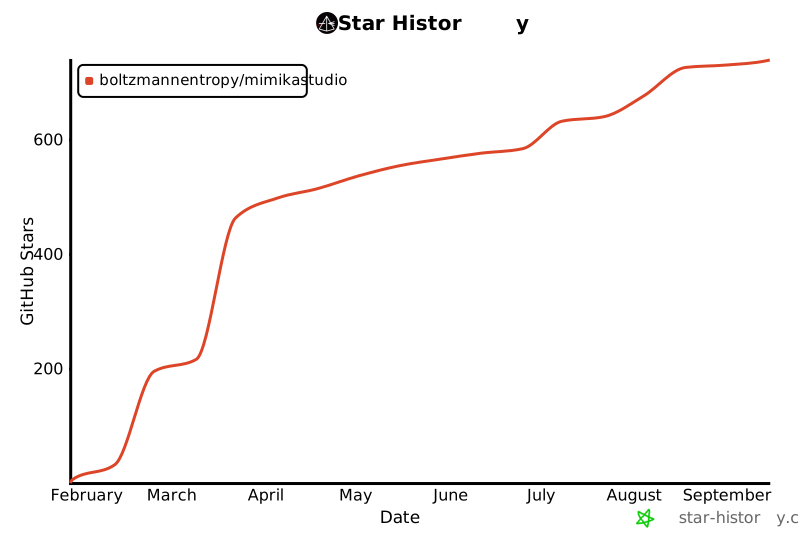](https://star-history.com/#BoltzmannEntropy/MimikaStudio&Date)

## Current UI Screens
| Screen | Image |
|-------|-------|
| AI Models | `assets/screen-models-ai-models.png` |
| Kokoro TTS | `assets/screen-kokoro-tts.png` |
| Supertonic TTS | `assets/screen-supertonic-tts.png` |
| Qwen3-TTS Preset Voice | `assets/screen-qwen3-preset-voice.png` |
| Qwen3-TTS Voice Clone | `assets/screen-qwen3-voice-clone.png` |
| Chatterbox | `assets/screen-chatterbox-voice-clone.png` |
| Read Aloud | `assets/screen-read-aloud.png` |
| Audiobook Generation | `assets/screen-audiobook-generation.png` |
| Jobs | `assets/screen-jobs.png` |
| Voice Prompt Management | `assets/screen-voice-prompt-management.png` |
| Settings > MCP | `assets/screen-settings-mcp.png` |
| Settings > About | `assets/screen-settings-about.png` |
| Settings > Pro | `assets/screen-settings-pro.png` |
---
## Supported Models
| Model | Parameters | Type | Languages |
|-------|-----------|------|-----------|
| [Kokoro-82M](https://github.com/hexgrad/kokoro) | 82M | Fast TTS | English (British RP + American) |
| [Qwen3-TTS 0.6B Base](https://github.com/QwenLM/Qwen3-TTS) | 600M | Voice Cloning | 10 languages |
| [Qwen3-TTS 1.7B Base](https://github.com/QwenLM/Qwen3-TTS) | 1.7B | Voice Cloning | 10 languages |
| [Qwen3-TTS 0.6B CustomVoice](https://github.com/QwenLM/Qwen3-TTS) | 600M | Preset Speakers | 4 languages (en, zh, ja, ko) |
| [Qwen3-TTS 1.7B CustomVoice](https://github.com/QwenLM/Qwen3-TTS) | 1.7B | Preset Speakers | 4 languages (en, zh, ja, ko) |
| [Qwen3-TTS 0.6B Base-8bit](https://github.com/QwenLM/Qwen3-TTS) | 600M | Voice Cloning (8-bit) | 10 languages |
| [Qwen3-TTS 1.7B Base-8bit](https://github.com/QwenLM/Qwen3-TTS) | 1.7B | Voice Cloning (8-bit) | 10 languages |
| [Qwen3-TTS 0.6B CustomVoice-8bit](https://github.com/QwenLM/Qwen3-TTS) | 600M | Preset Speakers (8-bit) | 4 languages (en, zh, ja, ko) |
| [Qwen3-TTS 1.7B CustomVoice-8bit](https://github.com/QwenLM/Qwen3-TTS) | 1.7B | Preset Speakers (8-bit) | 4 languages (en, zh, ja, ko) |
| [Chatterbox Multilingual](https://github.com/resemble-ai/chatterbox) | — | Voice Cloning | 23 languages |
| [Supertonic-2](https://huggingface.co/Supertone/supertonic-2) | — | Multilingual TTS (ONNX) | 5 languages (en, ko, es, pt, fr) |

## Audio Samples
Listen to samples generated by each TTS engine. For voice cloning demos, compare the reference voice with the generated output.
### Listen to All Long Audiobooks (Inline)
The section below embeds every long-form audiobook demo so users can listen directly from the README (similar to `ebook2audiobook` style demo blocks).
> If your GitHub client/browser does not render inline players, use the direct MP3 links under each demo.
<details>
<summary><strong>Sherlock - Yelena (43m 20s)</strong></summary>
<br>
<audio controls preload="none" src="backend/data/pregenerated/audiobooks/long-sherlock-yelena.mp3"></audio>
<br>
<a href="backend/data/pregenerated/audiobooks/long-sherlock-yelena.mp3">Direct MP3 link</a>
</details>
<details>
<summary><strong>Sherlock - Mikhail (45m 36s)</strong></summary>
<br>
<audio controls preload="none" src="backend/data/pregenerated/audiobooks/long-sherlock-mikhail.mp3"></audio>
<br>
<a href="backend/data/pregenerated/audiobooks/long-sherlock-mikhail.mp3">Direct MP3 link</a>
</details>
<details>
<summary><strong>Sherlock - Anastasia (43m 40s)</strong></summary>
<br>
<audio controls preload="none" src="backend/data/pregenerated/audiobooks/long-sherlock-anastasia.mp3"></audio>
<br>
<a href="backend/data/pregenerated/audiobooks/long-sherlock-anastasia.mp3">Direct MP3 link</a>
</details>
<details>
<summary><strong>Sherlock - Svetlana (43m 55s)</strong></summary>
<br>
<audio controls preload="none" src="backend/data/pregenerated/audiobooks/long-sherlock-svetlana.mp3"></audio>
<br>
<a href="backend/data/pregenerated/audiobooks/long-sherlock-svetlana.mp3">Direct MP3 link</a>
</details>
<details>
<summary><strong>Meditations - Emma (12m 28s)</strong></summary>
<br>
<audio controls preload="none" src="backend/data/pregenerated/audiobooks/long-meditations-emma.mp3"></audio>
<br>
<a href="backend/data/pregenerated/audiobooks/long-meditations-emma.mp3">Direct MP3 link</a>
</details>
<details>
<summary><strong>Meditations - George (13m 36s)</strong></summary>
<br>
<audio controls preload="none" src="backend/data/pregenerated/audiobooks/long-meditations-george.mp3"></audio>
<br>
<a href="backend/data/pregenerated/audiobooks/long-meditations-george.mp3">Direct MP3 link</a>
</details>
### Featured Qwen3 Long-Form Audiobooks
Full "A Scandal in Bohemia" audiobook chapters generated with Qwen3-TTS voice cloning. These are the primary long-form Qwen demos bundled with the repo.
| Voice | Duration | Sample |
|-------|----------|--------|
| **Yelena** | 43m 20s | [long-sherlock-yelena.mp3](backend/data/pregenerated/audiobooks/long-sherlock-yelena.mp3) |
| **Mikhail** | 45m 36s | [long-sherlock-mikhail.mp3](backend/data/pregenerated/audiobooks/long-sherlock-mikhail.mp3) |
| **Anastasia** | 43m 40s | [long-sherlock-anastasia.mp3](backend/data/pregenerated/audiobooks/long-sherlock-anastasia.mp3) |
| **Svetlana** | 43m 55s | [long-sherlock-svetlana.mp3](backend/data/pregenerated/audiobooks/long-sherlock-svetlana.mp3) |
### Qwen3-TTS Voice Clone
Voice cloning from a 3-second sample. Compare the reference voice with the generated output.
| Voice | Reference | Generated |
|-------|-----------|-----------|
| **Yelena Clone** (Genesis4 Style) | [Yelena.wav](backend/data/samples/voices/Yelena.wav) | [qwen3-yelena-genesis4-demo.wav](backend/data/pregenerated/qwen3/qwen3-yelena-genesis4-demo.wav) |
| **Svetlana Clone** (Genesis4 Style) | [Svetlana.wav](backend/data/samples/voices/Svetlana.wav) | [qwen3-svetlana-genesis4-demo.wav](backend/data/pregenerated/qwen3/qwen3-svetlana-genesis4-demo.wav) |
| **Yelena (Hebrew)** (Cross-language) | [Yelena.wav](backend/data/samples/voices/Yelena.wav) | [qwen3-yelena-hebrew-demo.wav](backend/data/pregenerated/qwen3/qwen3-yelena-hebrew-demo.wav) |
MimikaStudio also ships with **8 custom-designed reference voices** for local cloning workflows: **Alistair, Anastasia, Beatrice, Eleanor, Harriet, Mikhail, Svetlana, and Yelena**.
### Qwen3-TTS CustomVoice (Preset Speakers)
| Speaker | Sample |
|---------|--------|
| **Ryan** (English, dynamic male, Genesis4 Style) | [qwen3-ryan-genesis4-demo.wav](backend/data/pregenerated/qwen3/qwen3-ryan-genesis4-demo.wav) |
### Chatterbox Multilingual Voice Clone
Expressive voice cloning with emotion control. Natural, emotive speech synthesis.
| Voice | Reference | Generated |
|-------|-----------|-----------|
| **Yelena Clone** (Emotional Speech) | [Yelena.wav](backend/data/samples/voices/Yelena.wav) | [chatterbox-yelena-demo.wav](backend/data/pregenerated/chatterbox/chatterbox-yelena-demo-1770830814.wav) |
| **Svetlana Clone** (Emotional Speech) | [Svetlana.wav](backend/data/samples/voices/Svetlana.wav) | [chatterbox-svetlana-demo.wav](backend/data/pregenerated/chatterbox/chatterbox-svetlana-demo-1770830815.wav) |
### Kokoro TTS (Fast British/American Voices)
| Voice | Sample |
|-------|--------|
| **Emma** (British RP Female) | [sentence-01-bf_emma.wav](backend/data/samples/kokoro/sentence-01-bf_emma.wav) |
| **George** (British Male) | [sentence-02-bm_george.wav](backend/data/samples/kokoro/sentence-02-bm_george.wav) |
| **Lily** (British Female) | [sentence-03-bf_lily.wav](backend/data/samples/kokoro/sentence-03-bf_lily.wav) |
### Kokoro Long-Form Audiobook Examples
Full audiobook excerpts generated with Kokoro TTS from Marcus Aurelius' "Meditations" (public domain). The source excerpt is normalized before generation to avoid broken mid-word line-wrap artifacts. Generated at 0.95x speed for natural pacing.
| Voice | Duration | Sample |
|-------|----------|--------|
| **Emma** (British RP Female) | 12m 28s | [long-meditations-emma.mp3](backend/data/pregenerated/audiobooks/long-meditations-emma.mp3) |
| **George** (British Male) | 13m 36s | [long-meditations-george.mp3](backend/data/pregenerated/audiobooks/long-meditations-george.mp3) |
### Supertonic TTS
| Voice | Sample |
|-------|--------|
| **Female (F1)** (Genesis4 Style) | [supertonic-f1-genesis4-demo.wav](backend/data/pregenerated/supertonic/supertonic-f1-genesis4-demo.wav) |
| **Male (M2)** (Genesis4 Style) | [supertonic-m2-genesis4-demo.wav](backend/data/pregenerated/supertonic/supertonic-m2-genesis4-demo.wav) |
### Complete Pregenerated Example Index
All shipped pregenerated demo files in `backend/data/pregenerated`:
| Engine | File | Purpose |
|--------|------|---------|
| Qwen3-TTS | [qwen3-yelena-genesis4-demo.wav](backend/data/pregenerated/qwen3/qwen3-yelena-genesis4-demo.wav) | Voice clone demo (Yelena, Genesis4 style) |
| Qwen3-TTS | [qwen3-svetlana-genesis4-demo.wav](backend/data/pregenerated/qwen3/qwen3-svetlana-genesis4-demo.wav) | Voice clone demo (Svetlana, Genesis4 style) |
| Qwen3-TTS | [qwen3-ryan-genesis4-demo.wav](backend/data/pregenerated/qwen3/qwen3-ryan-genesis4-demo.wav) | Preset speaker demo (Ryan) |
| Qwen3-TTS | [qwen3-yelena-hebrew-demo.wav](backend/data/pregenerated/qwen3/qwen3-yelena-hebrew-demo.wav) | Cross-language clone demo (Hebrew) |
| Qwen3-TTS | [qwen3-yelena-hebrew-demo.txt](backend/data/pregenerated/qwen3/qwen3-yelena-hebrew-demo.txt) | Source text for Hebrew demo |
| Qwen3-TTS | [long-sherlock-yelena.mp3](backend/data/pregenerated/audiobooks/long-sherlock-yelena.mp3) | Long-form Sherlock audiobook demo (Yelena clone, 43m 20s) |
| Qwen3-TTS | [long-sherlock-mikhail.mp3](backend/data/pregenerated/audiobooks/long-sherlock-mikhail.mp3) | Long-form Sherlock audiobook demo (Mikhail clone, 45m 36s) |
| Qwen3-TTS | [long-sherlock-anastasia.mp3](backend/data/pregenerated/audiobooks/long-sherlock-anastasia.mp3) | Long-form Sherlock audiobook demo (Anastasia clone, 43m 40s) |
| Qwen3-TTS | [long-sherlock-svetlana.mp3](backend/data/pregenerated/audiobooks/long-sherlock-svetlana.mp3) | Long-form Sherlock audiobook demo (Svetlana clone, 43m 55s) |
| Chatterbox | [chatterbox-yelena-demo-1770830814.wav](backend/data/pregenerated/chatterbox/chatterbox-yelena-demo-1770830814.wav) | Emotional clone demo (Yelena) |
| Chatterbox | [chatterbox-svetlana-demo-1770830815.wav](backend/data/pregenerated/chatterbox/chatterbox-svetlana-demo-1770830815.wav) | Emotional clone demo (Svetlana) |
| Supertonic | [supertonic-f1-genesis4-demo.wav](backend/data/pregenerated/supertonic/supertonic-f1-genesis4-demo.wav) | Preset F1 multilingual ONNX demo |
| Supertonic | [supertonic-m2-genesis4-demo.wav](backend/data/pregenerated/supertonic/supertonic-m2-genesis4-demo.wav) | Preset M2 multilingual ONNX demo |
| Kokoro | [long-meditations-emma.mp3](backend/data/pregenerated/audiobooks/long-meditations-emma.mp3) | Long-form audiobook demo (Emma, British female, Marcus Aurelius excerpt, 0.95x speed) |
| Kokoro | [long-meditations-george.mp3](backend/data/pregenerated/audiobooks/long-meditations-george.mp3) | Long-form audiobook demo (George, British male, Marcus Aurelius excerpt, 0.95x speed) |
Kokoro short examples are bundled under `backend/data/samples/kokoro/`. Long-form audiobook demos are in `backend/data/pregenerated/audiobooks/`, and short engine-specific demos are grouped under `backend/data/pregenerated/qwen3/`, `backend/data/pregenerated/chatterbox/`, `backend/data/pregenerated/cosyvoice3/`, and `backend/data/pregenerated/supertonic/`.
---
## Installation
### System Requirements
| Component | Requirement |
|-----------|-------------|
| **OS** | macOS 13+ (Ventura or later) |
| **Chip** | Apple Silicon (M1/M2/M3/M4) — Intel not supported |
| **RAM** | 8GB minimum, 16GB+ recommended |
| **Storage** | 5-10GB for models |
| **Python** | 3.10 or later |
| **Flutter** | 3.x with desktop support |
> **Windows & Linux:** The codebase supports these platforms, but pre-built binaries are currently macOS-only. Windows/Linux support is planned for future releases.
### Unsigned DMG (Apple Gatekeeper)
As of **April 1, 2026**, the MimikaStudio DMG is **not yet signed/notarized by Apple**.
macOS may block first launch until you explicitly allow it in security settings.
1. Open the DMG and drag `MimikaStudio.app` to `/Applications`.
2. **Remove the quarantine attribute** by running one of these commands in Terminal:
```bash
# If installed to /Applications (system-wide):
xattr -d com.apple.quarantine /Applications/MimikaStudio.app
# If installed to ~/Applications (user-only):
xattr -d com.apple.quarantine ~/Applications/MimikaStudio.app
```
> **Why is this required?** macOS quarantines all downloaded apps. For unsigned apps, Gatekeeper may block execution entirely. The `xattr -d com.apple.quarantine` command removes this flag, allowing the app to run.
3. In `Applications`, right-click `MimikaStudio.app` and select `Open`.
4. Click `Open` in the warning dialog.
5. If macOS still blocks launch, go to:
`System Settings -> Privacy & Security -> Open Anyway` (for MimikaStudio), then confirm with password/Touch ID.
6. On first launch, wait for the bundled backend to start. The startup log screen below is expected for a few seconds.
7. On first use, click `Download` for the required model in the in-app model card.


### Automated Install (Recommended)
A single `install.sh` in the project root handles everything: prerequisites,
virtual environment, all Python dependencies (including Qwen3-TTS, Chatterbox,
OmegaConf, Perth, etc.), database setup, and Flutter.
```bash
git clone https://github.com/BoltzmannEntropy/MimikaStudio.git
cd MimikaStudio
./install.sh
```
The script will:
1. Check / install Homebrew, Python 3, espeak-ng, and ffmpeg
2. Create a Python venv in the project root (`./venv`)
3. Install **all** Python dependencies from the root `requirements.txt`
4. Install `chatterbox-tts` with `--no-deps` (its runtime deps are already in `requirements.txt`)
5. Download the **Dicta ONNX** Hebrew diacritizer model (~1.1 GB) for Chatterbox Hebrew TTS (skip with `SKIP_DICTA=1`)
6. Verify that every critical import works
7. Initialize the SQLite database
8. Set up Flutter (if installed)
Note: `./install.sh` creates the Python virtual environment and installs large dependencies, so the first run can take a few minutes.
After installation, start MimikaStudio:
```bash
source venv/bin/activate
./bin/mimikactl up # Backend + MCP + Desktop app
```
### Manual Install
```bash
git clone https://github.com/BoltzmannEntropy/MimikaStudio.git
cd MimikaStudio
# System dependencies (macOS)
brew install espeak-ng ffmpeg python@3.11
# Python venv
python3 -m venv venv
source venv/bin/activate
pip install --upgrade pip
# All Python dependencies (from project root)
pip install -r requirements.txt
# Chatterbox TTS (--no-deps to avoid version conflicts with its strict pins)
pip install --no-deps chatterbox-tts==0.1.6
# Initialize database
cd backend && python3 database.py && cd ..
# Flutter (optional, for desktop app UI)
cd flutter_app && flutter pub get && cd ..
# Start
./bin/mimikactl up
```
### Download Models (Optional)
Models auto-download on first use (~3 GB total). To pre-download:
```bash
./bin/mimikactl models download kokoro # ~300 MB
./bin/mimikactl models download qwen3 # ~4 GB for 1.7B
```
The **Dicta ONNX** Hebrew diacritizer (~1.1 GB) is downloaded by `install.sh` automatically. If you skipped it (`SKIP_DICTA=1`) and need Hebrew TTS later, run:
```bash
mkdir -p backend/models/dicta-onnx
curl -L -o backend/models/dicta-onnx/dicta-1.0.onnx \
https://github.com/thewh1teagle/dicta-onnx/releases/download/model-files-v1.0/dicta-1.0.onnx
```
### Verify Installation
```bash
source venv/bin/activate
python -c "import kokoro; print('Kokoro OK')"
python -c "from qwen_tts import QwenTTS; print('Qwen3-TTS OK')"
python -c "from chatterbox import ChatterboxTTS; print('Chatterbox OK')"
python -c "import omegaconf; print('OmegaConf OK')"
python -c "import perth; print('Perth OK')"
```
---
## Quick Start
```bash
# Start all services (Backend + MCP + Desktop UI)
./bin/mimikactl up
# Or: Backend + MCP only (no Flutter UI)
./bin/mimikactl up --no-flutter
# Check status
./bin/mimikactl status
# View logs
./bin/mimikactl logs backend
```
Example startup output:
```
=== Starting MimikaStudio ===
Starting backend...
Waiting for http://localhost:8000/api/health ...... OK
Starting MCP Server...
MCP Server started on port 8010
Starting Flutter UI (dev mode)...
```

---
## Platforms
MimikaStudio ships a desktop UI backed by the same local FastAPI agentic voice cloning server:
**macOS Desktop App** (default): `./bin/mimikactl up`

---
## Why MimikaStudio?
MimikaStudio brings together the latest advances in neural text-to-speech into a unified desktop experience.
### Lightning-Fast British TTS with Kokoro
**[Kokoro TTS](https://github.com/hexgrad/kokoro)** delivers sub-200ms latency with crystal-clear British and American accents. The 82M parameter model runs effortlessly on any machine, generating natural-sounding speech with Emma, George, Lily, and other premium voices.

### Voice Cloning Without Limits
Clone any voice from remarkably short audio samples. **[Qwen3-TTS](https://github.com/QwenLM/Qwen3-TTS)** requires just **3 seconds** of reference audio to capture a speaker's characteristics. Upload a voice memo, a podcast clip, or any audio snippet, and MimikaStudio will synthesize new speech in that voice.
For multilingual cloning, **[Chatterbox Multilingual TTS](https://huggingface.co/spaces/ResembleAI/Chatterbox-Multilingual-TTS)** supports 23 languages. Both Qwen3 and Chatterbox share a unified voice library — upload a voice sample once and use it across all cloning engines.
### Premium Preset Speakers
MimikaStudio includes **9 premium preset speakers** across 4 languages (English, Chinese, Japanese, Korean), each with distinct personalities. These CustomVoice speakers require no audio samples at all.
### Multiple State-of-the-Art Models
| Model | Type | Strength |
|-------|------|----------|
| **[Kokoro-82M](https://github.com/hexgrad/kokoro)** | Fast TTS | Sub-200ms latency, British RP & American accents |
| **[Qwen3-TTS](https://github.com/QwenLM/Qwen3-TTS) 0.6B/1.7B Base** | Voice Cloning | 3-second cloning, 10 languages |
| **[Qwen3-TTS](https://github.com/QwenLM/Qwen3-TTS) 0.6B/1.7B CustomVoice** | Preset Speakers | 9 premium voices, style control |
| **Qwen3-TTS 8-bit variants (0.6B/1.7B Base + CustomVoice)** | Low-memory mode | Smaller footprint with strong quality/speed tradeoff |
| **[Chatterbox Multilingual TTS](https://huggingface.co/spaces/ResembleAI/Chatterbox-Multilingual-TTS)** | Voice Cloning | Multilingual cloning with prompt audio |
| **[Supertonic-2](https://huggingface.co/Supertone/supertonic-2)** | Multilingual ONNX TTS | Low-latency local synthesis across 5 languages |

### Beyond Simple TTS
- **Read Aloud Document Reader**: Read PDF, DOCX, EPUB, Markdown, and TXT aloud with sentence-by-sentence highlighting
- **Audiobook Creator**: Convert documents into WAV/MP3/M4B audiobooks with smart chunking, crossfade merging, progress tracking, and chapter markers (Kokoro voices only)
- **State-of-the-Art Unified Jobs Queue**: Track, schedule, and monitor every executed job (TTS, voice clone, and audiobook) with queue state, progress, and inline playback controls
- **Shared Voice Library**: Voice samples shared across all cloning engines (Qwen3, Chatterbox)
- **Model Manager**: In-app model download manager — check status and download models on demand
- **Advanced Generation Controls**: Temperature, top_p, top_k, repetition penalty, seed
- **Style Instructions**: Tell speakers *how* to speak - "whisper softly", "speak with excitement", etc.
- **Real-time System Monitoring**: CPU, RAM, and GPU usage in the app header
- **Multi-LLM Support**: Claude, OpenAI, Ollama (local), or Claude Code CLI


---
## Features
- **Qwen3-TTS Voice Clone**: Clone any voice from just 3+ seconds of audio
- **Qwen3-TTS Custom Voice**: 9 preset premium speakers (Ryan, Aiden, Vivian, Serena, Uncle Fu, Dylan, Eric, Ono Anna, Sohee)
- **Chatterbox Voice Clone**: Multilingual voice cloning with prompt audio
- **Shared Voice Library**: Voice samples uploaded to any engine are available across all voice cloning models
- **Model Manager**: In-app UI to check model download status and download models on demand
- **Advanced Generation Controls**: Temperature, top_p, top_k, repetition penalty, seed
- **Model Size Selection**: 0.6B (Fast) or 1.7B (Quality)
- **Kokoro TTS**: Fast, high-quality English synthesis with 21 British/American voices (IPA transcription is not part of the current release)
- **Default Voice Samples**: Mikhail, Yelena, Anastasia, and Svetlana ship with the app; user uploads are stored in `~/MimikaStudio/data/user_voices/cloners/` by default (or `MIMIKA_DATA_DIR`)
- **User Voices in UI**: Uploaded voices appear immediately under each engine's **Your Voices** section
- **Jobs Tab**: State-of-the-art unified queue of TTS, voice clone, and audiobook jobs with live progress, completion state, and playback controls
- **Folder View in Settings**: View and open user home, Mimika data, logs, default voices (Yelena/Svetlana), and user clone voices folders directly from the app
- **Voice Previews**: Tap play/pause/stop to audition voices before generating
- **Document Reader**: Read PDFs, TXT, and MD files aloud with Kokoro TTS
- **Audiobook Creator**: Convert full documents to audiobook files (WAV/MP3/M4B) with smart chunking, crossfade merging, progress tracking, and playback controls (Kokoro voices only)
- **CLI Tool**: Full command-line interface for Kokoro and Qwen3
- **MCP & API Dashboard**: Built-in tab showing all MCP tools and REST endpoints with live server status
- **Settings Workspace**: General, MCP, Pro, and About are grouped under Settings sub-tabs
- **MCP Server**: Full MCP integration for programmatic access to all API endpoints
- **Windows Installer**: PyInstaller + Inno Setup build script for standalone Windows distribution
- **60+ REST API endpoints** with FastAPI (auto-documented at `/docs`)
### Voice Prompts Workflow
The **Voice Prompts** tab is the shared library for voice cloning. Add a voice once and reuse it across **Qwen3 Clone** and **Chatterbox** flows without re-uploading the sample for each engine.
- Search, filter, preview, edit, and delete saved prompts from one library
- Default voices ship with the app, and uploaded prompts appear immediately in clone screens
- The same prompt metadata is reused across local clone engines

### Clone from YouTube
MimikaStudio can turn a YouTube clip into a reusable voice prompt without leaving the app:
1. Open **Voice Prompts > Import URL**
2. Paste a YouTube URL and optionally set a start time
3. Download a 20-second preview and listen to it locally
4. Save the preview as a named voice prompt with optional transcript, gender, and language metadata
5. Use that saved prompt from the clone screens just like any uploaded reference voice

---
## Control Script (mimikactl)
```bash
# Service Commands
./bin/mimikactl up # Start all services
./bin/mimikactl up --no-flutter # Backend + MCP only
./bin/mimikactl down # Stop all services
./bin/mimikactl restart # Restart all
./bin/mimikactl status # Check status
# Backend Commands
./bin/mimikactl backend start # Start backend only
./bin/mimikactl backend stop # Stop backend
# Flutter Commands
./bin/mimikactl flutter start # Start Flutter (release mode)
./bin/mimikactl flutter start --dev # Start in dev mode
./bin/mimikactl flutter stop # Stop Flutter
./bin/mimikactl flutter build # Build macOS app
# MCP Server Commands
./bin/mimikactl mcp start # Start MCP server (port 8010)
./bin/mimikactl mcp stop # Stop MCP server
./bin/mimikactl mcp status # Check MCP status
# Utility Commands
./bin/mimikactl logs [service] # Tail logs (backend|mcp|flutter|all)
./bin/mimikactl test # Run API tests
./bin/mimikactl clean # Clean logs and temp files
./bin/mimikactl version # Show version info
```
---
## CLI Tool (mimika)
Full command-line interface for voice cloning and TTS generation.
### Quick Examples
```bash
# Kokoro TTS (fast British/American voices)
./bin/mimika kokoro "Hello, world!" --voice bf_emma --output hello.wav
./bin/mimika kokoro input.txt --voice bm_george --speed 1.2
# Qwen3 Custom Voice (preset speakers)
./bin/mimika qwen3 "Hello, world!" --speaker Ryan --style "professional narration"
# Qwen3 Voice Clone (clone from reference audio)
./bin/mimika qwen3 "Hello, world!" --clone --reference Alina.wav
./bin/mimika qwen3 book.pdf --clone --reference Bella.wav --output book.wav
# PDF audiobook generation (Kokoro voices only)
./bin/mimika kokoro book.pdf --voice bf_emma --output audiobook.wav
# List available voices
./bin/mimika voices --engine kokoro
./bin/mimika voices --engine qwen3
```
### Environment Variables
| Variable | Default | Description |
|----------|---------|-------------|
| `MIMIKA_API_URL` | `http://localhost:8000` | Backend API URL |
### `mimika kokoro` - Fast British/American TTS
```bash
./bin/mimika kokoro <input> [options]
```
| Parameter | Short | Default | Description |
|-----------|-------|---------|-------------|
| `input` | | *required* | Text string or file path (.txt, .pdf, .epub, .docx, .doc) |
| `--voice` | `-v` | `bf_emma` | Voice ID (see `mimika voices --engine kokoro`) |
| `--speed` | `-s` | `1.0` | Speech speed multiplier (0.5-2.0) |
| `--output` | `-o` | `<input>.wav` | Output WAV file path |
**Available Kokoro Voices:**
| Voice ID | Name | Gender | Accent |
|----------|------|--------|--------|
| `bf_emma` | Emma | Female | British RP |
| `bf_isabella` | Isabella | Female | British |
| `bf_alice` | Alice | Female | British |
| `bf_lily` | Lily | Female | British |
| `bm_george` | George | Male | British |
| `bm_lewis` | Lewis | Male | British |
| `bm_daniel` | Daniel | Male | British |
| `af_heart` | Heart | Female | American |
| `af_bella` | Bella | Female | American |
| `af_nicole` | Nicole | Female | American |
| `af_aoede` | Aoede | Female | American |
| `af_kore` | Kore | Female | American |
| `af_sarah` | Sarah | Female | American |
| `af_sky` | Sky | Female | American |
| `am_michael` | Michael | Male | American |
| `am_adam` | Adam | Male | American |
| `am_echo` | Echo | Male | American |
| `am_liam` | Liam | Male | American |
| `am_onyx` | Onyx | Male | American |
| `am_puck` | Puck | Male | American |
| `am_santa` | Santa | Male | American |
### `mimika qwen3` - Voice Clone & Custom Voice
```bash
./bin/mimika qwen3 <input> [options]
```
**Common Parameters:**
| Parameter | Short | Default | Description |
|-----------|-------|---------|-------------|
| `input` | | *required* | Text string or file path (.txt, .pdf, .epub, .docx, .doc) |
| `--output` | `-o` | `<input>.wav` | Output WAV file path |
| `--model` | `-m` | `1.7B` | Model size: `0.6B` (fast) or `1.7B` (quality) |
| `--language` | `-l` | `auto` | Language code (auto, en, zh, ja, ko, de, fr, ru, pt, es, it) |
| `--temperature` | | `0.9` | Generation randomness (0.1-2.0) |
| `--top-p` | | `0.9` | Nucleus sampling threshold (0.1-1.0) |
| `--top-k` | | `50` | Top-k sampling (1-100) |
**Custom Voice Mode (Preset Speakers):**
| Parameter | Short | Default | Description |
|-----------|-------|---------|-------------|
| `--speaker` | | `Ryan` | Preset speaker name |
| `--style` | | *see below* | Style instruction for voice |
Default style: `"Optimized for engaging, professional audiobook narration"`
**Available Preset Speakers:**
| Speaker | Language | Character |
|---------|----------|-----------|
| `Ryan` | English | Dynamic male, strong rhythm |
| `Aiden` | English | Sunny American male |
| `Vivian` | Chinese | Bright young female |
| `Serena` | Chinese | Warm gentle female |
| `Uncle_Fu` | Chinese | Seasoned male, mellow timbre |
| `Dylan` | Chinese | Beijing youthful male |
| `Eric` | Chinese | Sichuan lively male |
| `Ono_Anna` | Japanese | Playful female |
| `Sohee` | Korean | Warm emotional female |
**Voice Clone Mode:**
| Parameter | Short | Default | Description |
|-----------|-------|---------|-------------|
| `--clone` | | *flag* | Enable voice cloning mode |
| `--reference` | `-r` | *required* | Reference audio file (WAV, 3+ seconds) |
| `--reference-text` | | *optional* | Transcript of reference audio (improves quality) |
### `mimika voices` - List Available Voices
```bash
./bin/mimika voices [--engine kokoro|qwen3]
```
### Supported File Formats
| Format | Extension | Requirements |
|--------|-----------|--------------|
| Plain Text | `.txt` | Built-in |
| PDF | `.pdf` | `PyPDF2`, `pymupdf` |
| EPUB | `.epub` | `ebooklib`, `beautifulsoup4` |
| Word Document | `.docx` | `python-docx` |
| Legacy Word | `.doc` | `docx2txt` |
| Markdown | `.md` | Built-in |
All format dependencies are included in `requirements.txt`.
---
## TTS Engines
### Kokoro TTS
Fast, high-quality British English synthesis (82M parameters, 24kHz). Features 8 premium British voices including Emma, Alice, Isabella, Lily, George, Daniel, Fable, and Lewis.

### Qwen3-TTS
#### Voice Clone Mode (Base)
Clone any voice from just 3+ seconds of reference audio.
**Models**:
- `Qwen3-TTS-12Hz-0.6B-Base` - Fast, 1.4GB
- `Qwen3-TTS-12Hz-1.7B-Base` - Higher quality, 3.6GB
**Languages**: Chinese, English, Japanese, Korean, German, French, Russian, Portuguese, Spanish, Italian
MimikaStudio ships these **8 custom-designed clone voices** for local Qwen3 prompting and demos: **Alistair, Anastasia, Beatrice, Eleanor, Harriet, Mikhail, Svetlana, and Yelena**.
**Supported Language Showcase**: Genesis 1:1 generated with the shipped Mimika voices across every Qwen3 clone language. Korean is included with **Eleanor**.
| Language | Voice | Transcript | Sample |
|----------|-------|------------|--------|
| English | Alistair | In the beginning God created the heaven and the earth. | [qwen3-alistair-english-genesis1-demo.wav](backend/data/pregenerated/qwen3/qwen3-alistair-english-genesis1-demo.wav) |
| Chinese | Anastasia | 起初,神创造天地。 | [qwen3-anastasia-chinese-genesis1-demo.wav](backend/data/pregenerated/qwen3/qwen3-anastasia-chinese-genesis1-demo.wav) |
| Japanese | Beatrice | 初めに、神は天と地を創造された。 | [qwen3-beatrice-japanese-genesis1-demo.wav](backend/data/pregenerated/qwen3/qwen3-beatrice-japanese-genesis1-demo.wav) |
| Korean | Eleanor | 태초에 하나님이 천지를 창조하시니라. | [qwen3-eleanor-korean-genesis1-demo.wav](backend/data/pregenerated/qwen3/qwen3-eleanor-korean-genesis1-demo.wav) |
| German | Harriet | Am Anfang schuf Gott Himmel und Erde. | [qwen3-harriet-german-genesis1-demo.wav](backend/data/pregenerated/qwen3/qwen3-harriet-german-genesis1-demo.wav) |
| French | Mikhail | Au commencement, Dieu créa les cieux et la terre. | [qwen3-mikhail-french-genesis1-demo.wav](backend/data/pregenerated/qwen3/qwen3-mikhail-french-genesis1-demo.wav) |
| Russian | Svetlana | В начале сотворил Бог небо и землю. | [qwen3-svetlana-russian-genesis1-demo.wav](backend/data/pregenerated/qwen3/qwen3-svetlana-russian-genesis1-demo.wav) |
| Portuguese | Yelena | No princípio, Deus criou os céus e a terra. | [qwen3-yelena-portuguese-genesis1-demo.wav](backend/data/pregenerated/qwen3/qwen3-yelena-portuguese-genesis1-demo.wav) |
| Spanish | Alistair | En el principio creó Dios los cielos y la tierra. | [qwen3-alistair-spanish-genesis1-demo.wav](backend/data/pregenerated/qwen3/qwen3-alistair-spanish-genesis1-demo.wav) |
| Italian | Anastasia | Nel principio Dio creò i cieli e la terra. | [qwen3-anastasia-italian-genesis1-demo.wav](backend/data/pregenerated/qwen3/qwen3-anastasia-italian-genesis1-demo.wav) |
**How It Works**:
1. Upload a 3+ second audio sample
2. (Optional) Provide transcript for better quality
3. Enter text to synthesize
4. Adjust generation parameters if needed
5. Generate!
#### Custom Voice Mode (Preset Speakers)
Use 9 premium preset speakers without any reference audio.
**Models**:
- `Qwen3-TTS-12Hz-0.6B-CustomVoice`
- `Qwen3-TTS-12Hz-1.7B-CustomVoice`
**Style Instructions**: Control tone with prompts like "Speak slowly", "Very happy", "Whisper", or use "Optimized for engaging, professional audiobook narration" for long-form content.
#### Advanced Parameters
| Parameter | Default | Range | Description |
|-----------|---------|-------|-------------|
| Temperature | 0.9 | 0.1-2.0 | Randomness in generation |
| Top P | 0.9 | 0.1-1.0 | Nucleus sampling threshold |
| Top K | 50 | 1-100 | Top-k sampling |
| Repetition Penalty | 1.0 | 1.0-2.0 | Reduce repetition |
| Seed | -1 | -1 or 0+ | Reproducible generation (-1=random) |

### Chatterbox Multilingual TTS
Chatterbox adds multilingual voice cloning from a reference audio prompt. It uses the same voice library flow as Qwen3 (default samples + your uploads).
**23 Supported Languages**:
| Code | Language | Code | Language | Code | Language |
|------|----------|------|----------|------|----------|
| ar | Arabic | he | Hebrew | no | Norwegian |
| da | Danish | hi | Hindi | pl | Polish |
| de | German | it | Italian | pt | Portuguese |
| el | Greek | ja | Japanese | ru | Russian |
| en | English | ko | Korean | sv | Swedish |
| es | Spanish | ms | Malay | sw | Swahili |
| fi | Finnish | nl | Dutch | tr | Turkish |
| fr | French | | | zh | Chinese |
**Parameters**:
- Temperature (randomness)
- CFG weight (conditioning strength)
- Exaggeration (style intensity)
- Seed (reproducibility)
**Hebrew TTS**: Chatterbox Hebrew requires the **Dicta ONNX** diacritizer model (`dicta-1.0.onnx`, ~1.1 GB) which adds vowel marks (nikud) to unvocalized Hebrew text before synthesis. Without it, Hebrew output quality is severely degraded. The model can be downloaded from the app's Model Manager, or automatically by `install.sh` (skip with `SKIP_DICTA=1`), and is stored at `backend/models/dicta-onnx/dicta-1.0.onnx`. To download manually:
```bash
mkdir -p backend/models/dicta-onnx
curl -L -o backend/models/dicta-onnx/dicta-1.0.onnx \
https://github.com/thewh1teagle/dicta-onnx/releases/download/model-files-v1.0/dicta-1.0.onnx
```
**Note**: On Apple Silicon, Chatterbox runs on CPU due to MPS resampling limitations.

---
## API Reference
The backend exposes 60+ REST endpoints via FastAPI. Full interactive docs at **http://localhost:8000/docs**.
### System
| Endpoint | Method | Description |
|----------|--------|-------------|
| `/api/health` | GET | Health check |
| `/api/system/info` | GET | System information (Python, device, models, OS) |
| `/api/system/stats` | GET | Real-time CPU/RAM/GPU usage |
### Kokoro TTS
| Endpoint | Method | Description |
|----------|--------|-------------|
| `/api/kokoro/generate` | POST | Generate speech with Kokoro |
| `/api/kokoro/voices` | GET | List available voices |
| `/api/kokoro/audio/list` | GET | List generated audio files |
| `/api/kokoro/audio/{filename}` | DELETE | Delete audio file |
### Qwen3-TTS
| Endpoint | Method | Description |
|----------|--------|-------------|
| `/api/qwen3/generate` | POST | Generate audio (clone or custom mode) |
| `/api/qwen3/generate/stream` | POST | Streaming audio generation |
| `/api/qwen3/voices` | GET | List saved voice samples |
| `/api/qwen3/voices` | POST | Upload new voice sample |
| `/api/qwen3/voices/{name}` | PUT | Update voice sample |
| `/api/qwen3/voices/{name}` | DELETE | Delete voice sample |
| `/api/qwen3/voices/{name}/audio` | GET | Preview voice sample audio |
| `/api/qwen3/speakers` | GET | List 9 preset speakers |
| `/api/qwen3/models` | GET | List available models |
| `/api/qwen3/languages` | GET | List supported languages |
| `/api/qwen3/info` | GET | Model info and status |
| `/api/qwen3/clear-cache` | POST | Clear voice prompt cache |
### Chatterbox TTS
| Endpoint | Method | Description |
|----------|--------|-------------|
| `/api/chatterbox/generate` | POST | Generate speech (voice clone) |
| `/api/chatterbox/voices` | GET | List saved voice samples |
| `/api/chatterbox/voices` | POST | Upload new voice sample |
| `/api/chatterbox/voices/{name}` | PUT | Update voice sample |
| `/api/chatterbox/voices/{name}` | DELETE | Delete voice sample |
| `/api/chatterbox/voices/{name}/audio` | GET | Preview voice sample audio |
| `/api/chatterbox/languages` | GET | List supported languages |
| `/api/chatterbox/info` | GET | Model info |
### Model Management
| Endpoint | Method | Description |
|----------|--------|-------------|
| `/api/models/status` | GET | Check download status of all models |
| `/api/models/{model_name}/download` | POST | Trigger HuggingFace model download |
### Unified Voices
| Endpoint | Method | Description |
|----------|--------|-------------|
| `/api/voices/custom` | GET | All custom voices across all engines |
### Audiobook Creator
| Endpoint | Method | Description |
|----------|--------|-------------|
| `/api/audiobook/generate` | POST | Start audiobook generation from text |
| `/api/audiobook/generate-from-file` | POST | Generate from uploaded document file (PDF/TXT/MD/DOCX/EPUB) |
| `/api/audiobook/status/{job_id}` | GET | Job progress (chars/sec, ETA, chapters) |
| `/api/audiobook/cancel/{job_id}` | POST | Cancel in-progress job |
| `/api/audiobook/list` | GET | List generated audiobooks |
| `/api/audiobook/{job_id}` | DELETE | Delete audiobook file |
**Performance**: ~60 chars/sec on M2 MacBook Pro CPU.
**Output Formats**: WAV (lossless), MP3 (compressed), M4B (audiobook with chapter markers).
**Subtitle Formats**: SRT (VLC-compatible), VTT (web-compatible).
### Audio Library
| Endpoint | Method | Description |
|----------|--------|-------------|
| `/api/tts/audio/list` | GET | List Kokoro-generated audio |
| `/api/tts/audio/{filename}` | DELETE | Delete TTS audio file |
| `/api/voice-clone/audio/list` | GET | List Qwen3/Chatterbox clone audio |
| `/api/voice-clone/audio/{filename}` | DELETE | Delete clone audio file |
### Samples & Pregenerated Content
| Endpoint | Method | Description |
|----------|--------|-------------|
| `/api/samples/{engine}` | GET | Sample texts for engine |
| `/api/pregenerated` | GET | Pregenerated audio samples |
| `/api/voice-samples` | GET | Voice sample sentences with audio |
### Audiobook Generation Example
```bash
# Start generation
curl -X POST http://localhost:7693/api/audiobook/generate \
-H "Content-Type: application/json" \
-d '{"text": "Your document text...", "title": "My Audiobook", "voice": "bf_emma", "output_format": "m4b"}'
# From file
curl -X POST http://localhost:7693/api/audiobook/generate-from-file \
-F "file=@mybook.pdf" -F "title=My Audiobook" -F "voice=bf_emma" -F "output_format=m4b"
# Poll progress
curl http://localhost:7693/api/audiobook/status/{job_id}
```
---
## MCP Server
MimikaStudio includes a full MCP (Model Context Protocol) server that exposes every API endpoint as MCP tools for programmatic access via Claude Code CLI, Codex, or any MCP-compatible client.
**Start:** `./bin/mimikactl mcp start` (port 8010)
The MCP server provides 50+ tools for:
- TTS generation (Kokoro, Qwen3, Chatterbox)
- Voice management (list, upload, delete, update, preview)
- Audiobook generation and management
- System info and monitoring
- LLM configuration
- Audio library management
### MCP Workflow Example: PDF -> Audiobook (Kokoro British Voice)
This is the same JSON-RPC MCP workflow used by agent clients (Codex, Claude Code), without uploading audio anywhere.
```bash
# 1) Start backend + MCP
./bin/mimikactl up --no-flutter
```
```bash
# 2) (Optional) confirm Kokoro voices via MCP
curl -s http://127.0.0.1:8010 \
-H 'Content-Type: application/json' \
-d '{"jsonrpc":"2.0","id":1,"method":"tools/call","params":{"name":"tts_list_voices","arguments":{"engine":"kokoro"}}}'
```
```bash
# 3) Start audiobook generation from a local PDF file
curl -s http://127.0.0.1:8010 \
-H 'Content-Type: application/json' \
-d '{"jsonrpc":"2.0","id":2,"method":"tools/call","params":{"name":"audiobook_generate_from_file","arguments":{"file_path":"/absolute/path/to/document.pdf","title":"My Oral Exam Notes","voice":"bf_emma","speed":1.0,"output_format":"mp3"}}}'
```
```bash
# 4) Poll status until "completed"
curl -s http://127.0.0.1:8010 \
-H 'Content-Type: application/json' \
-d '{"jsonrpc":"2.0","id":3,"method":"tools/call","params":{"name":"audiobook_status","arguments":{"job_id":"<JOB_ID>"}}}'
```
On completion, the file is created locally in `backend/outputs/`:
- `backend/outputs/audiobook-<JOB_ID>.mp3`
- Served locally at `http://localhost:7693/audio/audiobook-<JOB_ID>.mp3`
### Using Mimika MCP from Codex and Claude Code
If your client is connected to the Mimika MCP server (`http://127.0.0.1:8010`), you can ask it to run the exact same flow.
**Codex prompt example**
```text
Use Mimika MCP tool audiobook_generate_from_file with:
file_path=/absolute/path/to/document.pdf
title=My Oral Exam Notes
voice=bf_emma
output_format=mp3
Then poll audiobook_status until completed and return job_id + audio_url.
```
**Claude Code prompt example**
```text
Call Mimika MCP audiobook_generate_from_file for /absolute/path/to/document.pdf
with voice bf_emma and output_format mp3.
Track audiobook_status every 10 seconds and report final audio_url.
```
### MCP & API Dashboard (In-App)
The **Settings > MCP** screen in the Flutter app provides a live dashboard showing:
- **Server status** — Backend API (port 7693), MCP Server (port 8010), and API Docs availability with green/red indicators
- **All MCP tools** grouped by category (System, Kokoro, Qwen3, Chatterbox, Audiobook, Voice Management, Models, Samples) with expandable parameter details
- **All 60+ REST API endpoints** grouped by category with HTTP method badges (GET/POST/PUT/DELETE)
- **Search** — Filter tools and endpoints by name, path, or description
The dashboard fetches MCP tools live from the MCP server via JSON-RPC, so it always reflects the current tool set.

---
## Running Tests
```bash
source venv/bin/activate
cd backend
# Run all tests (fast, no model loading required)
pytest tests/ -v
# Run specific test file
pytest tests/test_all_endpoints.py -v
# Run with actual model tests (slow, requires models downloaded)
RUN_MODEL_TESTS=1 pytest tests/
```
---
## Architecture
```
MimikaStudio/
├── install.sh # Single install script (run this first)
├── requirements.txt # All Python dependencies
├── venv/ # Python virtual environment (created by install.sh)
│
├── bin/
│ ├── mimikactl # Service control script
│ ├── mimika # CLI tool for TTS/voice cloning
│ └── tts_mcp_server.py # MCP server for programmatic access
│
├── pdf/ # Place read-aloud documents here (pdf/txt/md/docx/epub)
│
├── flutter_app/ # Flutter desktop application (~10,100 lines Dart)
│ ├── lib/
│ │ ├── main.dart # App entry, 6-tab navigation + Model Manager
│ │ ├── screens/
│ │ │ ├── quick_tts_screen.dart # Kokoro TTS
│ │ │ ├── qwen3_clone_screen.dart # Qwen3 voice cloning
│ │ │ ├── chatterbox_clone_screen.dart # Chatterbox voice cloning
│ │ │ ├── pdf_reader_screen.dart # PDF reader with TTS
│ │ │ ├── mcp_endpoints_screen.dart # MCP & API dashboard
│ │ │ └── models_dialog.dart # Model download manager
│ │ ├── widgets/
│ │ │ ├── audio_player_widget.dart # Shared audio player
│ │ │ └── multi_layer_text.dart # Text overlay widget
│ │ └── services/
│ │ └── api_service.dart # Backend API client (823 lines)
│ └── macos/ # macOS configuration
│
├── backend/ # FastAPI Python backend (~8,500 lines Python, 60+ endpoints)
│ ├── main.py # API endpoints (2,078 lines)
│ ├── database.py # SQLite initialization and seeding
│ ├── requirements.txt # (legacy, use root requirements.txt)
│ ├── tts/ # TTS engine wrappers
│ │ ├── kokoro_engine.py
│ │ ├── qwen3_engine.py # Clone + CustomVoice
│ │ ├── chatterbox_engine.py # Multilingual voice clone
│ │ ├── text_chunking.py # Smart text chunking for audiobooks
│ │ ├── audio_utils.py # Audio processing utilities
│ │ └── audiobook.py # Audiobook generation logic (822 lines)
│ ├── language/
│ ├── llm/ # LLM provider integration
│ │ ├── factory.py # Claude, OpenAI, Ollama support
│ │ ├── claude_provider.py
│ │ ├── openai_provider.py
│ │ └── codex_provider.py
│ ├── models/
│ │ ├── registry.py # Model registry (all engines)
│ │ └── dicta-onnx/ # Hebrew diacritizer (~1.1 GB, downloaded by install.sh)
│ ├── tests/ # Comprehensive test suite
│ └── data/
│ ├── samples/ # Shipped voice samples (shared across engines)
│ │ ├── qwen3_voices/ # Yelena, Svetlana
│ │ ├── chatterbox_voices/ # Yelena, Svetlana, Hebrew_Yelena
│ │ └── kokoro/ # Pre-generated Kokoro samples
│ ├── user_voices/ # User uploads (git-ignored, shared across engines)
│ │ ├── qwen3/
│ │ ├── chatterbox/
│ └── outputs/ # Generated audio files
│
├── scripts/ # Build & installer scripts
│ ├── build_installer.ps1 # Windows installer build (PyInstaller + Inno Setup)
│ ├── mimikastudio.spec # PyInstaller spec file
│ ├── mimikastudio.iss # Inno Setup installer script
│ ├── install_macos.sh # (legacy, use root install.sh)
│ └── setup.sh # (legacy, use root install.sh)
```
---
## Codebase Statistics
| Language | Lines of Code | Files |
|----------|--------------|-------|
| **Python** (backend, scripts, MCP server) | ~8,500 | 20+ |
| **Dart** (Flutter UI) | ~10,100 | 13 |
| **Total** | **~18,600** | **33+** |
### Python Breakdown
| Directory | Lines | Description |
|-----------|-------|-------------|
| `backend/main.py` | 2,078 | FastAPI endpoints |
| `backend/tts/` | 2,037 | TTS engine wrappers (Kokoro, Qwen3, Chatterbox) |
| `backend/tests/` | 1,567 | Comprehensive test suite |
| `bin/tts_mcp_server.py` | 1,438 | MCP server |
| `backend/llm/` | 409 | LLM provider integration |
| `backend/models/` | 163 | Model registry |
| `scripts/` | 377 | Build & installer scripts |
### Flutter/Dart Breakdown
| Directory | Lines | Description |
|-----------|-------|-------------|
| `lib/screens/` | 7,080 | 8 screens (Models, TTS, Qwen3, Chatterbox, PDF, MCP, Settings, About) |
| `lib/services/` | 823 | API service client |
| `lib/widgets/` | 952 | Shared widgets (audio player, text overlay) |
| `lib/main.dart` | 270 | App entry + 6-tab navigation |
### Largest Files
| File | Lines |
|------|-------|
| `backend/main.py` | 2,078 |
| `screens/pdf_reader_screen.dart` | 2,147 |
| `bin/tts_mcp_server.py` | 1,438 |
| `screens/qwen3_clone_screen.dart` | 1,482 |
| `screens/chatterbox_clone_screen.dart` | 1,243 |
| `screens/quick_tts_screen.dart` | 1,085 |
| `backend/tests/test_all_endpoints.py` | 927 |
| `backend/tts/audiobook.py` | 822 |
| `services/api_service.dart` | 823 |
---
## Troubleshooting
### Common Issues
**"espeak-ng not found"**
```bash
brew install espeak-ng
```
**"ffmpeg not found" (for MP3/M4B export)**
```bash
brew install ffmpeg
```
**"No module named 'perth'" or "No module named 'omegaconf'"**
These are Chatterbox runtime dependencies. Run `./install.sh` or manually:
```bash
source venv/bin/activate
pip install resemble-perth omegaconf conformer diffusers pyloudnorm pykakasi spacy-pkuseg
pip install --no-deps chatterbox-tts==0.1.6
```
**Hebrew TTS sounds garbled or robotic**
The Dicta ONNX diacritizer model is missing. Chatterbox requires it to add vowel marks (nikud) to Hebrew text. Download it:
```bash
mkdir -p backend/models/dicta-onnx
curl -L -o backend/models/dicta-onnx/dicta-1.0.onnx \
https://github.com/thewh1teagle/dicta-onnx/releases/download/model-files-v1.0/dicta-1.0.onnx
```
Then restart the backend. You should see `[Chatterbox] Hebrew diacritizer loaded` in the logs.
**"spaCy not available" (warning, not error)**
```bash
pip install spacy
# The app will use regex fallback if spaCy is not installed
```
**Models not downloading**
- Ensure you have internet access
- Models are stored in `~/.cache/huggingface/` (Qwen3) and `backend/models/` (Kokoro)
**Flutter build fails**
```bash
flutter clean && flutter pub get && flutter build macos --release
```
**Port 8000 already in use**
```bash
lsof -i :8000
kill -9 <PID>
```
### Performance Tips (Apple Silicon + MPS)
MimikaStudio is optimized for Apple Silicon Macs with MPS (Metal Performance Shaders) acceleration where supported:
- **Kokoro TTS**: Uses MPS for GPU-accelerated inference — sub-200ms latency
- **Qwen3-TTS**: Runs on CPU (MPS support planned); still fast on M-series chips
- **Chatterbox**: Runs on CPU due to MPS resampling limitations
- **Audiobook generation**: Expect ~60 chars/sec on M2 MacBook Pro (matching audiblez benchmark)
- **Memory**: Close other apps when generating long audiobooks with 1.7B model
---
## Author
| | |
|---|---|
| **Author** | Shlomo Kashani |
| **Affiliation** | Johns Hopkins University, Maryland, U.S.A. |
---
## Citation
```bibtex
@software{kashani2025mimikastudio,
title={MimikaStudio: Local-First Voice Cloning and Text-to-Speech Desktop Application},
author={Kashani, Shlomo},
year={2025},
institution={Johns Hopkins University},
url={https://github.com/BoltzmannEntropy/MimikaStudio},
note={Comprehensive desktop application integrating Qwen3-TTS and Kokoro for voice cloning and synthesis}
}
```
**APA Format:**
Kashani, S. (2025). *MimikaStudio: Local-First Voice Cloning and Text-to-Speech Desktop Application*. Johns Hopkins University. https://github.com/BoltzmannEntropy/MimikaStudio
**IEEE Format:**
S. Kashani, "MimikaStudio: Local-First Voice Cloning and Text-to-Speech Desktop Application," Johns Hopkins University, 2025. [Online]. Available: https://github.com/BoltzmannEntropy/MimikaStudio
---
## Similar Projects
| Project | Description | Key Features |
|---------|-------------|--------------|
| [**audiblez**](https://github.com/santinic/audiblez) | EPUB to audiobook converter using Kokoro TTS | spaCy sentence tokenization, M4B output with chapters |
| [**pdf-narrator**](https://github.com/mateogon/pdf-narrator) | PDF to audiobook with smart text extraction | Skips headers/footers/page numbers, TOC-based chapter splitting |
| [**abogen**](https://github.com/denizsafak/abogen) | Full-featured audiobook generator GUI | Voice mixer, subtitle generation, batch processing |
| [**Qwen3-Audiobook-Converter**](https://github.com/WhiskeyCoder/Qwen3-Audiobook-Converter) | Qwen3-TTS audiobook tool | Style instructions for professional narration |
### What MimikaStudio Adds
- **From audiblez**: spaCy-based sentence tokenization, character-based progress tracking, M4B with chapters
- **From pdf-narrator**: Smart PDF extraction that skips headers/footers/page numbers, TOC-based chapters
- **From abogen**: Multiple output formats (WAV/MP3/M4B), real-time progress with ETA
- **Unique to MimikaStudio**: Native macOS Flutter UI, 3-second voice cloning, voice library management, full MCP server integration, 60+ REST API endpoints, in-app MCP & API dashboard
---
## License
MimikaStudio uses a dual-license model:
| License | Scope | File |
|---------|-------|------|
| **Business Source License 1.1** | Source code | [LICENSE](LICENSE) |
| **Binary Distribution License** | DMG/executables | [BINARY-LICENSE.txt](BINARY-LICENSE.txt) |
**Source Code (BSL-1.1):**
- Free to use, modify, and build for personal/internal use
- Production use permitted under BSL terms
- Converts to GPL-2.0-or-later after the change date
**Binary Distribution:**
- Free for personal and evaluation use
- Commercial use requires a license
- Redistribution not permitted
See our [License page](https://boltzmannentropy.github.io/mimikastudio.github.io/license.html) for a plain-English overview, or contact solomon@qneura.ai for commercial licensing.
## Acknowledgments
- [Qwen3-TTS](https://github.com/QwenLM/Qwen3-TTS) - 3-second voice cloning with CustomVoice
- [Kokoro TTS](https://github.com/hexgrad/kokoro) - Fast, high-quality English TTS
- [Chatterbox](https://github.com/resemble-ai/chatterbox) - Multilingual voice cloning
- [Dicta ONNX](https://github.com/thewh1teagle/dicta-onnx) - Hebrew diacritization for Chatterbox TTS
- [Flutter](https://flutter.dev) - Cross-platform UI framework
- [FastAPI](https://fastapi.tiangolo.com) - Python API framework
- [spaCy](https://spacy.io) - Industrial-strength NLP for sentence tokenization
- [PyMuPDF](https://pymupdf.readthedocs.io) - Smart PDF text extraction
MCP Config
Below is the configuration for this MCP Server. You can copy it directly to Cursor or other MCP clients.
mcp.json
Connection Info
You Might Also Like

markitdown
Python tool for converting files and office documents to Markdown.
OpenAI Whisper
OpenAI Whisper MCP Server - 基于本地 Whisper CLI 的离线语音识别与翻译,无需 API Key,支持...

claude-flow
Claude-Flow v2.7.0 is an enterprise AI orchestration platform.

oh-my-opencode
Background agents · Curated agents like oracle, librarians, frontend...

ai-engineering-from-scratch
Learn it. Build it. Ship it for others. The most comprehensive open-source...

hyperframes
Write HTML. Render video. Built for agents.