Content
# ApiTap
[](https://www.npmjs.com/package/@apitap/core)
[](https://github.com/n1byn1kt/apitap)
[](./LICENSE)
**The CLI, MCP server, and npm library that turns any website into an API — no docs, no SDK, no browser.**
ApiTap is a CLI, MCP server, and npm library that lets AI agents (and you) browse the web through APIs instead of browsers. It ships with **6,400+ pre-mapped endpoints** across 280+ APIs (Stripe, GitHub, Twilio, Slack, Spotify, and more) — ready to query on install. For sites not in the database, it captures API traffic from any website, generates reusable "skill files," and replays them directly with `fetch()`. No DOM, no selectors, no flaky waits. Token costs drop 20-100x compared to browser automation.
The web was built for human eyes; ApiTap makes it native to machines.
```bash
# Import 280+ APIs instantly — no browser needed
apitap import --from apis-guru --limit 100
Done: 87 imported, 3 failed, 10 skipped
1,847 endpoints added across 87 APIs
# Replay any imported endpoint immediately
apitap replay api.stripe.com get-listcharges limit=5
# Or capture a site's private API
apitap capture https://polymarket.com
apitap replay gamma-api.polymarket.com get-events
# Or read content directly
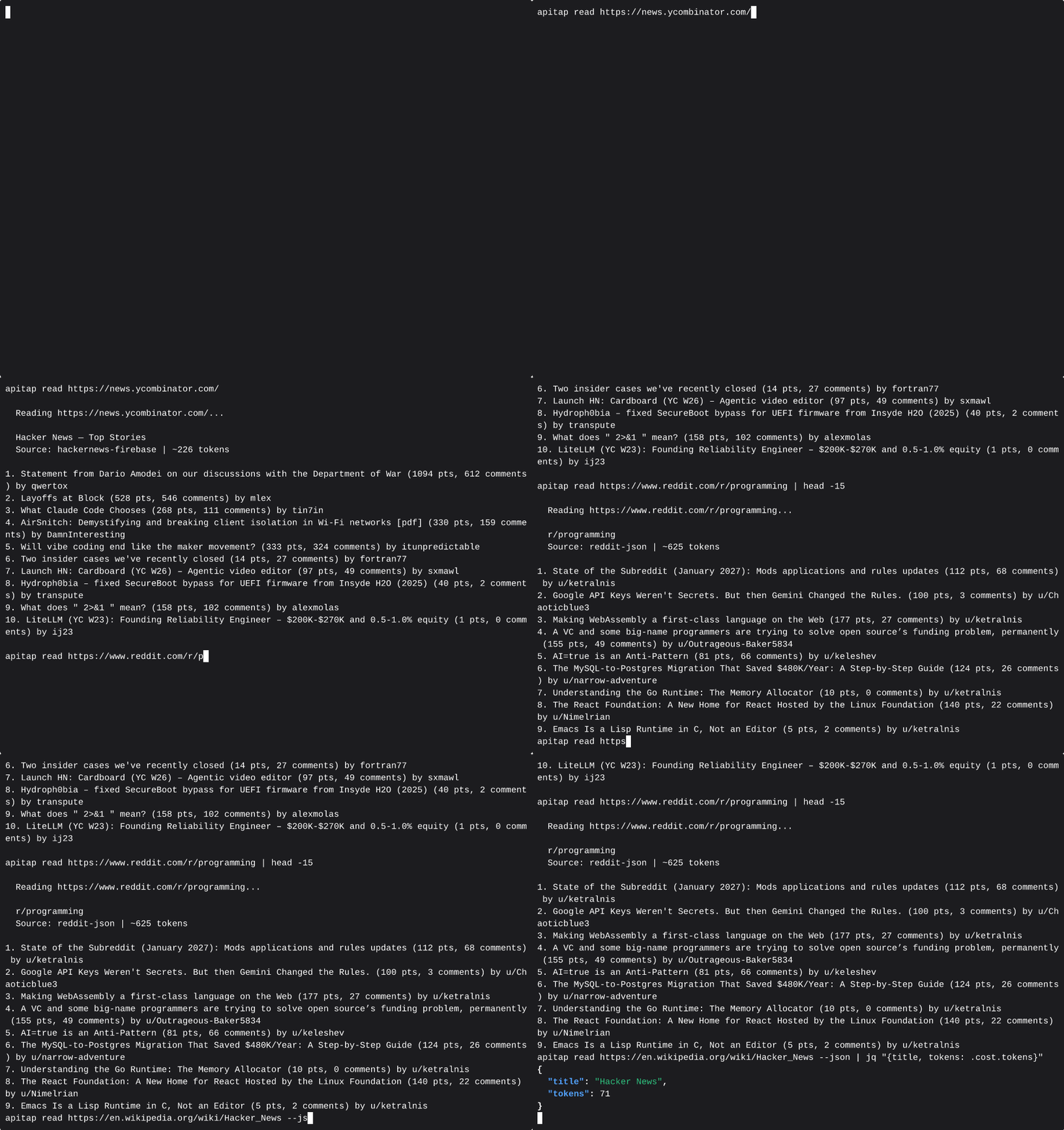
apitap read https://en.wikipedia.org/wiki/Node.js
✓ Wikipedia decoder: ~127 tokens (vs ~4,900 raw HTML)
```
No scraping. No browser. Just the API.
---
## How It Works
ApiTap has three ways to build its API knowledge:
1. **Import** (instant) — Import OpenAPI/Swagger specs from the [APIs.guru](https://apis.guru) directory of 2,500+ public APIs, or from any spec URL/file. Endpoints get a confidence score based on spec quality. No browser needed.
2. **Capture** (30 seconds) — Launch a browser, visit a site, browse normally. ApiTap intercepts all network traffic via CDP, filters noise, and generates a skill file. Or use `apitap attach` to capture from your already-running Chrome.
3. **Discover** (automatic) — ApiTap auto-detects frameworks (WordPress, Next.js, Shopify) and probes for OpenAPI specs at common paths. Works without a browser.
All three paths produce the same artifact: a **skill file** — a portable JSON map of an API's endpoints, stored at `~/.apitap/skills/`.
```
Import: OpenAPI spec → Converter → Merge → skill.json (confidence 0.6-0.85)
Capture: Browser → CDP listener → Filter → Skill Generator → skill.json (confidence 1.0)
Attach: Running Chrome → CDP attach → Filter → skill.json (confidence 0.8-1.0)
Replay: Agent → Replay Engine (skill.json) → fetch() → API → JSON response
↑ no browser in this path
```
### Confidence Model
Every endpoint tracks how it was discovered:
| Source | Confidence | Meaning |
|--------|-----------|---------|
| Captured with response body | 1.0 | Full capture — response shape verified |
| OpenAPI import, high quality | 0.85 | Spec has response examples |
| CDP skeleton (real traffic, no body) | 0.8 | Endpoint exists, body was evicted from Chrome buffer |
| OpenAPI import, base | 0.6 | Thin spec, no examples |
Imported endpoints auto-upgrade to confidence 1.0 on first successful replay. The merge is additive — captured data is never overwritten by imports, imports fill gaps that capture missed.
## Install
```bash
npm install -g @apitap/core
```
**Claude Code** — one command to wire it up:
```bash
claude mcp add -s user apitap -- apitap mcp
```
That's it. 12 MCP tools, ready to go. Requires Node.js 20+.
> **Note:** `npx @apitap/core mcp` does not work due to [npm scoped package bin resolution](https://github.com/n1byn1kt/apitap/issues/46). Use `npx apitap mcp` or `apitap-mcp` instead.
> **Optional:** To use `capture` and `browse` (which open a real browser), also run:
> ```bash
> npx playwright install chromium
> ```
> The `read`, `peek`, `discover`, and `import` tools work without it.
## Quick Start
### Import APIs instantly
```bash
# Import from the APIs.guru directory (2,500+ public APIs)
apitap import --from apis-guru --limit 100
# Import a specific API by name
apitap import --from apis-guru --search stripe
# Import a single OpenAPI spec from URL
apitap import https://api.apis.guru/v2/specs/stripe.com/2022-11-15/openapi.json
# Import a local spec file (JSON or YAML)
apitap import ./my-api-spec.json
# Skip auth-required APIs (open endpoints only)
apitap import --from apis-guru --limit 500 --no-auth-only
# Preview what would be imported
apitap import --from apis-guru --search twilio --dry-run
# Update previously imported APIs (skip unchanged)
apitap import --from apis-guru --update
```
Import produces a diff showing what changed:
```
Importing api.stripe.com from OpenAPI 3.0 spec...
✓ 12 existing captured endpoints preserved
+ 34 new endpoints added from OpenAPI spec
~ 8 endpoints enriched with spec metadata
· 0 skipped (already imported)
Skill file: ~/.apitap/skills/api.stripe.com.json (54 endpoints)
```
Captured endpoints are never overwritten. Import fills gaps and adds metadata (descriptions, response schemas, query param enums) from the spec.
### Capture API traffic
```bash
# Capture from a single domain (default)
apitap capture https://polymarket.com
# Capture all domains (CDN, API subdomains, etc.)
apitap capture https://polymarket.com --all-domains
# Include response previews in the skill file
apitap capture https://polymarket.com --preview
# Stop after 30 seconds
apitap capture https://polymarket.com --duration 30
```
ApiTap opens a browser window. Browse the site normally — click around, scroll, search. Every API call is captured. Press Ctrl+C when done.
### Attach to a running Chrome
```bash
# Launch Chrome with remote debugging enabled
google-chrome --remote-debugging-port=9222
# Attach to your signed-in Chrome — captures all tabs
apitap attach --port 9222
# Filter to specific domains
apitap attach --port 9222 --domain *.github.com
# Ctrl+C to stop — generates signed skill files for each captured domain
```
No separate browser, no re-login. Captures from your real Chrome sessions with all your cookies and auth tokens. When response bodies are evicted from Chrome's buffer (common on high-traffic pages), skeleton endpoints are written at confidence 0.8 instead of being dropped.
### List and explore APIs
```bash
# List all skill files
apitap list
✓ api.stripe.com 446 endpoints 5m ago [imported-signed]
✓ gamma-api.polymarket.com 3 endpoints 2h ago [signed]
✓ api.github.com 499 endpoints 1h ago [imported-signed]
# Show endpoints for a domain
apitap show api.stripe.com
[ ] GET /v1/account object (22 fields)
[ ] GET /v1/charges object (4 fields)
[ ] GET /v1/customers/:customer object (30 fields)
# Search across all skill files
apitap search stripe
```
### Replay an endpoint
```bash
# Replay with captured defaults
apitap replay gamma-api.polymarket.com get-events
# Override parameters
apitap replay gamma-api.polymarket.com get-events limit=5 offset=10
# Machine-readable JSON output
apitap replay gamma-api.polymarket.com get-events --json
```
## Text-Mode Browsing
ApiTap includes a text-mode browsing pipeline — `peek` and `read` — that lets agents consume web content without launching a browser. Seven built-in decoders extract structured content from popular sites at a fraction of the token cost:
| Site | Decoder | Typical Tokens | vs Raw HTML |
|------|---------|----------------|-------------|
| Reddit | `reddit` | ~627 | 93% smaller |
| YouTube | `youtube` | ~36 | 99% smaller |
| Wikipedia | `wikipedia` | ~127 | 97% smaller |
| Hacker News | `hackernews` | ~200 | 90% smaller |
| Grokipedia | `grokipedia` | ~150-5000+ | varies by article length |
| Twitter/X | `twitter` | ~80 | 95% smaller |
| Any other site | `generic` | varies | ~74% avg |
**Average token savings: 74% across 83 tested domains.**
```bash
# Triage first — zero-cost HEAD request
apitap peek https://reddit.com/r/programming
✓ accessible, recommendation: read
# Extract content — no browser needed
apitap read https://reddit.com/r/programming
✓ Reddit decoder: 12 posts, ~627 tokens
# Works for any URL — falls back to generic HTML extraction
apitap read https://example.com/blog/post
```
For MCP agents, `apitap_peek` and `apitap_read` are the fastest way to consume web content — use them before reaching for `apitap_browse` or `apitap_capture`.
## Pre-Loaded APIs
ApiTap can instantly import from the [APIs.guru](https://apis.guru) directory of 2,500+ public API specs. A single command populates your local pattern database:
```bash
apitap import --from apis-guru --limit 500
```
Some of the APIs available out of the box:
| API | Endpoints | Auth |
|-----|-----------|------|
| Stripe | 446 | API Key |
| GitHub | 499 | OAuth |
| Jira/Atlassian | 487 | API Key |
| Twilio | 199+ | API Key |
| Slack | 175 | OAuth |
| DigitalOcean | 290 | Bearer |
| Linode | 350 | Bearer |
| SendGrid | 334 | API Key |
| Spotify | 90 | OAuth |
| Square | 200 | OAuth |
| Plaid | 198 | API Key |
| Asana | 167 | Bearer |
| Twitter | 163 | OAuth |
| Vimeo | 326 | OAuth |
| OpenAI | 28 | API Key |
Auth-required APIs import as endpoint maps with response schemas — you can explore what's available and see response shapes before setting up credentials. First successful replay with real auth auto-upgrades the endpoint to full captured status.
## Why ApiTap?
**Why not just use the public API?** Most sites don't have one, or it's heavily rate-limited. The internal API that powers the SPA is often richer, faster, and already handles auth.
**Why not just use Playwright/Puppeteer?** Browser automation costs 50-200K tokens per page for an AI agent. ApiTap captures the API once, then your agent calls it directly at 1-5K tokens. No DOM, no selectors, no flaky waits.
**Why not reverse-engineer the API manually?** You could open DevTools and copy headers by hand. ApiTap does it in 30 seconds and gives you a portable file any agent can use.
**Why not just use an OpenAPI spec?** You can! `apitap import` converts OpenAPI/Swagger specs directly into skill files. But many sites don't publish specs — ApiTap captures their APIs from live traffic.
**Isn't this just a MITM proxy?** No. ApiTap is read-only — it uses Chrome DevTools Protocol to observe responses. No certificate setup, no request modification, no code injection.
## Replayability Tiers
Every captured endpoint is classified by replay difficulty:
| Tier | Meaning | Replay |
|------|---------|--------|
| **Green** | Public, permissive CORS, no signing | Works with `fetch()` |
| **Yellow** | Needs auth, no signing/anti-bot | Works with stored credentials |
| **Orange** | CSRF tokens, session binding | Fragile — may need browser refresh |
| **Red** | Request signing, anti-bot (Cloudflare) | Needs full browser |
GET endpoints are auto-verified during capture by comparing Playwright responses with raw `fetch()` responses.
## MCP Server
ApiTap includes an MCP server with 12 tools for Claude Desktop, Cursor, Windsurf, and other MCP-compatible clients.
```bash
# Start the MCP server
apitap mcp
# Also works via npx (no global install needed)
npx apitap mcp
```
> The legacy `apitap-mcp` binary still works but `apitap mcp` is preferred.
> `npx @apitap/core mcp` does **not** work — npm can't resolve the default bin for scoped packages with multiple bins ([#46](https://github.com/n1byn1kt/apitap/issues/46)).
**Claude Code** — see [Install](#install) above.
**Claude Desktop / Cursor / Windsurf** — add to your MCP config:
```json
{
"mcpServers": {
"apitap": {
"command": "apitap",
"args": ["mcp"]
}
}
}
```
**VS Code (GitHub Copilot)** — add `.vscode/mcp.json`:
```json
{
"servers": {
"apitap": {
"command": "apitap",
"args": ["mcp"]
}
}
}
```
### MCP Tools
| Tool | Description |
|------|-------------|
| `apitap_browse` | High-level "just get me the data" (discover + replay in one call) |
| `apitap_peek` | Zero-cost URL triage (HEAD only) |
| `apitap_read` | Extract content without a browser (7 decoders) |
| `apitap_discover` | Detect a site's APIs without launching a browser |
| `apitap_search` | Search available skill files |
| `apitap_replay` | Replay a captured API endpoint |
| `apitap_replay_batch` | Replay multiple endpoints in parallel across domains |
| `apitap_capture` | Capture API traffic via instrumented browser |
| `apitap_capture_start` | Start an interactive capture session |
| `apitap_capture_interact` | Interact with a live capture session (click, type, scroll) |
| `apitap_capture_finish` | Finish or abort a capture session |
| `apitap_auth_request` | Request human authentication for a site |
You can also serve a single skill file as a dedicated MCP server with `apitap serve <domain>` — each endpoint becomes its own tool.
## Chrome Extension
> **Optional.** ApiTap works fully without the extension. Install it if you want passive API discovery or want to capture from your already-logged-in browser sessions.
The extension captures API traffic directly from your browser — no Playwright, no auth dance, no browser popups. It also silently builds a map of every API you visit in the background.
**Why use the extension?**
- You're already logged into Spotify, Discord, Reddit — the extension captures from your live session
- No `apitap auth request` needed — real tokens are captured automatically
- Passively builds a map of every API you visit, so your agents know what's available before asking
### Setup
**Step 1 — Install ApiTap CLI** (if you haven't already):
```bash
npm install -g @apitap/core
```
**Step 2 — Get the extension source:**
```bash
git clone https://github.com/n1byn1kt/apitap.git
cd apitap
```
**Step 3 — Build the extension:**
```bash
cd extension && npm install && npm run build
```
**Step 4 — Load into Chrome:**
1. Open `chrome://extensions`
2. Enable **Developer mode** (toggle, top right)
3. Click **Load unpacked**
4. Select the `extension/` folder inside the cloned repo
You should see the ApiTap icon appear in your toolbar.
**Step 5 — Wire up native messaging (one-time):**
```bash
apitap extension install --extension-id <your-extension-id>
```
Find your extension ID on the `chrome://extensions` page (shown under the extension name after loading).
**Step 6 — Verify the connection:**
Click the ApiTap icon in Chrome. The popup should show **"CLI: Connected"**. If it shows disconnected, re-run Step 5 with the correct extension ID.
### Passive Index (always-on)
Once installed, the extension silently observes API traffic as you browse — no infobar, no CDP, no performance impact. It builds a lightweight index of every domain's API shape: endpoints, HTTP methods, auth type, pagination patterns.
```bash
# See everything the extension has discovered
apitap index
# Filter to a specific domain
apitap index discord.com
```
The index lives at `~/.apitap/index.json` and is automatically read by the `apitap_discover` MCP tool — so your agents can ask "what do you know about Discord's API?" and get a useful answer without triggering a full capture.
### Promoting to a Full Skill File
The index is a map — it knows what endpoints exist but not their response shapes. To get a full replayable skill file, promote a domain:
**From the popup:** Click the ApiTap icon -> find the domain -> **Generate skill file**
**Via agent:** Your agent can request a capture automatically. You'll get a notification to approve, the extension briefly attaches CDP, captures response shapes, then detaches. The full skill file saves to `~/.apitap/skills/`.
**Auto-learn (opt-in):** In the extension popup -> Settings -> enable **Auto-learn**. The extension will automatically promote domains you visit frequently. Off by default.
### Manual Capture
For one-off captures without the passive index:
1. Click the ApiTap icon -> **Start Capture**
2. Browse the site — extension records API traffic
3. Click **Stop** -> skill file auto-saves to `~/.apitap/skills/`
The popup shows CLI connection status and live capture stats. Auth tokens are encrypted with AES-256-GCM in session storage and automatically persisted to `~/.apitap/auth.enc` via the native host, with `[stored]` placeholders in the exported skill files.
> **Note:** Chrome Web Store submission coming soon. For now, load as an unpacked extension in Developer mode.
---
## Auth Management
ApiTap automatically detects and stores auth credentials (Bearer tokens, API keys, cookies) during capture. Credentials are encrypted at rest with AES-256-GCM.
```bash
# View auth status
apitap auth api.example.com
# List all domains with stored auth
apitap auth --list
# Refresh expired tokens via browser
apitap refresh api.example.com
# Force fresh token before replay
apitap replay api.example.com get-data --fresh
# Clear stored auth
apitap auth api.example.com --clear
```
## Skill Files
Skill files are JSON documents stored at `~/.apitap/skills/<domain>.json`. They contain everything needed to replay an API — endpoints, headers, query params, request bodies, pagination patterns, and response shapes.
```json
{
"version": "1.2",
"domain": "gamma-api.polymarket.com",
"baseUrl": "https://gamma-api.polymarket.com",
"endpoints": [
{
"id": "get-events",
"method": "GET",
"path": "/events",
"queryParams": { "limit": { "type": "string", "example": "10" } },
"headers": {},
"responseShape": { "type": "object", "fields": ["id", "title", "slug"] },
"confidence": 1.0,
"endpointProvenance": "captured"
}
]
}
```
Skill files are portable and shareable. Auth credentials are stored separately in encrypted storage — never in the skill file itself.
### Import / Export
```bash
# Import a skill file from someone else
apitap import ./reddit-skills.json
# Import an OpenAPI spec (JSON or YAML)
apitap import ./stripe-openapi.json
apitap import https://api.apis.guru/v2/specs/stripe.com/2022-11-15/openapi.json
# Import validates: signature check / SSRF scan / format detection / confirmation
```
Imported files are re-signed with your local key. OpenAPI specs are automatically detected and converted using the same merge logic — captured endpoints are preserved, imports fill gaps.
## Security
ApiTap handles untrusted skill files from the internet and replays HTTP requests on your behalf. That's a high-trust position, and we treat it seriously.
### Defense in Depth
- **Auth encryption** — AES-256-GCM with PBKDF2 key derivation, keyed to your machine
- **PII scrubbing** — Emails, phones, IPs, credit cards, SSNs detected and redacted during capture
- **SSRF protection** — Multi-layer URL validation blocks access to internal networks (see below)
- **Header injection protection** — Allowlist prevents skill files from injecting dangerous HTTP headers (`Host`, `X-Forwarded-For`, `Cookie`, `Authorization`)
- **Redirect validation** — Manual redirect handling with SSRF re-check prevents redirect-to-internal-IP attacks
- **DNS rebinding prevention** — Resolved IPs are pinned to prevent TOCTOU attacks where DNS returns different IPs on second lookup
- **Skill signing** — HMAC-SHA256 signatures detect tampering; four-state provenance tracking (self/imported/imported-signed/unsigned)
- **Atomic writes** — Skill files are written to a temp file then renamed, preventing corruption from mid-write crashes
- **Safe JSON parsing** — Server responses parsed with `safeParseJson()` that returns raw text on malformed JSON instead of crashing
- **Spec fetch hardening** — OpenAPI spec imports are SSRF-validated, size-limited (10MB), timeout-limited (30s), and reject redirects
- **External $ref rejection** — Only local document `#/` references are resolved; `file://` and remote `$ref` pointers are blocked
- **No phone-home** — Everything runs locally. No external services, no telemetry
- **Read-only capture** — Playwright intercepts responses only. No request modification or code injection
### Why SSRF Protection Matters
Since skill files can come from anywhere — shared by colleagues, downloaded from GitHub, or imported from untrusted sources — a malicious skill file is the primary threat vector. Here's what ApiTap defends against:
**The attack:** An attacker crafts a skill file with `baseUrl: "http://169.254.169.254"` (the AWS/cloud metadata endpoint) or `baseUrl: "http://localhost:8080"` (your internal services). When you replay an endpoint, your machine makes the request, potentially leaking cloud credentials or hitting internal APIs.
**The defense:** ApiTap validates every URL at multiple points:
```
Skill file imported
-> validateUrl(): block private IPs, internal hostnames, non-HTTP schemes
-> validateSkillFileUrls(): scan baseUrl + all endpoint example URLs
OpenAPI spec imported
-> resolveAndValidateUrl(): SSRF check on spec URL before fetching
-> resolveAndValidateUrl(): SSRF check on extracted API domain
-> validateSkillFile(): validate merged skill file before writing
Endpoint replayed
-> resolveAndValidateUrl(): DNS lookup + verify resolved IP isn't private
-> IP pinning: fetch uses resolved IP directly (prevents DNS rebinding)
-> Header filtering: strip dangerous headers from skill file
-> Redirect check: if server redirects, validate new target before following
```
**Blocked ranges:** `127.0.0.0/8`, `10.0.0.0/8`, `172.16.0.0/12`, `192.168.0.0/16`, `169.254.0.0/16` (cloud metadata), `100.64.0.0/10` (CGNAT/Tailscale), `198.18.0.0/15` (benchmarking), `240.0.0.0/4` (reserved), `0.0.0.0`, IPv6 equivalents (`::1`, `fe80::/10`, `fc00::/7`, `::ffff:` mapped addresses), `localhost`, `.local`, `.internal`, `file://`, `javascript:` schemes. Alternative IP representations (decimal integer, octal, hex) are normalized before checking.
This is especially relevant now that [MCP servers are being used as attack vectors in the wild](https://cloud.google.com/blog/topics/threat-intelligence/distillation-experimentation-integration-ai-adversarial-use) — Google's Threat Intelligence Group recently documented underground toolkits built on compromised MCP servers. ApiTap is designed to be safe even when processing untrusted inputs.
## Trap-Aware Mode
ApiTap ingests web content on behalf of agents, and adds inspection at the two places it already sits in the pipeline:
- **`apitap read`** scans raw HTML for hidden content containing explicit prompt-injection markers before extraction. Results are annotated on the response via a `findings[]` field; content is never modified.
- **`apitap replay`** optionally scans outbound request bodies and query strings for secret patterns (SSH keys, cloud credentials, API tokens) before the `fetch()` call. Opt-in per skill file or globally.
### Read-side scanner
The read scanner runs by default on `apitap read` and the `apitap_read` MCP tool. It uses a two-condition gate: a finding is emitted only when content is in a hidden position (inline `style:display:none`, `visibility:hidden`, `opacity:0`, off-viewport positioning, `hidden` attribute, `aria-hidden="true"`, or inside an HTML comment) **and** the hidden content matches an explicit role marker or a known prompt-injection signature.
Visible content never triggers a finding. Blog posts about prompt engineering, documentation of jailbreak techniques, and this README itself are all non-triggering.
Disable with `--no-scan` on the CLI or `scan: false` on the MCP tool.
```bash
apitap read https://example.com # scan on by default
apitap read https://example.com --no-scan # scan off
```
**Known limitations:**
- Class-based CSS hiding is not detected in v1.0. The generic HTML extractor strips `<style>` blocks before the scanner runs, so class-resolved hiding is invisible.
- Site-specific decoders (Reddit, YouTube, Wikipedia, HN, Twitter, Grokipedia, DeepWiki) bypass scanning. They extract from structured API sources rather than raw HTML.
- The scanner is a heuristic, not a classifier. Absence of findings is not proof of safety.
### Egress-side scanner (opt-in)
The egress scanner is **opt-in per domain** or globally. Default behavior on upgrade is byte-identical to the previous release — cron-job users see zero change unless they explicitly enable it.
Three ways to enable:
**Per skill file** — add `egress_check: true` to the skill file (part of the signed payload):
```json
{
"version": "1.2",
"domain": "api.example.com",
"egress_check": true,
"egress_action": "annotate",
"endpoints": []
}
```
**Globally** — via `$XDG_CONFIG_HOME/apitap/config.json`:
```json
{
"egressCheckAll": true,
"egressCheckAction": "annotate"
}
```
**Per call** — via the CLI flag or MCP tool argument:
```bash
apitap replay api.example.com post-submit --egress-check=annotate
apitap replay api.example.com post-submit --egress-check=block
apitap replay api.example.com post-submit --no-egress-check
```
Precedence: per-call → skill file → global config → off.
When enabled with `annotate` (default action), the request proceeds normally and the response envelope gains a `warnings[]` field. When enabled with `block`, `high`-severity findings refuse the request. `medium`-severity findings (PII) always annotate, never block.
### Audit log
Both scanners write findings to `$XDG_STATE_HOME/apitap/findings.jsonl` (default: `~/.local/state/apitap/findings.jsonl`):
```bash
apitap audit --findings
apitap audit --findings --source=egress --since=2026-04-01
apitap audit --findings --json
```
The audit log **never contains matched secret bytes**. Egress findings record pattern name, parameter location, structural path, and match length only.
### Honest threat model
- The read scanner catches hidden content with explicit prompt-injection markers. It does not catch semantic manipulation, framing attacks, class-based hidden content, font-face remapping, or content hidden via external stylesheets.
- The egress scanner uses pattern matching. An attacker who can get the agent to encode or transform a secret before sending it will defeat pattern matching. This is defense in depth, not a DLP solution.
- The audit log is advisory tamper-evidence, same-user boundary. Same threat model as ApiTap's existing skill signing.
- v1.0 is rules-based. No learning loop. Tuning happens via signature list updates informed by audit log data.
## CLI Reference
All commands support `--json` for machine-readable output.
| Command | Description |
|---------|-------------|
| `apitap browse <url>` | Discover + replay in one step |
| `apitap peek <url>` | Zero-cost URL triage (HEAD only) |
| `apitap read <url>` | Extract content without a browser |
| `apitap discover <url>` | Detect APIs without launching a browser |
| `apitap capture <url>` | Capture API traffic from a website |
| `apitap attach --port <port>` | Attach to running Chrome and capture API traffic |
| `apitap import <url-or-file>` | Import OpenAPI spec or skill file |
| `apitap import --from apis-guru` | Bulk import from APIs.guru directory |
| `apitap list` | List available skill files |
| `apitap show <domain>` | Show endpoints for a domain |
| `apitap search <query>` | Search skill files by domain or endpoint |
| `apitap replay <domain> <id> [key=val...]` | Replay an API endpoint |
| `apitap refresh <domain>` | Refresh auth tokens via browser |
| `apitap auth [domain]` | View or manage stored auth |
| `apitap mcp` | Run the full ApiTap MCP server over stdio |
| `apitap serve <domain>` | Serve a skill file as an MCP server |
| `apitap inspect <url>` | Discover APIs without saving |
| `apitap stats` | Show token savings report |
| `apitap index [domain]` | View passive index from Chrome extension |
| `apitap audit` | Audit stored skill files and credentials |
| `apitap forget <domain>` | Remove skill file and credentials for a domain |
| `apitap --version` | Print version |
### Import flags
| Flag | Description |
|------|-------------|
| `--from apis-guru` | Bulk import from APIs.guru directory |
| `--search <query>` | Filter APIs.guru by provider or title |
| `--limit <N>` | Max APIs to import (default: 100) |
| `--no-auth-only` | Skip APIs requiring authentication |
| `--dry-run` | Show what would be imported without writing |
| `--update` | Skip APIs unchanged since last import |
| `--force` | Always reimport regardless of history |
### Capture flags
| Flag | Description |
|------|-------------|
| `--all-domains` | Capture traffic from all domains (default: target domain only) |
| `--preview` | Include response data previews |
| `--duration <sec>` | Stop capture after N seconds |
| `--port <port>` | Connect to specific CDP port |
| `--launch` | Always launch a new browser |
| `--attach` | Only attach to existing browser |
| `--no-scrub` | Disable PII scrubbing |
| `--no-verify` | Skip auto-verification of GET endpoints |
| `--domain <glob>` | Filter traffic by domain glob (attach mode, e.g. `*.github.com`) |
## Development
```bash
git clone https://github.com/n1byn1kt/apitap.git
cd apitap
npm install
npm test # ~1587 tests, Node built-in test runner
npm run typecheck # Type checking
npm run build # Compile to dist/
npx tsx src/cli.ts capture <url> # Run from source
```
## Contact
Questions, feedback, or issues? -> **[hello@apitap.io](mailto:hello@apitap.io)**
## License
[Business Source License 1.1](./LICENSE) — **free for all non-competing use** (personal, internal, educational, research, open source). Cannot be rebranded and sold as a competing service. Converts to Apache 2.0 on February 7, 2029.



