Content
<p align="center">
<img src="docs/image/logo.png" alt="QuickDesk Logo" width="120">
</p>
<h1 align="center">QuickDesk</h1>
<p align="center">
<strong>The First AI-Native Remote Desktop</strong><br>
Built-in MCP Server · AI Agents Control Any Remote Computer · Open-Source & Free
</p>
<p align="center">
<a href="https://github.com/barry-ran/QuickDesk/actions/workflows/quickdesk-windows.yml">
<img src="https://github.com/barry-ran/QuickDesk/actions/workflows/quickdesk-windows.yml/badge.svg" alt="Windows Build">
</a>
<a href="https://github.com/barry-ran/QuickDesk/actions/workflows/quickdesk-macos.yml">
<img src="https://github.com/barry-ran/QuickDesk/actions/workflows/quickdesk-macos.yml/badge.svg" alt="macOS Build">
</a>
<a href="https://github.com/barry-ran/QuickDesk/releases">
<img src="https://img.shields.io/github/v/release/barry-ran/QuickDesk" alt="Release">
</a>
<a href="https://github.com/barry-ran/QuickDesk/stargazers">
<img src="https://img.shields.io/github/stars/barry-ran/QuickDesk" alt="Stars">
</a>
<a href="LICENSE">
<img src="https://img.shields.io/github/license/barry-ran/QuickDesk" alt="License">
</a>
</p>
<p align="center">
English | <a href="README_zh.md">中文</a>
</p>
<p align="center">
<a href="https://t.me/+utsmSUhNLc1iNTY1">Telegram</a> | <a href="https://github.com/barry-ran/QuickDesk/issues">Issues</a> | <a href="https://github.com/barry-ran/QuickDesk/releases">Download</a>
</p>
---
QuickDesk is the **first AI-native remote desktop** — an open-source, free application with a **built-in MCP (Model Context Protocol) Server** that lets any AI agent see and control remote computers.
While other remote desktop tools only serve human users, QuickDesk extends **AI Computer Use** from "local machine only" to **"any remote machine in the world"**. Connect Claude, GPT, Cursor, or any MCP-compatible AI to QuickDesk, and it can screenshot, click, type, drag, and automate across remote desktops — just like a human operator, but faster and 24/7.
Built on Google Chromium Remoting technology (the engine behind Chrome Remote Desktop), QuickDesk delivers industrial-grade performance, stability, and security refined over 10+ years by Google.
Main Interface

Remote Desktop

AI Config

## Why QuickDesk?
### AI-First: The Only Remote Desktop with MCP Support [ → MCP Integration Guide](docs/mcp-integration.md)
- **Built-in MCP Server**: AI agents connect via standard MCP protocol — no plugins, no hacks, zero configuration
- **Dual Transport**: stdio mode (AI client spawns process) or HTTP/SSE mode (QuickDesk hosts MCP server for multi-client access)
- **Full Computer Use Toolkit**: 20+ MCP tools — screenshot, click, type, drag, scroll, hotkeys, clipboard, and more
- **Real-Time Visibility**: AI operations are displayed in the QuickDesk GUI in real time — the user sees every mouse move and keystroke, and can intervene at any time
- **Multi-Device AI Orchestration**: AI can connect to and control multiple remote machines simultaneously — batch automation, cross-device workflows, fleet management
- **Guided Prompts**: 9 built-in MCP prompt templates covering remote operation, server health check, batch automation, system diagnosis, screen analysis, multi-device orchestration, and SOP documentation
### High-Performance Foundation
- **Open-Source & Free**: MIT License, no feature restrictions, no connection limits, commercial use welcome
- **Self-Hosted**: Deploy your own signaling and TURN relay servers, keep full control of your data
- **Commercial-Grade Foundation**: Built on Chromium Remoting — the same technology powering Chrome Remote Desktop, refined by Google for 10+ years and proven by billions of users
- **Pure C++ Ultimate Performance**: Full C++ stack from protocol core to GUI — no GC pauses, no runtime overhead, minimal memory and CPU footprint
- **Modern Codecs**: H.264, VP8, VP9, AV1 — flexibly switch based on network and hardware conditions
- **WebRTC P2P Direct Connection**: Prioritizes peer-to-peer connections for lowest latency; automatically falls back to TURN relay when traversal fails
- **Cross-Platform**: Windows and macOS supported (Linux planned)
- **Modern UI**: Fluent Design interface built with Qt 6 + QML, with light and dark themes
## Comparison
| Feature | QuickDesk | RustDesk | BildDesk | ToDesk | TeamViewer |
|---------|:---------:|:--------:|:--------:|:------:|:----------:|
| **AI Agent Support (MCP)** | ✅ Built-in | ❌ | ❌ | ❌ | ❌ |
| **Open Source** | ✅ MIT | ✅ AGPL-3.0 | ❌ | ❌ | ❌ |
| **Free for Commercial Use** | ✅ | ❌ License required | ❌ | ❌ | ❌ |
| **Core Language** | C++ | Rust + Dart | — | — | — |
| **Remote Protocol** | Chromium Remoting (WebRTC) | Custom | Custom | Custom | Custom |
| **Protocol Maturity** | ⭐⭐⭐⭐⭐ Google 10yr+ | ⭐⭐⭐ | ⭐⭐ | ⭐⭐⭐ | ⭐⭐⭐⭐⭐ |
| **P2P Direct** | ✅ WebRTC ICE | ✅ TCP Hole Punching | ✅ | ✅ | ✅ |
| **Video Codecs** | H.264/VP8/VP9/AV1 | VP8/VP9/AV1/H.264/H.265 | — | — | — |
| **Self-Hosted** | ✅ Full solution | ✅ | ❌ | ❌ | ❌ |
| **GUI Framework** | Qt 6 (C++) | Flutter (Dart) | — | — | — |
| **Memory Usage** | ⭐⭐⭐⭐⭐ Very Low | ⭐⭐⭐ Medium | — | ⭐⭐⭐ | ⭐⭐⭐ |
| **CPU Usage** | ⭐⭐⭐⭐⭐ Very Low | ⭐⭐⭐ Medium | — | ⭐⭐⭐ | ⭐⭐⭐ |
| **Windows** | ✅ | ✅ | ✅ | ✅ | ✅ |
| **macOS** | ✅ | ✅ | ✅ | ✅ | ✅ |
| **Linux** | 🔜 | ✅ | ❌ | ✅ | ✅ |
| **iOS/Android** | 🔜 | ✅ | ✅ | ✅ | ✅ |
### Why Best-in-Class Performance?
1. **Pure C++ Full Stack**: The entire stack — from low-level protocol to GUI — is implemented in C++. No garbage collection pauses, no VM/runtime overhead. Compared to RustDesk's Dart/Flutter GUI layer or ToDesk's Electron-based approach, CPU and memory usage are significantly lower.
2. **Chromium-Level Optimization**: Core paths for video encoding/decoding, network transmission, and screen capture directly reuse Chromium's highly optimized C++ code, including SIMD instruction optimization and zero-copy rendering pipelines.
3. **Shared Memory Video Transfer**: QuickDesk uses shared memory to pass video frames (YUV I420) between processes, eliminating the serialization/deserialization and data copying overhead of traditional IPC.
4. **GPU-Accelerated Rendering**: YUV data is fed directly into the GPU rendering pipeline via Qt 6's `QVideoSink`, achieving zero-CPU-copy video rendering.
## Features
### AI Integration (MCP Server)
- Built-in MCP Server — AI agents connect via standard protocol, works with Cursor, Claude Desktop, VS Code, and any MCP client
- Dual transport: stdio (AI client launches process) or HTTP/SSE (QuickDesk manages MCP server, multiple AI clients connect)
- Persistent MCP transport mode — remembers your stdio/HTTP choice across restarts
- 40+ MCP tools: screenshot, mouse click/drag/scroll, keyboard type/hotkey, clipboard, OCR text recognition, UI element detection, screen verification, and more
- Host-side skill host with built-in skills (system info, file operations, shell execution) — run structured tools on the remote machine
- Pluggable skills architecture — add custom skill directories, skills auto-load and sync to connected clients
- Skill host toggle in Settings — enable/disable the skill host process with persistent configuration
- MCP Resources: real-time device status, connection info, host details
- 9 MCP Prompts: operation guide, server health check, batch automation, system diagnosis, screen analysis, multi-device orchestration, SOP documentation
- Real-time event streaming: connection state changes, clipboard updates, screen changes, performance stats
- Event-driven tools: wait_for_event, wait_for_connection_state, wait_for_clipboard_change, wait_for_screen_change for reactive automation
- Background automation mode: `show_window=false` for headless batch operations
- Screenshot scaling: adjustable resolution for faster AI processing
### Remote Control
- High-definition, low-latency remote desktop display
- Full keyboard and mouse mapping
- Real-time remote cursor synchronization
- Bidirectional clipboard sync
- Adaptive frame rate and bitrate
- Frame rate boost mode (Office / Gaming)
- Privacy screen mode — blacks out the host's physical display and blocks local keyboard/mouse input during remote control, protecting session privacy (Windows 10 2004+)
- Virtual display — creates virtual monitors via IDD driver for multi-screen extension, headless server remote access, privacy isolation, and resolution adaptation (Windows 10 2004+, requires virtual display driver installation)
### Connection Management
- 9-digit Device ID + temporary access code mechanism
- Auto-refresh access code (configurable: 30 min to 24 hours, or never)
- Multi-tab simultaneous connections to multiple remote devices
- Connection history with quick reconnect
- Real-time connection status monitoring
### Performance Monitoring
- Detailed latency breakdown panel (Capture → Encode → Network → Decode → Render)
- Real-time frame rate, bitrate, and bandwidth statistics
- Input round-trip time (RTT) monitoring
- Encoding resolution and quality information
### Personalization
- Fluent Design style interface
- Light and dark theme switching
- i18n support (Chinese / English)
- Video codec preference (H.264 / VP8 / VP9 / AV1)
### Self-Hosted Deployment
- Custom signaling server address
- Custom STUN/TURN servers
- Complete server deployment solution (Go signaling server + PostgreSQL + Redis + coturn)
- **Web Admin Panel** — full-featured management dashboard for the signaling server:
- Real-time monitoring with ECharts trend charts (connections, new devices over 24h/7d/30d)
- Device management with search, filter, sort, pagination, batch operations, and device groups
- User management with batch enable/disable/delete/set-level
- Admin TOTP two-factor authentication (QR code setup, Google Authenticator compatible)
- Operation audit logs with filtering by action/admin/time range
- IP whitelist (CIDR support) for admin panel access control
- Webhook notifications (device online/offline, new device/user, connection failures)
- CSV data export for devices, users, and activity logs
## Architecture
QuickDesk uses a modular multi-process architecture:
```mermaid
graph TD
subgraph AI["AI Agent (Claude / GPT / Cursor)"]
A1["MCP Protocol"]
end
subgraph MCP["quickdesk-mcp (Rust Bridge)"]
M1["MCP stdio ↔ WebSocket"]
M2["MCP HTTP/SSE ↔ WebSocket"]
end
subgraph GUI["QuickDesk GUI (Qt 6)"]
direction LR
WS["WebSocket API Server"]
QML["QML/C++"]
MainWin["Main Window"]
RemoteWin["Remote Desktop Window"]
end
subgraph Host["quickdesk-host (Chromium Remoting)"]
H1["Screen Capture"]
H2["Video Encoding"]
H3["Input Event Handling"]
H4["WebRTC Connection"]
end
subgraph Client["quickdesk-client (Chromium Remoting)"]
C1["Video Decoding"]
C2["Input Event Injection"]
C3["Shared Memory Video Frames"]
C4["WebRTC Connection"]
end
subgraph Signaling["Signaling Server (Go + Gin)"]
S1["WebSocket Signaling"]
S2["ICE Config Distribution"]
S3["Device Registration & Auth"]
S4["PostgreSQL + Redis"]
end
subgraph TURN["TURN Server (coturn)"]
T1["Relay when P2P traversal fails"]
end
AI -- "stdio (JSON-RPC)" --> MCP
AI -. "HTTP/SSE" .-> M2
MCP -- "WebSocket" --> WS
GUI -- "Native Messaging\n(stdin/stdout JSON)" --> Host
GUI -- "Native Messaging\n(stdin/stdout JSON)" --> Client
Host -- "WebSocket" --> Signaling
Client -- "WebSocket" --> Signaling
Signaling -- "ICE Config" --> TURN
Host -. "WebRTC P2P / TURN Relay" .-> Client
```
### Tech Stack
| Layer | Technology |
|-------|------------|
| AI Integration | MCP Server (Rust) + WebSocket API |
| GUI Client | Qt 6 (QML + C++17) |
| UI Style | Fluent Design Component Library (custom-built) |
| Remote Protocol Core | Chromium Remoting (C++) |
| Video Codecs | H.264 / VP8 / VP9 / AV1 |
| Network Transport | WebRTC (ICE/STUN/TURN) |
| IPC | Native Messaging (JSON) + Shared Memory |
| Signaling Server | Go + Gin + GORM |
| Data Storage | PostgreSQL + Redis |
| TURN Relay | coturn |
| Logging | spdlog |
| Build System | CMake 3.19+ |
| CI/CD | GitHub Actions |
## Getting Started
### Download
Go to [Releases](https://github.com/barry-ran/QuickDesk/releases) to download the latest version:
| Platform | Download |
|----------|----------|
| Windows x64 | [QuickDesk-win-x64-setup.exe](https://github.com/barry-ran/QuickDesk/releases/latest) |
| macOS ARM64 | [QuickDesk-mac-arm64.dmg](https://github.com/barry-ran/QuickDesk/releases/latest) |
### Usage
1. Install and run QuickDesk on both the **host** (remote) and **client** (local) machines
2. The host will automatically generate a **Device ID** and **Access Code**
3. On the client, enter the host's Device ID and Access Code, then click **Connect**
4. You're now remotely controlling the host machine
### Silent install (Windows installer)
The Windows package is built with **Inno Setup** (`scripts/installer/quickdesk.iss`). Standard Inno command-line switches apply:
| Switch | Meaning |
|--------|---------|
| `/SILENT` | No wizard pages; progress window may appear |
| `/VERYSILENT` | Fully unattended (no progress window) |
| `/DIR="path"` | Install directory (optional) |
| `/TASKS="..."` | Comma-separated tasks from `[Tasks]` |
Available tasks:
| Task | Description |
|------|-------------|
| `desktopicon` | Create desktop shortcut |
| `startmenuicon` | Create Start Menu shortcut |
| `vdd` | Install virtual display driver (IDD) and related files, required for virtual display feature |
All three tasks are selected by default (`Flags: checkedonce` — checked on first install, preserves user choice on upgrades). To skip the virtual display driver, explicitly exclude `vdd` via `/TASKS`.
Examples:
```bat
REM Default tasks (includes virtual display driver when selected in script defaults)
QuickDesk-win-x64-setup.exe /VERYSILENT
REM Explicit tasks
QuickDesk-win-x64-setup.exe /VERYSILENT /TASKS="desktopicon,startmenuicon,vdd"
REM Install without virtual display driver
QuickDesk-win-x64-setup.exe /VERYSILENT /TASKS="desktopicon,startmenuicon"
REM Custom install path
QuickDesk-win-x64-setup.exe /VERYSILENT /DIR="D:\QuickDesk"
```
After a silent install, **QuickDesk.exe is not auto-launched** (`skipifsilent` in the installer script), but the **QuickDeskHost** Windows service is still installed and started when configured in `[Run]`.
Administrator rights are required (`PrivilegesRequired=admin` in the script).
## Build from Source
### Requirements
- CMake 3.19+
- Qt 6.5+ (Multimedia and WebSockets modules required)
- C++17 compiler
### Windows
```bash
# Requires Visual Studio 2022 + MSVC
# Set Qt path environment variable
set ENV_QT_PATH=C:\Qt\6.8.3
# Build
scripts\build_qd_win.bat Release
# Package (requires Inno Setup)
scripts\publish_qd_win.bat Release
scripts\package_qd_win.bat Release
```
### macOS
```bash
# Requires Xcode Command Line Tools
# Set Qt path environment variable
export ENV_QT_PATH=/path/to/Qt/6.8.3
# Build
bash scripts/build_qd_mac.sh Release
# Package
bash scripts/publish_qd_mac.sh Release
bash scripts/package_qd_mac.sh Release
```
### API Key (Optional)
If you deploy your own signaling server with API Key enabled, there are two ways to configure the API Key:
**Method 1: Runtime Configuration (Recommended)**
In QuickDesk **Settings → Network → API Key**, enter your signaling server's API Key. This is the recommended approach — no recompilation needed, and each deployment can use its own key.
**Method 2: Build-time Injection**
You can also inject the API Key at build time as a compile-time default:
```bash
# Windows
set ENV_QUICKDESK_API_KEY=your-secret-key
scripts\build_qd_win.bat Release
# macOS
ENV_QUICKDESK_API_KEY=your-secret-key bash scripts/build_qd_mac.sh Release
```
> **Priority**: Runtime API Key (from Settings) takes precedence over the build-time key. If both are set, the runtime value is used.
Without either configuration, the client can only connect to signaling servers without API Key protection.
> **WebClient note:** The WebClient is a static web page running in the browser. Since API keys embedded in JavaScript are visible via DevTools, the WebClient uses **Origin whitelist** validation instead of API Key. Configure `ALLOWED_ORIGINS` on the signaling server to restrict which domains can access it. Browsers automatically send the `Origin` header and JavaScript cannot forge it, so only the WebClient served from your official domain will be allowed.
See [Signaling Server Deployment](docs/signaling-server-deployment.md) for details.
## Self-Hosted Deployment
QuickDesk supports full self-hosted deployment. You can deploy all services on your own servers to ensure data security.
### Components
1. **Signaling Server** (required): Handles device registration and signaling relay
→ [Signaling Server Deployment Guide](docs/signaling-server-deployment.md)
2. **TURN Relay Server** (recommended): Provides relay when P2P direct connection fails
→ [TURN Server Deployment Guide](docs/turn-server-deployment.md)
### Docker Deploy (Signaling Server)
Three deployment methods for the signaling server:
```bash
cd SignalingServer
cp .env.example .env && vim .env
# Option 1: Pull pre-built image (recommended)
./deploy-pull.sh
# Option 2: Build from source
./deploy-build.sh
# Option 3: Offline deploy (no internet needed)
./deploy-offline.sh quickdesk-signaling-image.tar.gz
```
Pre-built Docker images are automatically published to `ghcr.io/barry-ran/quickdesk-signaling` on each tagged release. See the [deployment guide](docs/signaling-server-deployment.md) for details.
### Client Configuration
In QuickDesk **Settings → Network**:
- Signaling server address: `ws://your-server.com:8000` or `wss://your-server.com:8000`
- API Key: Enter the API Key configured on your signaling server (if enabled)
- Custom STUN server: `stun:your-server.com:3478`
- Custom TURN server: `turn:your-server.com:3478` (username and password required)
## Project Structure
```
QuickDesk/
├── QuickDesk/ # Qt GUI client
│ ├── main.cpp # Application entry point
│ ├── src/
│ │ ├── api/ # WebSocket API server + request handlers
│ │ ├── controller/ # Main controller
│ │ ├── manager/ # Business managers (Host/Client/Process/TURN/...)
│ │ ├── component/ # Video rendering, key mapping, cursor sync
│ │ ├── core/ # Config center, user data
│ │ ├── viewmodel/ # MVVM ViewModel
│ │ └── language/ # i18n
│ ├── qml/
│ │ ├── views/ # Main window, remote desktop window
│ │ ├── pages/ # Remote control, settings, about pages
│ │ ├── component/ # Fluent Design component library
│ │ └── quickdeskcomponent/ # QuickDesk-specific components
│ ├── base/ # Base utilities
│ └── infra/ # Infrastructure (database, logging, HTTP)
├── quickdesk-mcp/ # Rust MCP Bridge (stdio ↔ WebSocket)
│ └── src/
│ ├── main.rs # Entry point, CLI args, MCP server startup
│ ├── server.rs # MCP tools, prompts, resources
│ └── ws_client.rs # WebSocket client for Qt API
├── quickdesk-skill-host/ # Rust host-side skill host (Cargo workspace)
│ ├── agent/ # Skill host main binary
│ ├── mcp-server-common/ # Shared MCP server framework
│ └── skills/ # Built-in skill MCP servers
│ ├── sys-info/ # System information skill
│ ├── file-ops/ # File operations skill
│ └── shell-runner/ # Shell execution skill
├── SignalingServer/ # Go signaling server
│ ├── cmd/signaling/ # Entry point
│ └── internal/ # Business logic
├── scripts/ # Build, package, publish scripts
├── docs/ # Documentation
│ ├── mcp-integration.md # MCP integration guide (English)
│ └── MCP接入指南.md # MCP integration guide (Chinese)
├── .github/workflows/ # CI/CD configuration
└── version # Version number
```
## Roadmap
- [x] Windows support
- [x] macOS support
- [x] P2P direct connection + TURN relay
- [x] Multi-tab multi-connection
- [x] Auto-refresh access code
- [x] Video performance stats overlay
- [x] Fluent Design UI
- [x] Light and dark themes
- [x] i18n (Chinese / English)
- [x] **MCP Server — AI agents can control remote desktops**
- [x] **20+ MCP tools (screenshot, click, type, drag, hotkey, clipboard, etc.)**
- [x] **MCP Resources & Prompts**
- [x] **Host-side skill host with built-in skills (sys-info, file-ops, shell-runner)**
- [x] **OCR-based UI analysis tools (get_ui_state, find_element, screen_diff_summary, etc.)**
- [x] **Persistent MCP transport mode and skill host settings**
- [x] **Multi-directory skills loading with user-configurable paths**
- [x] **Device memory & history retrieval (auto-profiling, operation logs, failure patterns)**
- [x] **Workflow recording & playback (record, replay, parameterize)**
- [x] **Trust layer & safety (risk assessment, confirmation dialogs, emergency stop, audit log)**
- [x] **Privacy screen — blacks out host physical display and blocks local input during remote sessions**
- [x] **Virtual display — IDD virtual display driver for multi-screen extension, headless remote, and resolution adaptation**
- [x] File transfer
- [x] Audio streaming
- [x] Unattended access
- [ ] Linux support
- [ ] iOS / Android clients
- [ ] Address book & device groups
## Contributing
Contributions are welcome! Please follow these guidelines:
1. Fork the repository and create a feature branch
2. Keep code style consistent with the project
3. Ensure the build passes before submitting a PR
4. Each PR should contain a single feature or fix
## License
QuickDesk's own code is licensed under the [MIT License](LICENSE), free for commercial use.
The bundled `quickdesk-remoting` component is based on Chromium and licensed under the [BSD 3-Clause License](https://chromium.googlesource.com/chromium/src/+/refs/heads/main/LICENSE).
For complete third-party license information, see [THIRD_PARTY_LICENSES](THIRD_PARTY_LICENSES).
## Acknowledgments
- [Chromium Remoting](https://chromium.googlesource.com/chromium/src/+/refs/tags/140.0.7339.249/remoting/) — Remote desktop protocol core
- [Qt](https://www.qt.io/) — Cross-platform GUI framework
- [spdlog](https://github.com/gabime/spdlog) — High-performance logging library
- [coturn](https://github.com/coturn/coturn) — TURN relay server
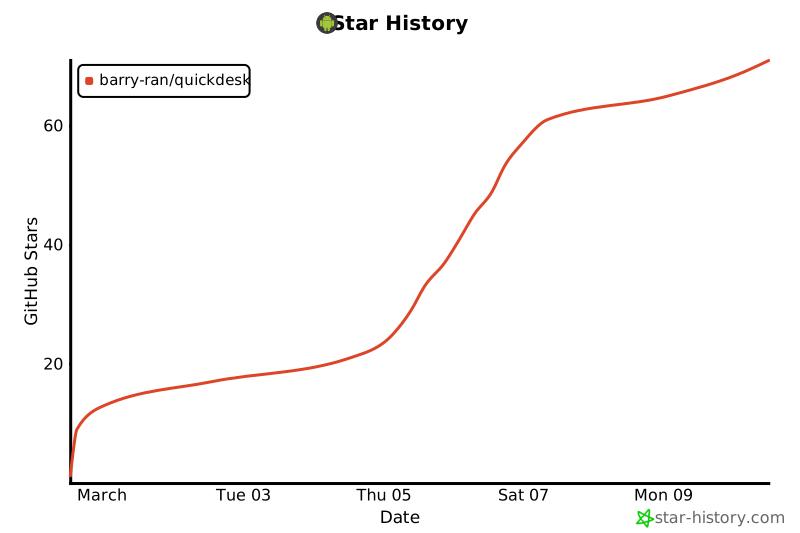
## Star History
[](https://star-history.com/#barry-ran/QuickDesk&Date)



