Content
# SpliceKit
[](https://github.com/elliotttate/SpliceKit/releases/latest)
[](LICENSE)
[](https://discord.com/invite/HD3FPc4Azu)
[](https://splicekit.fcp.cafe)
**Final Cut Pro, unlocked. A Command Palette, MCP server, and an open plugin framework to do almost anything.**
| 🎹 Command Palette | 🤖 MCP Server | 🧩 Plugin Framework |
|---|---|---|
| Hit `Cmd+Shift+P` and type what you want. Apple Intelligence runs it. | Any LLM can read and edit your timeline — and build new tools as it goes. | Every built-in feature is just an example plugin. You (or an AI) can ship more. |
> **Editor? Start here.** The [official SpliceKit site](https://splicekit.fcp.cafe) and the [FAQ](https://splicekit.fcp.cafe/faq/) are the friendliest way in. Questions, help, or feature requests? Join the SpliceKit channels on the [FCP Cafe Discord](https://discord.com/invite/HD3FPc4Azu). Bug reports: [open a GitHub issue](https://github.com/elliotttate/SpliceKit/issues).
>
> Can't wait to see what you do with it. 🥳
---
## The Three Pillars
### 🎹 1. The Command Palette
*One keystroke to anything.*
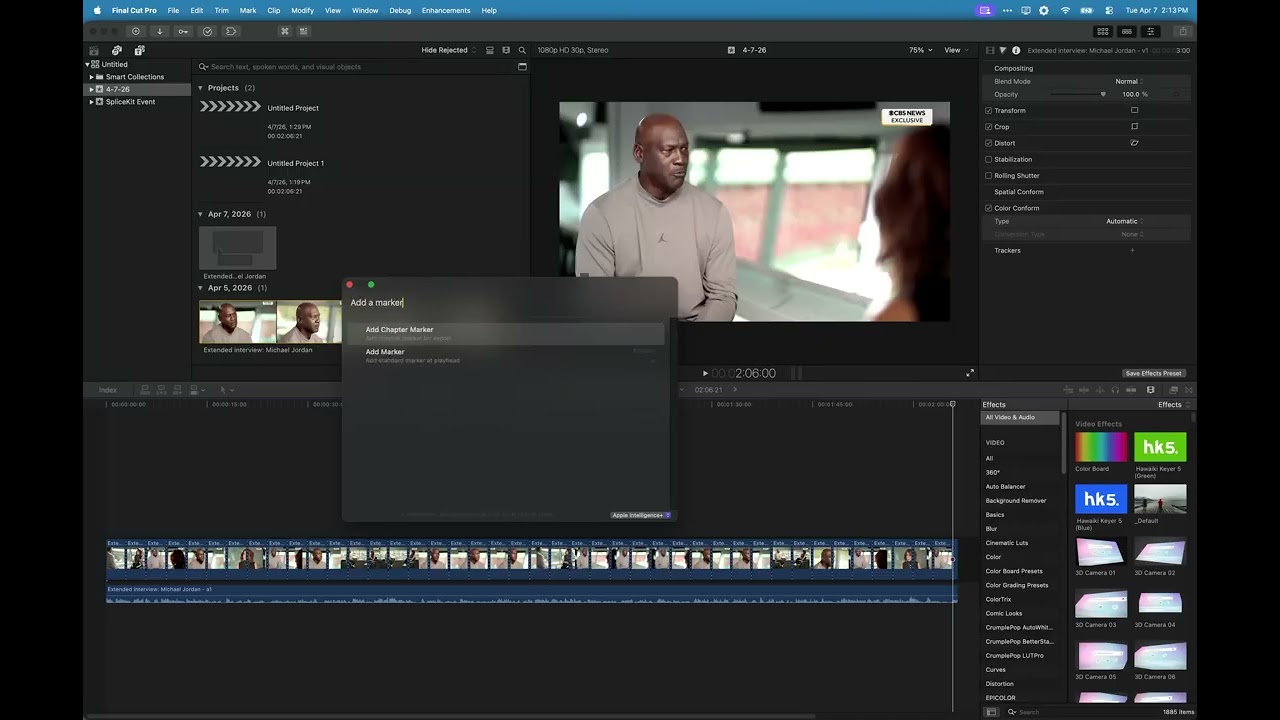
Hit **Cmd+Shift+P** inside the patched FCP. Fuzzy-search 100+ built-in editing actions — blade, trim, color, speed, markers, effects, transitions, export — or type plain English and let **Apple Intelligence** (on-device, private) figure out what you meant.
[](https://youtu.be/Q4GjHmmUISw)
#### Try saying…
- *"add markers every 5 seconds"*
- *"slow this clip to half speed"*
- *"blade at every scene change"*
- *"remove all the silences"*
- *"add a cross dissolve"*
> No more menu hunting. No more memorizing shortcuts. No cloud.
---
### 🤖 2. The MCP Server
*Claude (or any other LLM) can drive your editor — and teach it new tricks.*
SpliceKit ships with an MCP server that exposes ~200 tools covering every major FCP subsystem. Point **Claude Code**, **Claude Desktop**, or any MCP-compatible AI client at it and you can say things like:
- *"cut this 40-minute interview down to its best moments"*
- *"remove the silences from this podcast, add captions, and export"*
- *"assemble a rough cut from these clips, synced to the beat of this song"*
It's not a chat wrapper around keyboard shortcuts. The MCP talks to FCP's internal ObjC runtime directly — so it can read timeline state, inspect clips, blade, retime, color-correct, apply effects, and render without ever touching the UI.
#### The editor that gets smarter every week
The first time you ask for something complicated, the AI might be a little clumsy. It's improvising — stitching together primitives, trial-and-error against your timeline, occasionally picking the long way around.
When that happens, don't settle for the workaround. **Tell it to build the ability.**
| Step | What happens |
|---|---|
| **1. Ask** | You request something complex. The LLM improvises with the primitives it has. |
| **2. Build** | You say "make this a real command." Claude writes a plugin, registers a new MCP tool, and wires it into your editor. |
| **3. Reuse** | Next time — or the hundredth time after that — it's instant, reliable, and shared with everyone running the same plugin. |
> Every clumsy first attempt is a prompt to turn that workflow into a first-class feature. The editor you use six months from now is smarter than the one you installed today — and most of that improvement won't come from the SpliceKit team. It'll come from you, and from the community shipping plugins back.
---
### 🧩 3. The Plugin Framework
*Everything is a plugin.*
SpliceKit isn't a feature list — it's a platform. Once the SpliceKit dylib is loaded into Final Cut Pro, the entire ObjC runtime (78,000+ classes, including all private APIs) is open for plugins to use.
#### What a plugin can do
- Add new panels and windows inside FCP
- Put buttons on the toolbar, menu, or Enhancements menu
- Register commands in the Command Palette
- Expose new tools over the MCP server
- Hook into timeline events, selection changes, and playback
- Ship custom Motion templates, FxPlug effects, and Workflow Extensions
- Be written in Objective-C / C++, Swift, Lua, or Python
#### And you can ask an AI to build one
Describe what you want. Hand the spec to Claude. It writes the plugin against the SpliceKit framework — the project ships full API reference docs designed for AI consumption.
---
## Example Plugins (What Ships in the Box)
Every one of these is a plugin. They're bundled so you can use SpliceKit the day you install it, and they double as working examples for anyone building their own.
### Text-Based Editor
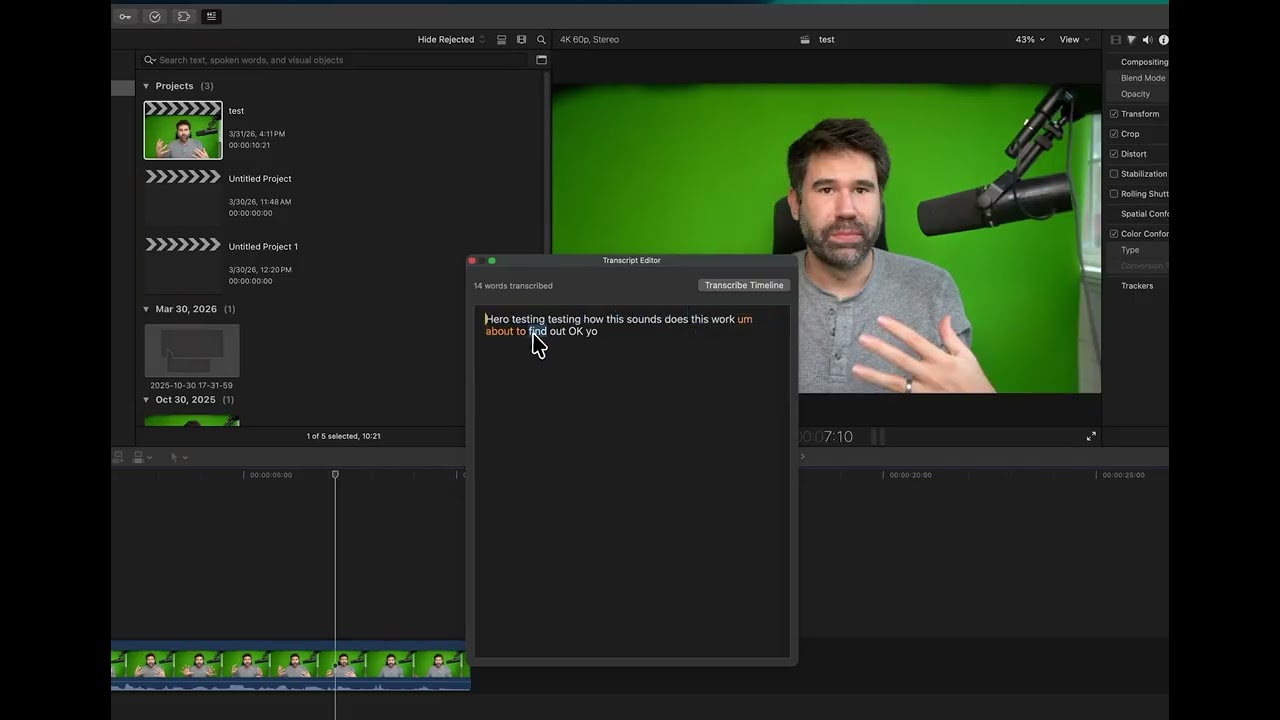
Transcribe every clip on your timeline with on-device speech recognition (NVIDIA Parakeet — 25 languages, no cloud, with speaker diarization). Click a word to jump there. Select a sentence, hit Delete, and the video gets cut to match. Drag words to reorder clips. Export as SRT or plain text.
[](https://www.youtube.com/watch?v=JxxDSH4Ly0I)
### Audio Mixer
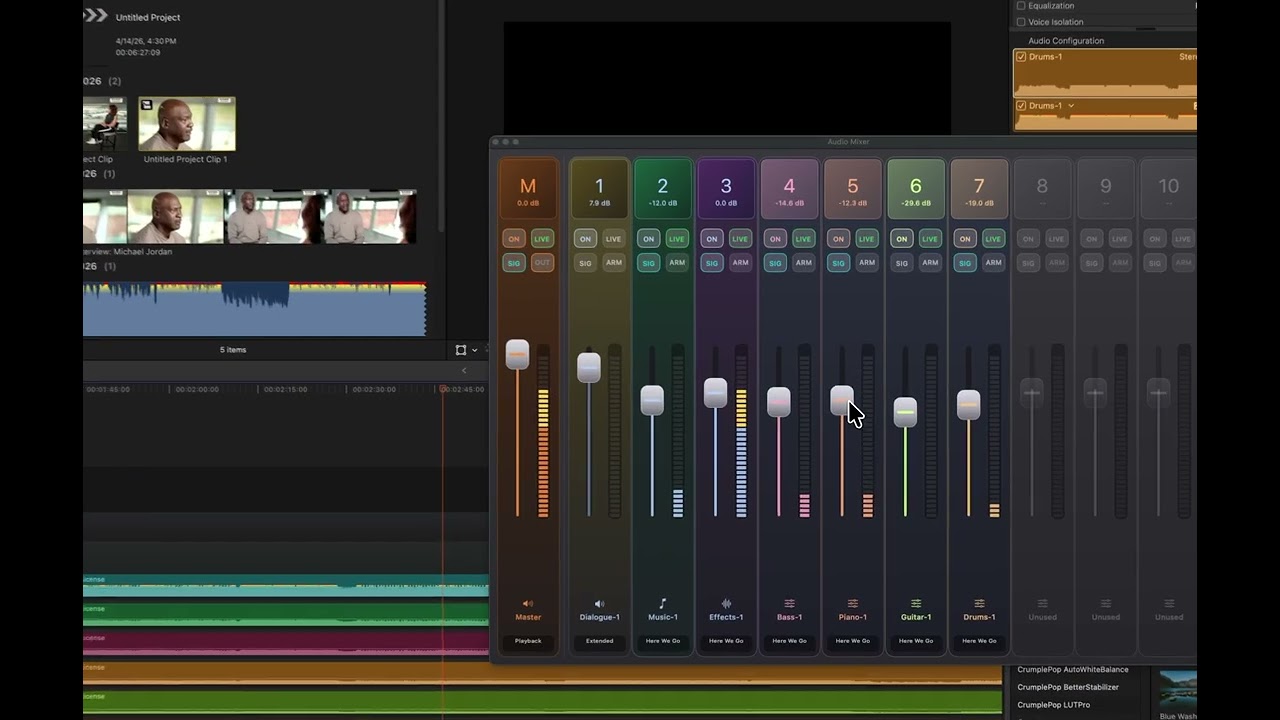
Mix by **role**, not clip-by-clip. Drop a compressor, EQ, or reverb on your Dialogue bus and every clip tagged Dialogue inherits it — past, present, and future. Retag a clip's role and it instantly picks up the new bus's processing. Set volumes, solo, and mute per role from one panel.
[](https://www.youtube.com/watch?v=k_HL35lXFOA)
### Sections
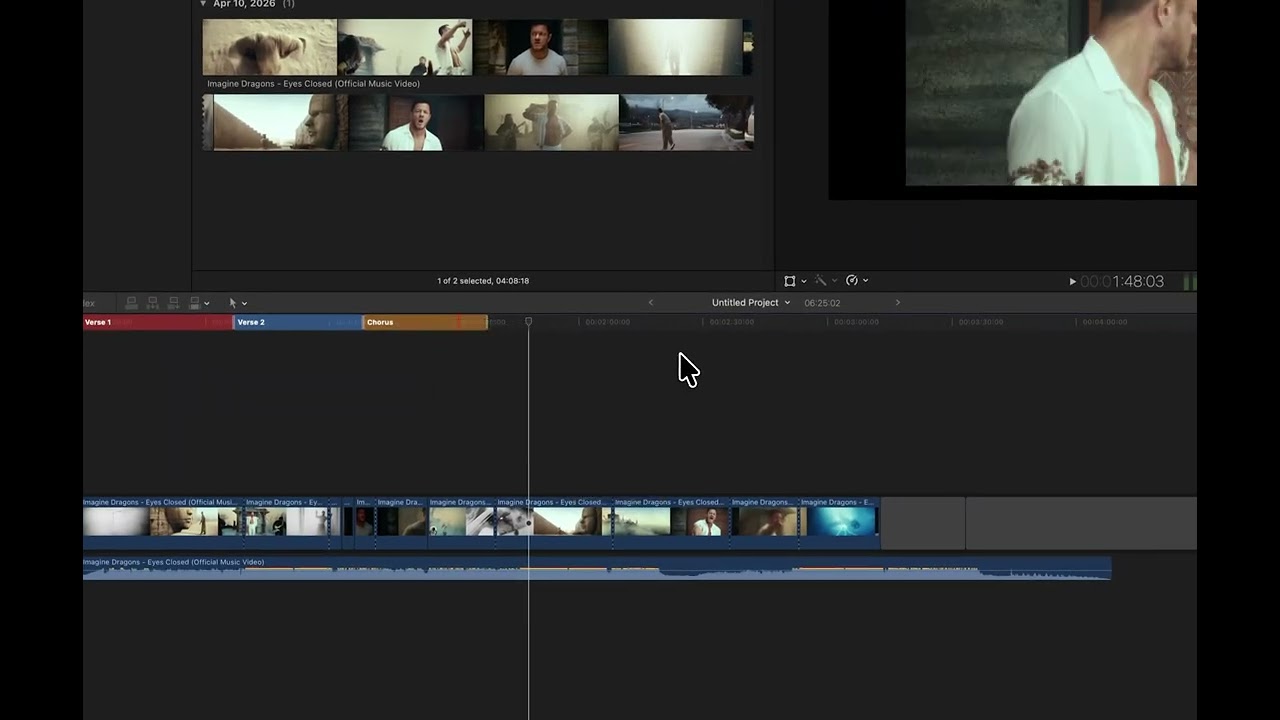
A color-coded section bar above the timeline that shows the shape of your edit at a glance. Name sections, color them, jump between them in one click — perfect for long-form edits, podcasts, multi-chapter projects, or anywhere you want to see structure without scrubbing.
[](https://youtu.be/plirvqHe6o0)
### Silence Remover
Point it at an interview or podcast recording and it finds and cuts every silent pause. Configurable threshold, minimum duration, and padding. Pure Apple-native AVFoundation + Accelerate under the hood.
### Social Media Captions
Generate word-by-word highlighted, animated captions in 13 built-in styles (Bold Pop, Neon Glow, Karaoke, Typewriter, Bounce, and more). Captions land directly on your timeline as editable Motion titles.
### Scene Detection
Finds every shot change in your footage using vImage histogram comparison. Add markers, blade the timeline, or both.
### Beat Detection & Song Cut
Pulls BPM, beats, bars, and song sections from any music file. Hand **Song Cut** a music track and a folder of footage and get back a beat-synced music video on your timeline, with selectable pacing (natural, medium, fast, aggressive) or custom step weights.
### LiveCam
A built-in webcam booth that records straight to your library or active timeline. Live preview with color adjustments, audio meter, and a subject-lift green-screen matte that works on people *and* objects (macOS 14+). Pick "Transparent" as the green-screen color and LiveCam writes ProRes 4444 with a real alpha channel.
### URL Import
Paste a YouTube, Vimeo, or Twitter link and pull it into your library as a real clip. Auto-discovers `yt-dlp` and `ffmpeg` from your shell PATH.
### Batch Export
One command, every clip on your timeline exports as its own file — all effects, color grades, and transitions baked in.
### Native BRAW and VP9 Support
Drop Blackmagic RAW (`.braw`) and VP9/WebM files straight onto your timeline — no transcoding, no wrappers, no third-party toolkit install. SpliceKit ships a BRAW RAW Processor and a VP9 decoder that plug into FCP through Apple's MediaExtension framework, so the clips show up as first-class media with thumbnails, scrubbing, and full quality decode. A huge unlock for anyone cutting Blackmagic camera footage or pulling down WebM video from the web.
### Dual Timelines, FlexMusic, Montage Maker, OpenTimelineIO exchange, Lua REPL, in-process debugger…
…and more. Every one of them is code in `Sources/` you can read, fork, or gut for parts.
---
## Install in 60 Seconds
The easiest path is the GUI patcher. Download the latest release, open it, click the button.
[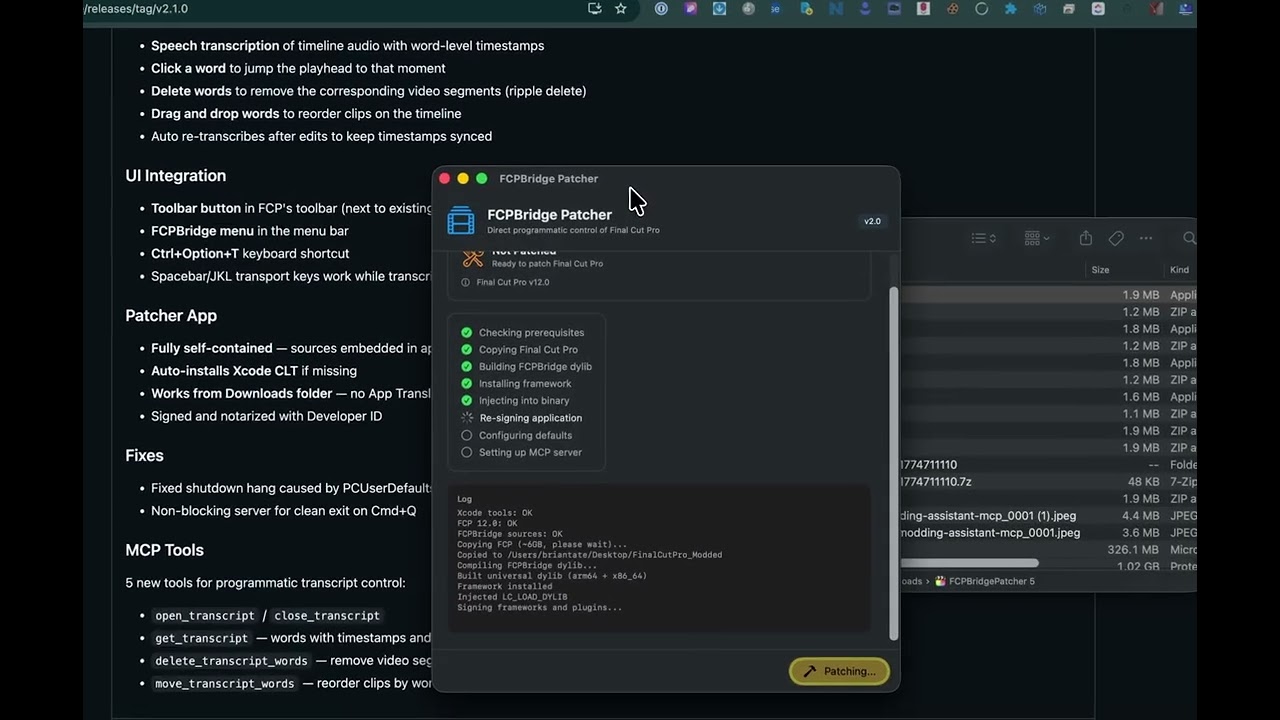](https://www.youtube.com/watch?v=NxbInKlXQVs)
1. Download **SpliceKit** from the [latest release](https://github.com/elliotttate/SpliceKit/releases/latest)
2. Unzip and open the app
3. Click **Patch** — it handles the rest
<img src="docs/patcher-screenshot.jpg" width="500" alt="SpliceKit Patcher">
The patcher copies Final Cut Pro to `~/Applications/SpliceKit/`, injects the SpliceKit dylib, re-signs it, and sets up the MCP server. **Your original Final Cut Pro is never touched.**
Once done, click **Launch FCP** in the patcher, or open the new copy from `~/Applications/SpliceKit/`. Press **Cmd+Shift+P** to open the Command Palette and you're off.
Prefer the terminal? `./patcher/patch_fcp.sh` does the same job.
---
## Connect It to Claude (or any MCP client)
The GUI patcher sets up the MCP server for you. If you skipped that step — or you're running from a repo checkout — here's the manual path.
### One-line setup
```bash
make mcp-setup
```
That creates an isolated Python virtualenv at `~/.venvs/splicekit-mcp` and installs the pinned dependencies from `mcp/requirements.txt`.
If you'd rather do it by hand:
```bash
python3 -m venv ~/.venvs/splicekit-mcp
~/.venvs/splicekit-mcp/bin/python -m pip install -r mcp/requirements.txt
```
### Verify everything is wired up
```bash
make mcp-doctor
```
Checks that the venv exists, `mcp` imports cleanly, `.mcp.json` points at the venv, and the FCP bridge is listening on `127.0.0.1:9876`.
### Point your MCP client at the server
Use the virtual environment's Python as the MCP `command`. The `args` path depends on how you installed SpliceKit:
**From a repo checkout:**
```json
{
"mcpServers": {
"splicekit": {
"command": "/Users/yourname/.venvs/splicekit-mcp/bin/python",
"args": ["/absolute/path/to/SpliceKit/mcp/server.py"]
}
}
}
```
**From the packaged installer:**
```json
{
"mcpServers": {
"splicekit": {
"command": "/Users/yourname/.venvs/splicekit-mcp/bin/python",
"args": ["/Applications/SpliceKit.app/Contents/Resources/mcp/server.py"]
}
}
}
```
The MCP server connects to the SpliceKit bridge running inside Final Cut Pro on `127.0.0.1:9876` — so the patched Final Cut Pro has to be running.
---
## Is This Safe? Is It Legal? Will Apple Ban Me?
Short answers: **Yes, it's safe. Yes, it's legal. No, Apple won't ban you.**
- **Your FCP stays untouched.** SpliceKit makes a *copy* in `~/Applications/SpliceKit/`. Your App Store FCP is never modified. Your libraries, projects, and media files are not touched by the install.
- **It's legal.** Reverse engineering for interoperability is explicitly protected under [DMCA §1201(f)](https://www.law.cornell.edu/uscode/text/17/1201) (US) and the EU Software Directive. SpliceKit is MIT licensed.
- **Apple doesn't ban Apple IDs for running modded local apps.** There's no precedent, and the mechanism (dyld injection + code signing) is the same one used by BetterTouchTool, Alfred, Hammerspoon, accessibility tools, and every Xcode debugger session.
- **The realistic risks** are that FCP updates can break compatibility (just re-patch) and that private APIs can behave unexpectedly in edge cases (Cmd+Z is your friend).
### Built to be stable
**SpliceKit is designed to be at least as stable as stock FCP — and in several places, measurably more.**
- **Fully reversible, any time.** SpliceKit never changes how FCP stores your projects, libraries, or media. Quit the patched copy whenever you want, open the exact same library in your vanilla App Store FCP, and keep editing with zero loss. Nothing is locked in, nothing is migrated.
- **Same safety level as any FXPlug 4 plugin — with more headroom.** SpliceKit plugins run at the same level of trust as Apple's own FXPlug system, and the architecture gives us more tools than FXPlug does. Expensive work runs on background threads, hot paths are explicitly designed not to contend, and state changes are guarded so plugins don't step on FCP's internals. Where an FXPlug plugin has to hope FCP recovers from a performance spike, SpliceKit is built to prevent the spike from happening in the first place.
- **SpliceKit actively fixes native FCP bugs.** A handful of long-standing issues in FCP are already patched in the modded copy, which means the patched build is measurably more stable than stock in those areas — [here's a video example](https://youtu.be/SNUpQvBef0k).
- **Automatic crash reporting is built in** (via Sentry) for both the patcher and the injected runtime, so anything unexpected surfaces immediately and gets turned around fast. Sharing logs in the [Discord](https://discord.com/invite/HD3FPc4Azu) or on [GitHub Issues](https://github.com/elliotttate/SpliceKit/issues) is still useful for extra context.
The full plain-English version is in [docs/WHAT_IS_SPLICEKIT.md](docs/WHAT_IS_SPLICEKIT.md).
---
## Building Plugins
If you're here to build things, this is the section for you.
### What's actually happening
SpliceKit injects a dynamic library into a re-signed copy of Final Cut Pro. Once loaded:
- The full ObjC runtime is exposed (78,000+ classes including all private APIs)
- A JSON-RPC 2.0 server listens on `127.0.0.1:9876`
- An MCP server translates tool calls into bridge RPCs
- Flexo, Ozone, TimelineKit, LunaKit, Helium, ProCore — all of FCP's internal frameworks — are reachable via direct `objc_msgSend`
- Crash points around CloudKit / ImagePlayground (which need entitlements a re-signed app doesn't have) are swizzled out
```
┌─────────────────────────────────────────────┐
│ Final Cut Pro (patched copy) │
│ ┌───────────────────────────────────────┐ │
│ │ SpliceKit.framework (LC_LOAD_DYLIB) │ │
│ │ ├── Command Palette │ │
│ │ ├── MCP / JSON-RPC server on :9876 │ │
│ │ ├── Plugin loader (hot-reload) │ │
│ │ └── your plugins here │ │
│ └───────────┬───────────────────────────┘ │
│ │ objc_msgSend │
│ ┌───────────▼───────────────────────────┐ │
│ │ Flexo / Ozone / TimelineKit / ... │ │
│ └───────────────────────────────────────┘ │
└──────────────────────┬──────────────────────┘
│ TCP :9876
┌──────────────▼──────────────┐
│ MCP server / Python REPL / │
│ nc / curl / Lua / your app │
└─────────────────────────────┘
```
### Ways to build
- **Native plugin** (ObjC / Swift / C++) — link against `SpliceKit.framework`, drop your dylib into the plugins folder, hot-load it with `debug.loadPlugin`. Examples in `Plugins/` and `Sources/`.
- **Lua, inside FCP** — Ctrl+Opt+L opens a REPL with an `sk` module. Drop `.lua` files into `~/Library/Application Support/SpliceKit/lua/auto/` for live coding. Full SDK in [docs/LUA_SDK_REFERENCE.md](docs/LUA_SDK_REFERENCE.md).
- **Python / any language with a TCP socket** — `python3 Scripts/splicekit_client.py` gives you an interactive runtime REPL. Or: `echo '{"jsonrpc":"2.0","method":"system.version","id":1}' | nc 127.0.0.1 9876`
- **MCP tools** — expose your plugin's capabilities as MCP tools and any AI client can drive them.
- **Ask an AI to build it** — the API reference in `docs/` is written to be AI-consumable. Describe what you want, hand the spec to Claude, and it can write the plugin for you.
- **Open a PR to SpliceKit itself** — if the thing you built is useful to other editors, send it upstream. The bundled "features" (Text-Based Editor, Silence Remover, LiveCam, Song Cut, etc.) all started as plugins. Fork the repo, drop your plugin in `Plugins/` or `Sources/`, and open a [pull request](https://github.com/elliotttate/SpliceKit/pulls) — community plugins are how SpliceKit grows.
### Key FCP internals worth knowing
| Class | Methods | Purpose |
|-------|---------|---------|
| `FFAnchoredTimelineModule` | 1435 | Primary timeline controller |
| `FFAnchoredSequence` | 1074 | Timeline data model |
| `FFLibrary` / `FFLibraryDocument` | 203 / 231 | Library management |
| `FFEditActionMgr` | 42 | Edit command dispatcher |
| `FFPlayer` | 228 | Playback engine |
| `PEAppController` | 484 | App controller |
| Prefix | Framework | Classes |
|--------|-----------|---------|
| FF | Flexo — core engine, timeline, editing | 2849 |
| OZ | Ozone — effects, compositing, color | 841 |
| PE | ProEditor — app controller, windows | 271 |
| LK | LunaKit — UI framework | 220 |
| TK | TimelineKit — timeline UI | 111 |
| IX | Interchange — FCPXML import/export | 155 |
### Build from source
```bash
git clone https://github.com/elliotttate/SpliceKit.git
cd SpliceKit
make all && make deploy
```
### Documentation map
- [`docs/WHAT_IS_SPLICEKIT.md`](docs/WHAT_IS_SPLICEKIT.md) — the plain-English tour
- [`docs/FCP_API_REFERENCE.md`](docs/FCP_API_REFERENCE.md) — full API reference for FCP internals
- [`docs/COMMAND_PALETTE_GUIDE.md`](docs/COMMAND_PALETTE_GUIDE.md) — Command Palette & Apple Intelligence
- [`docs/LUA_SDK_REFERENCE.md`](docs/LUA_SDK_REFERENCE.md) · [`docs/LUA_SCRIPTING_GUIDE.md`](docs/LUA_SCRIPTING_GUIDE.md) — Lua plugin scripting
- [`docs/TRANSCRIPT_EDITING_GUIDE.md`](docs/TRANSCRIPT_EDITING_GUIDE.md) — the Text-Based Editor plugin
- [`docs/FXPLUG_PLUGIN_GUIDE.md`](docs/FXPLUG_PLUGIN_GUIDE.md) — FxPlug 4 plugin dev
- [`docs/WORKFLOW_EXTENSIONS_GUIDE.md`](docs/WORKFLOW_EXTENSIONS_GUIDE.md) — Workflow Extensions
- [`docs/DEBUG_TOOLS_GUIDE.md`](docs/DEBUG_TOOLS_GUIDE.md) — in-process debugging, tracing, hot-loading
- [`docs/RUNTIME_INTROSPECTION_GUIDE.md`](docs/RUNTIME_INTROSPECTION_GUIDE.md) — ObjC runtime exploration
- [`docs/FCPXML_FORMAT_REFERENCE.md`](docs/FCPXML_FORMAT_REFERENCE.md) — FCPXML format
- [`docs/SCENE_BEAT_DETECTION_GUIDE.md`](docs/SCENE_BEAT_DETECTION_GUIDE.md) · [`docs/FLEXMUSIC_AND_MONTAGE_GUIDE.md`](docs/FLEXMUSIC_AND_MONTAGE_GUIDE.md) — detection & montage plugins
---
## Community
- **Questions, help, feature requests**: [FCP Cafe Discord](https://discord.com/invite/HD3FPc4Azu) (SpliceKit channels)
- **Bug reports**: [GitHub Issues](https://github.com/elliotttate/SpliceKit/issues)
- **Features, videos, FAQ**: [splicekit.fcp.cafe](https://splicekit.fcp.cafe)
There's a long tradition of community modding projects getting adopted back into the official products they extend. If SpliceKit helps push Final Cut Pro forward, everyone wins.
---
## License
[MIT](LICENSE). Use it, modify it, ship your own plugins with it.
Onwards & upwards 🥳



