Content
# DeepCurrent MCP
[](https://cursor.com/en/install-mcp?name=deepcurrent-cloud&config=eyJ1cmwiOiJodHRwczovL21jcC5kZWVwY3VycmVudC5hcHAvbWNwIiwiaGVhZGVycyI6eyJYLUFQSS1LZXkiOiJkY19ZT1VSX0FQSV9LRVkifX0%3D)
[](https://deepcurrent.app)
[](https://dashboard.deepcurrent.app)
[](./LICENSE)
[](https://github.com/Ulmo-AI/DeepCurrent/stargazers)
DeepCurrent gives AI agents a **web3-native growth intelligence engine**: discover high-fit users, builders, KOLs, projects, investors, communities, and market signals, then turn them into evidence-backed next actions.
It is built for founders, growth teams, researchers, business development teams, funds, ecosystem teams, and technical builders who need to move from "what is happening in web3?" to "who should we talk to, why, and what should happen next?"
This repo contains the open-source **local MCP server** for bring-your-own-data connectors and optional DeepCurrent Cloud access. For the fastest setup and the most powerful workflows, connect to the hosted DeepCurrent Cloud MCP gateway.
## What DeepCurrent Unlocks
- **Telegram-native growth intelligence:** find prospects in target groups, monitor pain and intent, detect competitor displacement, and expand KOL audiences from high-signal communities.
- **Evidence-backed lead discovery:** rank people, projects, builders, KOLs, funds, and communities with fit reasons, confidence, evidence snippets, and recommended next actions.
- **Web3 research workflows:** enrich companies, projects, people, wallets, funding context, ecosystem roles, and relationship paths from DeepCurrent intelligence surfaces.
- **DeepDive execution planning:** resolve an outcome, quote the work, run the plan, and retrieve structured results through one agent-friendly tool chain.
- **Local bring-your-own-data connectors:** keep user-owned files, keys, and community connectors on your machine while still using Cloud tools when you provide an API key.
DeepCurrent does not dump raw social data into a model. It returns transformed, decision-ready outputs: ranked candidates, signals, evidence, confidence, risk flags, and recommended next steps such as observe, enrich, watchlist, human review, or outreach handoff.
## Fastest Setup
### Hosted MCP: No Local Install
Use this if your MCP client supports remote Streamable HTTP servers.
[](https://cursor.com/en/install-mcp?name=deepcurrent-cloud&config=eyJ1cmwiOiJodHRwczovL21jcC5kZWVwY3VycmVudC5hcHAvbWNwIiwiaGVhZGVycyI6eyJYLUFQSS1LZXkiOiJkY19ZT1VSX0FQSV9LRVkifX0%3D)
After installing, replace the placeholder `dc_YOUR_API_KEY` with your DeepCurrent API key.
Manual config:
```json
{
"mcpServers": {
"deepcurrent-cloud": {
"url": "https://mcp.deepcurrent.app/mcp",
"headers": {
"X-API-Key": "dc_YOUR_API_KEY"
}
}
}
}
```
The hosted gateway exposes the official Cloud-backed tool set. It is best for managed data, credits, premium workflows, and no local Python setup.
### Local MCP: Bring Your Own Data
Use this if you want local connectors, local files, user-owned API keys, or strict data residency. The local server runs over STDIO by default, which is what most desktop and CLI MCP clients expect.
```bash
git clone https://github.com/Ulmo-AI/DeepCurrent.git
cd DeepCurrent
python3 -m venv .venv
source .venv/bin/activate # Windows: .venv\Scripts\activate
pip install .
deepcurrent-local-mcp
```
Verify the package before adding it to a client:
```bash
.venv/bin/python -c "import deepcurrent_local_mcp; print('ok')"
```
## Client Setup
| Client | Best path | Notes |
| --- | --- | --- |
| Cursor | Hosted install button or manual `mcp.json` | Edit the placeholder API key after install. |
| Claude Code | `claude mcp add` | Supports stdio and HTTP servers. |
| Claude Desktop | Manual config | Best for local stdio today. |
| OpenAI Codex | `codex mcp add` or `config.toml` | Supports stdio and remote HTTP config. |
| OpenClaw | Manual gateway config | Use the local stdio server path. |
| Smithery | Planned distribution path | Hosted listing or local desktop bundle, depending on auth and packaging. |
<details>
<summary>Cursor manual setup</summary>
Cursor config locations:
- Project: `.cursor/mcp.json`
- User/global: `~/.cursor/mcp.json` (Windows: `%USERPROFILE%\.cursor\mcp.json`)
Hosted:
```json
{
"mcpServers": {
"deepcurrent-cloud": {
"url": "https://mcp.deepcurrent.app/mcp",
"headers": {
"X-API-Key": "dc_YOUR_API_KEY"
}
}
}
}
```
Local:
```json
{
"mcpServers": {
"deepcurrent": {
"command": "/absolute/path/to/deepcurrent-local-mcp",
"args": [],
"env": {
"DEEPCURRENT_API_KEY": "dc_YOUR_API_KEY"
}
}
}
}
```
</details>
<details>
<summary>Claude Code and Claude Desktop</summary>
Claude Code local stdio:
```bash
claude mcp add --transport stdio --env DEEPCURRENT_API_KEY=dc_YOUR_API_KEY deepcurrent -- /absolute/path/to/deepcurrent-local-mcp
```
Claude Code hosted HTTP:
```bash
claude mcp add --transport http deepcurrent-cloud https://mcp.deepcurrent.app/mcp --header "X-API-Key: dc_YOUR_API_KEY"
```
Claude Desktop config:
```json
{
"mcpServers": {
"deepcurrent": {
"command": "/absolute/path/to/deepcurrent-local-mcp",
"args": [],
"env": {
"DEEPCURRENT_API_KEY": "dc_YOUR_API_KEY"
}
}
}
}
```
Claude Desktop config locations:
- macOS: `~/Library/Application Support/Claude/claude_desktop_config.json`
- Windows: `%APPDATA%\Claude\claude_desktop_config.json`
</details>
<details>
<summary>OpenAI Codex and OpenClaw</summary>
Codex local stdio:
```bash
codex mcp add deepcurrent --env DEEPCURRENT_API_KEY=dc_YOUR_API_KEY -- /absolute/path/to/deepcurrent-local-mcp
```
Codex hosted HTTP in `~/.codex/config.toml`:
```toml
[mcp_servers.deepcurrent-cloud]
url = "https://mcp.deepcurrent.app/mcp"
env_http_headers = { "X-API-Key" = "DEEPCURRENT_API_KEY" }
```
OpenClaw local gateway config:
```json5
{
mcp: {
servers: {
deepcurrent: {
command: "/absolute/path/to/deepcurrent-local-mcp",
args: [],
env: {
DEEPCURRENT_API_KEY: "dc_YOUR_API_KEY",
DEEPCURRENT_API_URL: "https://api.deepcurrent.app",
},
},
},
},
}
```
</details>
## Local Install Details
### Requirements
- Python 3.11, 3.12, or 3.13 recommended
- Python 3.14 is not recommended yet for local MCP testing because of current dependency issues seen during QA
### From Source
```bash
git clone https://github.com/Ulmo-AI/DeepCurrent.git
cd DeepCurrent
python3 -m venv .venv
source .venv/bin/activate # Windows: .venv\Scripts\activate
pip install .
```
Run:
```bash
deepcurrent-local-mcp
```
Use `cd` into whichever directory your clone created that contains this repo’s `pyproject.toml` (folder name may differ if you use a fork or mirror).
Verify the package is installed before MCP Inspector, Cursor, or any client that spawns the stdio binary:
```bash
.venv/bin/python -c "import deepcurrent_local_mcp; print('ok')"
```
If you see `ModuleNotFoundError: No module named 'deepcurrent_local_mcp'`, the project is not on that interpreter’s `sys.path`. From the repo root, run `pip install .` (or `poetry install`) using **this** venv’s `pip`.
**Editable install on macOS + Python 3.14+:** `pip install -e .` writes a `*.pth` file under `site-packages`. If that file has the **hidden** file flag, CPython’s `site` module **skips** it and the package still won’t import. Fix one of: use a normal install `pip install .` (recommended for local MCP), or run `chflags nohidden .venv/lib/python3.*/site-packages/deepcurrent_local_mcp.pth` (adjust the `python3.*` folder to match your venv), then re-run the one-liner above.
### Poetry for Contributors
```bash
poetry install
poetry run deepcurrent-local-mcp
```
### Cloud API Key
You can use community bring-your-own-data tools with **no DeepCurrent account**.
To enable official DeepCurrent Cloud tools, set:
```bash
export DEEPCURRENT_API_KEY="dc_..."
export DEEPCURRENT_API_URL="https://api.deepcurrent.app" # optional override
```
Optional config file (env vars override file values):
- `~/.config/deepcurrent/local-mcp.json`
- `~/.deepcurrent/local-mcp.json`
Example:
```json
{
"api_url": "https://api.deepcurrent.app",
"api_key": "dc_..."
}
```
## Finding the Local Executable
Most MCP clients need an **absolute path** to the executable because they do not load your shell `PATH`.
Find the path:
```bash
# macOS / Linux
which deepcurrent-local-mcp
# Windows (PowerShell)
where deepcurrent-local-mcp
```
Replace `/absolute/path/to/deepcurrent-local-mcp` in the examples below. After editing client config, **fully restart the client** (not only reload window) so the MCP process starts cleanly.
## Optional: Local Streamable HTTP
For local integration tests or a trusted LAN, you can run HTTP on loopback (do not expose to the public internet with a single shared `DEEPCURRENT_API_KEY`).
```bash
export DEEPCURRENT_MCP_TRANSPORT=http
export DEEPCURRENT_MCP_HTTP_HOST=127.0.0.1
export DEEPCURRENT_MCP_HTTP_PORT=8009
export DEEPCURRENT_MCP_HTTP_PATH=/mcp
deepcurrent-local-mcp
```
Point clients that support MCP over HTTP at `http://127.0.0.1:8009/mcp` (or your chosen path/port).
## Hosted vs Local
Hosted Cloud is the premium path for managed intelligence, credits, hosted bundle workflows, Telegram growth intelligence, and production result UX.
Local MCP is the open-source bring-your-own-data path. It gives you local connectors, local files, local execution, and an optional bridge to DeepCurrent Cloud when you configure `DEEPCURRENT_API_KEY`.
Some multi-step workflows run only in hosted DeepCurrent because they depend on managed Cloud execution and result history. Local tools still include intelligence, DeepDive, credits, result helpers, and bring-your-own-data connectors when an API key is configured.
## Tool Trust Levels
Tool responses include a source label so users can tell whether a result came from DeepCurrent Cloud, a reviewed local connector, or a community connector.
Trust model:
- Community and certified connectors run locally and keep your data on your machine.
- Official tools are a thin local wrapper that calls DeepCurrent Cloud for curated intelligence and paid unlocks.
- Hosted deployments (if used) should expose official tools only (no arbitrary community code execution on DeepCurrent infrastructure).
- Outputs are bounded by default (avoid dumping huge record sets into model context).
### Badge ladder
- `community`: local-only, unreviewed connectors that use user-owned data or keys
- `certified`: local-only, reviewed connectors with stable schemas and bounded outputs
- `official`: Cloud-backed tools operated by DeepCurrent and eligible for paid credits
## Tool surface (current)
Official (cloud-backed when an API key is configured):
- `connect_deepcurrent_cloud`
- `get_credit_status`
- `claim_growth_credits`
- `resolve_deepdive_outcome`
- `quote_deepdive_plan`
- `run_deepdive_plan`
- `get_deepdive_plan_status`
- `resolve_intelligence_intent`
- `preview_quote_intelligence_package`
- `quote_intelligence_package`
- `execute_intelligence_package`
- `fetch_intelligence_result`
- `expand_intelligence_package`
- `fetch_result_summary`
- `fetch_result_artifact`
Community (bring-your-own-data):
- `list_byod_connectors`
- `run_byod_connector`
## How agents should use it
- Start with `resolve` to clarify the requested outcome before spending credits.
- Use `preview_quote` / `quote` before any paid or proprietary action.
- Use `execute` to get curated results.
- To request a custom intelligence amount, quote again with `slots.limit` set to the requested count. When refining a previous quote, pass `anchor_quote_token` so the backend preserves the prior context.
- To request new results only, quote again with `slots.exclude_previously_delivered = true`; combine it with `slots.limit` when the user asks for a specific new-result count.
- Use `expand` only after quoting an expansion. Pass the `expansion_type` returned by the result's available expansions, such as `contact_unlock`, `increase_limit`, `show_people_at_entity`, `show_investors_for_company`, or `wallet_activity_snapshot`.
- For lead enrichment and DeepDive workflows, use the DeepDive tools (`resolve_deepdive_outcome` → `quote_deepdive_plan` → `run_deepdive_plan`, then `get_deepdive_plan_status` as needed).
For plan details and pricing, use the Cloud landing page: `https://deepcurrent.app`.
## Smithery
Smithery is planned as a distribution path for users who want marketplace-style installation and configuration.
- Hosted server path: publish `https://mcp.deepcurrent.app/mcp` once auth and scanning are ready for the Smithery flow.
- Local stdio path: publish a desktop bundle when we want one-click local installation across supported desktop clients.
Until then, use the hosted Cursor install button or the manual client configs above.
## Testing & QA
- **`bash scripts/qa_mcp.sh`** — `compileall` on `src` plus `pytest`.
- **`bash scripts/inspector_smoke.sh`** — one `tools/call` to `list_byod_connectors` via MCP Inspector **CLI** (uses an absolute path to the venv binary).
- **Manual MCP client QA:** run Inspector or your target client against the absolute path to `.venv/bin/deepcurrent-local-mcp`, then call `tools/list` and `connect_deepcurrent_cloud` if an API key is configured.
## Troubleshooting
- `**command` not found:** Use the full path from `which` / `where`, not a shell alias.
- **No cloud tools / auth errors:** Set `DEEPCURRENT_API_KEY` in the MCP entry `env` block (or your client’s secret mechanism), not in chat.
- **Client does not see changes:** Quit and relaunch the host app; MCP is usually started once at startup.
- **Too many tools:** Some clients have practical limits on total MCP tools across servers; split optional servers or disable unused ones.
## Telemetry (on by default, opt out)
```bash
export DEEPCURRENT_TELEMETRY=0
```
Telemetry is **metadata only** (event name, tool name, status, latency). It never includes tool inputs/outputs or API keys.
## Smithery Dev
- `smithery.yaml` (Python runtime)
- `pyproject.toml` `[tool.smithery]` server entrypoint
```bash
poetry run dev
poetry run playground
```
## Security
- Never paste your API key into chat messages or tool arguments.
- Prefer MCP client `env` (or TOML `env` / `env_vars`) for secrets.
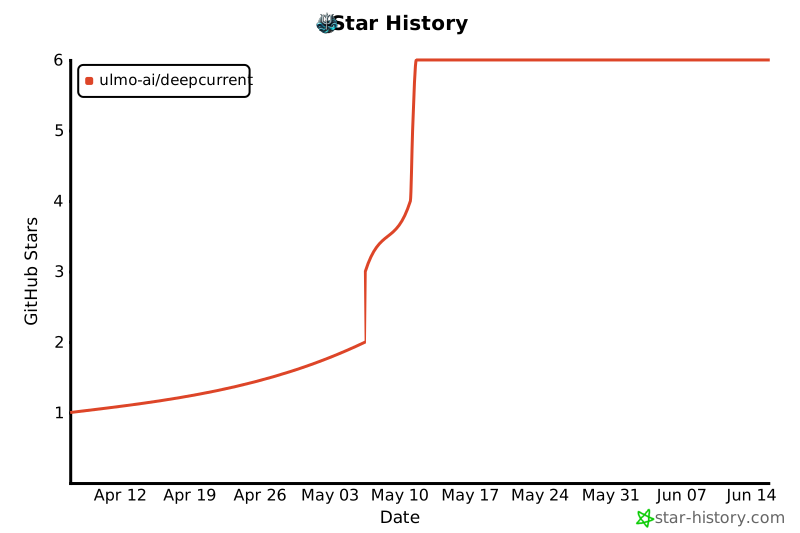
## Star History
[](https://www.star-history.com/#Ulmo-AI/DeepCurrent&Date)
## Contributing
See `CONTRIBUTING.md` for adding connectors, badges, and review expectations.



