Content
<div align="center">
# Kagi Session2API MCP Server
**Free Kagi Search MCP server — session tokens, no API key needed**
[](https://pypi.org/project/kagi-session2api-mcp/)
[](https://pypi.org/project/kagi-session2api-mcp/)
[](https://github.com/KSroido/Kagi-Session2API-MCP/stargazers)
[](LICENSE)
[](https://python.org/)
**[English](README.md)** | [中文文档](README_ZH.md)
</div>
---
> Access Kagi search and summarizer via session tokens — completely free. Works with Claude Desktop, Cursor, Windsurf, Cline, Hermes and any MCP-compatible AI coding assistant/agent.
## ⭐ Star History
[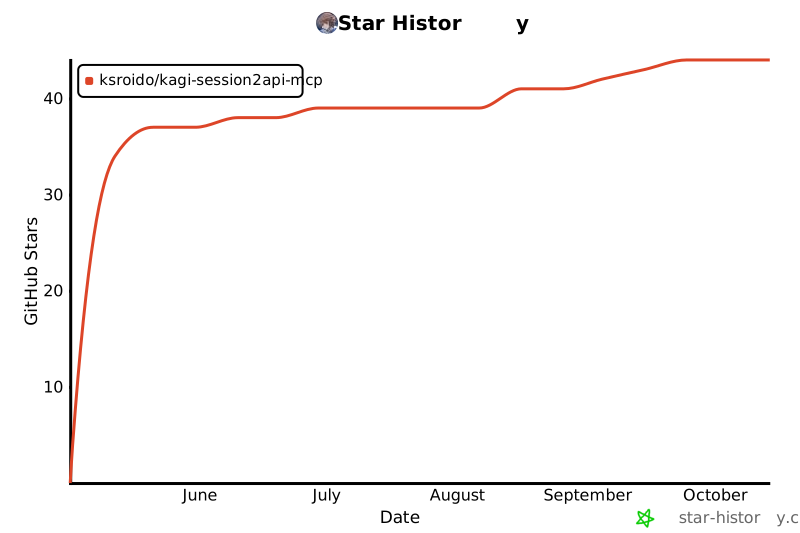](https://star-history.com/#KSroido/Kagi-Session2API-MCP&Date)
> **⚠️ EndUser Warning**: This project uses Kagi session tokens to access search and summarizer features without the official paid API. This may violate [Kagi's Terms of Service](https://kagi.com/terms). Potential consequences include account suspension or permanent ban. **Use at your own risk.** The authors assume no liability for any account actions taken by Kagi.
>
> **⚠️ Security Warning**: Your Kagi session token provides full account access. Treat it like a password. Never share it or commit it to version control.
## 🌟 Features
- **Session-based access**: Uses Kagi session tokens instead of the official API ($25/1000 queries) — completely free
- **Multi-token pool**: Configure multiple tokens for higher throughput with round-robin rotation
- **Per-token rate limiting**: 5 req/s per token with token bucket algorithm
- **API-compatible output**: Returns results in the same format as the official `kagimcp`
- **Two tools**: `kagi_search_fetch` (web search) and `kagi_summarizer` (URL summarization)
- **Firefox UA spoofing**: Mimics a real Firefox browser for session-based access
- **Auto-disable expired tokens**: Expired tokens are automatically detected and skipped
- **Search operators**: Supports Kagi operators (`site:`, `lang:`, `filetype:`, etc.)
## Compatible Platforms
Works with any MCP-compatible client:
- [Claude Desktop](https://claude.ai/desktop)
- [Cursor](https://cursor.sh)
- [Windsurf](https://codeium.com/windsurf)
- [Cline](https://cline.bot)
- [Hermes Agent](https://github.com/nousresearch/hermes)
- Any MCP client supporting `stdio` or `HTTP` transport
## Quick Install (For AI Agents)
Just paste this prompt to your AI agent:
```
Install the Kagi Session2API MCP server from https://pypi.org/project/kagi-session2api-mcp/.
Then add it to my MCP:
`uvx kagi-session2api-mcp`
set env KAGI_SESSION_TOKEN to my token (ask me if you don't have it).
If I have multiple tokens, use KAGI_SESSION_TOKENS (comma-separated) instead,
or create a config file at ~/.config/kagi-session2api-mcp/config.toml with:
[kagi]
session_tokens = ["TOKEN_1", "TOKEN_2"]
summarizer_engine = "cecil"
[client]
timeout = 30
max_retries = 2
and set env KAGI_SESSION_CONFIG to that path.
```
## Install Manually
```bash
pip install kagi-session2api-mcp
```
Or with `uvx`:
```bash
uvx kagi-session2api-mcp
```
## Configuration
### Option 1: Environment Variable (Single Token)
```json
{
"mcpServers": {
"kagi-session": {
"command": "uvx",
"args": ["kagi-session2api-mcp"],
"env": {
"KAGI_SESSION_TOKEN": "YOUR_SESSION_TOKEN_HERE"
}
}
}
}
```
### Option 2: Environment Variable (Multiple Tokens)
```json
{
"mcpServers": {
"kagi-session": {
"command": "uvx",
"args": ["kagi-session2api-mcp"],
"env": {
"KAGI_SESSION_TOKENS": "TOKEN_1,TOKEN_2,TOKEN_3"
}
}
}
}
```
### Option 3: Config File (Recommended for Multi-Token)
Create `~/.config/kagi-session2api-mcp/config.toml`:
```toml
[kagi]
session_tokens = [
"YOUR_TOKEN_1_HERE",
"YOUR_TOKEN_2_HERE",
]
summarizer_engine = "cecil"
[client]
timeout = 30
max_retries = 2
```
Then configure:
```json
{
"mcpServers": {
"kagi-session": {
"command": "uvx",
"args": ["kagi-session2api-mcp"],
"env": {
"KAGI_SESSION_CONFIG": "/path/to/config.toml"
}
}
}
}
```
## Getting Your Session Token
1. Log in to [kagi.com](https://kagi.com)
2. Go to **Settings → Account → Session Link**
3. Copy the token from the session URL: `https://kagi.com/search?token={THIS_PART}&q=test`
4. Use this token in your configuration
## Usage
### MCP Tools
#### `kagi_search_fetch`
Search the web using Kagi:
```
Search for "Python async tutorial"
```
Supports Kagi search operators:
- `site:github.com` - Restrict to domain
- `-site:reddit.com` - Exclude domain
- `filetype:pdf` - File type filter
- `intitle:python` - Title filter
- `lang:zh` - Language filter
- `before:2024-01-01` / `after:2024-01-01` - Date filters
- `"exact phrase"` - Exact match
#### `kagi_summarizer`
Summarize any URL:
```
Summarize https://example.com/article
```
Options:
- `summary_type`: "summary" (prose) or "takeaway" (bullet points)
- `engine`: "cecil" (default), "agnes", "daphne", "muriel"
- `target_language`: Language code (e.g., "EN")
> ⚠️ The summarizer is experimental — it uses Kagi's internal endpoint which may change.
### Transport Modes
**Stdio** (default, for Claude Desktop):
```bash
kagi-session2api-mcp
```
**HTTP** (for remote access):
```bash
kagi-session2api-mcp --http --host 0.0.0.0 --port 8000
```
## Architecture
```
MCP Client → FastMCP Server → TokenPool (round-robin) → httpx.AsyncClient → kagi.com
↓
TokenBucket (5 req/s per token)
↓
Auto-disable expired tokens
```
## Token Pool Behavior
| Config | Rate Limit | Effective Rate |
|--------|-----------|----------------|
| 1 token | 5 req/s | 5 req/s |
| 2 tokens | 5 req/s each | 10 req/s |
| N tokens | 5 req/s each | 5×N req/s |
When a token expires (detected via 401/403 or redirect to login), it is automatically disabled. Remaining tokens continue serving requests.
## Differences from Official `kagimcp`
| Aspect | Official `kagimcp` | `kagi-session2api-mcp` |
|--------|-------------------|-------------------|
| Authentication | API key ($25/1000) | Session token (free) |
| Search endpoint | `/api/v0/search` | `/html/search` (HTML scraping) |
| Summarizer | `/api/v0/summarize` | `/mother/summary_labs` (internal) |
| Rate limiting | Server-side | Client-side (token bucket) |
| `api_balance` | Returns balance | Always `null` |
| Cost | Paid | Free (uses existing session) |
## Thank you!
Star this repo if you feel it useful, that would help me a lot :)
## License
MIT
 MCP Store
