

Content
<div align="center">
# TeleBot Studio MCP
**Ground your AI in official docs. Let it manage your bots.**
[](https://python.org)
[](LICENSE)
[](https://modelcontextprotocol.io)
[](https://github.com/jlowin/fastmcp)
[]()
A production-ready MCP server with two engines:
1. **documentation search** — BM25-ranked search across official TeleBot Studio docs. Zero embeddings. Zero external APIs. Works offline.
2. **bot management** — full REST API integration. Create, configure, and control your TeleBot Studio bots from any MCP-compatible AI client.
[quick start](#quick-start) · [getting api credentials](#getting-your-telebotstudio-api-credentials) · [tools](#mcp-tools-26) · [architecture](#architecture) · [deployment](#deployment) · [security](#security--privacy)
</div>
---
## why this exists
LLMs hallucinate API specifics. When you ask an LLM about TeleBot Studio, it guesses based on stale training data — wrong function signatures, invented parameters, outdated patterns. This is **documentation drift**: the gap between what the AI says and what the docs actually specify.
TeleBot Studio MCP closes that gap two ways:
- **documentation tools** ground your AI in official docs. If the answer isn't in the corpus, the server returns nothing — no phantom functions, no invented APIs.
- **API tools** let your AI *do things* — create bots, write commands, start and stop them — through the official TeleBot Studio REST API v2.
The result: an AI assistant that both *knows* the platform and can *act on it*.
---
## features
| | what you get |
|:---|:---|
| **documentation** | BM25 full-text search, heading-aware chunking, unigram + bigram tokenization, 5 scoped search modes, LRU caching, 100% offline |
| **bot management** | create / delete / update bots, create / update / delete / list commands, start / stop / restart bots |
| **agent pipeline** | Planner → Validator → Preview → Executor for multi-step operations like full bot deployment |
| **batch operations** | bulk create or delete commands with per-step success/failure reporting |
| **safety** | preview-before-execute for destructive ops, session-scoped credentials (never persisted), token masking |
| **server** | FastMCP, STDIO + HTTP/streamable-http transports, `/health` endpoint, thread-safe sessions, retry with backoff |
---
## quick start
### prerequisites
- Python 3.9+
- pip
- A [TeleBot Studio](https://telebotstudio.com) account (for API tools — documentation tools work without one)
### install
```bash
git clone https://github.com/harshi79/telebotstudio-mcp.git
cd telebotstudio-mcp
python -m venv venv
source venv/bin/activate # Windows: .\venv\Scripts\Activate.ps1
pip install -r requirements.txt
```
### verify the index
```bash
python build_index.py --validate
```
This builds the BM25 index from the `docs/` directory and checks all chunks for issues. You should see something like:
```
✓ All 730 chunks validated successfully.
```
### run the server
```bash
# STDIO mode (Claude Desktop, Cursor, Windsurf, etc.)
python server.py
# HTTP mode (remote clients, web dashboards, Render deployment)
python server.py --transport http
```
### connect to your AI client
For **Claude Desktop**, add this to your config:
```json
{
"mcpServers": {
"telebotstudio": {
"command": "python",
"args": ["/absolute/path/to/telebotstudio-mcp/server.py"]
}
}
}
```
For **Cursor**, **Windsurf**, **Cline**, or **Continue** — set the command to `python`, the argument to the absolute path of `server.py`, and select STDIO transport.
### use the API tools
Once the server is running and connected, call tools in this order:
1. `tbs_set_api_key` — authenticate with your TeleBot Studio API key
2. `tbs_set_bot_id` — select which bot to operate on (or let `tbs_create_bot` auto-set it)
3. Call any management tool — `tbs_create_command`, `tbs_start_bot`, `tbs_deploy_bot`, etc.
Don't have an API key yet? See the next section.
---
## getting your telebotstudio api credentials
The bot management tools require two pieces of information: an **API Key** and a **Bot ID**. Here's how to get both.
### 1. create a telebotstudio account
If you don't have one yet, sign up at:
**[telebotstudio.com](https://telebotstudio.com)**
An account is required because the API tools communicate with the TeleBot Studio REST API on your behalf. Your API key authenticates every request.
### 2. get your api key
After logging in:
1. Open the top-left menu (**☰**)
2. Go to **Settings**
3. Scroll to **API Access**
4. Copy your API Key
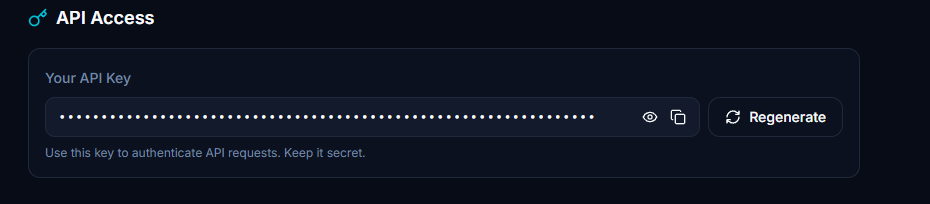
A few things to keep in mind:
- Your API key is a **secret**. Never commit it to git, never share it publicly, never hardcode it in your source.
- It is only needed at runtime. This MCP server stores it **in memory only** — it is never written to disk, never logged in cleartext, and is lost when the server restarts.
- If your key is compromised, you can regenerate it from the same Settings page.
### 3. create your bot
If you don't already have a bot on TeleBot Studio:
1. Create a Telegram bot using **@BotFather** on Telegram
2. Copy the **Bot Token** that BotFather gives you
3. Open TeleBot Studio and create a new bot using that token
Alternatively, you can create a bot directly through the MCP tool `tbs_create_bot` by passing the Bot Token.
### 4. get your bot id
After creating the bot:
1. Open the top-left menu (**☰**)
2. Go to **My Bots**
3. Select your bot
4. Open **Bot Settings**
5. Copy the **Bot ID**
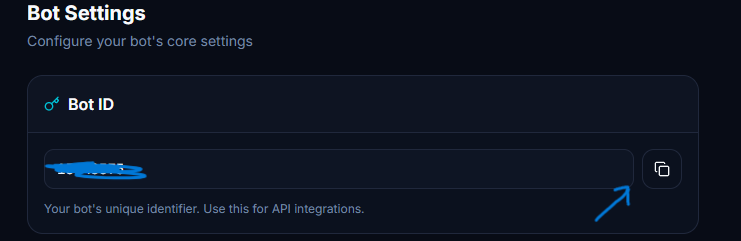
The Bot ID is required for almost every REST API operation — listing commands, creating commands, starting and stopping the bot, etc. Once you have it, pass it to `tbs_set_bot_id` so the server remembers it for the rest of your session.
---
## MCP tools (26)
### documentation search (8)
| tool | what it does |
|:---|:---|
| `search_docs(query, top_k)` | Primary search. Full-text BM25 across all chunks. |
| `get_page(name)` | Retrieve an entire documentation page by filename. |
| `list_pages()` | List all available documentation pages. |
| `search_examples(query, top_k)` | Scoped search for code examples and snippets. |
| `search_api(query, top_k)` | Scoped search for API references and endpoints. |
| `search_library(query, top_k)` | Scoped search for library and dependency info. |
| `search_functions(query, top_k)` | Scoped search for function definitions and signatures. |
| `search_errors(query, top_k)` | Scoped search for errors and troubleshooting. |
### credentials (3)
| tool | what it does |
|:---|:---|
| `tbs_set_api_key(api_key)` | Set your API key (memory-only, never persisted). |
| `tbs_set_bot_id(bot_id)` | Set the active Bot ID for the session. |
| `tbs_credential_status()` | Check if credentials are set (key is masked). |
### bot management (3)
| tool | what it does |
|:---|:---|
| `tbs_create_bot(bot_token)` | Create a new bot with a Telegram bot token. Auto-sets the Bot ID. |
| `tbs_delete_bot(bot_id, confirm)` | Soft-delete a bot. Set `confirm=true` to execute; defaults to preview-only. |
| `tbs_update_bot_token(bot_id, new_token, confirm)` | Update a bot's token (triggers a restart). Preview-supported. |
### command management (5)
| tool | what it does |
|:---|:---|
| `tbs_create_command(command, code, bot_id)` | Create a new command on a bot. |
| `tbs_get_command(command_name, bot_id)` | Get command details by name. |
| `tbs_update_command(command_name, code, bot_id, confirm)` | Update a command's code. Preview-supported. |
| `tbs_delete_command(command_name, bot_id, confirm)` | Delete a command. Preview-supported. |
| `tbs_list_commands(bot_id)` | List all commands for a bot. |
### bot control (3)
| tool | what it does |
|:---|:---|
| `tbs_start_bot(bot_id)` | Start a bot (set webhook). |
| `tbs_stop_bot(bot_id)` | Stop a bot (remove webhook). |
| `tbs_restart_bot(bot_id)` | Restart a bot (stop + start). |
### agent tools (2)
| tool | what it does |
|:---|:---|
| `tbs_deploy_bot(bot_token, commands_json, confirm)` | Complete deployment: create bot → add commands → start. |
| `tbs_setup_commands(commands_json, bot_id, confirm)` | Bulk create commands on an existing bot. |
### batch tools (2)
| tool | what it does |
|:---|:---|
| `tbs_batch_create_commands(commands_json, bot_id, confirm)` | Create multiple commands in sequence. |
| `tbs_batch_delete_commands(command_names_json, bot_id, confirm)` | Delete multiple commands in sequence. Preview-supported. |
---
## architecture
### two-engine design
```
┌─────────────────────────────────────────────────────┐
│ FastMCP Server │
│ │
│ ┌──────────────────┐ ┌──────────────────────────┐ │
│ │ documentation │ │ bot management │ │
│ │ engine (BM25) │ │ engine (REST API v2) │ │
│ │ │ │ │ │
│ │ 8 search tools │ │ Planner → Validator │ │
│ │ 100% offline │ │ → Preview → Executor │ │
│ │ in-memory index │ │ 18 API tools │ │
│ └──────────────────┘ └──────────────────────────┘ │
│ │
│ ┌────────────────────────────────────────────────┐ │
│ │ session manager (thread-safe, memory-only) │ │
│ └────────────────────────────────────────────────┘ │
└─────────────────────────────────────────────────────┘
│ │
STDIO / HTTP HTTPS → api.telebotstudio.com
```
### agent pipeline
Agent tools (`tbs_deploy_bot`, `tbs_setup_commands`, batch operations) decompose complex goals into executable plans:
```
user goal → Planner (decompose into steps)
→ Validator (check credentials, params)
→ Preview (show what will happen, mask secrets)
→ [confirm=true] → Executor (run steps sequentially)
→ BatchResult (per-step success/failure)
```
Each step runs independently. If step 3 of 5 fails, steps 4 and 5 still execute. The result reports exactly what succeeded and what didn't, so you always know the state of your bot.
### preview & confirmation
Destructive operations — deleting a bot, deleting a command, updating a bot token — require `confirm=true`. When `confirm` is false or omitted, the tool returns a **preview**: a description of what *will* happen, without executing anything.
This two-step pattern exists because AI assistants can misinterpret intent. "Remove the test bot" shouldn't accidentally delete a production bot. The preview gives you a chance to verify before anything irreversible happens.
---
## project structure
```
telebotstudio-mcp/
├── server.py entry point — FastMCP server, doc tools, /health
├── loader.py markdown loader & heading-aware chunking
├── search.py BM25 index builder & search engine
├── build_index.py CLI diagnostic tool
├── api/
│ ├── __init__.py public API exports
│ ├── auth.py input validation (API key, bot token, command names)
│ ├── client.py HTTP client with retry, timeout, error mapping
│ ├── errors.py typed exception hierarchy
│ ├── models.py request/response dataclasses
│ ├── session.py thread-safe credential manager
│ ├── bots.py bot management wrapper
│ ├── commands.py command management wrapper
│ └── bot_control.py start / stop / restart wrapper
├── agent/
│ ├── __init__.py agent layer exports
│ ├── planner.py decompose goals into execution plans
│ ├── validator.py validate plans against session state
│ ├── preview.py generate human-readable plan previews
│ └── executor.py execute plans with rate-limit awareness
├── tools/
│ ├── __init__.py
│ └── api_tools.py 18 MCP tool definitions
├── docs/ official TeleBot Studio documentation (.md)
├── Dockerfile container definition
├── .dockerignore Docker build exclusions
├── requirements.txt Python dependencies
├── LICENSE MIT License
└── README.md this file
```
---
## configuration
### transport modes
**STDIO** — default, for local AI clients:
```bash
python server.py
```
**HTTP / streamable-http** — for remote clients and deployment:
```bash
python server.py --transport http --host 0.0.0.0 --port 9000
```
### environment variables
| variable | default | purpose |
|:---|:---|:---|
| `TBS_DOCS_DIR` | `docs` | override the documentation directory |
| `HOST` | `0.0.0.0` | default host for HTTP mode |
| `PORT` | `8000` | default port for HTTP mode (Render sets this automatically) |
---
## deployment
### docker
```bash
docker build -t telebotstudio-mcp .
docker run -p 8000:8000 telebotstudio-mcp
```
The MCP endpoint is at `http://localhost:8000/mcp` and the health check is at `http://localhost:8000/health`.
The Dockerfile does not hardcode a port — it reads the `PORT` environment variable, so you can override it:
```bash
docker run -p 9000:9000 -e PORT=9000 telebotstudio-mcp
```
### render.com
1. Create a new **Web Service** on Render
2. Connect your GitHub repository
3. Build Command: `pip install -r requirements.txt`
4. Start Command: `python server.py --transport http`
5. Render auto-assigns the `PORT` environment variable — the server picks it up
### health check
`GET /health` returns `{"status": "ok"}`. This endpoint lives outside the MCP protocol and requires no authentication. Suitable for UptimeRobot, Render health checks, or any uptime monitor.
---
## security & privacy
- **no telemetry** — zero analytics, tracking, or phone-home
- **credentials in memory only** — API keys and bot tokens are stored in memory and lost on restart. Never persisted to disk, never logged in cleartext
- **token masking** — bot tokens and API keys are masked in all log messages and preview responses (e.g. `tbs_1...xyz`)
- **preview before destructive** — delete and update operations require explicit `confirm=true`. Default is preview-only
- **input validation** — all inputs are validated before API calls (token format, bot ID format, command name length, code length)
- **thread-safe sessions** — credential manager uses thread-local storage and locks for HTTP transport safety
- **offline docs** — documentation search works without any network connection. API tools require internet to reach `api.telebotstudio.com`
---
## design decisions
<details>
<summary>why BM25 instead of vector embeddings?</summary>
For a technical documentation corpus, users search for exact function names, error codes, and class properties. BM25 mathematically outperforms semantic embeddings for exact-lexicon matching at this scale — with zero cost, zero latency, and zero external dependencies.
</details>
<details>
<summary>why session-scoped credentials instead of persistent config?</summary>
Storing API keys in config files is a security risk — they could be committed to git, leaked in logs, or accessed by other processes. Session-scoped memory-only credentials are lost on restart, which is intentional: it forces re-authentication and prevents stale credentials from persisting.
</details>
<details>
<summary>why preview & confirmation for destructive ops?</summary>
AI assistants can misinterpret user intent. A user saying "remove the test bot" shouldn't accidentally delete a production bot. The two-step preview → confirm pattern gives the user a chance to verify before irreversible actions.
</details>
<details>
<summary>why sync HTTP client instead of async?</summary>
FastMCP tool handlers can be sync or async. We use sync `httpx.Client` for simplicity and reliability. The retry sleep logic is async-aware (uses `run_in_executor`) to avoid blocking the event loop under HTTP transport.
</details>
---
## faq
<details>
<summary>does the documentation search work offline?</summary>
Yes. Once installed, the BM25 index and documentation are entirely local. The API tools require internet to reach `api.telebotstudio.com`, but the documentation tools work without any network connection.
</details>
<details>
<summary>can i deploy this on render / railway?</summary>
Yes. Run `python server.py --transport http` and the server reads the `PORT` environment variable automatically.
</details>
<details>
<summary>is my api key safe?</summary>
Your API key is stored in server memory only — never written to disk, never logged in cleartext. It is transmitted over HTTPS to `api.telebotstudio.com` and is lost when the server restarts.
For multi-user HTTP deployments, note that FastMCP's streamable-http transport does not currently expose a per-client session identifier. All HTTP clients share a global credential store. This is fine for single-user deployments but not for multi-tenant environments.
</details>
<details>
<summary>what happens if a batch operation partially fails?</summary>
The executor runs each step independently. If step 3 of 5 fails, steps 4 and 5 still execute. The `BatchResult` reports per-step success/failure so you can see exactly what happened and which steps need retrying.
</details>
<details>
<summary>which API endpoints are supported?</summary>
All 11 endpoints from the TeleBot Studio REST API v2:
| method | endpoint | purpose |
|:---|:---|:---|
| POST | `/v2/create-bot` | Create a new bot |
| DELETE | `/v2/bots/{botid}` | Delete a bot |
| POST | `/v2/bots/{botid}/update-bot-token` | Update a bot's token |
| POST | `/v2/bots/{botid}/commands` | Create a command |
| POST | `/v2/bots/{botid}/command/by-name` | Get a command by name |
| POST | `/v2/bots/{botid}/command/by-name/update` | Update a command |
| POST | `/v2/bots/{botid}/command/by-name/delete` | Delete a command |
| GET | `/v2/bots/{botid}/commands/list` | List all commands |
| POST | `/v2/bots/{botid}/start` | Start a bot |
| POST | `/v2/bots/{botid}/stop` | Stop a bot |
| POST | `/v2/bots/{botid}/restart` | Restart a bot |
</details>
---
## development
### adding a new API endpoint
The architecture is designed for extensibility:
1. Add request/response models in `api/models.py`
2. Add a method to the appropriate manager (`api/bots.py`, `api/commands.py`, or `api/bot_control.py`)
3. Add a tool function in `tools/api_tools.py` with the `@mcp.tool` decorator
4. If it's destructive, add a `confirm` parameter with preview support
5. If it's a multi-step operation, add a planner method in `agent/planner.py`
### adding documentation
1. Drop `.md` files into the `docs/` directory
2. Restart the server — the BM25 index rebuilds automatically
### coding style
PEP 8 with type hints. `from __future__ import annotations` in every file. Keep functions pure where possible.
---
## roadmap
### current (v0.2.0)
- [x] 8 documentation search tools (BM25)
- [x] 18 bot management API tools
- [x] Session-scoped credential manager
- [x] Agent pipeline (Planner → Validator → Preview → Executor)
- [x] Preview & confirmation for destructive operations
- [x] Batch operations with per-step error reporting
- [x] Thread-safe credential storage
- [x] Async-aware retry logic
- [x] Docker + Render deployment
- [x] `/health` endpoint
### next
- [ ] Connection pooling for API calls
- [ ] FastMCP session middleware for per-client credential isolation
- [ ] Exact phrase match boosting for search
- [ ] Heading hierarchy boosting (H1 > H3)
### future
- [ ] GitHub Actions CI/CD pipeline
- [ ] Pytest unit and integration test suite
- [ ] Abstract into a generic documentation MCP framework
---
## changelog
### v0.2.0
- 18 TeleBot Studio API management tools
- Session-scoped, thread-safe credential manager
- Agent pipeline with Planner → Validator → Preview → Executor
- Preview & confirmation for destructive operations
- Batch command create/delete
- Async-aware retry with exponential backoff
- Token masking in logs and responses
### v0.1.0
- 8 documentation search tools
- BM25 ranking with unigram + bigram tokenization
- LRU caching, input validation, path traversal prevention
- STDIO and HTTP/streamable-http transports
- Docker support, `/health` endpoint
---
## contributing
1. Fork the repository
2. Create a feature branch (`git checkout -b feature/amazing-feature`)
3. Make sure your code passes basic linting
4. Write a clear, descriptive commit message
5. Open a Pull Request against `main`
---
## credits
- **[FastMCP](https://github.com/jlowin/fastmcp)** — Python framework for building MCP servers
- **[rank-bm25](https://github.com/dorianbrown/rank_bm25)** — Pure Python BM25 implementation
- **[TeleBot Studio](https://telebotstudio.com)** — The platform and documentation
- **[Model Context Protocol](https://modelcontextprotocol.io)** — Anthropic's standard for AI tool integration
---
<div align="center">
MIT License — see [LICENSE](LICENSE)
grounding AI in reality, one chunk at a time
</div>
MCP Config
Below is the configuration for this MCP Server. You can copy it directly to Cursor or other MCP clients.
mcp.json
Connection Info
You Might Also Like
No recommendations available