Content
.png)
# NiFiPilot — AI Copilot for Apache NiFi
MCP (Model Context Protocol) server for Apache NiFi 2.2.0. Lets AI agents inspect, build, and control NiFi flows safely and auditably via 17 ready-to-use tools.
[](tests/)
[](pyproject.toml)
[](LICENSE)
[](https://nifi.apache.org)
[](https://pypi.org/project/nifi-mcp/)
[](https://marketplace.visualstudio.com/items?itemName=CodHector.nifipilot)
---
## What it does
NiFiPilot exposes Apache NiFi's REST API as MCP tools so any compatible AI agent can:
- **Inspect** running flows, processor states, queue depths, and system health
- **Build** process groups, processors, and connections from natural language
- **Control** start/stop individual processors or entire process groups
- **Audit** every action — every tool call is written to a structured JSON log
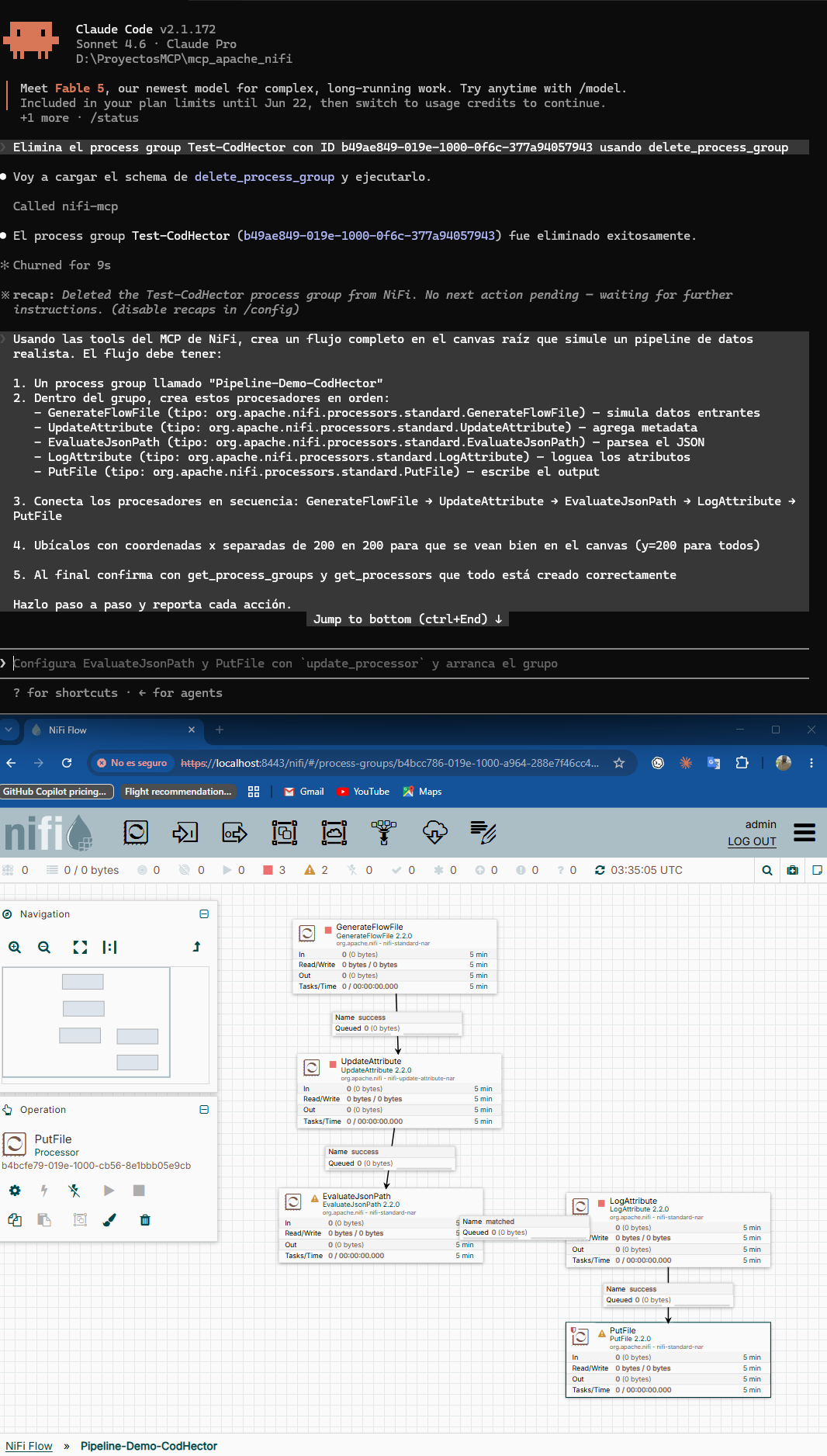
*Full pipeline created by AI: GenerateFlowFile → UpdateAttribute → EvaluateJsonPath → LogAttribute → PutFile*
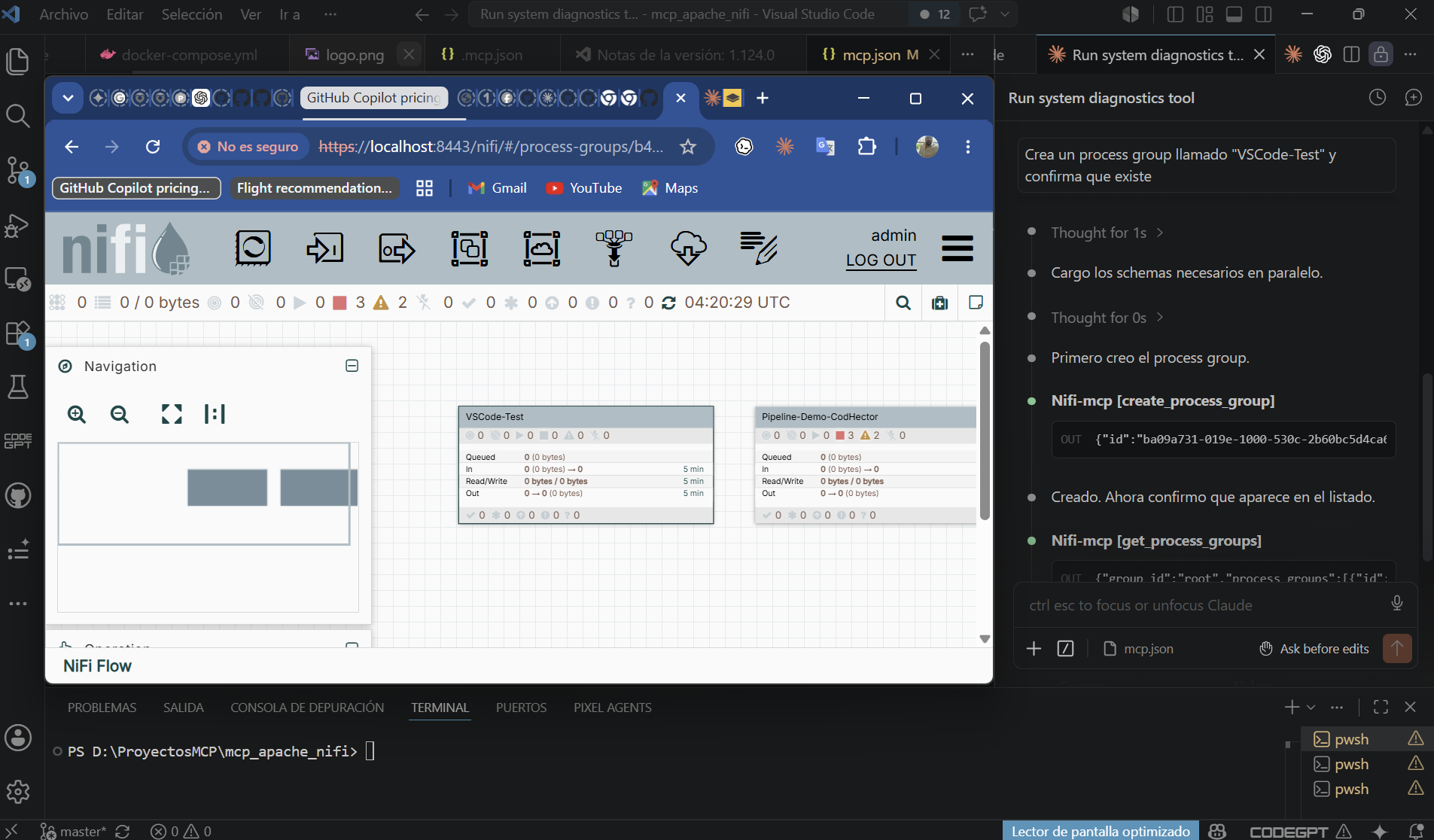
*NiFiPilot in VS Code — Claude executing MCP tools with NiFi canvas visible in real time*
---
## Features
- **17 tools** across three categories: read (5), write (6), control (6)
- **Readonly mode** — write and control tools are blocked; safe for production monitoring
- **Dry-run mode** — preview write/control actions without executing them
- **Structured audit log** — every tool call logged with params, result, and timestamp
- **Lazy authentication** — JWT token acquired on first call, refreshed automatically on 401
- **Transports** — stdio (local clients) and SSE (Docker/remote)
- **37 unit tests** — no live NiFi required
---
## Quick start with Docker Compose
The bundled compose file starts NiFi 2.2.0 and the MCP server together.
```bash
# 1. Copy and edit the env file
cp .env.example .env
# Edit NIFI_PASSWORD (min 12 chars) and set MCP_MODE=full to allow write/control
# 2. Start both services
docker compose up --build
# 3. NiFi UI: https://localhost:8443 (first start takes ~2 min)
# MCP SSE: http://localhost:8000/sse
```
Connect any MCP-compatible client to the SSE endpoint:
```json
{
"mcpServers": {
"nifi-mcp": { "url": "http://localhost:8000/sse" }
}
}
```
---
## Manual installation
**Requirements:** Python 3.11+
```bash
# From source
git clone https://github.com/Giojacke/mcp-nifipilot
cd mcp-nifipilot
pip install .
```
Run in stdio mode (used by Claude Code, VS Code, Cursor):
```bash
NIFI_URL=https://localhost:8443 \
NIFI_USERNAME=admin \
NIFI_PASSWORD=your-password \
NIFI_VERIFY_SSL=false \
MCP_MODE=readonly \
nifi-mcp
```
---
## Configuration
All settings come from environment variables (or a `.env` file in the working directory).
| Variable | Default | Description |
|----------------------|--------------------------|--------------------------------------------------|
| `NIFI_URL` | `https://localhost:8443` | NiFi base URL |
| `NIFI_USERNAME` | `admin` | NiFi username |
| `NIFI_PASSWORD` | _(required)_ | NiFi password (min 12 chars for single-user auth)|
| `NIFI_VERIFY_SSL` | `false` | Verify TLS certificate (`true` in production) |
| `MCP_MODE` | `readonly` | `readonly` — read tools only; `full` — all tools |
| `MCP_AUDIT_LOG` | `true` | Write JSON audit log |
| `MCP_AUDIT_LOG_PATH` | `./logs/audit.log` | Path for the audit log file |
| `MCP_RATE_LIMIT` | `60` | Max tool calls per minute |
| `MCP_DRY_RUN` | `false` | Describe write/control actions without executing |
| `MCP_TRANSPORT` | `stdio` | `stdio` for local clients; `sse` for Docker |
| `MCP_HOST` | `0.0.0.0` | Bind host when `MCP_TRANSPORT=sse` |
| `MCP_PORT` | `8000` | Port when `MCP_TRANSPORT=sse` |
---
## Tool reference
### Read tools _(always available)_
| Tool | Description |
|------|-------------|
| `get_process_groups(group_id)` | List direct child process groups |
| `get_processors(group_id)` | List processors in a group with run status |
| `get_connections(group_id)` | List connections with queue depth |
| `get_flow_status(group_id)` | Running/stopped/invalid counts and throughput |
| `get_system_diagnostics()` | NiFi version, heap, CPU, uptime |
### Write tools _(require `MCP_MODE=full`)_
| Tool | Description |
|------|-------------|
| `create_process_group(name, parent_group_id, x, y)` | Create a new process group |
| `create_processor(name, processor_type, group_id, x, y)` | Add a processor (full Java class name) |
| `update_processor(processor_id, name?, properties?, scheduling_period?)` | Update processor config |
| `create_connection(source_id, destination_id, group_id, relationships?, ...)` | Connect two components |
| `delete_processor(processor_id)` | Delete a stopped processor |
| `delete_process_group(group_id)` | Delete a stopped process group |
### Control tools _(require `MCP_MODE=full`)_
| Tool | Description |
|------|-------------|
| `start_processor(processor_id)` | Start a processor |
| `stop_processor(processor_id)` | Stop a processor |
| `start_process_group(group_id)` | Start all processors in a group |
| `stop_process_group(group_id)` | Stop all processors in a group |
| `get_queue_status(connection_id)` | Queue depth and throughput |
| `purge_queue(connection_id)` | Drop all flowfiles from a queue |
---
## Client setup
### Claude Code (stdio)
The `.mcp.json` at the project root is pre-configured. Fill in your password:
```jsonc
{
"mcpServers": {
"nifi-mcp": {
"command": "nifi-mcp",
"env": {
"NIFI_URL": "https://localhost:8443",
"NIFI_USERNAME": "admin",
"NIFI_PASSWORD": "YOUR_PASSWORD",
"NIFI_VERIFY_SSL": "false",
"MCP_MODE": "readonly"
}
}
}
}
```
### Claude Code (SSE — Docker stack running)
```jsonc
{
"mcpServers": {
"nifi-mcp": { "url": "http://localhost:8000/sse" }
}
}
```
### VS Code
Install from VS Code Marketplace: [NiFiPilot — AI Copilot for Apache NiFi](https://marketplace.visualstudio.com/items?itemName=CodHector.nifipilot)
Copy `.vscode/mcp.json` (included) and fill in your password.
### Cursor / Windsurf
Place the stdio config at `~/.cursor/mcp.json` (global) or `.cursor/mcp.json` (project).
---
## Security model
| Concern | Mitigation |
|---------|-----------|
| Credential exposure | All secrets via env vars — never hardcoded |
| Accidental writes | `MCP_MODE=readonly` blocks all write and control tools |
| Runaway changes | `MCP_DRY_RUN=true` describes actions without executing |
| Auditability | Every tool call writes a JSON entry to the audit log |
| Token expiry | `ensure_authenticated()` re-logins on 401 automatically |
| SSL in production | Set `NIFI_VERIFY_SSL=true` with a valid certificate |
---
## Development
```bash
# Install with dev dependencies
pip install -e ".[dev]"
# Run tests (no live NiFi needed)
pytest
# Lint and format
ruff check src tests
ruff format src tests
```
Tests mock nipyapi at the API class level — 37 tests, no live NiFi required. Integration tests can be added in `tests/integration/` (excluded from the default test run).
---
## Agent Skill
NiFiPilot includes an agent skill — a structured instruction set
that teaches AI agents how to use the MCP tools safely and effectively.
Located at [`skills/nifipilot-agent.md`](skills/nifipilot-agent.md), it covers:
- Standard workflows (create, modify, control, debug)
- Golden rules for safe operation
- Common processor types reference
- Production mode guidelines
- Example prompts to get started
### Quick start with the skill
**Claude Code:**
Add to your `CLAUDE.md`.
**VS Code:**
Pin `skills/nifipilot-agent.md` to the chat context before
starting a NiFi session.
---
## Architecture
See [ARCHITECTURE.md](ARCHITECTURE.md) for design decisions and the C4 diagrams.
---
## Roadmap
- [ ] Rate limiting enforcement (config exists, middleware pending)
- [ ] `NiFiClient` as real façade (tools currently call nipyapi directly)
- [ ] Integration tests against live NiFi
- [ ] Azure DevOps MCP bridge for CI/CD of NiFi flows
- [ ] `get_processor_details` — expose full processor config with exact property names for NiFi 2.x compatibility
---
## License
MIT
 MCP Store
