

Content
# Tool List
[](https://opensource.org/licenses/MIT)
[](https://www.python.org/downloads/)
[](https://www.solidworks.com/)
Complete toolset for automating SolidWorks control through Python COM interface, reusable by agents like Codex, Claude, OpenClaw, etc. Supports part modeling, assembly, drawing, sheet metal, weldment, simulation, and more.
<p align="center">
<img src="assets/douyin-balance.jpg" alt="Douyin @balance. Follow the QR code" width="320">
<br>
<strong>Follow Douyin @balance.</strong>
<br>
<sub>Embedded development, SolidWorks automation, and AI-assisted engineering practices, continuously updated</sub>
</p>
[English](#english) |
---
## English
### ✨ Features
- 🔧 **Part Modeling** - Sketching, extruding, revolving, chamfering, filleting, arraying, etc.
- 🧠 **VibeCAD Parametric Planning** - Converting natural language requirements into design plans, manufacturing rule checks, SolidWorks API execution summaries, and review gateways
- 🧵 **Threaded Hole Modeling** - Tapping bottom holes, M3/M4/M5/M6/M8 blind/through holes, hole chamfering, decorative threads, and visible spiral lines
- 🧾 **AutoCAD / DWG Sub-skill** - 2D DWG/DXF drawing, line draft vectorization, layer/text/annotation processing, exporting, and drawing self-inspection
- 🔩 **Assembly Operations** - Adding components, mate relationships, interference checking, and explosion views
- 📐 **Drawing Generation** - 3-view, section view, dimension annotation, BOM table
- 💾 **File Export** - STEP, STL, IGES, PDF, DXF/DWG, Parasolid
- 🎨 **Appearance Material** - Document, feature, and component-level color settings, supporting assembly color modeling
- 🎬 **Motion Study** - Automatic creation of motion studies, uniform rotation motors, and animation calculation/playback
- 🔌 **MCP Server** - Encapsulating SolidWorks COM automation into a local MCP tool callable by Codex / Claude / Cursor, covering basic modeling, assembly, mate, appearance, export, review, and rotary motors
- 🔨 **Sheet Metal Design** - Base flange, edge flange, and unfolded drawing export
- ⚡ **Weldment Design** - Structural members and cut list
- 📊 **FEA Simulation** - Static analysis, frequency analysis, and thermal analysis
- 📝 **Custom Properties** - Reading and writing file properties, configuration management, and design tables
- 👀 **Result Self-review** - Exporting multi-view preview images, `review_report.json`, and Markdown summaries to help agents review model compliance with intent
- 🔎 **API Verification Priority** - Unpackaged interfaces first check official API Help / local SDK, then implement, run, self-review, and precipitate
### 📋 Environment Requirements
- **Operating System**: Windows 10/11
- **SolidWorks**: 2020-2025 any version
- **Python**: 3.8 or higher
- **Dependencies**: `pywin32`, `comtypes`
> Run `python scripts/sw_preflight.py` before execution. If `comtypes` / `win32com` is missing, the script will ask for authorization to automatically configure the local environment; if SolidWorks is not detected, it will directly stop and prompt for manual installation.
### 🚀 Quick Start
#### Method 1: Install with npx (Recommended)
```bash
npx github:wzyn20051216/solidworks-automation-skill
```
Automatically download and install to detected skills directory for Codex / Claude / OpenClaw, and attempt to register SolidWorks MCP.
#### Method 2: OpenClaw / Dragon Usage
OpenClaw compatible with `SKILL.md + scripts/ + references/` directory structure. Place the skill in:
```text
~/.openclaw/skills/solidworks-automation/
~/.agents/skills/solidworks-automation/
```
After installation, directly use natural language to drive SolidWorks in OpenClaw:
```text
Create a new 120x80x10 mm installation plate with four phi6 holes, save to C:\temp\plate.sldprt, and export STEP to C:\temp\plate.step
```
#### Method 3: Claude CLI Installation
```bash
claude skill add https://github.com/wzyn20051216/solidworks-automation-skill
```
#### Method 4: Manual Clone
##### 1. Install Dependencies
```bash
pip install "pywin32>=305" "comtypes>=1.2.0"
```
##### 2. Clone Repository
```bash
git clone https://github.com/wzyn20051216/solidworks-automation-skill.git
cd solidworks-automation-skill
```
##### 3. Run Example
Ensure SolidWorks is running, then execute:
```python
import sys
sys.path.insert(0, r"./scripts")
from sw_preflight import run_preflight
from sw_connect import connect_solidworks, mm, deg, new_document
from sw_part import start_sketch, sketch_rectangle, end_sketch, extrude_boss
run_preflight()
# Connect SolidWorks
sw, model = connect_solidworks()
# Create new part
model = new_document(sw, "part")
# Draw sketch
start_sketch(model, "Front Plane")
sketch_rectangle(model, 0, 0, mm(50), mm(30))
end_sketch(model)
# Extrude 10mm
extrude_boss(model, "Sketch1", mm(10))
print("Part creation completed!")
```
### 📚 Document Structure
```
solidworks-automation-skill/
├── scripts/ # Python script modules
│ ├── sw_session.py # Friendly session API
│ ├── sw_preflight.py # Pre-flight check, dependency completion, SolidWorks detection
│ ├── sw_macro_guard.py # Multi-model Prompt, VBA verification, retry, and template fallback
│ ├── sw_connect.py # Connection and document management
│ ├── sw_appearance.py # Appearance and material
│ ├── sw_part.py # Part modeling
│ ├── sw_assembly.py # Assembly operations
│ ├── sw_motion.py # Motion Study and rotary motor
│ ├── sw_drawing.py # Drawing
│ ├── sw_export.py # File export
│ └── sw_review.py # Multi-view preview and self-review report
├── references/ # API reference documents
│ ├── openclaw.md
│ ├── appearance.md
│ ├── review.md
│ ├── api-lookup.md
│ ├── part-modeling.md
│ ├── assembly.md
│ ├── motion-study.md
│ ├── drawing.md
│ ├── export.md
│ ├── advanced.md
│ └── troubleshooting.md
├── subskills/ # Specialized sub-skill matrix
│ ├── solidworks-vibecad/ # Natural language -> parametric design plan
│ ├── solidworks-fillet-chamfer-cnc/ # CNC multi-fillet/chamfer machining parts
│ ├── solidworks-threaded-holes/ # Threaded holes, tapping bottom holes, and hole chamfering
│ └── autocad-automation/ # AutoCAD DWG/DXF 2D drawing and line draft vectorization
├── examples/ # Example code
├── mcp-server/ # Local stdio MCP Server
├── SUBSKILLS.md # Multi-sub-skill index and routing instructions
└── README.md
```
### 🧩 Sub-skill Matrix
This repository is organized in a "large repository + multi-sub-skill" approach. The root skill provides SolidWorks COM connection, document management, modeling API, export, self-review, and MCP Server; specialized capabilities are placed under `subskills/`, each with its own `SKILL.md`, `README.md`, `manifest.yaml`, scripts, and measured references.
| Sub-skill | Status | Purpose |
|---|---|---|
| [`solidworks-vibecad`](subskills/solidworks-vibecad/README.md) | experimental | Natural language requirements -> parametric design plan, manufacturing rule checks, execution summary, review gateway |
| [`solidworks-fillet-chamfer-cnc`](subskills/solidworks-fillet-chamfer-cnc/README.md) | stable | CNC installation seat, connection block, bracket, multi-fillet/chamfer, hole groove, and weight reduction pocket |
| [`solidworks-threaded-holes`](subskills/solidworks-threaded-holes/README.md) | stable | M3-M12 threaded holes, tapping bottom holes, hole chamfering, thread attributes, and STEP output |
| [`autocad-automation`](subskills/autocad-automation/README.md) | stable | AutoCAD DWG/DXF 2D drawing, line draft vectorization, layer/text/annotation processing, export, and drawing self-inspection |
For more routing instructions, see [`SUBSKILLS.md`](SUBSKILLS.md).
### 🔌 MCP Server
This repository includes a local `stdio` MCP Server, allowing Codex / Claude Code / Claude Desktop / Cursor / Windsurf MCP clients to call SolidWorks tools:
```powershell
pip install -r mcp-server\requirements.txt
python mcp-server\server.py
```
Recommended to use the multi-client registrar:
```powershell
powershell -ExecutionPolicy Bypass -File .\mcp-server\register_all_ai_mcp.ps1 -InstallDependencies
codex mcp list
claude mcp list
```
The registrar will attempt to:
- Codex: call `codex mcp add`
- Claude Code: call `claude mcp add --scope user`
- Claude Desktop: write `claude_desktop_config.json`
- Cursor: write `~/.cursor/mcp.json`
- Windsurf: write `~/.codeium/windsurf/mcp_config.json`
> Installation via `npx github:wzyn20051216/solidworks-automation-skill` will automatically run the registrar. If using certain clients' pure skill import functionality, the client may not execute the installation script; in this case, have AI run the above registration command.
Client manual configuration example:
```json
{
"mcpServers": {
"solidworks": {
"command": "python",
"args": [
"C:\\Users\\23201\\.codex\\skills\\solidworks-automation\\mcp-server\\server.py"
]
}
}
}
```
The first phase exposes `solidworks_connect`, `solidworks_open_document`, `solidworks_save_document`, `solidworks_export_active`, `solidworks_review_active`, `solidworks_add_rotary_motor`, etc. For more information, see [mcp-server/README.md](mcp-server/README.md).
The current MCP also includes `solidworks_health_check`, `solidworks_create_basic_part`, `solidworks_add_component`, `solidworks_add_coincident_mate`, `solidworks_add_distance_mate`, `solidworks_add_concentric_mate`, `solidworks_set_component_fixed`, `solidworks_set_appearance`, etc. Complex fillets/chamfers are recommended as subsequent specialized optimizations, not as a benchmark demo's success criteria.
### 🎯 Usage Examples
#### Recommended Writing Method: Session API
```python
import sys
sys.path.insert(0, r"./scripts")
from sw_preflight import run_preflight
from sw_connect import mm
from sw_part import sketch, sketch_circle, extrude_boss
from sw_session import SolidWorksSession
run_preflight()
session = SolidWorksSession()
model = session.new_part()
with sketch(model, "Front Plane") as sketch_name:
sketch_circle(model, 0, 0, mm(25))
extrude_boss(model, sketch_name, mm(50))
session.save(model, r"C:\temp\cylinder.sldprt")
session.export(model, r"C:\temp\cylinder.step")
```
#### Multi-model VBA Macro Protection
When generating SolidWorks VBA macros from GPT / Kimi / Claude, use `sw_macro_guard.py` to uniformly handle format differences:
```python
from sw_macro_guard import build_prompt, fallback_macro_for_request, validate_vba_macro
prompt = build_prompt("Draw a 50mm cylinder", model_name="claude")
macro = fallback_macro_for_request("Draw a 50mm cylinder")
result = validate_vba_macro(macro)
assert result.ok, result.issues
```
Strategy:
- GPT series use concise prompts.
- Kimi / Claude / unknown models automatically use strongly formatted prompts, only allowing VBA source code output.
- Verify `SldWorks`, `ModelDoc2`, `Sub`, `End Sub` before execution.
- Model output parsing failure automatically retries `1~2` times; still failed, then use local templates as a fallback.
#### Create Part
```python
from sw_connect import connect_solidworks, mm, new_document
from sw_part import *
sw, _ = connect_solidworks()
model = new_document(sw, "part")
# Draw sketch
start_sketch(model, "Front Plane")
sketch_circle(model, 0, 0, mm(25))
end_sketch(model)
# Extrude
extrude_boss(model, "Sketch1", mm(50))
```
#### Assembly Operations
```python
from sw_connect import connect_solidworks, new_document
from sw_assembly import add_component, add_mate_coincident
sw, _ = connect_solidworks()
asm = new_document(sw, "assembly")
# Add part
comp1 = add_component(asm, r"C:\parts\part1.sldprt", 0, 0, 0)
comp2 = add_component(asm, r"C:\parts\part2.sldprt", 0.1, 0, 0)
# Add mate
add_mate_coincident(asm, "Face1@part1", "FACE", "Face1@part2", "FACE")
```
#### Motion Study Rotary Motor
```python
from sw_connect import mm
from sw_motion import (
create_motion_study,
add_constant_speed_rotary_motor_by_cylinders,
calculate_and_play,
)
# Tool List
```python
from sw_connect import connect_solidworks, open_document
from sw_export import export_to_step, export_to_stl
sw, _ = connect_solidworks()
model = open_document(sw, r"C:\parts\mypart.sldprt")
# Export STEP
export_to_step(model, r"C:\output\mypart.step")
# Export STL
export_to_stl(model, r"C:\output\mypart.stl", quality="fine")
```
### 🔑 Key Concepts
#### Unit Conversion
SolidWorks API uses **meters** as the base unit, with helper functions for conversions:
```python
from sw_connect import mm, deg
length = mm(50) # 50mm → 0.05m
angle = deg(90) # 90° → 1.5708 radians
```
#### Entity Selection
Select entities before operating on features:
```python
model.Extension.SelectByID2(
"Front Plane", # Entity name
"PLANE", # Entity type
0, 0, 0, # Coordinates
False, # Append selection
0, # Mark
None, # Tag
0 # Selection mark
)
```
#### Datum Plane Names
| English | Chinese | Normal direction |
|--------|--------|------------------|
| Front Plane | Front Plane | Z-axis |
| Top Plane | Top Plane | Y-axis |
| Right Plane | Right Plane | X-axis |
As of this version, `start_sketch()` automatically falls back to default plane names in both English and Chinese, making it more suitable for agents running on different language versions of SolidWorks.
### 🛠️ Advanced Features
- **Batch processing**: Batch open, convert, and export files
- **Appearance and materials**: Set document, feature, and component-level colors; recommend splitting complex colors into multiple part assemblies
- **Configuration management**: Create and switch configurations, modify configuration parameters
- **Custom properties**: Read and write part properties, support configuration-specific properties
- **Design tables**: Drive parametric design with Excel
- **Sheet metal unfolding**: Export DXF unfolded views for laser cutting
- **Simulation analysis**: Create FEA studies, run analysis, obtain results
- **CAD Agent self-review**: Automatically export multi-view previews, generate `review_report.json`, provide `pass/warn/fail` evaluations and repair suggestions
- **API verification workflow**: For unwrapped SolidWorks APIs, look up official API Help or local SDK docs, confirm signatures, enumerations, return values, and version differences; implement and verify with actual runs, saving/exporting files
See [references/](./references/) directory for complete documentation.
### 🔎 Agent API Verification Convention
This skill does not hard-code the entire SolidWorks API into the context. When encountering unwrapped interfaces in `scripts/`, the agent should:
1. Read [`references/api-lookup.md`](./references/api-lookup.md)
2. Query SolidWorks official API Help or local SDK
3. Confirm signatures, enumerations, return values, and version differences
4. Implement and verify with actual runs, saving/exporting files
### ⭐ Star History
[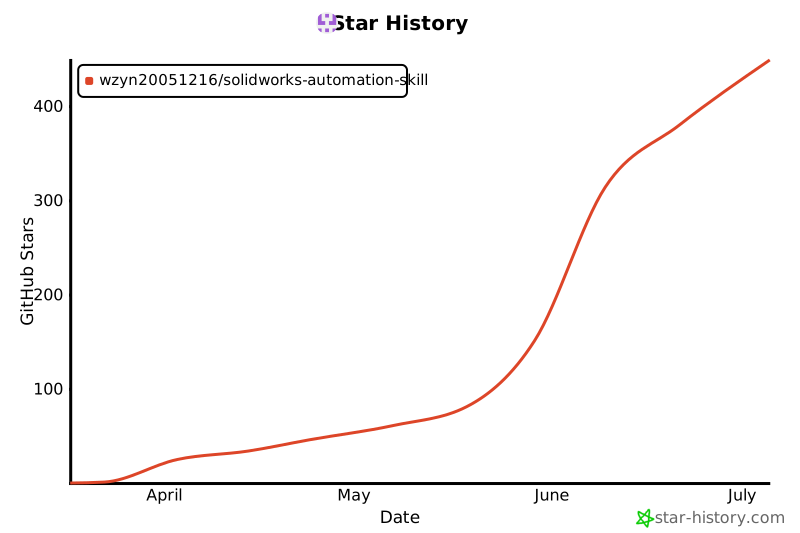](https://www.star-history.com/#wzyn20051216/solidworks-automation-skill&Date)
### ❓ Frequently Asked Questions
#### Not recognized in OpenClaw?
Check:
1. Is the directory placed in `~/.openclaw/skills/solidworks-automation/` or `~/.agents/skills/solidworks-automation/`?
2. Is `SKILL.md` present in the directory root?
3. Has the current session restarted after installation?
4. Are Python / `pywin32` / `comtypes` ready; run `python scripts/sw_preflight.py` first
#### Cannot connect to SolidWorks?
Ensure:
1. SolidWorks is running
2. Python and SolidWorks architectures match (usually 64-bit)
3. Dependencies installed: `pip install "pywin32>=305" "comtypes>=1.2.0"`
#### Feature creation fails?
Check:
1. Is the sketch closed?
2. Are units correct (using `mm()` conversion)?
3. Are entities correctly selected; in SW2024 Chinese version, prioritize `with sketch(...)` or `end_sketch()` return values, not just `SelectByID2("SKETCH")`
4. See [troubleshooting.md](./references/troubleshooting.md)
### 🤝 Contributions
Welcome to submit Issues and Pull Requests!
1. Fork this repository
2. Create a feature branch (`git checkout -b feature/AmazingFeature`)
3. Commit changes (`git commit -m 'Add some feature'`)
4. Push to the branch (`git push origin feature/AmazingFeature`)
5. Open a Pull Request
### 📄 License
This project is licensed under the MIT License - see [LICENSE](LICENSE) file.
### 🙏 Acknowledgements
- SolidWorks API documentation
- pywin32 project
- All contributors
---
## English
### ✨ Features
- 🔧 **Part Modeling** - Sketching, extrusion, revolution, chamfer, fillet, patterns
- 🔩 **Assembly Operations** - Add components, mates, interference detection, exploded views
- 📐 **Drawing Creation** - Standard views, section views, dimensions, BOM tables
- 💾 **File Export** - STEP, STL, IGES, PDF, DXF/DWG, Parasolid
- 🎨 **Appearance and Materials** - Document, feature, and component-level color workflows
- 🔨 **Sheet Metal** - Base flange, edge flange, flat pattern export
- ⚡ **Weldments** - Structural members, cut lists
- 📊 **FEA Simulation** - Static, frequency, thermal analysis
- 📝 **Custom Properties** - Read/write file properties, configuration management
- 👀 **CAD Agent Self-Review** - Export multi-view previews, JSON reports, Markdown summaries, and `pass/warn/fail` evaluations
- 🔎 **Verified API Workflow** - Look up official API Help or local SDK docs before using unwrapped SolidWorks APIs
### 📋 Requirements
- **OS**: Windows 10/11
- **SolidWorks**: 2020-2025 (any version)
- **Python**: 3.8+
- **Dependencies**: `pywin32`, `comtypes`
### 🚀 Quick Start
#### Option 1: Install with npx
```bash
npx github:wzyn20051216/solidworks-automation-skill
```
This installs the skill into detected Claude/Codex/OpenClaw skill directories.
#### Option 2: Clone Manually
```bash
git clone https://github.com/wzyn20051216/solidworks-automation-skill.git
cd solidworks-automation-skill
pip install "pywin32>=305" "comtypes>=1.2.0"
python scripts/sw_preflight.py
```
#### Run Example
Make sure SolidWorks is running, then:
```python
import sys
sys.path.insert(0, r"./scripts")
from sw_connect import connect_solidworks, mm, new_document
from sw_part import start_sketch, sketch_rectangle, end_sketch, extrude_boss
# Connect to SolidWorks
sw, model = connect_solidworks()
# Create new part
model = new_document(sw, "part")
# Draw rectangle on Front Plane
start_sketch(model, "Front Plane")
sketch_rectangle(model, 0, 0, mm(50), mm(30))
end_sketch(model)
# Extrude 10mm
extrude_boss(model, "Sketch1", mm(10))
print("Part created!")
```
### 📚 Documentation
See [references/](./references/) for focused workflows:
- [`references/openclaw.md`](./references/openclaw.md) for OpenClaw agent usage.
- [`references/review.md`](./references/review.md) for CAD self-review.
- [`references/api-lookup.md`](./references/api-lookup.md) for verified use of unwrapped SolidWorks APIs.
- [`references/troubleshooting.md`](./references/troubleshooting.md) for common COM and modeling failures.
### 🤝 Contributing
Contributions are welcome! Please feel free to submit a Pull Request.
### 📄 License
This project is licensed under the MIT License - see [LICENSE](LICENSE) file for details.
MCP Config
Below is the configuration for this MCP Server. You can copy it directly to Cursor or other MCP clients.
mcp.json
Connection Info
You Might Also Like
No recommendations available