Content
# mcp-debugger
> Transparent proxy to **debug, record, validate, and replay** MCP (Model Context Protocol) sessions.
[](https://pypi.org/project/mcp-debugger/)
[](https://github.com/sushant-mutnale/mcp-debugger/actions/workflows/ci.yml)
[](https://pypi.org/project/mcp-debugger/)
[](https://opensource.org/licenses/MIT)
[](https://github.com/sushant-mutnale/mcp-debugger/actions)
---
## ✨ Features
| Feature | What it does |
|---|---|
| 🔍 **Record** | Capture every JSON-RPC message between an MCP client and server |
| 📋 **Inspect** | Browse messages with syntax-highlighted, formatted terminal output |
| ✅ **Validate** | Check MCP protocol compliance — handshake order, method names, schemas |
| 🔄 **Replay** | Regression-test server changes by replaying recorded sessions |
| 📊 **Stats** | Visualise tool usage, latency trends, and error rates |
| 🔀 **Compare** | Delta reports between two sessions (latency, errors, tool calls) |
| 📤 **Export** | JSON, Markdown, or OpenTelemetry (OTLP) traces |
| ⚙️ **Config** | Persistent user preferences — aliases, timeouts, defaults |
| 🩺 **Doctor** | Environment diagnostics — Python version, SQLite, Node.js, paths |
| 🚀 **Local-first** | No cloud, no signup — all data stays on your machine |
---
## 📦 Installation
```bash
pip install mcp-debugger
```
With optional OpenTelemetry (OTLP) export support:
```bash
pip install "mcp-debugger[otlp]"
```
**Requirements:** Python 3.11+, Node.js (for `npx`-based MCP servers)
---
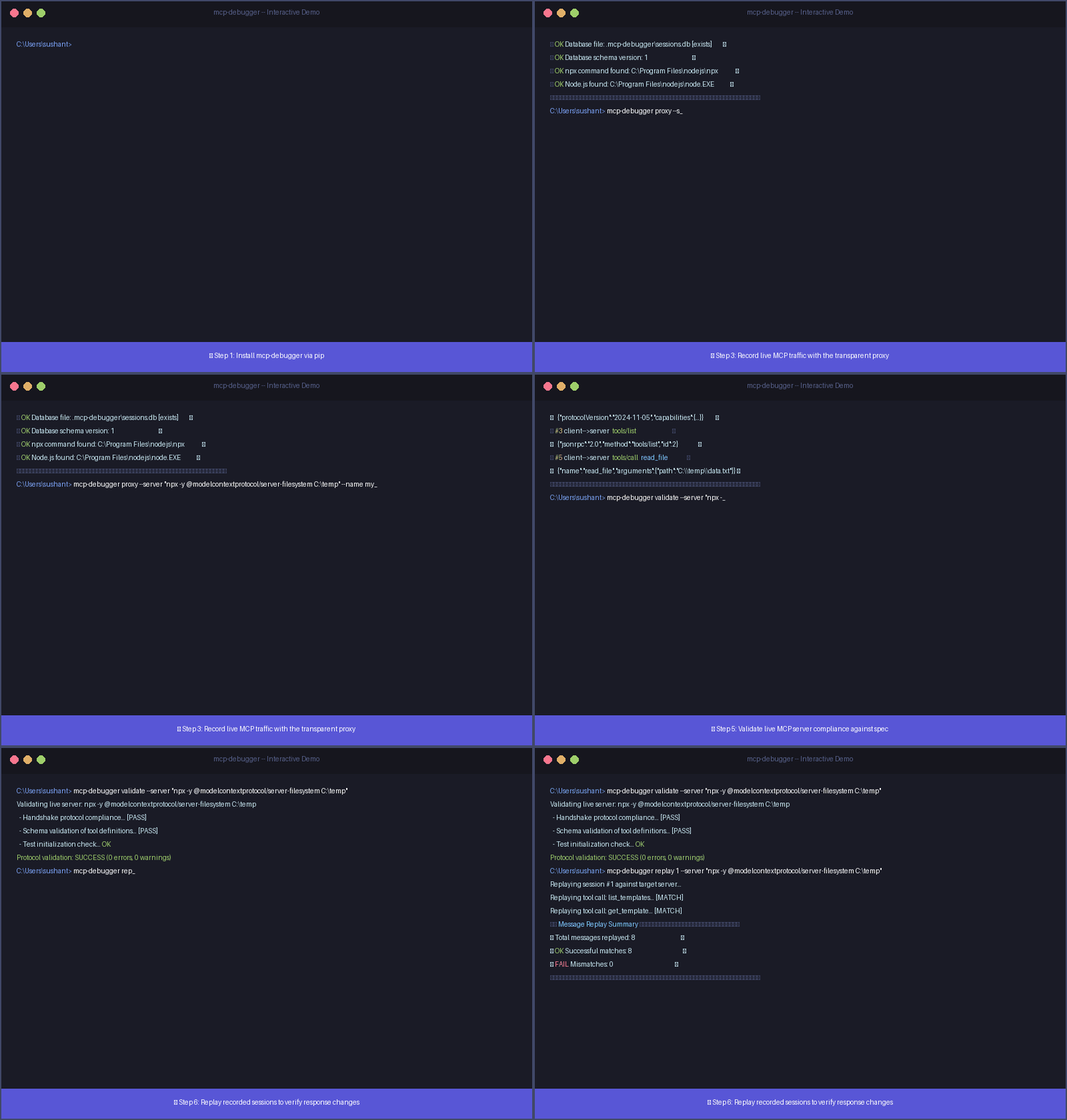
## 🚀 Quickstart
### 1. Record a session
```bash
mcp-debugger proxy \
--server "npx -y @modelcontextprotocol/server-filesystem /tmp" \
--name "my-first-session"
```
Interact with your MCP client (e.g. Claude Desktop). Press `Ctrl+C` to stop.
### 2. List recorded sessions
```bash
mcp-debugger list
```
### 3. Inspect a session
```bash
mcp-debugger inspect 1
```
### 4. Validate protocol compliance
```bash
mcp-debugger validate --server "npx -y @modelcontextprotocol/server-filesystem /tmp"
```
### 5. Replay against a new server version
```bash
mcp-debugger replay 1 --server "npx -y @modelcontextprotocol/server-filesystem /tmp"
```
### 6. Export to Markdown
```bash
mcp-debugger export 1 --format markdown --output session-report.md
```
---
## 🔧 Use with Claude Desktop
Edit your Claude Desktop config (`~/Library/Application Support/Claude/claude_desktop_config.json` on macOS, `%APPDATA%\Claude\claude_desktop_config.json` on Windows):
```json
{
"mcpServers": {
"my-filesystem": {
"command": "mcp-debugger",
"args": [
"proxy",
"--server",
"npx -y @modelcontextprotocol/server-filesystem /path/to/dir",
"--name",
"claude-session"
]
}
}
}
```
Every message between Claude and your server is now recorded transparently.
---
## 📖 Documentation
| Document | Description |
|---|---|
| [Command Reference](docs/commands.md) | Every CLI command with all options and examples |
| [Architecture](docs/architecture.md) | How it works — components, data flow, sequence diagrams |
| [Tutorials](docs/tutorials.md) | Step-by-step workflows for common use cases |
| [Configuration](docs/config.md) | All config keys, defaults, and examples |
| [FAQ](docs/faq.md) | Common questions and troubleshooting |
| [Contributing](docs/contributing.md) | Development setup, test structure, PR process |
| [Changelog](CHANGELOG.md) | Version history |
---
## 🧪 Development Setup
```bash
git clone https://github.com/sushant-mutnale/mcp-debugger.git
cd mcp-debugger
python -m venv .venv
source .venv/bin/activate # Linux/macOS
# or: .venv\Scripts\activate # Windows
pip install -e ".[dev]"
# Run all tests
pytest
# With coverage
pytest --cov=mcp_debugger --cov-report=term-missing
# Lint and type-check
ruff check .
mypy src/mcp_debugger --ignore-missing-imports
```
---
## 🤝 Contributing
See [CONTRIBUTING.md](CONTRIBUTING.md) for setup instructions, coding style, and pull request process.
---
## 📄 License
MIT © [Sushant Mutnale](https://github.com/sushant-mutnale)
 MCP Store
