

Content
<div align="center">
# Tool List
### WeChat Article Acquisition & RSS Subscription Service
**100% Open Source | Free Deployment | RSS Subscription | Article Crawling | Anti-Wind Control**
[](https://github.com/tmwgsicp/wechat-download-api/stargazers)
[](LICENSE)
[](https://hub.docker.com/r/tmwgsicp/wechat-download-api)
[](https://www.python.org/)
[](https://fastapi.tiangolo.com/)
> **100% Open Source, 100% Free.** The code is completely public, and private deployment has no restrictions. We do not charge for "open source" but actually make you pay.
</div>
---
## Features
- **RSS Subscription** — Subscribe to any public account, automatically pull new articles (including complete article content and images) at regular intervals, generate standard RSS 2.0 source, and access readers like FreshRSS/Feedly.
- **Article Content Acquisition** — Get the complete content of an article (title, author, text HTML/plain text, image list) through the URL.
- **Markdown Export** — Export the crawled articles as markdown (with YAML frontmatter, images go through a proxy to render directly), which can be imported into Obsidian/Logseq; supports incremental synchronization of all articles by time cursor.
- **Anti-Wind Control System** — Chrome TLS fingerprint simulation + SOCKS5 proxy pool rotation + three-layer automatic frequency limit, effectively counteracts WeChat wind control.
- **Article List & Search** — Get the historical article list of any public account, support pagination and keyword search.
- **Public Account Search** — Search public accounts by name and get FakeID.
- **Public Account Information** — Get the authentication subject, authentication status, original article count, and other detailed information of the public account.
- **Scan Code Login** — WeChat public platform scan code login, credentials automatically saved, 4-day validity period.
- **Image Proxy** — Proxy WeChat CDN images to solve the anti-hotlinking problem.
- **Webhook Notification** — Login expiration reminder (24h/6h early warning + expired notification), trigger verification, and other events automatically push (support enterprise WeChat robot).
- **API Documentation** — Automatically generate Swagger UI/Redoc, online debugging of all interfaces.
<div align="center">
<img src="assets/dashboard.jpg" width="800" alt="Management Panel">
<p><em>Management Panel — Login status, API documentation, online testing, one-stop management</em></p>
<br>
<img src="assets/rss.jpg" width="800" alt="RSS Subscription Management">
<p><em>RSS Subscription Management — Search public accounts with one click to subscribe, copy the address to access the RSS reader</em></p>
</div>
---
## Docker Deployment 🐳
**The fastest deployment method**, no need to configure the Python environment, start with one click:
```bash
# Method 1: Use docker-compose (recommended)
git clone https://github.com/tmwgsicp/wechat-download-api.git
cd wechat-download-api
cp env.example .env
# Edit .env to set SITE_URL to the actual access address
docker-compose up -d
# Method 2: Run directly
docker run -d \
-p 5000:5000 \
-v $(pwd)/data:/app/data \
-v $(pwd)/.env:/app/.env \
--name wechat-api \
tmwgsicp/wechat-download-api:latest
```
After the service starts, access `http://localhost:5000/login.html` to scan the code and log in.
**Support multi-architecture**: `linux/amd64` / `linux/arm64` (Apple Silicon, Raspberry Pi, ARM server)
---
## SaaS Hosted Version — Online 🚀
**No need to bother with deployment? Register in 30 seconds to use** 👉 **[wechatrss.waytomaster.com](https://wechatrss.waytomaster.com)**
Search for the public account name, get the RSS link, and throw it into your reader — Feedly, Inoreader, NetNewsWire are all compatible.
---
## Prerequisites
> This tool needs to call the interface through the WeChat public platform background login certificate, so before use, you need to:
1. **Have a WeChat public account** (subscription account, service account are acceptable)
2. Deploy and start the service, then access the login page to scan the code and log in with the **public account administrator WeChat**.
3. After successful login, the credentials are automatically saved to the `.env` file, with an effective period of about **4 days**, and need to re-scan the code after expiration.
After logging in, you can get the public articles of **any public account** (not limited to your own public account) through the API.
> **Local computer can be used directly!** No need for a public server — after starting the service on the local computer, access through `localhost` to complete the scan code login and all functions. Only when you need to access remotely from other devices (such as mobile RSS readers), you need a public server or intranet penetration.
---
## Quick Start
### Method 1: Docker Deployment (Recommended)
```bash
# 1. Clone the project
git clone https://github.com/tmwgsicp/wechat-download-api.git
cd wechat-download-api
# 2. Configure environment variables
cp env.example .env
# Edit .env, set SITE_URL to the actual access address (e.g., http://your-domain.com)
# 3. Start the service
docker-compose up -d
# 4. View logs
docker-compose logs -f
```
### Method 2: One-Click Script Deployment
**Step 1: Clone the project**
```bash
git clone https://github.com/tmwgsicp/wechat-download-api.git
cd wechat-download-api
```
**Step 2: Start with one click**
```bash
bash start.sh # Linux/macOS
# or
start.bat # Windows
```
The script will automatically complete environment checking, virtual environment creation, dependency installation, and service startup.
**Step 3: Scan code login**
Access `http://localhost:5000/login.html`, use the **public account administrator WeChat** to scan the code and log in.
---
## API Usage
### Access Address
| Address | Description |
|------|------|
| http://localhost:5000 | Management Panel |
| http://localhost:5000/login.html | Scan Code Login |
| http://localhost:5000/api/docs | Swagger API Documentation |
| http://localhost:5000/api/health | Health Check |
---
## Server Deployment
### Linux Production Environment (systemd)
The `start.sh` script on Linux runs with `sudo`, automatically registers the systemd service and enables boot self-start:
```bash
sudo bash start.sh
```
Then, you can manage the service through the following commands:
```bash
# View running status
bash status.sh
# Stop the service
bash stop.sh
# Manual operation
sudo systemctl restart wechat-download-api
sudo systemctl status wechat-download-api
```
### Configure Reverse Proxy (Optional)
If you need to access through a domain name or HTTPS, configure the Nginx reverse proxy to `localhost:5000`:
```nginx
server {
listen 80;
server_name your-domain.com;
location / {
proxy_pass http://127.0.0.1:5000;
proxy_set_header Host $host;
proxy_set_header X-Real-IP $remote_addr;
proxy_set_header X-Forwarded-For $proxy_add_x_forwarded_for;
}
}
```
### Environment Variables
Copy `env.example` to `.env` and modify as needed:
```bash
cp env.example .env
```
Main configuration items are described in the comments of `env.example`.
---
## API Interface
### Get Article Content
`POST /api/article` — Parse WeChat public account articles, return title, text, images, and other structured data
| Parameter | Type | Required | Description |
|------|------|------|------|
| `url` | string | Yes | WeChat article link (`https://mp.weixin.qq.com/s/...`) |
Request example:
```bash
curl -X POST http://localhost:5000/api/article \
-H "Content-Type: application/json" \
-d '{"url": "https://mp.weixin.qq.com/s/xxxxx"}'
```
Return fields: `title`, `content`, `plain_content`, `author`, `publish_time`, `images`
### Search Public Account
`GET /api/public/searchbiz` — Search WeChat public accounts by keyword, get FakeID
| Parameter | Type | Required | Description |
|------|------|------|------|
| `query` | string | Yes | Search keyword (public account name) |
Request example:
```bash
curl "http://localhost:5000/api/public/searchbiz?query=Public Account Name"
```
Return fields: `list[]` public account list, each item contains `fakeid`, `nickname`, `alias`, `round_head_img`
### Get Public Account Information
`GET /api/public/accountinfo` — Get the authentication subject, authentication status, original article count, and other information of the public account
| Parameter | Type | Required | Description |
|------|------|------|------|
| `fakeid` | string | Yes | FakeID of the public account (obtained from the search interface) |
Request example:
```bash
curl "http://localhost:5000/api/public/accountinfo?fakeid=YOUR_FAKEID"
```
Return example:
```json
{
"success": true,
"data": {
"identity_name": "Tencent Technology (Shenzhen) Co., Ltd.",
"is_verify": 2,
"original_article_count": 15234
}
}
```
Return fields:
- `identity_name` — Authentication subject name (company/institution name)
- `is_verify` — Authentication status (`0`=not verified, `1`=WeChat verification, `2`=new media verification)
- `original_article_count` — Original article count
### Get Article List
`GET /api/public/articles` — Get the article list of the specified public account, support pagination
| Parameter | Type | Required | Description |
|------|------|------|------|
| `fakeid` | string | Yes | FakeID of the target public account (obtained from the search interface) |
| `begin` | int | No | Offset, default `0` |
| `count` | int | No | Number of items to get, default `10`, maximum `100` |
| `keyword` | string | No | Search keyword within the public account |
Request example:
```bash
# Get the first 50 articles
curl "http://localhost:5000/api/public/articles?fakeid=YOUR_FAKEID&begin=0&count=50"
# Get articles 51-100
curl "http://localhost:5000/api/public/articles?fakeid=YOUR_FAKEID&begin=50&count=50"
```
### Search Public Account Articles
`GET /api/public/articles/search` — Search articles within the specified public account by keyword
| Parameter | Type | Required | Description |
|------|------|------|------|
| `fakeid` | string | Yes | FakeID of the target public account |
| `query` | string | Yes | Search keyword |
| `begin` | int | No | Offset, default `0` |
| `count` | int | No | Number of items to get, default `10`, maximum `100` |
Request example:
```bash
curl "http://localhost:5000/api/public/articles/search?fakeid=YOUR_FAKEID&query=keyword"
```
### RSS Subscription
`GET /api/rss/{fakeid}` — Get the RSS 2.0 subscription source of the specified public account
| Parameter | Type | Required | Description |
|------|------|------|------|
| `fakeid` | string (path) | Yes | Public account FakeID |
| `limit` | int (query) | No | Upper limit of returned articles, default `20` |
Usage:
```bash
# 1. Search public account to get fakeid
curl "http://localhost:5000/api/public/searchbiz?query=People's Daily"
# Return fakeid: MzA1MjM1ODk2MA==
# 2. Add subscription
curl -X POST http://localhost:5000/api/rss/subscribe \
-H "Content-Type: application/json" \
-d '{"fakeid": "MzA1MjM1ODk2MA==", "nickname": "People's Daily"}'
# 3. Manually trigger polling (immediately pull articles)
curl -X POST http://localhost:5000/api/rss/poll
# 4. Get RSS source (add this address to the RSS reader)
curl "http://localhost:5000/api/rss/MzA1MjM1ODk2MA=="
```
You can also manage RSS subscriptions through the **RSS Subscription** page of the management panel, search for public accounts with one click to subscribe and copy the RSS address.
> **About RSS content**: The RSS source contains **complete article content** (图文混排), and you can directly read the full text in the RSS reader.
>
> The system uses **SOCKS5 proxy pool + Chrome TLS fingerprint simulation** technology to obtain article content, effectively avoiding WeChat wind control.
>
> After scanning the code and logging in, the system will **automatically** use the WeChat credentials for content acquisition, without manual configuration. If you need to disable complete content acquisition (only retain title and summary), you can set `RSS_FETCH_FULL_CONTENT=false` in `.env`.
#### RSS Subscription Management Interface
| Method | Path | Description |
|------|------|------|
| `POST` | `/api/rss/subscribe` | Add RSS subscription |
| `DELETE` | `/api/rss/subscribe/{fakeid}` | Cancel RSS subscription |
| `GET` | `/api/rss/subscriptions` | Get subscription list |
| `POST` | `/api/rss/poll` | Manually trigger polling |
| `GET` | `/api/rss/status` | Poller status |
### Markdown Export / Article Synchronization
Export the crawled articles as markdown (with YAML frontmatter), which can be directly imported into Obsidian/Logseq and other tools.
`GET /api/feed/articles.json` — List the metadata of locally crawled articles (including article `id`), incrementally synchronize by time cursor
| Parameter | Type | Required | Description |
|------|------|------|------|
| `since` | int (query) | No | Unix timestamp, return articles with `publish_time > since`; pass `0` for the first time |
| `fakeid` | string (query) | No | Only look at a certain public account |
| `limit` | int (query) | No | Number of items returned at once (1-200), default `50` |
The response contains `next_since` (the publication time of the last article in this batch), which is used as the next `since` loop call, and pull until `articles` is empty, then the synchronization is complete; then use the saved `next_since` to do daily incremental.
`GET /api/feed/article/{id}.md` — Get the markdown text of a single article by `id` (with title/author/nickname/fakeid/publish_time/source_url and other frontmatter)
```bash
# 1. Pull the article list to get id (loop since until return empty)
curl "http://localhost:5000/api/feed/articles.json?since=0&limit=200"
# 2. Download a markdown article by id (browser/download tool will automatically save as "title.md")
curl -OJ "http://localhost:5000/api/feed/article/1.md"
```
Status code: `200` text / `404` does not exist / `422` content has not been crawled yet (try again later).
### Other Interfaces
| Method | Path | Description |
|------|------|------|
| `GET` | `/api/image?url=IMG_URL` | Image Proxy (Only for WeChat CDN domain) |
| `GET` | `/api/health` | Health Check |
| `GET` | `/api/stats` | Rate Limiting Statistics |
| `POST` | `/api/login/session/{id}` | Initialize Login Session |
| `GET` | `/api/login/getqrcode` | Get Login QR Code |
| `GET` | `/api/login/scan` | Check Scan Status |
| `POST` | `/api/login/bizlogin` | Complete Login |
| `GET` | `/api/login/info` | Get Login Information |
| `GET` | `/api/admin/status` | Query Login Status |
| `POST` | `/api/admin/logout` | Logout |
For the complete API documentation, please visit http://localhost:5000/api/docs
## Configuration Instructions
Copy `env.example` to `.env`, and login credentials will be automatically saved:
```bash
cp env.example .env
```
| Configuration Item | Description | Default Value |
|--------|------|--------|
| `WECHAT_TOKEN` | WeChat Token (Automatically filled after login) | - |
| `WECHAT_COOKIE` | WeChat Cookie (Automatically filled after login) | - |
| `WECHAT_FAKEID` | Public FakeID (Automatically filled after login) | - |
| `WECHAT_EXPIRE_TIME` | Credential Expiration Time (Automatically filled after login) | - |
| `WEBHOOK_URL` | Webhook Notification Address (Supports WeChat Work Robot) | Empty |
| `WEBHOOK_NOTIFICATION_INTERVAL` | Minimum Notification Interval for the Same Event (seconds) | 300 |
| `RATE_LIMIT_GLOBAL` | Global Request Limit per Minute | 10 |
| `RATE_LIMIT_PER_IP` | Single IP Request Limit per Minute | 5 |
| `RATE_LIMIT_ARTICLE_INTERVAL` | Article Request Minimum Interval (seconds) | 3 |
| `RSS_POLL_INTERVAL` | RSS Polling Interval (seconds) | 3600 |
| `RSS_FETCH_FULL_CONTENT` | Whether to Fetch Full Content in RSS (true/false) | true |
| `PROXY_URLS` | **SOCKS5 Proxy Pool Address (Highly recommended to configure to avoid account risk control)** | Empty |
| `SITE_URL` | **Website Access Address (used for RSS image proxy, must be configured)** | http://localhost:5000 |
| `PORT` | Service Port | 5000 |
| `HOST` | Listening Address | 0.0.0.0 |
| `DEBUG` | Debug Mode (Enable hot reload) | false |
> **⚠️ Important**: `SITE_URL` must be configured to the actual access address (IP or domain name), otherwise, RSS images cannot be displayed normally. For example:
> - Local development: `http://localhost:5000`
> - LAN deployment: `http://192.168.1.100:5000`
> - Public domain name: `https://your-domain.com`
### SOCKS5 Proxy Pool Configuration (⚠️ Highly Recommended)
**Important Tips**:
- ⚠️ **When enabling full content retrieval, it is highly recommended to configure a proxy pool to avoid account risk control**
- ⚠️ **Not configuring a proxy pool and directly connecting to WeChat may lead to: frequent verification, account restrictions, IP bans**
- ✅ **Configuring 2-3 proxy IPs can effectively disperse requests and reduce risk control risks**
**Purpose**: When retrieving article full content, disperse request IPs, and cooperate with Chrome TLS fingerprint simulation to effectively avoid WeChat risk control.
> This project uses `curl_cffi` to simulate Chrome TLS fingerprints, and the request characteristics are consistent with real browsers. It works better with a proxy pool.
**Solution: Multiple VPS Self-built SOCKS5 Proxy**
Prepare 2-3 low-cost VPS (major cloud service providers' lightweight application servers can be used, about ¥20-30/month/台), and run a SOCKS5 proxy service on each. Recommended [gost](https://github.com/go-gost/gost) (Go language implementation, single binary file, no dependencies).
**Step 1: Install gost on each VPS**
```bash
# Download the latest version (for Linux amd64, select other architectures on GitHub Releases page)
# Direct download for foreign servers
wget https://github.com/go-gost/gost/releases/download/v3.2.6/gost_3.2.6_linux_amd64.tar.gz
# Domestic servers use accelerated mirroring (choose any available one)
wget https://gh-proxy.com/https://github.com/go-gost/gost/releases/download/v3.2.6/gost_3.2.6_linux_amd64.tar.gz
# or
wget https://ghproxy.cc/https://github.com/go-gost/gost/releases/download/v3.2.6/gost_3.2.6_linux_amd64.tar.gz
# Decompress and move to system path
tar -xzf gost_3.2.6_linux_amd64.tar.gz
mv gost /usr/local/bin/
chmod +x /usr/local/bin/gost
# Verify installation
gost -V
```
**Step 2: Start SOCKS5 Proxy Service**
```bash
# With username and password authentication (recommended, replace myuser / mypass and port)
gost -L socks5://myuser:mypass@:1080
# Without authentication (only for intranet or configured firewall)
gost -L socks5://:1080
```
**Step 3: Configure as systemd Service (boot auto-start)**
```bash
cat > /etc/systemd/system/gost.service << 'EOF'
[Unit]
Description=GOST Proxy
After=network.target
[Service]
Type=simple
ExecStart=/usr/local/bin/gost -L socks5://myuser:mypass@:1080
Restart=always
RestartSec=5
[Install]
WantedBy=multi-user.target
EOF
systemctl daemon-reload
systemctl enable gost
systemctl start gost
```
**Step 4: Open Firewall Port**
```bash
# Allow only your main server IP to connect (replace with actual IP)
ufw allow from YOUR_MAIN_SERVER_IP to any port 1080
# Or, if using cloud provider security group, add inbound rule in console:
# Port 1080 / TCP / Source IP restricted to your main server
```
**Step 5: Configure Proxy Pool in `.env` on Main Server**
```bash
PROXY_URLS=socks5://myuser:mypass@vps1-ip:1080,socks5://myuser:mypass@vps2-ip:1080,socks5://myuser:mypass@vps3-ip:1080
```
After configuration, restart the service. Each article request will use a different proxy IP in rotation. You can confirm the proxy pool status by `GET /api/health`.
---
## Project Structure
```
├── app.py # FastAPI main application
├── requirements.txt # Python dependencies
├── env.example # Environment variable example
├── data/ # Data directory (automatically created at runtime)
│ └── rss.db # RSS subscription SQLite database
├── routes/ # API routes
│ ├── article.py # Article content retrieval
│ ├── articles.py # Article list
│ ├── rss.py # RSS subscription management and output
│ ├── search.py # Public account search
│ ├── login.py # Scan code login
│ ├── admin.py # Management interface
│ ├── image.py # Image proxy
│ ├── health.py # Health check
│ └── stats.py # Statistical information
├── utils/ # Tool modules
│ ├── auth_manager.py # Authentication management
│ ├── helpers.py # HTML parsing
│ ├── http_client.py # HTTP client (curl_cffi + proxy pool)
│ ├── proxy_pool.py # Proxy pool rotation
│ ├── rate_limiter.py # Rate limiter
│ ├── rss_store.py # RSS data storage (SQLite)
│ ├── rss_poller.py # RSS background poller
│ ├── login_reminder.py # Login expiration reminder (active detection)
│ ├── content_processor.py # Content processing and image proxy
│ ├── image_proxy.py # Image URL proxy tool
│ ├── article_fetcher.py # Batch concurrent article retrieval
│ └── webhook.py # Webhook notification
└── static/ # Front-end pages (including RSS management)
```
---
## Content Types and Retrieval Strategies
This project supports multiple WeChat public account content types, including standard rich text, pure image articles, graphic messages, short content, audio articles, etc.
For detailed instructions, please see: **[CONTENT_TYPES.md](CONTENT_TYPES.md)**
**Document Content**:
- All supported content types and `item_show_type` values
- Unavailable status identification (deleted, violated, privacy, verification pages, etc.)
- Anti-crawling strategy and proxy configuration
- Key function description
- Development contribution guide
---
## Frequently Asked Questions
<details>
<summary><b>Prompt "Server not logged in"</b></summary>
Visit http://localhost:5000/login.html to scan code login, and credentials will be automatically saved to `.env`.
</details>
<details>
<summary><b>Triggered WeChat risk control / needs verification</b></summary>
1. Open the article URL prompted in the browser to complete verification
2. Wait 30 minutes and try again
3. Reduce request frequency (system has built-in automatic rate limiting)
</details>
<details>
<summary><b>How to get the FakeID of a public account</b></summary>
Call the search interface: `GET /api/public/searchbiz?query=public account name`, and get it from the `fakeid` field of the return result.
</details>
<details>
<summary><b>How long does the Token expire? How to know in advance?</b></summary>
Cookie login is valid for about 4 days. The system will:
1. Display expiration time on the front-end (`/api/admin/status` interface returns `expireTime` and `isExpired` fields)
2. **Actively detect every 6 hours**, and warn 24h / 6h in advance through Webhook
3. Immediately notify through Webhook after expiration
Configuring `WEBHOOK_URL` (supports WeChat work group robot) can receive real-time reminders to avoid RSS polling failure or search function unavailability due to credential expiration.
</details>
<details>
<summary><b>Can multiple public accounts be logged in simultaneously?</b></summary>
The current version does not support multi-account login. It is recommended to deploy multiple instances, each logging in a different public account.
</details>
---
## Technical Stack
| Level | Technology |
|------|------|
| **Web Framework** | FastAPI |
| **ASGI Server** | Uvicorn |
| **HTTP Client** | curl_cffi (Chrome TLS fingerprint) / HTTPX (fallback) |
| **Anti-risk Control** | TLS fingerprint simulation + SOCKS5/HTTP proxy pool rotation |
| **RSS Storage** | SQLite (zero configuration, data localization) |
| **Configuration Management** | python-dotenv |
| **Runtime Environment** | Python 3.8+ |
---
## Open Source License
This project is open-sourced under the **AGPL 3.0** license, **all functional code is completely public, and private deployment is free**.
| Usage Scenario | Allowed |
|---------|---------|
| Personal learning and research | Allowed, free use |
| Enterprise internal use | Allowed, free use |
| Private deployment | Allowed, free use |
| Modified and provided network services | Need to open-source modified code |
See [LICENSE](LICENSE) file for details.
### Disclaimer
- This software is provided as-is, without any form of warranty
- This project is for learning and research purposes only, please comply with WeChat public platform related service terms
- Users are responsible for their own operations
- Developers do not bear any responsibility for losses caused by using this software
---
## Participate in Contributions
Due to limited personal energy, **PRs are not accepted for now**, but very welcome:
- **Submit Issues** — Report bugs, propose functional suggestions
- **Fork Project** — Free modification and customization
- **Star Support** — Give the project a Star, let more people see it
---
## Contact Information
<table>
<tr>
<td align="center">
<img src="assets/qrcode/wechat.jpg" width="200"><br>
<b>Personal WeChat</b><br>
<em>Technical exchange · Business cooperation</em>
</td>
<td align="center">
<img src="assets/qrcode/sponsor.jpg" width="200"><br>
<b>Appreciation support</b><br>
<em>Open source is not easy, thank you for your support</em>
</td>
</tr>
</table>
- **GitHub Issues**: [Submit issues](https://github.com/tmwgsicp/wechat-download-api/issues)
- **Email**: creator@waytomaster.com
- **SaaS Hosted Version**: [wechatrss.waytomaster.com](https://wechatrss.waytomaster.com)
---
## Acknowledgements
- [FastAPI](https://fastapi.tiangolo.com/) — High-performance Python Web framework
- [curl_cffi](https://github.com/lexiforest/curl_cffi) — HTTP client supporting browser TLS fingerprint simulation
- [HTTPX](https://www.python-httpx.org/) — Modern HTTP client
- [gost](https://github.com/go-gost/gost) — Lightweight proxy tool
---
<div align="center">
**If you find the project useful, please give it a Star!**
[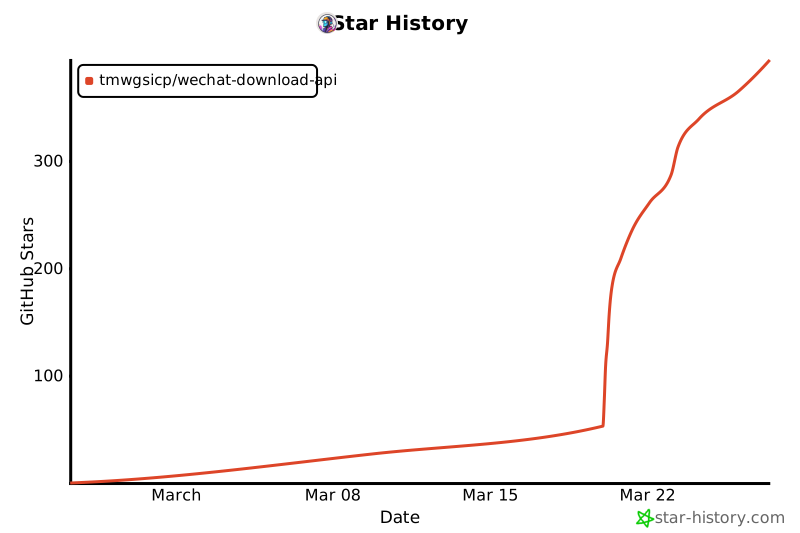](https://star-history.com/#tmwgsicp/wechat-download-api&Date)
Made with ❤️ by [tmwgsicp](https://github.com/tmwgsicp)
</div>
MCP Config
Below is the configuration for this MCP Server. You can copy it directly to Cursor or other MCP clients.
mcp.json
Connection Info
You Might Also Like
No recommendations available