

Content
# <img src="https://raw.githubusercontent.com/xsip/liquid-local-ai-client/refs/heads/main/apps/ui/public/logo-cropped.png" alt="Logo" width="30"/> Liquid Local AI Client | [Preview on youtube](https://www.youtube.com/watch?v=_UhKke10JzY)
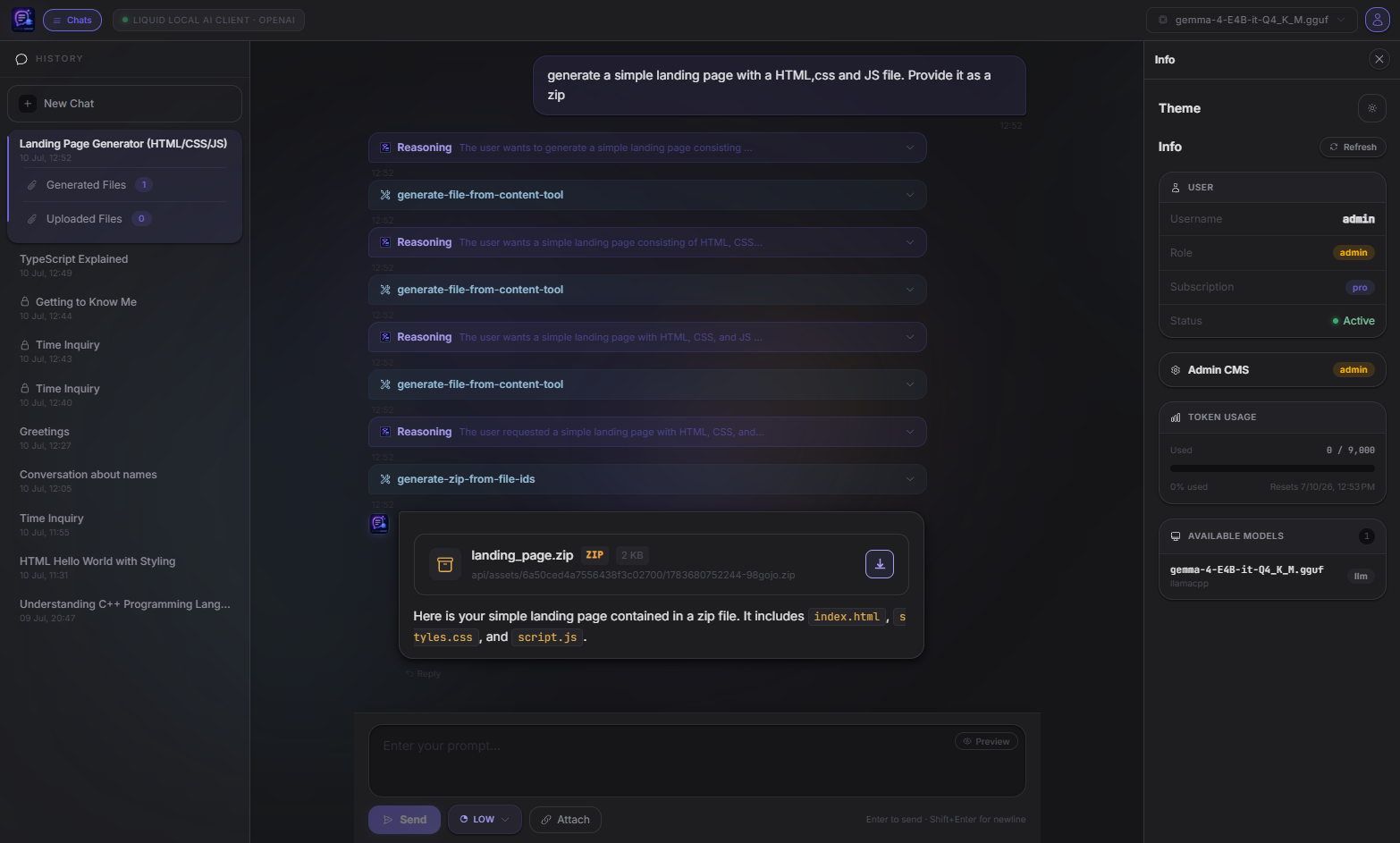
A full-stack AI chat client that connects to any OpenAI-compatible local inference server (LM Studio, Ollama, llama.cpp, vLLM, ...) via the standard `/v1/chat/completions` endpoint. Built with Angular, NestJS, and MongoDB, with first-class MCP (Model Context Protocol) tool support, AI image generation via [InvokeAI](https://invoke-ai.github.io/InvokeAI/), image upload into chat, and optional end-to-end AES message encryption.
> **⚠️ Breaking change:** LM Studio's native `/api/v1/chat` API and the OpenAI-compatible `/v1/responses/create` (Responses API) endpoint are **disabled**. See [Chat Completions API (current default)](#chat-completions-api-current-default) below for why and what replaced them.
---
---
## Table of Contents
- [Overview](#overview)
- [Chat Completions API (current default)](#chat-completions-api-current-default)
- [Architecture](#architecture)
- [Features](#features)
- [Tech Stack](#tech-stack)
- [Project Structure](#project-structure)
- [Prerequisites](#prerequisites)
- [Environment Variables](#environment-variables)
- [Getting Started](#getting-started)
- [MCP Tool Integration](#mcp-tool-integration)
- [Image Generation (InvokeAI)](#image-generation-invokeai)
- [Image Upload](#image-upload)
- [Message Encryption](#message-encryption)
- [Authentication & Authorization](#authentication--authorization)
- [Token Usage & Rate Limiting](#token-usage--rate-limiting)
- [API Overview](#api-overview)
---
## Overview
This monorepo hosts two applications:
| App | Location | Description |
|-----|----------|-------------|
| `api` | `apps/api` | NestJS REST backend, MCP server, and LM Studio proxy |
| `ui` | `apps/ui` | Angular 21 single-page chat interface |
The backend acts as an authenticated proxy between the Angular frontend and your local inference server. All chat sessions are persisted in MongoDB, token usage is tracked per user, and the backend runs its own **MCP client** that calls tools on-demand as the model requests them — rather than relying on the inference server to orchestrate tool calls itself. The MCP toolset includes an image generation tool that connects to a local InvokeAI instance, and uploaded images are stored as binary blobs in MongoDB and served back through the API.
---
## Chat Completions API (current default)
LM Studio recently disabled connecting to localhost MCP servers, which broke this project's original architecture: the Responses API (`/v1/responses/create`) worked by handing LM Studio a `type: 'mcp'` tool pointing at this backend's MCP server, and relying on LM Studio itself to connect, list tools, call them, and feed results back to the model. With per-request localhost MCP connections disabled, that flow no longer works — and it was never portable to other backends anyway, since `type: 'mcp'` tool passthrough is a Responses-API-only convenience that virtually no other OpenAI-compatible server implements.
The fix was to stop depending on the inference server for MCP orchestration entirely and do it ourselves:
- The backend now runs its own MCP client (`apps/api/src/modules/mcp-client`) that connects directly to the MCP tool server, lists available tools, and translates them into plain OpenAI **function-tool** definitions.
- Chat requests go out over the standard **Chat Completions API** (`/v1/chat/completions`) with those function tools attached — no `type: 'mcp'` passthrough involved.
- When the model returns a `tool_calls` response, the backend executes the call itself via the MCP client, appends the result as a `tool` role message, and loops back into the model until it produces a final answer.
Because this only requires standard OpenAI function-calling support, it works against **any** OpenAI-compatible backend — LM Studio, Ollama, llama.cpp, vLLM, etc. — not just LM Studio.
**As a result:**
- LM Studio's own native `/api/v1/chat` API is disabled in this project going forward, in favor of the OpenAI-compatible `/v1/chat/completions` route, which is the more broadly standardized way to talk to local inference servers.
- The OpenAI Responses API (`/v1/responses/create`) is disabled, since it depended entirely on the now-broken `type: 'mcp'` passthrough.
- **Chat Completions (`/v1/chat/completions`) is the only supported chat path.** All new chats use it; existing Responses-API chat history remains viewable but can no longer be continued.
One known limitation of the Chat Completions path: file attachments are text-only-friendly (images are inlined as vision content; other file types are referenced by ID and fetched on demand via the `get-content-from-file-ids` tool) — reasoning-effort and AI-decided chat naming are supported, matching the old Responses-API experience.
---
## Architecture
```
┌──────────────────────────────────────────────────────────┐
│ Angular UI (port 4200) │
│ OpenAI Chat Completions route │
└────────────────────────────┬──────────────────────────────┘
│ SSE stream
┌────────────────────────────▼──────────────────────────────┐
│ NestJS API (port 8888) │
│ │
│ ┌──────────────┐ ┌────────────────┐ │
│ │ OpenAI │ │ Auth / JWT │ │
│ │ Module │ │ Module │ │
│ └──────┬───────┘ └────────────────┘ │
│ │ tool_calls loop │
│ ┌──────▼───────┐ ┌────────────────┐ ┌────────────────┐│
│ │ McpClient │ │ Chats / │ │ MCP Server ││
│ │ Module │ │ ChatMetadata │ │ (@rekog/mcp- ││
│ │ (MCP client) │◄─┤ MongoDB │ │ nest) ││
│ └──────┬───────┘ │ persistence │ └────────┬───────┘│
│ │ └────────────────┘ ▲ │
│ └──────────── connects as MCP client ─────┘ │
│ ┌─────────────────────────────────────────┐ │
│ │ Assets Module │ │
│ │ Image blobs stored in MongoDB │ │
│ └─────────────────────────────────────────┘ │
└────────────────────────────┬──────────────────────────────┘
│ /v1/chat/completions
┌────────────────────────────▼──────────────────────────────┐
│ Any OpenAI-compatible inference server │
│ LM Studio │ Ollama │ llama.cpp │ vLLM │ ... │
└──────────────────────────────────────────────────────────┘
│ generate-image-tool triggers
┌──────────────────────────▼───────────────────────────────┐
│ InvokeAI (port 9090) │
│ /api/v2/models │ /api/v1/queue/default/enqueue │
│ Socket.IO (/ws/socket.io/) │
└──────────────────────────────────────────────────────────┘
```
Unlike the old Responses-API flow — where LM Studio itself connected to the MCP server mid-inference — the NestJS backend now acts as the MCP client itself: it lists tools from its own MCP server, attaches them to the Chat Completions request as plain function tools, and executes any `tool_calls` the model returns before looping back into the model. The inference server never talks to MCP directly, so this works with any backend that supports standard OpenAI function calling.
---
## Features
- **OpenAI-compatible Chat Completions** — talks to any backend that implements `/v1/chat/completions` (LM Studio, Ollama, llama.cpp, vLLM, ...); LM Studio's native API and the OpenAI Responses API are disabled (see [above](#chat-completions-api-current-default))
- **Client-side MCP orchestration** — the backend runs its own MCP client, translates MCP tools into OpenAI function-tool definitions, and executes `tool_calls` itself in a loop — no dependency on the inference server's own MCP support
- **Real-time SSE streaming** — responses are streamed token-by-token to the browser, including reasoning/"thinking" deltas where the model provides them
- **Persistent chat history** — every exchange is stored in MongoDB as a rolling message array and rehydrated on demand, including reconstructed tool-call banners and image attachments
- **MCP tool server** — the backend registers itself as an MCP server and also calls itself as an MCP client
- `get-token-usage-tool` — returns the authenticated user's current token usage and limit
- `get-content-from-file-ids` — fetches uploaded file content on demand by file ID
- `generate-file-from-content-tool` / `generate-zip-from-file-ids` — lets the model generate downloadable files and bundle them into a ZIP
- `get-image-tool` — fetches an image from a URL
- `decrypt-message-tool` — decrypts an AES-encrypted user message at inference time
- `greeting-tool` — example tool with progress reporting
- `generate-image-tool` — generates an image via InvokeAI from a natural-language prompt and injects it into the chat as a persistent asset
- **AI image generation** — the model can call `generate-image-tool` during inference; the backend submits a txt2img job to InvokeAI, downloads the result, stores it in MongoDB, and returns a Markdown image reference to the chat
- **Image upload** — users can attach one or more images before sending a message; images are uploaded to MongoDB via the Assets API and forwarded to the model as vision content
- **End-to-end AES message encryption** — per-chat opt-in; messages are encrypted with CryptoJS AES before leaving the browser, and the model decrypts them via MCP during inference
- **JWT authentication** — login / register with bcrypt-hashed passwords; tokens expire after 1 hour
- **Role-based access control** — `User` and `Admin` roles via `RolesGuard`
- **Subscription-aware token rate limiting** — configurable token budgets per subscription tier (`free` / `basic`), with automatic reset intervals
- **Model selector** — dynamically fetches available models from the running LM Studio instance
- **Reasoning mode** — pass reasoning effort (`off` / `low` / `medium` / `high`) to supported models
- **Swagger UI** — optional OpenAPI documentation (enabled via `USE_SWAGGER=true`)
- **Markdown rendering** — assistant responses rendered as formatted Markdown in the chat UI
---
## Tech Stack
| Layer | Technology |
|-------|-----------|
| Frontend | Angular 21, TailwindCSS 4, RxJS 7 |
| Backend | NestJS 11, TypeScript 5.9 |
| Database | MongoDB via Mongoose |
| MCP | `@rekog/mcp-nest` (Streamable HTTP + SSE transports) |
| Image generation | InvokeAI (local, via REST API + Socket.IO) |
| Image storage | MongoDB (`image_blobs` collection, binary Buffer) |
| File upload | `@nestjs/platform-express` / Multer (memory storage) |
| Encryption | `crypto-js` (AES) |
| Auth | JWT (`@nestjs/jwt`), bcrypt |
| HTTP client | `@nestjs/axios` |
| OpenAI SDK | `openai` npm package (pointed at LM Studio base URL) |
| API docs | Swagger / OpenAPI (`@nestjs/swagger`) |
---
## Project Structure
```
apps/
├── api/ # NestJS backend
│ └── src/
│ ├── app.module.ts # Root module — MCP, Mongo, guards
│ ├── main.ts # Bootstrap, CORS, Swagger, body-parser
│ ├── tools/
│ │ └── api.tools.ts # MCP server tools (token-usage, file gen/zip, image, decrypt, ...)
│ └── modules/
│ ├── auth/ # JWT auth, guards, user schema
│ ├── assets/ # Image blob storage & retrieval (MongoDB)
│ ├── chats/ # Chat message persistence (Responses entries + Completions message arrays)
│ ├── chat-metadata/ # Per-session metadata (model, crypto config, etc.)
│ ├── invoke/ # InvokeAI integration (image generation)
│ ├── lm-studio/ # Native LM Studio API proxy — disabled, kept for reference only
│ ├── mcp-client/ # MCP client — connects to the MCP server, executes tool_calls for Chat Completions
│ ├── openai/ # OpenAI-compatible Chat Completions (active) + legacy Responses API (disabled) proxy
│ └── token-limit/ # Token budget tracking & rate-limit enforcement
└── ui/ # Angular frontend
└── src/app/
├── app.ts # Root component — JWT expiry guard
├── lmstudio-stream.service.ts # SSE client for LM Studio API (unused — endpoint disabled)
├── client/ # Auto-generated API client DTOs
└── routes/
├── login.ts # Login / register page
├── lm-studio-api/ # Legacy chat UI for native LM Studio endpoint — disabled
│ ├── chat-input.component.ts
│ ├── chat-messages.component.ts # Renders text, images, tool calls (shared by both routes)
│ ├── chat-sidebar.component.ts
│ ├── model-selector.component.ts
│ └── info.component.ts
└── openai-api/ # Chat UI for OpenAI Chat Completions endpoint (active) + legacy Responses (disabled)
├── chat-input.component.ts # Includes image/file attach button
├── chat.service.ts # Legacy Responses API chat state
├── chat-completions.service.ts # Active Chat Completions chat state
├── openai-stream.service.ts # SSE client for legacy Responses API
├── completions-openai-stream.service.ts # SSE client for Chat Completions
└── model-selector.component.ts
```
---
## Prerequisites
- **Node.js** 18+
- **MongoDB** running locally (default: `mongodb://localhost:27017/lmStudioWrapper`) or a remote URI
- **An OpenAI-compatible inference server** running locally with its `/v1` API enabled (LM Studio, Ollama, llama.cpp, vLLM, ...) — default assumes LM Studio on `http://localhost:1234`
- A loaded model that supports tool/function calling for MCP features
- **InvokeAI** *(optional)* — required only for AI image generation; default: `http://127.0.0.1:9090`
---
## Environment Variables
Create a `.env` file in `apps/api/` (or set variables in your shell):
```env
# MongoDB connection URI
MONGODB_URI=mongodb://localhost:27017/lmStudioWrapper
# OpenAI-compatible inference server base URL (LM Studio, Ollama, llama.cpp, vLLM, ...)
LM_STUDIO_BASE_URL=http://localhost:1234
LM_STUDIO_API_TOKEN= # optional — set if your backend requires a token
# JWT signing secret — use a long random string in production
JWT_SECRET=your-very-secret-key
# URL the backend's MCP client connects to in order to call MCP tools.
# This is the backend calling itself — safe to leave as localhost/LAN IP of this machine.
SELF_MCP_URL=http://192.168.0.34:8888/tools/mcp
# Additional external MCP servers to connect to, comma-separated (optional)
# MCP_SERVER_URLS=http://example.com/mcp,http://another-host:9000/mcp
# Public base URL of this backend — used to construct asset URLs returned by generate-image-tool
# Must be reachable from the browser (e.g. http://localhost:8888 or your LAN IP)
SELF_URL=http://localhost:8888
# Backend HTTP port (default: 8888)
PORT=8888
# Set to any non-empty value to enable Swagger UI at /api
USE_SWAGGER=true
```
> **Note on `SELF_MCP_URL`:** since the backend's own `McpClientService` is now what calls MCP tools (see [Chat Completions API](#chat-completions-api-current-default)), this only needs to be reachable from the backend process itself — it's no longer required to be reachable from LM Studio.
> **Note on `SELF_URL`:** Used by `generate-image-tool` to build the public image URL returned to the chat. Set this to the address the browser uses to reach the NestJS API. If omitted, asset links will be broken.
> **Note on InvokeAI base URL:** The InvokeAI base URL is currently hard-coded to `http://127.0.0.1:9090` in `app.module.ts` (`InvokeModule.forRoot(...)`). Change this value directly if your InvokeAI instance runs elsewhere.
---
## Getting Started
### 1. Install dependencies
```bash
# From the monorepo root
npm install
```
### 2. Start the API
```bash
nx serve api
```
The API will be available at `http://localhost:8888`.
If `USE_SWAGGER=true`, Swagger UI is at `http://localhost:8888/api`.
### 3. Start the UI
```bash
nx serve ui
```
The UI will be available at `http://localhost:4200`.
### 4. Start both simultaneously
```bash
npm start
# runs: nx run-many --target=serve --projects=api,ui
```
### 5. Register a user
Either use the Swagger UI or send a `POST /auth/register` request:
```bash
curl -X POST http://localhost:8888/auth/register \
-H "Content-Type: application/json" \
-d '{"username": "alice", "password": "s3cret"}'
```
Then log in at `POST /auth/login` to receive a JWT.
---
## MCP Tool Integration
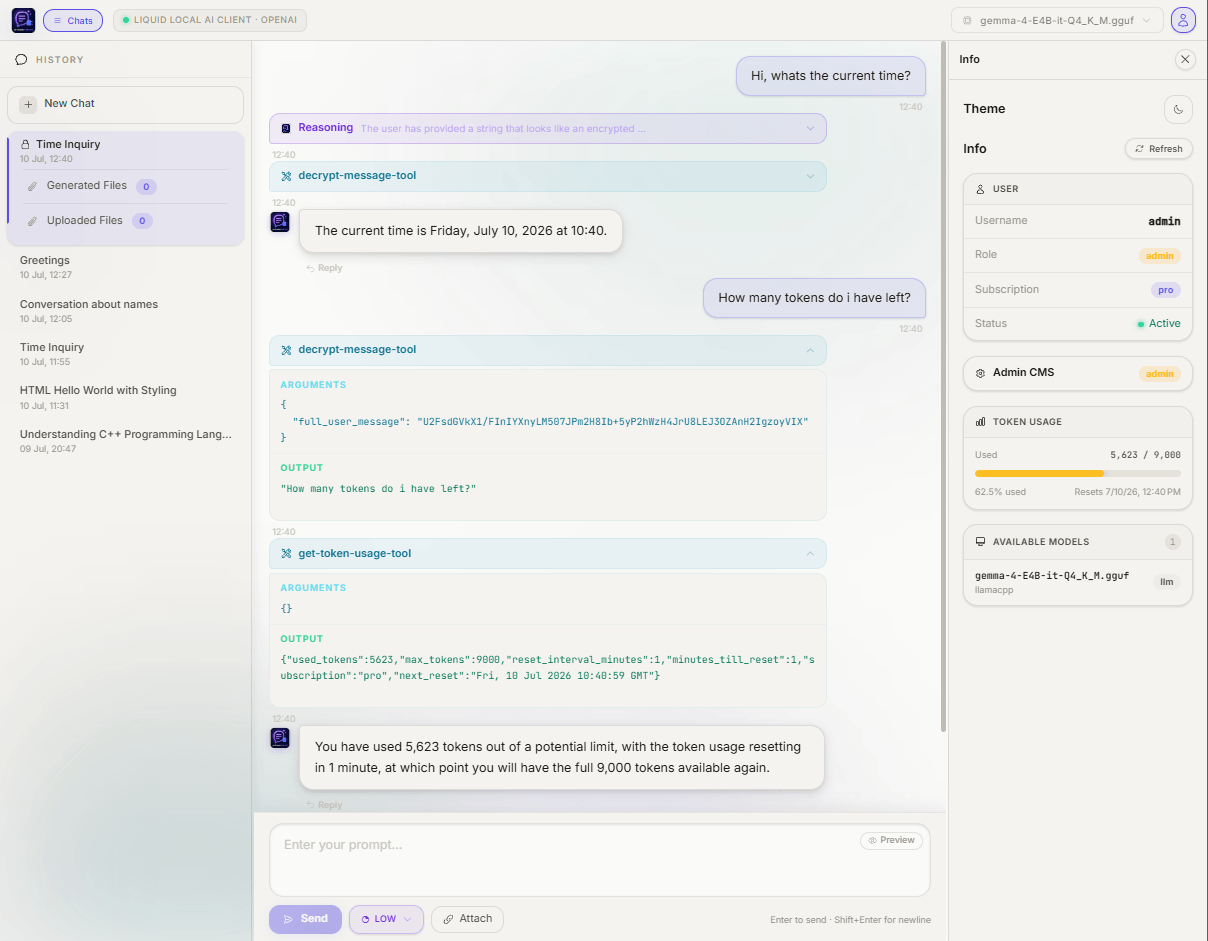
The NestJS backend plays **both** MCP roles at once:
- **MCP server** (`apps/api/src/tools/api.tools.ts`) — registered via `@rekog/mcp-nest`, exposing Streamable HTTP + SSE transports at `http://localhost:8888/tools/mcp`.
- **MCP client** (`apps/api/src/modules/mcp-client`) — connects to that same MCP server (and any others configured via `MCP_SERVER_URLS`), lists its tools, and calls them on the model's behalf.
For every Chat Completions request, the backend:
1. Calls `McpClientService.listTools()` to fetch the current tool list and converts each into a plain OpenAI function-tool definition.
2. Sends the chat request with those tools attached over `/v1/chat/completions`.
3. If the model responds with `tool_calls`, executes each one via `McpClientService.callTool()`, forwarding the authenticated user's JWT and the current `chatId` as MCP request headers so tools have full access to the user's context.
4. Appends the tool results as `tool` role messages and loops back into the model until it produces a final answer (capped at 8 iterations as a safety guard).
This means MCP tools work with **any** OpenAI-compatible backend the model server happens to be — the inference server itself never needs to know MCP exists.
### Available Tools
| Tool | Description |
|------|-------------|
| `get-token-usage-tool` | Returns the user's current token consumption, subscription tier, limit, and next reset time |
| `get-content-from-file-ids` | Returns the base64 content of previously uploaded/generated files, by file ID |
| `generate-file-from-content-tool` | Generates a downloadable file from provided content and stores it as an asset |
| `generate-zip-from-file-ids` | Bundles multiple previously generated/uploaded files into a downloadable ZIP archive |
| `get-image-tool` | Fetches an image from a URL and stores it as an asset |
| `decrypt-message-tool` | Decrypts an AES-encrypted user message using the per-chat crypto key stored in `chat_metadata` |
| `greeting-tool` | Example tool — returns a greeting with streaming progress updates |
| `generate-image-tool` | Generates an image from a text prompt via InvokeAI, stores it in MongoDB, and returns a chat-renderable image URL |
To add new tools, create an `@Injectable()` class in `apps/api/src/tools/`, decorate methods with `@Tool(...)` from `@rekog/mcp-nest`, register the class as a provider in `AppModule`, and add its name to the `allowedTools` list in `OpenAiService.chatStreamCompletions` so it's actually offered to the model.
---
## Image Generation (InvokeAI)
The `generate-image-tool` MCP tool allows the language model to generate images on demand during a conversation. It requires a locally running [InvokeAI](https://invoke-ai.github.io/InvokeAI/) instance.
### How It Works
1. **Tool call** — the model calls `generate-image-tool` with a natural-language `prompt` string.
2. **Model lookup** — `InvokeService` queries InvokeAI's `/api/v2/models/` endpoint and finds the first model whose name contains the requested model name (default: `"Dreamshaper 8"`).
3. **Job submission** — a txt2img pipeline graph is constructed (512 × 512, 30 steps, `dpmpp_3m_k` scheduler, CFG 7.5) and submitted to InvokeAI's queue via `POST /api/v1/queue/default/enqueue_batch`.
4. **Socket.IO listener** — the service opens a Socket.IO connection to InvokeAI (`/ws/socket.io/`) and subscribes to the `default` queue. It waits for an `invocation_complete` event containing the generated image name.
5. **Download & persist** — the generated image is downloaded from InvokeAI's `/api/v1/images/i/{name}/full` endpoint and stored as a binary blob in MongoDB via `AssetsService`.
6. **URL construction** — a public asset URL is returned to the model in the form `{SELF_URL}/assets/filequery/{filename}?userId=...&chatId=...`. The model renders this as a Markdown image reference in the chat.
### InvokeAI Configuration
The InvokeAI base URL defaults to `http://127.0.0.1:9090` and is set in `AppModule`:
```typescript
InvokeModule.forRoot('http://127.0.0.1:9090')
```
Change this value to match your InvokeAI installation. Make sure InvokeAI has at least one SD1.x-compatible model loaded (e.g. Dreamshaper 8) for the default pipeline to work.
---
## Image Upload
Users can attach images to their chat messages before sending. Uploaded images are stored in MongoDB and forwarded to the model as vision content.
### How It Works
1. **Frontend** — the chat input component (OpenAI API route) includes an **Attach** button that opens a native file picker. Multiple images can be attached in a single message. Attached files are listed below the textarea with their filename and size; individual files can be removed before sending.
2. **Upload** — on send, each attached image is `POST`-ed to `POST /assets/:chatId` as `multipart/form-data`. The backend validates the MIME type (JPEG, PNG, WebP, GIF, AVIF), limits file size to **10 MB**, and stores the raw binary in the `image_blobs` MongoDB collection.
3. **Retrieval** — images are served back via:
- `GET /assets/:chatId/:filename` — authenticated endpoint (uses the JWT of the requesting user)
- `GET /assets/filequery/:filename?chatId=...&userId=...` — public endpoint used by the `generate-image-tool` return value so the browser can display AI-generated images without an extra auth header
4. **In-chat rendering** — the chat messages component renders uploaded user images inline inside the user's message bubble. AI-generated images returned by the model as Markdown image tags are rendered by the Markdown pipe.
### Supported Formats
| Format | MIME type |
|--------|-----------|
| JPEG | `image/jpeg`, `image/jpg` |
| PNG | `image/png` |
| WebP | `image/webp` |
| GIF | `image/gif` |
| AVIF | `image/avif` |
Maximum file size: **10 MB** per file.
---
## Message Encryption
Per-chat AES-256 message encryption can be opted into when creating a new chat session. The goal is to keep plaintext message content out of the inference server's own message store/logs — only ciphertext is ever forwarded to the model server.
### How It Works
The encryption is powered by [CryptoJS](https://github.com/brix/crypto-js) (`crypto-js ^4.2`) on both ends, using AES in CBC mode with a per-chat secret key that lives exclusively in MongoDB.
**End-to-end flow:**
1. **Session creation** — when the user enables encryption for a new chat, a `cryptoKey` is generated and stored in the `chat_metadata` document alongside `useCrypto: true`. The key never leaves the server.
2. **Message encryption (backend)** — before each request is forwarded to LM Studio, `OpenAiService.encryptChatMessage()` walks the entire input array and replaces every plaintext `content` string (or `text` field inside content parts) with its AES ciphertext:
```
CryptoJS.AES.encrypt(plaintext, cryptoKey).toString()
```
This means LM Studio only ever receives — and stores — opaque ciphertext.
3. **System prompt injection** — alongside the encrypted messages, the backend injects a developer-turn instruction that instructs the model to:
- **Always** call `decrypt-message-tool` first, passing the full unmodified user message
- Completely ignore the original encrypted input after receiving the tool response
- Treat the decrypted text as the real user message and answer it directly
- Never mention the decryption step in its response
4. **MCP decryption at inference time** — LM Studio calls back into the NestJS MCP server via the `decrypt-message-tool`. The tool receives the ciphertext, looks up the `cryptoKey` from `chat_metadata` using the `chatId` header forwarded with the request, and returns the plaintext to the model:
```
CryptoJS.AES.decrypt(ciphertext, cryptoKey).toString(CryptoJS.enc.Utf8)
```
5. **Transparent response** — the model answers the decrypted question normally. From the user's perspective the conversation flows as usual; the encrypt/decrypt cycle is invisible.
### Key Storage & Security Boundaries
| What | Where | Plaintext? |
|------|-------|-----------|
| `cryptoKey` | `chat_metadata` MongoDB document | ✅ Yes — treat MongoDB as a trusted boundary |
| Messages forwarded to LM Studio | LM Studio message store | ❌ No — always ciphertext |
| Messages in the browser → API request | HTTP body to NestJS | ✅ Yes — HTTPS in production |
| `chatId` forwarded to MCP tool | `chatId` request header | ✅ Yes — used for key lookup only |
> **Security note:** The encryption is designed to protect message content from being readable inside LM Studio's own conversation storage. The security boundary is your NestJS API + MongoDB — if those are compromised, the keys are accessible. Use HTTPS in any non-local deployment.
---
## Authentication & Authorization
- **Registration** — `POST /auth/register` creates a user with a bcrypt-hashed password. New accounts are inactive until an activation link is used.
- **Login** — `POST /auth/login` returns a signed JWT (1-hour expiry).
- **Guard** — `JwtAuthGuard` is applied globally as an `APP_GUARD`. Routes can be opted out with the `@Public()` decorator.
- **Roles** — `RolesGuard` enforces `@Roles(Role.Admin)` / `@Roles(Role.User)` decorators.
- **Token auto-refresh** — the Angular `App` root component checks JWT expiry on every navigation and redirects to `/login` when expired.
---
## Token Usage & Rate Limiting
Token consumption is tracked per user and enforced against subscription-tier limits configured in the `token_limit_configs` MongoDB collection.
| Field | Description |
|-------|-------------|
| `tokensPerInterval` | Maximum tokens allowed within one reset window |
| `minutesTillReset` | How many minutes until the counter resets |
| `subscription` | Which tier this config applies to (`free` or `basic`) |
After each completed inference, `TokenLimitService.updateUsedTokens()` increments the user's `usedTokens` counter. If the limit is reached, a `api.info` SSE event is emitted to the client with the reset timestamp. The counter resets automatically when `tokenCountResetDate` elapses.
Token limits can be managed via the `TokenLimitModule` controller.
---
## API Overview
| Method | Path | Description |
|--------|------|-------------|
| `POST` | `/auth/register` | Create a new user account |
| `POST` | `/auth/login` | Authenticate and receive a JWT |
| `GET` | `/lm-studio/models` | ⚠️ Disabled — list models via native LM Studio API |
| `POST` | `/lm-studio/chat` | ⚠️ Disabled — non-streaming chat (LM Studio native API) |
| `POST` | `/lm-studio/chat/stream` | ⚠️ Disabled — streaming SSE chat (LM Studio native API) |
| `GET` | `/openai/models` | List models via OpenAI SDK |
| `POST` | `/openai/chat-stream` | ⚠️ Disabled — streaming SSE via OpenAI **Responses** API |
| `POST` | `/openai/completions-stream` | ✅ **Active** — streaming SSE via OpenAI **Chat Completions** API, with client-side MCP tool orchestration |
| `GET` | `/chat-metadata` | List the user's chat sessions |
| `GET` | `/chat-metadata/:id` | Get a single chat session |
| `POST` | `/chat-metadata` | Create a chat session |
| `PATCH` | `/chat-metadata/:id` | Update a chat session |
| `DELETE` | `/chat-metadata/:id` | Delete a chat session |
| `GET` | `/chats/:chatId` | Retrieve messages for a session |
| `POST` | `/assets/:chatId` | Upload an image for a chat session |
| `GET` | `/assets/:chatId/:filename` | Retrieve an uploaded image (authenticated) |
| `GET` | `/assets/filequery/:filename?chatId=&userId=` | Retrieve an image by query params (public, used for AI-generated images) |
| `GET` | `/invoke/test` | Test endpoint — generates a sample image via InvokeAI |
| `GET` `/POST` | `/tools/mcp` | MCP server endpoint (SSE + Streamable HTTP) |
Full interactive documentation is available at `http://localhost:8888/api` when `USE_SWAGGER=true`.
MCP Config
Below is the configuration for this MCP Server. You can copy it directly to Cursor or other MCP clients.
mcp.json
Connection Info
You Might Also Like
No recommendations available