Content
# Passiton
[简体中文](./README.zh-CN.md)
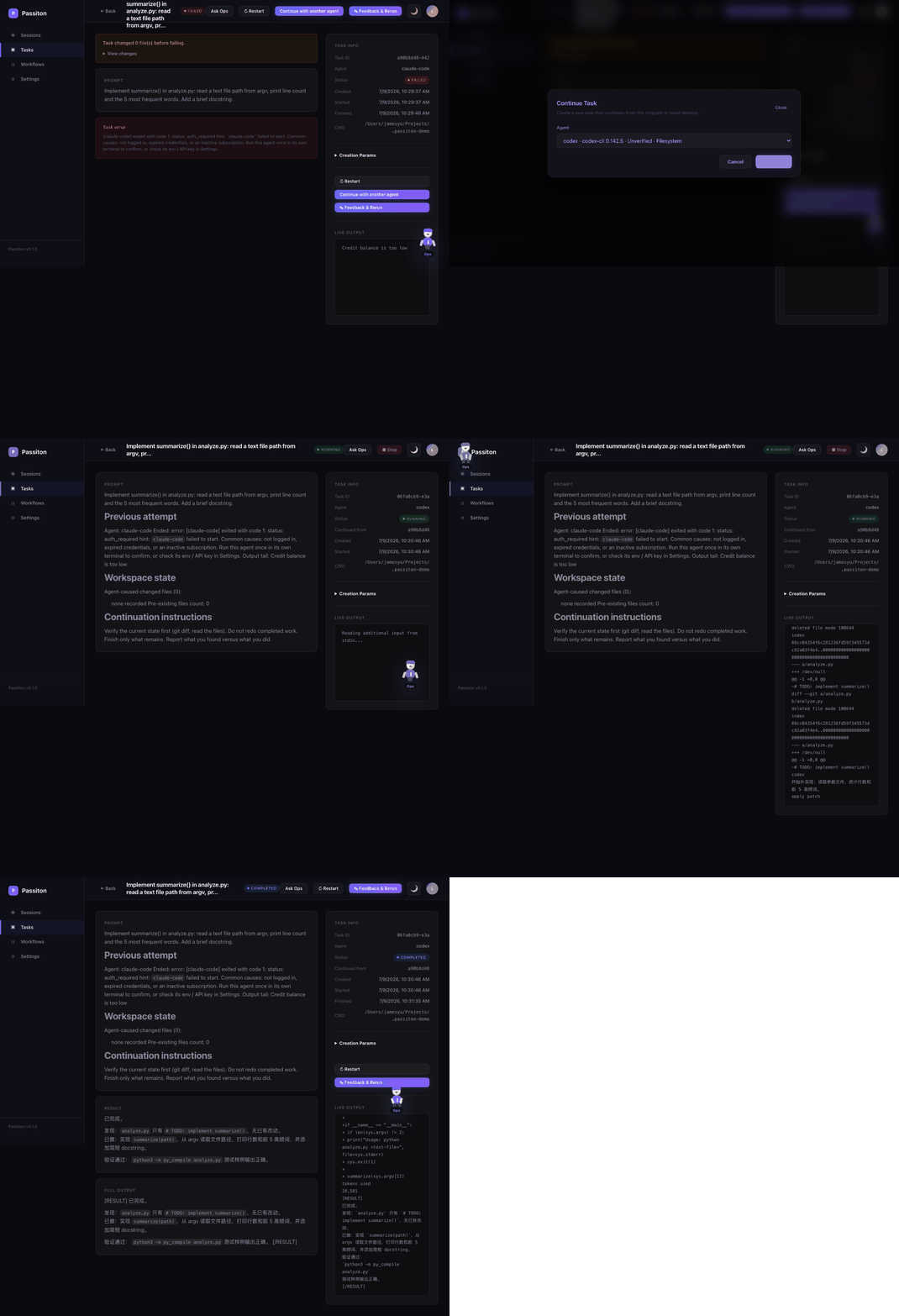
Passiton is local-first multi-agent orchestration: run tasks across the CLI agents and API models you already have, and when one agent dies from quota, timeout, or interruption, pass the task on to another.
## Key Features
- **Task / Session / Workflow**: run one agent, pair two agents, or chain multi-step workflows with dependencies and approvals.
- **Agent handoff**: continue errored or stopped tasks with another ready agent, including the previous output tail and verified git workspace state when available.
- **Human-in-the-loop**: pause, resume, inject feedback, approve workflow steps, and rerun downstream steps after changes.
- **Local-first SQLite**: defaults to `127.0.0.1`, stores config and state under `~/.passiton/`, and keeps the legacy `turing.db` filename for compatibility.
- **CLI and API agents**: Codex, Claude Code, Gemini CLI, OpenCode, Anthropic, OpenAI, DeepSeek, Zhipu, Qwen, Moonshot, and OpenAI-compatible endpoints.
- **i18n**: English is the default UI language; Simplified Chinese is available in Settings.
## Quick Start
```bash
git clone https://github.com/fusae/passiton.git
cd passiton
npm install
npm run build
npm start
```
Open `http://localhost:4590`.
Optional verification:
```bash
npm test
```
`npx passiton` is coming after the npm package is published. For local development, use `npm link` after `npm run build`.
## First Task Walkthrough
1. Open `Settings`.
2. Confirm a local CLI agent shows `Discovered`.
3. Click `Add`; it becomes `unverified`.
4. Click `Diagnose`; a usable agent becomes `ready`.
5. Open `Tasks`, choose the agent, enter a prompt, and optionally set `cwd`.
Tasks with `cwd` require a filesystem-capable local CLI agent. API assistants can plan and review, but they cannot read or write local files directly.
## Configuration
Passiton reads `~/.passiton/config.json`, merged with `config/default.json`. Existing installs using `~/.turing/` are still detected.
Common environment variables:
| Variable | Purpose |
| --- | --- |
| `PORT` | HTTP port; default `4590` |
| `PASSITON_HOST` | bind host; default `127.0.0.1` |
| `PASSITON_HOME` | data directory for `config.json` and `turing.db` |
| `PASSITON_JWT_SECRET` | stable JWT secret for exposed/server mode |
| `PASSITON_ENCRYPTION_KEY` | key material for encrypted provider keys |
| `PASSITON_LOCAL_ACCESS` | local auto-login; default `true` |
| `PASSITON_ALLOW_REGISTRATION` | user registration; default `false` |
| `PASSITON_ALLOWED_ORIGINS` | comma-separated CORS origins beyond localhost |
| `PASSITON_LOCAL_CLI_AGENTS` | auto-discover local CLI agents; default `true` |
| `PASSITON_ALLOWED_WORKSPACES` | path-delimited roots that CLI agents may use |
| `PASSITON_CODEX_COMMAND` / `PASSITON_CLAUDE_COMMAND` / `PASSITON_GEMINI_COMMAND` / `PASSITON_OPENCODE_COMMAND` | override CLI binary paths |
| `PASSITON_DREAMINA_COMMAND` / `PASSITON_GEMINI_SKILL_SCRIPT` | enable bundled experimental providers |
Legacy `TURING_*` variables are accepted as fallbacks for the matching `PASSITON_*` names.
## Security Model
Passiton is designed for local use by one trusted user. Defaults:
- server binds to `127.0.0.1`
- local auto-login is enabled
- registration is disabled
- JWT and encryption secrets are generated on first run
- CLI agents run as local processes and can act inside allowed workspaces
If you expose Passiton beyond localhost through a LAN, tunnel, or public host, startup requires:
1. `PASSITON_LOCAL_ACCESS=false`
2. `PASSITON_JWT_SECRET` or `auth.jwtSecret`
3. non-empty `policy.allowedWorkspaces`
Use `trusted` permission mode only for trusted agents and narrowly scoped `cwd` values. See [SECURITY.md](./SECURITY.md).
## HTTP API
The server exposes JSON endpoints for agents, tasks, sessions, workflows, provider keys, auth tokens, file previews, logs, and stats. Start with the machine-readable reference:
```text
GET /api/docs
```
Most `/api/*` endpoints require `Authorization: Bearer <token>`. Local mode can obtain a token through `POST /api/auth/local`.
## MCP Integration
Passiton provides a Streamable HTTP MCP gateway at `POST /mcp` and `POST /api/mcp`. Use a Bearer token or token query parameter.
Tool names use the `passiton_*` prefix, including:
- `passiton_list_agents`
- `passiton_create_task`
- `passiton_get_task_result`
- `passiton_create_session`
- `passiton_send_feedback`
- `passiton_get_progress`
- `passiton_create_workflow`
- `passiton_get_workflow`
- `passiton_approve_step`
- `passiton_retry_step`
- `passiton_stop_run`
- `passiton_read_artifact`
When connecting from a remote MCP client, use HTTPS and the exposure requirements above.
## External Task Providers
The core router is not tied to a vendor. Integrations that submit remote jobs and poll until done implement `ExternalTaskProvider` from `src/types.ts` and register with `router.registerExternalTaskProvider(provider)`.
Providers can:
- parse agent output for external job IDs
- own workflow steps through `handledNodeTypes`
- poll for completion and attach output paths
- resume polling after server restart
Bundled examples:
- Dreamina video provider in `src/examples/dreamina/`, enabled by `PASSITON_DREAMINA_COMMAND`
- Gemini Image adapter, enabled by `PASSITON_GEMINI_SKILL_SCRIPT` and `GEMINI_WEB_COOKIE_PATH`
## Data Retention
Persistent state lives in `~/.passiton/turing.db` by default. Existing `~/.turing/` data is reused when present.
Messages are retained for 30 days by default via `policy.messageRetentionMs`. Provider keys are encrypted at rest. Protect the data directory like any other local credential store.
## More Docs
- [HTTP API usage](./docs/EXTERNAL_AGENT_USAGE.md)
- [Community adapters](./docs/community-adapters.md)
- [Contributing](./CONTRIBUTING.md)
- [Security](./SECURITY.md)
 MCP Store