Content
# Deep Search
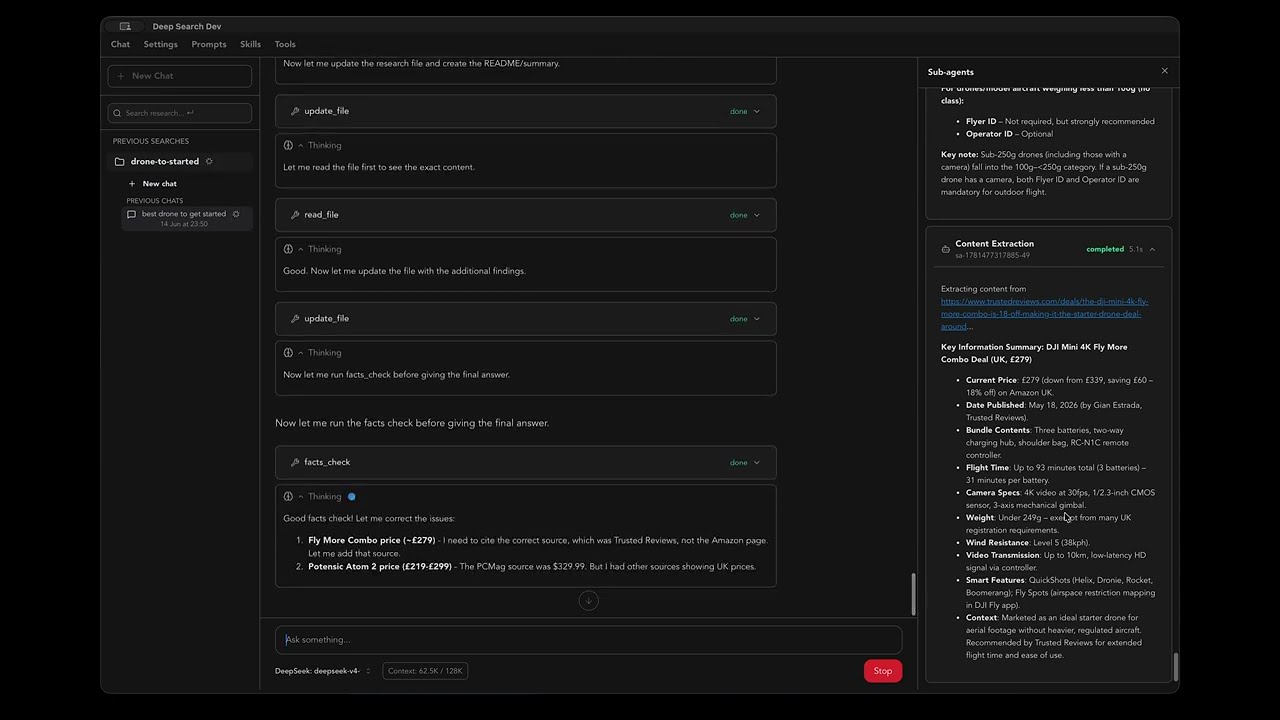
A desktop research agent that runs on your machine, with your API keys, storing everything on your disk.
[](https://www.youtube.com/watch?v=bN8V7AK_ByE)
## Download
[Get the latest release](https://github.com/example-user/deep-search-app/releases) for your platform.
| Platform | Format |
| --------------------- | -------------------- |
| macOS (Apple Silicon) | `.dmg` |
| macOS (Intel) | `.dmg` |
| Windows | `.msi` / `.exe` |
| Linux | `.deb` / `.AppImage` |
The app auto-updates when new versions come out.
## Getting started
1. Download and install.
2. Open Settings, paste in your LLM provider API key.
3. Add at least one search provider API key.
4. Ask a question.
## Why not use OpenCode directly?
Everything this app does can be done with a custom OpenCode config — that's what [local-deep-search](https://github.com/example-user/local-deep-search) was before I built this app. But that route has tradeoffs.
Some agents don't always follow instructions — they skip currency conversions, forget to fact-check, or gloss over contradictions. You can add guardrails with OpenCode plugins, but once your config gets custom enough, you're maintaining what's effectively an app inside a config file.
Deep Search bakes those guardrails in. The agent has to fetch and read sources — it can't skip steps. Tool calls are enforced, not suggested. It also adds proper search with embeddings: the LLM can search past research, create memories, and find files across topics. And you configure everything from a UI — API keys, providers, settings — without touching a config file.
If you just want a chat agent that can browse the web, OpenCode already does that well. This app is for when you want enforced research steps, persistent memory, and a polished UI without building it yourself.
## You own everything
You pick the LLM provider. You pick the search backends. You hold the API keys. The app talks directly to the services you choose — no middleman, no cloud server routing your questions through someone else's infrastructure.
If you want full privacy, you can run a local LLM and a self-hosted search engine like SearXNG. Everything stays on your machine. No data leaves your network unless you decide it should.
Your research is saved to per-topic folders on your disk, indexed with vector search, so you can search across past projects and pick up where you left off.
Because the app runs from your computer with a real browser webview, websites see a normal browser session. You are less likely to get blocked as a bot compared to cloud-based research tools.
## How it works
The agent searches the web, reads the actual pages, follows leads, cross-references sources, checks for contradictions, and verifies high-risk claims before writing up the answer with citations.
Each step is a separate tool call with guardrails. The agent has to actually fetch and read sources — it can't skip steps or make them up.
## Use from coding agents
Deep Search includes a stdio MCP proxy for coding agents. The proxy talks to the running desktop app, so MCP research uses the same settings, browser rendering, saved history, research folders, and guardrails as a normal in-app research run.
1. Open the Deep Search desktop app.
2. Configure a chat model and at least one search provider in Settings.
3. In Settings, copy the path shown under Deep Search MCP.
4. In your coding agent's MCP config, use that path as the server command:
```json
{
"mcpServers": {
"deep-search": {
"command": "/Users/you/Library/Application Support/com.deep-search-app.app/deep-search-mcp.mjs"
}
}
}
```
If your MCP client does not execute shebang scripts directly, use Node with the
same file path:
```json
{
"mcpServers": {
"deep-search": {
"command": "node",
"args": ["/Users/you/Library/Application Support/com.deep-search-app.app/deep-search-mcp.mjs"]
}
}
}
```
You do not need to run `npm run mcp` manually. MCP clients start the configured
command when they need the server.
The MCP exposes:
- `deep_search` - start, poll, resume, or follow up on a research session.
- `deep_search_cancel` - cancel a running research session.
Use `deep_search` with one of these inputs:
```json
{ "question": "Research React 19 migration risk for this repo" }
```
```json
{ "session_id": "mcp-session-id" }
```
```json
{
"session_id": "mcp-session-id",
"answers": ["migration plan"]
}
```
```json
{
"session_id": "mcp-session-id",
"question": "Now compare that with the Vue migration risk."
}
```
Responses are one of:
```json
{ "session_id": "mcp-session-id", "status": "running" }
```
```json
{
"session_id": "mcp-session-id",
"status": "questions",
"questions": [
{
"text": "Do you want a migration plan or a risk assessment?",
"options": ["migration plan", "risk assessment"]
}
]
}
```
```json
{
"session_id": "mcp-session-id",
"status": "done",
"result": "Final cited research answer..."
}
```
When `status` is `running`, the research is still active. Call `deep_search`
again with only `session_id` until it returns `done`, `questions`, `failed`, or
`cancelled`. Do not treat `running` as the final answer.
When `status` is `questions`, ask the user and call `deep_search` again with
`session_id` and `answers`.
After `status` is `done`, ask a follow-up by calling `deep_search` again with
the same `session_id` and a new `question`. Deep Search appends that message to
the same saved research chat.
## Providers
LLM (pick one or more):
- Anthropic (Claude)
- OpenRouter
- OpenCode Zen
- Zhipu
Search (pick one or more):
- Brave Search
- Exa
- Serper
- Tavily
- SearXNG (self-hosted)
- YouTube Data API v3
API keys are stored locally via Tauri's plugin-store.
### YouTube search setup
YouTube search uses Google's official YouTube Data API v3. Subtitle download
uses public caption tracks when a video exposes them; Google's official caption
download API requires OAuth access to a video you can edit, so an API key does
not unlock subtitles for arbitrary public videos.
To enable YouTube search:
1. Open [Google Cloud Console](https://console.cloud.google.com/).
2. Create or select a Google Cloud project.
3. Open [YouTube Data API v3](https://console.cloud.google.com/apis/library/youtube.googleapis.com) and click **Enable**.
4. Go to [APIs & Services -> Credentials](https://console.cloud.google.com/apis/credentials).
5. Click **Create credentials -> API key**.
6. Restrict the key under **API restrictions** so it can only call **YouTube Data API v3**.
7. In Deep Search, open Settings and paste the key into **YouTube Data API Key**.
For local development smoke tests, you can also put the key in `.env`:
```sh
YOUTUBE_API_KEY=your_google_api_key_here
```
The desktop app reads the key from Settings at runtime. `.env` is ignored by Git
and is only for local developer commands or tests.
### YouTube subtitle fallback
When the in-app public caption fetch fails for a YouTube video, Deep Search can
optionally ask your local `yt-dlp` binary to download the video's caption file.
This handles videos where YouTube's public timed-text response is blocked or
empty, but `yt-dlp` can still access the autogenerated captions.
Configure these fields in Settings under Extraction Services:
- **yt-dlp Path**: absolute path to the installed `yt-dlp` executable. The
app runs a command equivalent to:
```sh
yt-dlp --skip-download --write-auto-subs --sub-langs en --sub-format vtt <youtube-url>
```
The fallback is only used after the direct public-caption extraction fails. It
downloads a temporary `.vtt` subtitle file, parses it into the normal YouTube
transcript format, and deletes the temporary subtitle file afterwards.
## Development
You need Node.js LTS, Rust stable, and the [Tauri prerequisites](https://v2.tauri.app/start/prerequisites/) for your platform.
```sh
npm install
npm run tauri dev
```
| Command | What it does |
| ------------------------------ | ------------------------------- |
| `npm run dev` | Frontend only (Vite, port 1420) |
| `npm run mcp` | Dev smoke command for the MCP proxy |
| `npm run verify` | Full local verification gate |
| `npm run build` | TypeScript check + Vite build |
| `npm test` | Unit tests (Vitest) |
| `npm run test:e2e` | E2E tests (Playwright/headless Chrome) |
| `cargo test` (in `src-tauri/`) | Rust backend tests |
## Architecture
```
src/ # React frontend (Vite + Tailwind CSS 4)
lib/
transport/ # Chat transport, tool registry, guardrails
system-prompt.md # Agent system prompt
tools/ # AI tool definitions (search, extract, research...)
components/
assistant-ui/ # Chat UI (@assistant-ui/react)
ui/ # shadcn/ui components
src-tauri/ # Rust backend (Tauri v2)
src/
lib.rs # Tauri commands: tabs, fetch, content extraction
research_search/ # SQLite + sqlite-vec vector search
```
## License
MIT
 MCP Store
