

Content
# React Debugger — Chrome DevTools Extension
[](https://github.com/hoainho/react-debugger-extension/stargazers)
[](https://www.npmjs.com/package/@nhonh/react-debugger)
[](https://www.npmjs.com/package/@nhonh/react-debugger)
[](./LICENSE)
[](https://github.com/hoainho/react-debugger-extension/actions/workflows/ci.yml)
[](https://deepwiki.com/hoainho/react-debugger-extension)
> **The only Chrome extension that unifies React Timeline + Performance + Memory + Side Effects + Redux + CLS + AI analysis into a single DevTools tab — zero install in your app.**
**Extension version:** 3.0.0 · **CLI version:** 2.1.2 · **Author:** [NhoNH](https://github.com/hoainho) · **License:** MIT
## ⚡ Try it in 30 seconds
```bash
npx @nhonh/react-debugger@latest
```
Then load the built extension as unpacked in `chrome://extensions`. _Chrome Web Store listing coming soon — `npx` is the fastest path today._
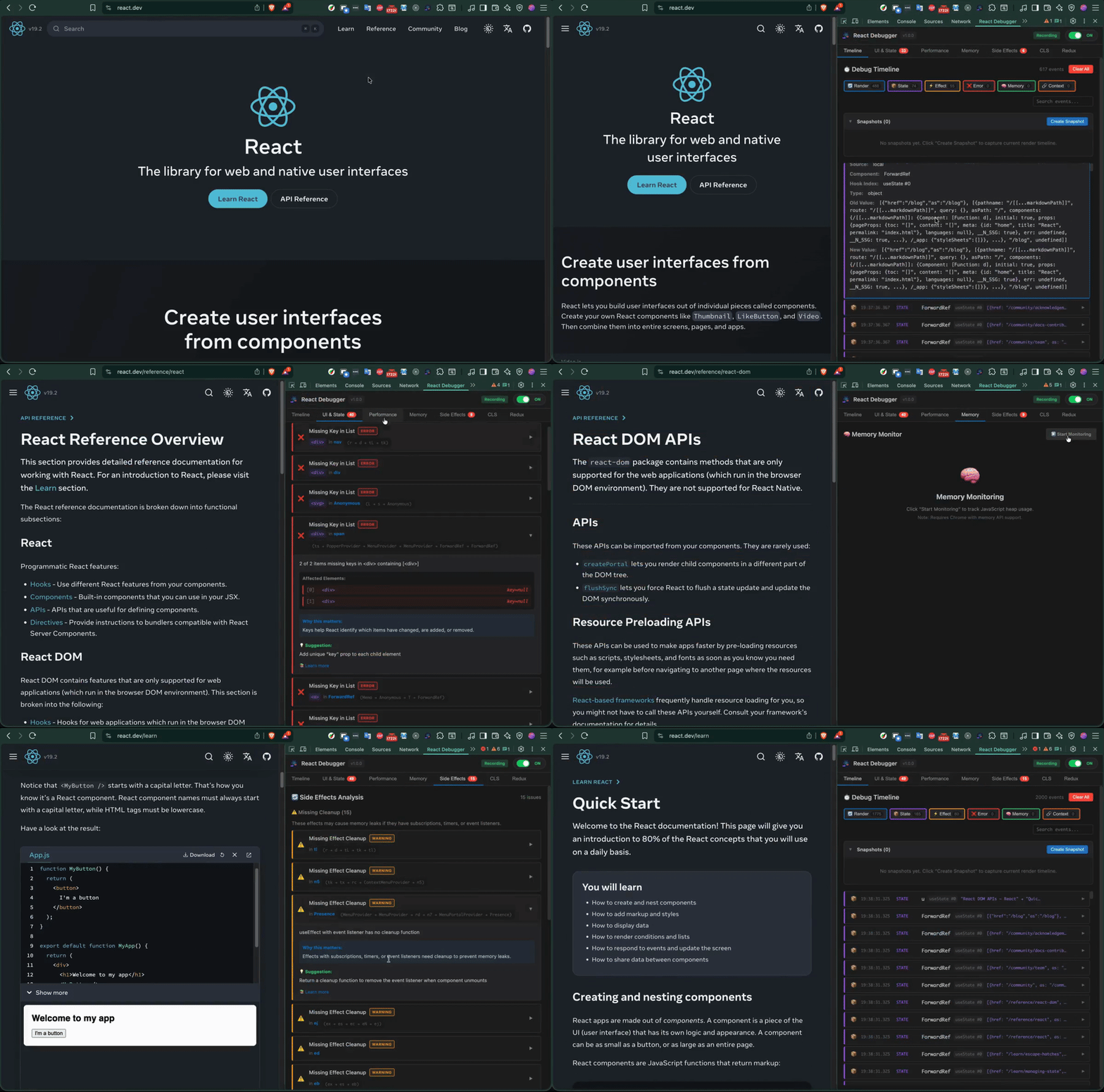
## Demo
---
## Why this extension
If you debug React apps in production today, you're probably switching between four tools to chase one bug:
- **[React DevTools](https://github.com/facebook/react)** — component tree, but no timeline, no CLS, no memory leak detection
- **Chrome Performance tab** — renders, but no React context
- **[Redux DevTools](https://github.com/reduxjs/redux-devtools)** — state, but isolated from render cycle
- **[react-scan](https://github.com/aidenybai/react-scan)** — great render overlay, but requires app-code changes; no Redux, no CLS, no memory
- **[why-did-you-render](https://github.com/welldone-software/why-did-you-render)** — precise render logs, but console-only and needs Babel config
**React Debugger unifies all of this into a single DevTools tab** — zero code changes in your app, with seven analyzers and an optional AI layer for security/perf/crash insight.
The **defensible triple-lock** no competitor combines: **CLS overlay + `useEffect` audit + AI analysis**, all in one zero-install browser panel.
## Features
| Tab | What it does |
|---|---|
| **Timeline** | Visual history of every render, state change, effect, and error |
| **UI & State** | Detects direct state mutation, missing keys, `index` as key, stale closures |
| **Performance** | Render counts, render reasons (props/state/context), Core Web Vitals overlay |
| **Memory** | Heap-size sparkline, growth-rate alerts, leak-detection heuristics |
| **Side Effects** | `useEffect` auditor: missing cleanups, bad dependency arrays |
| **CLS** | Real-time Cumulative Layout Shift score + per-element attribution |
| **Redux** | State tree, action history, manual action dispatch (no separate Redux DevTools needed) |
| **AI Analysis** | LLM-powered security, performance, and crash-risk scan. 3 free analyses per session; unlimited with a subscription key. Requires no API key from you. |
## Screenshots
| Timeline | Performance |
|---|---|
|  |  |
| Memory | Side Effects |
|---|---|
|  |  |
| CLS | Redux |
|---|---|
|  |  |
## How it compares
| Feature | **React Debugger** | react-devtools | react-scan | why-did-you-render | redux-devtools |
|---|:---:|:---:|:---:|:---:|:---:|
| Render timeline (ambient) | ✅ | ⚠️ (manual record) | ⚠️ overlay only | ❌ | ❌ |
| Render reasons (prop/state diff) | ✅ | ⚠️ (no values) | ✅ | ✅ console | ❌ |
| **Memory leak detection** | ✅ | ❌ | ❌ | ❌ | ❌ |
| **`useEffect` audit** | ✅ | ❌ | ❌ | ❌ | ❌ |
| Redux integrated | ✅ | ❌ | ❌ | ⚠️ | ✅ time-travel |
| **CLS overlay** | ✅ | ❌ | ❌ | ❌ | ❌ |
| **AI analysis** | ✅ | ❌ | ❌ | ❌ | ❌ |
| Install method | Chrome extension (no app changes) | Chrome extension | npm/script tag (app code) | npm + Babel | Chrome extension |
**Bold rows** = features no other tool combines into one panel.
### Recent release: v3.0.0 — DevTools-native redesign + 8 new detectors
The biggest release since launch — a full UI redesign, eight new issue detectors, an MCP server, and BYOK AI:
- **DevTools-native UI redesign.** The 9 legacy tabs consolidate into a focused 5-view shell — **Dashboard / Profiler / State / Effects / Settings** — with an active-underline nav, per-view count badges, segmented sub-tabs, and a sticky header. The classic 9-tab layout stays one toggle away.
- **New Dashboard.** A first-screen overview: severity KPI stat-tiles, React version/mode + Redux chip, a render-pressure sparkline, top-offender components, and page-load vitals.
- **Charts.** A dependency-free `ChartCanvas` (area / line / bars + faint grid + emphasized endpoint) powers the Memory heap-over-time timeline and the Performance render-distribution.
- **8 new detectors** on a pluggable registry (per-detector Settings toggles + confidence badges): 4 hero — **unstable list keys**, **hydration mismatch**, **context cascade**, **suspense waterfall** — plus **stale-closure-async**, **inline-handler-cost**, and **ref-mutation-during-render**.
- **MCP server** for LLM coding agents (stdio bridge + token/Origin pairing) and **BYOK AI providers** (HostedProxy / OpenAI / Anthropic / none), with opt-in anonymous telemetry (default **off**).
- **Accessibility & quality.** WCAG 2.1 AA contrast, `prefers-reduced-motion`, focus-visible rings, and a headless Playwright visual-regression lane.
See [CHANGELOG.md](./CHANGELOG.md) for the full history (including the v2.0.3 zero-lag performance work this builds on).
---
## Installation
### Option 1 — Quick install via npx (recommended)
```bash
npx @nhonh/react-debugger
```
This downloads and extracts the latest extension build to your current directory. Then load it in Chrome:
1. Open `chrome://extensions/`
2. Enable **Developer mode** (top right)
3. Click **Load unpacked**
4. Select the extracted folder
### Option 2 — Build from source
You need **Node 20+** and **Chrome 122+**.
```bash
git clone https://github.com/hoainho/react-debugger-extension.git
cd react-debugger-extension
npm ci
npm run build
```
Then load the `dist/` folder in Chrome via the same `chrome://extensions/` → **Load unpacked** flow.
### Option 3 — Download ZIP from Releases
1. Grab `react-debugger.zip` from [GitHub Releases](https://github.com/hoainho/react-debugger-extension/releases/latest)
2. Extract and load via `chrome://extensions/` → **Load unpacked**
---
## Quick Start
1. Open any React 16+ application
2. Press `F12` (or `Cmd+Option+I` / `Ctrl+Shift+I`)
3. Find the **"React Debugger"** tab in the DevTools panel strip
4. The extension auto-detects React and starts collecting data immediately
For detailed walkthroughs of each tab, debugging strategies by skill level, and threshold reference tables, see **[DEBUGGING-GUIDE.md](./DEBUGGING-GUIDE.md)**.
For 50 documented edge cases across 6 categories (Initialization, Performance Monitoring, Redux Integration, Memory & Cleanup, UI & State, CLS & Layout), see **[EDGE-CASES.md](./EDGE-CASES.md)**.
---
## Comparison
| | React Debugger | React DevTools | why-did-you-render | react-scan |
|---|:---:|:---:|:---:|:---:|
| Component tree | partial | ✅ | — | ✅ |
| Render tracking | ✅ | ✅ profiler | ✅ | ✅ |
| Memory profile | ✅ | — | — | — |
| Side-effect audit | ✅ | — | partial | — |
| Redux state | ✅ | — | — | — |
| CLS monitoring | ✅ | — | — | — |
| AI analysis | ✅ | — | — | — |
| In-DevTools panel | ✅ | ✅ | — | — |
**The wedge:** React Debugger is the only Chrome DevTools panel that combines all seven analyzers in one tab.
---
## Development
```bash
npm ci # one-time install
npm run dev # rebuild on change (watch mode)
npm run build # production build → dist/
npm run test:run # one-shot Vitest run
npm run package # build + zip → react-debugger.zip
```
After every rebuild during dev, click the refresh icon on the extension card at `chrome://extensions/` and reload the inspected page.
### Project structure
```
react-debugger-extension/
├── src/
│ ├── background/ # Service worker
│ ├── content/ # Content script (CLS monitoring)
│ ├── inject/ # Page script (React fiber hook, bippy-aligned)
│ ├── devtools/ # DevTools page entry
│ ├── panel/
│ │ ├── components/ # Reusable components
│ │ ├── tabs/ # 8 tab components incl. AI Analysis
│ │ └── styles/ # CSS (with prefers-reduced-motion support)
│ ├── services/ # AI client, token optimizer, snapshot builder
│ ├── types/ # TypeScript types
│ ├── utils/ # Utilities (sanitize, messaging)
│ └── __tests__/ # Vitest unit tests (170 tests across 9 files)
├── cli/ # @nhonh/react-debugger npm package
├── worker/ # Cloudflare Worker (AI subscription key validation)
├── test/
│ └── fixtures/basic/ # E2E fixture app for Playwright (Vite + React 18)
├── docs/ # Landing page (hoainho.github.io/react-debugger-extension)
└── openspec/ # In-flight design proposals (growth campaign, MCP server v1)
```
---
## Troubleshooting
### Extension doesn't show in DevTools
1. Verify you loaded the `dist/` folder, not the repo root
2. Reload the inspected page after loading the extension
3. Check `chrome://extensions/` for errors
### React not detected
- The page must use React 16+ with the Fiber architecture
- Refresh the page — content script attaches at `document_start`
- Check the console for errors from the extension
- React must be in development mode for some features (e.g., render reasons)
### No issues detected
- The extension only surfaces issues when found — a quiet panel is a healthy app
- Try the examples in [DEBUGGING-GUIDE.md](./DEBUGGING-GUIDE.md)
### Performance regression on the host page
v2.0.3 specifically targeted host-page lag. If you still see it, please [open a bug](https://github.com/hoainho/react-debugger-extension/issues/new?template=bug_report.yml) with Chrome version, extension version, and the inspected page URL.
---
## Contributing
We welcome contributions of all sizes. The fastest way in:
1. Browse [good-first-issue items](https://github.com/hoainho/react-debugger-extension/issues?q=is%3Aissue+is%3Aopen+label%3A%22good+first+issue%22) — each one has scope, file pointers, and acceptance criteria
2. Claim with a comment: `@hoainho I'll take this`
3. Read **[CONTRIBUTING.md](./.github/CONTRIBUTING.md)** for local setup, conventional commits, and the PR review SLA
We also have [`help wanted` items](https://github.com/hoainho/react-debugger-extension/issues?q=is%3Aissue+is%3Aopen+label%3A%22help+wanted%22) for larger contributions.
### Community
- 💬 [GitHub Discussions](https://github.com/hoainho/react-debugger-extension/discussions) — questions, ideas, show-and-tell. Five categories with structured templates: [Q&A](https://github.com/hoainho/react-debugger-extension/discussions/categories/q-a), [Ideas](https://github.com/hoainho/react-debugger-extension/discussions/categories/ideas), [Show & Tell](https://github.com/hoainho/react-debugger-extension/discussions/categories/show-and-tell), [General](https://github.com/hoainho/react-debugger-extension/discussions/categories/general), [Announcements](https://github.com/hoainho/react-debugger-extension/discussions/categories/announcements).
- 📚 [Wiki](https://github.com/hoainho/react-debugger-extension/wiki) — living docs: architecture overview, FAQ, debugging cookbook, glossary
- 🐛 [Issues](https://github.com/hoainho/react-debugger-extension/issues) — bug reports, feature requests
- 🔒 [Security policy](./SECURITY.md) — responsible disclosure (90-day timeline)
- 📜 [Code of Conduct](./.github/CODE_OF_CONDUCT.md) — Contributor Covenant v2.1
---
## What's Next
Active design work lives in [openspec/changes/](./openspec/changes/):
- **`mcp-server-v1/`** — adding a Model Context Protocol server so LLM coding agents (Claude Desktop, opencode, Cursor) can drive the extension's debugging tools programmatically. Currently in spec phase; first contributor PRs are already landing scaffolding.
- **`growth-and-contributor-attraction/`** — 90-day plan to grow the project and contributor base. Week 1 (license + on-ramp) shipped May 2026.
---
## ⭐ If this saves you time, please star the repo
Every star helps more React developers discover the project — and it's the single most useful signal you can send the maintainer that the work matters. **One click. Big difference.**
[](https://star-history.com/#hoainho/react-debugger-extension&Date)
You can also [👀 Watch releases](https://github.com/hoainho/react-debugger-extension/subscription) to get notified when new tabs (or the MCP server) ship.
## License
[MIT](./LICENSE) — Copyright © 2025-2026 NhoNH.
> React and the React logo are trademarks of Meta Platforms, Inc. This extension is not affiliated with or endorsed by Meta or the React team.
MCP Config
Below is the configuration for this MCP Server. You can copy it directly to Cursor or other MCP clients.
mcp.json
Connection Info
You Might Also Like
No recommendations available