Content
# C4X - C4 Model Diagrams for VS Code

[](https://www.typescriptlang.org/)

Fast, offline C4 architecture diagrams with real-time preview and AI-powered generation via Google Gemini. Mermaid-inspired DSL, C4-compliant SVG rendering, PNG export, and 1500+ cloud icons.
<img src="assets/marketplace/images/c4x-system-context-v140.png" width="700" alt="C4X System Context Diagram" />
## New in v1.4.0
- **PNG export** -- Canvas-based at 1x/2x/4x resolution, no Chromium needed
- **C4 Standard theme** -- Official filled-box convention as the new default
- **Auto-layout** -- Smart direction: LR for small diagrams, TB for large
- **24 architecture pattern examples** -- [CQRS, Saga, BFF, Hexagonal, IoT, CI/CD, Zero-Trust, and more](./docs/EXAMPLES-PATTERNS.md)
- **All C4 view levels documented** -- [C1 through C4 + Dynamic diagrams](./docs/EXAMPLES-VIEWS.md)
- **398 unit tests** with parser 94% and model 98% coverage
## Features
- **Instant Preview** -- Sub-50ms rendering for 30-node diagrams, live as you type
- **AI Generation (Gemini)** -- Code-to-diagram, text-to-diagram, and visual PNG generation
- **All C4 Levels** -- System Context, Container, Component, Deployment, and Dynamic views
- **6 Themes** -- C4 Standard (default), Classic, Modern, Muted, High Contrast, Auto
- **Export** -- PNG (1x/2x/4x), SVG, Copy SVG with theme preservation
- **1500+ Icons** -- AWS, Azure, GCP with IntelliSense autocomplete (`$sprite` syntax)
- **Markdown Integration** -- Render `c4x` blocks directly in README and architecture docs
- **Auto-Layout** -- Smart direction selection: horizontal for small, vertical for large diagrams
- **Self-Correcting AI** -- Parser-validated output with automatic retry and self-remediation
- **MCP Server** -- Built-in validator for Claude, Cursor, and other AI assistants
### Watch 30s Demo
[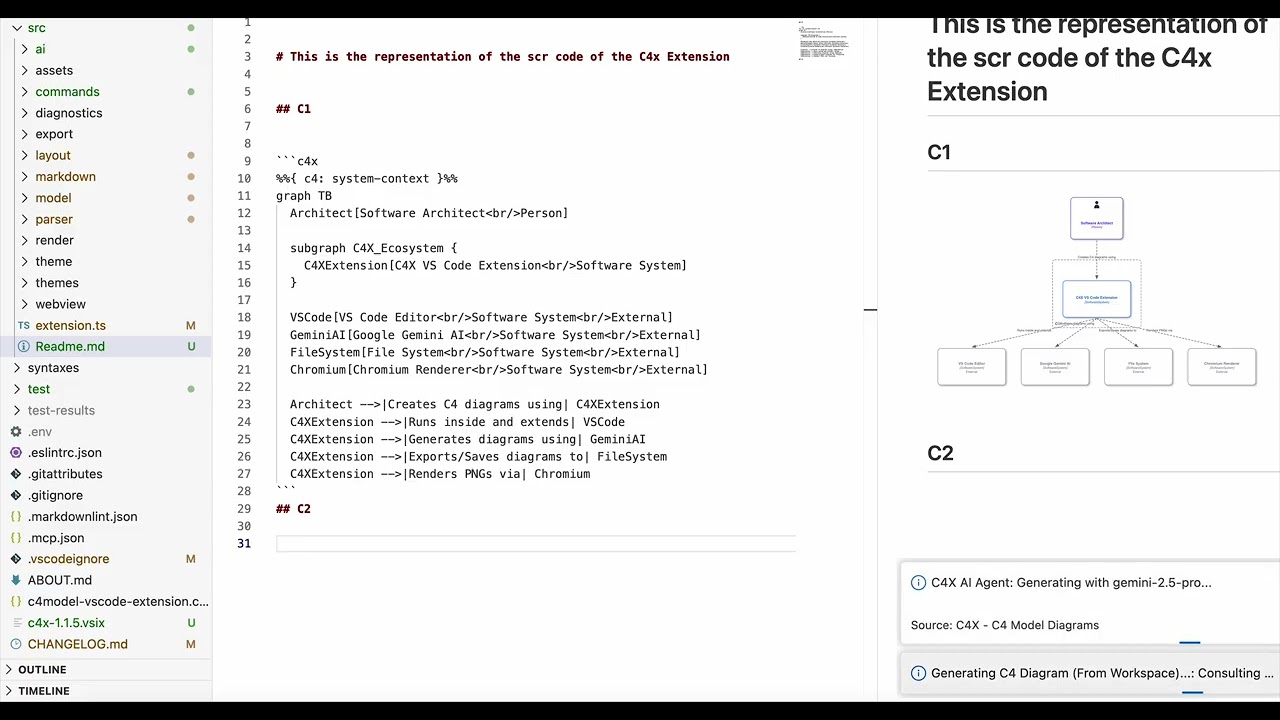](https://youtu.be/qR1bbctj2rQ)
## Quick Start
### Install
**VS Code Marketplace** (recommended): Search "C4X" in Extensions (`Cmd+Shift+X`) and install.
**Command line**: `code --install-extension jpantsjoha.c4x`
### Create a Diagram
1. Create a file `architecture.c4x`
2. Write your diagram:
```c4x
%%{ c4: system-context }%%
graph TB
Customer[Customer<br/>Person]
Banking[Banking System<br/>Software System]
Email[Email System<br/>Software System<br/>External]
Customer -->|Uses| Banking
Banking -->|Sends notifications| Email
```
1. Open preview: `Cmd+K V` (or `Ctrl+K V`)
No Java, no servers, no configuration needed.
### Embed in Markdown
````text
```c4x
%%{ c4: system-context }%%
graph TB
User[User<br/>Person]
System[My System<br/>Software System]
User -->|Uses| System
```
````
The extension renders `c4x` code blocks as visual diagrams in VS Code's Markdown Preview.
## DSL Syntax
### Elements
```text
%% Bracket syntax
Admin[Administrator<br/>Person]
API[Payment API<br/>Software System<br/>External]
%% Function syntax (supports icons, technology, description)
Container(WebApp, "Web App", "React", $sprite="c4xicons.aws.elastic-beanstalk-application")
ContainerDb(DB, "Database", "PostgreSQL")
Person(User, "End User")
```
Types: `Person`, `Software System`, `Container`, `ContainerDb`, `Component`, `ComponentDb`, plus `*_Ext` variants for external elements.
### Relationships
```text
A -->|Label| B %% Standard dependency
A ==>|Label| B %% Synchronous / blocking
A -.->|Label| B %% Asynchronous / event-driven
```
### Boundaries
```c4x
%%{ c4: container }%%
graph TB
User[User<br/>Person]
subgraph BankingSystem {
WebApp[Web App<br/>Container]
Database[DB<br/>Container]
}
User -->|Uses| WebApp
WebApp ==>|Reads/Writes| Database
```
### View Types
```text
%%{ c4: system-context }%% %% C1
%%{ c4: container }%% %% C2
%%{ c4: component }%% %% C3
%%{ c4: deployment }%% %% C4
%%{ c4: dynamic }%% %% Sequence/interaction
```
Full reference: [Syntax Guide](./docs/c4x-syntax.md)
## AI Generation (Gemini)
C4X uses Google Gemini to generate diagrams from code, text, or selections.
**Setup**: Get a free API key from [Google AI Studio](https://aistudio.google.com/) or use a [Google Cloud](https://cloud.google.com/) Vertex AI key for enterprise compliance. Keys are stored in VS Code's encrypted SecretStorage.
**Default model**: `gemini-3-flash-preview` (free tier) with automatic fallback to `gemini-3.1-pro-preview`. Configure any Gemini model via `c4x.ai.model` in settings.
| Command | What it does |
|---------|-------------|
| `C4X: Generate Diagram Here` | Generate C4X diagram at cursor from context |
| `C4X: Generate from Selection` (`Alt+V`) | Generate visual PNG from highlighted text |
| `C4X: Generate from Workspace` | Analyze code files and create C4 model |
All AI-generated diagrams are parser-validated with up to 3 self-correction retries.
Full guide: [Gemini AI Guide](./docs/GEMINI_GUIDE.md) | [Visual Diagram Guide](./docs/DIAGRAM-WITH-GEMINI-IMAGE.md)
## Icons
1500+ built-in cloud and technology icons with IntelliSense autocomplete.

```c4x
Container(S3, "Storage", "AWS S3", $sprite="c4xicons.aws.simple-storage-service-bucket")
ContainerDb(DB, "Database", "Cloud SQL", $sprite="c4xicons.gcp.cloudsql")
```
Full icon catalog: [Icons & Examples](./docs/EXAMPLES-with-ICONS.md)
## Export
| Command | Format | Notes |
|---------|--------|-------|
| `C4X: Export PNG` | PNG | 1x, 2x, or 4x resolution. Canvas-based, no Chromium. |
| `C4X: Export SVG` | SVG | Vector format for Figma, Sketch, Illustrator |
| `C4X: Copy SVG to Clipboard` | SVG | Quick paste into other apps |
Exported diagrams preserve your selected theme.
## Themes
| Theme | Description |
|-------|-------------|
| **C4 Standard** | Official filled-box convention (default) |
| Classic | White-fill with colored borders |
| Modern | Vibrant colors, rounded corners |
| Muted | Grayscale minimalist |
| High Contrast | WCAG AAA compliant |
| Auto | Adapts to VS Code light/dark |
Change via Command Palette (`C4X: Change Theme`) or settings (`"c4x.theme": "modern"`).
## Examples & Documentation
| Guide | Content |
|-------|---------|
| [Example Gallery](./docs/EXAMPLES.md) | Banking, Microservices, AI Agents |
| [All C4 View Levels](./docs/EXAMPLES-VIEWS.md) | C1-C4 + Dynamic, relationship types, database variants |
| [Architecture Patterns](./docs/EXAMPLES-PATTERNS.md) | CQRS, Event Sourcing, Saga, BFF, Hexagonal, IoT, CI/CD, and more |
| [Cloud Icons](./docs/EXAMPLES-with-ICONS.md) | AWS, Azure, GCP sprites with autocomplete |
| [Layout Guide](./docs/EXAMPLES-LAYOUT.md) | Direction control, nested layouts, manual positioning |
| [Ordering Guide](./docs/EXAMPLES-ORDERING.md) | Controlling element placement |
| [Visual Diagrams](./docs/DIAGRAM-WITH-GEMINI-IMAGE.md) | AI-powered PNG generation |
| [Syntax Reference](./docs/c4x-syntax.md) | Complete DSL specification |
| [Generation Guidelines](./docs/C4X-GENERATION-GUIDELINES.md) | Advanced AI prompting |
## MCP Server
C4X includes a Model Context Protocol server for AI assistant integration.
```json
{
"mcpServers": {
"c4x-validator": {
"command": "node",
"args": ["/path/to/c4x-vscode-extension/out/mcp/c4x-mcp-server.js"]
}
}
}
```
**Tool**: `validate_c4x` -- validates syntax, returns line/column errors for auto-correction.
**Resources**: `c4x://guidelines`, `c4x://syntax`, `c4x://examples/*`
Works with Claude Desktop, Cursor, Windsurf, Cline, and any MCP-compatible client.
## Performance
| Metric | Target | Achieved |
|--------|--------|----------|
| Activation | < 200ms | **0.15ms** |
| Bundle Size | < 1MB | **386KB** |
| Parse | < 50ms | **10ms** |
| Preview Render | < 250ms | **55ms** |
Tested with 30-node diagrams. 398 unit tests with 94% parser and 98% model coverage.
## Roadmap
**Shipped**: v1.4.0 (May 2026) -- PNG export, auto-layout, 398 tests, C4-compliant renderer, model validation
**Next**: v1.5.0 "Copilot Chat & Import Bridge" (Q3 2026)
- `@c4x` VS Code Copilot Chat participant
- Mermaid C4 import bridge
- ELK layout engine for hierarchical boundaries
- Custom local sprites (`$sprite="./logo.png"`)
Full roadmap: [docs/ROADMAP.md](./docs/ROADMAP.md)
## Contributing
Contributions welcome via [GitHub Issues](https://github.com/jpantsjoha/c4x-vscode-extension/issues) and pull requests. See [CONTRIBUTING.md](./CONTRIBUTING.md) for guidelines.
## More from the Author
- **[Pine Script (v5)](https://marketplace.visualstudio.com/items?itemName=jpantsjoha.pine-script-v5)** -- Syntax highlighting, snippets, and linting for TradingView's Pine Script
## License
MIT -- see [LICENSE](./LICENSE).
## Acknowledgments
- [C4 Model](https://c4model.com/) by Simon Brown
- [Mermaid.js](https://mermaid.js.org/) -- DSL syntax inspiration
- [Dagre.js](https://github.com/dagrejs/dagre) -- Graph layout engine
---
**Made with [Gemini](https://blog.google/products/gemini/gemini-3/) for architects who value simplicity** | [Report Issues](https://github.com/jpantsjoha/c4x-vscode-extension/issues) | [Star on GitHub](https://github.com/jpantsjoha/c4x-vscode-extension)
 MCP Store
