

Content
# mnemon
[](https://github.com/nousergon/mnemon/issues)
[](https://www.python.org/downloads/)
[](LICENSE)
[](https://modelcontextprotocol.io)
[](https://pypi.org/project/mnemon-memory/)
[](https://github.com/nousergon/mnemon/actions/workflows/ci.yml)
> One memory vault. Every MCP client. Self-hosted.
>
> **Status:** alpha — interfaces may change. [Issues](https://github.com/nousergon/mnemon/issues) and PRs welcome.
Claude Code, Cursor, claude.ai web/mobile/desktop, Claude Desktop, Gemini CLI — one vault shared across all of them.
mnemon is a [Model Context Protocol](https://modelcontextprotocol.io) server with hybrid BM25 + vector search. Your data stays on your machine or your own Fly app.
**Platforms:** Tested on macOS 14+. Linux should work. Windows untested.
## Two product lanes: local and web
| Capability | **mnemon local** | **mnemon web** |
|---|---|---|
| Claude Code (CLI) | ✅ | ✅ |
| Claude Desktop (Mac/Win app) | ✅ | ✅ |
| Cursor | ✅ | ✅ |
| Gemini CLI | ✅ | ✅ |
| Any local MCP client | ✅ | ✅ |
| **claude.ai (web)** | ❌ | ✅ |
| **Claude mobile app** | ❌ | ✅ |
| Memory shared across laptop + desktop | ❌ | ✅ |
| Durable off-machine backup | ❌ (manual file copy) | ✅ (S3) |
| External accounts required | none | Fly.io + AWS |
| Credit card required | no | yes (both free tiers) |
| First-install setup time | ~2 min | ~15 min |
| Ongoing cost | $0 | ~$0 on free tiers |
| Cold-start latency after idle | none | 2–5s |
- **mnemon local** — one machine, one or more MCP clients. Zero external accounts. `pip install mnemon-memory && mnemon setup`.
- **mnemon web** — memory across devices + claude.ai + mobile. Requires Fly.io + AWS. `mnemon upgrade web --app-name my-mnemon`.
Start local, upgrade later — your vault rides along. `mnemon downgrade local` reverts. Comfortable up to ~50k memories.
## Install
```bash
pip install mnemon-memory
```
Optional: `pip install "mnemon-memory[ui]"` for the Streamlit dashboard, or `[llm]` for the on-device 1.7B model.
**From source** (e.g. to try unreleased fixes on `main`):
```bash
git clone https://github.com/nousergon/mnemon.git
cd mnemon
pip install -e .
```
**For contributors** (adds `pytest`, `ruff`, and other test/lint tooling):
```bash
pip install -e ".[dev]"
```
## Quick Start
mnemon's whole point is **one memory vault across every client** — Claude Code, claude.ai web, Claude Desktop, the mobile app, Cursor. That's the **default setup** below. It's a deploy of your own Fly.io app (on your keys, your data), and `upgrade web` makes it turnkey — including auth for both headless *and* browser clients.
### Cross-device (the default)
Prereqs: [`flyctl`](https://fly.io/docs/flyctl/install/) authenticated, `aws` CLI configured, an S3 bucket.
```bash
pip install "mnemon-memory[server]"
export MNEMON_S3_BUCKET=my-mnemon-vault
mnemon upgrade web --app-name my-mnemon
```
This deploys **your own** mnemon to Fly, seeds the vault, and provisions auth for both client kinds:
- **Headless clients** (Claude Code, Cursor) — reconfigured automatically with a bearer token.
- **Browser clients** (claude.ai web, Claude Desktop, mobile) — a self-hosted OAuth Authorization Server is enabled for you (keypair persists on the Fly volume). In the app's Settings → Connectors, add a custom connector with a name + the URL `https://my-mnemon.fly.dev/mcp` — **leave Client ID / Client Secret blank** (the AS self-registers via Dynamic Client Registration). When you click Connect it redirects to a login page; enter the **passphrase printed at the end of the deploy** there (also saved to `~/.mnemon/as_passphrase`). The passphrase is the OAuth login, *not* a connector field.
No third-party auth vendor, no manual secret-wrangling. `mnemon doctor` runs at the end to verify the deployment.
### Local-only (quick demo)
Just trying it on one machine, with no Fly/AWS accounts? You can elect the local-only path instead — but note it's **single-machine, no cross-device sharing** (that's the whole feature you'd be skipping):
```bash
pip install mnemon-memory
mnemon setup
```
Auto-detects Claude Code, Claude Desktop, Cursor, Gemini CLI — configures each, then runs `mnemon doctor`. First `memory_search` takes ~10–20s (one-time FastEmbed model download). Move up to the full cross-device setup anytime with `mnemon upgrade web`.
### Upgrade to a newer version (already on web)
Rerun the same command after `pip install -U mnemon-memory` — `upgrade web` is idempotent. If the Fly app already exists, it skips the first-time steps (S3 push, volume create, client reconfigure) and just redeploys with the new version pinned. Clients keep their URL and token; the new image is picked up on the next request.
```bash
pip install -U 'mnemon-memory[server]'
mnemon upgrade web --app-name my-mnemon
```
> **Upgrading from a pre-0.7.0rc10 deployment? Re-auth your browser connectors once.** Apps deployed before the OAuth Authorization Server was auto-provisioned only ever had the headless bearer token. The first `upgrade web` on such an app **provisions a brand-new OAuth passphrase** (and enables the AS) — so your existing claude.ai / Desktop / mobile connector login stops working until you re-authenticate. Grab the new passphrase from the deploy summary or `~/.mnemon/as_passphrase` and re-enter it on the connector's login page. This is a **one-time** transition: once the passphrase exists, every later redeploy leaves it untouched (it is never rotated). Headless clients (Claude Code, Cursor) are unaffected — they keep their bearer token.
#### Optional: deploy from CI
The commands above are the **supported, fully-capable** way to deploy — for self-hosting and for testing a change before trusting automation. The repo also ships an optional **`Deploy to Fly`** GitHub Actions workflow (`.github/workflows/deploy-fly.yml`) so you can roll merged changes without running `flyctl` locally. It only wraps the same `flyctl deploy` — it can't do anything you can't do by hand.
It's keyed to *your* deployment, so it's inert in a fresh fork until you wire two things:
1. **`FLY_API_TOKEN`** repo secret — `fly tokens create deploy -a <your-app>` (Settings → Secrets and variables → Actions → **Secrets**).
2. **`FLY_APP`** repo variable — your Fly app name (same page → **Variables**). Or pass it as the `app` input on a manual run.
Once wired, it runs two ways:
- **Automatically on every push to `main`** (e.g. a merged PR) — zero clicks. This auto-deploy fires **only on the canonical, non-forked repo**, so forking the project never gives you red CI on merges.
- **Manually** — from the **Actions** tab, or `gh workflow run "Deploy to Fly"` (this path works on forks too).
Either way it renders `fly.toml` from `fly.toml.example` for your app, runs `flyctl deploy --remote-only` (builds on Fly's builders), and fails the run unless `/health` reports `status=ok` afterward. A redeploy preserves your vault volume and secrets (including the OAuth passphrase, never rotated) — same as `upgrade web`'s redeploy path. Don't want auto-deploy? Remove the `push:` trigger from the workflow and it reverts to manual-only.
### Downgrade back to local
```bash
mnemon downgrade local --destroy-fly-app
```
Pulls the Fly vault back via S3, reconfigures clients to stdio, optionally destroys the Fly app. No memories lost.
### Visualize your vault
```bash
pip install "mnemon-memory[ui]"
mnemon dashboard
```
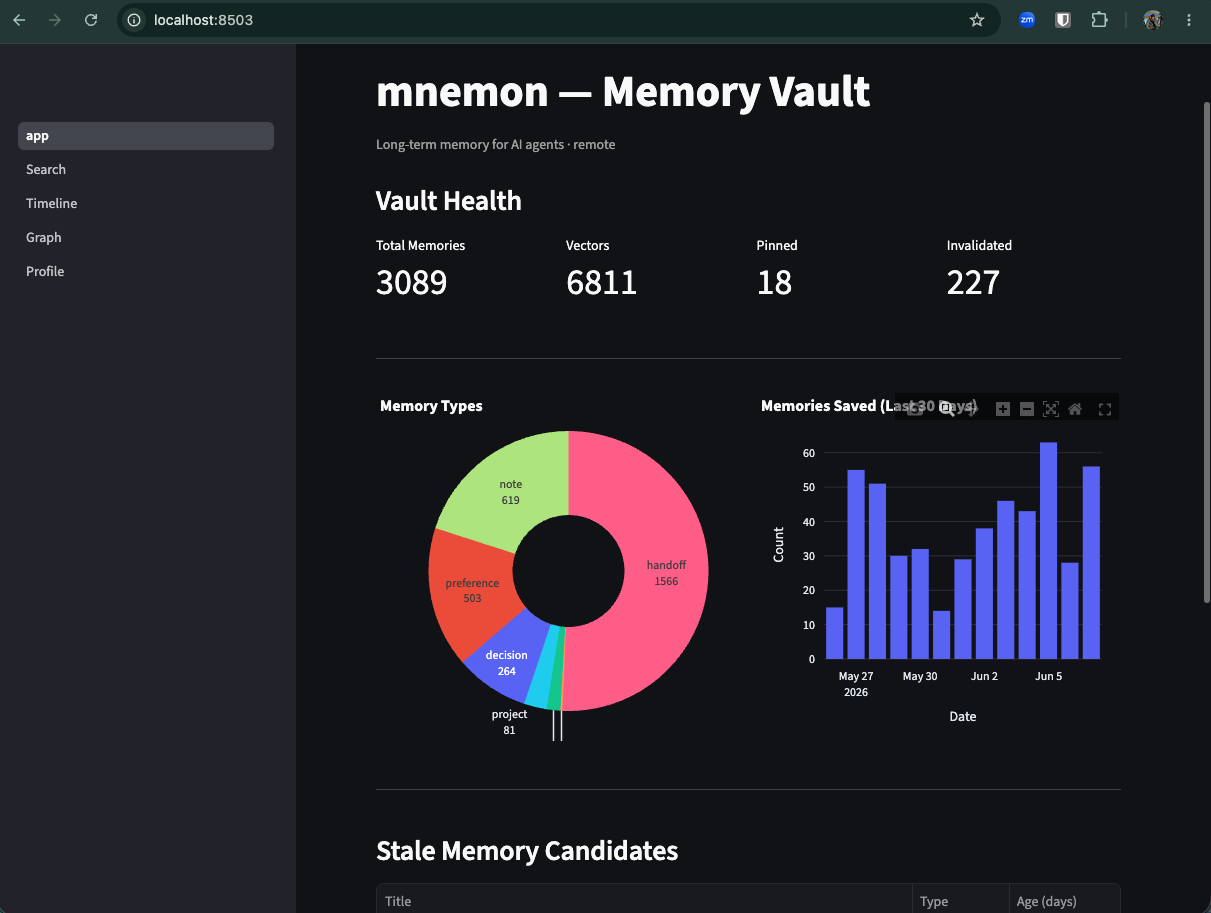
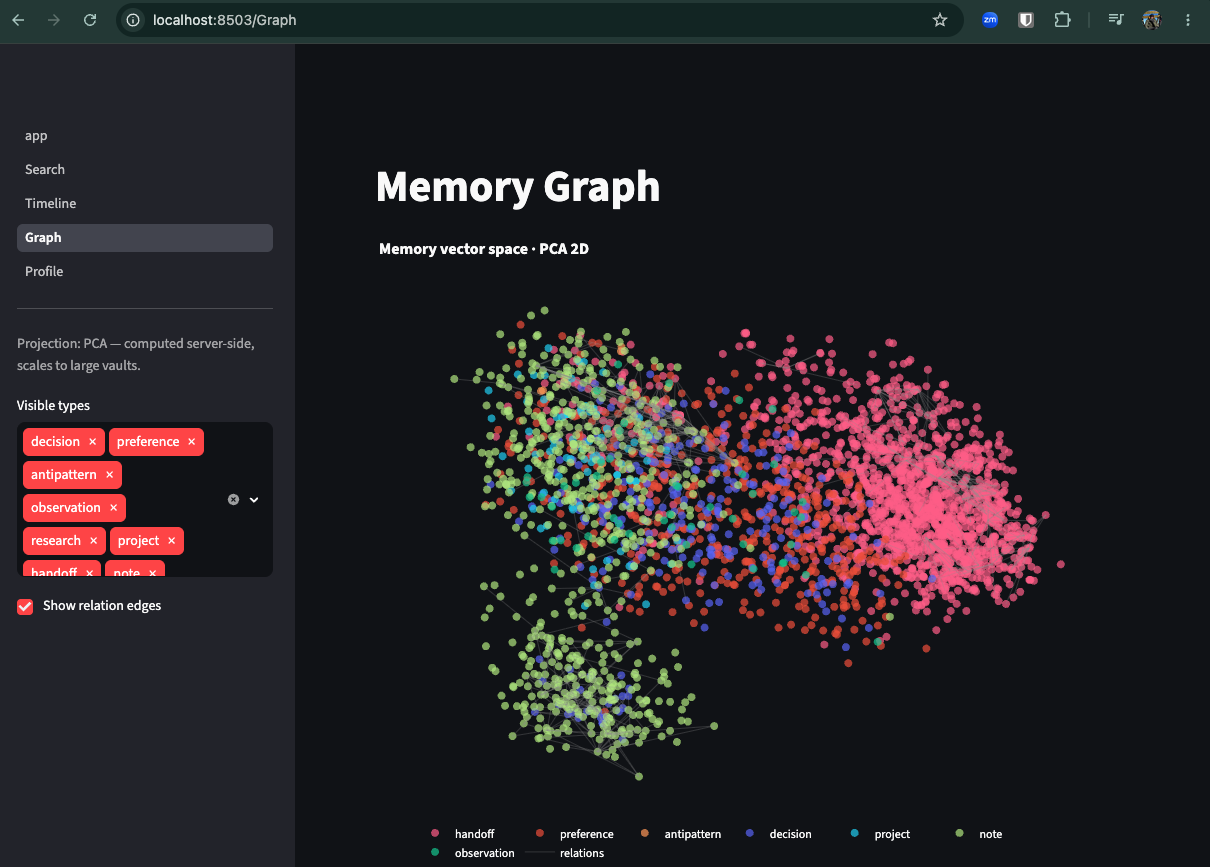
Streamlit UI at `http://localhost:8503` — vault health, search, timeline, an interactive graph view, and your profile. Works against both local and remote vaults.
The graph view projects your embedding space to 2-D — UMAP for local vaults, and PCA computed server-side for remote vaults so it scales to thousands of memories without shipping every vector over the wire.
### Use it
Once configured, mnemon works automatically — memories save and surface during your sessions. You can also interact directly:
```bash
mnemon search "deployment architecture"
mnemon save "DB migration plan" "Migrate from PostgreSQL to DynamoDB in Q3"
mnemon forget 42
mnemon status
```
### Verify it's working
```bash
mnemon doctor # health + auth + a real save→search→forget round-trip
mnemon verify-sharing # prove multiple clients share one vault (web mode)
```
`doctor` auto-detects local vs web and runs the right checks (in web mode it also warns if a stale local vault is shadowing the remote). `verify-sharing` writes a sentinel to the remote and prints a search term to run in another client (e.g. Claude Desktop) — if it shows up there, that client is wired to the same vault. Clean up with `mnemon verify-sharing --cleanup`.
## MCP Tools
### Retrieval
| Tool | Description |
|------|-------------|
| `memory_search` | Hybrid BM25 + vector search with composite scoring (relevance + recency + confidence) |
| `memory_get` | Fetch a specific memory by ID with full content |
| `memory_timeline` | Recent memories in reverse chronological order |
| `memory_related` | Find memories related to a given memory via the relationship graph |
### Mutation
| Tool | Description |
|------|-------------|
| `memory_save` | Store a new memory with content type classification and auto-embedding |
| `memory_pin` | Pin a memory to boost confidence and prevent archival |
| `memory_forget` | Soft-delete a memory (marked as invalidated, not physically removed) |
### Standing tier (salience)
| Tool | Description |
|------|-------------|
| `memory_promote` | Promote a memory to the standing tier — always-on context, injected regardless of query |
| `memory_demote` | Demote a standing memory back to situational (relevance-ranked) recall |
| `memory_list_standing` | List the current standing-tier memories |
### Lifecycle
| Tool | Description |
|------|-------------|
| `memory_status` | Vault health stats — counts by type, vectors, pinned/invalidated |
| `memory_sweep` | Archive stale memories past their half-life (dry-run by default) |
| `memory_rebuild` | Re-embed all documents (use after upgrading embedding model) |
| `memory_export_vectors` | Export stored embeddings (e.g. for analysis or visualization) |
| `memory_export_coords` | Export a 2-D PCA projection of the vault's embeddings — the dashboard Graph page's scalable path for large remote vaults |
| `memory_export_relations` | Export every relation edge between live documents in one call, for the Graph page's edge overlay |
### Intelligence
| Tool | Description |
|------|-------------|
| `memory_check_contradictions` | Check a memory for conflicts using vector similarity + NLI classification (`cross-encoder/nli-deberta-v3-xsmall`) |
| `profile_get` | Synthesized user profile from stored preferences and decisions |
| `profile_update` | Manually add a fact to the user profile |
## Memory Types
Each memory has a content type that determines its default confidence and decay half-life:
| Type | Default Confidence | Half-Life | Use for |
|------|-------------------|-----------|---------|
| `decision` | 0.85 | Never | Architectural choices, design decisions |
| `preference` | 0.80 | Never | User workflow habits, style preferences |
| `antipattern` | 0.80 | Never | Things that failed, approaches to avoid |
| `observation` | 0.70 | 90 days | Learned facts, discovered behaviors |
| `research` | 0.70 | 90 days | Investigation results, findings |
| `project` | 0.65 | 120 days | Project status, goals, context |
| `handoff` | 0.60 | 30 days | Session summaries for continuity |
| `note` | 0.50 | 60 days | General notes, default type |
Memories with access activity decay slower — each access extends the effective half-life by 10%, up to 3x the base value.
## Claude Code Hooks
When configured via `mnemon setup`, the following hooks are installed on Claude Code:
| Hook | Event | Timeout | Mode | Description |
|------|-------|---------|------|-------------|
| Health warm-keeper | `UserPromptSubmit` | 40s | remote only | `curl /health` to wake/keep the Fly machine warm. Runs first so the MCP call below has a warm machine. |
| Context surfacing | `UserPromptSubmit` | 8s | both | Searches vault and injects relevant memories as context |
| Session pre-warm | `SessionStart` | 90s | remote only | Polls `/health` for up to 60s in the background so the first prompt of the session lands on a warm machine |
| Session extractor | `Stop` | 30s | both | Extracts decisions, preferences, and observations from the transcript |
| Handoff generator | `Stop` | 30s | both | Creates a session summary for the next session |
The extractor and handoff generator use LLM-based extraction when `mnemon[llm]` is installed, with regex/heuristic fallback otherwise.
### Why a warm-keeper if Fly auto-stops?
A self-hosted mnemon Fly app with autostop enabled (`fly.toml.example` defaults to `auto_stop_machines = "suspend"` — RAM-snapshot/resume in ~1s, so the OAuth token refresh on wake stays under the connector timeout) will idle the machine after a few minutes. The warm-keeper resets Fly's idle timer on every prompt, so the machine stays warm during an active Claude Code session and only autostops once you've been idle for a while. Cost stays the same — Fly bills only running time — but you get reliable mid-session access without paying for an always-on machine. The `|| true` ensures a slow Fly cold-start never blocks your prompt.
### What if a cold-stop happens anyway?
The server persists every issued MCP session ID to `<vault_dir>/mcp_sessions.sqlite` (7-day TTL). When a request bearing a known-but-not-in-memory session ID arrives at a fresh process — typical after a cold-stop or redeploy — the session is transparently resumed: a new transport is spawned with the same ID, and the underlying `ServerSession` is born already-initialized so tool calls succeed without a re-handshake. The MCP client sees no break in continuity. This is the safety net under the warm-keeper, not a replacement for it.
## Claude Desktop and other MCP clients
The Claude Code hook above gives **unconditional pre-LLM retrieval** — every prompt triggers a `memory_search` *before* the model sees the question, and the results are injected into context. **No other MCP client supports this flow today**, including Claude Desktop, claude.ai web, the Claude mobile app, Cursor, and Gemini CLI.
Why: the hook works because Claude Code exposes a `UserPromptSubmit` lifecycle event that runs a subprocess between the user pressing Enter and the model being invoked. Desktop and the other clients only expose the standard MCP surfaces — **tools** (model-decided), **prompts** (user-invoked via slash menu), and **resources** (client-pulled). None of these fire automatically on every prompt, so there is no architectural place for an MCP server to insert "always-on" recall. Aggressively rewriting the `memory_search` tool description to coerce the model into calling it first is rejected by design — it pollutes the tool surface for every other consumer and is still model-decided.
### Closest practical workaround
Same snippet for every non-Code client — paste it into whichever custom-instructions / rules / memory surface that client exposes:
> Before responding to any of my prompts, call the `memory_search` tool from the mnemon MCP server using relevant terms from my question. Use the returned memories to inform your response. If `memory_search` returns nothing useful, proceed without it.
| Client | Need custom instructions? | Where to paste |
|---|---|---|
| **Claude Code** | No — the `UserPromptSubmit` hook handles it unconditionally. | — |
| **Claude Desktop** | Yes | Settings → Profile → "What personal preferences should Claude consider in responses?" |
| **claude.ai (web)** | Yes | Same Profile field as Desktop — it's shared across your Anthropic account. Per-Project instructions also work and override the Profile within that Project. |
| **Claude mobile app** | Yes | Inherits from the same Profile field — set it once on Desktop or claude.ai and mobile picks it up. |
| **Cursor** | Yes | Settings → Rules → **User Rules** (global) or a `.cursor/rules/*.mdc` file in the project (workspace-scoped). |
| **Gemini CLI** | Yes | `~/.gemini/GEMINI.md` (global) or a project-rooted `GEMINI.md`. |
In every non-Code client the call is still model-decided — it will skip on short prompts, follow-ups, or when distracted. Not a substitute for a real lifecycle hook.
### When the true fix lands
Anthropic would need to add a pre-prompt lifecycle hook to Claude Desktop — the Desktop-side equivalent of Claude Code's `UserPromptSubmit`. Once that surface exists, mnemon's existing `context_surfacing` hook can be wired to it directly. Until then, Claude Code is the only client with guaranteed pre-LLM injection; everywhere else, retrieval is model-decided.
## Uninstall
Remove mnemon state from this machine. Nothing user-owned in the cloud is touched.
```bash
mnemon uninstall [--yes] [--keep-vault]
```
### What mnemon uninstall removes
- `~/.mnemon/` — vault (SQLite + vectors), archive/, remote_url, local_token, models cache. With `--keep-vault`, this directory is preserved.
- Claude Code MCP registration (`claude mcp remove --scope user mnemon`).
- mnemon hook + mcpServers entries in `~/.claude/settings.json`.
- mnemon entry in `~/.cursor/mcp.json`.
- mnemon entry in Claude Desktop's config.
### What mnemon uninstall does NOT touch
- **The `mnemon-memory` Python package.** Use `pip uninstall mnemon-memory` separately.
- **Your Fly.io app.** Destroy it first with `mnemon downgrade local --destroy-fly-app` if you want the app gone — that pulls the remote vault back to local so no memories are lost.
- **Your S3 bucket contents.** mnemon has no `sync delete`.
- **claude.ai + Claude mobile MCP entries.** These live in your Anthropic account. `claude mcp list` shows them with a `claude.ai` prefix. Remove via Settings → Connectors in the claude.ai web UI. If `mnemon uninstall` detects one, it surfaces a `⚠ REQUIRED` bullet pointing you there.
### Memory retention matrix
| Command | Local `~/.mnemon/default.sqlite` | Fly volume | S3 bucket contents |
|---|---|---|---|
| `mnemon uninstall` | deleted (unless `--keep-vault`) | **untouched** | **untouched** |
| `mnemon uninstall --keep-vault` | **untouched** | **untouched** | **untouched** |
| `mnemon downgrade local` | replaced with Fly state (via S3 pull) | untouched (keeps running) | untouched |
| `mnemon downgrade local --destroy-fly-app` | replaced with Fly state | destroyed (after data was pulled to local) | untouched |
| `mnemon upgrade web` | archived to `archive/pre-web-<date>.sqlite` | newly created, seeded from S3 | written to (push) |
| `mnemon sync push` / `mnemon sync pull` | read/write local | — | read/write |
Memories are always recoverable as long as at least one of {S3 backup, Fly volume, local vault, local archive} exists.
### Common flows
**Test from scratch on one machine:**
```bash
mnemon uninstall --yes
pip install -e . # or: pip install mnemon-memory
mnemon setup
```
**Stop using mnemon entirely:**
```bash
mnemon downgrade local --destroy-fly-app # tears down Fly, preserves vault via S3 pull
mnemon uninstall --yes # removes local state
pip uninstall mnemon-memory # removes the package
# Then remove mnemon entries in claude.ai and the Claude mobile app manually.
# Delete your S3 bucket contents if you want no residual memory data.
```
**Move to a new machine (preserve all memories):**
```bash
# Old machine:
mnemon sync push
mnemon uninstall --yes
# New machine:
pip install mnemon-memory
mnemon setup claude-code --remote-url https://<your-app>.fly.dev/mcp
```
## Install troubleshooting
### Intel Mac + Python 3.12: `pip install "mnemon-memory[ui]"` fails building `llvmlite` / `numba`
The `[ui]` extra pulls in `umap-learn`, which requires `numba` + `llvmlite`. Starting with `numba 0.63`, those packages only ship macOS wheels for Apple Silicon (arm64). On an Intel Mac (x86_64), pip falls back to a source build and fails with `llvmlite needs CMake tools to build`.
Pin to the last versions that ship x86_64 macOS wheels:
```bash
pip install 'numba==0.62.1' 'llvmlite==0.45.1' 'mnemon-memory[ui]'
```
If pip then complains about NumPy, add `'numpy<2.3'` to the same command.
Apple Silicon, Linux, and Windows are unaffected — prebuilt wheels exist on those platforms.
## Development
```bash
pip install -e ".[dev]"
pytest
```
## License
MIT
MCP Config
Below is the configuration for this MCP Server. You can copy it directly to Cursor or other MCP clients.
mcp.json
Connection Info
You Might Also Like
No recommendations available