

Content
# Unity Biome MCP — Control Unity Editor from Any AI Assistant
<div align="center">
<img src="docs/assets/hero.svg" width="100%" alt="Unity Biome MCP — control Unity from Claude, a live heartbeat status window with a breathing mint-green orb, ECG trace, and TCP packet field">
<a href="https://github.com/german-krasnikov/unity-biome-mcp">
<img src="https://readme-typing-svg.demolab.com?font=Fira+Code&weight=600&size=22&pause=900&color=3AD29F¢er=true&vCenter=true&width=760&lines=The+editor's+heartbeat%2C+made+visible.;Control+Unity+from+Claude%2C+Codex%2C+and+more.;80-95%25+batch+token+savings.;Scene+CRUD+%C2%B7+Animation+%C2%B7+VFX+%C2%B7+PlayTest+DSL." alt="Control Unity from Claude — token-minimized MCP tools — 80-95% batch token savings">
</a>
</div>
<!-- ─────────────────────────── BADGE WALL ─────────────────────────── -->
<div align="center">
<sub>**STATUS**</sub><br>
<img src="https://img.shields.io/github/license/german-krasnikov/unity-biome-mcp?style=for-the-badge&labelColor=1a1a2e&color=3ad29f&logo=opensourceinitiative&logoColor=white" alt="License">
<img src="https://img.shields.io/github/stars/german-krasnikov/unity-biome-mcp?style=for-the-badge&labelColor=1a1a2e&color=3ad29f&logo=github&logoColor=white" alt="Stars">
<img src="https://img.shields.io/github/last-commit/german-krasnikov/unity-biome-mcp?style=for-the-badge&labelColor=1a1a2e&color=3ad29f&logo=git&logoColor=white" alt="Last Commit">
<sub>**SPEC**</sub><br>
<img src="https://img.shields.io/endpoint?url=https://raw.githubusercontent.com/german-krasnikov/unity-biome-mcp/master/.github/badges/tests.json&style=for-the-badge&labelColor=1a1a2e" alt="Tests">
<img src="https://img.shields.io/endpoint?url=https://raw.githubusercontent.com/german-krasnikov/unity-biome-mcp/master/.github/badges/tools.json&style=for-the-badge&labelColor=1a1a2e" alt="Tools">
<img src="https://img.shields.io/badge/dynamic/toml?url=https://raw.githubusercontent.com/german-krasnikov/unity-biome-mcp/master/server/pyproject.toml&query=$.project.version&label=SERVER%20BETA&style=for-the-badge&labelColor=1a1a2e&color=888899" alt="Server Version">
<img src="https://img.shields.io/github/package-json/v/german-krasnikov/unity-biome-mcp?filename=unity-plugin/package.json&label=PLUGIN%20BETA&style=for-the-badge&labelColor=1a1a2e&color=888899" alt="Plugin Version">
<sub>**STACK**</sub><br>
<img src="https://img.shields.io/badge/Unity-6000.0+-e8a23a?style=for-the-badge&labelColor=1a1a2e&logo=unity&logoColor=white" alt="Unity">
<img src="https://img.shields.io/badge/Python-3.10+-ccccff?style=for-the-badge&labelColor=1a1a2e&logo=python&logoColor=white" alt="Python">
<img src="https://img.shields.io/badge/MCP-1.0+-ccccff?style=for-the-badge&labelColor=1a1a2e&logo=anthropic&logoColor=white" alt="MCP">
</div>
> **Let any MCP-compatible AI assistant control your Unity Editor** — inspect scenes, edit GameObjects, run playtests, and capture screenshots without leaving the chat. JSON-framed TCP protocol; batch delivers 80–95% token savings (5–20× compression) on multi-step work.
<sub>MCP (Model Context Protocol) is Anthropic's open standard for giving AI assistants structured tool access.</sub>
<img src="docs/assets/divider.svg" width="100%" alt="">
## Why Unity Biome MCP?
- **Stop alt-tabbing.** Your AI assistant inspects your scene, edits components, runs playtests, and captures screenshots without you leaving the chat.
- **Stop burning tokens on boilerplate.** Each `batch` call replaces 5–20 individual round-trips — **80–95% fewer tokens** on the same work.
- **Stop writing glue code.** Registered tools cover scene CRUD, animation, VFX, UI, shaders, runtime control, and code intelligence — with a plugin seam for your own.
### Two ways to work
🖥️ **CLI Mode** — run from terminal via Claude Code, Codex CLI, or any MCP client. The Python server connects to Unity over TCP :9500. Best for automation, batch operations, and scripting. Full access to 142 MCP tools with 80–95% token compression.
💬 **In-Unity Chat** — open `MCP → Chat` inside the editor. No API key needed — spawns the CLI directly. 5 backends: Claude, Antigravity, Kimi, Codex, OpenCode. Drag GameObjects, scripts, and materials into chat as typed context chips. Each AI turn gets its own undo group — one Ctrl+Z rolls back everything the AI changed. Domain-reload safe. Extensible chip-kind registry lets third-party plugins add new chip types with zero core edits.
**Before / after — creating and configuring 3 objects:**
```python
# Before: 9 separate MCP calls (~1800 tokens)
create_object("Enemy")
set_property("Enemy", "Transform", "position", "0,1,0")
manage_component("Enemy", "Health", "add")
set_property("Enemy", "Health", "maxHp", "100")
# ... 5 more calls
```
```python
# After: 1 batch call (~120 tokens, 93% savings)
batch("""
create_object name=Enemy
set_property path=Enemy component=Transform prop=position value=0,1,0
manage_component path=Enemy type=Health action=add
set_property path=Enemy component=Health prop=maxHp value=100
""")
```
### What you can say
> "Create a player character with health component and position it at the center of the scene"
> "Find all enemies without colliders and add BoxCollider to each"
> "Take a multi-view screenshot and compare it with the last one"
> "Run a playtest: move the player to the door, wait for it to open, assert the score increased"
> "Show me what changed since my last checkpoint"
<img src="docs/assets/divider-heartbeat.svg" width="100%" alt="">
### Architecture
<img src="docs/assets/architecture.svg" width="100%" alt="Architecture: MCP Client → Python MCP Server → TCP :9500 → Unity Editor Plugin">
## Quick Start
**Prerequisites:** <kbd>Python 3.10+</kbd> · <kbd>Unity 6000.0+</kbd> · <kbd>TCP port 9500</kbd> free
**Step 1: Add the plugin via Package Manager**
1. Open **Window → Package Manager**
2. Click **+ → Add package from git URL**
3. Paste:
```
https://github.com/german-krasnikov/unity-biome-mcp.git?path=unity-plugin
```
4. Wait for import, then open any scene
The plugin auto-generates MCP configuration for your AI tool on first load.
**Step 2: Configure your AI tool (if needed)**
Run the diagnostic to verify everything is working:
```bash
uvx --from git+https://github.com/german-krasnikov/unity-biome-mcp.git#subdirectory=server unity-biome-mcp doctor
```
**One-liner (macOS / Linux):**
```bash
curl -fsSL https://raw.githubusercontent.com/german-krasnikov/unity-biome-mcp/master/install/bootstrap.sh | bash
```
**One-liner (Windows PowerShell):**
```powershell
iex (iwr https://raw.githubusercontent.com/german-krasnikov/unity-biome-mcp/master/install/bootstrap.ps1).Content
```
<details>
<summary>Windows: antivirus blocked the script?</summary>
**Option 1: Install via install.py**
1. Install `uv`:
```powershell
winget install astral-sh.uv
```
2. Clone the repo:
```powershell
git clone https://github.com/german-krasnikov/unity-biome-mcp.git "$HOME\.unity-biome-mcp\server"
cd "$HOME\.unity-biome-mcp\server"
```
3. Run setup:
```powershell
uv run python install.py setup
```
4. Configure your AI tool:
```powershell
uv run python install.py configure --tool claude-code
```
**Option 2: Manual setup**
1. Install `uv`: Open PowerShell and run:
```powershell
winget install astral-sh.uv
```
2. Add the Unity plugin via **Package Manager → Add package from git URL:**
```
https://github.com/german-krasnikov/unity-biome-mcp.git?path=unity-plugin
```
3. Configure your AI tool manually (see "Manual MCP configuration" above).
4. Open the **Setup Wizard** in Unity via **MCP → Setup Wizard** to complete setup.
</details>
<details>
<summary>Manual MCP configuration (all AI tools)</summary>
Add this to your MCP config file:
```json
{
"mcpServers": {
"unity-biome-mcp": {
"command": "uvx",
"args": ["--from", "git+https://github.com/german-krasnikov/unity-biome-mcp.git#subdirectory=server", "unity-biome-mcp"]
}
}
}
```
| AI Tool | Config file path |
|---------|-----------------|
| Claude Code | `~/.claude.json` |
| Claude Desktop | `~/Library/Application Support/Claude/claude_desktop_config.json` (macOS) or `%APPDATA%\Claude\claude_desktop_config.json` (Windows) |
| Cursor | `~/.cursor/mcp.json` |
| Windsurf | `~/.codeium/windsurf/mcp_config.json` (macOS/Linux) or `%APPDATA%\Codeium\windsurf\mcp_config.json` (Windows) |
| Kimi | `~/.kimi-code/mcp.json` |
| VS Code | `~/Library/Application Support/Code/User/mcp.json` (macOS), `%APPDATA%\Code\User\mcp.json` (Windows), or `~/.config/Code/User/mcp.json` (Linux) |
| OpenCode | `~/.config/opencode/opencode.json` (macOS/Linux) or `%APPDATA%\opencode\opencode.json` (Windows) |
| Codex | `~/.codex/config.toml` |
**Without uvx:** replace `"command": "uvx", "args": ["--from", "git+...", "unity-biome-mcp"]` with `"command": "python", "args": ["-m", "unity_mcp.server"]`
</details>
**Manual setup:**
1. Python server: `uvx --from git+https://github.com/german-krasnikov/unity-biome-mcp.git#subdirectory=server unity-biome-mcp` — zero-install, runs on demand from GitHub (no separate install step).
2. Add the Unity plugin via **Package Manager → Add package from git URL:**
```
https://github.com/german-krasnikov/unity-biome-mcp.git?path=unity-plugin
```
3. Open Unity, then open the **Setup Wizard** via **MCP → Setup Wizard** menu. It will:
- Auto-detect installed AI tools (shows "detected" badge)
- One-click configure: pick your tool → choose Global or Project scope → done
- Supports 9 backends: Claude Code, Claude Desktop, Cursor, Windsurf, VS Code, Codex, Kimi, OpenCode, Antigravity
<details>
<summary>Alternative: full local clone</summary>
```bash
git clone https://github.com/german-krasnikov/unity-biome-mcp.git
cd unity-biome-mcp
python install.py setup
python install.py configure --tool claude-code
python install.py doctor
```
This clones the repo, creates a venv, installs dependencies, configures your AI tool, and verifies the setup. Supported tools: `claude-code`, `claude-desktop`, `cursor`, `windsurf`, `vscode`, `codex`, `kimi`, `opencode`
</details>
<details>
<summary><b>Compatibility</b></summary>
| Component | Tested | Minimum |
|-----------|--------|---------|
| Unity | 6000.3 | 6000.0 (Unity 6) |
| Python | 3.12 | 3.10 |
| OS | macOS | macOS, Windows, Linux |
| Claude Code | latest | any with MCP support |
| Codex CLI | latest | any with MCP support |
| Claude Desktop | latest | any with MCP support |
</details>
<img src="docs/assets/stats.svg" width="100%" alt="142 MCP Tools · 10809 Tests (4749 Python · 5776 Unity · 284 Live) · 80–95% Batch Savings">
<img src="docs/assets/divider-wave.svg" width="100%" alt="">
## AI Skills & Agents
The plugin ships with **23 AI skills** and **2 specialized agents** that teach your AI assistant how to use MCP tools effectively. Skills cover scene management, animation, physics, VFX, playtesting DSL, performance profiling, and more. Agents provide ready-to-use personas for Play Mode testing and Unity Editor interaction.
**Location:** `unity-plugin/ClientSkills/` inside the UPM package.
**Install via Wizard:**
1. Open **MCP → Install AI Skills** in Unity
2. Review the file list (23 skills, 2 agents, 1 Codex sync script)
3. Toggle **Overwrite existing files** if updating
4. Click **Install** — files are copied to `.claude/skills/` and `.claude/agents/` in your project
5. *(Optional)* Enable **Codex sync** to also generate `.codex/agents/` and `.agents/skills/` for Codex CLI
**What gets installed:**
| Type | Count | Destination | Purpose |
|------|-------|-------------|---------|
| Skills | 23 | `.claude/skills/` | Tool reference, DSL syntax, batch patterns, domain-specific guides |
| Agents | 2 | `.claude/agents/` | `playmode-tester` (read-only Play Mode testing) and `unity-editor-developer` (scene building and debugging) |
| Scripts | 1 | `.codex/scripts/` | `claude_to_codex.py` — converts Claude format to Codex format |
Skills are updated with each release — re-run **Install AI Skills** after updating the plugin to get the latest versions.
## Features
- **Token Optimization** — `batch` compresses 5–20 calls into one (80–95% savings), deferred tool schemas, per-session cost analytics
- **In-Unity Chat** — 5 CLI backends (Claude, Antigravity, Kimi, Codex, OpenCode), no API key needed, typed context chips (`[hierarchy:/Player]`, `[script:Health.cs]`), per-turn undo, domain-reload safe
- **Code Intelligence** — Roslyn-powered `find_references`, `compile_preflight`, `semantic_at`
- **PlayTest DSL** — 24 commands: `MOVE`, `MOVE_PATH`, `ASSERT`, `WAIT_UNTIL`, `INVOKE`, `SNAPSHOT`, `SIMULATE`, `SECTION`, `MACRO/CALL`, AND/OR compounds, abort-on-fail, and more
- **Playtest Composer** — visual drag-and-drop editor (UI Toolkit) for composing PlayMode test scripts; context-aware D&D from Hierarchy/Inspector; Smart Command NL→DSL via active CLI backend
- **Multi-Scene Management** — Load multiple scenes, inspect/edit across scenes, move/copy objects between loaded scenes, unified `object_diff` for cross-scene comparison
- **Scene CRUD & Tools** — `scene` actions (open_additive, close, set_active, list), hierarchy inspection, query syntax, diff tracking, checkpoint/restore
- **Animation & Timeline** — clips, key management, Timeline assets, Animator states/transitions
- **VFX & Particles** — particle system CRUD, 11 module presets, shader graph integration
- **Multi-View Screenshots** — 4-panel grid (Front/Left/Top/Iso), bounding-box overlay, visual regression
- **Multi-Project Ports** — each Unity project auto-assigns a unique TCP port (9500–9599), CLI and Chat get isolated slots
- **Capability Gating** — TIER1 core always on; 8 category toggles per-session
- **Cross-Platform** — Windows, macOS, Linux — binary resolution, lockfile, and venv per platform
- **Plugin Extensibility** — register your own tools in one file, no cross-imports
<details>
<summary><b>PlayTest DSL example</b></summary>
```
run_playtest(script="""
MOVE /Player TO 5,0,3
WAIT_UNTIL /Enemy|Health|hp <= 0 timeout=5
ASSERT /Player|Health|hp > 0
ASSERT_CONSOLE_CLEAN
SNAPSHOT /Player /Enemy
""")
```
</details>
<details>
<summary><b>Add your own tool</b> — one file, zero cross-imports</summary>
```python
# server/src/unity_mcp/tools/my_tool.py
def register(mcp, send, args):
@mcp.tool()
async def find_inactive(path: str = "/") -> str:
"""Find all inactive GameObjects under path."""
return await send("find_objects", args(path=path, active="false"))
```
Drop the file in `tools/` and add it to `tools/__init__.py` — it registers on next server start.
</details>
<img src="docs/assets/divider-pulse.svg" width="100%" alt="">
## Recent Changes
<div><sub>Full history: <a href="CHANGELOG.md"><b>CHANGELOG.md</b></a></sub></div>
<!-- CHANGELOG_START -->
<details>
<summary><b>v0.96.1</b> — 2026-07-24 — `pyproject.toml`: added `[tool.hatch.build.targets.wheel] packages = …</summary>
`pyproject.toml`: added `[tool.hatch.build.targets.wheel] packages = ["src/unity_mcp"]` — fixes wheel build failure after rebrand (project name …
</details>
<details>
<summary><b>v0.96.0</b> — 2026-07-24 — Renamed `SecurityLevel` enum: `Normal` → `Standard`, `Permissive` → `AllowAll`</summary>
Renamed `SecurityLevel` enum: `Normal` → `Standard`, `Permissive` → `AllowAll`
</details>
<details>
<summary><b>v0.95.0</b> — 2026-07-24 — Server name `unity-mcp` → `unity-biome-mcp` (SERVER_NAME, UPM packages, data …</summary>
Server name `unity-mcp` → `unity-biome-mcp` (SERVER_NAME, UPM packages, data dir, docs, URLs)
</details>
<details>
<summary><b>v0.94.0</b> — 2026-07-20 — Removed `get_perf` tool stub (use `get_frame_stats`)</summary>
Removed `get_perf` tool stub (use `get_frame_stats`)
</details>
<details>
<summary><b>v0.93.1</b> — 2026-07-19 — `objects_in_radius`: now sorts all hits by distance ascending before truncating …</summary>
`objects_in_radius`: now sorts all hits by distance ascending before truncating to `cap`.
</details>
<details>
<summary>Older releases</summary>
- **v0.93.0** — 2026-07-19 — `IsPlaytestSuccess` predicate parses both `" OK"` and `"PLAYTEST: X/Y"` formats …
- **v0.92.0** — 2026-07-19 — `move_to` and `ask_user` gain `isSuccess` predicates (P0: were missing, treated …
- **v0.91.0** — 2026-07-19 — `run_playtest`, `wait_until`, `test_step`: correct `isSuccess` predicates (P0 …
- **v0.90.0** — 2026-07-18 — `PATH_PREFIX /path` directive — applies path prefix to all `VAL` path aliases …
- **v0.89.0** — 2026-07-17 — `SecurityLevel` enum (`Standard` / `AllowAll` / `Strict`) — dropdown in …
- **v0.88.0** — 2026-07-13 — `MCPSettings.cs`: default `_defaultCatalog` rewritten from 13 legacy categories …
- **v0.87.0** — 2026-07-12 — `tool_specs.py`: new `direct_only: bool = False` field on ToolSpec; 21 tools …
- **v0.86.0** — 2026-07-12 — 83 tests removed across 59 test files; `test_schema_cache.py` deleted entirely …
- **v0.85.1** — 2026-07-12 — `get_perf` — fully removed from Python (`diagnostics.py`) and C# …
- **v0.84.0** — 2026-07-12 — CORE shrunk from 15 → 11: `delete_object`, `set_parent`, `scene`, …
- **v0.83.0** — 2026-07-11 — `ToolSpec.mutability: Literal['read','write']` — single-source classification …
- **v0.82.0** — 2026-07-11 — `run_playtest_file` + `run_playtest_suite` — file-based and suite-level …
- **v0.81.0** — 2026-07-11 — NUnit: `RenameObject_Undo` — added `LogAssert.Expect` for expected undo log …
- **v0.80.0** — 2026-07-11 — `middleware_hooks.py` — `POST_HOOKS` registry + `@register_post` decorator for …
- **v0.79.1** — 2026-07-11 — `run_playtest(path="Playtests/farm.playtest")` — C# reads file server-side; ~15 …
- **v0.79.0** — 2026-07-10 — `_ensure_heartbeat()` called on every send → duplicate tasks leaked → …
- **v0.78.0** — 2026-07-09 — **`AliasType` enum** (`PlaytestConfig.cs`) — `ValPath` / `ValConst` / …
- **v0.77.0** — 2026-07-09 — **M1: `reorder_track`** — move track to position index (reflection on …
- **v0.69.1** — 2026-07-03 — **CallerIsPlugin Gate** — New `CommandRegistrar.CallerIsPlugin()` filter strips …
- **v0.69.0** — 2026-07-02 — **Auto-Config on Editor Startup** — `ProjectConfigWriter` [InitializeOnLoad] …
- **v0.68.0** — 2026-07-01 — **Issue 23: Batch DSL with CommandValidator** — CommandValidator replaces …
- **v0.67.1** — 2026-06-29 — **output_format Discriminator** — Replaces `uses_stream_json: bool` with typed …
- **v0.67.0** — 2026-06-29 — **ThinView Flag Removed** — Deleted MCPChat.ThinView conditional compilation …
- **v0.66.0** — 2026-06-28 — **FIX-1: Cross-Assembly Compile Error Detection (diagnose tool)** — …
- **v0.65.1** — 2026-06-27 — **Plugin Development Guide** — New `/docs/plugin-development.md` (2100+ lines).
- **v0.65.0** — 2026-06-27 — **Python run_tests Pre-Flight Gate** — `diagnose(expected_compile=False)` …
- **v0.64.0** — 2026-06-27 — **T1: Bare-Name Chip Detection** — `SceneObjectNormalizer._resolver?.Refresh()` …
- **v0.63.0** — 2026-06-27 — **IToolbarButtonProvider.MenuOnly DIM** — New default interface member `bool …
- **v0.62.0** — 2026-06-26 — **Error Resolver Toolbar** — Chat toolbar button ("Fix Errors") for …
- **v0.61.0** — 2026-06-26 — **PerfOverlay** — SceneView UITK overlay showing real-time FPS sparkline, …
- **v0.60.0** — 2026-06-26 — **profile MCP Tool** — Session-based frame recording (burst/manual modes) with …
- **v0.59.0** — 2026-06-26 — **Runtime Code Execution in Play Mode** — `execute_code` removed `mutating: …
- **v0.58.0** — 2026-06-25 — **ask tool Scene Queries** — Extended `UNITY_NOUNS_RE` with 23 …
- **v0.57.0** — 2026-06-24 — **Tool-Gating OR Bug** — Empty disabled set was falsy, skipping the entire tool …
- **v0.56.0** — 2026-06-24 — **Unified Scene View Overlay** — Merged 2 separate overlays …
- **v0.55.0** — 2026-06-24 — **Chat sees 3rd-party MCP from CLI global configs** — Claude Code, Codex, Kimi, …
- **v0.54.1** — 2026-06-23 — **Focus-Loss CPU Storm (Multi-Unity × Multi-CLI)** — Fixed 1000% CPU spike when …
- **v0.53.1** — 2026-06-23 — **Codex App-Server Elicitation Hang** — Fixed infinite spinner on mutating MCP …
- **v0.53.0** — 2026-06-23 — **Reconnect stability** — Exponential backoff (5→60s) on failed reconnects + …
- **v0.52.6** — 2026-06-22 — **Multi-Unity Port Race Conditions** — Fixed port file collision and …
- **v0.52.5** — 2026-06-22 — **Auto-discard dirty scene on quit** — removed opt-in toggle, now always active.
- **v0.52.0** — 2026-06-21 — **Arcade Animation System** — Unified animation primitives for consistent UI …
- **v0.51.0** — 2026-06-21 — **Scene Annotation Primitives** — Expanded RegionTool with 3 new annotation …
- **v0.50.3** — 2026-06-21 — **Unstructured MCP Output** — Introduced `_UnstructuredMCP(FastMCP)` subclass …
- **v0.50.2** — 2026-06-21 — **WizardConfigWriter visibility** — changed class and `GitInstallUrl` from …
- **v0.50.1** — 2026-06-21 — **Update Cache Loop** — `UpdateChecker` now clears EditorPrefs cache after …
- **v0.50.0** — 2026-06-21 — **Wizard Fallback** — Setup Wizard detects missing backends (e.g., no Claude …
- **v0.47.0** — 2026-06-21 — Replaces USD cost display with input/output token counts + context window fill %
- **v0.46.0** — 2026-06-21 — **Polygon2D** — Immutable 2D polygon (XZ plane), winding-number …
- **v0.45.0** — 2026-06-20 — **InstallSourceDetector** — Detects `file:` (local Git clone) vs `git:` (UPM …
- **v0.44.1** — 2026-06-20 — **Fix: Codex Windows path crash** — TOML `command` now uses literal strings …
- **v0.44.0** — 2026-06-20 — LevelUpPanel: 4-state machine (Idle→Animating→Done→Diff) with XP bar + sparkles …
- **v0.43.0** — 2026-06-20 — Remove tundra.digestcache deletion (SIGABRT in RegisterAssemblyDefinition)
- **v0.42.0** — 2026-06-20 — **Setup Wizard One-Button Install** — 3-screen flow (Welcome → PickBackend → …
- **v0.41.4** — 2026-06-20 — **@Mention Autocomplete** — Type `@` in Chat input to trigger autocomplete …
- **v0.41.0** — 2026-06-20 — **Session Handoff (Chat↔CLI)** — Button "→ CLI" in Chat copies resume command …
- **v0.40.1** — 2026-06-19 — **Fix: Chat duplicate TCP connections** — Claude Chat no longer spawns …
- **v0.40.0** — 2026-06-19 — **One-Liner Installation** — `curl | bash` (macOS/Linux) or `iex (iwr).Content` …
- **v0.38.0** — 2026-06-19 — **External MCP Server Support in Chat:**
- **v0.37.0** — 2026-06-18 — **Bridge Stability & Reload Recovery (v0.36.0):**
- **v0.36.0** — 2026-06-18 — **Media Preview Redesign:**
- **v0.35.0** — 2026-06-17 — **Inline Media Preview Bubbles** — Phase 2 lazy-load media panel in chat:
- **v0.34.6** — 2026-06-17 — **Binary Resolver — macOS zsh PATH sourcing** — Changed `bash -lc` to `zsh …
- **v0.34.0** — 2026-06-17 — **Plugin Extensibility API** — New public interfaces for plugins to extend chat …
- **v0.33.0** — 2026-06-16 — **Codex Silent Abort Fix (Plugin v0.33.0)** — Fixes hung turns when Codex tools …
- **v0.32.0** — 2026-06-16 — **run_tests Fire-and-Forget Protocol (Server v0.32.0)** — `run_tests(mode)` now …
- **v0.31.1** — 2026-06-16 — **run_tests Domain Reload Disconnect Recovery (Server v0.31.1)** — Fixes silent …
- **v0.31.0** — 2026-06-16 — **Security Hardening (Gate A: release blocker)** — CodeExecutor.SecurityScan …
- **v0.30.4** — 2026-06-16 — **Per-Backend Model Selector (Plugin v0.30.4)** — Dropdown in MCPChatWindow …
- **v0.30.3** — 2026-06-16 — **Gemini CLI Backend (Plugin v0.30.1, v0.30.2, v0.30.3)** — Third CLI backend …
- **v0.29.38** — 2026-06-15 — **Codex Interactive User Input (Plugin v0.29.38)** — Codex CLI can now show …
- **v0.29.37** — 2026-06-15 — **Claude Interactive User Input (Plugin v0.29.37, Server)** — Claude CLI …
- **v0.29.11** — 2026-06-15 — **Interactive Permission Protocol Fix (Plugin v0.29.11, Sprint 1C)** — Fixes …
- **v0.29.2** — 2026-06-15 — **Chat Assembly Split (Plugin v0.29.2)** — `UnityMCP.Editor.Chat` split into …
- **v0.27.4** — 2026-06-14 — **Reload Recovery Package (Plugin + Server v0.27.4)** — Independent UPM package …
- **v0.26.0** — 2026-06-13 — **Test Quality Audit (Server + Plugin v0.26.0)** — Systematic cleanup of test …
- **v0.25.13** — 2026-06-12 — **UTF-8 Encoding Round-3 (Server + Plugin v0.25.13)** — **(C1: Python test I/O …
- **v0.25.12** — 2026-06-12 — **UTF-8 Everywhere (Server + Plugin v0.25.12)** — **(Round 1)** Python file I/O …
- **v0.25.0** — 2026-06-12 — **Multi-Scene CRUD + Diff (Plugin v0.25.0)** — Cross-scene `transfer_object` …
- **v0.24.1** — 2026-06-12 — **Port Re-Discovery on Reconnect (Server v0.24.1)** — UnityBridge now …
- **v0.24.0** — 2026-06-12 — **Multi-Scene Hierarchy Support (Plugin v0.24.0)** — `get_hierarchy` now …
- **v0.23.13** — 2026-06-11 — **SettingsNavController Hardening (Plugin v0.23.13)** — Timer-based animated …
- **v0.23.0** — 2026-06-11 — **Reconnect Recovery: Zombie Detection + SO_REUSEPORT + TCP Probe (Server + …
- **v0.22.1** — 2026-06-11 — **Crash Logging for Unhandled Server Exceptions** — Python MCP server now …
- **v0.22.0** — 2026-06-11 — **Multi-Project Port Configuration (Plugin + Server v0.22.0)** — Unity projects …
- **v0.21.0** — 2026-06-11 — **Cross-Platform Windows/Linux Support (Plugin v0.21.0 + Server)** — Plugin now …
- **v0.20.7** — 2026-06-10 — Reload-resume re-sends the full-path chip payload, not short-name mentions (task#10)
- **v0.20.6** — 2026-06-10 — Full-path chip payload + always-raw "Show LLM payload" inspector for every turn type
- **v0.20.0** — 2026-06-10 — Chip-unification Phase 1 — delete SceneNameLinker path, unified @-mention rendering
- **v0.19.2** — 2026-06-10 — Chat reload double-bubble MAJOR + drag-drop crash guard + clean test console
- **v0.19.1** — 2026-06-10 — P0/P1 chat UX hardening — ResetTurnFlags DRY, bubble dedup, backend restore race
- **v0.19.0** — 2026-06-10 — Chat UX F27–F30 — Domain reload + external drag/drop + input height + backend cleanup
- **v0.18.0** — 2026-06-10 — Chat UX F20–F26 — Stop button, reload survival, AutoScroll, dropdown persist, @Object dedup, direct Clear, drag/drop MonoScript
- **v0.17.36** — 2026-06-06 — Settings Hub redesign — central hub UI + circuit-node header animation + Claude foldout grouping
- **v0.17.34** — 2026-06-06 — F25 Phase 2 settings hub — unique thematic header animations per sub-window
- **v0.17.28** — 2026-06-06 — F23 settings split — 3 focused EditorWindows + Chat event hook
- **v0.17.20** — 2026-06-06 — 40-architect test audit — 299 new tests total, 3 P0+P1 bug fixes
- **v0.17.18** — 2026-06-06 — F20–F22 bugfixes — select-all, @mention search, orphan bold
- **v0.17.17** — 2026-06-05 — F15a-F19 chip redesign — linker disable, leading-space guard, context menus
- **v0.17.14** — 2026-06-05 — F13–F14 inline-chip architecture + bare-name normalizer + review fixes
- **v0.17.2** — 2026-06-05 — inline context chips + review fixes (regex + staleness + test DRY)
- **v0.17.0** — 2026-06-05 — full-project code review sprint — 12 waves of fixes across Python + C#
- **v0.16.0** — 2026-06-05 — F12 chat UX overhaul — composed inline-chip field + response pills + session clear
- **v0.15.8** — 2026-06-05 — inline-chips + extensible chip-kind registry — F11
- **v0.15.0** — 2026-06-04 — chat UX polish sprint — F1–F10 + review-hardening
- **v0.14.0** — 2026-06-04 — multi-backend agent chat — Claude + Codex via DRY CliBackendBase
- **v0.7.1** — 2026-06-04 — tech-debt sprint wave 1–3 (Python/C#/Chat) — pure quality
- **v0.7.0** — 2026-06-04 — Editor.log out-of-band corroboration — P0 compile-tool blindness fix
- **v0.6.1** — 2026-06-04 — atomic batch rollback — transactional scene edits
- **v0.5.0 / 0.12.0** — 2026-06-04 — scoped scene queries — search_scene root+limit + spatial center
- **v0.11.0** — 2026-06-04 — per-turn undo rollback + Restore button
- **v0.10.0** — 2026-06-04 — chat plan/act approve & execute + slash templates
- **v0.9.0** — 2026-06-04 — chat context resolution + compile gating tool
- **v0.8.0** — 2026-06-04 — compile auto-fix + editor-state injection + tool ping
- **v0.7.0** — 2026-06-04 — F4 deferred schema + reload-survival + auto-selection
- **v0.6.0** — 2026-06-03 — Aura pill + native theme + perms gating
- **v0.5.0** — 2026-06-03 — chat UX polish — refs, grouping, scroll
- **v0.4.0** — 2026-06-03 — extensible render: md + mermaid + img
- **v0.3.0** — 2026-06-03 — in-Unity Agent Chat + UIToolkit status
- **v0.2.6** — 2026-06-02 — tool-gating fix + settings UI
</details>
<!-- CHANGELOG_END -->
<img src="docs/assets/divider.svg" width="100%" alt="">
## Documentation
**User Guides & Troubleshooting:** [`docs/README.md`](docs/README.md)
- Installation guides for macOS, Windows, Linux
- Troubleshooting TCP connection issues
- MCP configuration for all AI tools
- Chat feature reference (context chips, undo, domain-reload safety)
- PlayTest DSL tutorial with examples
- Multi-scene workflows
- Animation, VFX, and shader graph integration
**Developer Reference:**
- **Architecture & Design:** [`AI/architecture.md`](AI/architecture.md) — high-level system design, component responsibilities, serialization formats, test organization
- **MCP Tool Catalog:** [`AI/mcp-server.md`](AI/mcp-server.md) — complete tool reference with signatures, examples, and token costs
- **Token Optimization:** [`docs/tools/batch.md`](docs/tools/batch.md) — batch patterns, deferred schemas, per-session cost analytics
- **Multi-Scene Guide:** [`.claude/skills/multi-scene.md`](.claude/skills/multi-scene.md) — cross-scene queries, path resolution, component serialization
<img src="docs/assets/divider.svg" width="100%" alt="">
## FAQ
<details>
<summary><b>How is this different from Unity 6.2's built-in AI assistant?</b></summary>
Unity's built-in AI is limited to code generation. Unity Biome MCP gives full editor control: scene CRUD, animation, VFX, playtesting, screenshots. 126 tools vs basic code completion.
</details>
<details>
<summary><b>Does this work with Unity 5 / Unity 2022?</b></summary>
No, requires Unity 6000.0+ (Unity 6). Uses modern Editor APIs not available in older versions.
</details>
<details>
<summary><b>How much does it cost?</b></summary>
Unity Biome MCP is free and open source (MIT). You only pay for the AI tool you use (Claude, Codex, etc.). In-Unity Chat uses CLI tools directly — no separate API key needed.
</details>
<details>
<summary><b>Is my code/project data sent to the cloud?</b></summary>
MCP server runs locally. TCP communication is localhost-only (127.0.0.1). Your project data goes only to the AI provider you choose (Claude, Codex, etc.) through their standard API.
</details>
<details>
<summary><b>Can I use this with Cursor/Windsurf/VS Code?</b></summary>
Yes. Any MCP-compatible tool works. Setup Wizard auto-configures: Claude Code, Claude Desktop, Cursor, Windsurf, VS Code, Codex, Kimi, OpenCode, Antigravity.
</details>
<details>
<summary><b>What happens during Unity domain reload?</b></summary>
The TCP bridge reconnects automatically. In-Unity Chat is domain-reload safe (survives recompilation). Connection recovery with exponential backoff.
</details>
<details>
<summary><b>Can I add my own tools?</b></summary>
Yes. Drop a Python file in `tools/`, add it to `__init__.py`, implement the `register(mcp, send, args)` pattern. Auto-discovered on server restart.
</details>
<details>
<summary><b>Comparison with other Unity AI tools</b></summary>
| Feature | Unity Biome MCP | CoplayDev | IvanMurzak | CoderGamester |
|---------|-----------|-----------|------------|---------------|
| MCP Tools | 125 | ~40 | 70+ | 28 |
| In-Editor Chat | ✅ 5 backends | ❌ | ❌ | ❌ |
| Token Optimization | 80-95% batch savings | ❌ | ❌ | ❌ |
| One-Liner Install | ✅ curl/iex | ❌ | ❌ | ❌ |
| PlayTest DSL | ✅ 24 commands | ❌ | ❌ | ❌ |
| Multi-Scene Support | ✅ | ❌ | ✅ | ❌ |
| AI Backends | 9 (Claude, Codex, Kimi, Antigravity, OpenCode, etc.) | 1 | 4 | 9 |
| Tests | 9,581 | — | — | — |
| Code Intelligence | ✅ Roslyn-powered | ❌ | ❌ | ❌ |
| Cross-Platform | ✅ Win/Mac/Linux | ✅ | ✅ | ✅ |
| License | MIT | MIT | MIT | MIT |
</details>
<img src="docs/assets/divider.svg" width="100%" alt="">
## Contributing
```bash
# Python unit tests (no Unity, 4110 tests)
cd server && pytest -m "not live" -q
# Python live integration tests (Unity running on :9500, 284 tests)
pytest -m "live and not live_cli" -q
# C# EditMode tests (no play mode)
# Open Unity Test Runner → EditMode → Run All
```
**Test Tiers:**
- **Tier 1 (Unit):** LLM-mocked Python (230 tests, $0) + C# EditMode (5187 tests, $0)
- **Tier 2 (Integration):** Python live (284 tests, $0) + NUnit PlayMode (73 tests, $0) + reload stability (36 tests, $0)
- **Tier 3 (CLI):** Real `claude` CLI with interactive I/O (4 tests, ~$0.004)
Architecture overview: [`AI/architecture.md`](AI/architecture.md) · Full tool catalog: [`AI/mcp-server.md`](AI/mcp-server.md)
[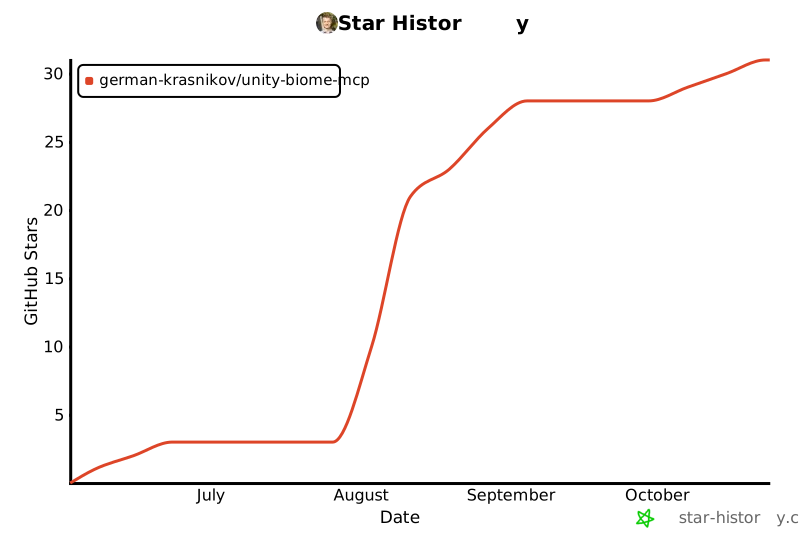](https://star-history.com/#german-krasnikov/unity-biome-mcp&Date)
<img src="docs/assets/divider.svg" width="100%" alt="">
<div align="center"><sub>MIT License · © <a href="https://github.com/german-krasnikov">German Krasnikov</a> · <a href="https://github.com/german-krasnikov/unity-biome-mcp">⭐ Star</a></sub></div>
MCP Config
Below is the configuration for this MCP Server. You can copy it directly to Cursor or other MCP clients.
mcp.json
Connection Info
You Might Also Like
No recommendations available