

Content
# My Pi Coding Agent Configuration
[](LICENSE)
[](https://pi.dev)
[](#Tool-List)
[](#Global-Skill-List)
[](#MCP-Server-List)
[](#Quick-Start)
[](https://github.com/realchendahuang/pi-config/stargazers)
[](https://github.com/realchendahuang/pi-config/commits)
[](https://github.com/realchendahuang/pi-config)
<!-- ASCII rendering test: the following banner uses Unicode block characters to test GitHub's fixed-width rendering -->
```
██████╗ ██╗ ██████╗ ██████╗ ███╗ ██╗███████╗██╗ ██████╗
██╔══██╗██║ ██╔════╝██╔═══██╗████╗ ██║██╔════╝██║██╔════╝
██████╔╝██║ ██║ ██║ ██║██╔██╗ ██║█████╗ ██║██║ ███╗
██╔═══╝ ██║ ██║ ██║ ██║██║╚██╗██║██╔══╝ ██║██║ ██║
██║ ██║ ╚██████╗╚██████╔╝██║ ╚████║██║ ██║╚██████╔╝
╚═╝ ╚═╝ ╚═════╝ ╚═════╝ ╚═╝ ╚═══╝╚═╝ ╚═╝ ╚═════╝
17 plugins · 18 global skills · 2 MCP servers · one-line installer
```
A replicable [Pi](https://pi.dev) configuration, organized into a tutorial format for sharing. Includes **17 plugins, 18 global skills, 2 MCP servers**, along with a one-line installer script.
Each item in the repository has been carefully selected through actual use, with the goal of turning Pi into a versatile terminal coding agent capable of multi-agent collaboration, token efficiency, and browser operation.
---
## 1. What is Pi?
[Pi](https://pi.dev) (npm package `@earendil-works/pi-coding-agent`) is an open-source terminal AI coding agent. You give it a task, and it reads and writes files, runs commands, and calls tools in your local project to complete the task.
If you haven't installed Pi yet:
```bash
npm install -g @earendil-works/pi-coding-agent
```
Then run `pi` to enter the interactive interface. All plugins in this repository assume you already have a functioning Pi.
---
## 2. Pi's Overall Architecture
Understanding the architecture helps you choose and write plugins. Pi is a **plugin-driven agent loop**, with a core layered structure:
```
┌─────────────────────────────────────────────────────┐
│ TUI / RPC / Print ← User Interaction Layer (Terminal Interface / API) │
├─────────────────────────────────────────────────────┤
│ Agent Loop ← Agent Loop: Receive Prompt → Call Model │
│ → Execute Tool → Return Result │
├─────────────────────────────────────────────────────┤
│ Providers / Models ← Multi-Model Abstraction: OpenAI / Anthropic │
│ / Local / Custom Provider │
├─────────────────────────────────────────────────────┤
│ Tools ← Model-Callable Tools: bash/read/ │
│ edit/web_search/mcp/custom │
├─────────────────────────────────────────────────────┤
│ Extensions ← TypeScript Modules, able to subscribe to events, │
│ register tools/commands/shortcuts/themes │
├─────────────────────────────────────────────────────┤
│ Skills / Prompts ← Markdown "Process Knowledge", │
│ injected into model context as needed │
├─────────────────────────────────────────────────────┤
│ Themes ← JSON color schemes │
├─────────────────────────────────────────────────────┤
│ Packages ← Distribution units for the above resources │
│ (npm / git / local path) │
└─────────────────────────────────────────────────────┘
```
**Key Concepts:**
- **Extension**: A TypeScript module, the most powerful way to modify Pi. Can subscribe to lifecycle events (e.g., `tool_calls` can intercept/modify/block tool calls), register custom tools, commands, system prompts, and custom rendering.
- **Skill**: A `SKILL.md` file describing "how to do a certain task". Models load it on demand, and it survives across sessions. Pi implements the [Agent Skills standard](https://agentskills.io/specification), so skills from Claude Code or OpenAI Codex can be used directly.
- **Prompt**: A reusable `.md` template, invoked with `/template`.
- **Theme**: A JSON color scheme file.
- **Package**: A distribution unit for the above resources (npm / git / local path). `pi install` installs packages.
**Agent Loop Process:**
1. User inputs prompt
2. `before_agent_start` event (extensions can inject messages/modify system prompts)
3. Enter turn loop: call model → model may call tools → `tool_calls` event (can intercept) → execute tool → `tool_result` event (can modify result) → return to model
4. Model no longer calls tools → `agent_end` → `agent_settled`
Extensions can hook into any part of the process.
---
## 3. Pi's Ecosystem and Package Market
### Package Market (pi.dev/packages)
Pi has an official [package market](https://pi.dev/packages), where all npm packages with the `pi-package` keyword in their `package.json` are automatically listed. Each package page shows version, downloads, dependencies, repository link, and even demo videos/screenshots.
You can also search for packages directly in Pi:
```bash
# Using the pi-marketplace extension (already installed in this repository)
# Or via command line:
pi install npm:@some/package
```
### Three Package Sources
| Source | Format | Description |
| --- | --- | --- |
| npm | `npm:@scope/pkg@1.2.3` | Most common, version can be pinned |
| git | `git:github.com/user/repo@v1` | Suitable for private/unreleased packages, SSH/HTTPS both work |
| Local Path | `/abs/path` or `./rel/path` | For development and debugging |
### Configuration File Locations
| File | Purpose |
| --- | --- |
| `~/.pi/agent/settings.json` | Global settings: package list, theme, default model, etc. |
| `~/.pi/agent/tools.json` | Tool switches: which tools are active/inactive |
| `~/.pi/agent/models.json` | Provider and model definitions |
| `~/.pi/agent/extensions/*.ts` | Global custom extensions (auto-discover, supports `/reload`) |
| `~/.agents/skills/` | Global custom skills |
| `~/.config/mcp/mcp.json` | MCP server configuration |
| `.pi/settings.json` | Project-level settings (can be shared with team) |
| `.pi/extensions/` | Project-level extensions |
---
## 4. How to Modify/Extend Pi
Pi provides three levels of modification, from lightweight to heavyweight, depending on your needs:
### Lightweight: Write a Skill
The simplest extension. Write a markdown file in `~/.agents/skills/my-skill/SKILL.md` describing a standard process for a certain task. Models load it on demand. This repository's `chrome-devtools` skill is in this format.
Suitable for: accumulating "how to debug a certain framework" or "how to release a version" type of process knowledge, with zero code.
### Medium: Install/Write an MCP Server
MCP (Model Context Protocol) is a tool protocol across agents. You write an MCP server (in any language), register it in `~/.config/mcp/mcp.json`, and Pi connects to it through `pi-mcp-adapter`. This repository's `context7` and `chrome-devtools` MCPs are connected this way.
Suitable for: integrating external services (database, API, browser, document source), and reusing tools across agents.
### Heavyweight: Write an Extension
The most powerful modification. Create `~/.pi/agent/extensions/my-ext.ts`:
```typescript
import type { ExtensionAPI } from "@earendil-works/pi-coding-agent";
import { Type } from "typebox";
export default function (pi: ExtensionAPI) {
// Intercept dangerous commands
pi.on("tool_calls", async (event, ctx) => {
if (event.toolName === "bash" && event.input.command?.includes("rm -rf")) {
const ok = await ctx.ui.confirm("Danger!", "Allow rm -rf?");
if (!ok) return { block: true, reason: "User blocked" };
}
});
// Register custom tool
pi.registerTool({
name: "greet",
label: "Greet",
description: "Greet by name",
parameters: Type.Object({ name: Type.String() }),
async execute(_id, params) {
return { content: [{ type: "text", text: `Hello, ${params.name}!` }] };
},
});
// Register command
pi.registerCommand("hello", {
description: "Say hello",
handler: async (_args, ctx) => ctx.ui.notify("Hello!", "info"),
});
}
```
Test: `pi -e ./my-ext.ts`; for production, move it to `~/.pi/agent/extensions/` and reload.
Suitable for: permission control, git checkpoint, custom compaction, external integration, stateful tools. Events cover session/agent/message/tool/model/provider lifecycle.
### Packaging and Distribution
Add a `package.json` with `pi` manifest and `pi-package` keyword, and publish to npm:
```json
{
"name": "my-pi-ext",
"keywords": ["pi-package"],
"pi": { "extensions": ["./extensions"], "skills": ["./skills"] }
}
```
Then `pi install npm:my-pi-ext`, and others can use your extension.
---
## 5. Quick Start (3 Steps)
```bash
# 1. Clone this repository
git clone https://github.com/realchendahuang/pi-config.git
cd pi-config
# 2. One-line installation (installs 17 plugins + merges MCP configuration)
bash install.sh
# 3. Restart pi to make all plugins and MCP servers take effect
```
The script will install 17 plugins using `pi install` and merge the configuration of 2 MCP servers into `~/.config/mcp/mcp.json` (if the file exists, it will preserve your existing servers and only merge).
> After installation, you need to configure the model provider/key using `pi config` — this part varies by user and is not covered in this repository.
---
## 6. Tool List (17, grouped by purpose)
Explained below, along with reasons for selection and repository links for deeper exploration.
### 🤖 Agent Orchestration and Workflow
#### `pi-subagents`
Sub-agent delegation framework. Allows main agent to delegate tasks to sub-agents, supporting five work modes:
- **single**: single sub-agent completes a task independently
- **chain**: multiple sub-agents form a pipeline, with each output feeding into the next
- **parallel**: multiple sub-agents run the same type of task in parallel
- **async**: background asynchronous execution with notification on completion
- **forked-context**: independent context forked from parent session
Suitable for complex processes like "let one agent research, another implement, and a third review". Comes with a `pi-subagents` skill to teach the model how to orchestrate.
- 📦 Repository: <https://github.com/nicobailon/pi-subagents>
#### `@narumitw/pi-goal`
Goal-driven mode. Set a goal with `/goal`, and Pi will autonomously drive towards completion, pausing when encountering obstacles.
- 📦 Repository: <https://github.com/narumiruna/pi-extensions>
#### `@narumitw/pi-plan-mode`
Read-only plan mode (similar to Codex's read-only collaboration). Let the model propose a plan, discuss it with you, and then execute. Avoids reckless modifications.
- 📦 Repository: <https://github.com/narumiruna/pi-extensions>
### 🔍 Code Intelligence and Context Management
#### `pi-lens`
Pi's "IDE eyes". Adds AST-level code understanding to Pi:
- Structured search/replace based on **ast-grep**
- Syntax rule checking based on **tree-sitter**
- **LSP diagnostics**: proactively check for type errors before building
- Symbol search, module reporting, and "cheap code reading" tools
Comes with 4 skills: `pi-lens-ast-grep`, `pi-lens-lsp-navigation`, `pi-lens-write-ast-grep-rule`, `pi-lens-write-tree-sitter-rule` (teaching custom rules).
- 📦 Repository: <https://github.com/apmantza/pi-lens>
#### `context-mode`
Token-saving core plugin. Routes large outputs (logs, build results, web content, git diff, etc.) into a sandbox, processes with code, and returns only summaries to the model. Includes a **FTS5 full-text search knowledge base** for indexing documents, web pages, and history sessions.
Effects: analyzing 47 source files directly would burn ~700KB context; with context-mode, it returns ~3.6KB. Comes with 8 skills (ctx-search/ctx-index/ctx-stats/ctx-purge/ctx-insight/ctx-doctor/ctx-upgrade/context-mode).
- 📦 Repository: <https://github.com/mksglu/context-mode>
#### `pi-hermes-memory`
Cross-session memory. Lets Pi remember things you've told it (preferences, project conventions, past pitfalls), and use them in new sessions. Memory is categorized into user/memory/project/failure types, searchable. Defaults to strategy-based token-aware memory, with SQLite FTS5 search + automatic merging.
- 📦 Repository: <https://github.com/chandra447/pi-hermes-memory>
### 🌐 Browsing, Retrieval, and External Integration
#### `pi-web-access`
Web access suite:
- **web_search**: multi-engine web search (OpenAI/Brave/Exa/Tavily/Perplexity/Gemini)
- **fetch_content**: fetch URL content as markdown, supporting YouTube transcription, GitHub repository cloning, PDF extraction, and local video frame extraction
- Comes with `librarian` skill: library research with GitHub permanent links, suitable for deep-diving into an open-source library's implementation
- 📦 Repository: <https://github.com/nicobailon/pi-web-access>
#### `pi-playwright`
Playwright browser automation. Enables Pi to open browsers, fill out forms, click buttons, take screenshots, and inspect console/network. Comes with the `playwright-browser` skill. Suitable for testing web applications and end-to-end automation.
- 📦 Repository: <https://github.com/guwidoe/pi-playwright>
#### `pi-mcp-adapter`
MCP (Model Context Protocol) adapter. Allows Pi to connect to any MCP server and integrate its tools. The two MCP servers in this repository are enabled through it. Supports OAuth, security review, and on-demand lazy startup.
- 📦 Repository: <https://github.com/nicobailon/pi-mcp-adapter>
#### `pi-marketplace`
Pi package marketplace entrance. Search, view details, security audit, and install Pi packages from npm directly in Pi. Comes with `marketplace_search` / `marketplace_detail` / `marketplace_audit` / `marketplace_install` tools. Makes discovering new plugins easy.
- 📦 Repository: <https://pi.dev/packages/pi-marketplace>
### ✨ Practical Tools and Themes
#### `@juicesharp/rpiv-todo`
A todo list for models, rendered as a real-time overlay, **resistant to `/reload` and session compression**. Visualizes multi-step task progress, making it less likely to get off track.
- 📦 Repository: <https://github.com/juicesharp/rpiv-mono>
#### `@narumitw/pi-statusline`
Status bar enhancement. Replaces Pi's default footer, displaying richer information such as model, context occupancy, and git status at the bottom, giving a clear view of the current state.
- 📦 Repository: <https://github.com/narumiruna/pi-extensions>
#### `@narumitw/pi-github-pr`
View GitHub PR review/checks/comment status in Pi without switching to a browser.
- 📦 Repository: <https://github.com/narumiruna/pi-extensions>
#### `pi-simplify`
Review recently modified code, providing suggestions from clarity, consistency, and maintainability perspectives. Run the code improvement tool after making changes to eliminate code smells.
- 📦 Repository: <https://github.com/MattDevy/pi-extensions>
#### `@firstpick/pi-prompts-git-pr`
A set of reusable prompt templates: commit messages, PR descriptions, and PR review processes. Directly invoke the corresponding template with `/`, saving time on manual input.
- 📦 Repository: <https://github.com/Firstp1ck/pi-coding-agent-forge>
#### `@firstpick/pi-skill-deep-research`
Comes with the `deep-research` skill: a two-stage rigorous research process with schema/policy validation. Suitable for high-stakes research requiring multi-source evidence and fact-checking.
- 📦 Repository: <https://github.com/Firstp1ck/pi-coding-agent-forge>
#### `@victor-software-house/pi-curated-themes`
A curated set of dark terminal themes (migrated from iTerm2-Color-Schemes), including `github-dark-colorblind`. Also includes the `adapt-ghostty-theme-to-pi` skill: migrating Ghostty terminal themes to Pi themes.
- 📦 Repository: <https://github.com/victor-software-house/pi-curated-themes>
---
## Seven. Global Skill List (18)
All skills are global - installed packages are available everywhere, regardless of the current project.
| Category | Skill | Source Package |
| --- | --- | --- |
| Research/Browsing | `librarian`, `deep-research`, `chrome-devtools` | pi-web-access / @firstpick / custom |
| Browsing | `playwright-browser` | pi-playwright |
| Context/Knowledge Base | `context-mode`, `ctx-search`, `ctx-index`, `ctx-stats`, `ctx-purge`, `ctx-insight`, `ctx-doctor`, `ctx-upgrade` | context-mode |
| Code Intelligence | `pi-lens-ast-grep`, `pi-lens-lsp-navigation`, `pi-lens-write-ast-grep-rule`, `pi-lens-write-tree-sitter-rule` | pi-lens |
| Agent Orchestration | `pi-subagents` | pi-subagents |
| Themes | `adapt-ghostty-theme-to-pi` | @victor-software-house |
> `chrome-devtools` is a custom global skill placed in `~/.agents/skills/`, not in any npm package, and needs to be created manually (refer to Section 2, "Writing a Skill").
---
## Eight. MCP Servers (2)
Configured in `mcp.json`, installation scripts will merge into `~/.config/mcp/mcp.json`.
### `context7`
Upstash's Context7 MCP. Fetches **latest documentation** from third-party libraries in real-time for the model, avoiding outdated training knowledge when writing code.
```json
{
"command": "npx",
"args": ["-y", "@upstash/context7-mcp@latest"],
"lifecycle": "lazy"
}
```
### `chrome-devtools`
Chrome DevTools remote control, 29 tools (clicking, screenshots, network capture, performance analysis, etc.). Pairs well with the `chrome-devtools` skill for debugging web pages.
> This server requires a local `chrome-devtools-mcp` binary, with the path written in `mcp.json` being fixed; please change it to your own path after switching machines.
Both are set to `"lifecycle": "lazy"` - started on demand, not constantly resident, saving resources.
---
## Nine. Repository Contents
| File | Description |
| --- | --- |
| `install.sh` | One-click installation script: installs 17 plugins + merges MCP configuration |
| `config.json` | Machine-readable complete configuration (plugins / globalSkills / mcpServers / UI / tools) |
| `mcp.json` | MCP server configuration, can be directly placed in `~/.config/mcp/mcp.json` |
| `README.md` | This document |
---
## Ten. How to Use After Installation
1. **Configure the model first**: Run `pi config` and add your own provider and model. This repository does not involve this part.
2. **Restart Pi**: To make the newly installed plugins and MCP server take effect.
3. **Try skills**: Describe tasks directly in Pi, and the model will automatically match suitable skills; you can also use slash commands like `/context-mode:ctx-stats` to manually invoke.
4. **Adjust tool switches (optional)**: Pi's `tools.json` can set infrequently used tools to inactive, keeping the tool list clean. My personal approach is to set `ast_grep_*` / `grep` / `find` / `ls` / `lsp_navigation` to inactive and invoke them as needed through `pi_lens_activate_tools`. The complete tools configuration can be referenced in `config.json`.
---
## Eleven. Star History
[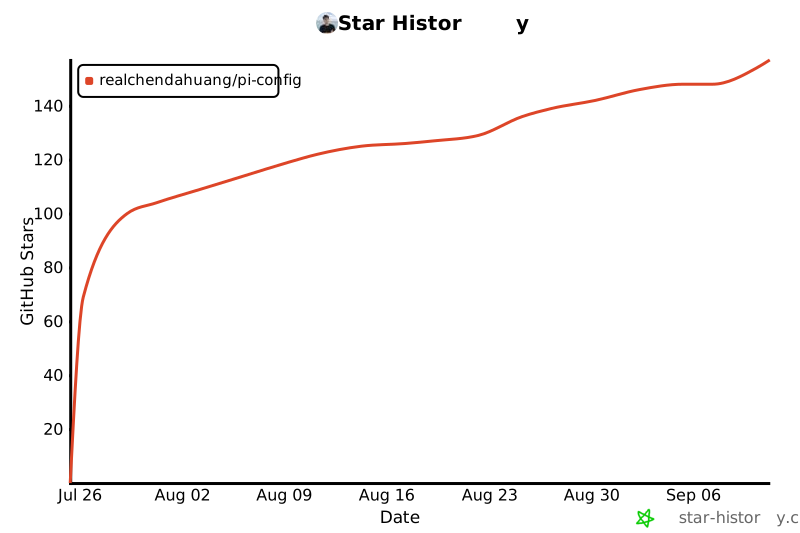](https://star-history.com/#realchendahuang/pi-config&Date)
> The repository is new, and the curve will update in real-time as stars increase. Clicking on the image will jump to the star-history interactive page.
---
## Twelve. Contribution Activity Line Graph
The ASCII line graph below is generated from the real `git log` of this repository (statistical commits per hour), directly drawn using equal-width block characters - both a visualization of contribution trends and a verification of GitHub's equal-width rendering.
```
Hourly commit distribution (2026-07-25)
4 │ ●─
│ ●─
│ ●─
│ ●─
│ ╱ ●─
│ ●─ ●─
└┴───┴───
17:00 18:00
Total commits: 5 | Time span: 17:34 → 18:13
```
> As commits increase, this graph will be automatically redrawn hourly or daily. Generation script idea: `git log --pretty=format:%ad` → bucket by hour → draw lines with `●` / `╱` / `─`.
---
## License
MIT
MCP Config
Below is the configuration for this MCP Server. You can copy it directly to Cursor or other MCP clients.
mcp.json
Connection Info
You Might Also Like
No recommendations available