

Content
# Figma MCP Bridge
[](https://gethopp.app)
- [Demo](#demo)
- [Quick Start](#quick-start)
- [Available Tools](#available-tools)
- [Design Tokens](#design-tokens)
- [Engineering Review Guidelines](#engineering-review-guidelines)
- [Development Docs](#development-docs)
- [Contributing](#contributing)
- [Local development](#local-development)
- [Structure](#structure)
- [How it works](#how-it-works)
<br/>
<img src="https://raw.githubusercontent.com/gethopp/figma-mcp-bridge/main/logo.png" alt="Figma MCP Bridge" align="center" />
<br/>
While other amazing Figma MCP servers like [Figma-Context-MCP](https://github.com/GLips/Figma-Context-MCP/) exist, one issues is the [API limiting](https://github.com/GLips/Figma-Context-MCP/issues/258) for free users.
The limit for free accounts is 6 requests per month, yes **per month**.
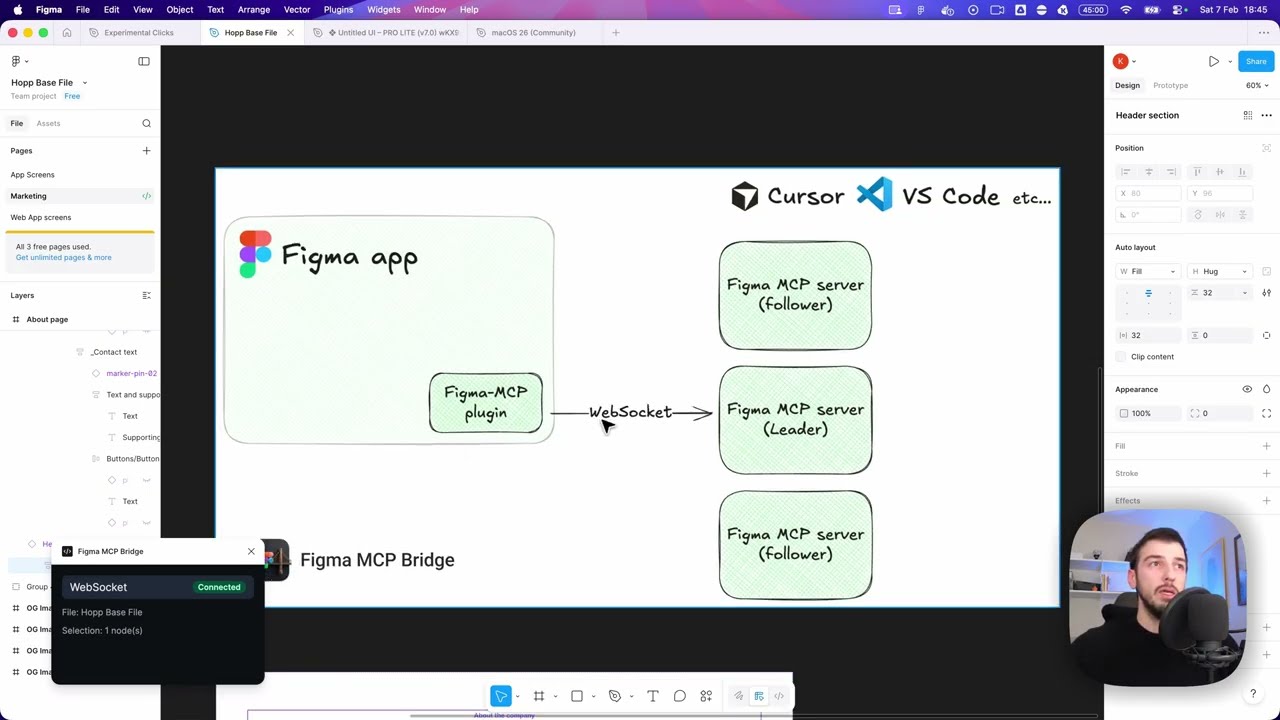
Figma MCP Bridge is a solution to this problem. It is a local Figma plugin + MCP server bridge that streams the currently open Figma file to AI/MCP clients over WebSocket, avoiding Figma REST API rate limits — Figma MCP for the rest of us ✊
## Demo
[Watch a demo of building a UI in Cursor with Figma MCP Bridge](https://youtu.be/ouygIhFBx0g)
[](https://youtu.be/ouygIhFBx0g)
## Quick Start
### 1. Add the MCP server to your favourite AI tool
Add the following to your AI tool's MCP configuration (e.g. Cursor, Windsurf, Claude Desktop):
```json
{
"figma-bridge": {
"command": "npx",
"args": ["-y", "@gethopp/figma-mcp-bridge"]
}
}
```
That's it — no binaries to download or install.
### 2. Add the Figma plugin
Download the plugin from the [latest release](https://github.com/gethopp/figma-mcp-bridge/releases) page, then in Figma go to `Plugins > Development > Import plugin from manifest` and select the `manifest.json` file from the `plugin/` folder.
### 3. Start using it 🎉
Open a Figma file, run the plugin, and start prompting your AI tool. The MCP server will automatically connect to the plugin.
If you want to know more about how it works, read the [How it works](#how-it-works) section.
## Available Tools
| Tool | Description |
|------|-------------|
| `list_files` | List Figma files currently connected to the bridge; use the returned `fileKey` to target a specific file |
| `get_document` | Get the current Figma page document tree |
| `get_selection` | Get the currently selected nodes in Figma |
| `get_node` | Get a specific Figma node by ID (colon format, e.g. `4029:12345`) |
| `get_styles` | Get all local paint, text, effect, and grid styles |
| `get_metadata` | Get file name, pages, and current page info |
| `get_design_context` | Get a depth-limited tree optimized for understanding design context |
| `get_variable_defs` | Get all variable collections, modes, and values (design tokens) |
| `get_design_tokens` | Get normalized design tokens from local variables and styles with AI-friendly paths, sources, modes, and summary counts |
| `get_token_usage` | Scan selection, current page, or specific nodes and map node properties to tokens via bindings, styles, or exact value matches |
| `audit_design_tokens` | Read-only audit of token coverage and consistency; returns issues and recommendations based on token graph + usage mapping |
| `propose_design_tokens` | Read-only token proposal workflow based on repeated unbound values and duplicate token values |
| `create_design_tokens` | Create local variables/styles from a reviewed token list; defaults to dry-run and only writes with `dryRun=false` |
| `apply_tokens` | Bind variables or apply styles to matching node properties; defaults to dry-run and only writes with `dryRun=false` |
| `export_design_tokens` | Export normalized tokens as JSON, DTCG JSON, CSS variables, or Tailwind theme tokens without modifying Figma |
| `get_screenshot` | Export nodes as PNG/SVG/JPG/PDF (base64-encoded) |
| `save_screenshots` | Export and save screenshots directly to the local filesystem |
| `create_frame` | Create a frame on the current page |
| `create_component` | Create a first-class Figma Component on the current page |
| `create_instance` | Create an Instance from a local Component by `componentId` |
| `combine_as_variants` | Combine two or more local Components into a native Figma Component Set / variants node |
| `set_variant_properties` | Set or update `State=Hover`, `Size=Large`, etc. on a variant Component inside a Component Set |
| `manage_component_properties` | Add, edit, or delete Component property definitions on a Component or Component Set |
| `set_component_properties` | Set variant/component property values on an Instance via Figma `setProperties(...)` |
| `set_exposed_instance` | Toggle whether a nested Instance is exposed to the containing Component / Component Set |
| `create_text` | Create a text node on the current page |
| `create_rectangle` | Create a rectangle on the current page |
| `append_children` | Re-parent existing child nodes under a parent |
| `find_nodes` | Find nodes on the current page by ID, name, key, or parent |
| `set_position` | Set node position |
| `set_size` | Set node size |
| `set_fills` | Set node fills using supported solid paints |
| `set_strokes` | Set node strokes using supported solid paints |
| `set_corner_radius` | Set uniform corner radius |
| `set_text_content` | Set text content |
| `set_text_style` | Set text style |
| `set_layout_mode` | Set auto-layout mode |
| `set_padding` | Set auto-layout padding |
| `set_item_spacing` | Set auto-layout item spacing |
| `set_node_name` | Rename an existing Figma node |
| `rename_node` | Alias for `set_node_name` |
| `delete_node` | Delete a node |
| `batch_mutation` | Execute up to 100 write operations in order, with temporary refs for multi-step generation |
Write tools are intentionally scoped to the current page and a deterministic subset of Figma mutations so AI-driven edits remain easier to validate and safer to automate. Component support covers creating Component nodes, creating local `componentId` instances, combining two or more existing local Components into a native `COMPONENT_SET` via `combine_as_variants` (`componentIds`, optional `parentId`, `name`, `x`, `y`, `key`), managing variant names/properties on components inside a component set, managing component property definitions, setting instance component properties, and toggling exposed nested instances. `set_variant_properties` updates variants by renaming the target component to Figma's `Property=Value` syntax; `manage_component_properties` follows Figma Plugin API limits (for example, deleting `VARIANT` definitions is not supported by Figma). `set_exposed_instance` also follows Figma's native eligibility rules: the target must be an eligible nested instance inside a component/component set and may need exposed nested instances or children with component property references. Remote library import by component key remains out of scope for this pass.
All Figma-backed tools accept an optional `fileKey`. When exactly one plugin instance is connected, tools remain backward compatible and can omit `fileKey`. When multiple Figma files/plugin instances are connected, tool calls fail closed unless the caller supplies a `fileKey`; call `list_files` first and pass the desired file's `fileKey` to read, screenshot, token, and write tools. Unsaved Figma files use a plugin-session fallback key so simultaneous `Untitled` files are still distinguishable.
Within `batch_mutation`, temporary references must use the `tmp:` prefix, for example `ref: "tmp:modal"` and `nodeId: "tmp:modal"`. Bare labels like `"modal"` are treated as literal node IDs and are not resolved as batch refs.
## Design Tokens
Figma MCP Bridge exposes design-system data as a layered workflow:
1. **Raw sources**: `get_styles` returns local paint, text, effect, and grid styles. `get_variable_defs` returns Figma variable collections, modes, values, and aliases.
2. **Normalized graph**: `get_design_tokens` combines variables and styles into stable AI-friendly token paths such as `color.brand.primary`, while preserving each token's `source` (`variable` or `style`) and mode-aware values.
3. **Usage and audit**: `get_token_usage` scans the current selection, current page, or explicit `nodeIds` and classifies matches as `boundVariable`, `style`, `exactValue`, or `none`. `audit_design_tokens` uses that usage map to report coverage, unbound usages, exact-value-only matches, duplicate values, unknown groups, empty scans, and unused tokens.
4. **Proposal and export**: `propose_design_tokens` suggests token candidates without writing to Figma. `export_design_tokens` serializes the normalized token graph to JSON, DTCG JSON, CSS variables, or Tailwind theme tokens.
5. **Dry-run-first writes**: `create_design_tokens` and `apply_tokens` preview their plans by default. They only modify the Figma file when callers explicitly pass `dryRun=false`.
Use the read-only graph, usage, audit, proposal, and export tools for design-system analysis. Treat `create_design_tokens` and `apply_tokens` as write workflows: review the dry-run plan first, then opt into real Figma changes only when the target collection, nodes, and conflict strategy are clear. See [docs/design-token-tools.md](./docs/design-token-tools.md) for the full token-tool matrix.
## Engineering Review Guidelines
Use [ENGINEERING_REVIEW_GUIDELINES.md](./ENGINEERING_REVIEW_GUIDELINES.md) as the team baseline for manual MCP tool development and code review. It defines module boundaries, tool categories, schema rules, write-operation safety boundaries, manual verification steps, PR checklist, issue severity levels, and design-token-specific constraints. It is a human engineering and review standard, not an AI-client usage guide.
## Development Docs
- [docs/design-token-tools.md](./docs/design-token-tools.md): token graph, usage, audit, proposal, dry-run write, and export workflows.
- [docs/development-workflow.md](./docs/development-workflow.md): local server/plugin setup, validation commands, Figma plugin import, and common troubleshooting.
- [docs/multi-file-routing.md](./docs/multi-file-routing.md): multi-file/plugin-instance routing behavior, `list_files`, `fileKey`, and live verification checklist.
- [skills/README.md](./skills/README.md): repo-local agent skills that capture practical MCP tool-selection, safety, screenshot, write, token, and debug workflows.
## Contributing
See [CONTRIBUTING.md](./CONTRIBUTING.md) for Conventional Commit scopes, release version semantics, and semantic-release dry-run instructions.
## Local development
#### 1. Clone this repository locally
```bash
git clone git@github.com:gethopp/figma-mcp-bridge.git
```
#### 2. Build the server
```bash
cd server && npm install && npm run build
```
#### 3. Build the plugin
```bash
cd plugin && bun install && bun run build
```
If `bun` is not available, the plugin can also be built with npm:
```bash
cd plugin && npm install && npm run build
```
#### 4. Add the MCP server to your favourite AI tool
For local development, add the following to your AI tool's MCP config:
```json
{
"figma-bridge": {
"command": "node",
"args": ["/path/to/figma-mcp-bridge/server/dist/index.js"]
}
}
```
## Validation
Before opening a PR, run the targeted local checks from the repository root:
```bash
cd server && npm test
cd ../plugin && npm run build
npm test
```
`server` tests compile the MCP server and verify multi-file routing/fail-closed behavior plus `fileKey` schema coverage.
`plugin` tests compile the plugin test build and run write plus design-token coverage: write operations, token graph, usage mapping, audit, proposal, create, apply, and export.
## Structure
```text
Figma-MCP-Bridge/
|-- plugin/ # Figma plugin (TypeScript/React)
| `-- src/
| |-- ui/ # Plugin UI shown inside Figma
| `-- main/
| |-- code.ts # Plugin runtime entry point and RPC dispatch
| |-- serializer.ts # Read-side node/style serialization
| `-- write.ts # Write-side mutation engine and batch execution
`-- server/ # MCP server (TypeScript/Node.js)
`-- src/
|-- index.ts # Entry point
|-- bridge.ts # WebSocket bridge to Figma plugin
|-- leader.ts # Leader: HTTP server + bridge
|-- follower.ts # Follower: proxies to leader via HTTP
|-- node.ts # Dynamic leader/follower role switching
|-- election.ts # Leader election & health monitoring
|-- schema.ts # Zod schemas for read/write tool inputs
|-- tools.ts # MCP tool registration for read/write operations
`-- types.ts # Shared transport types
```
## How it works
There are two main components to the Figma MCP Bridge:
### 1. The Figma Plugin
The Figma plugin is the user interface for the Figma MCP Bridge. You run this inside the Figma file you want to use the MCP server for, and its responsible for getting you all the information you need.
### 2. The MCP Server
The MCP server is the core of the Figma MCP Bridge. As the Figma plugin connects with the MCP server via a WebSocket connection, the MCP server is responsible for:
- Handling WebSocket connections from the Figma plugin
- Forwarding tool calls to the Figma plugin
- Routing responses back to the Figma plugin
- Handling leader election (as we can have only one WS connection to an MCP server at a time)
```
┌─────────────────────────────────────────────────────────────────────────────┐
│ FIGMA (Browser) │
│ ┌───────────────────────────────────────────────────────────────────────┐ │
│ │ Figma Plugin │ │
│ │ (TypeScript/React) │ │
│ └───────────────────────────────────────────────────────────────────────┘ │
└─────────────────────────────────────────────────────────────────────────────┘
│
│ WebSocket
│ (ws://localhost:1994/ws)
▼
┌─────────────────────────────────────────────────────────────────────────────┐
│ PRIMARY MCP SERVER │
│ (Leader on :1994) │
│ ┌─────────────────────────────────────────────────────────────────────┐ │
│ │ Bridge Endpoints: │ │
│ │ • Manages WebSocket conn • /ws (plugin) │ │
│ │ • Forwards requests to plugin • /ping (health) │ │
│ │ • Routes responses back • /rpc (followers) │ │
│ └─────────────────────────────────────────────────────────────────────┘ │
└─────────────────────────────────────────────────────────────────────────────┘
▲ ▲
│ HTTP /rpc │ HTTP /rpc
│ POST requests │ POST requests
│ │
┌─────────────────┴───────────┐ ┌─────────────┴───────────────┐
│ FOLLOWER MCP SERVER 1 │ │ FOLLOWER MCP SERVER 2 │
│ │ │ │
│ • Pings leader /ping │ │ • Pings leader /ping │
│ • Forwards tool calls │ │ • Forwards tool calls │
│ via HTTP /rpc │ │ via HTTP /rpc │
│ • If leader dies → │ │ • If leader dies → │
│ attempts takeover │ │ attempts takeover │
└─────────────────────────────┘ └─────────────────────────────┘
▲ ▲
│ │
│ MCP Protocol │ MCP Protocol
│ (stdio) │ (stdio)
▼ ▼
┌─────────────────────────────┐ ┌─────────────────────────────┐
│ AI Tool / IDE 1 │ │ AI Tool / IDE 2 │
│ (e.g., Cursor) │ │ (e.g., Cursor) │
└─────────────────────────────┘ └─────────────────────────────┘
```
MCP Config
Below is the configuration for this MCP Server. You can copy it directly to Cursor or other MCP clients.
mcp.json
Connection Info
You Might Also Like
No recommendations available