

Content
# Horizun PBI MCP
[](https://github.com/HorizunGroup/horizun-pbi-mcp/actions/workflows/ci.yml)
[](https://pypi.org/project/horizun-pbi-mcp/)
[](https://pypi.org/project/horizun-pbi-mcp/)
[](LICENSE)
**Build and fix Power BI reports by describing what you want.**
Ask in plain language; the server runs the DAX, edits the model, writes the
report pages — and checks its own work afterwards.
### No licence, no API key, no paid plan
It runs as a **local process on your own Windows machine**, so the free apps are
enough: install it in **ChatGPT Desktop** or **Claude Desktop** on their free
tiers and start asking. No OpenAI or Anthropic API key, no subscription, no
server of ours in the middle — and Power BI Desktop is free as well. One click
installs it and it prepares its own runtime: no Python, no JSON to edit.
**v2.1.1** · 139 tools · Windows · ChatGPT Desktop Free · Claude Desktop Free · Claude Code · Codex
New to the project? Start with [what this Power BI MCP is, when to use it, and
what it deliberately does not do](docs/POWER_BI_MCP.md).
## Install
No repository clone, manual DLL download or `.mcp.json` editing is required.
Pick the line that matches you.
### ChatGPT Desktop Free
Run the verified one-paste installer from [`docs/INSTALL.md`](docs/INSTALL.md),
restart ChatGPT Desktop, then open **Plugins → Personal** and install
**Horizun PBI MCP**. No OpenAI API key is required.
### Claude Desktop Free
Download the `.mcpb` from the
[latest release](https://github.com/HorizunGroup/horizun-pbi-mcp/releases/latest)
and double-click it. Claude Desktop supplies the bootstrap runtime; no Claude
Code install or JSON editing is required. It will say the extension is **not
verified by Anthropic** — what it says about anything installed outside its own
directory — and let you continue.
### Claude Code
```powershell
claude plugin marketplace add HorizunGroup/horizun-pbi-mcp
claude plugin install horizun-pbi-mcp@horizun
```
### Codex
```powershell
codex plugin marketplace add HorizunGroup/horizun-pbi-mcp
```
Then open `/plugins`, pick the **Horizun** marketplace and install
`horizun-pbi-mcp`.
### Desktop or Code?
Same server, same 139 tools, same local runtime — install both and they share
it. Pick by what you are doing: **Claude Desktop** to *use* Power BI, in chat,
one click, free tier. **Claude Code** to *build* — it adds the terminal, git
and your repo, and loads tool schemas on demand instead of all at once.
On a new PC, the [verified one-paste installer](docs/INSTALL.md) prepares the
prerequisites without administrator rights. First setup takes a few minutes:
run `pbi_install_status` until `ready`, restart once, and confirm the 139 `pbi_*` tools appear.
## Your first minute
1. Open Power BI Desktop with any report.
2. Ask: *"List the Power BI models that are open and connect to the first one."*
3. Ask: *"Run a read-only DAX query that returns revenue by month for this year."*
If step 2 answers, everything works.
## Things worth asking for
```text
Audit this PBIP project and explain the highest-risk issues before changing anything.
```
```text
This measure returns blank for December. Find out why.
```
```text
Create a report page from this specification, validate it, and show me the layout.
```
```text
Document every measure in the model and export it to Excel.
```
## What it provides
| Area | Capabilities |
|---|---|
| Live model | Discover Desktop sessions, run DAX, inspect metadata, refresh, and manage measures through TOM |
| Semantic model | Read and edit TMDL tables, columns, measures, relationships, roles and calculation groups |
| Report authoring | Create pages and visuals, clone templates, arrange layouts, apply themes, bookmarks and interactions |
| Conversion | Convert `.pbix` to `.pbip`, migrate supported structures and validate the result |
| Quality | Audit models and reports, document schemas, detect broken references and normalize report structures |
| Delivery | Export verified PDF, Word, Excel and PowerPoint artifacts; ingest SharePoint data read-only |
See the [tool catalog](docs/TOOL_CATALOG.md) for all 139 tools and their risk
classifications.
## Why it is safe to point at real work
- Local-first: Power BI Desktop communication stays on `localhost`.
- No telemetry, and the MCP server needs no account.
- Project writes stay inside the active project directory.
- Every project write makes a backup and is re-read to confirm it landed.
- Destructive tools require `confirm=true`.
- JSON writes are atomic; invalid JSON is never written over good JSON.
- Downloaded runtime components are version-pinned and SHA-256 verified.
- Logs go to stderr or files, so stdout stays a clean JSON-RPC channel.
Full guarantees and failure behavior: [security model](docs/SECURITY.md) and
[recovery guide](docs/RECOVERY.md). Report vulnerabilities privately as described
in [SECURITY.md](SECURITY.md).
## Requirements
- Windows 10 or 11.
- Python 3.10 or newer.
- Power BI Desktop — only for the live layer (DAX, refresh, capture, render checks).
- A `.pbip` project with PBIR enabled, for report-file authoring.
- Node.js 20+ only for the optional Microsoft PBIR validator.
Claude Code, Codex and Power BI Desktop are external programs; this project does
not install them. Without Desktop the `.pbip` tools still work — the live tools
do not.
## Known limits
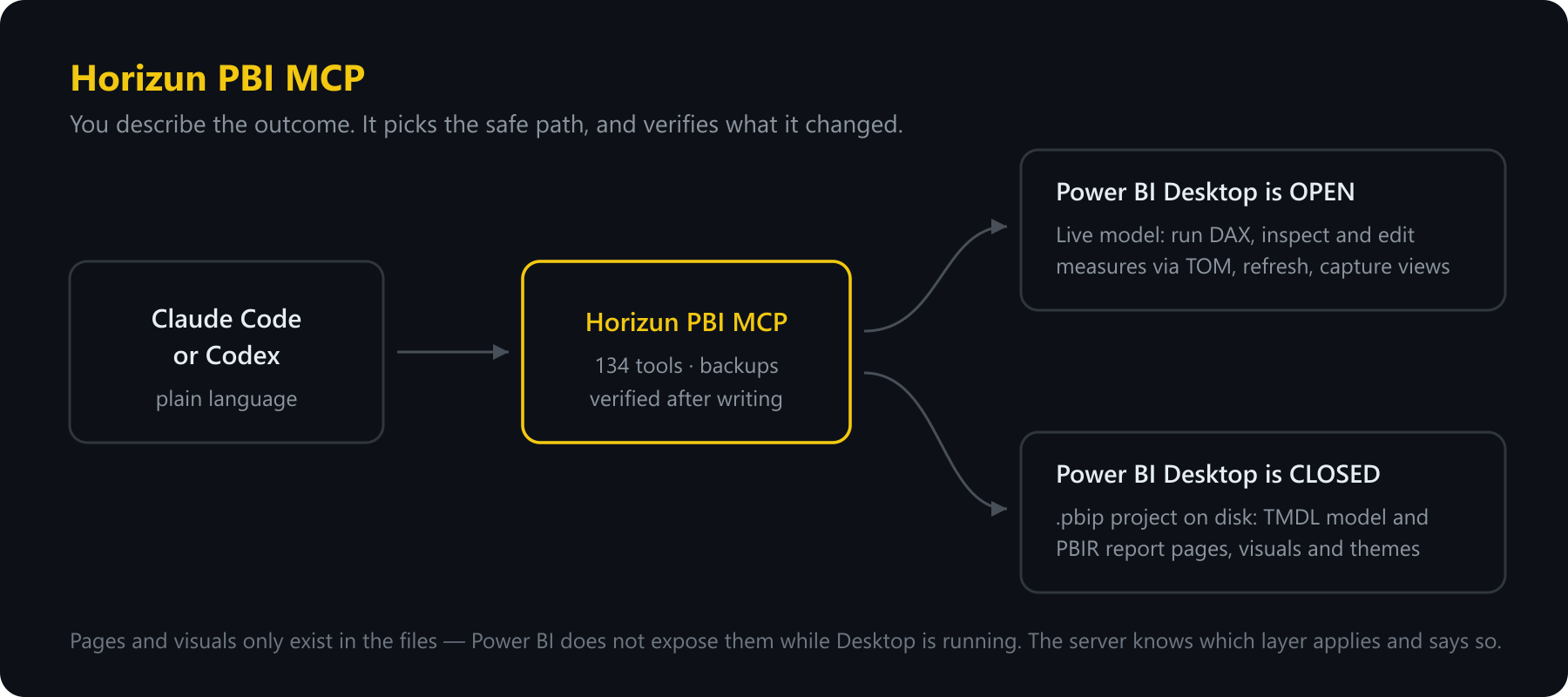
- Power BI does not expose pages or visuals through its live local endpoint, so
those are edited in PBIR files while Desktop is safely closed.
- `mode="both"` is disabled for dual live/disk writes: Desktop being open and a
PBIP project being safe to edit are mutually exclusive states.
- The server does not publish to or refresh the Power BI Service.
- Three PBIR schemas referenced by Power BI are not published by Microsoft;
affected writes fail closed instead of guessing.
## Documentation
| Document | Purpose |
|---|---|
| [Installation](docs/INSTALL.md) | Setup, repair, offline installation and MCP client registration |
| [Tutorial](docs/TUTORIAL.md) | First connection through report authoring |
| [Power BI MCP overview](docs/POWER_BI_MCP.md) | Use cases, boundaries, safety and first workflow |
| [Tool catalog](docs/TOOL_CATALOG.md) | All tools, grouped by capability and risk |
| [Architecture](docs/ARCHITECTURE.md) | Components, boundaries and invariants |
| [Security](docs/SECURITY.md) | Threat model and operational guarantees |
| [Validation](docs/VALIDATION.md) | TMDL/PBIR validation layers and known limits |
| [Migration guide](docs/MIGRACION_1x_A_2.0.md) | Breaking changes from 1.x to 2.0 |
| [Contributing](CONTRIBUTING.md) | Development workflow and pull-request requirements |
## Development
```powershell
git clone https://github.com/HorizunGroup/horizun-pbi-mcp.git
cd horizun-pbi-mcp
python -m pip install -e .
python scripts/fetch_libs.py
python scripts/fetch_pbir_schemas.py
python scripts/doctor.py
```
Before opening a pull request:
```powershell
python -m pytest -q
python scripts/doctor.py
python -m tests.contract_utils
```
The MCP contract is frozen and checked against `tests/golden/tools_v1.json`.
Real `.pbix`, `.pbip`, credentials, DLLs, outputs and backups are never
committed. See [AGENTS.md](AGENTS.md) for the repository invariants.
## License
Apache License 2.0. See [LICENSE](LICENSE) and [NOTICE](NOTICE).
## MCP Registry
This package is the one published under the server name below. The registry
reads this line from the README of the **PyPI package** to confirm that whoever
publishes the metadata also owns the package, so it has to live here rather
than in `.mcp/server.json` alone.
```
mcp-name: io.github.HorizunGroup/horizun-pbi-mcp
```
Connection Info
You Might Also Like
No recommendations available