

Content
# HermesOffice
**The world's first full-featured open-source AI Office suite.**
[](LICENSE)
[](https://github.com/criptogus/HermesOffice/releases/latest)
[](https://github.com/criptogus/HermesOffice/releases)
[Download](https://github.com/criptogus/HermesOffice/releases/latest) · [Privacy](PRIVACY.md) · [Demo](https://www.youtube.com/watch?v=B2pLdMX95v4)
HermesOffice is a free, open-source alternative to Microsoft Office for macOS,
Windows, and Linux, built around AI editing as a first-class workflow rather
than a bolted-on chat box. It opens and saves the real Microsoft Office
formats — Word (`.docx`), Excel (`.xlsx`), PowerPoint (`.pptx`) — and edits
PDF and Markdown too: a word processor, spreadsheet, presentation editor,
PDF editor, and Markdown editor as six Electron apps sharing one engine
layer.
[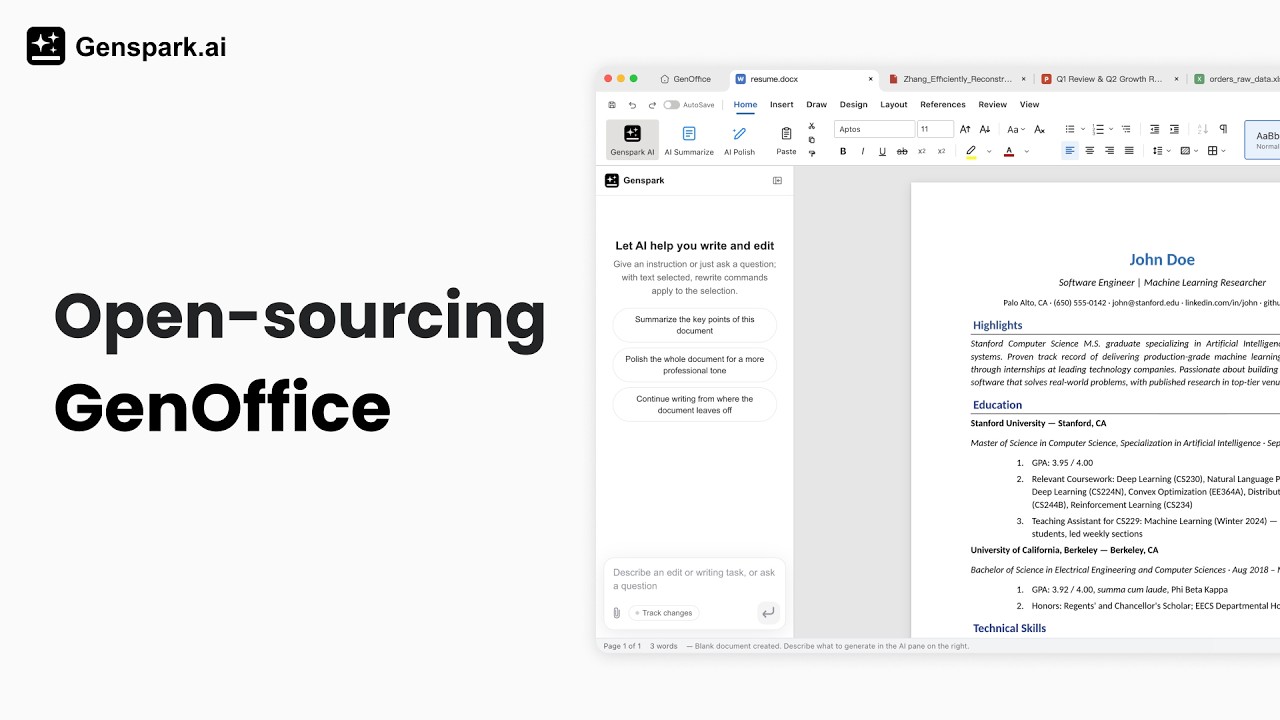](https://www.youtube.com/watch?v=B2pLdMX95v4)
[Watch the demo video on YouTube](https://www.youtube.com/watch?v=B2pLdMX95v4)
## Features
- **Real PDF editing** — retype text and edit images in the page itself, original fonts preserved.
- **Local PDF → Word / PowerPoint / Excel conversion** — turn a PDF into an editable `.docx`, `.pptx`, or `.xlsx` entirely on your machine: no cloud, no upload.
- **Scanned PDFs too** — on macOS and Windows scanned pages are read with the system OCR, so they convert to editable text.
- **Microsoft Word–compatible, byte-preserving `.docx` editing** — only what you touched changes; Word never notices.
- **Word-faithful pagination** — page breaks land where Word puts them.
- **Excel-compatible spreadsheets** — in-house engine with a Rust `.xlsx` sidecar, own charts, pivot tables, slicers.
- **PowerPoint-compatible presentations** — in-house `.pptx` engine with masters, layouts, smart guides, non-destructive crop.
- **Markdown to Word, fully local** — the same OOXML engine, no Pandoc, no cloud.
- **AI that edits documents** — block-level edits with snapshots and diffs, document-aware agents.
- **Bring your own key (BYOK)** — run the AI on your own API key: Claude, OpenAI, Gemini, DeepSeek, Kimi, GLM, Qwen, Doubao, MiniMax, Grok, Mistral, OpenRouter, or any OpenAI-compatible endpoint — or sign in with Genspark and skip keys entirely.
- **Agent tools built in** — web/image search, image generation, media analysis.
- **Light / dark / system themes.**
- **macOS, Windows, Linux.**
- **Free & open-source (Apache-2.0).**
## Download
**macOS · Apple Silicon — [download the latest `.dmg`](https://github.com/criptogus/HermesOffice/releases/latest/download/HermesOffice-arm64.dmg)**
One click, always the newest build. That link never changes — it is also the one to share or put on a page.
| Platform | Requirements | Download |
| ------------------------------------ | --------------------------- | ------------------------------------------------------------------------------------------------------------------------------------------------------------------------------------------------------------- |
| **macOS** — Apple Silicon (arm64) | macOS 11+ | [`.dmg`](https://github.com/criptogus/HermesOffice/releases/latest/download/HermesOffice-arm64.dmg) · [`.zip`](https://github.com/criptogus/HermesOffice/releases/latest/download/HermesOffice-arm64-mac.zip) |
| **macOS** — Intel (x64) | macOS 11+ | [build from source](#development) — no published artifact yet |
| **Windows** (x64) | Windows 10+ | [build from source](#development) — no published artifact yet |
| **Linux** — Debian / Ubuntu | x86_64, glibc 2.34+ | [build from source](#development) — no published artifact yet |
| **Linux** — Fedora / RHEL / openSUSE | x86_64, glibc 2.34+ | [build from source](#development) — no published artifact yet |
| **Linux** — other distributions | x86_64, glibc 2.34+, FUSE 2 | [build from source](#development) — no published artifact yet |
Builds come from `main`. The macOS bundle is **ad-hoc signed, not notarized** (there is no
Apple Developer ID behind it yet), so the first launch needs one confirmation: right-click
the app → **Open**, or allow it under **System Settings → Privacy & Security**.
Older versions are on the [Releases](https://github.com/criptogus/HermesOffice/releases) page.
### Installing on Linux
The deb installs with apt — it pulls in the dependencies and adds HermesOffice
to the applications menu:
```bash
sudo apt install ./hermesoffice_<version>_amd64.deb
```
On Fedora / RHEL-family / openSUSE, install the rpm instead:
```bash
sudo dnf install ./hermesoffice-<version>.x86_64.rpm # Fedora / RHEL family
sudo zypper install ./hermesoffice-<version>.x86_64.rpm # openSUSE
```
The AppImage instead runs in place: install the FUSE 2 runtime
(`sudo apt install libfuse2`; on Ubuntu 24.04 the package is `libfuse2t64`),
make the file executable, then run it:
```bash
chmod +x HermesOffice-<version>.AppImage
./HermesOffice-<version>.AppImage
```
## Apps
| App | Product | What it is |
| --------------- | ------------------------- | ---------------------------------------------------------------------------------------------------------------------------------------------------------------------------------------------------------------------------------------------------------------------------------------------------------------------------------------------------------------------------------------------------------------------------------------------------------------------------------------------------------------------------------------------------------------------------------------------------------------------------------------------------------------------------------------------------------------------------------------- |
| `apps/docs` | **HermesOffice Docs** | `.docx` word processor. Byte-preserving round trip: only dirty paragraphs are regenerated (paragraph patch), everything else in the original file is kept byte-for-byte, so opening and saving never breaks layout in Word. Paginated view whose line metrics reproduce the original document's layout, tracked changes, comments, styles, equations, ink. |
| `apps/sheets` | **HermesOffice Sheets** | `.xlsx` spreadsheet. UI built on the open-source [Univer](https://github.com/dream-num/univer) core (Apache-2.0) with a large layer of in-house extensions; `.xlsx` import/export runs through an in-house Rust sidecar (calamine + IronCalc), charts are rendered in-house (Konva), plus pivot tables, slicers, conditional formatting, and formula tracing. |
| `apps/slides` | **HermesOffice Slides** | `.pptx` presentations. In-house `.pptx` parse/render/edit engine with masters, charts, cropping, ink, and text shaping (HarfBuzz metrics). |
| `apps/pdf` | **HermesOffice PDF** | `.pdf` viewer/editor on [pdf.js](https://github.com/mozilla/pdf.js) (Apache-2.0) + [pdf-lib](https://github.com/Hopding/pdf-lib) (MIT): annotations, forms, outlines, stamps, signatures, page operations, and printing support. True text editing — paragraph selection with in-block reflow, alignment restoration, original-font preservation — and content-stream image insert/edit, all rewriting page content streams through [PDFium](https://pdfium.googlesource.com/pdfium/) wasm (BSD-3-Clause) with subset-embedded fonts — no cover-up annotations. Converts PDFs into editable Word, PowerPoint, and Excel files fully locally (`packages/pdf2docx`), with OCR support for scanned pages (system OCR on macOS and Windows). |
| `apps/markdown` | **HermesOffice Markdown** | `.md` / `.markdown` editor: Tiptap block editor over plain Markdown files — headings, lists, tables, images, code blocks — saved back as plain Markdown, hosted in shell tabs. |
| `apps/shell` | **HermesOffice** | The suite shell: home screen, tabbed hosting of the five editors, light/dark/system theme, auto-update. |
Every app embeds the same AI panel: block-granular AI editing with version
snapshots and diffs in docs, a tool-calling agent over workbook/slide/PDF
state in the others.
The whole suite ships light / dark / system UI themes built on shared design
tokens (`packages/ui`), with a CI guard that keeps chrome colors on the token
system. Document surfaces stay light in dark mode — Word-style dark chrome
around white paper — so files render and export identically in both themes.
**AI backends — Genspark sign-in or bring your own key.** By default the
apps sign in to a Genspark account through a device-code flow — no model API
key to enter — and model calls route through the Genspark proxy (Claude,
GPT, and Gemini families). Or bring your own key (BYOK) in the AI settings:
Claude, OpenAI, Gemini, DeepSeek, Kimi, GLM, Qwen, Doubao, MiniMax, Grok,
Mistral, and OpenRouter are built in, plus a custom provider slot for any
OpenAI-compatible endpoint (base URL + key), local servers included. A
Genspark account also unlocks the Genspark ("gsk") tool endpoints the agents
build on — web and image search, image generation and editing,
image/audio/video analysis, and audio transcription — all reachable through
`packages/ai-search` for anyone extending the agent layer.
## Engine packages
All pure TypeScript, no Electron dependency, unit-tested (except the UI kit):
- `packages/docx-engine` — docx parsing → block tree (with `docxIndex`
anchors and passthrough), OOXML fragment generation, byte-level paragraph
patching.
- `packages/pptx-engine` / `packages/pptx-render` — pptx model and rendering.
- `packages/pdf2docx` — local PDF → DOCX conversion: PDFium character-level
extraction, pure-geometry layout analysis, rebuild through `docx-engine`;
the same analysis drives the PDF app's PowerPoint and Excel exports.
- `packages/file-parse` — text extraction for AI attachments (office formats,
text formats).
- `packages/agent-core` — the AI agent loop and skill composition shared by
every app.
- `packages/ai-provider` — provider abstraction and streaming for the model
backends.
- `packages/ai-search` — Genspark auth + web/image search tools.
- `packages/i18n`, `packages/ui`, `packages/project-store`,
`packages/electron-utils` — shared i18n core, React UI kit, recent-files
store, and Electron main-process helpers.
## Development
```bash
npm install
npm run fixtures # generate test .docx fixtures
npm test # engine + app unit tests (docs/sheets/slides need no display)
npm run typecheck # tsc --noEmit across every workspace
npm run dev # all five editors + shell against Vite dev servers
npm run dev:docs # a single app (same pattern works per workspace)
npm run dist:mac # package macOS dmg (regenerates third-party notices)
npm run dist:win # package Windows nsis installer
npm run dist:linux # package Linux AppImage + deb + rpm
```
The sheets app additionally needs a Rust toolchain for its xlsx sidecar
(`cargo` on PATH); `npm run build -w @hermesoffice/sheets` compiles it
automatically.
Local UI/e2e driver scripts (Playwright + Electron, for local acceptance, not
committed by default) live in [`scripts/drivers/`](scripts/drivers/README.md).
## Architecture notes (docx round trip)
```
open docx ─► archive original by hash (never touched)
─► docx-engine parses word/document.xml top-level elements (w:p / w:tbl / …)
─► Block tree, each block anchored by docxIndex + original XML slice
─► Tiptap streaming editor (manual + AI editing, dirty tracking)
save ─► dirty blocks → OOXML fragments (referencing existing styles only)
─► splice into original document.xml (untouched blocks keep original bytes)
─► repack zip; all other entries copied byte-for-byte
```
The same philosophy holds in sheets and slides: the original file is the
source of truth, edits are applied as narrow patches, and everything the
editor didn't touch survives the round trip untouched.
## FAQ
**Is HermesOffice free?**
Yes. HermesOffice is free and open-source under the Apache-2.0 license — no
trial, no paid tier for the apps themselves.
**Can HermesOffice open Microsoft Word, Excel, and PowerPoint files?**
Yes. HermesOffice opens and saves native `.docx`, `.xlsx`, and `.pptx` files.
Saving is byte-preserving: parts of the file you didn't touch are written
back byte-for-byte, so documents keep working in Microsoft Office.
**Does HermesOffice work offline?**
Document editing is fully local — files never leave your machine to be
opened, edited, or saved. The AI features (agents, search, image tools) need
a network connection, with either a Genspark sign-in or your own model API
key (BYOK).
**Can HermesOffice edit PDF files?**
Yes — real PDF text and image editing that rewrites the page content stream
with the original fonts preserved, not cover-up annotations.
**Can HermesOffice convert PDF to Word, Excel, or PowerPoint?**
Yes — HermesOffice converts PDFs into editable `.docx`, `.xlsx`, and `.pptx`
files entirely on-device: PDFium character-level extraction plus
geometry-based layout analysis, no cloud service, no upload. Scanned pages are
covered too — on macOS and Windows the system OCR reads them, so they convert
to editable text rather than a page image.
**Can I use my own AI model or API key?**
Yes. Besides the keyless Genspark sign-in, HermesOffice supports bring your own
key (BYOK) for Claude, OpenAI, Gemini, DeepSeek, Kimi, GLM, Qwen, Doubao,
MiniMax, Grok, Mistral, and OpenRouter, plus any OpenAI-compatible endpoint
— including local model servers.
**Does HermesOffice collect any data?**
Official packaged builds send limited usage analytics by default, and you can
disable reporting at any time under Settings → General. Analytics never sends
document content, file names, file paths, account identity, or email addresses.
See [HermesOffice Privacy](PRIVACY.md) for the complete event and data disclosures.
## Security
See [SECURITY.md](SECURITY.md) for the process security posture (renderer
sandboxing, IPC validation, external-link gating) and the threat models for
AI-generated content.
## Acknowledgements
HermesOffice would not be possible without these open-source projects:
- [Electron](https://www.electronjs.org/) — the desktop runtime for every app.
- [Univer](https://github.com/dream-num/univer) (Apache-2.0) — the spreadsheet
UI core that Sheets extends.
- [PDFium](https://pdfium.googlesource.com/pdfium/) (BSD-3-Clause, bundled via
[@embedpdf/pdfium](https://github.com/embedpdf/embed-pdf-viewer)) — the
content-stream engine behind true PDF text and image editing.
- [pdf.js](https://github.com/mozilla/pdf.js) (Apache-2.0) and
[pdf-lib](https://github.com/Hopding/pdf-lib) (MIT) — PDF rendering and
document assembly.
- [Tiptap](https://tiptap.dev/) / [ProseMirror](https://prosemirror.net/) —
the block editors in Docs and Markdown.
- [Konva](https://konvajs.org/) — canvas rendering for Slides and Sheets
charts.
- [HarfBuzz](https://github.com/harfbuzz/harfbuzz) (wasm) — text-shaping
metrics for complex scripts.
- [calamine](https://github.com/tafia/calamine) and
[IronCalc](https://github.com/ironcalc/IronCalc) — the read and calc layers
of the Rust xlsx sidecar.
- Liberation, Carlito, Caladea, and Noto CJK fonts (OFL/Apache-2.0) — bundled
document fonts.
## Third-party notices
`npm run notices` regenerates the bundled third-party license summary
(`tools/gen-third-party-notices.mjs`); all runtime dependencies are
MIT/Apache-2.0/BSD-3-Clause/OFL, and the bundled fonts (Liberation, Carlito,
Caladea, Noto CJK subsets) are OFL/Apache.
## License
HermesOffice is licensed under the [Apache License 2.0](LICENSE), with one
exception: the `ee/` directory is reserved for future enterprise modules and
is covered by the [HermesOffice Enterprise License](ee/LICENSE).
The HermesOffice and Genspark names and logos are trademarks of Mainfunc, Inc.
The Apache-2.0 license does not grant permission to use them (see section 6);
forks should use their own branding.
Connection Info
You Might Also Like
No recommendations available