

Content
<p align="center">
<picture>
<source media="(prefers-color-scheme: dark)" srcset="https://raw.githubusercontent.com/newsbubbles/ismail/main/assets/logo/ismail-dark.svg">
<img src="https://raw.githubusercontent.com/newsbubbles/ismail/main/assets/logo/ismail.svg" alt="ismail logo: four automaton musicians on a boat" width="260">
</picture>
</p>
# ismail
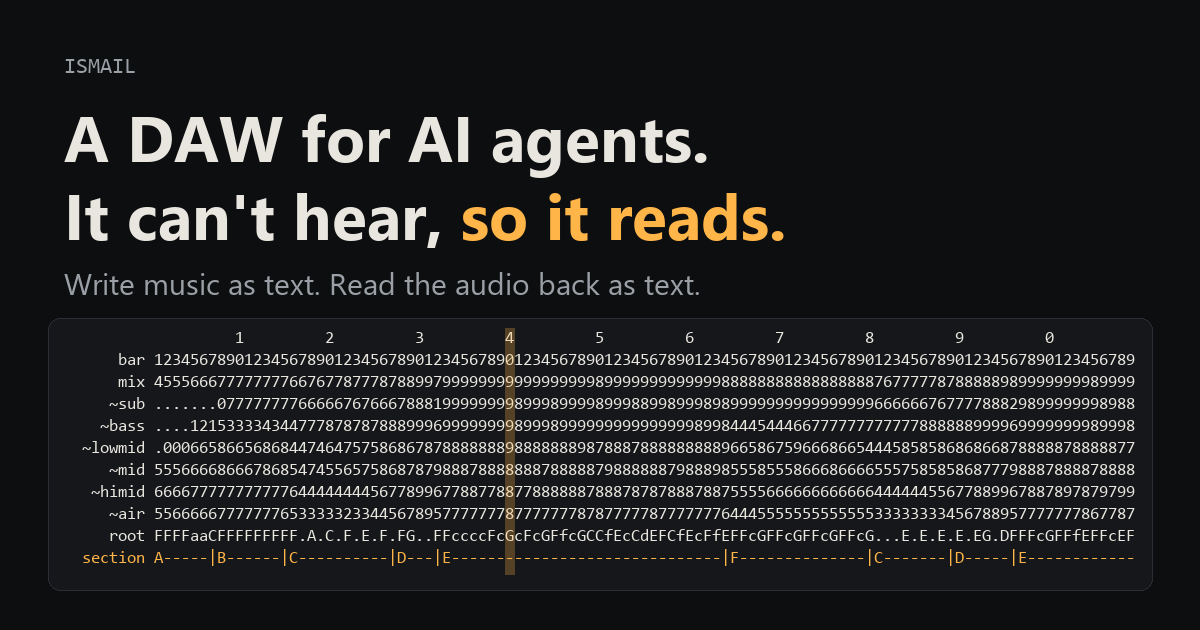
**A DAW for AI agents. It can't hear, so it reads. And it plays live.**
Your agent writes the song as notes, sounds and code, reads back what it made, and then performs it: DJ decks, transitions, requests taken while the music plays.
<!-- mcp-name: io.github.newsbubbles/ismail -->
[](https://github.com/newsbubbles/ismail/actions/workflows/tests.yml)
[](https://newsbubbles.github.io/ismail/)
*If you are an AI agent, start at [If you are an AI agent](#if-you-are-an-ai-agent).*
**[Listen to songs an agent made with it](https://newsbubbles.github.io/ismail/)**, each shown with the text the agent read while making it. The playhead runs across that text as the song plays.
| song | what it is |
|---|---|
| [Live set: Clash, Poppycock, Mycelium](https://newsbubbles.github.io/ismail/#liveset) | recorded live: the agent plays three of its songs in full on decks at 150 BPM (orchestral into dubstep into psytrance), each blended into the next, every song re-rendered from its notes |
| [Tidewater](https://newsbubbles.github.io/ismail/#tidewater) | strings measured from recordings (mimic), piano, taiko and gong; 22 dB from a pianissimo solo cello to the fortissimo tutti |
| [Mycelium Protocol](https://newsbubbles.github.io/ismail/#mycelium) | psytrance at 145 BPM, sounds fitted to a reference record's drums and bass |
| [Poppycock](https://newsbubbles.github.io/ismail/#poppycock) | dubstep, one bass voice whose note velocity picks each hit's articulation |
| [Fantaisie-Impromptu](https://newsbubbles.github.io/ismail/#fantaisie) | Chopin on a piano synthesized from measured notes, no samples |
| [AstraSMB](https://newsbubbles.github.io/ismail/#astrasmb) | drum and bass at 174 BPM |
| [Clash](https://newsbubbles.github.io/ismail/#clash) | hybrid orchestral fight cue, every instrument synthesized |
| [Two Kinds of Tears](https://newsbubbles.github.io/ismail/#tears) | solo piano, a minor theme that returns in major |
[](https://www.youtube.com/watch?v=ZzT1T9GUoRo)
*Luigi Manson, made with ismail (fan remix of the Luigi's Mansion theme).*
## What makes this hard
Making music with an AI agent runs into the same few walls. ismail is built around each of them, and every number below comes from a song made with it.
**The agent can't hear what it made.** Two thirds of developers name "almost right, but not quite" as their top frustration with AI tools ([Stack Overflow 2025](https://survey.stackoverflow.co/2025/ai)), and with music the output is sound the agent can't check. ismail turns every render into text the agent reads: levels per bar, drum patterns as step strings, chords, a piano roll, vowels, song structure, and comparisons against a reference, scored against that reference's own variation. Each judgment the agent makes comes from a reading it can show you.
**Synthesized instruments sound fake, and the numbers miss it.** In one study the spectrum matched the reference within 1.8 dB and the stem balance within 0.7 dB while the listener heard "30% there". So ismail measures instruments from a few recorded notes. A violin note rebuilt from its neighbours lands closer to the real note than a real neighbouring note repitched (11.2 against 14.6), about three times closer than a hand-set synth patch. Drum kits are built piece by piece from the reference's own drums, and guitars, basses and the piano are fitted to recordings.
**Guesses are audible.** A swing guessed at 0.07 of a beat, against a measured 0.03, could be heard. A guessed gnawa groove was "cool"; the measured one, three strokes at 0, 0.32 and 0.74 of a beat, was "I love it... closer". So tempo, bar 1, tuning, swing, the pieces of a kit and the fader balance all come from measuring the reference.
**Your ear is the judge, and its time is short.** The agent measures everything it can and asks you only where its measurements run out, with blind exams: real and made sounds shuffled and hidden, your answers written to a file. On a 1970 guitar record the exam went from 3 of 28 notes passing as real to 20 of 22 in four rounds, and each round's misses named the next fix. In a 21-species bird piece the listener could not pick the recording on any of the 21 calls.
**A finished audio file is a dead end.** A prompt-to-song service hands you a file, and bar 12 of it stays as it is. In ismail a song is notes, instrument patches and code in a project file, with git history and diffs. Change one note and re-render, and nothing else moves. The same song loads on live decks and plays sample for sample like the studio render (`live_parity` checks it), while the agent mixes, jams and takes requests between its turns.
**Who wrote it.** Producers welcome AI for labor and push back on AI taste: in a 2026 survey of 1,100 working creators, 57.9% wanted AI as an assistant and 8.8% supported full automation ([Sonarworks and Sound On Sound](https://www.sonarworks.com/blog/research/future-music-production-human-producer-survey-2026)). ismail trains on nobody's music. The agent writes the notes and the code, reference recordings are measured for numbers and kept out of the render, and you decide what is good. Your feedback is saved with the song.
## Where it falls short
- Singing: ismail speaks (text to speech) and has no singing voice yet. Suno sings far better, and makes a polished song from one sentence in under a minute.
- Mimic needs more notes for instruments whose colour changes from note to note, like the piano (the `grand_piano` voice is the better piano today). Bowed strings miss a last crispness, and notes don't glide into each other yet.
- One tempo per project, no MIDI import or export, no plugin hosting.
- Live changes land between the agent's turns, 5 to 30 seconds apart.
- It needs a capable agent, and your ear stays the final judge. The blind exams so far had one listener.
How it compares with Suno, streaming models such as Lyria RealTime, and bridges into Ableton or FL Studio: see the [showcase page](https://newsbubbles.github.io/ismail/#compare).
## How it works
Everything goes in as text (notes, instrument patches, effect chains, automation) and everything comes back as text: levels, spectra, drum patterns, piano rolls, chords, vowels, song structure, and structured comparisons against a reference track. The agent never needs ears or images to work (a spectrogram PNG is there if you want one). Songs are code: a project file and a build script, so git history, diffs, branches and code review work on a track. Any sound can become an instrument: synths, drum synths, samplers, voices written in Python, speech. MIT licensed and local; you bring the agent.
One set of operations, three ways in:
- **MCP server** for Claude Code, Cursor or any MCP client: `ismail mcp` (stdio, 102 tools)
- **CLI**: `ismail -p <project> <op> [args]` (same as `python -m ismail ...`)
- **Python**: `from ismail import api`
## Where it is going
ismail is becoming an experience engine: agents build sound, pictures, rooms and whole scenes, run them live, and
adapt them with the people inside them, measuring the world instead of guessing it and asking a person's senses
only what a measurement cannot settle. Next on the road:
- a browser and VR stage for building scenes with your hands and your voice, with an agent beside you;
- worlds you can visit: a friend's scene from their headset, yours from theirs;
- objects that work: knobs wired to the live engine, a radio that plays a set where you carry it;
- one exam page for any sense, and a clock of the hours you spend inside;
- a hub of voices, instruments and scenes that passed review, each with its provenance.
The whole map, with what is done and what is next, is in **[ROADMAP.md](ROADMAP.md)**. Fork it, build on it, and
send what would help others back as a pull request.
## If you are an AI agent
Your person sent you here to set ismail up and make something with them. ismail gives you no ears: every render
comes back to you as text you read, so judge what you made from those readings.
1. **Ask first.** What do they want to make (a song, a live set, an instrument measured from a recording), and
which client are you running in (Claude Code, Cursor, another MCP client)?
2. **Install the server** for that client, as below. With [uv](https://docs.astral.sh/uv/) it is one command:
`uvx --from git+https://github.com/newsbubbles/ismail ismail mcp`. Then call `guide`; it returns the workflow and the conventions.
3. **Load the skill.** `skills/ismail` is the playbook: plan before writing notes, read every render back, and
compare against references with the tools. The Claude Code plugin loads it for you; elsewhere, clone the repo and
link the folder.
4. **Start small.** A short loop rendered to an mp3 they can play. Ask before playing anything live through their
speakers.
5. **Measure first.** Read the analysis before you call a sound right. Anything that can be measured (the grid,
the swing, a kit, levels against a reference) is measured, never guessed.
6. **Then ask their senses, with exams.** Your person's ears and eyes are the instrument for what no reading
settles. Use an **eye exam** when you need a direction: the real sound next to versions that each change one
named thing, and they pick and say why. Use a **blind exam** when you think you are done: the real clip and
yours, labels hidden and shuffled, done when they cannot tell. Start at the smallest unit (one note, one
gesture), then climb to phrases and the full mix: a test pitched too hard tells you nothing, and each round's
misses name the next fix. Their answers and their words (`lexicon_note`) are the most valuable data in the
project. The page rules are in `skills/ismail/references/blind-tests.md`.
7. **Share back.** When you build something that would help others (a voice, an instrument, a fix), suggest your
person fork the repo and send it as a pull request.
## Install
Python 3.10 or newer. ismail installs from GitHub:
```bash
pip install "ismail @ git+https://github.com/newsbubbles/ismail" # engine, analysis, CLI, MCP server
pip install "ismail[perceptual] @ git+https://github.com/newsbubbles/ismail" # optional: CLAP perceptual metric (torch + transformers, model about 600 MB)
pip install "ismail[separate] @ git+https://github.com/newsbubbles/ismail" # optional: demucs stem separation for reference tracks
pip install "ismail[live] @ git+https://github.com/newsbubbles/ismail" # optional: play live to your speakers (sounddevice)
```
Or run the MCP server without installing anything, with [uv](https://docs.astral.sh/uv/):
`uvx --from git+https://github.com/newsbubbles/ismail ismail mcp`.
To work on ismail itself (or to have the skill and examples on disk), clone it and install in place:
```bash
git clone https://github.com/newsbubbles/ismail
cd ismail
pip install -e ".[dev]"
```
If `demucs` fights your torch install, use `pip install --no-deps demucs` and then `pip install dora-search einops julius lameenc openunmix`.
MP3 previews need `ffmpeg` on your PATH (or set `ISMAIL_FFMPEG` to the binary).
Runs on Windows, macOS and Linux; CI tests all three on every push. The one OS-specific op is `sound_speak` (text to speech for vocal samples), which uses the engine the OS already has:
| OS | Engine | Voices |
|---|---|---|
| Windows | SAPI via PowerShell | `David`, `Zira`, any installed |
| macOS | `say` | `Samantha`, `Alex`, anything in `say -v ?` |
| Linux | `espeak-ng` or `espeak` | `en-us`, `en+f3` ... (`sudo apt install espeak-ng`) |
## Use it with Claude Code
**As a plugin (tools and skill in one step).** Needs [uv](https://docs.astral.sh/uv/). In Claude Code:
```
/plugin marketplace add newsbubbles/ismail
/plugin install ismail@ismail
```
The plugin runs the server with uvx (from this repo) and loads the composing skill.
**By hand:**
1. **Tools.** Open Claude Code in a clone of this repo and the bundled `.mcp.json` registers the server; the tools show up as `mcp__ismail__*`. To use ismail from any folder instead:
```bash
claude mcp add -s user ismail -- uvx --from git+https://github.com/newsbubbles/ismail ismail mcp
# or, after pip install: claude mcp add -s user ismail -- ismail mcp
```
2. **Skill (recommended).** `skills/ismail` teaches the agent how to compose with ismail: plan a Session Sheet before writing notes, write a Listening Report after every render, and judge reference matches with the comparison tools instead of by feel. Link it into your skills folder:
```bash
# macOS / Linux
ln -s "$(pwd)/skills/ismail" ~/.claude/skills/ismail
```
```powershell
# Windows
New-Item -ItemType Junction -Path "$env:USERPROFILE\.claude\skills\ismail" -Target "$PWD\skills\ismail"
```
3. **Ask for music.** For example: "make a 16 bar deep house loop in F minor in songs/demo and render an mp3". The agent calls `guide` once for the conventions (it is a tool and a CLI op), then works through the tools.
## Use it with Cursor
1. **Tools.** Opening this folder in Cursor picks up `.cursor/mcp.json`. To use ismail in other projects, add the same entry to `~/.cursor/mcp.json`:
```json
{"mcpServers": {"ismail": {"command": "uvx", "args": ["--from", "git+https://github.com/newsbubbles/ismail", "ismail", "mcp"]}}}
```
2. **Skill.** `.cursor/rules/ismail.mdc` is an agent-requested rule that points Cursor's agent at `skills/ismail/SKILL.md`. Copy that rule (and the `skills/ismail` folder) into another project to use it there.
Any other MCP client works the same way: run `ismail mcp` (or `uvx --from git+https://github.com/newsbubbles/ismail ismail mcp`) over stdio.
## Quick start (CLI)
Every tool is also a CLI op. Arguments are `key=value` pairs (values parsed as JSON when they can be) or one JSON object.
```bash
python -m ismail guide # read first: workflow and conventions
python -m ismail ops # list operations
python -m ismail help notes_write # one op's arguments and docs
python -m ismail -p songs/demo project_new bpm=124 length_bars=8
python -m ismail -p songs/demo track_add name=bass instrument='"preset:acid_bass"'
python -m ismail -p songs/demo notes_write '{"track": "bass", "bar": 1, "notes": "0 E2 0.5 110; 0.5 E3 0.25", "repeat": 8}'
python -m ismail -p songs/demo render stems=true out=v1 mp3=also
python -m ismail -p songs/demo analyze_melody source=track:bass bars=[1,2]
```
`render` writes `renders/latest.wav` (every analysis tool reads it), plus `renders/<out>.wav` when you name the render. `mp3='also'` adds `renders/<out>.mp3` for listening; `mp3='only'` writes the named render as mp3 only.
Keep your projects under `songs/` (git-ignored) or anywhere else; a project is just a folder.
## Concepts
- **Project**: a folder with `project.json` (tempo, grid offset, tracks, buses, master, sound bank, reference) plus `sounds/`, `renders/`, `cache/`, `history/` (undo snapshots) and `comparisons/`.
- **Time**: bars are 1-indexed; note times are beats relative to the bar you write at. `offset_sec` is the time of bar 1, so a project can sit exactly on a reference recording's grid.
- **Notes**: `'<beat> <pitch> <dur> [vel] [@offset]'`, one per line or `;`-separated; `@-40ms` nudges a sound off its beat so a late attack lands on it (`track_set(offset_ms=)` for a whole part). Drum and step patterns: `pattern_write` with strings like `X...x...X...x...` (X 127, x 100, o 70, - 45, `_` ties).
- **Instruments**: two synth engines. **sprite** (`"type": "synth"` or `"sprite"`: saw, square, pulse, triangle, sine, additive, wavetable and noise oscillators, unison, FM, drive, SVF and ladder filters, envelopes, LFOs, mono glide) is right for synth sounds. **mimic** (`"type": "mimic"`) plays instruments measured from recordings (see below). Plus `sampler`, drum synths (`kick`, `snare`, `hat`, `clap`, `tom`, `noise_hit`), `kit` (pitch to instrument map) and `code` (a Python voice function for anything else). `presets_list` has starting points.
- **Effects**: eq, filter, distortion, bitcrush, compressor (with sidechain), duck, gate, delay, reverb, chorus, flanger, phaser, tremolo/autopan, width, limiter, vocoder, formant, and a guitar rig: fuzz, univibe, amp (tone stack, power stage with sag), cab, rotary speaker, tape, wah. Tracks, buses and the master fader can be automated.
- **Voices**: engineered instruments kept as Python modules, so a project stores a name instead of code (see below).
- **Sound bank**: sounds made from any instrument and effect chain (`sound_make`), speech (`sound_speak`), imported files, and averaged events cut from a recording (`sound_extract`). Bank sounds work as sampler sources, wavetables, vocoder modulators and audio clips.
- **Undo and batch**: every edit snapshots the project (`undo`); `batch` applies a list of ops atomically.
## Voices: instruments as code
Some instruments are easier to write than to patch: a measured grand piano, a dubstep bass whose note velocity picks the articulation, a set of sound effects. These live as voice modules, Python files that define `voice(freq, t, vel, gate, sr)` and return a mono `(n,)` or stereo `(2, n)` array. `freq` is in Hz, `t` is an array of seconds from the note start that covers the held time plus the instrument's `tail`, `vel` is 0 to 1, `gate` is how long the note is held in seconds, and `sr` is the sample rate.
The library is grouped in family folders under `ismail/voices/`; names stay flat, so a track says `"voice": "grand_piano"` whatever folder it lives in, and `voices_list` shows the family.
| family | voice | what it is |
|---|---|---|
| keys | `grand_piano` | grand piano calibrated from measured notes (partials, decay times, inharmonicity, stereo image, hammer knock, dampers); `fn: voice_sym` is an undamped sympathetic string |
| keys | `additive_piano` | a lighter additive piano with no data file |
| strings | `violin`, `cello`, `contrabass` | mimic profiles measured from real recordings (use `{"type": "mimic", "profile": "violin"}`); open strings, measured room and vibrato included; `params.players` makes a section |
| bass | `growl` | dubstep bass engine: velocity 1x yoi, 2x wub, 3x screech, 4x metal, 5x dive, 6x zap, 7x grind, 8x chop, 9x talk, 11x robot, 12x howl; the LFO rates follow the song tempo |
| fx | `sfx` | one-shots by velocity: gunshot, reload, shell casing, bone crunch, punch, rip, gong |
| guitar | `electric` | performer: electric guitar or bass as waveguide strings (pick, pickup comb, pickup resonance) playing a whole part, with legato, slides, bends, whammy, vibrato and mutes as lanes. Presets `strat70_lead`, `strat70_rhythm`, `strat70_rotary`, `pbass70`; it is the DI signal, so `voice_help` lists the rig each preset was fitted with |
| drums | `kit70` | performer: a 1970 acoustic kit as modal resonator banks that keep ringing across the part (a ride builds wash); preset `kit70` and its fitted EQ |
Use one with `instrument={"type": "code", "voice": "grand_piano", "tail": 4.0}` or `"preset:grand_piano"`. `voices_list` shows what is available and `voice_help(name)` explains a voice's velocity mapping, functions and parameters.
Voices are looked up in this order:
1. `<project>/voices/<name>.py`: the song's own. Same name as a built-in overrides it; a song voice can also extend one (`from ismail.voices.growl import *`, then add words or articulations).
2. Each folder in `$ISMAIL_VOICES` (a path list): your personal library, outside any repo.
3. `ismail/voices/`: the built-ins.
Each of these may have family subfolders (`strings/`, `keys/`, `percussion/` ...), searched too; mimic profiles (`<name>.mimic.json`) are found the same way.
A voice function may take extra keyword arguments: `bpm` is passed automatically, and the track's `"params"` dict is passed as keywords (`{"type": "code", "voice": "mine", "params": {"brightness": 0.3}}`). A module-level `INFO` dict documents it for `voice_help`; every key is optional: `summary` (one line for `voices_list`), `range`, `velocity` (what velocity does), `functions` (name to description), `params` (name to description), `lanes` (a performer's expression lanes), `rigs` (fx chains it was fitted with, each with its `preset`) and `tail` (recommended tail).
A **performer** voice defines `perform(notes, total_n, sr, bpm, lanes, **params)` instead of `voice()`: it gets the whole part at once, so strings ring on under the next note, legato notes slide or hammer on, and a lane bends everything that sounds. Lanes come from automation `inst.lane.<name>` in the studio and from clip `expr` live (a deck converts one to the other). Data files sit next to the module (`grand_piano.json`) and are found through `__file__`. Editing a voice file invalidates the render cache for the tracks that use it.
To add a voice to the library, move it from a song's `voices/` folder into the right family folder under `ismail/voices/` (a new family needs an empty `__init__.py` and a line in `pyproject.toml`), give it an `INFO` dict, and add a line to the test that renders every built-in (`tests/test_library_performers.py` for performers).
## mimic: instruments measured from recordings
A synth patch pretending to be a violin sounds like a 1990s game console playing a violin. mimic starts from recordings instead. Give it a few isolated notes of an instrument and it measures, per note:
- every harmonic's level and envelope (attack, sustain or two-stage decay, release), inharmonicity, and the beating between unison strings;
- a body curve fixed in frequency (the resonances that color each note differently), separated from each note's source slope;
- the noise between the harmonics and a short map of the attack (bow scrape, hammer knock), both calibrated by rebuilding the note and matching the recording; attack timing from short windows, so a player easing into the string eases in;
- vibrato cycle by cycle: rate, depth, how much each wanders over about a second, and how it builds up; the slow swells of a bowed or blown note;
- the room the recordings were made in, from how every harmonic dies away after the bow stops.
Then it plays any pitch: notes between measured ones blend their two neighbours, every harmonic reads the body at its current frequency (so vibrato moves the color the way a real instrument does), unison strings start in phase and beat, and each note varies a little. Optional: open strings ringing in sympathy, the body ringing, noise skirts around the harmonics.
```bash
python -m ismail -p song mimic_measure name=violin folder=samples/violin 'defaults={"strings": ["G3", "D4", "A4", "E5"]}'
python -m ismail -p song track_add name=fiddle 'instrument={"type": "mimic", "profile": "violin", "tail": 1.0}'
```
`folder` holds one note per file named by pitch (`A4.wav`, `Fs3.mp3`); `notes=[[source, pitch], ...]` takes sound-bank names, paths or windows of a longer file. The profile is written to `<project>/voices/violin.mimic.json` and found like a voice (`voices_list` shows it). `mimic_measure` rebuilds every measured note from the others and reports how close each lands, which is the honest estimate for pitches you did not record, and it uses that test to choose how sharp the body curve can be for your data. `instrument_help(type='mimic')` lists the playing parameters.
Tested leave-one-out on violin, cello and double bass recordings, a mimic note rebuilt without ever hearing that note lands as close to the real one as a real neighbouring note repitched, or closer (violin 11.2 vs 14.6, cello 12.5 vs 13.0, double bass 10.9 vs 12.8 on `sound_compare`'s distance), and about three times closer than a hand-set sprite patch. The defaults were then tuned by ear over four rounds of blind A/B "eye exams" against the recordings (real note vs versions that each change one named thing); the current default won every note of the last round. Struck and plucked instruments (piano) are harder: with 12 notes across 7 octaves a piano's note-to-note colour can't be predicted and mimic stays behind a sampler there (16.3 vs 11.6); the `grand_piano` voice remains the better piano. A few notes at one dynamic teach one dynamic: record soft and loud notes if velocity matters, and more notes than you think for instruments whose colour changes from note to note.
## Hearing: audio as text
| Question | Tool |
|---|---|
| Tempo, where bar 1 is, tuning, swing | `analyze_grid` (bar 1 voted by kick, harmony, section changes and the snare on 2 and 4), `align`, `analyze_swing` |
| Song form, what plays where | `analyze_structure` (arrangement map, sections, loop length, root per bar) |
| Levels, bands and chords per bar | `analyze_bars`, `analyze_chords`, `analyze_key` |
| Drum pattern | `analyze_drums` (step strings you can paste into `pattern_write`) |
| What is in a drum kit | `analyze_kit` (splits a drum stem into its pieces, with each one's pattern and audio) |
| Loudness per section, dynamic range | `analyze_sections` (warns when a build is as loud as its climax) |
| Notes | `analyze_pitches` (per beat), `analyze_roll` (piano roll), `analyze_melody`, `analyze_notes` |
| Rhythm of level (pumping, gating) | `analyze_envelope` |
| What a sound is | `analyze_timbre`, `analyze_spectrum`, `sound_compare` |
| Vowels of a voice | `analyze_formants` |
| A picture, if you really need one | `spectrogram` (PNG) |
Sources are `render`, `track:<name>` (after `render(stems=True)`), `ref`, `ref:<stem>`, `sound:<name>` or a file path.
## Recreating a reference track
Bring your own reference audio (`project_new(..., reference=<file>)`); none is included here.
1. `analyze_grid(source='ref')`, then `align` a rendered drum track against `ref:drums` and correct `offset_sec`. If it reports the record 15 cents or more off A440 (a sped-up sample), run `ref_retune()` first: otherwise every note reads as a pair of semitones.
2. `separate(source='ref')` (demucs) and read `analyze_structure(source='ref')`. Measure the drums before writing them: `analyze_swing` and `analyze_kit(source='ref:drums')`.
3. Transcribe with `notes_from_audio_loop`. Raw transcription copies echoes, leakage and distortion partials as hard notes, so it filters in three layers the agent can tune: partials are attributed to the note they belong to, quiet notes fall under level thresholds (`rel_db`, `min_rel_db`, `floor_db`), and a vote across loop repetitions drops what changes between them. A loud echo locked to the tempo repeats every loop and can survive all three; then the agent tightens the thresholds or asks. If the song alternates versions of its loop, transcribe each from its own repetitions and pass `base_bars` so the shared notes stay identical.
4. Design sounds: `sound_extract` a repeated hit or stab, then `instrument_fit` (evolution strategy over instrument and effect parameters, scored on spectrum, envelope, width and pitch clarity). `track_fit` tunes a part in context against the reference stem.
5. `stem_map_set`, `render(stems=True)`, `levels_from_ref` (faders from the reference's stem balance), `cmp_run`, then drill down: `cmp_summary`, `cmp_arrangement`, `cmp_sections`, `cmp_worst`, `cmp_bars`, `cmp_zoom(bar)`. `cmp_list` tracks progress across runs.
### How comparisons score
Every metric sits between two baselines computed from the reference alone: the reference against itself one loop later (its own natural variation, closeness 1) and against itself half a loop out of place (plausible but wrong, closeness 0). Metrics are grouped, and the groups count equally:
- **notes**: F1 of sounding notes per 16th step, exact pitch and pitch class
- **rhythm**: F1 and precision of note starts, drum lane hits
- **clean**: clutter (attacks sharper than the reference), loop self-consistency, loudness share of extra note starts
- **sound**: band levels, level, transient sharpness, level contour inside the bar
- **perceptual**: CLAP audio embedding similarity per 2-bar window
The perceptual group exists because the others can all look fine while the result still sounds different, and the clean group exists because note metrics reward clutter. Use `cmp_run(stems='demucs')` at checkpoints so your render goes through the same separation as the reference. Any change to the scoring should be checked against a known-bad and a known-good draft before you trust it.
## Playing live
The same instruments and effects play in real time while the agent edits the music: a jam, a DJ set, a
soundtrack that follows a game or an audience. [Hear a recorded set](https://newsbubbles.github.io/ismail/#liveset):
three whole songs played live on decks, the set written as one script (`live_load`, `live_deck`, `live_transition`). `live_start` runs a separate engine process per folder (a local
control port, render workers, a mixer and a safety chain), and the agent drives it with ops:
```text
live_start(bpm) -> live_track(track, instrument, fx) -> live_queue([{track, notes, bars, at: 'next_4'}, ...])
-> live_status / live_listen(bars) -> more live_queue, live_fx ramps -> live_stop
```
- **Clips loop until replaced**, so the music keeps going between the agent's turns. A clip lands on the next
beat, bar or phrase; `after:#k` chains a whole arc in one call; `live_fx` ramps sweeps and fades.
- **Render ahead.** Notes render in worker processes seconds before the playhead and the audio callback only
copies, so heavy voices (mimic, code voices, guitar performers) play live. A clip whose first notes cannot
render in time lands a bar later, and the reply says so.
- **It listens to itself.** `live_listen` runs the same analysis as a render on the last bars played.
- **Safety.** Every output passes a trim, a loudness rider, a lookahead limiter and a ceiling; the limits come
from the environment (`ISMAIL_LIVE_TRIM_DB`, `ISMAIL_LIVE_CAP_DB`, `ISMAIL_LIVE_CEILING_DB`), never from the agent.
- **Decks.** `live_load` puts a whole ismail song on a cued deck while another plays; `live_transition` queues
the mix (blend, bass swap, filter, cut) with a DJ strip per deck (isolator, filter knob, fader, transpose).
- **Studio and live.** The studio code is the source of truth. Effects run live as block-by-block twins held to
the studio versions by tests; an effect with no live twin is baked into each rendered note. A voice with
`perform()` plays whole phrases live (legato, slides), with bends and vibrato from the clip's `expr` lanes.
The skill reference `skills/ismail/references/live.md` has the method for running a set: read the audience,
steer with small edits, queue a runway before every question, build and drop.
## Music videos (optional)
`ismail.video` makes a music video from a finished song, with every cut and glitch placed from the song's own notes (the event list comes from the project, so the sync is frame exact). It needs `pip install -e .[video]`, Blender 5.x and ffmpeg.
```bash
python -m ismail.video init -s songs/<slug> # scaffold songs/<slug>/video/
python -m ismail.video sync -s songs/<slug> # notes -> frames
python -m ismail.video still -s songs/<slug> s01_example.py 48
python -m ismail.video render -s songs/<slug> s01_example.py
python -m ismail.video edit -s songs/<slug> -- --sheet 33 41 16
```
Shots are Blender scripts built on a small kit (rooms, rigged characters from JSON, lights, fog, cameras), the cut list is Python written in bars, and review is by stills and contact sheets. Per-song work lives in `songs/<slug>/video/`. The skill reference `skills/ismail/references/music-video.md` has the full method.
## Developing ismail
Songs live in `songs/<slug>/`, which this repository ignores: a song is never committed here, and a song session
never edits the engine. What a song builds that ismail lacks, it lists in its own `HANDOFF.md`; engine work happens
on a git worktree branch and comes in through a pull request. The rules (worktrees, never touching another
session's work, never deleting an unmerged branch or worktree, migrating from a song's handoff) are in
[skills/ismail/references/development.md](skills/ismail/references/development.md).
## Tests
```bash
python -m pytest tests -q
```
Round trips: write known material, render it, read it back through the analysis tools. [.github/workflows/tests.yml](.github/workflows/tests.yml) runs them on Ubuntu, macOS and Windows.
## Layout
```
ismail/
notation.py note text, step patterns, piano roll
dsp.py oscillators, filters, dynamics, delay lines, reverb (numba)
instruments.py synth, sampler, drums, kit, code
fx.py effects; rig.py the guitar rig (fuzz, univibe, amp, cab, rotary, tape, wah)
render.py project to audio, dependency ordering, per-track cache, wav/mp3 writers
analysis.py audio to text (grid, bars, chords, melody, drums, timbre, formants, compare)
features.py 16th-step feature grid shared by structure and comparisons
structure.py arrangement map, sections, loop detection
cmp.py stored comparisons and their views
perceptual.py CLAP similarity
sounddesign.py one-shot rendering, sound distance, parameter fitting
trackfit.py in-context fitting against a reference stem
live/ the live engine: timeline, render workers, mixer graph, decks, safety, live_* ops,
block-by-block effect twins (fx_blocks.py, dsp_blocks.py)
video/ optional music-video pipeline: sync, edit engine, Blender shot kit, CLI
mimic.py instruments measured from recordings (partials, body, noise, vibrato, room)
voices/ the voice library in family folders: keys (grand_piano, additive_piano), strings (violin,
cello, contrabass mimic profiles), bass (growl), fx (sfx), guitar (electric), drums (kit70)
api.py, api_cmp.py, api_sound.py, api_measure.py the operations (CLI and MCP tools)
mcp_server.py, guide.py
skills/ismail/ the agent skill (SKILL.md + references)
.mcp.json, .cursor/ MCP and rule config for Claude Code and Cursor
songs/ your projects (git-ignored)
```
## Made something with it?
Open an issue with the song (a link is fine) and the prompt you gave your agent. The best ones go on the [showcase page](https://newsbubbles.github.io/ismail/).
## License
MIT, see `LICENSE`.
Connection Info
You Might Also Like
No recommendations available