

Content
<div align="center">
<img src="https://raw.githubusercontent.com/kanaworksai-hue/sonicproof/main/docs/assets/banner-en.jpg" alt="Sonicproof: check, rank and QC AI-generated sound" width="820">
<p>
<a href="https://github.com/kanaworksai-hue/sonicproof/blob/main/LICENSE"><img alt="License: MIT" src="https://img.shields.io/badge/license-MIT-6b4dff?style=flat-square"></a>
<a href="https://pypi.org/project/sonicproof/"><img alt="PyPI" src="https://img.shields.io/pypi/v/sonicproof?style=flat-square&logo=pypi&logoColor=white&color=3775a9"></a>
<img alt="Python 3.11 to 3.13" src="https://img.shields.io/badge/python-3.11–3.13-3776ab?style=flat-square&logo=python&logoColor=white">
<img alt="macOS, Linux, Windows" src="https://img.shields.io/badge/platform-macOS_·_Linux_·_Windows-111?style=flat-square">
<a href="#use-it-from-your-ai-agent"><img alt="MCP server" src="https://img.shields.io/badge/MCP-server-19b8d6?style=flat-square"></a>
<a href="https://huggingface.co/google/embeddinggemma-2"><img alt="Model: EmbeddingGemma 2" src="https://img.shields.io/badge/model-EmbeddingGemma_2-ff9d00?style=flat-square&logo=huggingface&logoColor=white"></a>
<a href="https://github.com/kanaworksai-hue/sonicproof/actions/workflows/ci.yml"><img alt="CI" src="https://img.shields.io/github/actions/workflow/status/kanaworksai-hue/sonicproof/ci.yml?branch=main&style=flat-square&label=CI"></a>
<a href="https://github.com/kanaworksai-hue/sonicproof/stargazers"><img alt="GitHub stars" src="https://img.shields.io/github/stars/kanaworksai-hue/sonicproof?style=flat-square&logo=github&label=stars&color=f5c518"></a>
</p>
<p><a href="https://github.com/kanaworksai-hue"><img src="https://raw.githubusercontent.com/kanaworksai-hue/sonicproof/main/docs/brand/kanaworks-mark.png" height="22" alt="" align="absmiddle"></a> <a href="https://github.com/kanaworksai-hue"><b>A KanaWorks_AI project</b></a></p>
<p><b>English</b> · <a href="https://github.com/kanaworksai-hue/sonicproof/blob/main/README.zh-CN.md">简体中文</a> · <a href="https://github.com/kanaworksai-hue/sonicproof/blob/main/README.ja.md">日本語</a></p>
[Install](#install) · [Use](#use) · [Workbench](#workbench) · [AI agents](#use-it-from-your-ai-agent) · [Reading a score](#how-to-read-a-score) · [⭐ Star](#like-it-star-it)
</div>
**Does your AI-generated sound match what you asked for?**
Sonicproof is a local QA tool for generative audio — sound effects, music and ambience from Stable Audio and
friends. It listens with one multilingual model, Google's
[EmbeddingGemma 2](https://huggingface.co/google/embeddinggemma-2), which puts text, sound, images and video in
one shared space:
- **check** — does this clip sound like the prompt? Prompts can be in any language.
- **rank** — you generated four seeds; which one should you keep?
- **qc** — is it technically clean? Loudness, true peak, clipping, DC, silence, cut-off tails, clicks, phase,
loop seams — with a one-line fix for every problem.
- **fit** — does this sound suit the picture? A frame, a piece of concept art, a video clip, or a video's own
soundtrack.
- **search** — find sounds in your own library by words (any language), by example, or by picture.
- **dedupe** — find the re-encoded, re-leveled and trimmed copies cluttering your library, and which one to keep.
Everything runs on your machine — no uploads, no API keys — and you can use it from a local
[workbench](#workbench) in your browser, from [your AI agent](#use-it-from-your-ai-agent) (MCP server + agent
skill), or from the command line and [Python](#python).
```text
$ sp check dog_bark.wav "a dog barking"
╭─ dog_bark.wav ───────────────────────────────────────────────────────╮
│ │
│ STRONG +3.79σ ━━━━━━━━━━━━━━━━━━━━━━━━━━━━ │
│ clearly sounds like the prompt │
│ │
│ prompt “a dog barking” │
│ ranking #1 of 438 descriptions for this clip │
│ evidence cos 0.765 · clip-side +4.22σ · prompt-side +3.36σ │
│ │
│ Heard as │
│ +3.79σ a dog barking ✓ animals │
│ +3.37σ a small dog yapping animals │
│ +3.10σ a dog whining ✓ animals │
│ +3.03σ a dog growling ✓ animals │
│ +2.26σ a duck quacking animals │
│ │
╰──────────────────────────────────────────────────────────────────────╯
```
## Install
```bash
uv tool install "sonicproof[model]" # or: pip install "sonicproof[model]"
sonicproof doctor --load # downloads the model once and checks the setup
```
- **Python 3.11 or newer** (tested on 3.11–3.13). Apple Silicon (MPS), CUDA and CPU all work. `sp` is a short alias for `sonicproof`.
- **The model** — [EmbeddingGemma 2](https://huggingface.co/google/embeddinggemma-2), about 1.5 GB — is
downloaded from Hugging Face into its usual cache on first use. No Hugging Face account or token is needed.
- **ffmpeg** is only needed for M4A / AAC / MP4 and other formats libsndfile can't read, and for video in
`fit` / `search`. WAV, FLAC, OGG and MP3 work without it.
- **Windows + NVIDIA GPU:** the PyPI build of PyTorch for Windows is CPU-only (`uv tool install` and `uvx`
get that build too). Everything works on the CPU, only slower. To use the GPU, make an environment with the
CUDA build of **both `torch` and `torchvision`** first — installing only `torch` lets `sonicproof[model]` pull a
newer `torchvision` that silently swaps it back to the CPU build. In PowerShell:
```powershell
uv venv $HOME\sonicproof-env --python 3.12
# cu128 or whichever CUDA version pytorch.org lists for your GPU
uv pip install --python $HOME\sonicproof-env torch torchvision --index-url https://download.pytorch.org/whl/cu128
uv pip install --python $HOME\sonicproof-env "sonicproof[model]"
& $HOME\sonicproof-env\Scripts\sonicproof.exe doctor --load # the PyTorch row should say "device cuda"
```
With plain `pip` in a venv it is the same two installs, in the same order. Use
`$HOME\sonicproof-env\Scripts\sonicproof.exe` (or add that folder to `PATH`) wherever this README says
`sonicproof`, including the MCP server command below.
- **Technical checks only?** `qc` needs no model: `pip install sonicproof` (without `[model]`) is enough.
- **Latest `main`:** `git clone https://github.com/kanaworksai-hue/sonicproof`, run `uv sync --extra model`
inside it, and run commands with `uv run sp …` (or `uv run --project /path/to/sonicproof sp …` from any other
folder).
## Use
```bash
# Prompt adherence. Omit the prompt to read it from a Stable Audio .json sidecar.
sp check explosion.wav "a huge explosion with debris"
sp check thunder.wav
# Pick the best take
sp rank "a wooden door creaking open" door_v1.wav door_v2.wav door_v3.wav door_v4.wav
# Technical checks (no model needed). Exit code 1 if anything fails — handy in scripts.
sp qc *.wav
sp qc ambience_loop.wav --loop --target-lufs -16
# Everything in one scorecard: SHIP / REVIEW / REDO. --strict exits 1 unless it is SHIP.
sp report footsteps.wav "footsteps on gravel"
sp report footsteps.wav "footsteps on gravel" --strict
# Does the sound suit the picture? Words about the scene are optional.
sp fit sizzle.wav --image kitchen.png
sp fit rumble.wav --video storm.mp4 "a stormy night with thunder"
sp fit trailer.mp4 # a video's own soundtrack against its own picture
```
### Your sound library
```bash
sp index ~/SFX # once; re-runs only read new or changed files
sp search "rain on a tin roof" --in ~/SFX
sp search --like take_03.wav --in ~/SFX # sounds like this one
sp search --image frame.png --in ~/SFX # sounds that suit this picture
sp dedupe ~/SFX # duplicates and near-duplicates (nothing is deleted)
```
The library folder is always given explicitly: `index DIR`, `search … --in DIR`, `dedupe DIR` (your home
folder, a drive root and system folders are refused — point at the folder that holds your sounds).
The index lives in `~/SFX/.sonicproof/`; `--in-cache` keeps it in Sonicproof's cache instead, so nothing is
written into the folder (read-only folders use the cache automatically). `search` and `dedupe` bring the index
up to date on the fly, so `sp index` is optional.
### Scripting: `--json` and exit codes
The analysis commands — `check`, `rank`, `qc`, `report`, `fit`, `index`, `search`, `dedupe` — take `--json`
(`doctor`, `serve`, `mcp` and `skill` don't). `qc --json` always prints an array, one record per file, even for
a single file. In `qc` and `rank`, a file that can't be read is marked `"error"` and the rest are still
processed; the exit code is then 2.
| Exit code | Meaning |
|---|---|
| `0` | Done. `check` / `rank` / `fit` exit 0 whatever the verdict — read the verdict. |
| `1` | `qc` found a failure, `report --strict` did not say SHIP, or a `doctor` check failed. |
| `2` | A problem with the input: missing or unreadable file, empty audio, bad option value. |
| `3` | A problem with the setup: model extra not installed, model not downloaded and offline, ffmpeg needed, port busy. |
With `--json`, errors are JSON too — `{"error": {"code": "not_found", "message": "…", "file": "…"}}` on stdout
— so a script doesn't have to parse a traceback. Command-line usage mistakes (a missing argument, an option
value out of range) are the exception: they print the usual usage message and exit 2. Set
`SONICPROOF_DEBUG=1` to see the full traceback.
## Workbench
```bash
sonicproof serve # opens http://localhost:7788
sonicproof serve --port 8800 --no-open # another port, no browser tab
```
The address is printed in the terminal (`http://localhost:<port>`, 7788 unless you pass `--port`); open it
yourself if you used `--no-open` or no tab appeared. `Ctrl+C` stops the server.
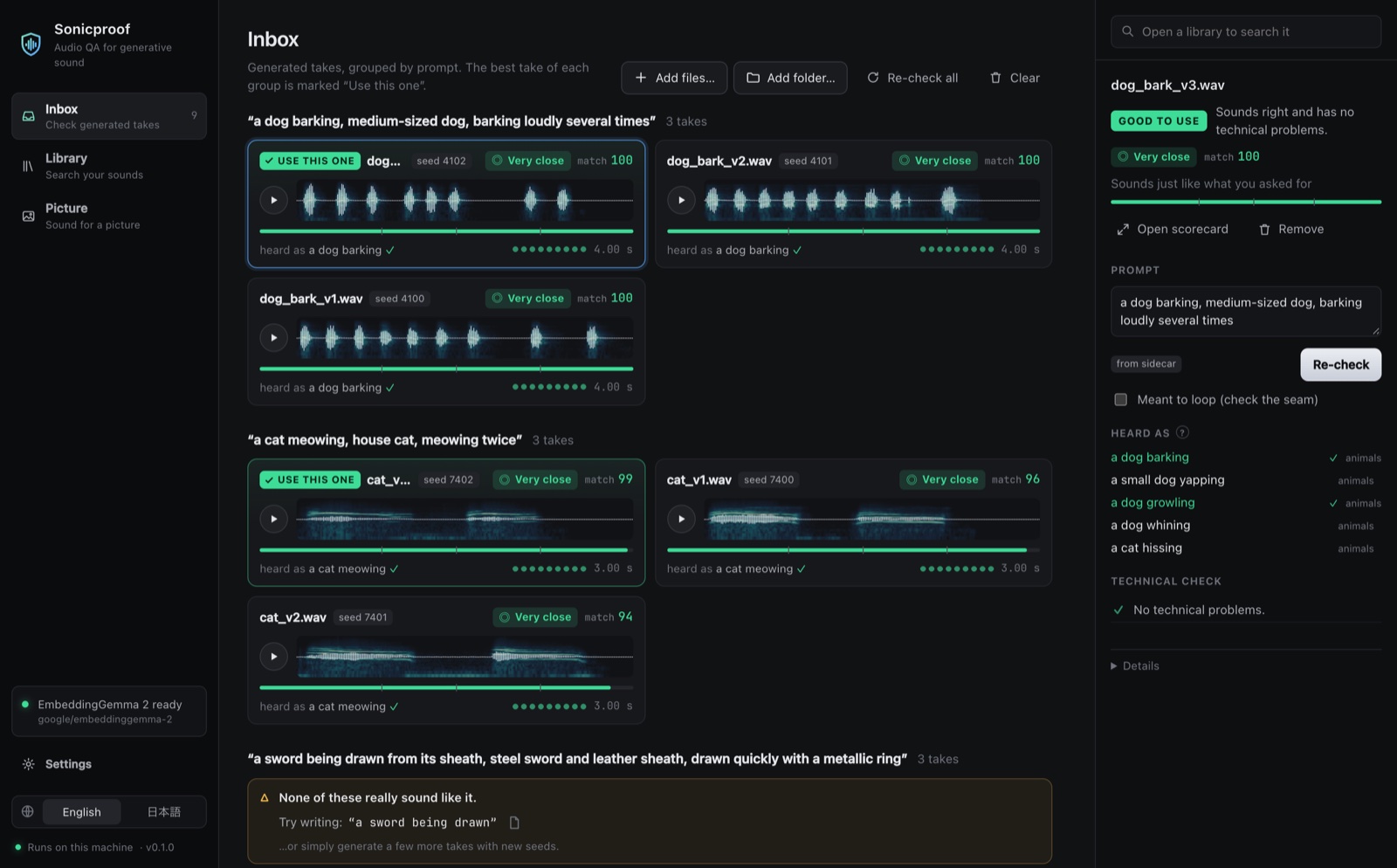
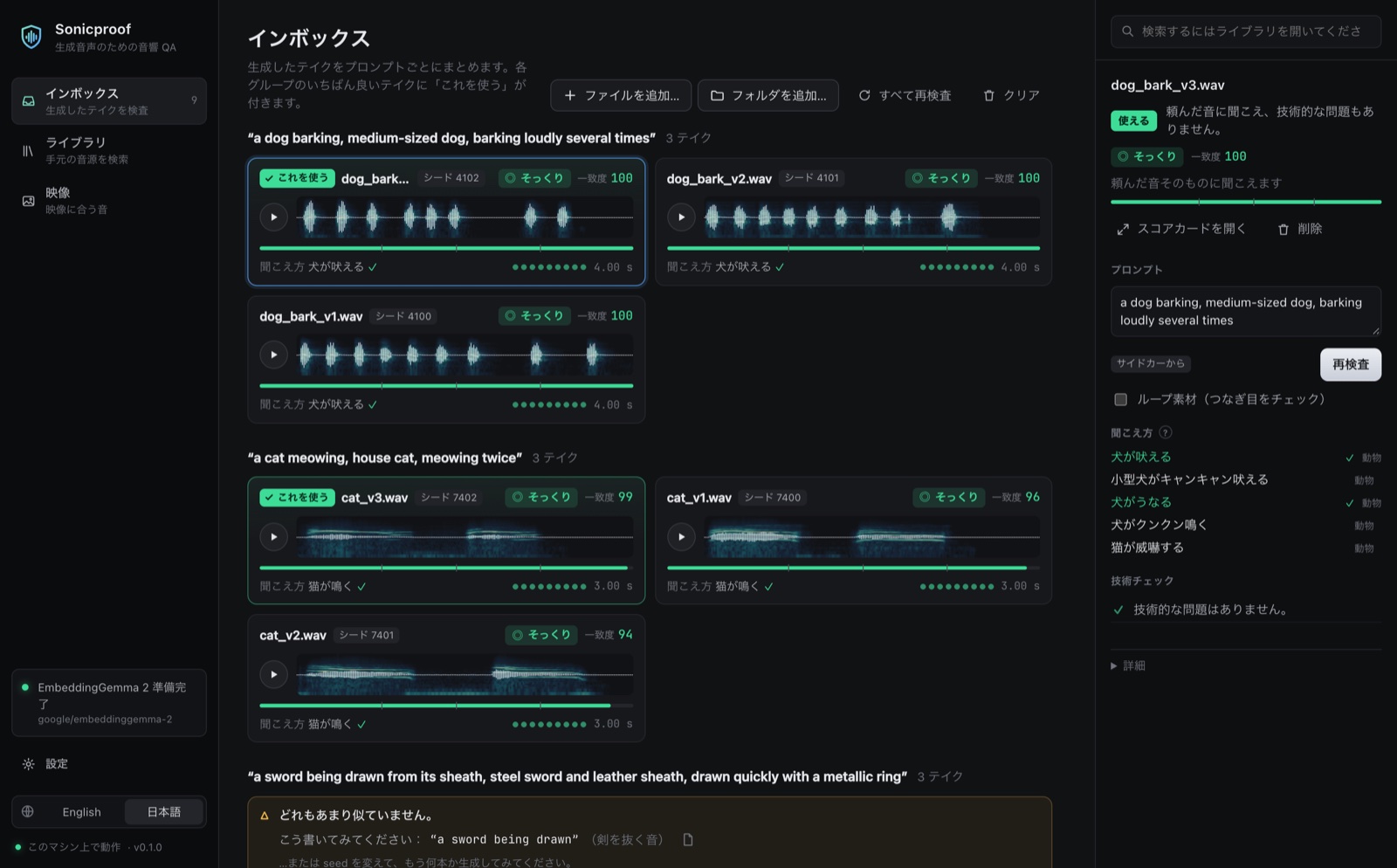
- **Inbox** — drop audio files or whole folders. Prompts are read from Stable Audio `.json` sidecars (or type
your own). Takes of the same prompt are grouped, ranked, and the best one is marked **Use this one**. When
nothing in a group sounds right, it says so and suggests a wording to try next.
Each card shows the waveform over a spectrogram, a plain verdict (◎ Very close · ○ Close · △ Somewhat ·
✕ Not a match), a 0–100 match bar and a dot per technical check; technical findings are spelled out in
plain words with the fix.
- **Library** — choose a folder, index it (with progress), then search by words, by dropping a sound, or by
picture. The **Duplicates** tab lists copies and which one to keep (nothing is deleted). Indexes made here
are kept in the cache, so opening a folder never writes into it.
- **Picture** — drop an image or a video: see what it shows in sound words, score your Inbox sounds against
it, find matching sounds in your library, or judge a video's own soundtrack.
The raw numbers behind each verdict are one click away under **Details**, or shown everywhere with
**Settings → Pro mode**. Settings also shows how much the cache uses and clears it; removing files from the
Inbox deletes the copies made when they were dropped (your originals are never touched).
The interface is in English and Japanese; it follows your browser and can be switched. Sound only plays when
you press play. The server listens on `localhost` only and refuses requests from other sites.
## Use it from your AI agent
The quickest way: give your agent the link to this repository and ask it to check the sounds it generates.
Everything it needs is in this section.
**1. Install and download the model once, in a terminal** ([Install](#install)). The MCP server never starts
the 1.5 GB download inside a tool call — it would look like a hang — so make sure `sonicproof doctor --load`
has run once. Or, without a permanent install:
```bash
uvx --from "sonicproof[model]" sonicproof doctor --load
```
**2. Add the MCP server** — tools `check`, `rank`, `qc`, `report`, `fit`, `search`, `dedupe`, `index`. Each returns
the same records the matching CLI command prints with `--json`. The model loads once and stays loaded.
```bash
# Claude Code
claude mcp add sonicproof -e HF_HOME="${HF_HOME:-$HOME/.cache/huggingface}" -- uvx --from "sonicproof[model]" sonicproof mcp
# Codex
codex mcp add sonicproof --env HF_HOME="${HF_HOME:-$HOME/.cache/huggingface}" -- uvx --from "sonicproof[model]" sonicproof mcp
# any client: streamable HTTP at http://127.0.0.1:7789/mcp
sonicproof mcp --http --port 7789
```
On Windows the server finds the default cache (`%USERPROFILE%\.cache\huggingface`) by itself:
```powershell
claude mcp add sonicproof -- uvx --from "sonicproof[model]" sonicproof mcp
codex mcp add sonicproof -- uvx --from "sonicproof[model]" sonicproof mcp
```
If you moved the cache with `HF_HOME`, `HF_HUB_CACHE` or the older `HUGGINGFACE_HUB_CACHE`, pass it on — some
clients (Codex, for one) start the server without it, and the server then reports the model as not downloaded.
In PowerShell:
```powershell
codex mcp add sonicproof --env "HF_HOME=$env:HF_HOME" -- uvx --from "sonicproof[model]" sonicproof mcp
# HF_HUB_CACHE or HUGGINGFACE_HUB_CACHE: pass the folder as HF_HUB_CACHE
codex mcp add sonicproof --env "HF_HUB_CACHE=$env:HUGGINGFACE_HUB_CACHE" -- uvx --from "sonicproof[model]" sonicproof mcp
# Claude Code: the same with -e instead of --env
```
Other clients take the same command in their JSON config (write out the absolute path of your cache):
```json
{ "mcpServers": { "sonicproof": {
"command": "uvx", "args": ["--from", "sonicproof[model]", "sonicproof", "mcp"],
"env": { "HF_HOME": "/Users/you/.cache/huggingface" } } } }
```
- **Why `HF_HOME`:** MCP clients start servers with a reduced environment. Passing it makes the server use
the same Hugging Face cache as your terminal, so the model is not downloaded a second time. If you set
`HF_HUB_CACHE` (or the older `HUGGINGFACE_HUB_CACHE`) instead, pass that folder as `HF_HUB_CACHE`.
- **Use absolute paths** in tool calls. A relative path resolves against the server's working directory, which
is usually not yours.
- **HTTP mode** listens on `127.0.0.1` only and refuses requests from web pages not served from localhost, but it has no
authentication: any process on your machine can call it. Use stdio when that matters.
- **From a clone of `main`:** use `uv run --project /absolute/path/to/sonicproof --extra model sonicproof mcp`
as the server command (`--project` keeps the caller's working directory; `--directory` would change it).
**3. Add the agent skill** — it teaches an agent the loop that makes generated audio trustworthy: *generate
several takes → rank them → check the best one → rephrase or reseed when nothing matches → deliver the pick
with its scorecard*. It ships with the package:
```bash
sp skill install # → ~/.claude/skills/sonicproof/SKILL.md
sp skill install --project # → ./.claude/skills/sonicproof/SKILL.md (this project only)
sp skill show # print it, for agents that read skills from elsewhere
```
In a clone it lives at [`src/sonicproof/skill/SKILL.md`](https://github.com/kanaworksai-hue/sonicproof/blob/main/src/sonicproof/skill/SKILL.md).
[`examples/stable_audio_loop.py`](https://github.com/kanaworksai-hue/sonicproof/blob/main/examples/stable_audio_loop.py)
runs the same loop as a script, with one MCP client for a Stable Audio server and one for Sonicproof.
**If you are an agent reading this repository:** do steps 1–3, then follow the skill (`sp skill show` prints
it). Without MCP, every analysis command works from the shell with `--json`, e.g.
`sp rank "prompt" /abs/a.wav /abs/b.wav --json`. Pass absolute local file paths; never play audio to "listen"
— Sonicproof is your ears.
## How to read a score
Every clip gets one of four verdicts. The workbench shows them in plain words with a 0–100 match bar; the CLI
and `--json` give the verdict name and the raw score behind it.
| Workbench | Verdict | Raw score | Meaning |
|---|---|---|---|
| ◎ Very close | **strong** | ≥ 2.0 | clearly sounds like the prompt |
| ○ Close | **plausible** | ≥ 1.1 | sounds like the prompt |
| △ Somewhat | **weak** | ≥ 0.3 | only loosely matches |
| ✕ Not a match | **miss** | < 0.3 | does not sound like the prompt |
Where the raw score comes from: plain similarity between a prompt and a clip is not very informative — almost
any caption scores about the same against any clip — so Sonicproof asks two relative questions and averages
them:
1. **Clip side** — compared with ~440 everyday sound descriptions, how well does *your prompt* describe *this clip*?
2. **Prompt side** — compared with a bank of 110 reference sounds, how much closer is *this clip* to *your prompt*?
Both are measured in standard deviations above those baselines, which is why the CLI prints scores like
`+3.79σ`. The workbench's match bar maps −1 … +3 onto 0 … 100.
**Heard as** lists what the clip sounds most like; ✓ marks descriptions that agree with your prompt. When a
verdict surprises you, that list usually explains why. Silent clips (nothing above −60 dBFS) are never scored
as a match: they get `"verdict": "miss"` with `"note": "silent"` and rank last. Short one-shots such as UI
clicks are judged normally.
Sonicproof is a second opinion, not a judge: short, concrete prompts ("glass shattering") work better than long
ones full of mixing notes, and very short transient sounds are the hardest to tell apart. Always listen
before you ship.
### fit
`fit` weighs two pieces of evidence, both calibrated the same way and read on the same verdict scale:
- **direct** — how much closer is the picture to *this clip* than to the reference sounds?
- **described** — the picture is first described in words (**Pictured as**), and the clip is checked against
those descriptions as if they were the prompt. Add your own words about the scene and they count too.
**Pictured as** marks with ✓ what the clip also sounds like; **Heard as** marks what the picture also shows.
When the fit is weak or a miss, Sonicproof suggests a prompt drawn from the picture — useful for regenerating.
Videos are sampled at one frame per second (up to 32 frames, spread evenly over longer clips).
### dedupe
Two sounds can be close in meaning without being the same file — four seeds of the same prompt, say.
`dedupe` therefore uses the embeddings only to find candidates, then compares the signals themselves
(time-aligned spectral fingerprints), so it groups copies that differ in format, codec, level, sample rate,
channel count or trimmed ends, and leaves different takes alone. In each group it picks the copy to keep —
lossless over lossy, not clipped, more of the spectrum (a higher sample rate only counts when it really
holds more — an upsampled copy does not), more channels, longest, not turned down — and says why.
## Python
```python
from sonicproof.judge import Judge
judge = Judge(vision=True) # one model for everything; Judge() alone is lighter but can't see pictures
result = judge.check("door.wav", "a creaky wooden door")
print(result.verdict, result.score, [a.text for a in result.heard_as])
fit = judge.fit("sizzle.wav", "kitchen.png", "image")
print(fit.verdict, [a.text for a in fit.pictured_as])
from sonicproof.library import Library, find_duplicates, search_text
lib = Library("~/SFX")
lib.update(lambda wave: judge.embedder.embed_audio([wave])[0])
for hit in search_text(lib, judge, "rain on a tin roof"):
print(hit.path, hit.score, hit.verdict)
for group in find_duplicates(lib):
print(group.keep, group.reason)
```
## Development
```bash
uv sync --extra model --group dev && uv run pytest
cd web && npm ci && npm run dev # UI with hot reload on :5173; proxies /api to `sp serve` on :7788
npm run build # (in web/) writes the bundled UI into src/sonicproof/web
```
UI strings live in `web/src/i18n/` (`en.ts`, `ja.ts`); the type checker makes sure both have the same keys.
See [CONTRIBUTING.md](https://github.com/kanaworksai-hue/sonicproof/blob/main/CONTRIBUTING.md) for tests, linting and pull requests.
## License
Sonicproof is licensed under the [MIT License](https://github.com/kanaworksai-hue/sonicproof/blob/main/LICENSE) (see also [NOTICE](https://github.com/kanaworksai-hue/sonicproof/blob/main/NOTICE)). It downloads
EmbeddingGemma 2 from Hugging Face on first run — the model is not bundled. The model is released by Google
under Apache 2.0, and its model card asks that deployments follow the
[Gemma Prohibited Use Policy](https://ai.google.dev/gemma/prohibited_use_policy).
The KanaWorks_AI name, logo and the Kana character are © KanaWorks_AI and are **not** covered by the MIT
license. See [docs/brand](https://github.com/kanaworksai-hue/sonicproof/blob/main/docs/brand/README.md).
## Like it? Star it
<div align="center">
<a href="https://x.com/KanaWorks_AI"><img src="https://raw.githubusercontent.com/kanaworksai-hue/sonicproof/main/docs/brand/kana-wave.png" width="150" alt="Kana, the KanaWorks_AI mascot, waving"></a>
<p><b>Made with ♥ by <a href="https://x.com/KanaWorks_AI">KanaWorks_AI</a></b></p>
<p><sub>If Sonicproof saves you a listen, a ⭐ helps others find it. More projects: <a href="https://github.com/kanaworksai-hue">github.com/kanaworksai-hue</a></sub></p>
</div>
Connection Info
You Might Also Like
No recommendations available