Content
# Mac Messages MCP
A local-first Model Context Protocol server for reading, searching, and sending through the macOS Messages app.
[](https://pypi.org/project/mac-messages-mcp/)
[](https://pypi.org/project/mac-messages-mcp/)
[](https://github.com/carterlasalle/mac_messages_mcp/actions/workflows/ci.yml)

Messages and contacts stay on the Mac where this server runs. Database connections are opened read-only; sending is a separate, explicit tool that uses Messages.app automation.
## Quick Install
### For Cursor Users
[](https://cursor.com/install-mcp?name=mac-messages-mcp&config=eyJjb21tYW5kIjoidXZ4IG1hYy1tZXNzYWdlcy1tY3AifQ%3D%3D)
*Click the button above to automatically add Mac Messages MCP to Cursor*
### For Claude Desktop Users
See the [Integration section](#integration) below for setup instructions.
## Features
- **Universal Message Sending**: Automatically sends via iMessage or SMS/RCS based on recipient availability
- **Smart Fallback**: Seamless fallback to SMS when iMessage is unavailable (perfect for Android users)
- **Message Reading**: Read recent messages from the macOS Messages app
- **Contact Filtering**: Filter messages by specific contacts or phone numbers
- **Group Chat Filtering**: Use chat IDs from `tool_get_chats` to read one group conversation chronologically
- **Fuzzy Search**: Search through message content with intelligent matching
- **Attachments**: Find and view photos, PDFs, and other attachments shared in conversations
- **iMessage Detection**: Check if recipients have iMessage before sending
- **Cross-Platform**: Works with both iPhone/Mac users (iMessage) and Android users (SMS/RCS)
### Working with attachments
Attachment access uses **progressive disclosure** — discovery is cheap, fetching is deliberate:
1. **Tier 1 — discovery in message search.** `tool_get_recent_messages` and `tool_fuzzy_search_messages` annotate messages that have attachments with a compact summary like `[attachments: #42 image/jpeg (invitation.jpg)]`. The id lets you fetch the file later.
2. **Tier 2 — attachment-first search.** `tool_search_attachments(start_date, end_date, contact, mime_type, limit)` returns metadata only (id, MIME type, filename, size, sender) — useful for "find all images Elizabeth sent in April 2026" without scanning message text.
3. **Tier 3 — fetch.** `tool_get_attachment(attachment_id)` returns the file. Image MIME types come back inline (HEIC is converted to PNG so it can be viewed directly). PDFs, video, and audio come back as a filesystem path the agent can read with its own tools. Inline image bytes are capped at 5MB by default to avoid context blowup; oversized images fall back to path return.
Stickers, link-preview "balloon" payloads, and `.pluginPayloadAttachment` containers are filtered out by default.
### Recipient formats
For direct sends, E.164 phone numbers with a leading `+` are the most reliable format, such as `+14155551234`. Bare digit phone numbers with a country code are normalized before sending, and 10-digit US numbers are sent as `+1...`. `tool_find_contact` returns phone matches in the same send-ready format.
## Prerequisites
- macOS (tested on macOS 11+)
- Python 3.10+
- **uv package manager**
## Security and privacy model
- Message and Contacts databases are opened with SQLite `mode=ro` and `query_only` enabled.
- The server does not upload a message archive or maintain its own copy of the databases.
- MCP clients receive only tool results requested in the current session. Attachment retrieval is deliberate and size limited.
- Sending requires an explicit `tool_send_message` call and uses escaped AppleScript values with a bounded execution timeout.
- Full Disk Access is powerful. Grant it only to the specific trusted client that launches this server.
See [SECURITY.md](SECURITY.md) for private vulnerability reporting.
### Installing uv
If you're on Mac, install uv using Homebrew:
```bash
brew install uv
```
Otherwise, follow the installation instructions on the [uv website](https://github.com/astral-sh/uv).
⚠️ **Do not proceed before installing uv**
## Installation
### Full Disk Access Permission
⚠️ This application requires **Full Disk Access** permission for your terminal or application to access the Messages database.
To grant Full Disk Access:
1. Open **System Preferences/Settings** > **Security & Privacy/Privacy** > **Full Disk Access**
2. Click the lock icon to make changes
3. Add your terminal app (Terminal, iTerm2, etc.) or Claude Desktop/Cursor to the list
4. Restart your terminal or application after granting permission
## Integration
### Claude Desktop Integration
#### Option 1: Claude Desktop Extension
This repo includes an MCPB-compatible `manifest.json` for Claude Desktop's one-click extension flow.
```bash
yarn global add @anthropic-ai/mcpb
mcpb pack
```
Install the generated `.mcpb` file from Claude Desktop **Settings** > **Extensions** > **Advanced settings** > **Install Extension...**.
Claude Desktop, or the terminal used to package/run the extension, still needs Full Disk Access to read Messages.
**Building the extension**
Build the `.mcpb` with the build script:
```bash
python scripts/build_mcpb.py # build for the host architecture
python scripts/build_mcpb.py --arch x86_64 # build for Intel macs
```
By default it vendors a `uv` binary into the bundle (`bin/uv`) so the extension also runs on machines without `uv` installed — that binary is architecture specific (build one `.mcpb` per arch) and downloads Python and dependencies on first launch (network required once). Pass `--no-bundle` to pack against the system `uv` instead; see `python scripts/build_mcpb.py --help` for all options.
#### Option 2: Manual Config
1. Go to **Claude** > **Settings** > **Developer** > **Edit Config** > **claude_desktop_config.json**
2. Add the following configuration:
```json
{
"mcpServers": {
"messages": {
"command": "uvx",
"args": [
"mac-messages-mcp"
]
}
}
}
```
### Cursor Integration
#### Option 1: One-Click Install (Recommended)
[](https://cursor.com/install-mcp?name=mac-messages-mcp&config=eyJjb21tYW5kIjoidXZ4IG1hYy1tZXNzYWdlcy1tY3AifQ%3D%3D)
#### Option 2: Manual Setup
Go to **Cursor Settings** > **MCP** and paste this as a command:
```
uvx mac-messages-mcp
```
⚠️ Only run one instance of the MCP server (either on Cursor or Claude Desktop), not both
### Docker Container Integration
If you need to connect to `mac-messages-mcp` from a Docker container, you'll need to use the `mcp-proxy` package to bridge the stdio-based server to HTTP.
This repository also includes a `Dockerfile` for catalog checks and container builds:
```bash
docker build -t mac-messages-mcp .
```
Messages.app automation is macOS-only and will not work inside a Linux container. Container use is primarily for MCP catalog compatibility and read-only database experiments with mounted data.
#### Setup Instructions
1. **Install mcp-proxy on your macOS host:**
```bash
npm install -g mcp-proxy
```
2. **Start the proxy server:**
```bash
# Using the published version
npx mcp-proxy uvx mac-messages-mcp --port 8000 --host 0.0.0.0
# Or using local development (if you encounter issues)
npx mcp-proxy uv run python -m mac_messages_mcp.server --port 8000 --host 0.0.0.0
```
3. **Connect from Docker:**
Your Docker container can now connect to:
- URL: `http://host.docker.internal:8000/mcp` (on macOS/Windows)
- URL: `http://<host-ip>:8000/mcp` (on Linux)
4. **Docker Compose example:**
```yaml
version: '3.8'
services:
your-app:
image: your-image
environment:
MCP_MESSAGES_URL: "http://host.docker.internal:8000/mcp"
extra_hosts:
- "host.docker.internal:host-gateway" # For Linux hosts
```
5. **Running multiple MCP servers:**
```bash
# Terminal 1 - Messages MCP on port 8001
npx mcp-proxy uvx mac-messages-mcp --port 8001 --host 0.0.0.0
# Terminal 2 - Another MCP server on port 8002
npx mcp-proxy uvx another-mcp-server --port 8002 --host 0.0.0.0
```
**Note:** Binding to `0.0.0.0` exposes the service to all network interfaces. In production, consider using more restrictive host bindings and adding authentication.
### Option 1: Install from PyPI
```bash
uv pip install mac-messages-mcp
```
### Option 2: Install from source
```bash
# Clone the repository
git clone https://github.com/carterlasalle/mac_messages_mcp.git
cd mac_messages_mcp
# Install dependencies
uv install -e .
```
## Usage
### Smart Message Delivery
Mac Messages MCP automatically handles message delivery across different platforms:
- **iMessage Users** (iPhone, iPad, Mac): Messages sent via iMessage
- **Android Users**: Messages automatically fall back to SMS/RCS
- **Mixed Groups**: Optimal delivery method chosen per recipient
```python
# Send to iPhone user - uses iMessage
send_message("+1234567890", "Hey! This goes via iMessage")
# Send to Android user - automatically uses SMS
send_message("+1987654321", "Hey! This goes via SMS")
# Check delivery method before sending
check_imessage_availability("+1234567890") # Returns availability status
```
### As a Module
```python
from mac_messages_mcp import get_recent_messages, send_message
# Get recent messages
messages = get_recent_messages(hours=48)
print(messages)
# Send a message (automatically chooses iMessage or SMS)
result = send_message(recipient="+1234567890", message="Hello from Mac Messages MCP!")
print(result) # Shows whether sent via iMessage or SMS
```
### As a Command-Line Tool
```bash
# Run the MCP server directly
mac-messages-mcp
```
## Development
### Versioning
This project uses semantic versioning. See [VERSIONING.md](VERSIONING.md) for details on how the versioning system works and how to release new versions.
To bump the version:
```bash
python scripts/bump_version.py [patch|minor|major]
```
## Security Notes
This application accesses the Messages database directly, which contains personal communications. Please use it responsibly and ensure you have appropriate permissions.
[](https://mseep.ai/app/carterlasalle-mac-messages-mcp)
## License
MIT
## Contributing
Contributions are welcome! Please feel free to submit a Pull Request.
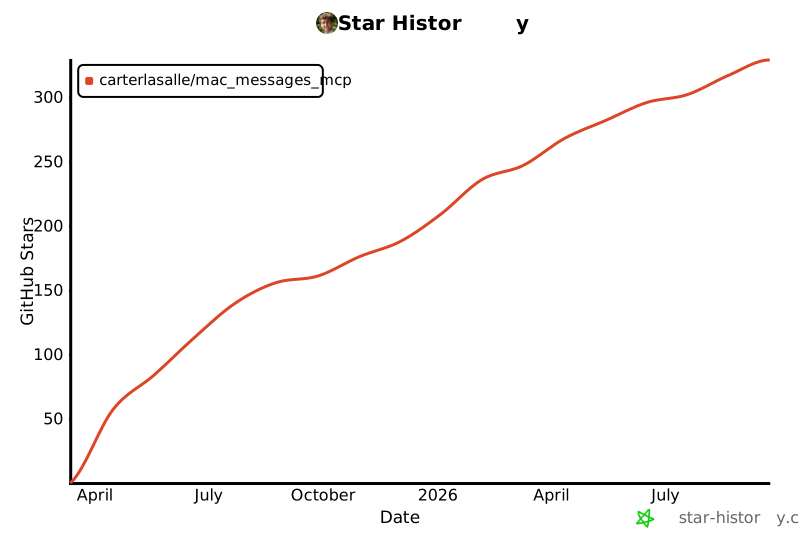
## Star History
[](https://www.star-history.com/#carterlasalle/mac_messages_mcp&Date)



