Content

---
<p align="center">
<a href="https://trendshift.io/repositories/13868" target="_blank"><img src="https://trendshift.io/api/badge/repositories/13868" alt="groupultra%2Ftelegram-search | Trendshift" style="width: 250px; height: 55px;" width="250" height="55"/></a>
</p>
<p align="center">
[<a href="https://search.lingogram.app">立即体验</a>] [<a href="./docs/README_EN.md">English</a>] [<a href="./docs/README_JA.md">日本語</a>]
</p>
<p align="center">
<a href="https://discord.gg/NzYsmJSgCT">
<img alt="Discord" src="https://img.shields.io/badge/dynamic/json?url=https%3A%2F%2Fdiscord.com%2Fapi%2Finvites%2FNzYsmJSgCT%3Fwith_counts%3Dtrue&query=%24.approximate_member_count&suffix=%20members&logo=discord&logoColor=white&label=%20&color=7389D8&labelColor=6A7EC2" />
</a>
<a href="https://t.me/+Gs3SH2qAPeFhYmU9">
<img alt="Telegram" src="https://img.shields.io/badge/Telegram-%235AA9E6?logo=telegram&labelColor=FFFFFF" />
</a>
<a href="https://deepwiki.com/groupultra/telegram-search">
<img alt="DeepWiki" src="https://deepwiki.com/badge.svg" />
</a>
<br>
<a href="https://github.com/groupultra/telegram-search/releases">
<img alt="GitHub Package Version" src="https://img.shields.io/github/package-json/v/groupultra/telegram-search?style=flat&colorA=080f12&colorB=1fa669" />
</a>
<a href="https://github.com/groupultra/telegram-search/actions/workflows/release-docker.yaml">
<img alt="Release Docker / OCI" src="https://github.com/groupultra/telegram-search/actions/workflows/release-docker.yaml/badge.svg" />
</a>
<a href="https://github.com/groupultra/telegram-search/actions/workflows/ci.yaml">
<img alt="CI" src="https://github.com/groupultra/telegram-search/actions/workflows/ci.yaml/badge.svg" />
</a>
</p>
> [!TIP]
>
>
>
>
>
>
>
## 💖 Sponsors

## ✅ Key Features
### 📦 Export & Backup
- [x] Supports exporting chat history to various databases: compatible with PGlite and PostgreSQL
- [x] Media resources can be automatically backed up to MinIO object storage without manual intervention
- [x] Message export automatically completes vector embedding and word segmentation processing to help with subsequent accurate retrieval
- [x] Real-time synchronization, automatically pull and update the latest conversation content
### 🔍 Chat History Search
- [x] Automatic intelligent word segmentation, supports accurate multi-language retrieval
- [x] Combines fuzzy matching and vector semantic search for higher search efficiency
- [x] Image semantic search: supports image embedding, searching for images with text
- [x] Infinite scrolling of search results for a smoother browsing experience
- [x] RAG intelligent Q&A: Chat directly with AI to get real-time answers based on historical context
### 🤖 Telegram Bot
- [x] Search and export messages via Bot
- [x] Message deep link jump, one-click positioning of the original conversation
### 🚀 Advanced Features
- [x] Intelligent summary of unread messages: One-click summary of all unread messages, automatically generate concise summaries, and key content is clear at a glance
- [x] Date range filtering to quickly narrow the search scope
- [x] Right-click menu to jump to the original Telegram message, supports mobile
## 🛣️ Roadmap
### 🧠 AI Capability Enhancement
- [ ] Automatically generate session summaries
- [ ] "Super Brain": Automatically build knowledge graphs of people and events based on historical messages
### 🔗 Media and Link Expansion
- [ ] Intelligently organize the "Saved Messages" favorites to improve content management efficiency
- [ ] Deep indexing of links and images: web page summaries, image OCR text recognition and intelligent descriptions to help with search and archiving
### 🌐 Multi-Platform Integration
- [ ] Cross-platform expansion: Support Discord and other mainstream social/communication platforms to achieve unified retrieval and backup
## 🎉 Get Started
We provide an online trial version, so you can experience all the features of Telegram Search without deploying it yourself.
Visit the following website to get started: https://search.lingogram.app
> [!WARNING]
>
>
>
## 🚀 Quick Start
### Using Docker Compose
1. Create a new empty directory to store Telegram Search's configuration and data:
```bash
mkdir telegram-search
cd telegram-search
```
2. Download the Docker Compose file and start all services (including database, MinIO, etc.):
```bash
curl -L https://raw.githubusercontent.com/groupultra/telegram-search/refs/heads/main/docker/docker-compose.yml -o docker-compose.yml
curl -L https://raw.githubusercontent.com/groupultra/telegram-search/refs/heads/main/docker/.env.example -o .env
curl -L https://raw.githubusercontent.com/groupultra/telegram-search/refs/heads/main/docker/init.sql -o init.sql
docker compose -f docker-compose.yml up -d
```
3. Then open **http://localhost:3333** to use 🎉
### Using Docker Image
If MinIO related parameters are not configured, media files will be saved to the local `data/media` directory by default.
```bash
docker run -d --name telegram-search -p 3333:3333 ghcr.io/groupultra/telegram-search:latest
```
### Custom Environment Variables
> [!IMPORTANT]
> AI Embedding & LLM settings are now configured **per account** within the application (Settings → API).
>
> After modifying the `.env` file, execute `docker compose -f docker-compose.yml up -d` again to start the service.
The following environment variables are all optional. If not filled in, the default values will be used.
| Environment Variable | Description | Example Value |
| --- | --- | --- |
| `TELEGRAM_API_ID` | Telegram Application ID obtained from [my.telegram.org](https://my.telegram.org/apps) | `611335` |
| `TELEGRAM_API_HASH` | Telegram Application Hash obtained from [my.telegram.org](https://my.telegram.org/apps) | `d524b414d21f4d37f08684c1df41ac9c` |
| `DATABASE_TYPE` | Database type, optional `postgres` or `pglite` | `pglite` |
| `DATABASE_URL` | PostgreSQL connection string (only fill in when `DATABASE_TYPE=postgres`) | `postgresql://postgres:123456@pgvector:5432/postgres` |
| `TELEGRAM_BOT_TOKEN` | Telegram Bot Token created via [@BotFather](https://t.me/BotFather) | `123456:ABC-DEF1234ghIkl-zyx57W2v1u123ew11` |
| `PROXY_URL` | Proxy address (supports formats such as `socks5://user:pass@host:port`) | `socks5://user:pass@host:port` |
| `PORT` | Backend service HTTP/WebSocket listening port | `3333` |
| `HOST` | Backend service listening address | `0.0.0.0` |
| `BACKEND_URL` | Upstream backend address for `/api` and `/ws` when Nginx is used as a reverse proxy | `http://127.0.0.1:3333` |
| `MINIO_URL` | MinIO service address | `http://minio:9000` |
| `MINIO_ACCESS_KEY` | MinIO access key | `minioadmin` |
| `MINIO_SECRET_KEY` | Secret key corresponding to the MinIO access key | `minioadmin` |
| `MINIO_BUCKET` | MinIO bucket name | `telegram-media` |
#### Using Docker Image Environment Variables
Please modify the environment variables according to your needs.
```bash
docker run -d --name telegram-search \
-p 3333:3333 \
-e DATABASE_TYPE=postgres \
-e DATABASE_URL=postgresql://postgres:123456@localhost:5432/postgres \
ghcr.io/groupultra/telegram-search:latest
```
## 💻 Development Guide
### Pure Browser Mode
```bash
git clone https://github.com/groupultra/telegram-search.git
cd telegram-search
pnpm install
cp .env.example .env
pnpm run dev
```
### Server Mode
```bash
git clone https://github.com/groupultra/telegram-search.git
cd telegram-search
pnpm install
cp .env.example .env
docker compose -f docker/docker-compose.dev.yml up -d pgvector minio
pnpm run server:dev
pnpm run web:dev
```
📖 **More development details and architectural details:** [CONTRIBUTING.md](./docs/CONTRIBUTING.md)
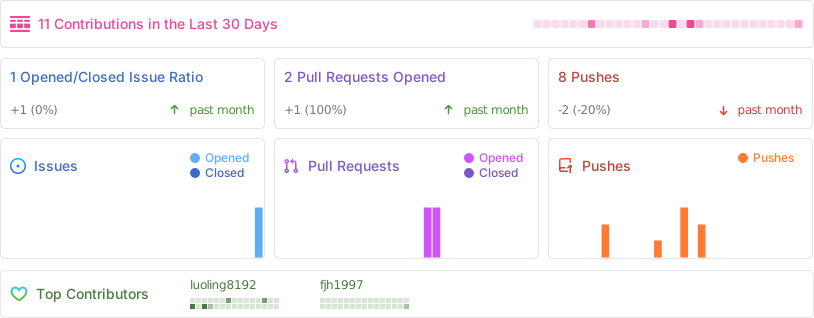
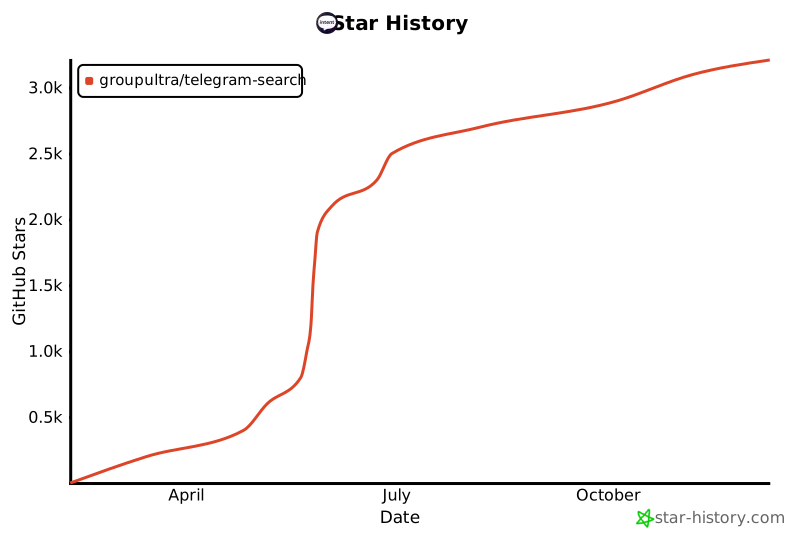
## 🚀 Activity
[](https://star-history.com/#groupultra/telegram-search&Date)



