Content
[](https://mseep.ai/app/boomlinkai-image-worker-mcp)
# @boomlinkai/image-worker-mcp
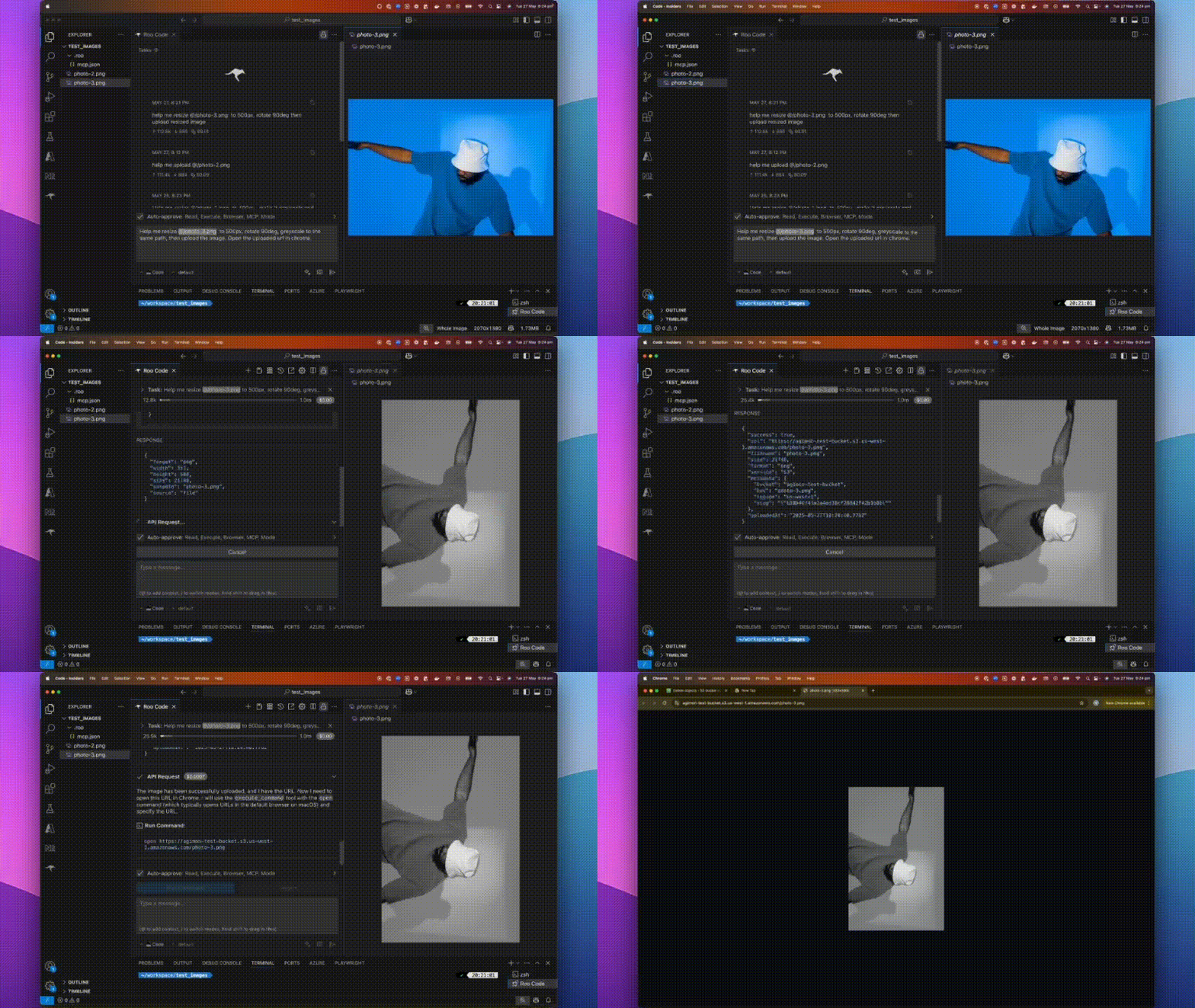
A fast, plug-and-play MCP server for **image processing** and **cloud uploads**, designed for AI assistants and automation workflows.
---
## 📝 What is @boomlinkai/image-worker-mcp?
A lightweight server implementing [Model Context Protocol (MCP)](https://github.com/modelcontextprotocol) for automated image manipulation and uploads. It makes image resizing, converting, optimizing, and uploading seamless for devs, AI tools, or automated pipelines.
---
## ✨ Features
- **All-in-One Image Processing:** Resize, convert, optimize, and transform images with the powerful [sharp](https://sharp.pixelplumbing.com/) library.
- **Effortless Cloud Uploads:** Integrates with AWS S3, Cloudflare R2, Google Cloud Storage.
- **AI & Workflow Ready:** Built for MCP, integrates with any AI assistant or workflow runner.
- **Flexible Input:** Works with file paths, URLs, or base64 images.
- **Automatable:** Scriptable for batch tasks or as a backend service.
---
## 🚀 How to Install
Use **npm** (or yarn/pnpm):
```sh
npm install -g @boomlinkai/image-worker-mcp
# or
yarn global add @boomlinkai/image-worker-mcp
# or
pnpm add -g @boomlinkai/image-worker-mcp
````
Or use it instantly (no install):
```sh
npx @boomlinkai/image-worker-mcp
```
---
## ⚡ Quick Start
### Start the MCP Server
```sh
npx @boomlinkai/image-worker-mcp
```
### Example: AI Assistant Workflow
Resize an image:
```json
{
"tool_code": "use_mcp_tool",
"tool_name": "resize_image",
"server_name": "image-worker",
"arguments": {
"imageUrl": "https://example.com/original.jpg",
"width": 800,
"format": "webp",
"outputPath": "./resized_image.webp"
}
}
```
Upload an image:
```json
{
"tool_code": "use_mcp_tool",
"tool_name": "upload_image",
"server_name": "image-worker",
"arguments": {
"imagePath": "./resized_image.webp",
"service": "s3",
"filename": "my-optimized-image",
"folder": "website-assets"
}
}
```
---
## 🛠️ Usage & Configuration
The MCP server works via **stdio**, making it easy to plug into AI tools and code editors.
### Platform Integrations
<details>
<summary>Click to expand platform setup guides (Cursor, Windsurf, VSCode, Zed, Claude, BoltAI, Roo Code)</summary>
#### Cursor
Add to `~/.cursor/mcp.json`:
```json
{
"mcpServers": {
"image-worker": {
"command": "npx",
"args": ["-y", "@boomlinkai/image-worker-mcp"]
}
}
}
```
<!-- Repeat for other platforms as in your original -->
</details>
---
## 🧰 Tools Reference
### `resize_image`
Resize and transform images via:
* `imagePath`, `imageUrl`, or `base64Image` (input)
* `width`, `height`, `fit`, `format`, `quality`, `rotate`, etc.
* Returns path or base64 of processed image
### `upload_image`
Upload any image (by path/url/base64) to:
* `service`: `s3` | `cloudflare` | `gcloud`
* `filename`, `folder`, `public`, etc.
* Set credentials as env vars
---
## 🔑 Environment Variables
Set these for your chosen cloud provider:
**AWS S3**
```sh
export AWS_ACCESS_KEY_ID=xxx
export AWS_SECRET_ACCESS_KEY=xxx
export S3_BUCKET=your-bucket
export S3_REGION=us-east-1
# Optional: S3_ENDPOINT=https://...
```
**Cloudflare R2**
```sh
export CLOUDFLARE_R2_ACCESS_KEY_ID=xxx
export CLOUDFLARE_R2_SECRET_ACCESS_KEY=xxx
export CLOUDFLARE_R2_BUCKET=your-bucket
export CLOUDFLARE_R2_ENDPOINT=https://...
```
**Google Cloud Storage**
```sh
export GCLOUD_PROJECT_ID=xxx
export GCLOUD_BUCKET=your-bucket
# Optionally: GCLOUD_CREDENTIALS_PATH=/path/to/key.json
```
**Default upload service:**
```sh
export UPLOAD_SERVICE=s3
```
> ⚠️ **Never commit credentials to source control.** Use environment variables or secret managers.
---
## 🏗️ Requirements
* Node.js 18.x or higher
* No system dependencies; `sharp` is auto-installed
---
## 🐞 Troubleshooting / FAQ
* **Install fails on ARM/Apple Silicon?** Run `brew install vips` (sharp dependency) or use Node 18+.
* **Credentials not working?** Check env var spelling/casing.
* **Image output is blank or corrupt?** Confirm input image type and size.
---
## 🤝 Contributing
PRs and issues welcome! Please [open an issue](https://github.com/BoomLinkAi/image-worker-mcp/issues) or submit a pull request.
---
## 👤 Author
**Vuong Ngo** – [BoomLink.ai](https://boomlink.ai)
---
## 🌐 Connect with Us
[](https://discord.gg/88ND8bpmrA)
[](https://x.com/agimon_ai)
[](https://linkedin.com/company/boomlink)
- **[Join our Discord](https://discord.gg/88ND8bpmrA)** for support, feedback, and community discussions
- **[Follow us on X.com](https://x.com/agimon_ai)** for updates and news
- **[Connect on LinkedIn](https://linkedin.com/company/boomlink)** for company news and insights
---
## 📄 License
MIT
---
## 💖 Sponsored by BoomLink.ai
[](https://boomlink.ai)



