Content
<div align="center">
<img src="assets/logo.svg" alt="McpStore" width="400"/>
---
   
[English](README_en.md) | [简体中文](README_zh.md)
[在线体验](https://web.mcpstore.wiki) | [详细文档](https://doc.mcpstore.wiki/) | [快速使用](###简单示例)
</div>
### What is mcpstore?
mcpstore is an out-of-the-box MCP service orchestration layer for developers: it uses a Store to uniformly manage services and adapts MCP to AI frameworks such as `LangChain`.
### Simple Example
First, you only need to initialize a store
```python
from mcpstore import MCPStore
store = MCPStore.setup_store()
```
Now you have a `store`. Subsequently, you only need to add or operate your services around this `store`. The `store` will maintain and manage these MCP services.
#### Add the first service to the store
```python
#Add the following code below
store.for_store().add_service({"mcpServers": {"mcpstore_wiki": {"url": "https://www.mcpstore.wiki/mcp"}}})
store.for_store().wait_service("mcpstore_wiki")
```
Add services conveniently through the add method. The add_service method supports various mcp service configuration formats, and mainstream mcp configuration formats can be directly passed in. The wait method is optional, whether to synchronously wait for the service to be ready.
#### Adapt mcp to the object required by langchain
```python
tools = store.for_store().for_langchain().list_tools()
print("loaded langchain tools:", len(tools))
```
Simply chain it to intuitively adapt mcp into a list of tools directly used by langchain
##### Framework Adaptation
More frameworks will be gradually supported
| Supported Frameworks | Get Tools |
| --- | --- |
| LangChain | `tools = store.for_store().for_langchain().list_tools()` |
| LangGraph | `tools = store.for_store().for_langgraph().list_tools()` |
| AutoGen | `tools = store.for_store().for_autogen().list_tools()` |
| CrewAI | `tools = store.for_store().for_crewai().list_tools()` |
| LlamaIndex | `tools = store.for_store().for_llamaindex().list_tools()` |
#### Now you can use langchain normally
```python
#Add the above code
from langchain.agents import create_agent
from langchain_openai import ChatOpenAI
llm = ChatOpenAI(
temperature=0,
model="deepseek-chat",
api_key="sk-*****",
base_url="https://api.deepseek.com"
)
agent = create_agent(model=llm, tools=tools, system_prompt="你是一个助手,回答的时候带上表情")
events = agent.invoke({"messages": [{"role": "user", "content": "mcpstore怎么添加服务?"}]})
print(events)
```
### Quick Start
```bash
pip install mcpstore
```
#### Agent Grouping
Use `for_agent(agent_id)` to group mcp services
```python
agent_id1 = "agent1"
store.for_agent(agent_id1).add_service({"name": "mcpstore_wiki", "url": "https://www.mcpstore.wiki/mcp"})
agent_id2 = "agent2"
store.for_agent(agent_id2).add_service({"name": "playwright", "command": "npx", "args": ["@playwright/mcp"]})
agent1_tools = store.for_agent(agent_id1).list_tools()
agent2_tools = store.for_agent(agent_id2).list_tools()
```
`store.for_agent(agent_id)` and `store.for_store()` share most of the function interfaces. Essentially, a logical subset is created within the global scope through a grouping mechanism.
By assigning exclusive services to different Agents, effective service isolation is achieved, avoiding excessively long contexts.
It works well with the aggregation service `hub_service` (experimental) and the rapid generation of A2A Agent Card (planned support).
#### Common Operations
| Action | Command Example |
|---|---|
| Locate Service | `store.for_store().find_service("service_name")` |
| Update Service | `store.for_store().update_service("service_name", new_config)` |
| Incremental Update | `store.for_store().patch_service("service_name", {"headers": {"X-API-Key": "..."}})` |
| Delete Service | `store.for_store().delete_service("service_name")` |
| Restart Service | `store.for_store().restart_service("service_name")` |
| Disconnect Service | `store.for_store().disconnect_service("service_name")` |
| Health Check | `store.for_store().check_services()` |
| View Configuration | `store.for_store().show_config()` |
| Service Details | `store.for_store().get_service_info("service_name")` |
| Wait for Ready | `store.for_store().wait_service("service_name", timeout=30)` |
| Aggregate Services | `store.for_agent(agent_id).hub_services()` |
| List Agents | `store.for_store().list_agents()` |
| List Services | `store.for_store().list_services()` |
| List Tools | `store.for_store().list_tools()` |
| Locate Tool | `store.for_store().find_tool("tool_name")` |
| Execute Tool | `store.for_store().call_tool("tool_name", {"k": "v"})` |
#### Cache/Redis Backend
Supports using Redis as a shared cache backend for cross-process/multi-instance sharing of service and tool metadata. Install additional dependencies:
```bash
pip install mcpstore[redis]
#Or directly pip install redis separately
```
How to use: Pass in through the `external_db` parameter when initializing the store:
```python
from mcpstore import MCPStore
store = MCPStore.setup_store(
external_db={
"cache": {
"type": "redis",
"url": "redis://localhost:6379/0",
"password": None,
"namespace": "demo_namespace"
}
}
)
```
See the documentation for more `setup_store` configurations
### API Mode
#### Start api
Quickly start through SDK
```python
from mcpstore import MCPStore
prod_store = MCPStore.setup_store()
prod_store.start_api_server(host="0.0.0.0", port=18200)
```
Or use CLI to start quickly
```bash
mcpstore run api
```
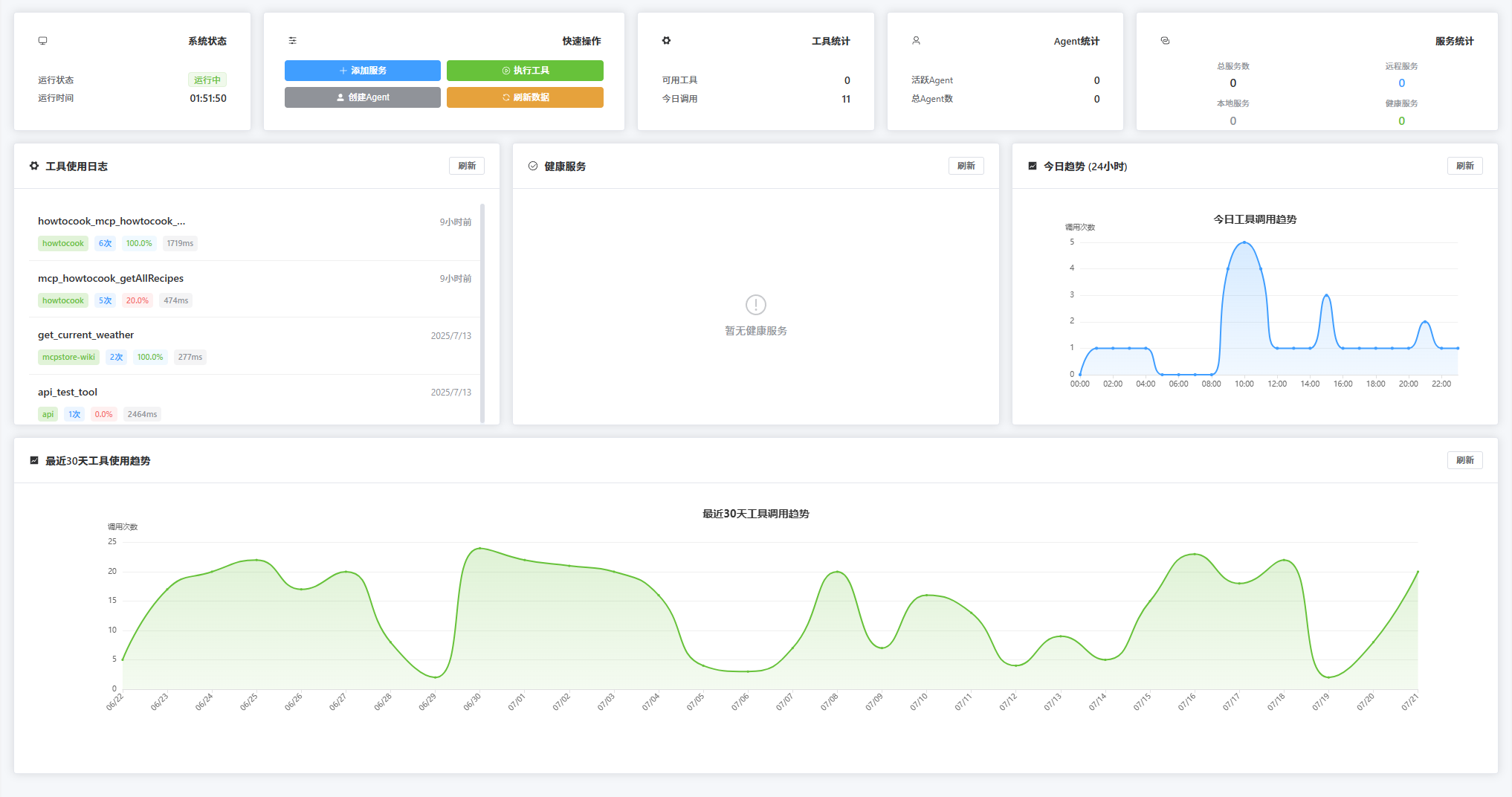
Example page: [Online Experience](https://web.mcpstore.wiki)
#### Common Interfaces
```bash
# Service Management
POST /for_store/add_service
GET /for_store/list_services
POST /for_store/delete_service
# Tool Operation
GET /for_store/list_tools
POST /for_store/use_tool
# Running Status
GET /for_store/get_stats
GET /for_store/health
```
See the interface documentation for more details: [Detailed Documentation](https://doc.mcpstore.wiki/)
### docker deployment
## Star History
<div align="center">
[](https://star-history.com/#whillhill/mcpstore&Date)
</div>
---
McpStore is still being updated frequently, and feedback and suggestions are welcome.



