

Content
<div align="center">
<img src="https://github.com/user-attachments/assets/a978cb0a-785d-4a7d-aff2-7e962edd3120" width="10000" alt="Claude Codex Settings Logo">
[](https://github.com/hesreallyhim/awesome-claude-code)
[](#installation)
[](#installation)
[](#installation)
[](https://context7.com/fcakyon/claude-codex-settings)
[](https://context7.com/fcakyon/claude-codex-settings/llms.txt)
[](https://github.com/fcakyon/claude-codex-settings/blob/traffic-data/history.json)
[](https://github.com/fcakyon/claude-codex-settings/blob/traffic-data/history.json)
Battle-tested [Claude Code](https://github.com/anthropics/claude-code), [Claude Desktop](https://claude.ai/download), [OpenAI Codex](https://developers.openai.com/codex), and [Cursor](https://cursor.com) setup with skills, commands, hooks, subagents, and MCP servers, plus Kimi, MiniMax, and GLM API support.
> _"They make wrong assumptions on your behalf and just run along with them without checking. They don't manage their confusion, they don't seek clarifications, they don't surface inconsistencies, they don't present tradeoffs. They really like to overcomplicate code and APIs, they bloat abstractions, they don't clean up dead code after themselves."_ -- [Andrej Karpathy](https://x.com/karpathy/status/2015883857489522876)
This repo's guidelines are structured to fix exactly these pitfalls.
[Installation](#installation) • [Plugins](#plugins) • [Configuration](#configuration) • [References](#references)
</div>
## Installation
Plugins add skills, commands, and automations to your AI coding tool. Install only what you need from the plugin list below.
> **Prerequisites:** See [INSTALL.md](INSTALL.md) for setup requirements.
<details open>
<summary><strong>Claude Code</strong></summary>
```bash
# Add marketplace (one time)
claude plugin marketplace add fcakyon/claude-codex-settings
# Install any plugin by name
claude plugin install fable-advisor@claude-settings
```
</details>
<details>
<summary><strong>Codex CLI</strong></summary>
```bash
# Add marketplace (one time)
codex plugin marketplace add fcakyon/claude-codex-settings
# Install any plugin by name
codex plugin add simplify@claude-settings
```
</details>
<details>
<summary><strong>Gemini CLI</strong></summary>
```bash
# Install any plugin by name
gemini extensions install --path ./plugins/simplify
```
</details>
<details>
<summary><strong>Cursor</strong></summary>
```bash
# Install any plugin by name
cursor plugin install simplify@claude-settings
```
</details>
Want the shared agent guidance too? [`.claude/CLAUDE.md`](https://github.com/fcakyon/claude-codex-settings/blob/main/.claude/CLAUDE.md) is the file written for your projects. Run `/claude-tools:sync-claude-md` to pull it into `~/.claude/CLAUDE.md`, or paste it into a project as `CLAUDE.md`, then point the other tools at the same file:
```bash
ln -sfn CLAUDE.md AGENTS.md # Codex CLI, Cursor, Copilot
ln -sfn CLAUDE.md GEMINI.md # Gemini CLI
```
## Plugins
<details>
<summary><strong>simplify</strong> - Review changed code for reuse, redundancy, and over-engineering, then apply fixes</summary>
| Claude Code | Codex CLI | Gemini CLI |
| ------------------------------------------------ | ------------------------------------------- | ----------------------------------------------------- |
| `claude plugin install simplify@claude-settings` | `codex plugin add simplify@claude-settings` | `gemini extensions install --path ./plugins/simplify` |
Run `/simplify` to review your staged or committed diff across four angles (reuse, simplification, efficiency, altitude) with parallel agents, then apply the cleanups. It reviews changed-code quality, not correctness bugs. It brings [Claude Code's built-in `/simplify`](https://code.claude.com/docs/en/code-review#review-a-diff-locally) to Codex, Cursor, and Gemini, which don't ship it natively, so all three get the same review and apply flow.
**Skills:**
- [`simplify`](./plugins/simplify/skills/simplify/SKILL.md) - review the changed diff across four angles and apply the fixes
**Hooks:**
- [`guard.py`](./plugins/simplify/hooks/scripts/guard.py) - Require a completed /simplify run before each Claude Code or Codex commit, unless you explicitly ask to skip it for one commit
</details>
<details>
<summary><strong>humanize</strong> - Block a curated list of AI buzzwords on every write with a hook</summary>
| Claude Code | Codex CLI | Gemini CLI |
| ------------------------------------------------ | ------------------------------------------- | ----------------------------------------------------- |
| `claude plugin install humanize@claude-settings` | `codex plugin add humanize@claude-settings` | `gemini extensions install --path ./plugins/humanize` |
Before a Write or Edit saves, humanize scans the new text and blocks whatever reads like a machine wrote it, each hit paired with a plain-word swap. It reads markdown files whole and, in code, only the comments and docstrings, never the code:
- **3 marks**: the em-dash, section sign, and stray semicolon (the en-dash stays)
- **53 stock words** like `leverage`, `seamlessly`, `vibrant`, `game-changing`, each mapped to a plain swap
- **16 openers and cliches** like `in conclusion`, `a testament to`, `aims to bridge`
- **10 pile-up words** like `crucial` or `significant`, flagged at 3+ uses in one write
Runs on Claude Code and Gemini. Unlike a markdown rule the model can ignore, the hook checks every Write or Edit and blocks each match until it is replaced. The word list draws on [Wikipedia's "Signs of AI writing"](https://en.wikipedia.org/wiki/Wikipedia:Signs_of_AI_writing).
**Skills** (ZIP for claude.ai, ChatGPT, Claude Code, Cursor, Codex, VS Code):
| Skill | Description | ZIP |
| --------------------------------------------------------- | ---------------------------------------------- | ---------------------------------------------------------------------------------------------------------------------------------------------------------------- |
| [`humanize`](./plugins/humanize/skills/humanize/SKILL.md) | Avoid common AI writing patterns with examples | [](https://github.com/fcakyon/claude-codex-settings/releases/latest/download/humanize.zip) |
**Hooks:**
- [`humanize.py`](./plugins/humanize/hooks/scripts/humanize.py) - blocks matched marks, buzzwords, and cliches before a Write or Edit lands
</details>
<details>
<summary><strong>fable-advisor</strong> - Get a second opinion from Claude Fable 5 before big decisions</summary>
| Claude Code | Codex CLI | Gemini CLI |
| ----------------------------------------------------- | ------------------------------------------------ | ---------------------------------------------------------- |
| `claude plugin install fable-advisor@claude-settings` | `codex plugin add fable-advisor@claude-settings` | `gemini extensions install --path ./plugins/fable-advisor` |
Ask a Fable 5 reviewer to challenge a plan or conclusion before you commit, a drop-in for the built-in advisor when the Opus-main plus Fable-advisor pairing fails with a bare "unavailable" ([#73365](https://github.com/anthropics/claude-code/issues/73365)). Claude Code uses a native Fable agent with the recent conversation attached. Codex, Cursor, and Gemini call the same model through an authenticated Claude Code CLI with `claude -p --model fable`.
**Agents:**
- [`fable-advisor`](./plugins/fable-advisor/claude-agents/fable-advisor.md) - Native Claude Code reviewer with recent conversation context
**Skills:**
- [`fable-advisor`](./plugins/fable-advisor/skills/fable-advisor/SKILL.md) - Routes Claude Code to its native agent and other tools to `claude -p`
</details>
<details>
<summary><strong>codex-advisor</strong> - Get a second opinion from GPT via Codex CLI before big decisions</summary>
| Claude Code | Codex CLI | Gemini CLI |
| ----------------------------------------------------- | ------------------------------------------------ | ---------------------------------------------------------- |
| `claude plugin install codex-advisor@claude-settings` | `codex plugin add codex-advisor@claude-settings` | `gemini extensions install --path ./plugins/codex-advisor` |
Ask GPT to challenge a plan before you build it, the cross-model check the built-in advisor cannot give you. Claude Code attaches the recent conversation, so "ask the codex advisor" is enough. Codex, Cursor, and Gemini reach the same reviewer. Needs the Codex CLI signed in.
**Agents:**
- [`codex-advisor`](./plugins/codex-advisor/claude-agents/codex-advisor.md) - Sends the recent conversation to GPT and returns the verdict verbatim
**Skills:**
- [`codex-advisor`](./plugins/codex-advisor/skills/codex-advisor/SKILL.md) - Routes Claude Code to its native agent and other tools to `codex exec`
</details>
<details>
<summary><strong>adhd-output-style</strong> - Use fewer output tokens with short steps, quick insights, and clear next actions</summary>
| Claude Code | Codex CLI | Gemini CLI |
| --------------------------------------------------------- | ---------------------------------------------------- | -------------------------------------------------------------- |
| `claude plugin install adhd-output-style@claude-settings` | `codex plugin add adhd-output-style@claude-settings` | `gemini extensions install --path ./plugins/adhd-output-style` |
Cuts filler and keeps output token use down with the answer or next step first, one-action-per-step lists, concrete time estimates, a single under-two-minute next action, and short teaching notes while coding. Claude Code applies the output style automatically. Codex, Cursor, and Gemini CLI expose the same instructions as an `adhd-output-style` skill because they do not support plugin output styles.
**Output styles:**
- [`ADHD Explanatory`](./plugins/adhd-output-style/output-styles/adhd-explanatory.md) - Low-token ADHD formatting plus educational Insight blocks while coding
**Skills** (ZIP for claude.ai, Claude Code, Cursor, Codex, VS Code):
| Skill | Description | ZIP |
| ------------------------------------------------------------------------------------ | ------------------------------------------------------------ | ------------------------------------------------------------------------------------------------------------------------------------------------------------------------- |
| [`adhd-output-style`](./plugins/adhd-output-style/skills/adhd-output-style/SKILL.md) | Apply the same reply format in Codex, Cursor, and Gemini CLI | [](https://github.com/fcakyon/claude-codex-settings/releases/latest/download/adhd-output-style.zip) |
</details>
<details>
<summary><strong>intelligent-compact</strong> - Keep file paths, root causes, and open questions through auto-summaries</summary>
| Claude Code | Codex CLI | Gemini CLI |
| ----------------------------------------------------------- | ------------------------------------------------------ | ---------------------------------------------------------------- |
| `claude plugin install intelligent-compact@claude-settings` | `codex plugin add intelligent-compact@claude-settings` | `gemini extensions install --path ./plugins/intelligent-compact` |
When Claude Code auto-summarizes a long session, the default summary routinely drops the highest-signal facts. This plugin tells the summarizer to keep them:
- **File paths under investigation** so the next turn doesn't re-discover where you were
- **Confirmed root causes** so you don't re-debug what's already solved
- **Open questions, metrics, and IDs** that prose summaries usually round away
- **Findings from expensive subagent runs** that took minutes to gather
Runs on every `/compact` (manual) and every auto compaction. Claude Code only; Codex, Cursor, and Gemini CLI don't yet expose a comparable summary hook.
**Hooks:**
- [`precompact_priorities.sh`](./plugins/intelligent-compact/hooks/scripts/precompact_priorities.sh) - Priority-preservation instructions for the compaction summarizer
</details>
<details>
<summary><strong>claude-telemetry-hooks</strong> - Track Claude Code usage, rejections, and session stats in one dashboard</summary>
| Claude Code | Codex CLI | Gemini CLI |
| -------------------------------------------------------------- | --------- | ------------------------------------------------------------------- |
| `claude plugin install claude-telemetry-hooks@claude-settings` | n/a | `gemini extensions install --path ./plugins/claude-telemetry-hooks` |
Adds the two missing pieces Claude Code's telemetry needs to power a usage dashboard:
- **Sticky session ID per project**: resumed conversations stay one session, not dozens
- **Categorized rejection reasons** (profanity, wrong target, scope drift, retry, and more): chart why Claude pushes back
Per-device data is already in Claude Code's built-in OpenTelemetry stream. Pairs naturally with `openobserve-skills` for the dashboard side.
**Hooks:**
- [`session_start_chat_id.py`](./plugins/claude-telemetry-hooks/hooks/scripts/session_start_chat_id.py) - SessionStart hook that emits a sticky per-project `chat_id`
- [`user_prompt_reject_feedback.py`](./plugins/claude-telemetry-hooks/hooks/scripts/user_prompt_reject_feedback.py) - UserPromptSubmit hook that categorizes tool-rejection reasons
</details>
<details>
<summary><strong>anthropic-office-skills</strong> - Official Anthropic PDF, Word, PowerPoint, Excel skills</summary>
| Claude Code | Codex CLI | Gemini CLI |
| --------------------------------------------------------------- | ---------------------------------------------------------- | -------------------------------------------------------------------- |
| `claude plugin install anthropic-office-skills@claude-settings` | `codex plugin add anthropic-office-skills@claude-settings` | `gemini extensions install --path ./plugins/anthropic-office-skills` |
**Skills CLI**
```bash
npx skills add https://github.com/fcakyon/claude-codex-settings/tree/main/plugins/anthropic-office-skills --skill '*'
```
Official office document skills from [anthropics/skills](https://github.com/anthropics/skills).
| Skill | Description | Install |
| ---------------------------------------------------------------- | ------------------------------------------------------- | --------------------------------------------------------------------------------------------------------------------------------------------------------------------- |
| [`pdf`](./plugins/anthropic-office-skills/skills/pdf/SKILL.md) | PDF processing (read, merge, split, create, OCR, forms) | [](https://github.com/fcakyon/claude-codex-settings/releases/latest/download/anthropic-pdf.zip) |
| [`pptx`](./plugins/anthropic-office-skills/skills/pptx/SKILL.md) | PowerPoint presentation building and editing | [](https://github.com/fcakyon/claude-codex-settings/releases/latest/download/pptx.zip) |
| [`xlsx`](./plugins/anthropic-office-skills/skills/xlsx/SKILL.md) | Excel spreadsheet processing with formulas | [](https://github.com/fcakyon/claude-codex-settings/releases/latest/download/xlsx.zip) |
| [`docx`](./plugins/anthropic-office-skills/skills/docx/SKILL.md) | Word document creation and editing | [](https://github.com/fcakyon/claude-codex-settings/releases/latest/download/docx.zip) |
</details>
<details>
<summary><strong>openai-office-skills</strong> - Official OpenAI PDF, Word, PowerPoint, Excel skills</summary>
| Claude Code | Codex CLI | Gemini CLI |
| ------------------------------------------------------------ | ------------------------------------------------------- | ----------------------------------------------------------------- |
| `claude plugin install openai-office-skills@claude-settings` | `codex plugin add openai-office-skills@claude-settings` | `gemini extensions install --path ./plugins/openai-office-skills` |
**Skills CLI**
```bash
npx skills add https://github.com/fcakyon/claude-codex-settings/tree/main/plugins/openai-office-skills --skill '*'
```
Office document skills for creating and editing PDFs, Word documents, slide decks, and spreadsheets.
| Skill | Description | Install |
| --------------------------------------------------------------------------- | --------------------------------------------------- | ------------------------------------------------------------------------------------------------------------------------------------------------------------------- |
| [`pdf`](./plugins/openai-office-skills/skills/pdf/SKILL.md) | PDF generation and extraction with visual review | [](https://github.com/fcakyon/claude-codex-settings/releases/latest/download/openai-pdf.zip) |
| [`slides`](./plugins/openai-office-skills/skills/slides/SKILL.md) | Slide deck creation with PptxGenJS | [](https://github.com/fcakyon/claude-codex-settings/releases/latest/download/slides.zip) |
| [`spreadsheet`](./plugins/openai-office-skills/skills/spreadsheet/SKILL.md) | Spreadsheet processing with formulas and formatting | [](https://github.com/fcakyon/claude-codex-settings/releases/latest/download/spreadsheet.zip) |
| [`doc`](./plugins/openai-office-skills/skills/doc/SKILL.md) | Word document creation and editing | [](https://github.com/fcakyon/claude-codex-settings/releases/latest/download/doc.zip) |
</details>
<details>
<summary><strong>python-skills</strong> - Python best practices from PEP 8, Zen of Python, Google style, and Effective Python</summary>
| Claude Code | Codex CLI | Gemini CLI |
| ----------------------------------------------------- | ------------------------------------------------ | ---------------------------------------------------------- |
| `claude plugin install python-skills@claude-settings` | `codex plugin add python-skills@claude-settings` | `gemini extensions install --path ./plugins/python-skills` |
Python coding guidelines grounded in authoritative sources: PEP 8, PEP 20 (Zen of Python), Google Python Style Guide, and Brett Slatkin's "Effective Python" (3rd ed.). Covers code integration, idiomatic patterns, YAGNI anti-abstraction rules, Google-style docstrings, and 18 before/after code examples.
**Skills** (ZIP for claude.ai, Claude Code, Cursor, Codex, VS Code):
| Skill | Description | ZIP |
| -------------------------------------------------------------------------------- | ------------------------------------------- | ------------------------------------------------------------------------------------------------------------------------------------------------------------------------- |
| [`python-guidelines`](./plugins/python-skills/skills/python-guidelines/SKILL.md) | Core rules, self-tests, and reference index | [](https://github.com/fcakyon/claude-codex-settings/releases/latest/download/python-guidelines.zip) |
**Reference files:**
- [`zen-of-python.md`](./plugins/python-skills/skills/python-guidelines/references/zen-of-python.md) - Full PEP 20 with annotations
- [`google-style-guide.md`](./plugins/python-skills/skills/python-guidelines/references/google-style-guide.md) - Curated sections with source URLs
- [`idiomatic-patterns.md`](./plugins/python-skills/skills/python-guidelines/references/idiomatic-patterns.md) - 18 patterns with before/after code
- [`effective-python-tips.md`](./plugins/python-skills/skills/python-guidelines/references/effective-python-tips.md) - Key tips from 3rd edition
</details>
<details>
<summary><strong>react-skills</strong> - Official React, Next.js, and React Native best practices</summary>
| Claude Code | Codex CLI | Gemini CLI |
| ---------------------------------------------------- | ----------------------------------------------- | --------------------------------------------------------- |
| `claude plugin install react-skills@claude-settings` | `codex plugin add react-skills@claude-settings` | `gemini extensions install --path ./plugins/react-skills` |
**Skills CLI**
```bash
npx skills add https://github.com/fcakyon/claude-codex-settings/tree/main/plugins/react-skills --skill '*'
```
React and frontend best practices from [vercel-labs/agent-skills](https://github.com/vercel-labs/agent-skills).
**Skills** (ZIP for claude.ai, Claude Code, Cursor, Codex, VS Code):
| Skill | Description | ZIP |
| ----------------------------------------------------------------------------------------- | ---------------------------------------------------------------------- | ------------------------------------------------------------------------------------------------------------------------------------------------------------------------------ |
| [`composition-patterns`](./plugins/react-skills/skills/composition-patterns/SKILL.md) | React composition patterns: compound components, render props, context | [](https://github.com/fcakyon/claude-codex-settings/releases/latest/download/composition-patterns.zip) |
| [`react-best-practices`](./plugins/react-skills/skills/react-best-practices/SKILL.md) | 64 React/Next.js performance rules from Vercel Engineering | [](https://github.com/fcakyon/claude-codex-settings/releases/latest/download/react-best-practices.zip) |
| [`react-native-skills`](./plugins/react-skills/skills/react-native-skills/SKILL.md) | 35+ React Native/Expo rules for performance and animations | [](https://github.com/fcakyon/claude-codex-settings/releases/latest/download/react-native-skills.zip) |
| [`react-view-transitions`](./plugins/react-skills/skills/react-view-transitions/SKILL.md) | View Transition API for page/route animations | [](https://github.com/fcakyon/claude-codex-settings/releases/latest/download/react-view-transitions.zip) |
| [`web-design-guidelines`](./plugins/react-skills/skills/web-design-guidelines/SKILL.md) | UI review against 16 web interface guideline categories | [](https://github.com/fcakyon/claude-codex-settings/releases/latest/download/web-design-guidelines.zip) |
</details>
<details>
<summary><strong>agent-browser</strong> - Official browser automation CLI for AI agents</summary>
| Claude Code | Codex CLI | Gemini CLI |
| ----------------------------------------------------- | ------------------------------------------------ | ---------------------------------------------------------- |
| `claude plugin install agent-browser@claude-settings` | `codex plugin add agent-browser@claude-settings` | `gemini extensions install --path ./plugins/agent-browser` |
**Skills CLI**
```bash
npx skills add https://github.com/fcakyon/claude-codex-settings/tree/main/plugins/agent-browser --skill '*'
```
Browser automation via CLI instead of MCP. [93% less context usage](https://medium.com/@richardhightower/agent-browser-ai-first-browser-automation-that-saves-93-of-your-context-window-7a2c52562f8c) than Playwright MCP by using snapshot + element refs instead of full DOM tree dumps. From [vercel-labs/agent-browser](https://github.com/vercel-labs/agent-browser).
**Skills** (ZIP for claude.ai, Claude Code, Cursor, Codex, VS Code):
| Skill | Description | ZIP |
| ------------------------------------------------------------------------ | ---------------------------------------------------------------------------- | --------------------------------------------------------------------------------------------------------------------------------------------------------------------- |
| [`agent-browser`](./plugins/agent-browser/skills/agent-browser/SKILL.md) | Browser automation: navigation, forms, clicking, screenshots, auth, sessions | [](https://github.com/fcakyon/claude-codex-settings/releases/latest/download/agent-browser.zip) |
| [`electron`](./plugins/agent-browser/skills/electron/SKILL.md) | Automate Electron desktop apps (VS Code, Slack, Discord, Figma, Notion) | [](https://github.com/fcakyon/claude-codex-settings/releases/latest/download/electron.zip) |
**CLI Tool:** [agent-browser](https://github.com/vercel-labs/agent-browser) - install via `npm i -g agent-browser && agent-browser install`
</details>
<details>
<summary><strong>frontend-design-skills</strong> - Official frontend design skills (Anthropic + OpenAI)</summary>
| Claude Code | Codex CLI | Gemini CLI |
| -------------------------------------------------------------- | --------------------------------------------------------- | ------------------------------------------------------------------- |
| `claude plugin install frontend-design-skills@claude-settings` | `codex plugin add frontend-design-skills@claude-settings` | `gemini extensions install --path ./plugins/frontend-design-skills` |
**Skills CLI**
```bash
npx skills add https://github.com/fcakyon/claude-codex-settings/tree/main/plugins/frontend-design-skills --skill '*'
```
Frontend design skills from [anthropics/claude-plugins-official](https://github.com/anthropics/claude-plugins-official) and [openai/plugins](https://github.com/openai/plugins).
| Skill | Description | Install |
| --------------------------------------------------------------------------------------------------------- | --------------------------------------------------------------------------------- | --------------------------------------------------------------------------------------------------------------------------------------------------------------------------------- |
| [`openai-frontend-design`](./plugins/frontend-design-skills/skills/openai-frontend-design/SKILL.md) | Composition-first design: restrained layout, image-led hierarchy, tasteful motion | [](https://github.com/fcakyon/claude-codex-settings/releases/latest/download/openai-frontend-design.zip) |
| [`anthropic-frontend-design`](./plugins/frontend-design-skills/skills/anthropic-frontend-design/SKILL.md) | Bold aesthetic direction, distinctive typography, anti-generic AI aesthetics | [](https://github.com/fcakyon/claude-codex-settings/releases/latest/download/anthropic-frontend-design.zip) |
</details>
<details>
<summary><strong>mongodb-skills</strong> - Official MongoDB agent skills for schema design, query tuning, and Atlas Search</summary>
| Claude Code | Codex CLI | Gemini CLI |
| ------------------------------------------------------ | ------------------------------------------------- | ----------------------------------------------------------- |
| `claude plugin install mongodb-skills@claude-settings` | `codex plugin add mongodb-skills@claude-settings` | `gemini extensions install --path ./plugins/mongodb-skills` |
**Skills CLI**
```bash
npx skills add https://github.com/fcakyon/claude-codex-settings/tree/main/plugins/mongodb-skills --skill '*'
```
Official MongoDB agent skills for schema design, query tuning, Atlas Search, and connections. From [mongodb/agent-skills](https://github.com/mongodb/agent-skills).
**Skills** (ZIP for claude.ai, Claude Code, Cursor, Codex, VS Code):
| Skill | Description | ZIP |
| ----------------------------------------------------------------------------------------------------------------- | -------------------------------- | ----------------------------------------------------------------------------------------------------------------------------------------------------------------------------------------- |
| [`mongodb-atlas-stream-processing`](./plugins/mongodb-skills/skills/mongodb-atlas-stream-processing/SKILL.md) | Atlas stream processing patterns | [](https://github.com/fcakyon/claude-codex-settings/releases/latest/download/mongodb-atlas-stream-processing.zip) |
| [`mongodb-connection`](./plugins/mongodb-skills/skills/mongodb-connection/SKILL.md) | Connection management | [](https://github.com/fcakyon/claude-codex-settings/releases/latest/download/mongodb-connection.zip) |
| [`mongodb-mcp-setup`](./plugins/mongodb-skills/skills/mongodb-mcp-setup/SKILL.md) | MCP server setup | [](https://github.com/fcakyon/claude-codex-settings/releases/latest/download/mongodb-mcp-setup.zip) |
| [`mongodb-natural-language-querying`](./plugins/mongodb-skills/skills/mongodb-natural-language-querying/SKILL.md) | Natural language to queries | [](https://github.com/fcakyon/claude-codex-settings/releases/latest/download/mongodb-natural-language-querying.zip) |
| [`mongodb-query-optimizer`](./plugins/mongodb-skills/skills/mongodb-query-optimizer/SKILL.md) | Query performance tuning | [](https://github.com/fcakyon/claude-codex-settings/releases/latest/download/mongodb-query-optimizer.zip) |
| [`mongodb-schema-design`](./plugins/mongodb-skills/skills/mongodb-schema-design/SKILL.md) | Schema design patterns | [](https://github.com/fcakyon/claude-codex-settings/releases/latest/download/mongodb-schema-design.zip) |
| [`mongodb-search-and-ai`](./plugins/mongodb-skills/skills/mongodb-search-and-ai/SKILL.md) | Atlas Search and AI integration | [](https://github.com/fcakyon/claude-codex-settings/releases/latest/download/mongodb-search-and-ai.zip) |
</details>
<details>
<summary><strong>supabase-skills</strong> - Supabase Postgres best practices, JavaScript SDK, and CLI skills</summary>
| Claude Code | Codex CLI | Gemini CLI |
| ------------------------------------------------------- | -------------------------------------------------- | ------------------------------------------------------------ |
| `claude plugin install supabase-skills@claude-settings` | `codex plugin add supabase-skills@claude-settings` | `gemini extensions install --path ./plugins/supabase-skills` |
**Skills CLI**
```bash
npx skills add https://github.com/fcakyon/claude-codex-settings/tree/main/plugins/supabase-skills --skill '*'
```
Supabase skills covering Postgres query/schema best practices from [supabase/agent-skills](https://github.com/supabase/agent-skills), JavaScript SDK usage from [supabase/supabase-js](https://github.com/supabase/supabase-js), and CLI workflows from [supabase/cli](https://github.com/supabase/cli).
**Skills** (ZIP for claude.ai, Claude Code, Cursor, Codex, VS Code):
| Skill | Description | ZIP |
| ---------------------------------------------------------------------------------------------------------------- | -------------------------------------------------------------------- | ---------------------------------------------------------------------------------------------------------------------------------------------------------------------------------------- |
| [`supabase-postgres-best-practices`](./plugins/supabase-skills/skills/supabase-postgres-best-practices/SKILL.md) | Postgres performance and schema design across 8 categories | [](https://github.com/fcakyon/claude-codex-settings/releases/latest/download/supabase-postgres-best-practices.zip) |
| [`supabase-js`](./plugins/supabase-skills/skills/supabase-js/SKILL.md) | JavaScript SDK for auth, database, storage, realtime, edge functions | [](https://github.com/fcakyon/claude-codex-settings/releases/latest/download/supabase-js.zip) |
| [`supabase-cli`](./plugins/supabase-skills/skills/supabase-cli/SKILL.md) | CLI for local dev, migrations, edge functions, project management | [](https://github.com/fcakyon/claude-codex-settings/releases/latest/download/supabase-cli.zip) |
</details>
<details>
<summary><strong>stripe-skills</strong> - Official Stripe agent skills for payments, billing, Connect, and API upgrades</summary>
| Claude Code | Codex CLI | Gemini CLI |
| ----------------------------------------------------- | ------------------------------------------------ | ---------------------------------------------------------- |
| `claude plugin install stripe-skills@claude-settings` | `codex plugin add stripe-skills@claude-settings` | `gemini extensions install --path ./plugins/stripe-skills` |
**Skills CLI**
```bash
npx skills add https://github.com/fcakyon/claude-codex-settings/tree/main/plugins/stripe-skills --skill '*'
```
Official Stripe agent skills for payment integration: API selection, Connect platform setup, billing/subscriptions, Treasury, and SDK upgrades. From [stripe/ai](https://github.com/stripe/ai).
**Skills** (ZIP for claude.ai, Claude Code, Cursor, Codex, VS Code):
| Skill | Description | ZIP |
| ---------------------------------------------------------------------------------------- | --------------------------------------------------------------- | ----------------------------------------------------------------------------------------------------------------------------------------------------------------------------- |
| [`stripe-best-practices`](./plugins/stripe-skills/skills/stripe-best-practices/SKILL.md) | Payments, billing, Connect, Treasury integration best practices | [](https://github.com/fcakyon/claude-codex-settings/releases/latest/download/stripe-best-practices.zip) |
| [`stripe-projects`](./plugins/stripe-skills/skills/stripe-projects/SKILL.md) | Stripe Projects CLI setup and stack provisioning | [](https://github.com/fcakyon/claude-codex-settings/releases/latest/download/stripe-projects.zip) |
| [`upgrade-stripe`](./plugins/stripe-skills/skills/upgrade-stripe/SKILL.md) | Stripe API version and SDK upgrade guide | [](https://github.com/fcakyon/claude-codex-settings/releases/latest/download/upgrade-stripe.zip) |
</details>
<details>
<summary><strong>polar-skills</strong> - Official Polar agent skills for billing, subscriptions, and local dev environment</summary>
| Claude Code | Codex CLI | Gemini CLI |
| ---------------------------------------------------- | ----------------------------------------------- | --------------------------------------------------------- |
| `claude plugin install polar-skills@claude-settings` | `codex plugin add polar-skills@claude-settings` | `gemini extensions install --path ./plugins/polar-skills` |
**Skills CLI**
```bash
npx skills add https://github.com/fcakyon/claude-codex-settings/tree/main/plugins/polar-skills --skill '*'
```
Official Polar agent skills for billing system, Stripe integration, subscription lifecycle, and local dev with Docker. From [polarsource/polar](https://github.com/polarsource/polar).
**Skills** (ZIP for claude.ai, Claude Code, Cursor, Codex, VS Code):
| Skill | Description | ZIP |
| ------------------------------------------------------------------------------------------- | ----------------------------------------------------------------------------- | ------------------------------------------------------------------------------------------------------------------------------------------------------------------------------- |
| [`polar-billing`](./plugins/polar-skills/skills/polar-billing/SKILL.md) | Polar billing system, Stripe integration, subscriptions, benefit provisioning | [](https://github.com/fcakyon/claude-codex-settings/releases/latest/download/polar-billing.zip) |
| [`polar-local-environment`](./plugins/polar-skills/skills/polar-local-environment/SKILL.md) | Polar local development environment with Docker | [](https://github.com/fcakyon/claude-codex-settings/releases/latest/download/polar-local-environment.zip) |
</details>
<details>
<summary><strong>livekit-skills</strong> - LiveKit voice AI agent development (Cloud + self-hosted)</summary>
| Claude Code | Codex CLI | Gemini CLI |
| ------------------------------------------------------ | ------------------------------------------------- | ----------------------------------------------------------- |
| `claude plugin install livekit-skills@claude-settings` | `codex plugin add livekit-skills@claude-settings` | `gemini extensions install --path ./plugins/livekit-skills` |
**Skills CLI**
```bash
npx skills add https://github.com/fcakyon/claude-codex-settings/tree/main/plugins/livekit-skills --skill '*'
```
Voice AI agent development with the LiveKit Agents SDK. Cloud-agnostic: supports both LiveKit Cloud and self-hosted deployments. Uses `lk` CLI for docs access instead of MCP. Based on [livekit/agent-skills](https://github.com/livekit/agent-skills), patched for CLI workflow and BYOK model providers.
**Skills** (ZIP for claude.ai, Claude Code, Cursor, Codex, VS Code):
| Skill | Description | ZIP |
| --------------------------------------------------------------------------- | -------------------------------------------------------------- | ---------------------------------------------------------------------------------------------------------------------------------------------------------------------- |
| [`livekit-skills`](./plugins/livekit-skills/skills/livekit-skills/SKILL.md) | Voice AI agents: architecture, handoffs, testing, CLI workflow | [](https://github.com/fcakyon/claude-codex-settings/releases/latest/download/livekit-skills.zip) |
</details>
<details>
<summary><strong>cloudflare-skills</strong> - Official Cloudflare skill for Workers, R2, D1, KV, AI, and 50+ services</summary>
| Claude Code | Codex CLI | Gemini CLI |
| --------------------------------------------------------- | ---------------------------------------------------- | -------------------------------------------------------------- |
| `claude plugin install cloudflare-skills@claude-settings` | `codex plugin add cloudflare-skills@claude-settings` | `gemini extensions install --path ./plugins/cloudflare-skills` |
**Skills CLI**
```bash
npx skills add https://github.com/fcakyon/claude-codex-settings/tree/main/plugins/cloudflare-skills --skill '*'
```
Cloudflare developer platform skill with decision trees for product selection across Workers, Durable Objects, R2, D1, KV, Workers AI, and 50+ services. From [cloudflare/skills](https://github.com/cloudflare/skills).
**Skills** (ZIP for claude.ai, Claude Code, Cursor, Codex, VS Code):
| Skill | Description | ZIP |
| ------------------------------------------------------------------------------------ | --------------------------------------------------------------- | ------------------------------------------------------------------------------------------------------------------------------------------------------------------------- |
| [`cloudflare-deploy`](./plugins/cloudflare-skills/skills/cloudflare-deploy/SKILL.md) | Cloudflare platform: compute, storage, AI, networking, security | [](https://github.com/fcakyon/claude-codex-settings/releases/latest/download/cloudflare-deploy.zip) |
</details>
<details>
<summary><strong>web-performance-skills</strong> - Web performance audits with Core Web Vitals and Chrome DevTools</summary>
| Claude Code | Codex CLI | Gemini CLI |
| -------------------------------------------------------------- | --------------------------------------------------------- | ------------------------------------------------------------------- |
| `claude plugin install web-performance-skills@claude-settings` | `codex plugin add web-performance-skills@claude-settings` | `gemini extensions install --path ./plugins/web-performance-skills` |
**Skills CLI**
```bash
npx skills add https://github.com/fcakyon/claude-codex-settings/tree/main/plugins/web-performance-skills --skill '*'
```
Audit web page performance using Chrome DevTools MCP. Measures Core Web Vitals (FCP, LCP, TBT, CLS, Speed Index), identifies render-blocking resources, network dependency chains, layout shifts, caching issues, and accessibility gaps. From [cloudflare/skills](https://github.com/cloudflare/skills).
Bundles the `chrome-devtools` MCP server (no API key needed).
**Skills** (ZIP for claude.ai, Claude Code, Cursor, Codex, VS Code):
| Skill | Description | ZIP |
| --------------------------------------------------------------------------------------------------------------- | ------------------------------------------------------------------ | ------------------------------------------------------------------------------------------------------------------------------------------------------------------------------------ |
| [`web-performance-optimization`](./plugins/web-performance-skills/skills/web-performance-optimization/SKILL.md) | Core Web Vitals, Lighthouse, render-blocking, accessibility audits | [](https://github.com/fcakyon/claude-codex-settings/releases/latest/download/web-performance-optimization.zip) |
</details>
<details>
<summary><strong>openobserve-skills</strong> - Search logs, metrics, and traces and build OpenObserve dashboards via curl</summary>
| Claude Code | Codex CLI | Gemini CLI |
| ---------------------------------------------------------- | ----------------------------------------------------- | --------------------------------------------------------------- |
| `claude plugin install openobserve-skills@claude-settings` | `codex plugin add openobserve-skills@claude-settings` | `gemini extensions install --path ./plugins/openobserve-skills` |
**Skills CLI**
```bash
npx skills add https://github.com/fcakyon/claude-codex-settings/tree/main/plugins/openobserve-skills --skill '*'
```
Programmatic access to OpenObserve (Cloud or self-hosted) via the documented REST API. Covers:
- **Auth and search**: HTTP Basic auth, the search/SQL endpoint with microsecond timestamps
- **Streams and dashboards**: stream listing/schema, dashboard CRUD, the v8 panel JSON schema
- **Known pitfalls**: the `customQuery` re-aggregation bug that doubles table rows when `fields.y` carries an `aggregationFunction`
Built for AI agents: uses `curl` only, no SDK or CLI dependency. Pairs naturally with `claude-telemetry-hooks` for Claude Code usage dashboards. Reference docs are mirrored from [openobserve/openobserve-docs](https://github.com/openobserve/openobserve-docs).
**Skills** (ZIP for claude.ai, Claude Code, Cursor, Codex, VS Code):
| Skill | Description | ZIP |
| --------------------------------------------------------------------------------- | ----------------------------------------------------------------------------------- | ----------------------------------------------------------------------------------------------------------------------------------------------------------------------- |
| [`openobserve-api`](./plugins/openobserve-skills/skills/openobserve-api/SKILL.md) | Search SQL, streams, dashboards, panel schema, ingestion endpoints, common pitfalls | [](https://github.com/fcakyon/claude-codex-settings/releases/latest/download/openobserve-api.zip) |
</details>
<details>
<summary><strong>hetzner-skills</strong> - Hetzner Cloud CLI skill for servers, networks, firewalls, DNS, and storage</summary>
| Claude Code | Codex CLI | Gemini CLI |
| ------------------------------------------------------ | ------------------------------------------------- | ----------------------------------------------------------- |
| `claude plugin install hetzner-skills@claude-settings` | `codex plugin add hetzner-skills@claude-settings` | `gemini extensions install --path ./plugins/hetzner-skills` |
**Skills CLI**
```bash
npx skills add https://github.com/fcakyon/claude-codex-settings/tree/main/plugins/hetzner-skills --skill '*'
```
Hetzner Cloud infrastructure management via the `hcloud` CLI. Decision trees for compute, networking, storage, DNS, and common deploy workflows. Reference docs extracted from [hetznercloud/cli](https://github.com/hetznercloud/cli).
**Skills** (ZIP for claude.ai, Claude Code, Cursor, Codex, VS Code):
| Skill | Description | ZIP |
| --------------------------------------------------------------------------- | ------------------------------------------------------------------- | ---------------------------------------------------------------------------------------------------------------------------------------------------------------------- |
| [`hetzner-deploy`](./plugins/hetzner-skills/skills/hetzner-deploy/SKILL.md) | Servers, networks, firewalls, load balancers, DNS, volumes, storage | [](https://github.com/fcakyon/claude-codex-settings/releases/latest/download/hetzner-deploy.zip) |
</details>
<details>
<summary><strong>dokploy-skills</strong> - Dokploy deployment skill for Dokploy Cloud and self-hosted dashboards</summary>
| Claude Code | Codex CLI | Gemini CLI |
| ------------------------------------------------------ | ------------------------------------------------- | ----------------------------------------------------------- |
| `claude plugin install dokploy-skills@claude-settings` | `codex plugin add dokploy-skills@claude-settings` | `gemini extensions install --path ./plugins/dokploy-skills` |
**Skills CLI**
```bash
npx skills add https://github.com/fcakyon/claude-codex-settings/tree/main/plugins/dokploy-skills --skill '*'
```
Dokploy Cloud and self-hosted dashboard workflows from [Dokploy/website](https://github.com/Dokploy/website), plus a compact CLI command index generated from [Dokploy/cli](https://github.com/Dokploy/cli).
**Skills** (ZIP for claude.ai, Claude Code, Cursor, Codex, VS Code):
| Skill | Description | ZIP |
| --------------------------------------------------------------------------- | --------------------------------------------------------------------------------------------------- | ---------------------------------------------------------------------------------------------------------------------------------------------------------------------- |
| [`dokploy-deploy`](./plugins/dokploy-skills/skills/dokploy-deploy/SKILL.md) | Dokploy Cloud, self-hosted dashboard, Docker Compose, databases, domains, remote servers, CLI index | [](https://github.com/fcakyon/claude-codex-settings/releases/latest/download/dokploy-deploy.zip) |
</details>
<details>
<summary><strong>anthropic-essentials</strong> - Feature dev, CLAUDE.md management, skill creation</summary>
Best-of bundle from [anthropics/claude-plugins-official](https://github.com/anthropics/claude-plugins-official). Cherry-picks skills, agents, and commands from multiple upstream plugins.
**Skills:**
- `claude-md-improver` - Audit and improve CLAUDE.md files across a codebase
- `skill-creator` - Create, improve, and benchmark Agent Skills with eval testing
**Agents:**
- `code-architect` - Architecture design from codebase patterns
- `code-explorer` - Deep codebase exploration and analysis
- `code-reviewer` - Code quality and review
**Commands:**
- `/feature-dev` - Guided feature development workflow
- `/revise-claude-md` - Capture session learnings into CLAUDE.md
**Hooks:**
- `Stop` (prompt) - Suggest CLAUDE.md updates after significant code changes
- `SessionEnd` (prompt) - Remind to capture learnings when session ends
</details>
<details>
<summary><strong>anthropic-plugin-dev</strong> - Plugin development toolkit</summary>
Actively maintained plugin development toolkit from [anthropics/claude-plugins-official](https://github.com/anthropics/claude-plugins-official/tree/main/plugins/plugin-dev). 7 skills, 3 agents, and guided plugin creation.
**Skills:** hook-development, mcp-integration, plugin-structure, plugin-settings, command-development, agent-development, skill-development
**Agents:** agent-creator, plugin-validator, skill-reviewer
**Commands:** `/create-plugin` - Guided plugin workflow
</details>
<details>
<summary><strong>phd-skills</strong> - Hypothesis design, paper review, citation checks</summary>
Academic research toolkit from [fcakyon/phd-skills](https://github.com/fcakyon/phd-skills). Experiment design, literature review, paper writing, citation verification, and reviewer defense for PhD workflows.
**Skills:**
- [`dataset-curation`](https://github.com/fcakyon/phd-skills/blob/main/plugin/skills/dataset-curation/SKILL.md) - Dataset preparation and annotation guidelines
- [`experiment-design`](https://github.com/fcakyon/phd-skills/blob/main/plugin/skills/experiment-design/SKILL.md) - Experiment setup and ablation planning
- [`latex-setup`](https://github.com/fcakyon/phd-skills/blob/main/plugin/skills/latex-setup/SKILL.md) - LaTeX project configuration
- [`literature-research`](https://github.com/fcakyon/phd-skills/blob/main/plugin/skills/literature-research/SKILL.md) - Literature search and review
- [`paper-verification`](https://github.com/fcakyon/phd-skills/blob/main/plugin/skills/paper-verification/SKILL.md) - Citation and claim verification
- [`paper-writing`](https://github.com/fcakyon/phd-skills/blob/main/plugin/skills/paper-writing/SKILL.md) - Academic paper drafting
- [`research-publishing`](https://github.com/fcakyon/phd-skills/blob/main/plugin/skills/research-publishing/SKILL.md) - Submission and publishing workflow
- [`reviewer-defense`](https://github.com/fcakyon/phd-skills/blob/main/plugin/skills/reviewer-defense/SKILL.md) - Reviewer response preparation
**Agents:**
- [`experiment-analyzer`](https://github.com/fcakyon/phd-skills/blob/main/plugin/agents/experiment-analyzer.md) - Analyze experiment results and suggest next steps
- [`paper-auditor`](https://github.com/fcakyon/phd-skills/blob/main/plugin/agents/paper-auditor.md) - Audit paper for consistency and completeness
**Commands:**
- [`/factcheck`](https://github.com/fcakyon/phd-skills/blob/main/plugin/commands/factcheck.md) - Verify citations and claims
- [`/fortify`](https://github.com/fcakyon/phd-skills/blob/main/plugin/commands/fortify.md) - Strengthen paper against reviewer critiques
- [`/gaps`](https://github.com/fcakyon/phd-skills/blob/main/plugin/commands/gaps.md) - Find gaps in literature coverage
- [`/setup`](https://github.com/fcakyon/phd-skills/blob/main/plugin/commands/setup.md) - Configure phd-skills
- [`/xray`](https://github.com/fcakyon/phd-skills/blob/main/plugin/commands/xray.md) - Deep analysis of a paper
</details>
<details>
<summary><strong>github-dev</strong> - Git workflow agents + skills</summary>
| Claude Code | Codex CLI | Gemini CLI |
| -------------------------------------------------- | --------------------------------------------- | ------------------------------------------------------- |
| `claude plugin install github-dev@claude-settings` | `codex plugin add github-dev@claude-settings` | `gemini extensions install --path ./plugins/github-dev` |
**Skills CLI**
```bash
npx skills add https://github.com/fcakyon/claude-codex-settings/tree/main/plugins/github-dev --skill '*'
```
Git and GitHub automation. Run the `setup` skill after install.
**Agents:**
- [`commit-creator`](./plugins/github-dev/agents/commit-creator.md) - Intelligent commit workflow
- [`pr-creator`](./plugins/github-dev/agents/pr-creator.md) - Pull request creation
- [`pr-reviewer`](./plugins/github-dev/agents/pr-reviewer.md) - Code review agent
- [`pr-comment-resolver`](./plugins/github-dev/agents/pr-comment-resolver.md) - PR comment resolution
**Skills:**
- [`commit-staged`](./plugins/github-dev/skills/commit-staged/SKILL.md) - Commit staged changes and write the message
- [`create-pr`](./plugins/github-dev/skills/create-pr/SKILL.md) - Create a pull request from the full branch diff
- [`review-pr`](./plugins/github-dev/skills/review-pr/SKILL.md) - Review a pull request for bugs and regressions
- [`resolve-pr-comments`](./plugins/github-dev/skills/resolve-pr-comments/SKILL.md) - Address unresolved PR review comments
- [`update-pr-summary`](./plugins/github-dev/skills/update-pr-summary/SKILL.md) - Update the PR title and description
- [`clean-gone-branches`](./plugins/github-dev/skills/clean-gone-branches/SKILL.md) - Clean local branches deleted from remote
- [`setup`](./plugins/github-dev/skills/setup/SKILL.md) - Configure GitHub CLI
**Hooks:**
- [`git_commit_confirm.py`](./plugins/github-dev/hooks/scripts/git_commit_confirm.py) - Confirmation before git commit
- [`gh_pr_create_confirm.py`](./plugins/github-dev/hooks/scripts/gh_pr_create_confirm.py) - Confirmation before gh pr create
- [`block_ai_attribution.py`](./plugins/github-dev/hooks/scripts/block_ai_attribution.py) - Block AI attribution lines in commits and PRs
- [`block_commit_type.py`](./plugins/github-dev/hooks/scripts/block_commit_type.py) - Block commit types outside the allowed set
</details>
<details>
<summary><strong>ultralytics-dev</strong> - Ultralytics Platform + YOLO26 training skills, auto-formatting hooks</summary>
| Claude Code | Codex CLI | Gemini CLI |
| ------------------------------------------------------- | -------------------------------------------------- | ------------------------------------------------------------ |
| `claude plugin install ultralytics-dev@claude-settings` | `codex plugin add ultralytics-dev@claude-settings` | `gemini extensions install --path ./plugins/ultralytics-dev` |
Ultralytics Platform API flows and YOLO26 training know-how, plus auto-formatting hooks for Python, JavaScript, Markdown, and Bash and a guard that blocks force-push and rebase.
**Skills** (ZIP for claude.ai, Claude Code, Cursor, Codex, VS Code):
| Skill | Description | ZIP |
| ---------------------------------------------------------------------------------------- | ------------------------------------------------------------ | ---------------------------------------------------------------------------------------------------------------------------------------------------------------------------- |
| [`ultralytics-platform`](./plugins/ultralytics-dev/skills/ultralytics-platform/SKILL.md) | Platform API: model upload, datasets, search, cloud training | [](https://github.com/fcakyon/claude-codex-settings/releases/latest/download/ultralytics-platform.zip) |
| [`yolo-training`](./plugins/ultralytics-dev/skills/yolo-training/SKILL.md) | YOLO26 training diagnosis: read the curves, pick the knob | [](https://github.com/fcakyon/claude-codex-settings/releases/latest/download/yolo-training.zip) |
**Hooks:**
- [`format_python_docstrings.py`](./plugins/ultralytics-dev/hooks/scripts/format_python_docstrings.py) - Google-style docstring formatter
- [`python_code_quality.py`](./plugins/ultralytics-dev/hooks/scripts/python_code_quality.py) - Python code quality with ruff
- [`prettier_formatting.py`](./plugins/ultralytics-dev/hooks/scripts/prettier_formatting.py) - JavaScript/TypeScript/CSS/JSON
- [`markdown_formatting.py`](./plugins/ultralytics-dev/hooks/scripts/markdown_formatting.py) - Markdown formatting
- [`bash_formatting.py`](./plugins/ultralytics-dev/hooks/scripts/bash_formatting.py) - Bash script formatting
- [`block_force_push.py`](./plugins/ultralytics-dev/hooks/scripts/block_force_push.py) - Block force-push and rebase
Install `ruff` and `prettier` first ([setup](INSTALL.md#code-quality-tools)).
</details>
<details>
<summary><strong>ultralytics-branding</strong> - Ultralytics brand colors, fonts, logo, naming, and tone for branded content.</summary>
| Claude Code | Codex CLI | Gemini CLI |
| ------------------------------------------------------------ | ------------------------------------------------------- | ----------------------------------------------------------------- |
| `claude plugin install ultralytics-branding@claude-settings` | `codex plugin add ultralytics-branding@claude-settings` | `gemini extensions install --path ./plugins/ultralytics-branding` |
Official colors, Archivo typography, logo and naming rules, tone of voice, and per-format defaults from [ultralytics.com/brand](https://www.ultralytics.com/brand) for PDF/PPTX/Canva decks, DOCX documents, marketing email HTML, social posts, and web designs.
**Skills** (ZIP for claude.ai, Claude Code, Cursor, Codex, VS Code):
| Skill | Description | ZIP |
| --------------------------------------------------------------------------------------------- | -------------------------------------------------------- | ---------------------------------------------------------------------------------------------------------------------------------------------------------------------------- |
| [`ultralytics-branding`](./plugins/ultralytics-branding/skills/ultralytics-branding/SKILL.md) | Brand colors, fonts, logo, naming, tone, format defaults | [](https://github.com/fcakyon/claude-codex-settings/releases/latest/download/ultralytics-branding.zip) |
</details>
<details>
<summary><strong>azure-tools</strong> - Azure MCP & Skills</summary>
| Claude Code | Codex CLI | Gemini CLI |
| --------------------------------------------------- | ---------------------------------------------- | -------------------------------------------------------- |
| `claude plugin install azure-tools@claude-settings` | `codex plugin add azure-tools@claude-settings` | `gemini extensions install --path ./plugins/azure-tools` |
**Skills CLI**
```bash
npx skills add https://github.com/fcakyon/claude-codex-settings/tree/main/plugins/azure-tools --skill '*'
```
40+ Azure services with Azure CLI authentication. Run `/azure-tools:setup` after install.
**Skills:**
- [`azure-usage`](./plugins/azure-tools/skills/azure-usage/SKILL.md) - Best practices for Azure
- [`setup`](./plugins/azure-tools/skills/setup/SKILL.md) - Troubleshooting guide
**Commands:**
- [`/azure-tools:setup`](./plugins/azure-tools/commands/setup.md) - Configure Azure MCP
**MCP:** [`.mcp.json`](./plugins/azure-tools/.mcp.json) | [microsoft/mcp/Azure.Mcp.Server](https://github.com/microsoft/mcp/tree/main/servers/Azure.Mcp.Server)
</details>
<details>
<summary><strong>claude-tools</strong> - Sync CLAUDE.md + allowlist + context refresh</summary>
| Claude Code | Codex CLI | Gemini CLI |
| ---------------------------------------------------- | ----------------------------------------------- | --------------------------------------------------------- |
| `claude plugin install claude-tools@claude-settings` | `codex plugin add claude-tools@claude-settings` | `gemini extensions install --path ./plugins/claude-tools` |
Commands for syncing CLAUDE.md and permissions allowlist from repository, plus context refresh for long conversations.
**Commands:**
- [`/load-claude-md`](./plugins/claude-tools/commands/load-claude-md.md) - Refresh context with CLAUDE.md instructions
- [`/sync-claude-md`](./plugins/claude-tools/commands/sync-claude-md.md) - Sync CLAUDE.md from GitHub
- [`/sync-allowlist`](./plugins/claude-tools/commands/sync-allowlist.md) - Sync permissions allowlist
**Hooks:**
- [`sync_marketplace_to_plugins.py`](./plugins/claude-tools/hooks/scripts/sync_marketplace_to_plugins.py) - Syncs marketplace.json to plugin.json
</details>
<details>
<summary><strong>gcloud-tools</strong> - GCloud MCP & Skills</summary>
| Claude Code | Codex CLI | Gemini CLI |
| ---------------------------------------------------- | ----------------------------------------------- | --------------------------------------------------------- |
| `claude plugin install gcloud-tools@claude-settings` | `codex plugin add gcloud-tools@claude-settings` | `gemini extensions install --path ./plugins/gcloud-tools` |
**Skills CLI**
```bash
npx skills add https://github.com/fcakyon/claude-codex-settings/tree/main/plugins/gcloud-tools --skill '*'
```
Logs, metrics, and traces. Run `/gcloud-tools:setup` after install.
**Skills:**
- [`gcloud-usage`](./plugins/gcloud-tools/skills/gcloud-usage/SKILL.md) - Best practices for GCloud Logs/Metrics/Traces
- [`setup`](./plugins/gcloud-tools/skills/setup/SKILL.md) - Troubleshooting guide
**Commands:**
- [`/gcloud-tools:setup`](./plugins/gcloud-tools/commands/setup.md) - Configure GCloud MCP
**MCP:** [`.mcp.json`](./plugins/gcloud-tools/.mcp.json) | [google-cloud/observability-mcp](https://github.com/googleapis/gcloud-mcp)
</details>
<details>
<summary><strong>paper-search-tools</strong> - Paper Search MCP & Skills</summary>
| Claude Code | Codex CLI | Gemini CLI |
| ---------------------------------------------------------- | ----------------------------------------------------- | --------------------------------------------------------------- |
| `claude plugin install paper-search-tools@claude-settings` | `codex plugin add paper-search-tools@claude-settings` | `gemini extensions install --path ./plugins/paper-search-tools` |
**Skills CLI**
```bash
npx skills add https://github.com/fcakyon/claude-codex-settings/tree/main/plugins/paper-search-tools --skill '*'
```
Search papers across arXiv, PubMed, IEEE, Scopus, ACM. Run `/paper-search-tools:setup` after install. Requires Docker.
**Skills:**
- [`paper-search-usage`](./plugins/paper-search-tools/skills/paper-search-usage/SKILL.md) - Best practices for paper search
- [`setup`](./plugins/paper-search-tools/skills/setup/SKILL.md) - Troubleshooting guide
**Commands:**
- [`/paper-search-tools:setup`](./plugins/paper-search-tools/commands/setup.md) - Configure Paper Search MCP
**MCP:** [`.mcp.json`](./plugins/paper-search-tools/.mcp.json) | [mcp/paper-search](https://hub.docker.com/r/mcp/paper-search)
</details>
<details>
<summary><strong>tavily-tools</strong> - Tavily MCP & Skills</summary>
| Claude Code | Codex CLI | Gemini CLI |
| ---------------------------------------------------- | ----------------------------------------------- | --------------------------------------------------------- |
| `claude plugin install tavily-tools@claude-settings` | `codex plugin add tavily-tools@claude-settings` | `gemini extensions install --path ./plugins/tavily-tools` |
**Skills CLI**
```bash
npx skills add https://github.com/fcakyon/claude-codex-settings/tree/main/plugins/tavily-tools --skill '*'
```
Web search and content extraction. Run `/tavily-tools:setup` after install.
**Skills:**
- [`tavily-usage`](./plugins/tavily-tools/skills/tavily-usage/SKILL.md) - Best practices for Tavily Search
- [`setup`](./plugins/tavily-tools/skills/setup/SKILL.md) - Troubleshooting guide
**Commands:**
- [`/tavily-tools:setup`](./plugins/tavily-tools/commands/setup.md) - Configure Tavily MCP
**Hooks:**
- [`webfetch_to_tavily_extract.py`](./plugins/tavily-tools/hooks/scripts/webfetch_to_tavily_extract.py) - Redirect WebFetch to Tavily extract
- [`websearch_to_tavily_search.py`](./plugins/tavily-tools/hooks/scripts/websearch_to_tavily_search.py) - Redirect WebSearch to Tavily search
- [`tavily_extract_to_advanced.py`](./plugins/tavily-tools/hooks/scripts/tavily_extract_to_advanced.py) - Upgrade Tavily extract depth
**MCP:** [`.mcp.json`](./plugins/tavily-tools/.mcp.json) | [tavily-ai/tavily-mcp](https://github.com/tavily-ai/tavily-mcp)
</details>
<details>
<summary><strong>overleaf-skills</strong> - Pull Overleaf review comments into your .tex repo and apply the edits</summary>
| Claude Code | Codex CLI | Gemini CLI |
| ------------------------------------------------------- | -------------------------------------------------- | ------------------------------------------------------------ |
| `claude plugin install overleaf-skills@claude-settings` | `codex plugin add overleaf-skills@claude-settings` | `gemini extensions install --path ./plugins/overleaf-skills` |
**Skills CLI**
```bash
npx skills add https://github.com/fcakyon/claude-codex-settings/tree/main/plugins/overleaf-skills --skill '*'
```
Pull reviewer comments from an Overleaf project, locate each in your local git-tracked `*.tex` files, and apply edits you review. Run setup once to paste your Overleaf session cookie; sessions slide ~5 days idle. Pairs naturally with `github-dev` for the commit step.
**Skills:**
- [`setup`](./plugins/overleaf-skills/skills/setup/SKILL.md) - Capture and refresh the Overleaf session cookie
- [`review-overleaf`](./plugins/overleaf-skills/skills/review-overleaf/SKILL.md) - Fetch unresolved review threads and apply edits to local .tex files
</details>
---
## Configuration
<details>
<summary><strong>Claude Code</strong></summary>
Configuration in [`.claude/settings.json`](./.claude/settings.json):
- **Model**: OpusPlan mode (plan: Opus 5, execute: Opus 5, fast: Sonnet 4.6) - [source](https://github.com/anthropics/claude-code/blob/4dc23d0275ff615ba1dccbdd76ad2b12a3ede591/CHANGELOG.md?plain=1#L61)
- **Environment**: bash working directory, telemetry disabled, MCP output limits
- **Permissions**: bash commands, git operations, MCP tools
- **Auto mode**: `auto` permission mode with a custom `autoMode` classifier block in [`.claude/settings.json`](./.claude/settings.json) - see the [auto mode config reference](https://code.claude.com/docs/en/auto-mode-config) for what each rule section does, and run `claude auto-mode defaults` to print the current built-in block and allow rules
- **Advisor**: a stronger model reviews key decisions via the [advisor tool](https://code.claude.com/docs/en/advisor), paired as Opus main plus Opus advisor. Fable 5 as advisor currently fails with a bare "unavailable" ([#73365](https://github.com/anthropics/claude-code/issues/73365)), so for an on-demand Fable second opinion use the standalone [`fable-advisor`](./plugins/fable-advisor) plugin. The advisor only pairs Claude with Claude, so for a review from outside that family use [`codex-advisor`](./plugins/codex-advisor)
- **Plugins**: All plugins enabled
</details>
<details>
<summary><strong>Z.ai GLM-5.3 (1M context)</strong></summary>
Configuration in [`.claude/settings-zai.json`](./.claude/settings-zai.json) using [Z.ai GLM models via Anthropic-compatible API](https://docs.z.ai/scenario-example/develop-tools/claude):
- **Main model**: GLM-5.3 with 1M context (dialogue, planning, coding, complex reasoning)
- **Fast model**: GLM-4.7 (file search, syntax checking)
- **Cost savings**: much cheaper than frontier Claude models
- **API key**: Get from [z.ai/model-api](https://z.ai/model-api)
For Codex CLI, see the recipe at [`.codex/config-zai.toml`](./.codex/config-zai.toml). Z.ai serves a Responses endpoint at `/api/v1`, so no local proxy is needed.
</details>
<details>
<summary><strong>Kimi K3 (Fable5-level accuracy)</strong></summary>
Run Claude Code with [Kimi K3](https://www.kimi.com/blog/kimi-k3) via Anthropic-compatible API - [source](https://platform.moonshot.ai/docs/guide/claude-code-kimi):
- **Model**: `kimi-k3[1m]` - native vision, thinking mode, 1M context
- **Fast models**: `kimi-k2.7-code` (sonnet), `kimi-k2.6` (haiku) - cheaper 256K tiers
- **API key**: Get from [platform.moonshot.ai](https://platform.moonshot.ai)
```bash
export ANTHROPIC_BASE_URL=https://api.moonshot.ai/anthropic
export ANTHROPIC_AUTH_TOKEN="your-moonshot-api-key"
export ANTHROPIC_MODEL="kimi-k3[1m]"
export ANTHROPIC_DEFAULT_OPUS_MODEL="kimi-k3[1m]"
export ANTHROPIC_DEFAULT_SONNET_MODEL="kimi-k2.7-code"
export ANTHROPIC_DEFAULT_HAIKU_MODEL="kimi-k2.6"
export ANTHROPIC_DEFAULT_FABLE_MODEL="kimi-k3[1m]"
export CLAUDE_CODE_SUBAGENT_MODEL="kimi-k3[1m]"
export ENABLE_TOOL_SEARCH=false
```
Or use the settings file: [`.claude/settings-kimi.json`](./.claude/settings-kimi.json)
For Codex CLI, use Kimi K3 through the local Responses proxy in [`.codex/config-kimi.toml`](./.codex/config-kimi.toml). The recipe uses Kimi Code model ID `k3`. Use `k3-256k` in both the proxy command and config when 256K context is enough.
</details>
<details>
<summary><strong>MiniMax M3 (1M context)</strong></summary>
Run Claude Code with [MiniMax M3](https://www.minimax.io) via Anthropic-compatible API - [source](https://api.minimax.io/anthropic):
- **Model**: `MiniMax-M3[1m]` - 1M context window (512K guaranteed minimum, `[1m]` unlocks the full window)
- **Fast model**: `MiniMax-M2.7-highspeed` - high-throughput variant
- **API key**: Get from [minimax.io](https://www.minimax.io)
```bash
export ANTHROPIC_BASE_URL=https://api.minimax.io/anthropic
export ANTHROPIC_AUTH_TOKEN="your-minimax-api-key"
export ANTHROPIC_MODEL=MiniMax-M3[1m]
export ANTHROPIC_DEFAULT_OPUS_MODEL=MiniMax-M3[1m]
export ANTHROPIC_DEFAULT_SONNET_MODEL=MiniMax-M3[1m]
export ANTHROPIC_DEFAULT_HAIKU_MODEL=MiniMax-M2.7-highspeed
export CLAUDE_CODE_AUTO_COMPACT_WINDOW=400000
export ENABLE_TOOL_SEARCH=false
```
Or use the settings file: [`.claude/settings-minimax.json`](./.claude/settings-minimax.json)
For Codex CLI, see the recipe at [`.codex/config-minimax.toml`](./.codex/config-minimax.toml). Note that Codex requires a local Responses API proxy since MiniMax only exposes chat completions.
</details>
<details>
<summary><strong>OpenAI Codex</strong></summary>
Configuration in [`~/.codex/config.toml`](./.codex/config.toml):
- **Model**: `gpt-5.6-sol` with `model_reasoning_effort` set to "medium"
- **Sandbox**: `workspace-write` with network access enabled
- **Auto mode**: the "Approve for me" option under `/approvals`, set by `approvals_reviewer = "auto_review"`. A reviewer subagent judges each escalation against the `[auto_review] policy` block in [`.codex/config.toml`](./.codex/config.toml) instead of stopping to ask you, so it trades tokens for far fewer prompts. The policy mirrors the `autoMode` block in [`.claude/settings.json`](./.claude/settings.json)
- **Plugins**: a curated set enabled from this marketplace (`simplify`, `github-dev`, `python-skills`, and more)
</details>
<details>
<summary><strong>VSCode</strong></summary>
Settings in [`.vscode/settings.json`](./.vscode/settings.json):
- **GitHub Copilot**: Custom instructions for automated commit messages and PR descriptions
- **Python**: Ruff formatting with auto-save and format-on-save enabled
- **Terminal**: Cross-platform compatibility configurations
- **Thinking display**: point `claudeCode.claudeProcessWrapper` at a small wrapper that forces `--thinking-display summarized`, so thinking tokens still show in the extension (works around 2.1.111+ dropping the flag)
<details>
<summary><code>~/.local/bin/claude-wrapper</code> (chmod +x)</summary>
```bash
#!/bin/bash
# Workaround for VS Code Claude Code extension 2.1.111+ not passing
# --thinking-display to the binary on Opus 4.7 (API default changed
# to "omitted", so thinking blocks arrive empty).
exec "$@" --thinking-display summarized
```
</details>
</details>
## TODO
**Visual demos:**
- [ ] Add before/after comparison slider images or GIFs for each plugin showing the value visually
**Zero-MCP goal:**
- [ ] Replace MCP-based plugins with CLI alternatives where possible (mongodb, tavily, gcloud, azure, paper-search)
**New plugins/skills:**
- [x] Payments: [Stripe](https://stripe.com) best practices, [Polar](https://polar.sh) billing and local dev
- [ ] Payments: [Paddle](https://www.paddle.com) billing and checkout skills
- [x] Deployment: [Cloudflare](https://www.cloudflare.com) platform skill
- [x] Deployment: [Hetzner Cloud](https://www.hetzner.com/cloud) CLI skill
- [x] Deployment: [Dokploy](https://github.com/Dokploy/dokploy) deployment skill
- [x] Frontend design: Anthropic + OpenAI frontend design skills (bundled as `frontend-design-skills`)
- [ ] Frontend: [TanStack](https://tanstack.com) (Router, Query, Table, Form)
- [x] Real-time: [LiveKit](https://livekit.io) voice/video agent skill
- [x] Documents: Google Docs, PPTX, DOCX, Excel from OpenAI (bundled as `openai-office-skills`)
- [ ] Auth: Clerk, Firebase patterns
- [ ] Fullstack: FastAPI, NodeJS backends, Tailwind CSS v4, [shadcn/ui](https://github.com/shadcn-ui/ui), Sentry monitoring, [Web Vitals](https://nextjs.org/docs/app/api-reference/functions/use-report-web-vitals)
- [ ] Productivity: [Caveman](https://github.com/JuliusBrussee/caveman) compressed output style saving ~75% of tokens
**Static website:**
- [ ] Publish `agentplugins.net` as a plugin catalog site with search, category filtering, per-tool install snippets, and GitHub Pages hosting
**Other:**
- [ ] Change marketplace and repo name to Agent Plugins instead of Claude Settings or Claude Codex Settings, and update the repo thumbnail
## References
- [Claude Code](https://github.com/anthropics/claude-code) - Official CLI for Claude
- [Claude Code Plugins](https://code.claude.com/docs/en/plugins-reference) - Plugin format reference
- [Anthropic Skills](https://github.com/anthropics/skills) - Official skill examples
- [OpenAI Codex](https://github.com/openai/codex) - Official CLI for Codex
- [Codex Plugins](https://developers.openai.com/codex/plugins/build/) - Plugin format reference
- [Gemini CLI](https://github.com/google-gemini/gemini-cli) - Official CLI for Gemini
- [Gemini Extensions](https://geminicli.com/docs/extensions/reference/) - Extension format reference
- [Cursor Plugins](https://cursor.com/docs/reference/plugins) - Plugin format reference
- [AGENTS.md](https://agents.md/) - Cross-tool agent specification
- [Agent Skills](https://agentskills.io/) - Open format for giving agents new capabilities
## Thank you for the support!
[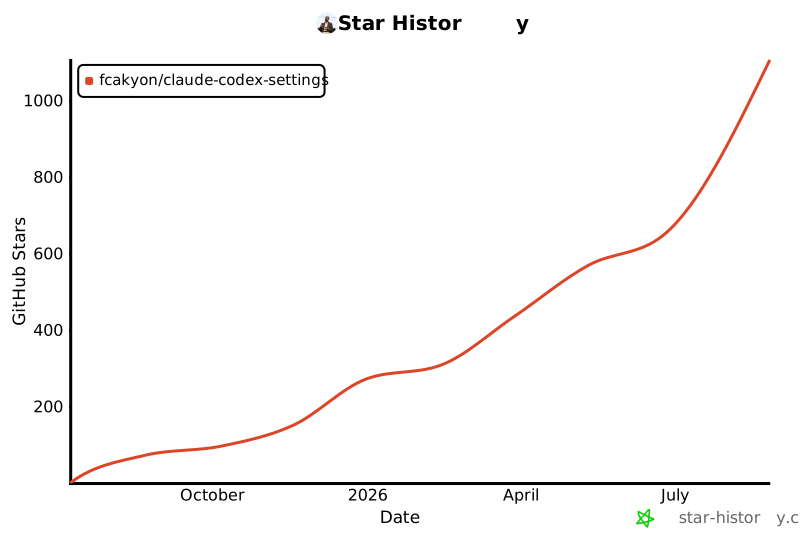](https://www.star-history.com/?repos=fcakyon%2Fclaude-codex-settings&type=date&legend=top-left)
<h3 align="center">Contributors</h3>
<p align="center">
<a href="https://github.com/fcakyon/claude-codex-settings/graphs/contributors">
<img src="https://contrib.rocks/image?repo=fcakyon/claude-codex-settings" />
</a>
</p>
Connection Info
You Might Also Like

cc-switch
All-in-One Assistant for Claude Code, Codex & Gemini CLI across platforms.

awesome-mcp-servers
A collection of MCP servers.

git
A Model Context Protocol server for Git automation and interaction.

oh-my-opencode
Background agents · Curated agents like oracle, librarians, frontend...

TrendRadar
TrendRadar: Your hotspot assistant for real news in just 30 seconds.

Appwrite
Build like a team of hundreds