Content
# Open PTC Agent
[English](README.md) | [中文](docs/zh/README.md)
[](https://opensource.org/licenses/MIT)
[](https://www.python.org/downloads/)
[](https://github.com/langchain-ai/langchain)
[](https://github.com/Chen-zexi/open-ptc-agent/stargazers)
[Getting Started](#getting-started) | [CLI Reference](#cli-reference) | [Configuration](docs/CONFIGURATION.md) | [Changelog](docs/CHANGELOG.md) | [Roadmap](#roadmap)
<video src="https://github.com/user-attachments/assets/cca8c6ee-0c6f-4a97-ad7d-08bad250c006" controls width="800"></video>
*Demo: Analyzing 2 years of NVDA, AMD & SPY stock data (15,000+ lines of raw JSON) using DeepSeek V3.2*
## What is Programmatic Tool Calling?
This project is an open source implementation of Anthropic recently introduced [Programmatic Tool Calling (PTC)](https://www.anthropic.com/engineering/advanced-tool-use), which enables agents to invoke tools with code execution rather than making individual JSON tool calls. This paradigm is also featured in their earlier engineering blog [Code execution with MCP](https://www.anthropic.com/engineering/code-execution-with-mcp).
## Why PTC?
1. LLMs are exceptionally good at writing code! They excel at understanding context, reasoning about data flows, and generating precise logic. PTC lets them do what they do best - write code that orchestrates entire workflows rather than reasoning through one tool call at a time.
2. Traditional tool calling returns full results to the model's context window. Suppose fetching 1 year of daily stock prices for 10 tickers. This means 2,500+ OHLCV data points polluting context - tens of thousands of tokens just to compute a portfolio summary. With PTC, code runs in a sandbox, processes data locally, and only the final output returns to the model. Result: 85-98% token reduction.
3. PTC particularly shines when working with large volumes of structured data, time series data (like financial market data), and scenarios requiring further data processing - filtering, aggregating, transforming, or visualizing results before returning them to the model.
## How It Works
```
User Task
|
v
+-------------------+
| PTCAgent | Tool discovery -> Writes Python code
+-------------------+
| ^
v |
+-------------------+
| Daytona Sandbox | Executes code
| +-------------+ |
| | MCP Tools | | tool() -> process / filter / aggregate -> dump to data/ directory
| | (Python) | |
| +-------------+ |
+-------------------+
|
v
+-------------------+
|Final deliverables | Files and data can be downloaded from sandbox
+-------------------+
```
> **Built on [LangChain DeepAgents](https://github.com/langchain-ai/deepagents)** - This project uses many components from DeepAgents and cli feature was bootstrapped from deepagent-cli. Special thanks to the LangChain team!
> **Sandbox environment provided by [Daytona](https://www.daytona.io/)**.
## What's New
- **Interactive CLI** - New `ptc-agent` command for terminal-based interaction with session persistence, plan mode, themes, and rich UI
- **Background Subagent Execution** - Subagents run asynchronously with Task IDs (Task-1, Task-2, etc.). The main agent continues working while subagents execute in parallel. Completed results are cached and the agent is notified to retrieve them via `task_output()`
- **Task Monitoring** - `wait()` blocks until task(s) complete; `task_output()` retrieves results or shows progress
- **Agent Skills** - Extensible capabilities via the open [Agent Skills](https://agentskills.io) standard
- **Vision/Multimodal Support** - New `view_image` tool enables vision-capable LLMs to analyze images from URLs, base64 data, or sandbox files
## Features
- **Universal MCP Support** - Auto-converts any MCP server tools to Python functions
- **Progressive Tool Discovery** - Tools discovered on-demand; avoids large number of tokens of upfront tool definitions
- **Custom MCP Upload** - Deploy Python MCP implementations directly into sandbox sessions
- **Agent Skills** - Skills for custom workflows
- **Enhanced File Tools** - Refined glob, grep and other file operation tools optimized for sandbox environment
- **Daytona Backend** - Secure code execution with filesystem isolation and snapshot support
- **Auto Image Upload** - Charts and images auto-uploaded to cloud storage (Cloudflare R2, AWS S3, Alibaba OSS)
- **LangGraph Ready** - Compatible with LangGraph Cloud/Studio deployment
- **Multi-LLM Support** - Works with Anthropic, OpenAI, and Any LLM provider you configure in `llms.json`
## Project Structure
```
├── libs/
│ ├── ptc-agent/ # Core agent library
│ │ └── ptc_agent/
│ │ ├── core/ # Sandbox, MCP registry, tool generator, session
│ │ ├── config/ # Configuration classes and loaders
│ │ ├── agent/ # PTCAgent, tools, prompts, middleware, subagents
│ │ └── utils/ # Cloud storage uploaders
│ │
│ └── ptc-cli/ # Interactive CLI application
│ └── ptc_cli/
│ ├── core/ # State, config, theming
│ ├── commands/ # Slash commands, bash execution
│ ├── display/ # Rich terminal rendering
│ ├── input/ # Prompt, completers, file mentions
│ └── streaming/ # Tool approval, execution
│
├── skills/ # Demo skills (from Anthropic)
│ ├── pdf/ # PDF manipulation
│ ├── xlsx/ # Spreadsheet operations
│ ├── docx/ # Document creation
│ ├── pptx/ # Presentation creation
│ └── creating-financial-models/ # Financial modeling
│
├── mcp_servers/ # Demo MCP server implementations
│ ├── yfinance_mcp_server.py
│ └── tickertick_mcp_server.py
│
├── example/ # Demo notebooks and scripts
│ ├── PTC_Agent.ipynb
│ ├── Subagent_demo.ipynb
│ └── quickstart.py
│
├── config.yaml # Main configuration
└── llms.json # LLM provider definitions
```
## Native Tools
The agent has access to native tools plus middleware capabilities from [deep-agent](https://github.com/langchain-ai/deepagents):
### Core Tools
| Tool | Description | Key Parameters |
|------|-------------|----------------|
| **execute_code** | Execute Python with MCP tool access | `code` |
| **Bash** | Run shell commands | `command`, `timeout`, `working_dir` |
| **Read** | Read file with line numbers | `file_path`, `offset`, `limit` |
| **Write** | Write/overwrite file | `file_path`, `content` |
| **Edit** | Exact string replacement | `file_path`, `old_string`, `new_string` |
| **Glob** | File pattern matching | `pattern`, `path` |
| **Grep** | Content search (ripgrep) | `pattern`, `path`, `output_mode` |
### Middleware
| Middleware | Description | Tools Provided |
|------------|-------------|----------------|
| **SubagentsMiddleware** | Delegates specialized tasks to sub-agents with isolated execution | `task()` |
| **BackgroundSubagentMiddleware** | Async subagent execution with background tasks and notification-based collection | `wait()`, `task_output()` |
| **ViewImageMiddleware** | Injects images into conversation for multimodal LLMs | `view_image()` |
| **FilesystemMiddleware** | File operations | `read_file`, `write_file`, `edit_file`, `glob`, `grep`, `ls` |
| **TodoListMiddleware** | Task planning and progress tracking (auto-enabled) | `write_todos` |
| **SummarizationMiddleware** | Auto-summarizes conversation history (auto-enabled) | - |
**Available Subagents (Default):**
- `research` - Web search with Tavily + think tool for strategic reflection
- `general-purpose` - Full execute_code, filesystem, and vision tools for complex multi-step tasks
**Background Execution Model:**
When the agent calls `task()`, subagents are assigned sequential IDs (Task-1, Task-2, etc.) and run in the background. The main agent:
1. Receives immediate confirmation with the Task ID
2. Continues with other work while subagents execute in parallel
3. Gets notified when tasks complete
4. Calls `task_output()` to retrieve cached results
5. Uses `wait(task_number=N)` to block for specific tasks if needed
## MCP Integration
### Demo MCP Servers
The demo includes 3 enabled MCP servers configured in `config.yaml`:
| Server | Transport | Tools | Purpose |
|--------|-----------|-------|---------|
| **tavily** | stdio (npx) | 4 | Web search |
| **yfinance** | stdio (python) | 21 | Stock prices, financials |
| **tickertick** | stdio (python) | 7 | Financial news |
### How MCP Tools Appear
**In Prompts** - Tool summaries are injected into the system prompt:
```
tavily: Web search engine for finding current information
- Module: tools/tavily.py
- Tools: 4 tools available
- Import: from tools.tavily import <tool_name>
```
**In Sandbox** - Full Python modules are generated:
```
/home/daytona/
├── tools/
│ ├── mcp_client.py # MCP communication layer
│ ├── tavily.py # from tools.tavily import search
│ ├── yfinance.py # from tools.yfinance import get_stock_history
│ └── docs/ # Auto-generated documentation
│ ├── tavily/*.md
│ └── yfinance/*.md
├── results/ # Agent output
└── data/ # Input data
```
**In Code** - Agent imports and uses tools directly:
```python
from tools.yfinance import get_stock_history
import pandas as pd
# Fetch data - stays in sandbox
history = get_stock_history(ticker="AAPL", period="1y")
# Process locally - no tokens wasted
df = pd.DataFrame(history)
summary = {"mean": df["close"].mean(), "volatility": df["close"].std()}
# Only summary returns to model
print(summary)
```
## Skills
[Agent Skills](https://agentskills.io) is an open standard by Anthropic for packaging domain expertise into reusable folders of instructions and resources. Skills load dynamically via **progressive disclosure** - only metadata at startup, full content on-demand
### Included Demo Skills
Skills from [anthropics/skills](https://github.com/anthropics/skills) are included for demonstration:
| Skill | Description |
|-------|-------------|
| **pdf** | PDF manipulation - extract text/tables, create, merge/split, fill forms |
| **xlsx** | Spreadsheet creation with formulas, formatting, and data analysis |
| **docx** | Document creation, editing, and formatting |
| **pptx** | Presentation creation, editing, and analysis |
| **creating-financial-models** | DCF analysis, sensitivity testing, Monte Carlo simulations |
### Configuration
Skills are enabled by default and loaded from:
1. User directory: `~/.ptc-agent/skills/`
2. Project directory: `.ptc-agent/skills/` (or `skills/` for legacy)
Project skills override user skills when names conflict.
```yaml
# config.yaml
skills:
enabled: true
user_skills_dir: "~/.ptc-agent/skills"
project_skills_dir: ".ptc-agent/skills"
```
### Creating Custom Skills
Each skill is a folder with a `SKILL.md` file containing YAML frontmatter and instructions:
```markdown
---
name: my-skill
description: "Clear description of what this skill does and when to use it"
---
# My Skill
Instructions, workflows, and examples that Claude follows when this skill is active.
## Guidelines
- Guideline 1
- Guideline 2
```
Additional files (e.g., `reference.md`, scripts) can be bundled alongside `SKILL.md` and referenced as needed. Skills are uploaded to the sandbox at `/home/daytona/skills/<skill-name>/`.
For detailed guidance, see [Anthropic's skill authoring best practices](https://www.anthropic.com/engineering/equipping-agents-for-the-real-world-with-agent-skills).
## Getting Started
### Prerequisites
- Python 3.12+
- Node.js (for MCP servers)
- [uv](https://docs.astral.sh/uv/) package manager
### Installation
```bash
git clone https://github.com/Chen-zexi/open-ptc-agent.git
cd open-ptc-agent
uv sync
source .venv/bin/activate # On Windows: .venv\Scripts\activate
```
### Minimal Configuration
Create a `.env` file with the minimum required keys:
```bash
# One LLM provider (choose one)
ANTHROPIC_API_KEY=your-key
# or
OPENAI_API_KEY=your-key
# or
# Any model you configured in llms.json and config.yaml
# You can also use Coding plans from Minimax and GLM here!
# Daytona (required)
DAYTONA_API_KEY=your-key
```
Get your Daytona API key from [Daytona Dashboard](https://app.daytona.io/dashboard/keys). They provide free credits for new users!
### Extended Configuration
For full functionality, add optional keys:
```bash
# MCP Servers
TAVILY_API_KEY=your-key # Web search
ALPHA_VANTAGE_API_KEY=your-key # Financial data
# Cloud Storage (choose one provider)
R2_ACCESS_KEY_ID=... # Cloudflare R2
AWS_ACCESS_KEY_ID=... # AWS S3
OSS_ACCESS_KEY_ID=... # Alibaba OSS
# Tracing (optional)
LANGSMITH_API_KEY=your-key
```
See `.env.example` for the complete list of environment variables options.
### Run the CLI
Start the interactive CLI:
```bash
ptc-agent
```
See the **[ptc-cli documentation](libs/ptc-cli/README.md)** for all commands and options.
For programmatic usage of PTC Agent, see the [ptc-agent documentation](libs/ptc-agent/README.md).
### Demo Notebooks
For Jupyter notebook examples:
- **[PTC_Agent.ipynb](example/PTC_Agent.ipynb)** - Quick demo with open-ptc-agent
- **[Subagent_demo.ipynb](example/Subagent_demo.ipynb)** - Background subagent execution
- **[quickstart.py](example/quickstart.py)** - Python script quickstart
Optionally, use the LangGraph API to deploy the agent.
## Configuration
The project uses two configuration files:
- **config.yaml** - Main configuration (LLM selection, MCP servers, Daytona, security, storage)
- **llms.json** - LLM provider definitions
### Quick Config
Select your LLM in `config.yaml`:
```yaml
llm:
name: "claude-sonnet-4-5" # Options: claude-sonnet-4-5, gpt-5.1-codex-mini, gemini-3-pro
```
Enable/disable MCP servers:
```yaml
mcp:
servers:
- name: "tavily"
enabled: true # Set to false to disable
```
For complete configuration options including Daytona settings, security policies, and adding custom LLM providers, see the [Configuration Guide](docs/CONFIGURATION.md).
## CLI Reference
The `ptc-agent` command provides an interactive terminal interface with:
- Session persistence and sandbox reuse
- Slash commands (`/help`, `/files`, `/view`, `/download`)
- Bash execution with `!command`
- File mentions with `@path/to/file`
- Customizable themes and color palettes
Quick start:
```bash
ptc-agent # Start interactive session
ptc-agent --plan-mode # Enable plan approval before execution
ptc-agent list # List available agents
```
For complete CLI documentation including all options, commands, keyboard shortcuts, and theming configuration, see the **[CLI Reference](libs/ptc-cli/README.md)**.
## Roadmap
Planned features and improvements:
- [x] CLI Version for PTC Agent
- [x] Agent Skills support ([agentskills.io](https://agentskills.io) open standard)
- [x] CI/CD pipeline for automated testing
- [ ] Additional MCP server integrations / More example notebooks
- [ ] Performance benchmarks and optimizations
- [ ] Improved search tool for smoother tool discovery
## Contributing
We welcome contributions from the community! Here are some ways you can help:
- **Code Contributions** - Bug fixes, new features, improvements (CI/CD coming soon)
- **Use Cases** - Share how you're using PTC in production or research
- **Example Notebooks** - Create demos showcasing different workflows
- **MCP Servers** - Build or recommend MCP servers that work well with PTC (data processing, APIs, etc.)
- **Prompt Tricks** - Share prompting techniques that improve agent performance
Open an issue or PR on [GitHub](https://github.com/Chen-zexi/open-ptc-agent) to contribute!
## Acknowledgements
This project builds on research and tools from:
**Research/Articles**
- [Introducing advanced tool use on the Claude Developer Platform](https://www.anthropic.com/engineering/advanced-tool-use) - Anthropic
- [Code execution with MCP: building more efficient AI agents](https://www.anthropic.com/engineering/code-execution-with-mcp) - Anthropic
- [CodeAct: Executable Code Actions Elicit Better LLM Agents](https://arxiv.org/abs/2402.01030) - Wang et al.
**Frameworks and Infrastructure**
- [LangChain DeepAgents](https://github.com/langchain-ai/deepagents) - Base Agent Framework
- [Daytona](https://www.daytona.io/) - Sandbox infrastructure
## Star History
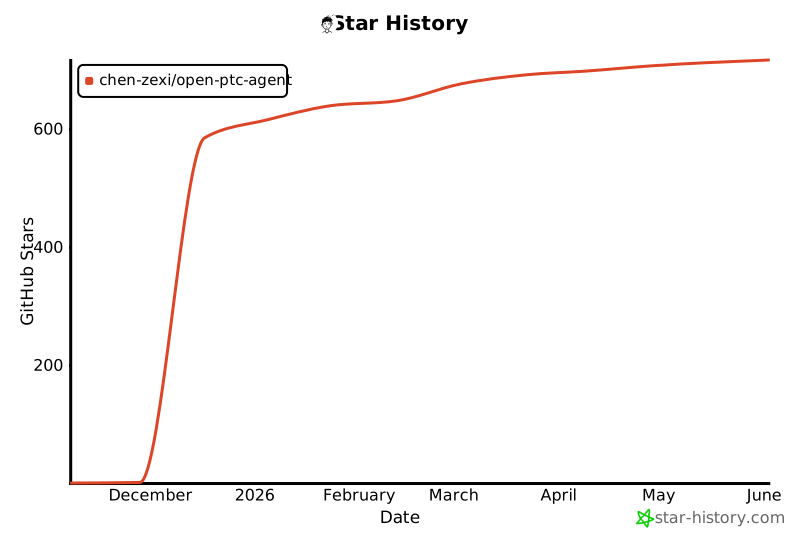
If you find this project useful, please consider giving it a star! It helps others discover this work.
[](https://star-history.com/#Chen-zexi/open-ptc-agent&Date)
## License
MIT License



