Content
# AI LocalBase
A local-first AI knowledge base system (RAG) for integrating local documents into vector retrieval and large model dialogue processes. The project provides a Web UI, supporting knowledge base management, document upload, retrieval-enhanced Q&A, chat record persistence, and model access based on Ollama or OpenAI compatible interfaces.

## Project Overview
AI LocalBase is suitable for individuals or small teams to quickly build a usable knowledge base Q&A system in a local environment or self-hosted environment.
- Backend: Go + Gin
- Frontend: React + Vite + TypeScript
- Vector Database: Qdrant
- Model Access: Ollama / OpenAI Compatible API
- Deployment: Local Startup / Docker Compose
- Scalability: Built-in MCP Server, available for external Agent / tool system access
## Core Capabilities
- Knowledge Base Management: Create, delete knowledge bases, view document lists
- Document Upload and Indexing: Support TXT, Markdown, PDF, xlsx, csv file upload and parsing
- Retrieval-Enhanced Q&A: Based on Qdrant for vector retrieval and injecting hit content into dialogue context
- Chat Record Persistence: Session messages saved to local SQLite database
- Configuration Persistence: Model configuration and knowledge base status saved to local JSON files
- Docker Compose Deployment: Support one-click startup for frontend, backend, and Qdrant
### Retrieval Enhancement Capabilities
- Automatic text segmentation and batch embedding
- Dynamic recall of candidate results
- Keyword coverage enhancement reordering
- MMR redundancy removal selection
- Secondary recall in low-confidence scenarios
- Embedding caching and optional semantic caching
- Optional Hybrid Search, Semantic Reranker, Query Rewrite, Context Compression
## Applicable Scenarios
- Local personal knowledge base
- Team internal document Q&A
- Self-hosted RAG prototype verification
- Ollama / OpenAI compatible model access testing
- Retrieval strategy experimentation and evaluation
- As MCP capability backend for Agent calls
## Quick Start
Shortest experience path:
1. Start Qdrant:
```bash
docker compose -f docker-compose.qdrant.yml up -d
```
2. Start backend:
```bash
cd backend
go run .
```
3. Start frontend:
```bash
cd frontend
npm install
npm run dev
```
4. Open `http://localhost:5173`, enter the settings page to configure Chat and Embedding models.
For more complete commands, environment variables, and interface descriptions, please see [`docs/getting-started.md`](docs/getting-started.md).
## Deployment
### Local Development Startup
Suitable for daily development, interface debugging, and frontend page modification.
1. Start Qdrant:
```bash
docker compose -f docker-compose.qdrant.yml up -d
```
2. Start backend:
```bash
cd backend
go run .
```
3. Start frontend:
```bash
cd frontend
npm install
npm run dev
```
Default addresses:
- Frontend: `http://localhost:5173`
- Backend: `http://localhost:8080`
- Qdrant: `http://localhost:6333`
### Docker Compose One-Click Startup
Suitable for quick experience or self-hosted deployment verification.
```bash
docker compose up --build
```
Default service addresses:
- Frontend: `http://localhost:4173`
- Backend: `http://localhost:8080`
- Qdrant HTTP API: `http://localhost:6333`
- Qdrant gRPC: `localhost:6334`
### Using Pre-Built Images for Deployment
If you don't want to compile locally, you can directly use pre-built images:
```bash
docker compose -f docker-compose.prod.yml up -d
```
For more image, version, and deployment details, see [`DOCKER_DEPLOY.md`](DOCKER_DEPLOY.md).
### Starting Application Orchestration Only
If you want to use application orchestration files alone, you can also execute:
```bash
docker compose -f docker-compose.app.yml up --build
```
## Settings Page Configuration
### Settings Page

After opening the frontend, enter the Settings page and configure Chat and Embedding respectively.
### Ollama Example
**Chat Configuration**
- Provider: `ollama`
- Base URL: `http://localhost:11434`
- Model: `qwen2.5:7b` or `llama3.2`
- API Key: Leave blank
**Embedding Configuration**
- Provider: `ollama`
- Base URL: `http://localhost:11434`
- Model: `bge-m3` or `nomic-embed-text`
- API Key: Leave blank
### OpenAI Compatible Example
**Chat Configuration**
- Provider: `openai`
- Base URL: Your compatible interface address, e.g., `https://your-api.example.com/v1`
- Model: Corresponding chat model name
- API Key: Corresponding access key
**Embedding Configuration**
- Provider: `openai`
- Base URL: Your compatible interface address
- Model: Corresponding embedding model name
- API Key: Corresponding access key
## MCP Support
The project has built-in basic MCP Server capabilities, running as a backend embedded tool service, available for external Agent, script, or tool system access via HTTP / JSON-RPC.
Current support:
- HTTP form MCP entrance
- Tool list discovery capability
- Read-only / write / dangerous tool permission grading
- Bearer Token authentication
- Rate limiting, timeout, and audit logging
- Dangerous tool secondary confirmation mechanism
- Reusing existing knowledge base, session, configuration, and retrieval services
Default entrance:
- `GET /mcp`
- `GET /mcp/tools`
- `POST /mcp`
Common environment variables:
- `ENABLE_MCP`: Whether to enable MCP, default `true`
- `MCP_BASE_PATH`: MCP mounting path, default `/mcp`
- `MCP_REQUEST_TIMEOUT_SECONDS`: Request timeout, default `15`
- `MCP_REQUESTS_PER_MINUTE`: Rate limit per minute, default `120`
### Cherry Studio Access Example
If you want to access [`AI LocalBase`](README.md) through MCP in Cherry Studio, you can configure as follows:
- **Type**: Streamable HTTP (`streamableHttp`)
- **URL**: `http://127.0.0.1:8080/mcp`
- **Request Header**:
- `Content-Type: application/json`
- `Authorization: Bearer <Your MCP Token>`

For more complete methods, tool lists, authentication, and call examples, see [`docs/mcp.md`](docs/mcp.md).
## Interface Preview
### Demo
<p align="center">
<img src="./assets/demo-1.1.png" alt="Demo 1" width="48%" />
<img src="./assets/demo-1.2.png" alt="Demo 2" width="48%" />
</p>
<p align="center">
<img src="./assets/demo_mcp_1.1.png" alt="Demo 1" width="48%" />
<img src="./assets/demo_mcp_1.2.png" alt="Demo 2" width="48%" />
</p>
## Document Navigation
- Quick Start and Usage Guide: [`docs/getting-started.md`](docs/getting-started.md)
- System Architecture: [`docs/architecture.md`](docs/architecture.md)
- MCP Description: [`docs/mcp.md`](docs/mcp.md)
- Retrieval Optimization Plan: [`docs/retrieval-improvement-plan.md`](docs/retrieval-improvement-plan.md)
- Docker Image and Deployment Guide: [`DOCKER_DEPLOY.md`](DOCKER_DEPLOY.md)
- Troubleshooting: [`TROUBLESHOOTING.md`](TROUBLESHOOTING.md)
## Project Structure
```text
ai-localbase/
├── backend/
├── frontend/
├── docs/
├── docker/
├── assets/
├── docker-compose.yml
├── docker-compose.qdrant.yml
├── docker-compose.app.yml
└── docker-compose.prod.yml
```
For more complete system structure, module responsibilities, and interface design, see [`docs/architecture.md`](docs/architecture.md).
## Open Source Collaboration
- License: [`LICENSE`](LICENSE)
- Contribution Guide: [`CONTRIBUTING.md`](CONTRIBUTING.md)
- Security Policy: [`SECURITY.md`](SECURITY.md)
- Update Log: [`CHANGELOG.md`](CHANGELOG.md)
**If this project helps you, please give it a ⭐ Star.**
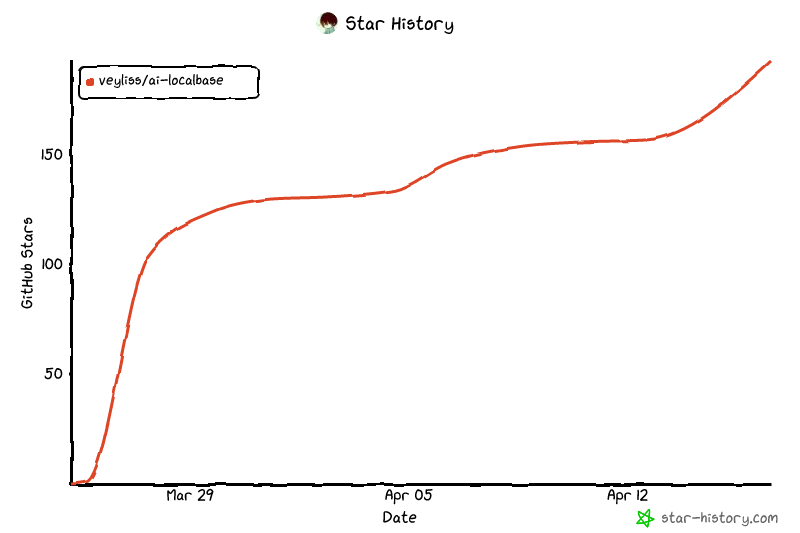
## Star History
[](https://www.star-history.com/?repos=veyliss%2Fai-localbase&type=date&legend=top-left)



