Content
<div align="center">
<img src="https://pic-1313147768.cos.ap-chengdu.myqcloud.com/ZotLink/logo.png" alt="ZotLink Logo" width="150" height="150">
# ZotLink
MCP Server for Zotero Connector
[](https://www.python.org/downloads/)
[](https://modelcontextprotocol.io/)
[](https://opensource.org/licenses/MIT)
[]()
**🌍 Language / 语言选择:**
[🇺🇸 English](README.md) | [🇨🇳 中文](README_zh.md)
</div>
## 🔗 ZotLink
A lightweight, production-ready MCP server that brings open scholarly sources into Zotero with one command.
❤️ Like ZotLink? Give it a star 🌟 to support the development!
## ✨ Core Features
- 🌐 **Open Preprint Coverage**: arXiv, CVF (OpenAccess), bioRxiv, medRxiv, chemRxiv
- 🧠 **Rich Metadata Extraction**: title, authors, abstract, DOI, subjects, comments
- 📄 **Smart PDF Attachment**: auto-attach when available; validated link fallback
- 📚 **One-Click Collection Save**: list + save (updateSession, treeViewID: C{id})
- 🧭 **Adaptive Browser Strategy**: Playwright for tough sites; HTTP for the rest
- 💻 **Client Compatibility**: Works with Claude Desktop and Cherry Studio
- 🧩 **Deep MCP Interoperability**: Integrates with literature-related MCPs such as [arxiv-mcp-server](https://github.com/blazickjp/arxiv-mcp-server) and [Zotero MCP](https://github.com/54yyyu/zotero-mcp)
- 📝 **Unified Logging**: `~/.zotlink/zotlink.log`
---
### 🎥 Demo Video
<div align="center">
[](https://www.bilibili.com/video/BV1o6xazvEfH/)
> **Click the image above to watch a 1-minute demo video on Bilibili.**
</div>
---
## 🚀 Quick Start
### 1️⃣ Install
```bash
pip install zotlink
python -m playwright install chromium
```
*Requires Python 3.10+. Includes full browser support for all preprint servers by default!*
### 2️⃣ One-Command Configuration ✨
Use `zotlink init` to automatically generate MCP configuration:
```bash
# Auto-detect Zotero path
zotlink init
# Or specify path manually
zotlink init /Users/yourname/Zotero
```
**The command outputs ready-to-use configuration JSON**, for example:
```json
{
"mcpServers": {
"zotlink": {
"command": "/opt/homebrew/.../zotlink",
"args": [],
"env": {
"ZOTLINK_ZOTERO_ROOT": "/Users/yourname/Zotero"
}
}
}
}
```
### 3️⃣ Add to Claude Configuration
Copy the generated configuration to your Claude Desktop config file:
- **macOS**: `~/Library/Application Support/Claude/claude_desktop_config.json`
- **Linux**: `~/.config/claude/claude_desktop_config.json`
- **Windows**: `~/AppData/Roaming/Claude/claude_desktop_config.json`
Restart Claude Desktop and you're ready to go!
---
### 🛠️ Development Installation
```bash
git clone https://github.com/your-org/ZotLink.git
cd ZotLink
pip install -e .
python -m playwright install chromium
```
### MCP Configuration Details
If you need manual configuration (without using `zotlink init`), see examples below:
<details>
<summary><b>📝 Manual Configuration Examples (click to expand)</b></summary>
**Recommended configuration** (simple - just specify Zotero directory):
```json
{
"mcpServers": {
"zotlink": {
"command": "/path/to/zotlink",
"args": [],
"env": {
"ZOTLINK_ZOTERO_ROOT": "/Users/yourname/Zotero"
}
}
}
}
```
**Advanced configuration** (specify paths separately):
```json
{
"mcpServers": {
"zotlink": {
"command": "/path/to/zotlink",
"args": [],
"env": {
"ZOTLINK_ZOTERO_DB": "/Users/yourname/Zotero/zotero.sqlite",
"ZOTLINK_ZOTERO_DIR": "/Users/yourname/Zotero/storage"
}
}
}
}
```
**Minimal config** (auto-detect Zotero paths):
```json
{
"mcpServers": {
"zotlink": { "command": "zotlink", "args": [] }
}
}
```
**Note**: Using `env` variables follows MCP standard and works with all MCP clients (Claude Desktop, Cherry Studio, etc.).
</details>
## 🧰 Available Tools
- `check_zotero_status`: Check if Zotero is running and reachable
- `get_zotero_collections`: List collections (tree view) from the local DB
- `save_paper_to_zotero`: Save a paper by URL (arXiv/CVF/rxiv), attach PDF/metadata
- `extract_arxiv_metadata`: Extract full arXiv metadata (title/authors/subjects/DOI/comment)
- Cookie helpers (stubs prepared) for auth-required sources
## 📁 Logging
Logs are written to `~/.zotlink/zotlink.log`.
## 🌐 Browser Mode
Browser-driven extraction is included by default! All preprint servers (bioRxiv, medRxiv, chemRxiv) work automatically.
The server switches to browser strategy automatically when needed (falls back to HTTP mode on Windows).
**Linux may require additional system dependencies**:
```bash
sudo apt-get install -y libnss3 libatk1.0-0 libatk-bridge2.0-0 libdrm2 libxkbcommon0 libgbm1 libasound2
```
### Advanced: Custom Zotero Paths
<details>
<summary><b>🔧 Environment Variable Configuration (click to expand)</b></summary>
**Recommended - Single directory**:
```bash
# macOS/Linux
export ZOTLINK_ZOTERO_ROOT=/Users/yourname/Zotero
# Windows PowerShell
$env:ZOTLINK_ZOTERO_ROOT='C:\Users\YourName\Zotero'
```
**Advanced - Separate paths**:
```bash
# macOS/Linux
export ZOTLINK_ZOTERO_DB=/Users/yourname/Zotero/zotero.sqlite
export ZOTLINK_ZOTERO_DIR=/Users/yourname/Zotero/storage
# Windows PowerShell
$env:ZOTLINK_ZOTERO_DB='C:\Users\YourName\Zotero\zotero.sqlite'
$env:ZOTLINK_ZOTERO_DIR='C:\Users\YourName\Zotero\storage'
```
**Local config file** `~/.zotlink/config.json`:
```json
{
"zotero": {
"database_path": "/Users/yourname/Zotero/zotero.sqlite",
"storage_dir": "/Users/yourname/Zotero/storage"
}
}
```
**Configuration precedence**: ENV vars > MCP env config > local config file > auto-detection
</details>
## 🧩 Supported Sources (Open)
- **arXiv** (preprint)
- **CVF (OpenAccess)** (CVPR/ICCV/WACV)
- **bioRxiv** / **medRxiv** / **chemRxiv** (preprint servers)
Auth-required sources (e.g., Nature) are planned via bookmark-based cookie sync.
## 🧰 Troubleshooting
- Zotero not detected: ensure Zotero Desktop is running (port 23119)
- No PDF attached: some pages only expose links; the server falls back to link attachments
- Browser mode errors: verify Playwright is installed and Chromium is available
- Install error: ensure Python 3.10+ is installed
## 🧪 Development
```bash
pip install -e .
python -m playwright install chromium
zotlink # or: python run_server.py
```
See `docs/DEVELOPMENT.md` for code structure, adding new extractors, and release tips.
## 🗺️ Roadmap (To‑Do)
- Sources
- [x] arXiv
- [x] CVF (OpenAccess)
- [x] bioRxiv
- [x] medRxiv
- [x] chemRxiv
- [ ] Nature (cookies)
- [ ] Science (cookies)
- [ ] IEEE Xplore (cookies)
- [ ] Springer (cookies)
- [ ] ACM Digital Library (cookies)
- [ ] OpenReview
- [ ] PLOS / PMC / Frontiers / MDPI
- Stability & Quality
- [x] Configurable Zotero DB path (ENV + ~/.zotlink/config.json)
- [x] HTTP fallback when browser fails (Windows compatibility)
- [x] PDF download retry mechanism (3 retries with exponential backoff)
- [ ] Windows playwright optimization (current limitation: Python asyncio ProactorEventLoop + MCP event loop nesting)
- [ ] Post-save title correction when placeholder detected
- [ ] Enhanced PDF heuristics and alternative URL strategies
- [ ] Crossref DOI enrichment as fallback
- [ ] Unified error taxonomy with auto-retry/backoff
- Integration & DX
- [ ] Cookie sync bookmark flow for Nature-family and other publishers
- [ ] Example templates for Claude Desktop / Cherry Studio
- [ ] Extended MCP interoperability docs and samples
- [ ] CI and tests (unit/integration) for extractors
- [ ] Packaged releases (optional)
## 📄 License
MIT (see SPDX identifier in packaging metadata)
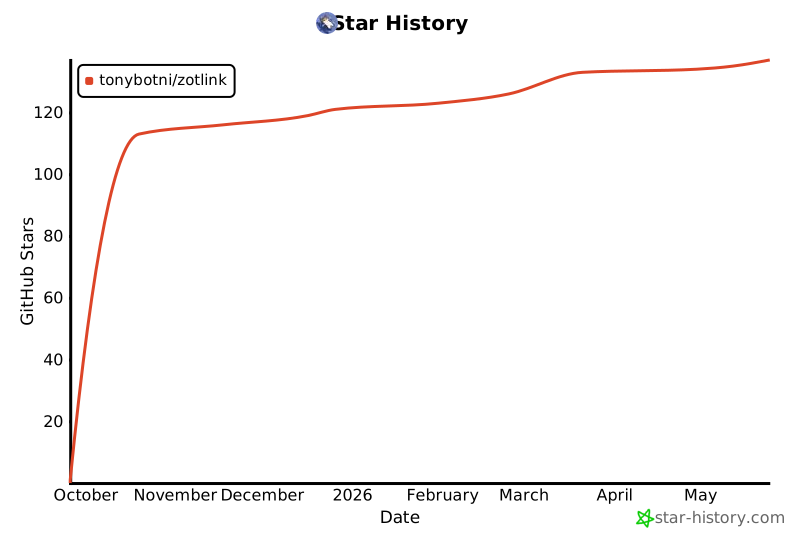
## 🌟 GitHub Star History
<div align="center">
[](https://star-history.com/#tonybotni/zotlink&Date)
Made with ❤️ for Zotero community
</div>



